clearout
  • Products
    • Email Verifier Verify emails addresses individually, in bulk or through API, with 99% accuracy
    • Email Finder Find individual or bulk emails by entering the person & company name or domain
    • Form Guard IconForm Guard Protect your forms from spam, bots, and invalid submissions with real-time email, phone, and name verification.
    • Prospect SQL/MQL list building with high levels of personalization, real-time data enrichment and prospect search
    • Clearout For SheetsVerify email addresses directly on Google Sheets with Clearout for sheets add-on
    • Prospect – LinkedIn Chrome ExtensionBuild verified, targeted prospect lists directly from LinkedIn profiles
    • ClearoutPhoneValidate phone numbers across 240+ countries in bulk, quick or real time validation
    • Free Tools
    • Disposable Email Checker
    • Reverse LinkedIn Profile Lookup Tool
    • Reverse Email Lookup Tool
    • Email List Cleaner
    • Company Domain Finder API
  • Resources
      DEVELOPERAPI iconAPI
      Clearout APIs are structured around REST and JSON
      Webhooks iconWebhooks
      Capture real-time events in your application workflow
      Form Guard iconForm Guard
      Real-time form validation to keep bad contacts out of your CRM
      KNOWLEDGE BASEGetting started iconGetting started
      Sending campaigns without bounces is made simple
      FAQ iconFAQ
      Easily find answers to services, security and common questions
      USE CASESLead Generation iconLead Generation
      Learn how professionals generate quality leads
      GUIDESPricing arrow iconTransparent & flexible pricing to support pay-per-use or recurringCompare Email Verification Tools arrow iconAI-powered email verification with 99%+ accuracy, real-time validation, and transparent risk scoringCompare Email Finder Tools arrow iconPre-verified B2B email addresses with confidence scoring, find real person email, not role-based addressBLOGSEmail Verification ToolsFind Anyone’s Email Address
      Most Accurate, Fast & Free Ways
      Form Validation
      Importance, Ways & Best Practices
      View All Blogs
  • Pricing
  • Integrations
  • Enterprise
  • Login
Try it free Book a 1-to-1 demo
Akanksha Mishra / March 23, 2026 March 23, 2026

How to End an Email: 15 Sign-Off Examples by Context


How to End an Email: 15 Sign-Off Examples by Context

The McKinsey reports found that professionals spend 28% of their workweek on email reading it, writing it, and managing it. Somewhere in that volume, the sign-off gets about 3 seconds of thought.

Most of that time goes into the subject line and the body. The sign-off gets three seconds, maybe less. But here's why that matters: the sign-off sits right before the reader decides whether to reply. A well-chosen one reinforces the entire email. A careless one quietly undercuts it.

The right sign-off:

  • Signals that the email was written deliberately
  • Matches the tone the reader experienced throughout
  • Makes it easier for the reader to respond
The 15 best ways to end an email are listed below.

Table of Content


‣ How To End Your Email In a Way: Step-by-step Guide
‣ 15 Professional Email Sign-Offs
‣ Which Email Sign-Off Gets The Most Replies?
‣ Bad Email Sign-Off (And Why They Fail)
‣ How To Choose The Right Email Sign-Off
‣ Common Email Sign-Off Mistakes That Reduce Response Rates
‣ What to do in your next email?
‣ FAQs
How To End Your Email In a Way: Step-by-step Guide


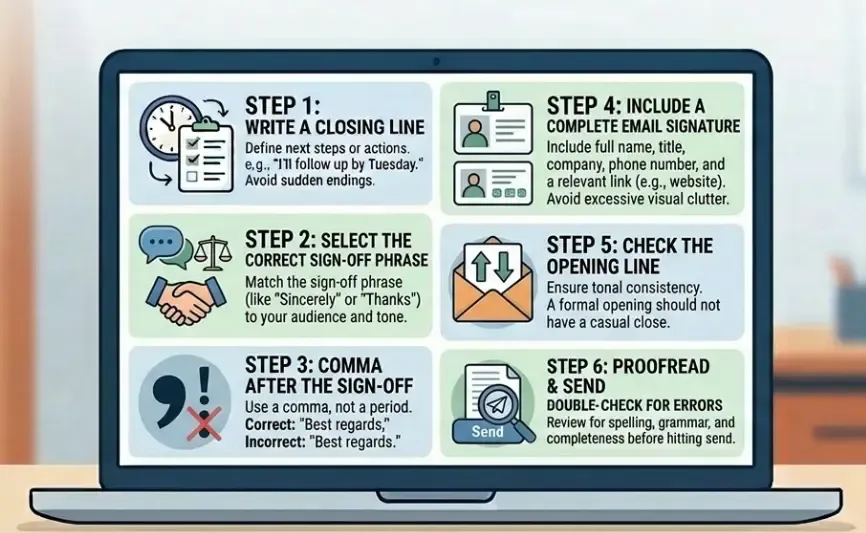
Emails closing steps shown on a screen.

The "Sincerely" or "Thanks" sign-off phrase above their name is what most people pay close attention to. But a well-structured email closing has 5 components. Skip any of them and the email feels incomplete, even if the reader cannot pinpoint why.

Step 1: Write a Closing Line


That is the wrong place to start. The closing line of the sentence that comes just before your sign-off is what actually tells the reader what happens next. Do they need to respond? Are you following up? Is the thread done? Without it, the email just ends and the reader is left guessing.

Most closing lines are one sentence.
  • "I'll send the revised draft by Thursday" that's enough.
  • "Let me know which date works for you" that works too.
Short, direct, done. The reader knows what's happening next and whether they need to do anything.

Step 2: Choosing the right email sign-of


Most people pick "Thanks" or "Best regards" at some point and just keep using it. Every email. Every person. Never really question it.
The problem is that one phrase doesn't fit everything. Who you're writing to matters. So does what you're asking and how well you actually know the person on the other end.

Worth knowing: warm sign-offs don't always read as warm. Using "Warmly," with someone you've emailed twice reads as presumptuous rather than friendly.

"Best," and "Regards," are the most common closings and they have the lowest response rates. Not because they're bad, but because they feel automatic. And when the closing feels automatic, the whole email tends to feel the same way.

The sign-off should match the tone of the email above it. Using "Cheers!" on every email regardless of who's reading it doesn't signal a relaxed personality it signals the closing wasn't thought about.

Step 3: Comma After the Sign-Off, Not a Period


Standard US business format puts a comma after the closing phrase, followed by your name on the next line. This is one of the first formatting details a careful reader notices.

Most closing lines are one sentence.
  • Correct: Best regards,
  • Incorrect: Best regards.
  • Incorrect: Best regards!

Step 4: Add an Email Signature


An email signature that runs longer than the email body draws attention to itself for the wrong reasons.

What a professional signature includes:
  • Full name,
  • Job title and company
  • Direct phone number
  • Email address (optional if already in the thread)
  • One link - company website, LinkedIn, or scheduling link - not all three
Skip motivational quotes, multi-paragraph legal disclaimers, and rows of social media icons. These add visual clutter without adding useful information.

Step 5: Check the Opening Line Against the Sign-Off


Prior to emailing, put the first and the final line next to each other. They are supposed to be holding the same tone.

An email that begins with words such as Dear Ms. Carter and ends with the words, Cheers! is tonally inconsistent. The official introduction created a promise; the informal conclusion was its non-fulfillment.

15 Professional Email Sign-Offs


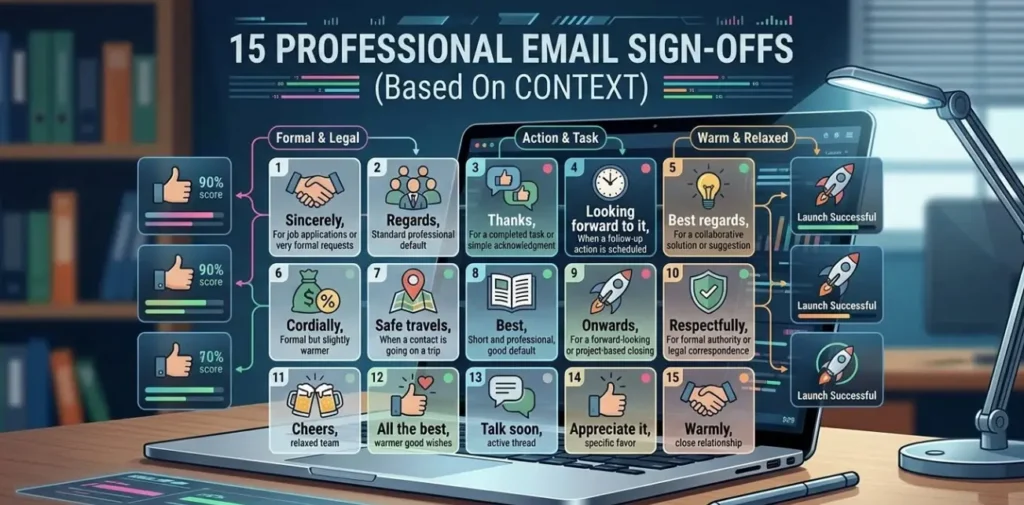
 An infographic illustrating 15 professional email sign-offs.

Ending an email sounds simple, but it’s one of those things people overthink a lot. There isn’t a fixed rule for it anyway. Most of the time, you just adjust based on who you’re writing to and how formal the exchange is.

So instead of one “best” sign-off, here are a few you can use depending on the context.

Formal Email Sign-Offs


Formal email sign-offs should be used when the stakes are slightly greater: a first email to a person, or the person has a senior position.

1. "Sincerely,"


When to use: First emails to prospects or institutional contacts, cover letters, formal proposals, written complaints, and any correspondence that may be referenced or cited later.

Why it works: "Sincerely" has been the standard for formal correspondence in American business writing for generations. It does not reach for warmth or personality which is the point.

In contexts that genuinely require formality, the absence of informality is appropriate. It also works as a neutral default when you are unsure of the recipient's seniority and do not want to risk a misjudged tone in either direction.

2. "Best regards,"


Use it for most formal work emails: B2B threads, vendor conversations, client communication, or anyone you've heard of but never actually spoken to.

It works because "it doesn't overclaim. Not cold enough to create distance, not warm enough to presume familiarity. It sits comfortably in the middle and offends nobody.

That's exactly what most professional emails need. Not stiff, not casual. That balance is why it holds up across so many different types of emails and why most people reach for it without thinking twice.

3. "Kind regards,"


When to use: After one or two prior exchanges, in proposals where signaling genuine interest in the relationship matters, and in follow-up emails after an initial meeting.

Why it works: One step warmer than "Best regards," but clearly still professional. The word "kind" signals that the closing was chosen deliberately rather than typed on autopilot which implies the email above it was written with the same care. Particularly effective in consulting, legal, and financial services, where the professional relationship carries weight on its own.

4. "Respectfully,"


When to use: Correspondence with government officials, regulatory bodies, academic institutions, and senior executives clearly several levels above you.

Why it works: This sign-off carries weight largely because it isn’t used often. A regulatory appeal, a letter to an academic committee these are exactly the kinds of emails where this closing fits.

A regulatory appeal, a letter to an academic committee these are exactly the kinds of emails where this closing fits.

Professional Sign-Offs For Standard Business Emails


Most professional emails are sent to clients, vendors, industry contacts or colleagues that you do not work with directly. These sign-offs are good for all of these people.

5. "Best,"


When to use: Routine, low-stakes correspondence where a reply is not critical status updates, FYI emails, brief confirmations.

Why it works: "Best," is clean and reads as professional cordiality. It is also the most commonly used sign-off in professional email, it has the lowest response rate among common closings at 51.2%. An email for which receiving a reply is actually important, a more deliberate closing will always be better.

6. "Thanks,"


Where to use: Every email where someone is expected to act carries your intent and your reputation with it. This includes vendor follow-ups, contractor coordination, colleague handovers, and internal task follow ups.

Why it works: 63% response rate for this sign-off, well above "Best," or "Regards,". The reason is straightforward: "Thanks," positions the recipient as capable and helpful before they have acted. Most people don't want to let someone down who's already thanked them so they follow through. One word, and the data backs it up across routine requests and task-based emails.

7. "Thank you,"


When to use: This works best when you’re asking for something that actually takes effort on their end like their time, input, a referral, or approval. You’ll also see it in a lot of interview follow-ups or proposals where the outcome really matters.

Why it works: It is only two words; however, sound as automatic as a thanks. It seems somehow more purposeful. “Thank you” can give you around a 57.9% response rate.

8. "Thanks in advance,"


When to use: Sending emails to established contacts, team members, or clients where follow-through is expected and clearly within scope of the relationship.

Why it works: The highest-performing sign-off at 65.7%. The psychology behind the number is that thanking someone for an action they have not yet taken creates a quiet commitment effect; it assumes good faith rather than applying pressure. Do not use this on cold outreach or formal requests where the recipient has no established obligation to respond. In those contexts, it reads as presumptuous.

9. "Warm regards,"


When to use: Long-term clients, Professional contacts

It works well in areas like: Consulting, estate, Financial advisory, Creative services

Why it works: "Warm regards" shows there is a real person behind the email. It is not a computer or robot sending a request.

In sustained professional relationships especially in industries where trust is part of what you are selling, that distinction carries real weight. It maintains professional register while acknowledging the relationship that exists.

10. "Looking forward to hearing from you,"


When to use: This should be used when you want to schedule an email, request approval, partnerships, or if a reply is needed.

Why it works: This sign-off gives a reminder in the closing. It makes the reader aware of the expected reply without putting pressure.

Professional Sign-Offs for Internal Emails


Internal communication operates under different norms. Too formal reads as strange and distancing. These two fit the register of most team correspondence.

11. "Let me know if you have any questions,"


Use this for things like team updates, when the company changes a policy or when there are processes to follow and any other email where you are sharing information and you do not need people to respond.

The reason this works is that people often have questions but they will not ask them because they do not want to look like they were not paying attention to the team updates or the new policy or the new processes.

12. "Talk soon,"


When to use: Colleagues in regular contact, ongoing back-and-forth threads, and emails sent right before a scheduled call or meeting.

Why it works: It signals continuity. This email is a waypoint in an active working relationship, not a closed transaction. For people you interact with daily, "Best regards" reads as oddly transactional. "Talk soon," fits the actual nature of the relationship.

Situation-Specific Sign Offs


13. "I look forward to your response."


When to use: When a response is not optional, a contract awaits, a compliance request, or a deadline-based decision.

Why it works: "Looking forward to hearing from you" leaves room for maybe. "I look forward to your response" doesn't. One word changes the whole weight of the closing. Formal without aggression.

14. "Please do not hesitate to reach out."


When to use: Professional emails need this sign-off.

The explanation and context is original.

Why it works: Unanswered questions don't disappear. They sit there until they become bigger problems. This closing gives people an easy way to ask and most of the time, that's all they need.

15. "With thanks for your time and consideration,"


When to use: Cold outreach, speaking requests, asks for introductions or advice from someone with no existing obligation to respond.

Why it works: When you're asking something of someone who has no reason to respond, acknowledging their time upfront shows respect not assumption. It signals that you understand the request has a cost. That awareness shows up in whether a reply comes back.

Which Email Sign-Off Gets The Most Replies?


Email Sign-OffResponse RateBest Used For
Thanks in advance65.7%Action-required emails
Thanks,63.0%Requests, task handoffs
Thank you,57.9%High-stakes asks
Cheers,54.4%Casual internal emails
Kind regards,53.9%Formal B2B, new contacts
Regards,53.5%Standard professional
Best Regards,52.9%Formal correspondence
Best,51.2%Everyday professional

Bad Email Sign-Off (And Why They Fail)


The right sign-off helps. The wrong one can quietly hurt. Some closings leave a bad impression, some read as careless, and some just make it less likely the person replies at all. Below is a complete list of bad email sign-offs.

Sign-OffWhy It Fails
Awaiting your prompt response, Passive-aggressive framing. It implies the reader might not respond quickly enough before they have done anything. That tone creates resistance right before the person decides whether to reply.
XOXO, Intimate and personal in a way that has no place in professional correspondence. Even in friendly internal teams, this crosses into personal-relationship territory. Leave it for people you actually know outside work.
Thx, Abbreviated sign-offs read as careless. If the email above required any effort or thought from the reader, this closing undercuts that entirely. "Thanks," takes two more characters and reads as a complete word.
Later, Dismissive. Works in a text between close friends; in any professional context it signals that the sender did not think about how this would land.
No sign-off at all An abrupt ending with no closing phrase reads as rushed or curt, especially in formal threads. It leaves the reader with no tonal cue about how the email was meant which usually defaults to cold.
Regards, Not offensive, but flat. A 53.5% response rate reflects how little impression it leaves. It is so reflexive and generic that it barely registers and an invisible closing is not the same as a neutral one.
Sent from my iPhone This is a device label left in by default, not a sign-off. Leaving it on a professional email signals that the message was not reviewed before sending. Remove it from your signature settings.
Best wishes, Straddles professional and personal without fully committing to either. In formal correspondence, it reads as slightly off-register; in casual correspondence it reads as stiff. There are clearer options on both ends of the spectrum.

The pattern across all of these: a bad sign-off draws attention to itself. A good one is nearly invisible; it fits the email so naturally that the reader moves past it. A bad one creates a moment of doubt right before the reply decision.

How To Choose The Right Email Sign-Off


 Illustration of a screen overflowing with emails.

Forget scanning a list every time you finish writing. Just answer these 3 questions in order the right choice will surface on its own.

Q1: How well do you actually know this person?

Familiarity only lands well when it's genuine. Signing off warmly with someone you've met once can come across as presumptuous, even if you didn't mean it that way.

  • Never met or first contact → Sincerely or Best regards
  • A few emails back and forth → Best, Thanks, or Warm regards
  • Regular colleague or long-term client → Talk soon, Thanks, or Warmlyg

Q2: What are you asking this email to do?

Your sign-off should echo the point of the email. A closing that quietly reinforces the next step does some of the work for you.

  • You need a reply → Thanks in advance or I look forward to your response
  • You're sharing information, no reply needed → Let me know if you have any questions or Don't hesitate to reach out
  • You're nurturing a relationship → Warm regards or Warmly
  • It's a formal submission → Sincerely or Respectfully

Q3: What does your industry actually sound like?

Every field has its unwritten register. Matching it tells the reader you understand the room.

  • Legal, finance, government → Sincerely, Respectfully, Best regards
  • Consulting and professional services → Best regards, Kind regards, Warm regards
  • Tech, marketing, creative → Best, Thanks, Cheers
  • Healthcare, education, nonprofit → Best regards, Warm regards, Thank you

Check the opening line and the sign-off side by side after responding to all three. Fix the register if it doesn't match. One of the best indicators that an email was written with the reader in mind is the tone consistency between the beginning and the end.

Common Email Sign-Off Mistakes That Reduce Response Rates


Below are the exact sign-off mistakes people make that reduce their email response rates. They come from habit, time pressure, and treating the closing as the least important part of an email.

1. Using the Same Sign-Off for Every Email


Defaulting to "Best," or "Regards," regardless of the recipient, purpose, or relationship signals. A first cold outreach and a follow-up with a long-term client need different closings. Using the same phrase for both treats a meaningful signal as a formality, and that comes through even when the reader cannot say exactly why something felt slightly off.

2. Mismatching the Tone Between Opening and Closing


An email that opens with "Dear Mr. Collins," and ends with "Cheers!" is inconsistent. The opening established a formal register; the closing ignored it. The same mismatch runs the other way: a warm, conversational opener paired with "Respectfully yours," reads as confused rather than professional

3. Skipping the Closing Line


Going straight from the email body to the sign-off phrase without a closing line leaves the reader uncertain about what they are supposed to do next. The body makes the case; the closing line names the action. Without it, many readers will not reply not from disinterest, but because the email did not tell them to. One sentence fixes this.

4. An Incomplete or Missing Email Signature


Closing with a first name, only no title, no contact details creates an unnecessary gap. In B2B correspondence, a full signature is a basic credibility signal. If someone has to search for your phone number or job title after reading your email, that is inconvenience you introduced by leaving it out.

5. Using Pressure-Based Closings


Sign-offs like "Awaiting your prompt response," or "Please respond at your earliest convenience," carry an implicit criticism before the reader has done anything. They frame a non-response as a failure rather than a possibility. Calls to action belong in the closing line, where they can be written constructively. The sign-off is not the place to apply pressure.

6. Sending a Template Without Updating the Sign-Off


A closing that references the wrong thread, uses the wrong name, or mismatches the context tells the reader the email was not written for them. Template emails have legitimate uses, but a sign-off that was clearly not updated for the current recipient signals a lack of attention that undermines the message above it.

What to do in your next email?


The email sign-off is 10 words at the end of an email. It takes 5 seconds to choose. But it shapes how the reader feels about everything they just read and whether they respond at all.

You do not need a different sign-off for every email. You need the right one for the right context. Use the examples in this guide as a reference, match the closing to the relationship, and make it a deliberate choice rather than a default.

If you need a better email response rate, you should also validate your email list along with adding good sign-offs in your emails.

Verify Emails With Clearout

FAQs


1. How do you professionally end an email?
Write one closing line that names the next step, add the sign-off phrase with a comma, then include a complete signature. The closing line is what makes an email feel finished. Without it, the message ends mid-thought and the reader is left to guess whether a reply is expected.
2. Is "Thanks" appropriate for B2B emails?
Yes. "Thanks" recorded a 63% response rate and holds up well across clients, vendors, and most professional contacts. For first emails to senior executives or institutional contacts you have never corresponded with, "Sincerely," or "Best regards," fits better. For general B2B correspondence, "Thanks" is appropriate and performs well.
3. Should formal and casual sign-offs always be different?
Yes, always. A casual close on a formal email signals that the sender misjudged the relationship. A stiff formal close on an internal message reads as distancing. The sign-off should match the tone of the email it ends, which starts with matching the register of the opening line.
4. What is the difference between "Best regards" and "Kind regards"?
Warmth and implied familiarity. "Best regards" is the neutral formal default right for first contact and situations where the relationship is unknown. "Kind regards" is one step warmer, fits better after one or two prior exchanges, and signals that a professional relationship has started to form. In consulting, legal, and financial services, "Kind regards" often becomes the standard once a client relationship is underway.
5. How do I end a casual email professionally?
"Best," "Thanks," or "Cheers," work well for internal emails and familiar professional contacts. The goal is to match the tone of the conversation relaxed but not careless. Even in casual emails, include a closing line if a next step exists, and keep the signature clean. Casual tone does not mean informal standards.

Share this article

Recent Posts

23 Mar 2026
How to End an Email: 15 Sign-Off Examples by Context

Discover how to end an email professionally with 15 sign-off examples. Choose the right closing by c ...

20 Mar 2026
Why Many Email Finders Return Inaccurate Emails | How to Fix

Many email finders return inaccurate emails due to outdated data, lack of verification, and other hi ...

18 Mar 2026
How to Automate Bulk Email Verification With API (Step-by-Step)

Learn how to automate bulk email verification using an API. Explore this step-by-step guide on setup ...

17 Mar 2026
B2B Investor Outreach: A Step-by-Step Guide for Founders

Learn how to do B2B investor outreach step by step. Discover how to find the right investors, locate ...

16 Mar 2026
Valid vs Active Email Contacts: The Difference Marketers Miss

Learn the difference between valid and active email contacts, why deliverability and engagement matt ...

Clearout's

Form Guard

Validate email, phone & name on any forms!

  • Real signups only
  • Verified emails
  • Valid phone numbers
  • No fake names
  • Cleaner CRM
  • No devs needed
Try for Free Now

Email Verification, Email Finding Form Guard & Prospecting Service

Expand Your Reach By Finding & Verifying Ideal Prospects.

Sign up & get 100 free credits

No Credit Card required

Create Free Account
Company

Why Clearout?

Pricing

Contact Us

Careers

Press

Enterprise

Sitemap

FAQ

Status

Products

Email Verifier

Email Finder

Form Guard

Prospect

LinkedIn Email Finder

Reverse Lookup

Google Sheets Add-on

WordPress Plugin

ClearoutPhone

What's New?

Resources

Integrations

HubSpot

Team Account

API

Compare Email Verifier

Compare Email Finder

Compare Prospecting

Use Cases

Blog

Help

Legal

Privacy Policy

Terms

DPA

Security

Trust Center

Certification

ISO 27001/2022

SOC 2 Type 2

GDPR

Partnership

HubSpot Certified

Affiliates

Partners

Clearout for browser

⚡ Supercharge Your Prospect Research with Clearout's LinkedIn Chrome Extension - Find and Verify Emails with Confidence!

Clearout Chrome extension

clearout
© 2026 Clearout Inc. All Rights Reserved. Powered by Clearout.
Auto Credit Replenishment is here! Your credits can now recharge automatically. Learn More ➞
X