Real-Time
Form Validator toBlock Spam Submissions
Prevent form spam, bots, and invalid entries before they reach your CRM with real-time email, phone, and name validation. Recover abandoned leads, audit every submission, and protect your sender reputation with no-code setup that works on any form.
No credit card required · 5-min setup · Works with any form
updating live
updating live
pipeline
this week
before submit
Trusted By Businesses of All Sizes Worldwide
100,000+ growing businesses rely on Clearout to verify leads every day


Setup your Form Protection in 5 minutes
No code, no developers, no per-platform plugins. Create a Guard in Clearout, choose what to validate, drop the snippet on your site - and watch your forms capture valid email, phone number and name from the first submission.
Create a Guard
Log into your Clearout dashboard and click Create Guard to start a new protection rule for your forms.
Set your validation rules
Choose which fields to validate - email, phone, name, or all three - and set what counts as bad data.
Copy your snippet
Form Guard generates a unique JavaScript snippet tied to your Guard and policy.
Embed on your forms
Paste the snippet into your site's HTML. Form Guard auto-detects every form on the page and starts validating instantly.
<script>
  (function(){var t=Date.now(),
    s=document.createElement('script');s.id='clearout-js-widget';
    s.src='https://clearout.io/jswidget/b74b4b3b***?t='+t;s.async=true;document.head.appendChild(s);})();
</script>
One snippet. Every form.
Paste once and Form Guard auto-detects every form on your site - contact, checkout, lead magnet, demo request, newsletter. No per-form configuration.
From form submit to clean CRM entry,
here's what happens in between
Validates in real time · Recovers abandoned contacts · Logs every drop-off
Form Guard's SDK listens from the first keystroke. No form submit required.
Email, phone, and name verified in parallel: MX records, disposable detection, carrier lookup, gibberish scoring. Results appear inline.
Disposable email, VoIP number, gibberish name? The field is flagged and the form cannot submit.
Only verified contacts reach your CRM. No post-processing or list cleaning required.
Let only real leads into your pipeline
validated in real time
Stop bad data before it hits your database. Form Guard instantly validates names (AI-powered), emails, and phone numbers as visitors type, ensuring higher lead quality and a frictionless submission experience.

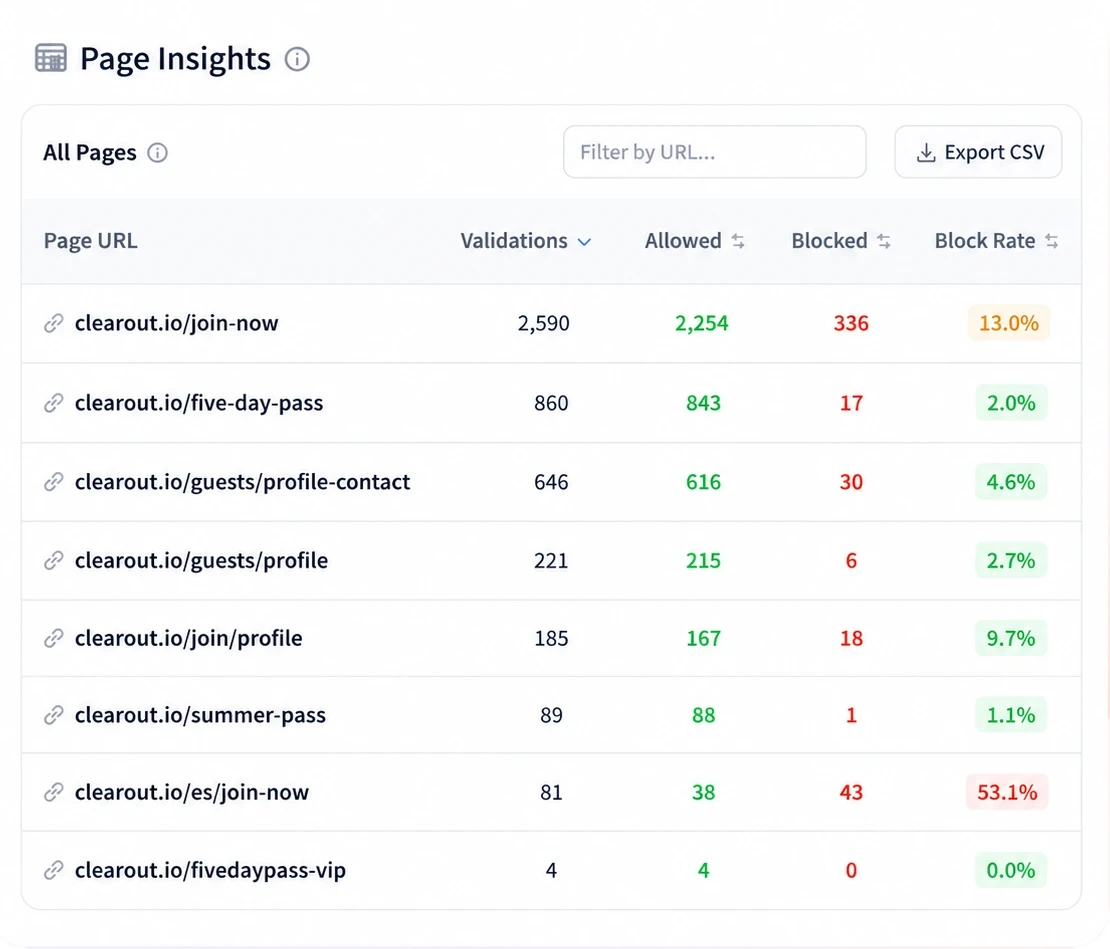
Form Analytics: See Exactly Which Pages Drive Bad Leads
The Page Insights view ranks every URL by block rate so you can spot which landing pages attract the most invalid submissions in seconds. Filter by date, drill into a URL, and export the data for your growth team.
- Block rate per page URL, sortable and filterable
- Validations, allowed, and blocked counts side-by-side
- Export CSV to share with your team instantly
Half your visitors abandon
form completion.
You never knew.
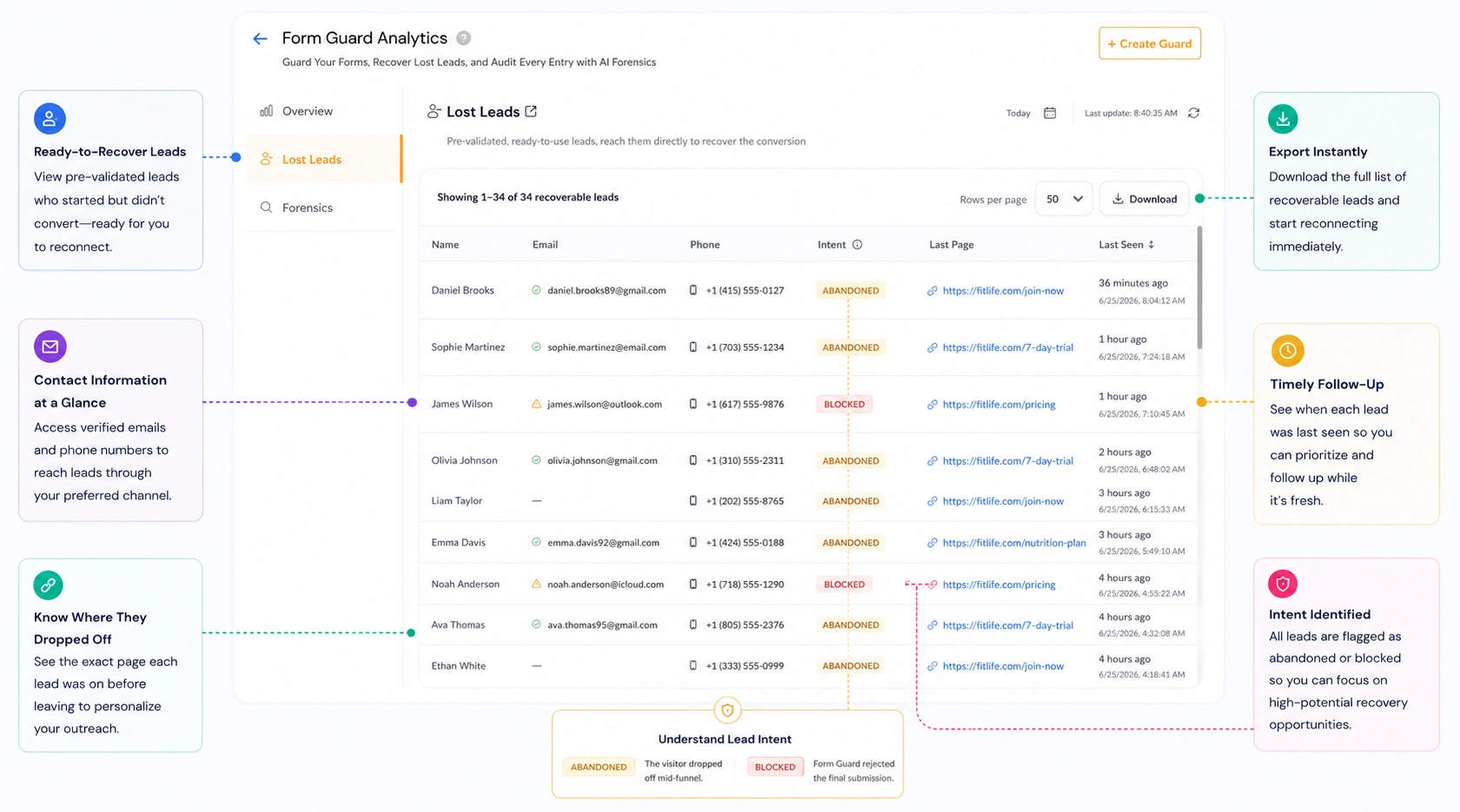
The visitor typed a verified email, maybe a phone number too, then closed the tab. With Form Guard, those partial sessions appear in a dedicated Lost Leads list - verified contact details, exact page, one click to push to your CRM or SDR queue.
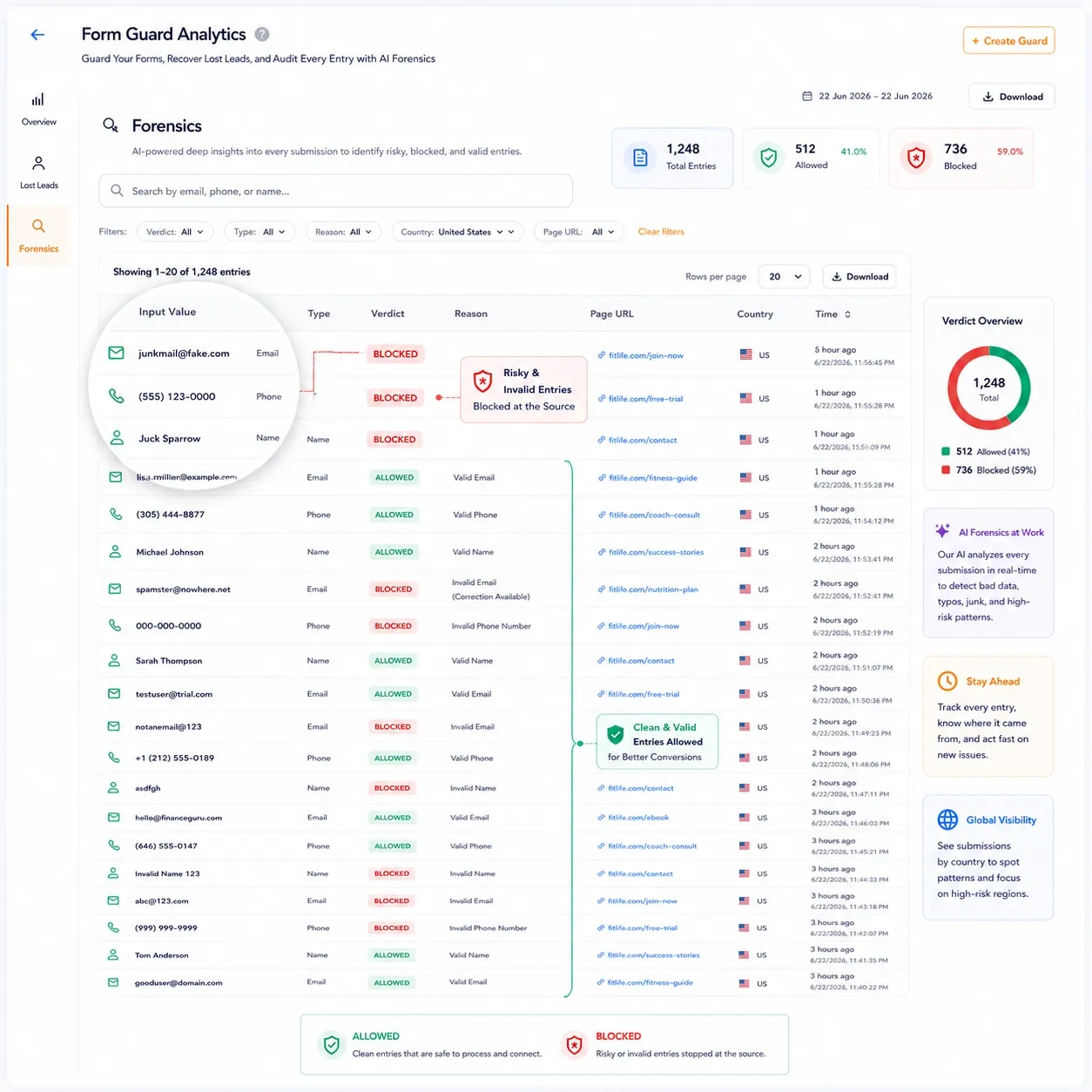
Audit Form Activity with Forensics to See What Gets Blocked and Why
Every form submission gets a verdict and a reason. Filter, search, and export to act on patterns fast.
Every session produces a record: input value, verdict (BLOCKED or ALLOWED), and the specific reason - Invalid Email, Disposable Email, Invalid Phone, Gibberish Name, and more.
Every interaction is timestamped. Surface patterns your GA4 dashboard will never show - like why Thursday evening traffic converts at half the rate of Tuesday morning.
Forensics goes a level deeper than page-level block rates - down to the individual field. One customer traced 40% of enterprise abandonment to a single "Company size" dropdown. One field removed, 18% conversion lift.
The same form can block at 3% on desktop and 15% on mobile. Isolate which version of the problem needs fixing.
Search by email, phone, or name. Filter by any dimension. Export to CSV for your dev team.
What changes when Form Guard is running
Same form. Same traffic. Completely different outcomes, because the data going into your CRM is actually real.
No credit card required · Cancel anytime
One script tag.
Full SDK control.
Drop a single <script> on any page, no build step, no framework needed. Override anything through window.clearout.options when you need granular control.
In a data-driven world, garbage in
still means garbage out
Every fake email in your CRM is a wasted follow-up and a skewed metric. Form Guard stops the problem at the source.
Your CRM stays clean from day one
Bad data compounds - every invalid contact becomes a bounce, a spam complaint, or a wasted sequence slot. Real-time form validation is the only place to stop it at the source.
Recover leads you didn't know you had
Half of all form sessions end without a submit - including sessions where someone typed a real, verified email. Lost Leads captures those contacts the moment validation passes.
Diagnose drop-offs before they become habits
Forensics logs every submission with verdict, reason, country, and page URL - filterable and exportable. Find the pattern, share it with your team, and fix it in the next sprint.
Ad spend converts, not just clicks
When paid traffic submits junk data, your CPL math is broken from the start. Block invalid contacts at the form and acquisition cost drops without touching a campaign. One customer cut CPA by 60% in week one by retargeting verified contacts from Lost Leads.
Mobile-first forms stop leaking on small screens
The same form can convert well on desktop and bleed leads on mobile. Forensics breaks drop-offs by device so you're fixing the mobile problem separately - not averaging it with desktop and wondering why nothing changes.
Bot attacks don't need defeating, they need preventing
CAPTCHA catches bots but ignores data quality - a real person can still enter a disposable email or VoIP number. Form Guard layers data validation on top of human verification, protected on both fronts with no added friction.
Results that show up in the numbers
"The Page Insights table told us our Spanish-language signup page had a 35.5% block rate, more than triple our English equivalent. That one number justified a full audit of our Spanish localization. We'd been running that page blind for eight months."
"We had 2,487 recoverable leads sitting there that we'd completely written off. Real people, verified emails, verified phones, they'd just closed the tab before hitting submit. The first week we ran retargeting on that list, our cost-per-acquisition dropped by 60%."
"Forensics flagged a 'Company size' dropdown that was causing 47-second hesitation times. We made it optional. Conversion rate went up 18% in two weeks, no other changes. I'd never have found that from GA4 alone, it just looks like a normal drop-off in aggregate."
One script tag. Works with any form builder.
No rebuild required. Drop the script on your page and Form Guard starts working immediately, whatever platform your form was built on.



Growing businesses rely on Clearout
to verify leads every single day
From the first form on your landing page to the thousandth submission in your enterprise funnel, Form Guard scales without configuration changes, maintenance windows, or per-seat pricing surprises.
Questions about Form Guard
Email: 20+ advanced checks including syntax, domain existence, MX records, disposable address detection, and catch-all resolution.
Phone: Carrier detection and line-type identification (mobile vs. landline vs. VoIP) to verify the number is real and reachable.
Name: AI and ML models that calculate the probability of an entry being a real human name, filtering out profanity and gibberish like "asdfgh".
This protects your sender reputation by keeping hard bounces, spam complaints, and undeliverable addresses out of your email lists from the start.
Form Guard takes a different approach. It includes invisible bot detection powered by Cloudflare Turnstile - no puzzles, no friction for real users. Then it goes further by validating the actual data quality: email deliverability, phone reachability, and name authenticity. A human can easily pass any CAPTCHA using fake details; Form Guard ensures the submission is both human and genuine.