

- Products
- ResourcesDEVELOPER

 API
Clearout APIs are structured around REST and JSON Webhooks
Capture real-time events in your application workflow Clearout MCP
Verify and find emails from AI assistants like Claude and Cursor Form Guard
Real-time form validation to keep bad contacts out of your CRMKNOWLEDGE BASE Getting started
Sending campaigns without bounces is made simple FAQ
Easily find answers to services, security and common questionsUSE CASES Lead Generation
Learn how professionals generate quality leadsGUIDES Clearout Insights Explore original research, industry statistics, and data-backed insights Pricing Transparent & flexible pricing to support pay-per-use or recurringCompare Email Verification Tools AI-powered email verification with 99%+ accuracy, real-time validation, and transparent risk scoringCompare Email Finder Tools Pre-verified B2B email addresses with confidence scoring, find real person email, not role-based addressData Pulse & HubSpot Breeze Intelligence Pre-verified B2B email addresses with confidence scoring, find real person email, not role-based addressBLOGSEmail Verification ToolsFind Anyone’s Email Address
Most Accurate, Fast & Free WaysForm Validation
Importance, Ways & Best PracticesView All Blogs - Pricing
- Integrations
- Enterprise
- Login



7 Checklists to Avoid Negative Sender Reputation
TL; DR
- Email sender reputation is a score ISPs assign to your sending domain and IP address based on your sending behaviour.
- Gmail and Yahoo introduced mandatory authentication requirements: SPF, DKIM, and DMARC that now directly affect sender reputation for bulk senders sending over 5,000 emails per day.
- Low scores cause emails to land in spam or go undelivered entirely.
- You can run a free email reputation check using Google Postmaster Tools, Microsoft SNDS, or a sender score checker like Validity.
- The main causes of a damaged reputation are high bounce rates, spam complaints, missing authentication, and sending on unverified lists.
- Clearout's Email Verifier removes invalid, risky, and catch-all addresses before they cause bounce damage.
Table Of Content
The reputation you establish in the market becomes a deciding factor of whether your business will thrive or get sabotaged eventually. A good reputation can help you win clients while a bad one can make your clients drift away with a fall in revenues.
Similarly, in the world of B2B email marketing, a bad email reputation can make your email marketing efforts go in vain and affect your email deliverability. Since email marketing is still one of the most effective ways of reaching customers online, you simply cannot take the risk of your emails ending up in spam due to your bad email sender reputation.
In 2026, this is more consequential than it has ever been. Gmail and Yahoo now enforce hard thresholds on spam complaint rates, authentication, and bounce rates for anyone sending at volume. These are no longer guidelines. They are enforcement conditions.
Therefore it is crucial to maintain a good email sender reputation and that’s exactly what we are going to help you with today!
Let’s start with understanding the term better…
Similarly, in the world of B2B email marketing, a bad email reputation can make your email marketing efforts go in vain and affect your email deliverability. Since email marketing is still one of the most effective ways of reaching customers online, you simply cannot take the risk of your emails ending up in spam due to your bad email sender reputation.
In 2026, this is more consequential than it has ever been. Gmail and Yahoo now enforce hard thresholds on spam complaint rates, authentication, and bounce rates for anyone sending at volume. These are no longer guidelines. They are enforcement conditions.
Therefore it is crucial to maintain a good email sender reputation and that’s exactly what we are going to help you with today!
Let’s start with understanding the term better…
What is Email Sender Reputation?
The email sender reputation is a score that Internet Service Providers (ISP) assign to a business that sends emails. Usually, the ISPs assign email senders a score based on several factors.
The better the score, the better your email domain reputation. However, a lower score can make a service provider divert your emails to the recipient’s spam folder. In some cases, the emails might not get delivered at all.
The score is not a single universal number. Every ISP maintains its own internal reputation model. Third-party tools like Validity's Sender Score approximate your email sender reputation score on a 0 to 100 scale based on publicly observable sending signals, but they are a proxy..
The better the score, the better your email domain reputation. However, a lower score can make a service provider divert your emails to the recipient’s spam folder. In some cases, the emails might not get delivered at all.
The score is not a single universal number. Every ISP maintains its own internal reputation model. Third-party tools like Validity's Sender Score approximate your email sender reputation score on a 0 to 100 scale based on publicly observable sending signals, but they are a proxy..
What is a Good Email Sender Reputation Score?
Understanding the score range helps you act on the right priority.
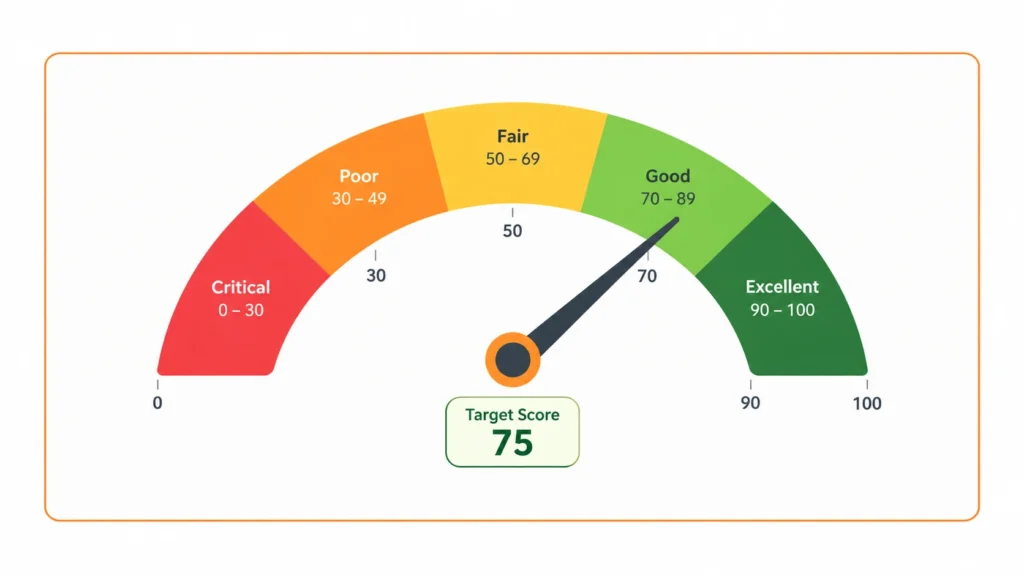
A score above 90 is the target for any team running regular outbound campaigns or marketing sends. Dropping below 70 should trigger an immediate audit of your sending practices.
What Results in Negative Domain Reputation?
Following are the most common reasons why you receive a low sender reputation score:
- The recipient often reports your messages as spam.
- There are lower open rates for your emails.
- There is a high bounce rate due to sending emails to multiple addresses.
- Missing or broken SPF, DKIM, or DMARC authentication records.
- Spam complaint rates above Google's enforced 0.10% threshold.
- Sending to purchased, scraped, or unverified lists.
- Sending from a new IP or domain without completing a proper IP warm up.
How to Improve Email Sender Reputation?
1. Implement Email Authentication
- SPF (Sender Policy Framework): A DNS record that specifies which servers are authorised to send email on behalf of your domain. Without it, receiving servers have no way to confirm your emails are legitimate.
- DKIM (DomainKeys Identified Mail): A cryptographic signature added to every outgoing email that proves the message was not altered in transit and originated from an authorised server.
- DMARC (Domain-based Message Authentication, Reporting, and Conformance): A policy that tells receiving servers what to do when SPF or DKIM checks fail. At minimum, set p=quarantine. A p=reject policy provides the strongest protection.
All three records are added through your DNS provider. Most email service providers include setup guides specific to their platform.
2. IP Warm Up Before Scaling New Sending Infrastructure
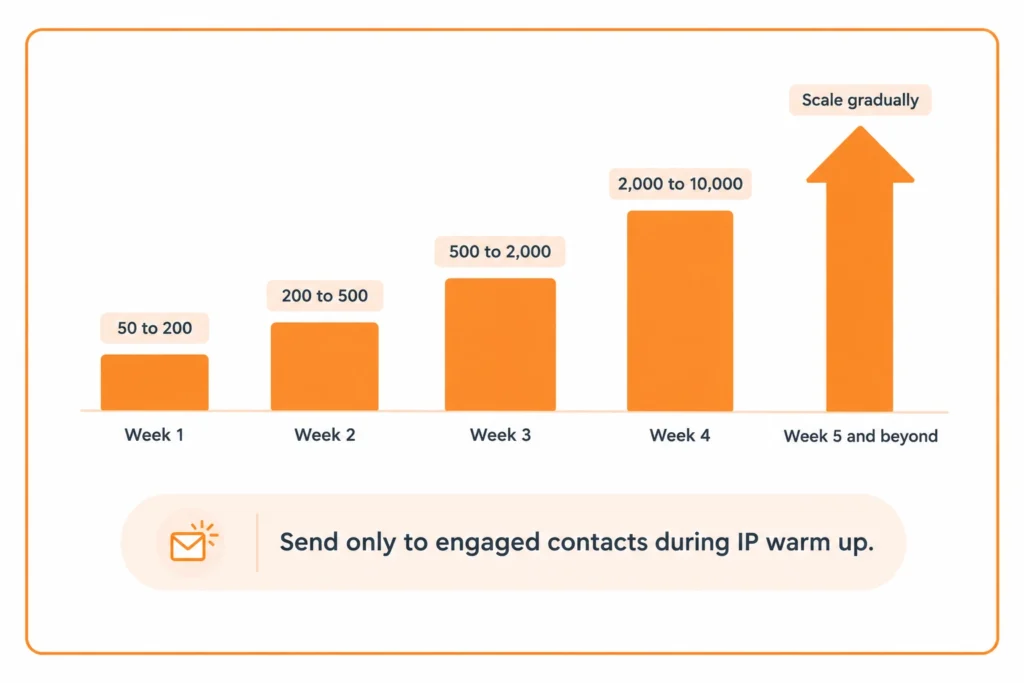
IP warm up is the process of gradually increasing sending volume from a new IP address or domain to build a sending history before scaling. ISPs have no reputation data on a new IP, so they apply more aggressive filtering until they can observe consistent, complaint-free sending behaviour.
Without IP warm up, sending 50,000 emails on day one of a new domain will trigger spam filters even if every address on the list is valid. The volume itself looks suspicious to ISPs with no prior signal from that source.
A basic IP warm up schedule:
Without IP warm up, sending 50,000 emails on day one of a new domain will trigger spam filters even if every address on the list is valid. The volume itself looks suspicious to ISPs with no prior signal from that source.
A basic IP warm up schedule:
| Week | Daily send volume |
|---|---|
| Week 1 | 50 to 200 |
| Week 2 | 200 to 500 |
| Week 3 | 500 to 2,000 |
| Week 4 | 2,000 to 10,000 |
| Week 5 onwards | Scale gradually based on engagement signals |
During IP warm up, send only to your most engaged contacts, such as recent openers and clickers. Strong engagement signals during this phase establish a positive reputation faster. Sending to a cold or unverified list during warm up can permanently damage a new IP before it has ever had a clean reputation.
3. Email Volume
The volume of emails that you send on a daily basis is one of the important factors. Try to equally distribute the email marketing campaigns.
A consistent volume of email campaigns where you ensure there are no sudden spikes or drop will help you. Meaning, if you are sending emails twice a week and suddenly boost the volume to three times a week due to some offer or festive then it will create a problem.
There can be times when you wish to send out more emails than normal like on Black Friday or Cyber Monday. However, aim for every day, consistent schedule of the email blast.
A consistent volume of email campaigns where you ensure there are no sudden spikes or drop will help you. Meaning, if you are sending emails twice a week and suddenly boost the volume to three times a week due to some offer or festive then it will create a problem.
There can be times when you wish to send out more emails than normal like on Black Friday or Cyber Monday. However, aim for every day, consistent schedule of the email blast.
4. Ensure Periodic Database Cleaning to Reduce Bounce Rate
Bounced emails are those which did not get delivered to the user mailbox. In such cases, the email is returned to the sender's email address along with a fail message. Bounced emails are categorized into 2 kinds namely hard bounce and soft bounce.
- Hard Bounce: When you try sending an email to an email address that does not exist or is incorrect then it is called hard bounce. This happens in circumstances when the user server has blocked incoming emails, or email address/ domain is incorrect or the address no longer exists.
- Soft Bounce: Soft bounces on the other hand results when the recipient mailbox is full or there is some issue on the server. Normally this can be a temporary issue and are not as bad as hard bounces, but in any case, your delivery rate gets impacted.
Therefore, periodic cleaning of the database is recommended to reduce the bounce rate. Ensure you use a good email verification tool to filter junk and inactive email addresses.
Verify your email list
5. Avoid Spam Complaints
Spam complaints are the reports that the user registers against the unwanted emails that land in their mailbox. Too many of such complaints can get you blacklisted by the ISPs. In order to avoid such spam complaints, ensure the following:
- Use a permission-based email list
- Avoid using database bought or rented by a third party
- Make an opt-in list to ensure the user shares a valid email address
- Use personalized and dynamic content
- Do not bombard the subscribers with too many emails
- Provide an option to unsubscribe to the user and ensure that you remove such email ids from your database
6. Avoid Spam Traps
A spam trap is a false email address which is used to detect the spammers. The number of spam traps has increased in count is the past couple of years. Statistics have shown that the number of spams has considerably reduced from 60% to 25% over a period of the last six years. Following up the precautionary measures covered in the previous pointers like preparing your own opt-in email list, periodic database cleaning, consistency in email campaigns etc will keep you away from getting trapped by such spam traps and will keep your sender reputation in good health.
7. Avoid Being Blacklisted!
Email Blacklists are lists of email or IP addresses that are identified as spammers and get blocked. The impact of being blacklisted may range from minor to a complete stop but deliverability gets hampered in any case. Once you discover that you have been blacklisted, it is a good idea to scrutinize your email marketing practices before you request clearance from the blocked list.
Having gone through the reputation check, marketers should make sure to improve deliverability. Without email landing in the user's inbox, the open rates would stay low and so would the email marketing campaign performance. Clearout.io helps with email verification, which ensures lower bounce rates and higher deliverability, leading to a good sender reputation and email engagement.
[Also Read: Risk businesses are exposed to by using poor quality email list]
Having gone through the reputation check, marketers should make sure to improve deliverability. Without email landing in the user's inbox, the open rates would stay low and so would the email marketing campaign performance. Clearout.io helps with email verification, which ensures lower bounce rates and higher deliverability, leading to a good sender reputation and email engagement.
[Also Read: Risk businesses are exposed to by using poor quality email list]
How to do an Email Reputation Check in 2026?
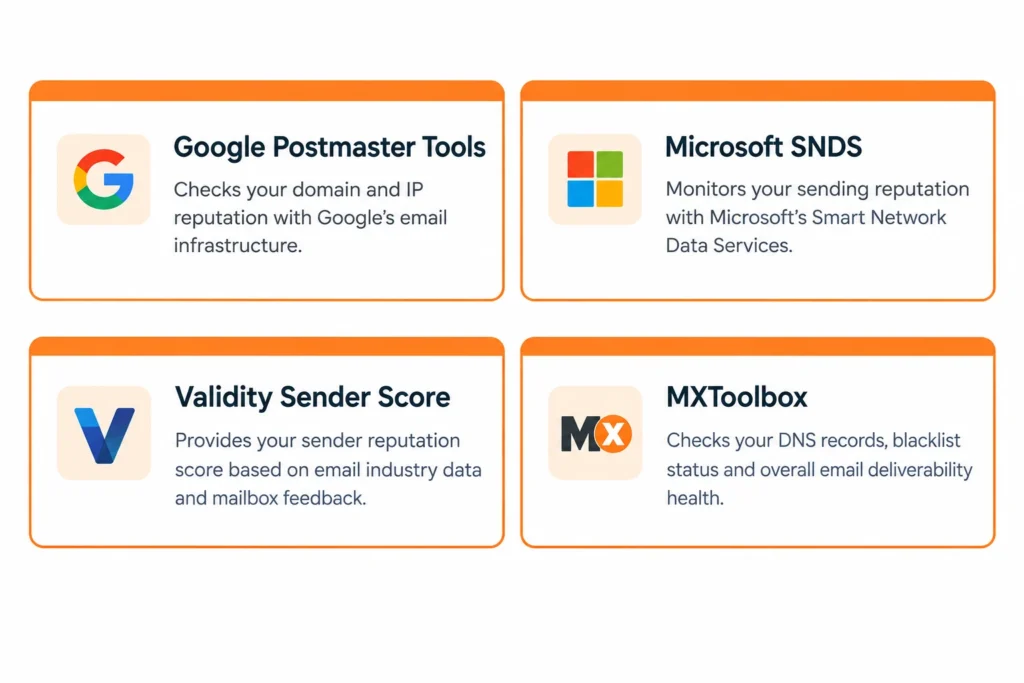
Not sure where your sender reputation stands right now? These 4 free tools give you a clear picture before a deliverability problem shows up in your campaign numbers.
- Google Postmaster Tools checks your domain and IP reputation directly with Gmail's infrastructure.
- Microsoft SNDS covers Outlook and Hotmail signals.
- Validity Sender Score benchmarks your reputation against email industry data.
- MXToolbox flags any blacklist status or DNS issues that could be blocking delivery.
Wrapping Up…
Email sender reputation in 2026 is determined by more factors than it was even two years ago. Authentication is now enforced, not optional. Spam complaint thresholds are actively monitored by Gmail and Yahoo. And a new sending domain or IP requires a structured IP warm up before it can handle volume reliably.
The fundamentals have not changed: clean lists, consistent volume, strong engagement signals, and quick removal of invalid contacts.What has changed is that the consequences of ignoring these fundamentals are faster and harder to reverse than they used to be.
Clearout's Email Verifier removes invalid, disposable, risky, and catch-all addresses from your list before a single email fires. That keeps your bounce rate low, your email sender score healthy, and your campaigns reaching the inboxes they are meant to reach.
The fundamentals have not changed: clean lists, consistent volume, strong engagement signals, and quick removal of invalid contacts.What has changed is that the consequences of ignoring these fundamentals are faster and harder to reverse than they used to be.
Clearout's Email Verifier removes invalid, disposable, risky, and catch-all addresses from your list before a single email fires. That keeps your bounce rate low, your email sender score healthy, and your campaigns reaching the inboxes they are meant to reach.

FAQs
How to check email sender reputation?
Run a free email reputation check across three tools. Google Postmaster Tools (postmaster.google.com) shows your domain and IP reputation specifically for Gmail delivery and reports your real-time spam rate. Microsoft SNDS (sendersupport.olc.protection.outlook.com) covers Outlook and Hotmail delivery signals. Validity's sender score checker at senderscore.org gives a 0 to 100 score based on signals from major ISPs.
How do I fix my sender reputation?
Start with a full email reputation check to understand the scope of the damage. Then address the most likely causes in this order: remove invalid and bounced addresses from your list immediately using an email verification tool like Clearout. Also, check and repair your SPF, DKIM, and DMARC records if any authentication is missing or misconfigured. If you are on a blocklist, submit a removal request after fixing the underlying issue.
How does email sender reputation affect email deliverability?
Your email sender reputation score is the primary signal ISPs use to decide where your mail goes. A high score means consistent inbox placement. A declining score means progressively more of your email lands in spam folders before it reaches anyone. A critically low score means ISPs block delivery entirely, often without sending a bounce notification.