clearout
  • Products
    • Email Verifier Verify emails addresses individually, in bulk or through API, with 99% accuracy
    • Email Finder Find individual or bulk emails by entering the person & company name or domain
    • Form Guard IconForm Guard Protect your forms from spam, bots, and invalid submissions with real-time email, phone, and name verification.
    • Prospect SQL/MQL list building with high levels of personalization, real-time data enrichment and prospect search
    • Clearout For SheetsVerify email addresses directly on Google Sheets with Clearout for sheets add-on
    • Prospect – LinkedIn Chrome ExtensionBuild verified, targeted prospect lists directly from LinkedIn profiles
    • ClearoutPhoneValidate phone numbers across 240+ countries in bulk, quick or real time validation
    • Free Tools
    • Disposable Email Checker
    • Reverse LinkedIn Profile Lookup Tool
    • Reverse Email Lookup Tool
    • Email List Cleaner
  • Resources
      DEVELOPERAPI iconAPI
      Clearout APIs are structured around REST and JSON
      Webhooks iconWebhooks
      Capture real-time events in your application workflow
      Form Guard iconForm Guard
      Real-time form validation to keep bad contacts out of your CRM
      KNOWLEDGE BASEGetting started iconGetting started
      Sending campaigns without bounces is made simple
      FAQ iconFAQ
      Easily find answers to services, security and common questions
      USE CASESLead Generation iconLead Generation
      Learn how professionals generate quality leads
      GUIDESPricing arrow iconTransparent & flexible pricing to support pay-per-use or recurringCompare Email Verification Tools arrow iconAI-powered email verification with 99%+ accuracy, real-time validation, and transparent risk scoringCompare Email Finder Tools arrow iconPre-verified B2B email addresses with confidence scoring, find real person email, not role-based addressBLOGSEmail Verification ToolsFind Anyone’s Email Address
      Most Accurate, Fast & Free Ways
      Form Validation
      Importance, Ways & Best Practices
      View All Blogs
  • Pricing
  • Integrations
  • Enterprise
  • Login
Try it free Book a 1-to-1 demo
Priyanshi Sharma / December 18, 2025 December 18, 2025

ESP Validation vs Dedicated Email Verification: Which Works?


ESP Validation vs Dedicated Email Verification: Which Works?

Your ESP just rolled out "email validation.” But is the problem solved?

No.

Last month, Marcus ran a product launch campaign through HubSpot. He was thrilled to see their new in-built email validation feature flagging obvious typos like "gmial.com" and "yahooo.com." He thought his list was clean.

The campaign was sent to 8,500 contacts. His bounce rate hit 9.2%. His domain reputation took a nosedive. And worse, the HubSpot algorithm rate-limited his outgoing during the next two weeks, in the middle of his quarter-end drive.

What went wrong? The native ESP email validation identified the obvious errors but failed to identify the actual threats: disposable emails, spam traps, and inactive addresses which have not been used in 18 months.

It has been found that 25% of email addresses stored in your database are becoming invalid in a matter of one year. And though the most basic validation of your ESP can be used to detect syntax errors, it is not set to guard against the underlying data quality problems that will in fact, be the ones that kill your campaigns.

So, should you use inbuilt ESP email validation? The answer is “No.” Check the reasons here!

Table Of Content


‣ What Is Inbuilt ESP Email Validation?
‣ What does Most ESP Email Validation Actually Check?
‣ The Limitations of ESP Email Validation
‣ How ESP Email Validation Affects Email Deliverability
‣ The Real Cost of Inadequate Email Validation
‣ Common Mistakes with Inbuilt ESP Email Validation
‣ Inbuilt ESP Email Validation vs Dedicated Email Verification Tool: The Key Differences
‣ Why Are Third-Party Email Verification Tools The Best?
‣ Deliverability Protection is Revenue Protection
‣ Taking Action: Your Email Verification Strategy for 2026
‣ Why Use the Clearout Email Verification Tool
‣ Final Thoughts: The Email Verification Decision You Can't Afford to Get Wrong
‣ FAQs
What Is Inbuilt ESP Email Validation?


With inbuilt ESP email validation, we are referring to email checking capabilities that include the services of sites such as HubSpot, Mailchimp, ActiveCampaign and Salesforce Marketing Cloud.

These functions are automatic in that they operate in the event of an importation of a list or the completion of a form related to your ESP. They are made to identify issues in advance to the time of sending.

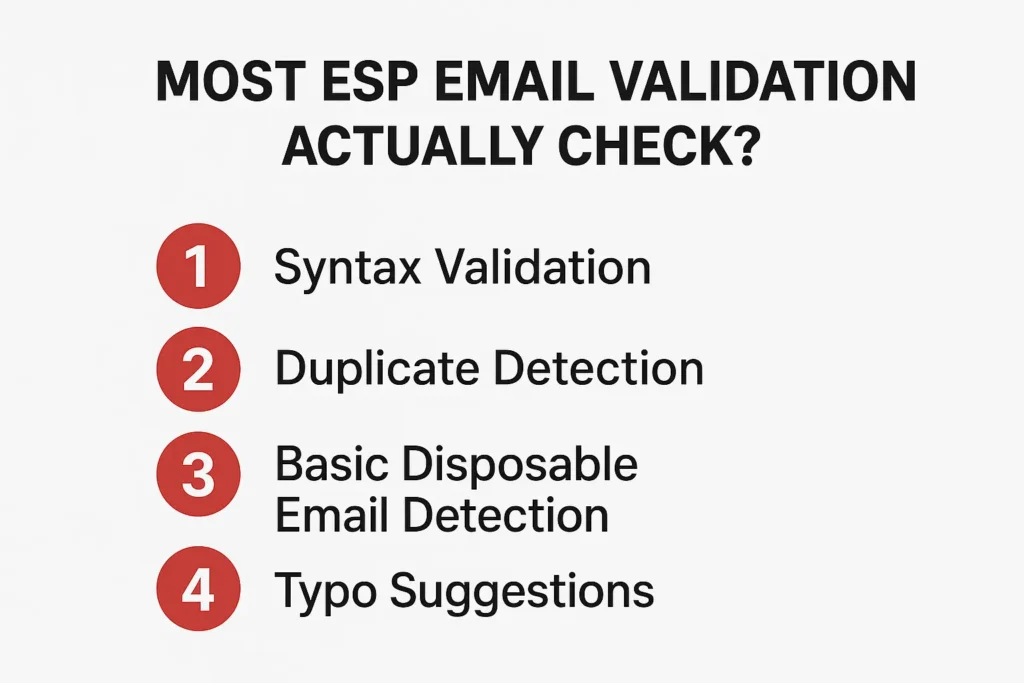
What does Most ESP Email Validation Actually Check?


4 ESP Email Validation Actually Checks

Here's what the typical in-built email validation process looks like across major ESPs:

1. Syntax Validation


The system checks if the email follows the basic format:

[email protected].

It'll catch errors like missing @ symbols, spaces in the address, or multiple @ symbols.

2. Duplicate Detection


Most ESPs will flag duplicate email addresses within the same list or across your database.

3. Typo Suggestions


More advanced ESPs like HubSpot will suggest corrections for common typos—"gmial.com" becomes "gmail.com."

Sounds comprehensive, right?

Here's the problem: this is where most inbuilt ESP email validation stops. And that's exactly where your real deliverability problems begin.

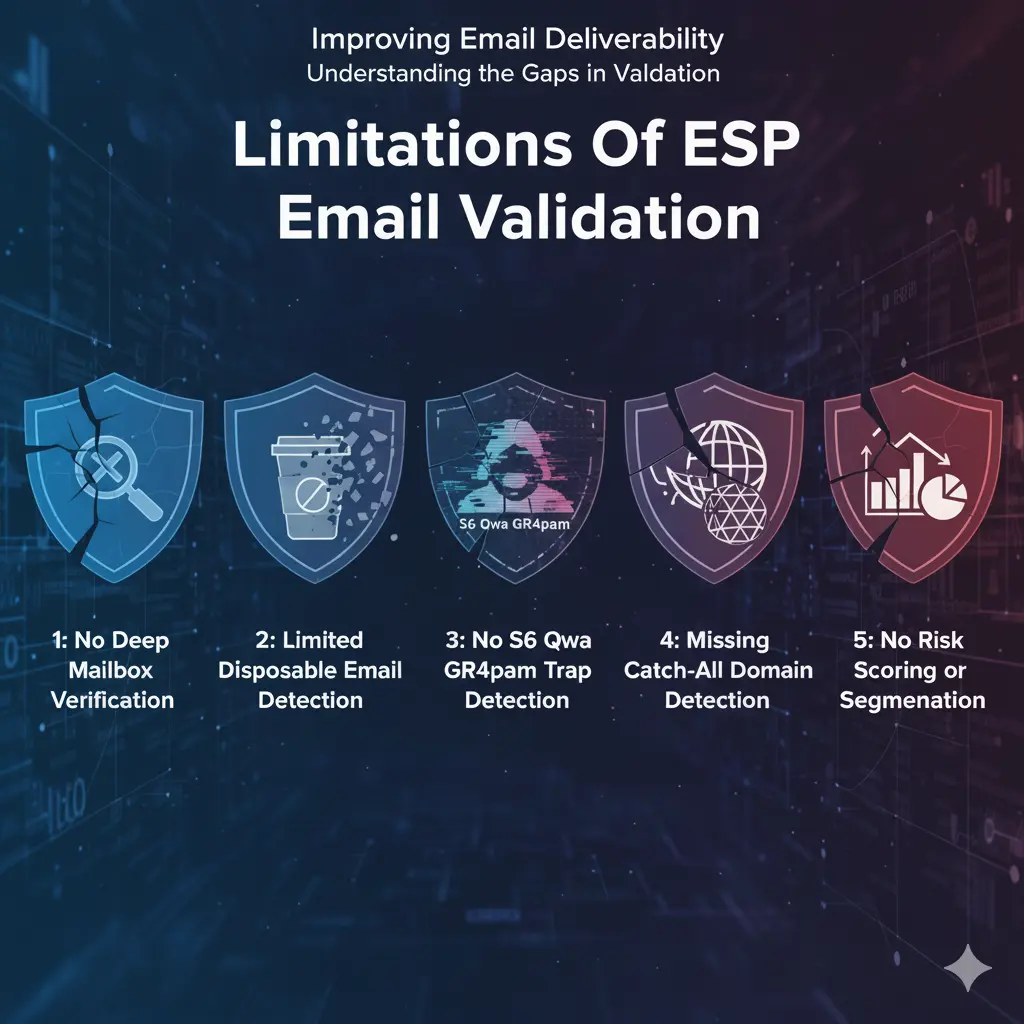
The Limitations of ESP Email Validation


Limitations of ESP email validation

Let's see the limitations of ESP email validation:

The biggest gap in in-built ESP email validation is that it rarely performs actual mailbox verification, the process of checking whether a specific email address is actually active and able to receive mail.

It won't tell you:

  • Whether that specific mailbox actually exists
  • Whether it's set up to auto-reject all incoming mail
  • If it's actually a role-based address that goes to a general inbox no one monitors
This is why you can have a "validated" list according to your ESP and still see bounce rates of 5-10% or higher. The addresses pass basic checks but fail in the real world.

Limitation 1: Limited Disposable Email Detection


One of the most critical limitations of in-built ESP email validation is its inability to catch all temporary and disposable email addresses.

While your ESP might block obvious services, there are literally thousands of disposable email services that pop up daily.

People use these to access your gated content or download your lead magnet, then the address vanishes within hours or days. Your ESP's inbuilt validation won't catch most of these because they technically have valid domains and MX records.

Limitation 2: No S6 Qwa GR4pam Trap Detection


Spam Trap email addresses look like a normal email address, having proper formatting, valid domains, and active mailboxes.

The difference? They're honeypots set up by ISPs and anti-spam organizations to catch senders with poor list hygiene. Send to a spam trap, and your sender reputation takes an immediate hit.

Inbuilt ESP email validation cannot detect spam traps. Why? Spam traps are deliberately designed to pass basic validation checks. They require sophisticated monitoring of email address behavior patterns, historical data, and threat intelligence that ESPs simply don't provide in their basic validation features.

An email validation service, such as Clearout, keeps records of spam traps and applies AI to determine possible traps based on the patterns.

Limitation 3: Missing Catch-All Domain Detection


The catch-all domains are set to receive emails addressed to any address in a domain, although the particular mailbox may not exist. To illustrate, in case company.com is a catch-all domain, any emails that were sent to [email protected] will be accepted by the server, and nobody will ever read these emails.

This is a big blind spot of ESP email validation. The domain is valid (the domain exists and accepts mail), but your email is lost in a black hole, or is trapped in a full catch-all mailbox that is not checked.

Catch-all addresses may comprise 15-30% of B2B contact lists, but the vast majority of inbuilt ESP email validation considers them valid. This artificially increases your list size and pulls down your real engagement rates.

Limitation 4: No Risk Scoring or Segmentation


Perhaps the most significant limitation of in-built ESP email validation is that it provides binary results: valid or invalid.

But email addresses exist on a spectrum of quality:

  • Safe to send: Active, engaged addresses with clean history
  • Risky: Role addresses, catch-alls, poor reputation domains.
  • Harmful: Spam traps, respected complainers, or honeypots.
  • Invalid: Hard bounces, semantic errors (non-existent domains)
  • Gibberish: Addresses that follow no logical pattern, often created by bots or generated randomly
  • Disposable: Temporary, fully anonymous address that works for a limited time and can be used without any registration

These differences are not detected by the validation of your ESP. The same green flag is given to the address that technically is good, but has a possibility of being treated as spam, as your best customer.

So, you are unable to make informed choices regarding which of your contacts to focus on, who to take approaches to, and who to avoid sensitive campaigns altogether.

How ESP Email Validation Affects Email Deliverability


Now we will draw the links between these limitations and how it will impact your campaigns.

The Domino Effect of Inadequate Validation


When you rely solely on in-built ESP email validation, here's the progression:

Week 1-2: Everything Seems Fine


You import your list, the ESP's validation catches obvious errors, and you start sending. Initial engagement looks decent because you're hitting your genuinely interested contacts first.

Week 3-4: Warning Signs Appear


Bounce rates start increasing. Some domains are blocking your emails. Gmail is routing more of your messages to the Promotions tab (or worse, spam). Your ESP's analytics show declining open rates.

Month 2-3: The Damage Compounds


Your sender reputation score drops. Major ISPs start throttling your emails or blocking them entirely. Even your good contacts aren't seeing your messages in their primary inbox anymore.

Month 4+: Crisis Mode


You're fighting to salvage your domain reputation. Your marketing team is spending hours manually cleaning lists. Sales is complaining that leads aren't responding. And you're considering the nuclear option: starting over with a new sending domain.

The Real Cost of Inadequate Email Validation


Let's put some numbers on this. Say you have a database of 50,000 contacts and you're relying solely on your ESP's in-built email validation:

  • 10-15% of addresses are likely invalid or risky (but passed ESP validation)
  • 5,000-7,500 contacts are actively harming your deliverability
  • At a $0.50 cost per send, you're wasting $2,500-$3,750 per campaign
  • With 2-3 campaigns monthly, that's $60,000-$135,000 annually in wasted spend
  • Plus, countless hours of team time on damage control

And this doesn't even account for the opportunity cost; the real, engaged prospects who never see your messages because your emails are landing in spam.

Common Mistakes with Inbuilt ESP Email Validation


Here are the biggest mistakes we see marketers make when relying on ESP-provided validation:

Mistake 1: Assuming "Validated" Means "Deliverable"


Just because an email passes your ESP's checks doesn't mean it will successfully receive and engage with your messages.

Mistake 2: Validating Only at Import


Many ESPs perform email validation only at the moment you import your contacts. After the initial check, the system does not continue monitoring whether those email addresses remain deliverable, active, or safe.

Mistake 3: Ignoring Validation Warnings


Most ESPs will give the red flag on suspicious addresses as accept-all or unknown and yet allow you to send them. These warnings are not taken into consideration by marketers and they send anyway.

Mistake 4: Not Segmenting by Validation Results


Even if your ESP provides some quality signals, failing to segment based on these signals means you're treating all contacts equally.

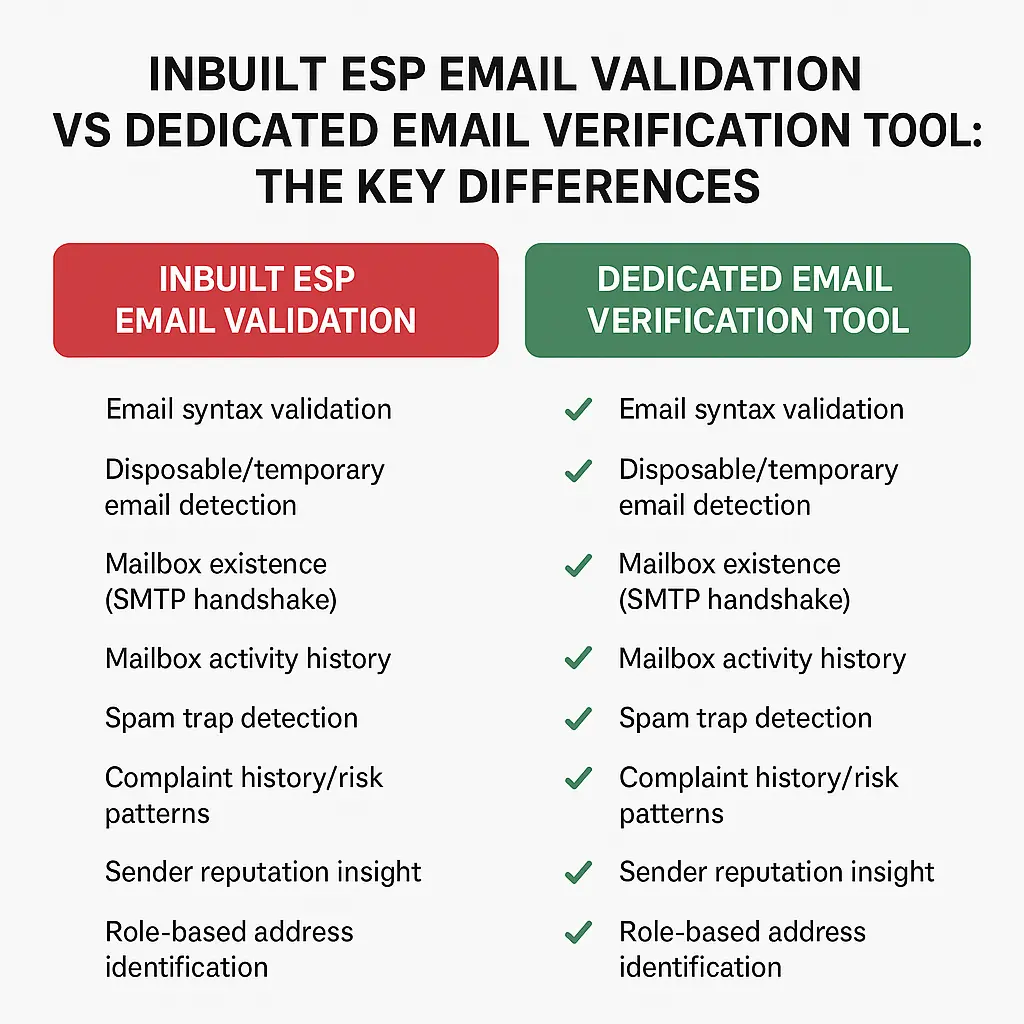
Inbuilt ESP Email Validation vs Dedicated Email Verification Tool: The Key Differences


Inbuilt ESP Email Validation vs Dedicated Email Verification Tool.

Let's break down the differences between ESP Email Validation vs Dedicated Email Verification Tool:
Verification CheckESPs Typically PerformDedicated Verification Tools Perform
Email syntax validation✓(with stricter pattern checks)
Disposable/temporary email detectionLimitedComprehensive, updated in real time
Mailbox existence (SMTP handshake)x✓
Mailbox activity historyx✓
Spam trap detectionx✓
Complaint history/risk patternsx✓
Sender reputation insightx✓
Role-based address identificationx✓
Catch-all domain detectionx(advanced catch-all resolver)
Honeypot/bot detectionx✓
Domain age analysisx✓
Domain reputation scoringx✓
Historical bounce pattern analysisx✓
Syntax validation beyond basicsx✓

1. Verification Technology and Infrastructure


Dedicated email verification services like Clearout invest heavily in technology and infrastructure that's needed for the primary function, but ESPs having email verification do the basic functions.

2. Advanced SMTP Verification


Dedicated email verification tools like Clearout perform actual SMTP conversations with recipient mail servers to verify mailbox existence.

ESPs rarely if ever perform this level of verification because it's resource-intensive and can slow down their primary functions (sending campaigns).

3. Machine Learning and Pattern Recognition


Tools like Clearout use AI models trained on billions of email verification results to:

  • Identify patterns that indicate invalid, gibberish, role-based, risky, and other email addresses
  • Detect newly created disposable email services
  • Recognize bot-generated email patterns

4. Continuous Threat Intelligence


Dedicated verification services maintain constantly updated databases of:

  • Known spam traps
  • Disposable email providers (thousands of domains)
  • Compromised email servers
  • High-risk domains
  • Complaint patterns

They verify millions of email addresses daily and can spot emerging threats across their entire customer base.

Why Are Third-Party Email Verification Tools The Best?


Let's check specific scenarios where the differences between ESP email validation and third-party email verification tools become critical.

Scenario 1: Handling Purchased or Rented Lists


B2B marketers still buy or rent contact lists for their campaigns. This is where the limitations of in-built ESP email validation become painfully obvious.

Using ESP Validation Only


You validate a purchased list of 10,000 B2B contacts into HubSpot. The platform's validation flags 200 addresses with obvious syntax errors. So, you remove those and send to the remaining 9,800.

Results:

  • Bounce rate: 12%
  • Opens: 8%
  • Domain reputation drops significantly
  • HubSpot throttles her sending for 14 days

Using a Dedicated Verification Tool First


If the same list is through Clearout first. The verification does the following:

  • Bounce rate: Reduce to 3% or less
  • Opens: 18%
  • Domain reputation remains strong

The difference? Mike's campaign actually works. Sarah damages her infrastructure for months.

Scenario 2: Form Submissions and Real-Time Validation


Another area where differences between ESP email validation and reputable email verification tools matter enormously is at the point of capture, when someone fills out your form.

ESP Form Validation (HubSpot Example)


HubSpot's form validation will:

  • Check email syntax in real-time
  • Suggest corrections for common typos
  • Flag if the email domain doesn't exist
  • Allow submission of disposable emails, catch-alls, and role addresses

Dedicated Tool Form Validation (Clearout Form Guard)


Clearout's Form Guard performs:

  • Real-time email, name, and contact verification
  • Enrichment with additional contact data
  • Bot detection and prevention
  • Name validation to filter fake entries
  • Phone number validation is included

With ESP-only validation, 30-40% of your form submissions might be low-quality. With dedicated form validation, you're capturing only legitimate, reachable prospects from day one.

Scenario 3: Re-Engagement Campaigns


Let's check what you'll get with these different services for re-engagement campaigns.

With Inbuilt ESP Email Validation


Your ESP shows 15,000 unengaged contacts. You create a compelling win-back campaign and send to all of them, hoping to revive interest, and it fails drastically, leaving you clueless with no proper reason for the failure and damaging your sender reputation.

With Dedicated Verification Before Sending


You export those 15,000 contacts and verify them through a dedicated tool first. You discover:

  • 2,000 are now invalid (hard bounces waiting to happen)
  • 1,800 are disposable emails that were never real
  • 2,200 are catch-all addresses with low engagement likelihood
  • 9,000 are verified, deliverable addresses

You send only to the verified 9,000 with a clean list.

Deliverability Protection is Revenue Protection


Here's what many marketers miss: when you damage your sender reputation with bad list hygiene, it doesn't just affect your bad contacts. It affects everyone.

ISPs like Gmail, Outlook, and Yahoo don't evaluate individual recipients; they evaluate your sending domain as a whole. When your bounce rates spike and spam complaints increase, they downgrade your entire sending reputation.

This means:

  • Your emails to engaged, loyal customers land in spam
  • Your time-sensitive transactional emails get delayed
  • Your sales team's one-to-one emails get filtered
  • Your brand reputation suffers when people don't receive expected communications

Taking Action: Your Email Verification Strategy for 2026


If you've made it this far, you understand why relying solely on your ESP's built-in validation isn't enough. Here's how to take action.

Step 1: Audit Your Current Email List Quality


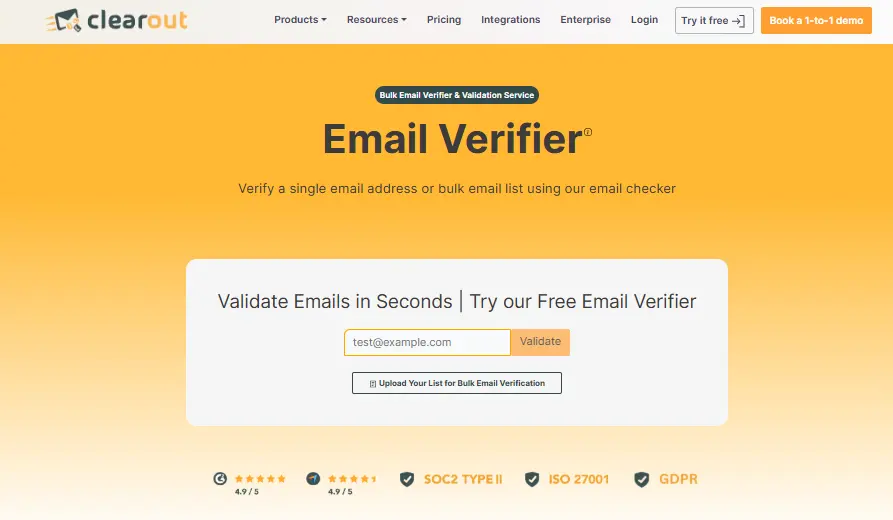
Clearout home page

Before you can improve, you need to understand where you stand. Export a sample of your list (5,000-10,000 contacts) and run it through a dedicated verification service like Clearout.

Pay attention to these metrics:

  • What percentage is invalid?
  • How many disposable emails are in your database?
  • What's your catch-all rate?
  • How many high-risk addresses are you sending to?

This baseline will help you calculate ROI and set improvement goals.

Step 2: Implement Form-Level Protection


The easiest way to prevent future data quality problems is to stop bad data at the source. Implement real-time email verification on your forms using Clearout's Form Guard or similar tools to bring reachable submissions for your sales team.

Step 3: Create a Verification Schedule


Don't verify once and forget about it. Email addresses decay constantly. Create a regular verification cadence:

For New Contacts:

  • Real-time verification at point of capture (forms)
  • Weekly verification of contacts added through other sources
For Existing Database:

  • Monthly verification of unengaged segments
  • Quarterly verification of moderately engaged contacts
  • Annual full database verification
  • Or validate when the bounce starts to show above 3%

Step 4: Segment As Per Your Verification Results


Not all addresses are created equal. Use verification results to create strategic segments:

Tier 1 - Verified Safe:

  • Send all campaigns
  • Include in time-sensitive communications
  • Prioritize for sales outreach
Tier 2 - Risky (Catch-alls, Unknown):

  • Send less frequently
  • Exclude from reputation-sensitive campaigns
  • Monitor closely for engagement
Tier 3 - High Risk:

  • Exclude from regular campaigns
  • Consider one-time re-verification attempt
  • Remove if re-verification confirms risk

Why Use the Clearout Email Verification Tool


Clearout Email Verification Tool

Clearout's Email Verification Tool offers all of the above, plus several unique advantages:

  • Guaranteed Deliverables

    Clearout verifies email addresses to the highest standard and guarantees to reduce bounce rates by 3%. This category is useful when you are the victim of a high bounce rate, damaged sender reputation, and email landing in spam and lower engagement.


  • 20+ Verification Checks

    While most services perform 5-10 verification steps, Clearout runs over 20+ different checks on every email address, including:


  • Syntax and format validation
  • Domain, MX records, and DNS verification
  • SMTP mailbox verification
  • Disposable email detection (10,000+ domains)
  • Role-based address identification
  • Spam trap detection
  • Catch-all domain identification
  • Gibberish Identification
  • Greylisting detection

  • Bulk + API + Real-Time

    Whether you need to verify a one-time list of 100,000 contacts, integrate verification into your application, or protect form submissions in real-time, Clearout handles all scenarios.


  • 99% Accuracy

    Clearout maintains high-industry-leading accuracy rates, backed by a guarantee. If verified addresses bounce, you get your credits back.


Final Thoughts: The Email Verification Decision You Can't Afford to Get Wrong


ESP's inbuilt email validation was never designed to be your only line of defense.

ESPs are in the business of sending emails, not deeply verifying them. Their validation features are built to catch obvious errors and provide basic protection. They're not sophisticated enough to protect you from the real threats that damage deliverability and waste budget.

The solution is to add a dedicated email verification tool like Clearout to your workflow. The cost is minimal compared to what you're already wasting on bad data, and the ROI is realized within the first month.

If you choose Clearout, the important thing is to stop relying solely on your ESP's built-in tools. Ready to see the difference proper email verification makes?

Try Clearout free with 100 credits

FAQs


1. Does my ESP's email validation provide any value?
No. Your ESP's in-built email validation is not useful for catching syntax errors, typos, and basic formatting issues. The solution is dedicated email verification tools for marketers who want to use tools with 20+ domain checks.
2. How often should I verify my email list?
This depends on your list size and growth rate, but you must verify immediately at capture (real-time via forms) or within 24 hours of import. Remember, email addresses decay at about 22.5% per year, so regular verification is important to validate the email list when your bounce rate starts to touch 3%. Learn more.
3. Will email verification slow down my workflow?
No. Most email verification tools, like Clearout, give on-form validation (with instant response, keeping the UX in mind), real-time API verification for forms, bulk verification that processes 50,000-100,000+ addresses, and integrations with major CRMs for automated workflows.
4. What's the ROI of email verification?
A lot of companies see ROI within the first month. It can eliminate waste on sends to invalid addresses for sales, fewer customer service issues from deliverability problems, and higher open and click rates from better inbox placement.

Share this article

Recent Posts

18 Dec 2025
ESP Validation vs Dedicated Email Verification: Which Works?

Compare inbuilt ESP email validation with dedicated email verification tools. See how dedicated veri ...

16 Dec 2025
What Is Free Trial Abuse in SaaS & How to Stop It

Learn what free trial abuse is, its types, how it impacts your SaaS and ways to prevent it. Discover ...

27 Nov 2025
Clearout Recognized In Forbes India DGEMS Select 200 | 2025

Clearout featured in Forbes India DGEMS Select 200 (2025 Cohort) for its innovative & scalable solut ...

21 Nov 2025
9 Hidden Bot Patterns Behind Modern Form Attacks

Wondering how bots still slip through your forms? Explore 9 hidden bot patterns behind modern form a ...

19 Nov 2025
10 Proven CRM Migration Best Practices for 2026

Explore the best practices of CRM migration in 2026 and learn how to audit data, map fields, cleanse ...

Clearout's

Form Guard

Validate email, phone & name on any forms!

  • Real signups only
  • Verified emails
  • Valid phone numbers
  • No fake names
  • Cleaner CRM
  • No devs needed
Try for Free Now

Email Verification, Email Finding Form Guard & Prospecting Service

Expand Your Reach By Finding & Verifying Ideal Prospects.

Sign up & get 100 free credits

No Credit Card required

Create Free Account
Company

Why Clearout?

Pricing

Contact Us

Careers

Enterprise

Sitemap

FAQ

Status

Products

Email Verifier

Email Finder

Form Guard

Prospect

LinkedIn Email Finder

Reverse Lookup

Google Sheets Add-on

WordPress Plugin

ClearoutPhone

What's New?

Resources

Integrations

HubSpot

Team Account

API

Compare Email Verifier

Compare Email Finder

Compare Prospecting

Use Cases

Blog

Help

Legal

Privacy Policy

Terms

DPA

Security

Trust Center

Certification

ISO 27001/2022

SOC 2 Type 2

GDPR

Partnership

HubSpot Certified

Affiliates

Partners

Clearout for browser

⚡ Supercharge Your Prospect Research with Clearout's LinkedIn Chrome Extension - Find and Verify Emails with Confidence!

Clearout Chrome extension

clearout
© 2025 Clearout. All Rights Reserved. Powered by Clearout, LLC.
Auto Credit Replenishment is here! Your credits can now recharge automatically. Learn More ➞
X