clearout
  • Products
    • Email Verifier Verify emails addresses individually, in bulk or through API, with 99% accuracy
    • Email Finder Find individual or bulk emails by entering the person & company name or domain
    • Form Guard IconForm Guard Protect your forms from spam, bots, and invalid submissions with real-time email, phone, and name verification.
    • Prospect SQL/MQL list building with high levels of personalization, real-time data enrichment and prospect search
    • Clearout For SheetsVerify email addresses directly on Google Sheets with Clearout for sheets add-on
    • Prospect – LinkedIn Chrome ExtensionBuild verified, targeted prospect lists directly from LinkedIn profiles
    • ClearoutPhoneValidate phone numbers across 240+ countries in bulk, quick or real time validation
    • Free Tools
    • Disposable Email Checker
    • Reverse LinkedIn Profile Lookup Tool
    • Reverse Email Lookup Tool
    • Email List Cleaner
  • Resources
      DEVELOPERAPI iconAPI
      Clearout APIs are structured around REST and JSON
      Webhooks iconWebhooks
      Capture real-time events in your application workflow
      Form Guard iconForm Guard
      Real-time form validation to keep bad contacts out of your CRM
      KNOWLEDGE BASEGetting started iconGetting started
      Sending campaigns without bounces is made simple
      FAQ iconFAQ
      Easily find answers to services, security and common questions
      USE CASESLead Generation iconLead Generation
      Learn how professionals generate quality leads
      GUIDESPricing arrow iconTransparent & flexible pricing to support pay-per-use or recurringCompare Email Verification Tools arrow iconAI-powered email verification with 99%+ accuracy, real-time validation, and transparent risk scoringCompare Email Finder Tools arrow iconPre-verified B2B email addresses with confidence scoring, find real person email, not role-based addressBLOGSEmail Verification ToolsFind Anyone’s Email Address
      Most Accurate, Fast & Free Ways
      Form Validation
      Importance, Ways & Best Practices
      View All Blogs
  • Pricing
  • Integrations
  • Enterprise
  • Login
Try it free Book a 1-to-1 demo
Akanksha Mishra / January 16, 2026 January 16, 2026

Why IP Blocking on Forms is Not Enough to Stop Fake Signups


Why IP Blocking on Forms is Not Enough to Stop Fake Signups

If you’ve ever opened your CRM and found it filled with strange names, broken emails, and leads that never respond, you’re not alone. False accounts are consuming the budget of the SaaS companies. Almost 49.6% of all internet traffic was in the form of automated bots in 2023. A few blatant spam can be blocked as well using IP blocking. However, most of the fake or poor-quality signups are still making it through.

That’s why keeping your contact data clean and using smarter form-level checks is so important.

Many teams try to control spam by using IP blocking on their forms to stop fake or automated signups. Techniques like IP filtering, IP restrictions, IP address blocking, and IP blacklisting are commonly used to block spam by IP and limit signups by IP address.

While this approach can slow down basic repeat attacks, modern fake signup activity no longer comes from a few fixed sources, making IP-based blocking far less effective than it used to be.

So even if you’re using IP-based form spam prevention, fake signups can still slip through. And once they enter your CRM, they drain sales time, hurt deliverability, and damage your revenue.

Table of Content


‣ What Is IP Blocking?
‣ How Does IP Blocking Work?
‣ Why Does IP Blocking on Forms Fail Against Modern Fake Signups?
‣ Why Do You Need Real-Time Form Protection Today?
‣ Benefits of Using Clearout Form Guard and IP Blocking Together
‣ How Form Guard Succeeds Where IP-Based Blocking Fails
‣ Smarter Protection Starts at the Form Level
‣ FAQs

What Is IP Blocking?


IP Blocking

IP blocking is a security method that restricts form access based on the visitor’s IP address. If a system detects suspicious behavior like repeated submissions or known spam activity, it blocks that IP from submitting your forms again.

Techniques like IP filtering for forms, IP blacklisting, and IP restrictions used to prevent fake signups. These controls help stop very basic, repeated spam attempts, but they were built for a much simpler internet.

How Does IP Blocking Work?


IP-based blocking works by analyzing where form traffic comes from and deciding whether that source should be allowed to submit data. It creates a perimeter around your form, blocking suspicious networks while letting others through.

1. IP Monitoring & Detection


Your form system tracks incoming IP addresses and monitors behavior patterns such as submission frequency, failed attempts, and known spam signatures. When activity crosses predefined thresholds, the IP is flagged as suspicious.

This is the first step of IP-based blocking designed to detect automated behavior rather than verify the actual identity of the user submitting your form.

2. IP Blacklisting & Filtering


Once an IP is flagged, it can be added to a blacklist or restricted list. IP filtering for forms ensures that any future submissions from that address are blocked automatically. This is how businesses attempt to block form spam by IP and limit signups by IP address.

It creates a defensive layer, but it only works if the spammer keeps using the same IP, which modern attackers rarely do.

3. Access Restriction


After blacklisting, your system denies access to form submission pages from those IPs. This prevents further attempts from that source.

However, IP blocking only verifies the network location, not whether the person behind the form is real, reachable, or legitimate. That limitation becomes critical in today’s bot-driven traffic environment.

Why Does IP Blocking on Forms Fail Against Modern Fake Signups?


IP blocking worked when spam was simple, when bad traffic came from a few obvious sources, and could be stopped by cutting off repeat offenders. But today’s fake signups don’t look like “spam traffic” anymore.

They look like normal website visitors. Bots now rotate IPs, use residential networks, and even rely on real devices to submit forms.

As a result, IP-based blocking on forms no longer filters fake leads the way it once did, and many bad signups slip into your CRM without raising any red flags.

1. IP Rotation Makes IP Filtering Ineffective


Modern spam operations use rotating IP pools that change with every submission. This means every fake signup appears to come from a new “visitor,” making IP-based blocking ineffective. Even the most aggressive IP filtering for forms cannot keep up with thousands of constantly changing IPs.

2. Proxies Allow Bots to Bypass IP Filtering for Forms


Residential and mobile proxies allow bots to submit forms through real consumer IP addresses. These look like legitimate users to your system, so they bypass IP restrictions completely, letting fake signups flow directly into your CRM.

3. IP Farms Create “Human-Looking” Fake Leads


IP farms distribute traffic across large pools of real devices and networks, making fake signups appear human. These leads often look legitimate at first glance, real names, real locations, but the contact data is unreachable or disposable.

4. Shared IPs Cause False Positives


One person fills a form with bad intent or triggers a security rule. The IP gets flagged. From that point on, every visitor coming from that location is treated with suspicion. Real buyers get blocked, forms stop submitting, or verification tools quietly mark them as risky. This happens without alerts. Your funnel still looks active. Traffic still shows up. But conversions drop and no one knows why.

Sales teams then say leads are low quality. Marketing thinks traffic is weak. In reality, good prospects were filtered out simply because they shared an IP with the wrong user. This is why IP-based blocking alone is dangerous. It judges people by their network, not their intent. Smart teams treat IPs as one signal, not a verdict. They combine it with behavioral and identity checks so genuine buyers are not lost before they even get a chance to convert.

5. IP Blocking Only Checks Where Traffic Comes From


IP-based form spam prevention only evaluates the network, not the validity of the submitted email, phone number, or bot behavior. That means fake leads can still enter your pipeline even when your IP controls are active.

Why Do You Need Real-Time Form Protection Today?


Real-Time Form Validation

IP blocking protects your door, but modern attacks walk through open windows.

Today’s fake signups are built to look real. They rotate IPs, mimic human behavior, and submit realistic-looking data. That means businesses now need protection that verifies the actual submission itself, not just the network behind it.

This is where Clearout Form Guard becomes essential.

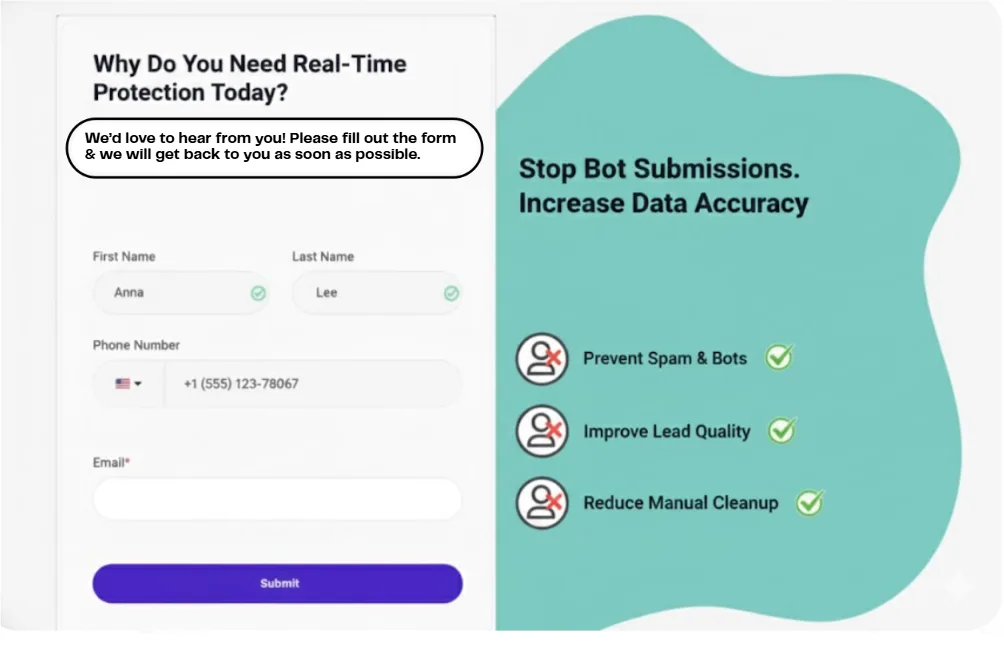
Form Guard operates at the form level, validating data including email addresses, phone, and name in real-time, before entering your CRM. Thus, it prevents fake signups and also the low quality of data to get into your sales team lists.

It has inbuilt bot detection and input filtering feature to help in stopping spam sign-ups and non-human entries in real time. Form Guard can also be integrated with your existing form builder like WordPress, HubSpot, Unbounce, Lead Pages, Marketo, and Webflow.

Benefits of Using Clearout Form Guard and IP Blocking Together


Clearout Form Guard page

Using both layered protection: IP blocking and Form Guard, you can filter out all kinds of fake signups. IP blocking filters obvious threats at the network level, while Form Guard validates the data submitted and protects your actual pipeline.

1. Real Lead Validation at Form Level


IP blocking restricts suspicious sources, but it can’t check the quality of submitted data. Clearout Form Guard works alongside it to validate the quality of the submitted email, phone number, and name in real time. This prevents invalid, gibberish, and disposable data from entering your CRM. Together, you get both source-level filtering and data-level validation.

2. Protection Against Rotating IP & Proxy Abuse


Fake signups often bypass IP-based restrictions using rotating IPs or proxies. While IP blocking flags repeated abuse from known addresses, Form Guard independently checks each form submission. Using both ensures that even if traffic sources change, fake or low-quality data doesn’t slip into your CRM.

3. Cleaner CRM, Better Deliverability


IP blocking reduces obvious spam traffic, giving your system a first line of defense, while Form Guard stops invalid data from entering your CRM. Together, they help maintain cleaner records, protect sender reputation, improve email deliverability, and ensure your sales team focuses only on real, actionable leads.

How Form Guard Succeeds Where IP-Based Blocking Fails


IP blocking can slow down suspicious traffic, but it only looks at where a submission comes from. Today’s fake signups often use rotating IPs and proxy networks, which allows junk leads to slip through.

Check how Form Guard can help you in a more advanced manner:

Protection LayerIP Blocking on FormsClearout Form Guard
Fake signups❌ Still common✅ Blocked at the source
Bot detection❌ Not Applicable✅ Built-in bot detection
Input filtering❌ Not Applicable✅ Smart email, phone & name logic
Setup effort❌ Dev-heavy✅ No developer needed
Customization❌ Hard-coded rules✅ Point-and-click UI
Speed of deployment❌ Days/weeks✅ Under 5 minutes

Why Does This Matter?


IP blocking works at the network level, but it doesn’t evaluate the data itself. Clearout Form Guard validates form inputs directly, preventing fake signups from entering your CRM, even when bots change IPs or use proxies.

Smarter Protection Starts at the Form Level


IP blocking was effective when spam came from limited sources, but today’s fake signups are built to bypass network-based filters. That’s why protecting lead quality now requires validating what’s submitted, not just where it comes from.

Clearout Form Guard helps prevent junk signups from entering your CRM, reducing downstream issues like deliverability problems, sales follow-ups on bad leads, and unreliable reporting.

Protect Your Forms And Your Pipeline


Try Clearout Form Guard

FAQs


1. How to block fake signups on website forms?
Fake signups are best stopped at the form level, not just by blocking traffic sources. Clearout Form Guard validates the data being submitted in real time, helping prevent fake or automated signups from entering your CRM.
2. Is IP blocking effective for preventing fake signups?
Not really. IP blocking can stop basic spam, but modern bots rotate IPs and easily bypass it. On its own, it’s not enough to protect your forms from fake signups.
3. What is the best way to prevent fake signups in 2025?
Modern protection requires validating submission fields such as email addresses, phone numbers, and name along with bot patterns at the form level.Clearout Form Guard provides this real-time validation to stop fake leads before CRM entry.
4. Can IP blocking affect real customers?
Yes. IP blocking can unintentionally affect real customers. Shared networks in offices, schools, and coworking spaces can get blocked by mistake.This can prevent genuine buyers from completing your forms and contacting your sales team.

Share this article

Recent Posts

16 Jan 2026
Why IP Blocking on Forms is Not Enough to Stop Fake Signups

Learn why IP blocking alone can’t stop modern fake signups and how pairing it with real-time form va ...

30 Dec 2025
Build a Verified Email List That Actually Converts in 2026

Learn how to build verified email lists in 2026. Discover email list building tools, common mistakes ...

26 Dec 2025
11 Reasons Why Email Verification is Crucial in Healthcare

Learn 11 reasons why email verification is crucial in the healthcare industry, from HIPAA compliance ...

24 Dec 2025
MX Records Simplified: Sustain Email Effectiveness in 2026

Explore what MX records are, how they work, their components, common mistakes, examples and why corr ...

23 Dec 2025
Email Frequency by Industry: What Works in 2026

Learn how often to send emails in 2026 based on your industry. Explore email frequency benchmarks, b ...

Clearout's

Form Guard

Validate email, phone & name on any forms!

  • Real signups only
  • Verified emails
  • Valid phone numbers
  • No fake names
  • Cleaner CRM
  • No devs needed
Try for Free Now

Email Verification, Email Finding Form Guard & Prospecting Service

Expand Your Reach By Finding & Verifying Ideal Prospects.

Sign up & get 100 free credits

No Credit Card required

Create Free Account
Company

Why Clearout?

Pricing

Contact Us

Careers

Enterprise

Sitemap

FAQ

Status

Products

Email Verifier

Email Finder

Form Guard

Prospect

LinkedIn Email Finder

Reverse Lookup

Google Sheets Add-on

WordPress Plugin

ClearoutPhone

What's New?

Resources

Integrations

HubSpot

Team Account

API

Compare Email Verifier

Compare Email Finder

Compare Prospecting

Use Cases

Blog

Help

Legal

Privacy Policy

Terms

DPA

Security

Trust Center

Certification

ISO 27001/2022

SOC 2 Type 2

GDPR

Partnership

HubSpot Certified

Affiliates

Partners

Clearout for browser

⚡ Supercharge Your Prospect Research with Clearout's LinkedIn Chrome Extension - Find and Verify Emails with Confidence!

Clearout Chrome extension

clearout
© 2026 Clearout. All Rights Reserved. Powered by Clearout, LLC.
Auto Credit Replenishment is here! Your credits can now recharge automatically. Learn More ➞
X