

- Products
- Solutions
- Resources
- DeveloperAPIReference and quick-start guidesWebhooksReal-time event notificationsForm Guard SDKReal-time form validationMCP ServerConnect AI assistants to ClearoutKnowledge baseGetting startedSet up your account in minutesFAQAnswers to common questionsLead generationBuild clean, verified lead listsGuidesPricing guideHow credits and plans workCompare email verifiersHow email verification tools compareCompare email findersHow email finder tools compareData Pulse & HubSpot BreezeKeep Breeze Intelligence data reliable
- Free Tools
- Pricing
- Login





How to Find Right Contacts & Emails for PR Outreach in 2026

But…your brand’s success depends on how it's perceived. Without a strong reputation and media presence, even the best businesses struggle to gain traction.
One effective way to do so is through PR.
Getting journalists, bloggers, and influencers to vouch for your brand boosts visibility, earns valuable backlinks, and amplifies new product/feature launches.
But PR success hinges on finding the right contacts, securing their details, and crafting a strategic outreach plan. Ask yourself:
✔ Am I targeting the right contacts for my PR outreach?
✔ How do I get the right journalist emails?
✔ Which tools can help me find accurate PR contact & email details?
If you're unsure where to begin, this guide will walk you through finding the right PR contacts and securing their details. Let’s start with the basics.
Table of Contents:
Why Finding the Right PR Emails Matters
- Builds authentic relationships with media professionals, increasing the likelihood of coverage.
- Ensures your pitch reaches the right person instead of getting lost in general press inboxes.
- Reduces email bounce rates and improves sender reputation.
- Saves time and resources by focusing efforts on high-potential contacts.
Common Challenges in PR Email Outreach
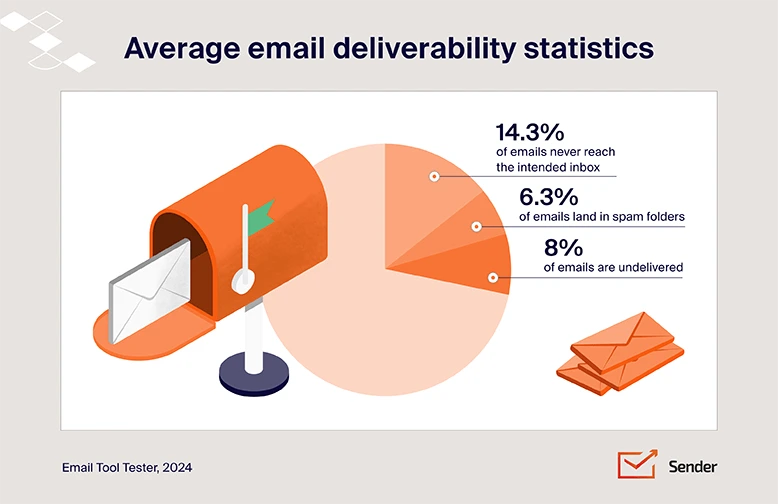
- Many journalists don’t publicly list their emails due to privacy concerns.
- Outdated or incorrect contact details can lead to email deliverability issues.
- Some journalists use different emails for freelance and publication work.
- Media professionals receive overwhelming amounts of emails daily, making it difficult to stand out.
Here’s how you can deal with these challenges…
Start With Identifying The Right PR Contacts
1. Define Your PR Goals & Target Audience
To better align everything, start with questions like:
Who would be interested in covering your news or product?
Think if your promotion plan is more aligned with a blogger or a journalist?
Is your company big enough to attract the major PR companies?
Not all press is good press or relevant to you. So, it becomes important to think where you want to be featured (hint: where your audience already engages).
For example:
- A fashion brand should connect with trend-focused influencers and fashion journalists.
- A fintech startup should reach out to finance blogs and business publications.
- A tech company should target journalists covering startups and innovation.
2. Start Looking For Relevant Media Professionals
Who would be interested in covering your news or product?
- Google News Search –
Look for new articles, or publications related to your target niche and take note of the publishers, or authors of those articles.
- Twitter (X) & LinkedIn –
Many journalists and professionals share their stories or bits of it on LinkedIn & Twitter. You can try looking for such posts on Twitter and LinkedIn. You can also try your luck to search for profiles with specific job roles or company names on LinkedIn.
- Industry-Specific Websites & Blogs –
If your business is in fintech, fashion, or any specialized field, there are likely niche blogs and websites where reporters and writers contribute regularly.
- Press Pages of Major Publications –
Many news outlets have directories listing their writers and editors by topic. This makes it easier to find the right person to pitch.
- Media Databases –
Use platforms like Muck Rack, Cision, and Prowly to filter journalists by industry.
- HARO (Help a Reporter Out) –
Monitor queries from journalists looking for expert insights using HARO. It is a service that connects journalists with sources for stories. It's also a database of sources that journalists can use to gather feedback from the public
3. Shortlisting the Right Publications & Contributors
- Identify guest contributors and columnists who frequently write on relevant topics.
- Check the editorial staff pages of these publications to pinpoint the most relevant contacts.
- Also, review bylines in competitor press mentions to discover journalists who have already covered similar topics, increasing the likelihood that they will be interested in your pitch.
Top 5 Ways To Find PR Contact Emails
Here’s how you can do it:
1. Use Clearout’s Email Finder or LinkedIn Extension or (Fastest & Most Accurate Method)
Clearout Email Finder
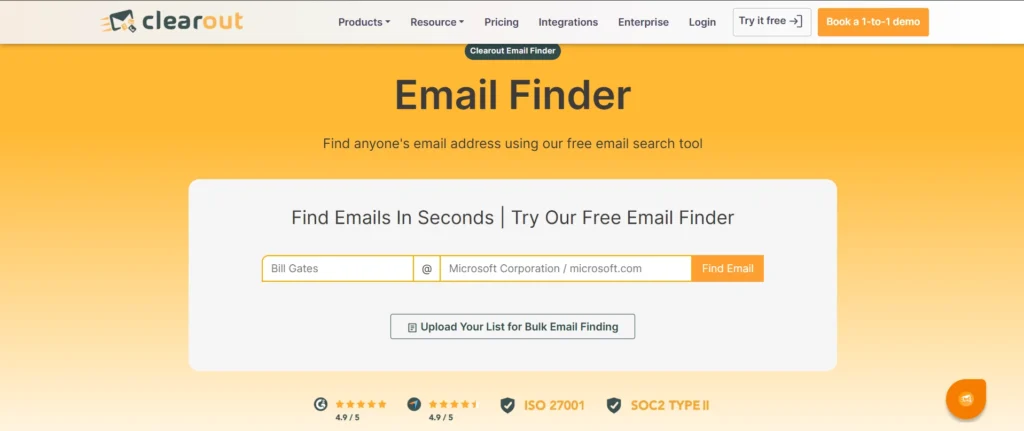
- Enter the journalist’s name and company/domain to find their email
- You get pre-verified email addresses, along with a confidence scoring, indicating how reliable the found email is.
- You can even choose how strict you want to keep the search - based on the company name, website domain, or both.
Clearout LinkedIn Email Finder Extension
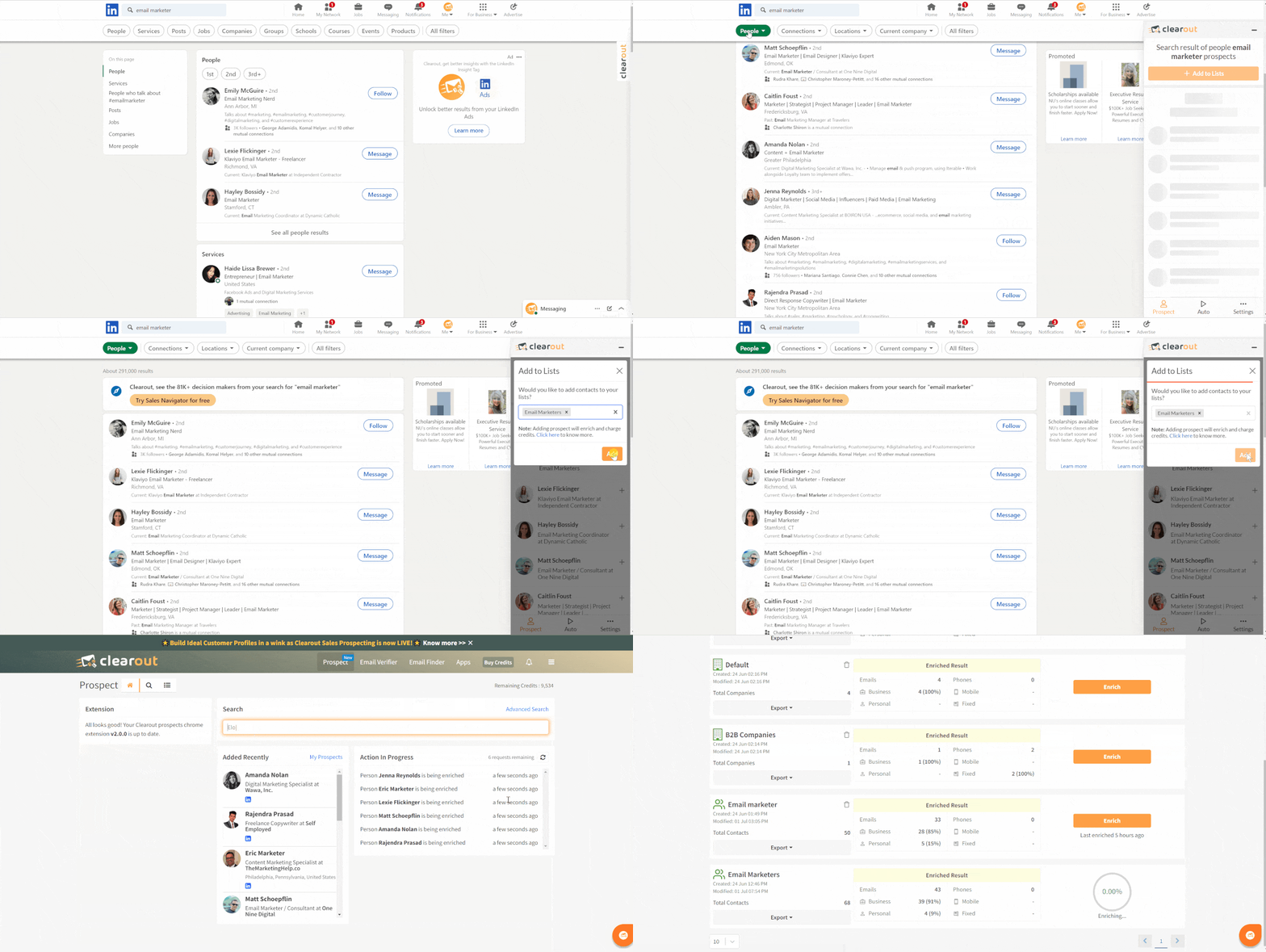
Clearout’s LinkedIn Email Finder Extension allows you to find PR contact emails directly from Linkedin profiles, search pages, and sales navigator.
Combined with the strong LinkedIn database + filters and Clearout, it won't take too long to find the right profiles and get their details including their email, phone number, job details, and more.
You can even automate your data extraction process, saving hours of manual search.
✔ Find pre-verified emails with 99.73% accuracy
✔ Data check & validated in real-time
✔ 20+ checks to give high quality data
✔ AI insights to plan campaigns better
✔ Reduces email bounce rates with built-in verification
2. Check Official Websites & Media Contact Pages
- Visit the ‘Contact Us’ or ‘Editorial Team’ sections of news websites, usually present at the bottom of the homepage.
- Look for press contacts in the site’s footer or newsroom pages, and you;ll be able to find information about your desired journalist.
- Many influencers have their marketing agency’s email or contact number in their bio.
But, you might find their name and company name most of the time through the mentioned sections. So, you can still use this data on email finders to extract verified emails for your outreach.
3. Use Google Search Operators
- Search Within a Specific Website
To find emails listed on a publication’s website, you can use the site operator.
For example: site:forbes.com "email" – will find pages on Forbes that contain the word “email”.
- Find Emails Linked to a Journalist’s Name
To look for web pages mentioning an email alongside a journalist’s name, you can use this: ["journalist name" + "@domain.com"].
For example: "John Doe" + "@nytimes.com" – will find potential contact details from The New York Times.
- Search for Author Contact Information
Some journalists include contact details in their bio pages or articles. You can use ["author name" + "contact"] to find emails from contact pages.
For example: "Jane Smith" + "contact" – will find contributor pages or interviews with contact details.
- Find Emails in Press Releases and Articles
To locate press releases that include journalist or PR contact details you can use this operator: [site:example.com "press release" + "contact"].
For example: site:techcrunch.com "press release" + "contact" – will find TechCrunch press releases listing contacts.
4. Lookup PR & Journalist Databases
- Muck Rack- You can choose any topic you like and find journalists who write about the topic, along with their contact details
- Cision- It provides a media database and services to strengthen PR relations
- Prowly- Prowly lets you find media contacts, create press releases and even has an AI tool to help you
- Anewstip- Ever come across an article or a tweet and were wowed by it to the extent you want to find its author? Anewstip lets you do exactly that
5. Extract Emails from Social Media
- Twitter (X) – Many journalists mention their emails in their bio. You can use advanced search operators in twitter to look for anyone's email and if you have luck, you might find one.
- Instagram & Facebook – Check the ‘Contact’ section on business accounts of the desired journalists - sometimes you might find their phone number or emails.
Keep Your PR Contact Email List Updated
But with Journalists frequently switching publications, your list can quickly become outdated. This makes it important to update your list ideally before each new campaign or every 3-6 months.
You should also remove any inactive or unresponsive contacts, especially those who haven't engaged in over three months.
This will keep your list fresh, helps you avoid wasted efforts and ensures you're always reaching out to the right people.
5 Advanced PR Email Outreach Tips for Better Results
- Get Warm Intros – Try finding mutual connections on LinkedIn or Twitter (X) who can introduce you to journalists. A warm introduction increases credibility and response rates.
- Offer Exclusive Data or Insights – Make it easier for them to cover your story. Journalists love unique, data-driven stories. So, you can conduct surveys, analyze industry trends, or compile internal data to provide them with exclusive insights they can’t find elsewhere.
- Exclusive Media Hub – Create a private press page with exclusive reports, expert quotes, and pre-written story angles. Providing easy-to-access resources makes it more likely journalists will cover your story.
- Engage First – Follow journalists on social media, interact with their posts, and share their work before reaching out. This builds familiarity and increases the chances of your pitch being noticed.
- Perfect Timing – Most journalists check emails early in the morning. Pitch between 6-9 AM in their timezone to maximize visibility and response rates. You can then again keep changing the sending time based on the recipient’s response timing.
Also read: Complete guide to Cold Email Outreach
With a quality PR contact list and a strong PR content backed up with solid data and research can help you get featured more and reach your target audience.