

- Products
- ResourcesDEVELOPER

 API
API
Clearout APIs are structured around REST and JSON Webhooks
Capture real-time events in your application workflow Clearout MCP
Verify and find emails from AI assistants like Claude and Cursor Form Guard
Real-time form validation to keep bad contacts out of your CRMKNOWLEDGE BASE Getting started
Sending campaigns without bounces is made simple FAQ
FAQ
Easily find answers to services, security and common questionsUSE CASES Lead Generation
Learn how professionals generate quality leadsGUIDES Clearout Insights Explore original research, industry statistics, and data-backed insights Pricing Transparent & flexible pricing to support pay-per-use or recurringCompare Email Verification Tools AI-powered email verification with 99%+ accuracy, real-time validation, and transparent risk scoringCompare Email Finder Tools Pre-verified B2B email addresses with confidence scoring, find real person email, not role-based addressData Pulse & HubSpot Breeze Intelligence Pre-verified B2B email addresses with confidence scoring, find real person email, not role-based addressBLOGSEmail Verification ToolsFind Anyone’s Email Address
Most Accurate, Fast & Free WaysForm Validation
Importance, Ways & Best PracticesView All Blogs - Pricing
- Integrations
- Enterprise
- Login



How to Check If an Email Address is Valid Without Sending an Email
You can verify an email address without sending an email by running it through an email verifier. Such tools check its format, domain, MX records, and mail-server response. These help determine whether the address is valid and deliverable so that your email doesn’t bounce and the domain doesn’t get flagged. An email verification tool like Clearout also identifies risky addresses, including disposable, role-based, and catch-all emails.
In this guide, we will explain how to verify an email address without sending one and how to check whether they are valid or risky before adding it to your list or outreach campaign.
In this guide, we will explain how to verify an email address without sending one and how to check whether they are valid or risky before adding it to your list or outreach campaign.

Why is it important to verify an email before sending it?
The answer to this question is simple: "Email Deliverability"
Verifying an email address with a tool helps identify invalid and risky addresses before they enter your sending list. This can reduce unnecessary bounces and help you avoid repeatedly sending to addresses that cannot receive email.
Verifying an email address with a tool helps identify invalid and risky addresses before they enter your sending list. This can reduce unnecessary bounces and help you avoid repeatedly sending to addresses that cannot receive email.
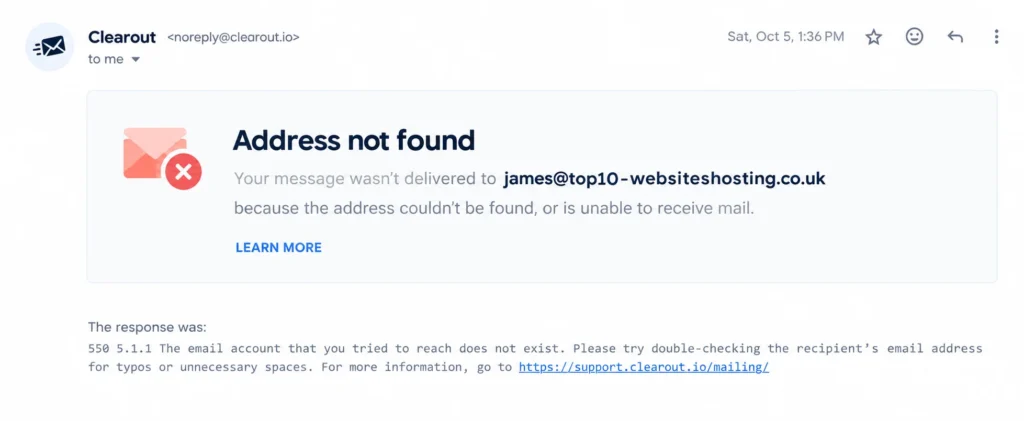
This is what can happen when you send an email to an address that does not exist. In the example above, Gmail returns a 550 5.1.1 error stating that the email account does not exist.
You can identify an invalid address this way, but only after attempting to send the email and receiving the bounce. Verifying the address beforehand helps you identify potential delivery problems before using the email as a recipient.
You can identify an invalid address this way, but only after attempting to send the email and receiving the bounce. Verifying the address beforehand helps you identify potential delivery problems before using the email as a recipient.
How to verify email address without sending email?
You can verify an email address without sending a message by using Clearout’s Email Verifier. It checks the address syntax, domain, MX records, SMTP response, and other risk signals to determine whether the address can receive email.
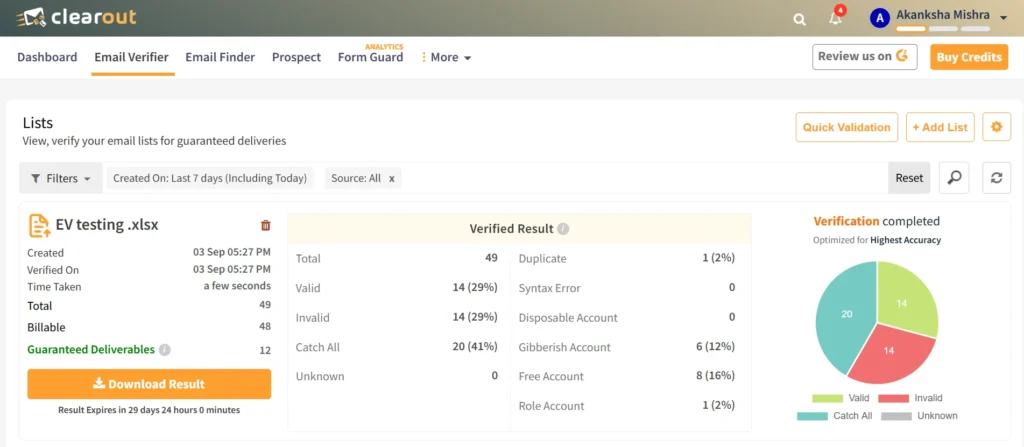
Clearout identifies Valid, Invalid, Catch-All, Disposable, Gibberish, Free, and Role-Based addresses. These results help you distinguish addresses that appear deliverable from those that may be invalid or carry additional delivery risk.
Clearout identifies Valid, Invalid, Catch-All, Disposable, Gibberish, Free, and Role-Based addresses. These results help you distinguish addresses that appear deliverable from those that may be invalid or carry additional delivery risk.
Email finder tools with built-in verification: If you're scaling email campaigns and don't want to risk facing bounces, opt for an email finder tool that will automatically find and verify any given email address.
Clearout Email Finder is the perfect tool to find verified leads. Its built-in verification provides pre-verified email addresses that are ready for outreach.
Clearout Email Finder is the perfect tool to find verified leads. Its built-in verification provides pre-verified email addresses that are ready for outreach.

Email Databases: Then there are databases like ZoomInfo and Apollo.io that fetch and store details of individuals like the company they work in, email addresses, phone numbers, and more.
But the issue with such platforms is that many email addresses obtained from here can be outdated, so sending emails to them can rocket your bounce rate. So, you would need an email verifier to validate the email address before sending out emails to them for better campaign results.
Clearout even integrates with Apollo.io to help you ensure the data quality and get better deliverability results.
Checkout: How Apollo email verification with Clearout works
But the issue with such platforms is that many email addresses obtained from here can be outdated, so sending emails to them can rocket your bounce rate. So, you would need an email verifier to validate the email address before sending out emails to them for better campaign results.
Clearout even integrates with Apollo.io to help you ensure the data quality and get better deliverability results.
Checkout: How Apollo email verification with Clearout works
Whether you need a few verified email addresses or a list of thousands, Clearout can make it super easy for you to verify email addresses without sending an email.
How does email verification work without sending an email?
An email verifier can check an address without delivering a message to the recipient. It identifies domain, MX records, and mail-server responses to determine whether the address appears deliverable.
Some verification services also detects signals such as disposable domains, role-based addresses, and catch-all domains. For catch-all addresses, you can run Clearout's Deep Verify as it performs multi-layer SMTP analysis to resolve catch-all results into valid and invalid.
Some verification services also detects signals such as disposable domains, role-based addresses, and catch-all domains. For catch-all addresses, you can run Clearout's Deep Verify as it performs multi-layer SMTP analysis to resolve catch-all results into valid and invalid.
What does a valid email address mean?
A valid email address has passed the verification checks and can receive email at the time of verification. It does not guarantee that a future email will reach the inbox because mailbox status, server policies, and other delivery conditions can change.
Ways to verify email addresses without sending an email using Clearout

Here’s how you can use Clearout to check if an email address is valid without sending an email.
#1 Using The Email Verifier
Clearout offers various ways to verify email addresses-
1. Instant Verification:
Verify email addresses in seconds. The Instant verifier lets you verify up to 10 email addresses in real-time.
All you need is to copy and paste the email addresses in the validation box and click on 'validate.'
All you need is to copy and paste the email addresses in the validation box and click on 'validate.'
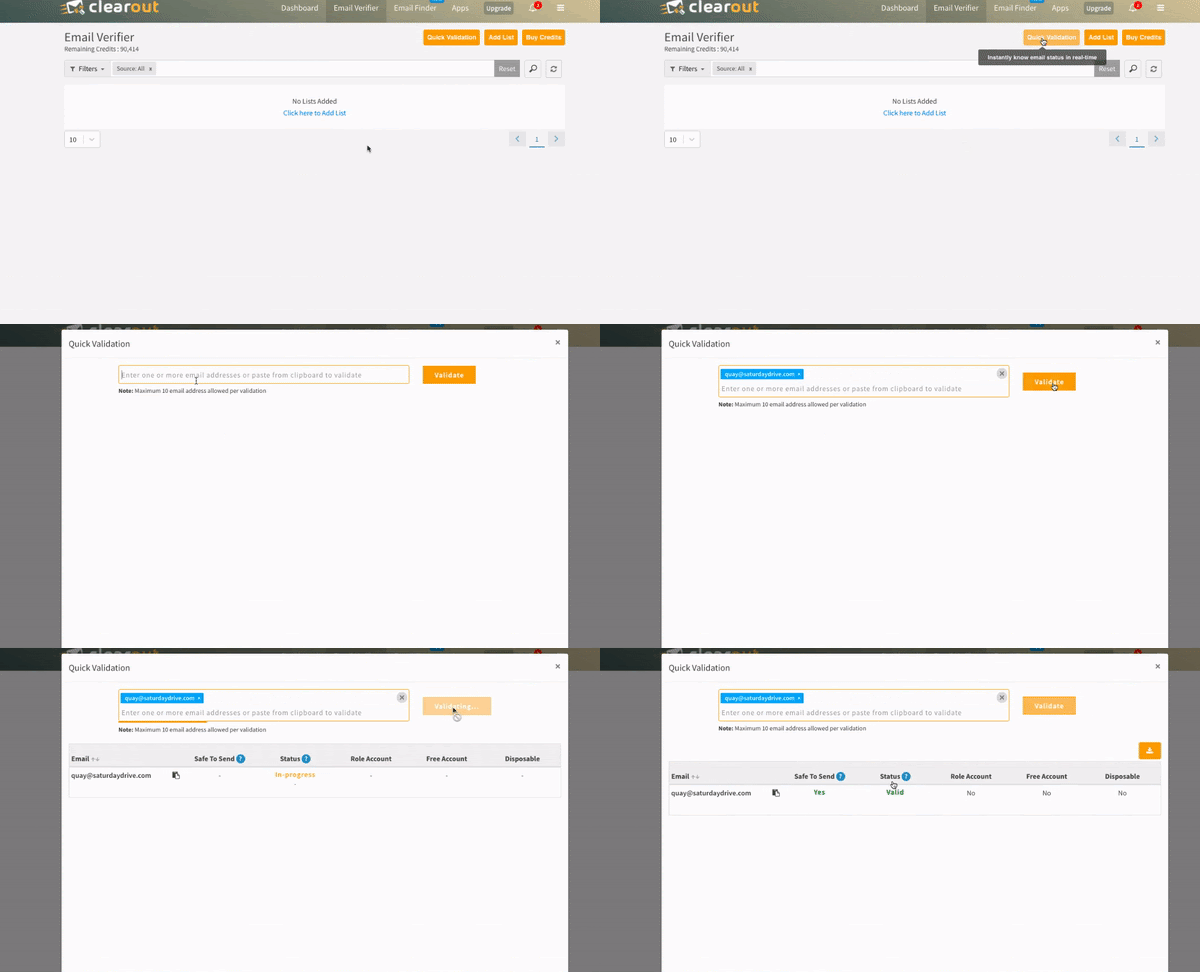
You’ll get categorized results showing whether an address is Valid, Invalid, Catch-All, Disposable, Gibberish, Free, or Role-Based, along with an AI Verdict. The Safe-to-Send feature shows whether an address is Yes, Risky, No, or Unknown, so you can identify addresses that are safer to send to and avoid those flagged as risky or undeliverable.
2. Bulk Email List Verification:
Verify large numbers of email addresses in bulk with Clearout Email Verifier. The bulk email validator lets you upload your email list and produces a detailed result in minutes.
All you need to do is select the bulk email validation option, upload your list, and validate.
All you need to do is select the bulk email validation option, upload your list, and validate.
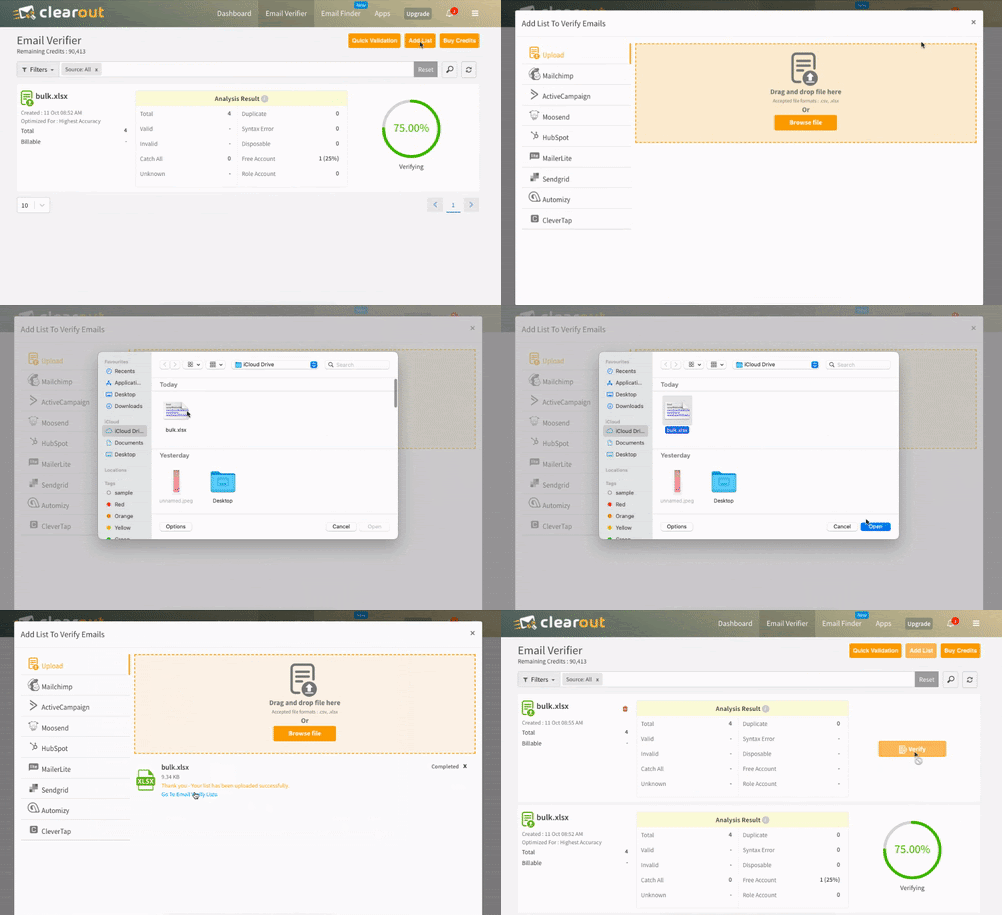
Bulk verification supports files in both CSV and XLSX formats to make the verification process more convenient for you.
3. Clearout add-on for Google Sheets:
Verify your email database directly on Google Sheets.
Integrate your Google Sheets with Clearout and validate emails at your convenience without uploading or downloading any file.
For a step-by-step guide, see our blog on how to verify email addresses in Google Sheets.
Here’s how you can use Google Sheet for email verification:
Integrate your Google Sheets with Clearout and validate emails at your convenience without uploading or downloading any file.
For a step-by-step guide, see our blog on how to verify email addresses in Google Sheets.
Here’s how you can use Google Sheet for email verification:
4. WordPress Plugin:
WordPress Plugin integrates with major WordPress form plugins to validate email addresses in real time upon submission. It can allow valid addresses and block disposable, fake, and other unwanted email addresses based on your configured rules.
5. API & Integrations:
You can directly verify email addresses from the sales and marketing apps. Plenty of integrations are available, including Apollo.io, Mailchimp, HubSpot, Salesforce, and many more. You can even use the REST API, Zapier, and Make (formerly Integromat) to connect literally any application with Clearout.
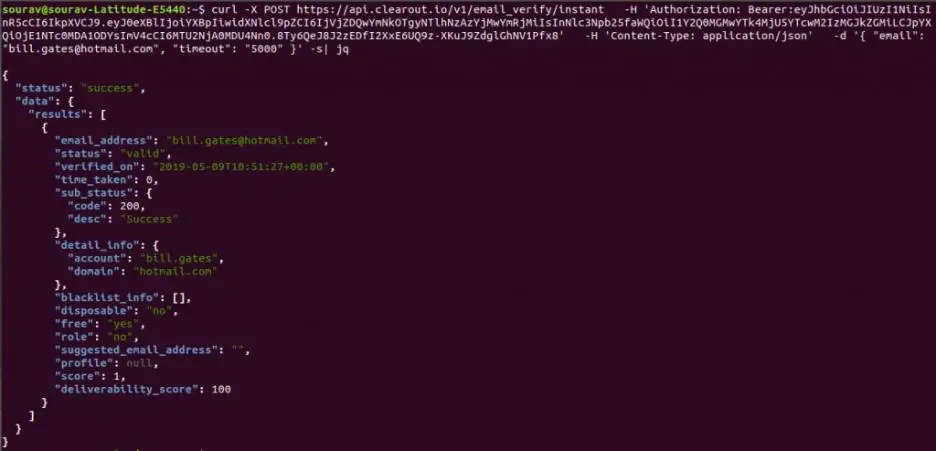
Apart from their validity, Clearout also provides additional details such as whether the email addresses are safe to send, role-based, disposable, or free. With such a detailed report, your bounce rates get significantly lower, and you stay away from the risk of getting marked as spam.
#2 Using The Email Finder
Clearout Email Finder helps you find B2B email addresses and provides a Confidence Score for each result. The results are pre-verified, so you get an email address that has already been checked before it is returned.
This is useful when you need to find a prospect’s email and verify it at the same time. Instead of finding an address first and verifying it separately, Clearout does both as part of the Email Finder process.
This is useful when you need to find a prospect’s email and verify it at the same time. Instead of finding an address first and verifying it separately, Clearout does both as part of the Email Finder process.
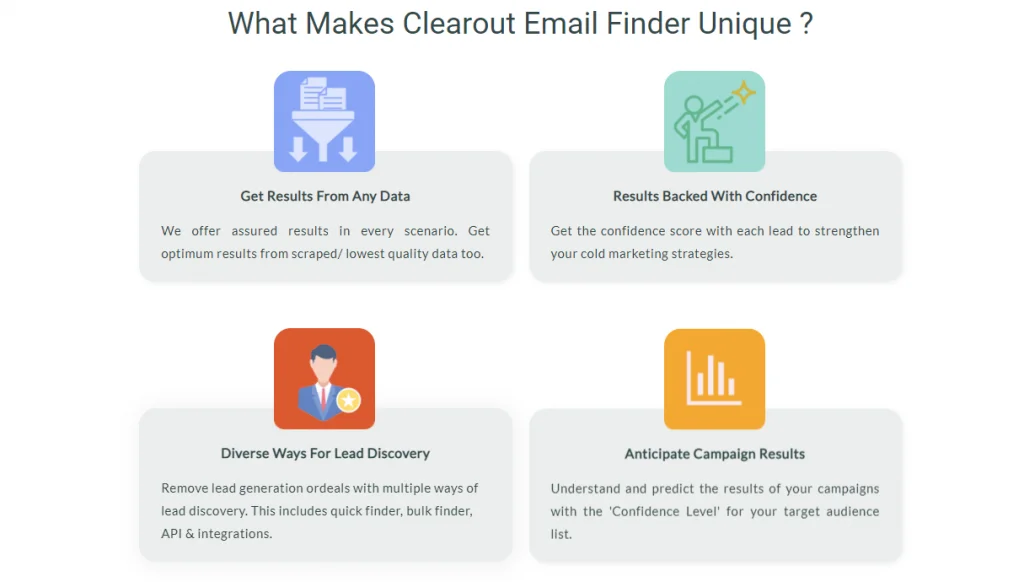
You can find email addresses in the following ways:
1. Quick Email Finder:
Enter your prospect's name and company or domain to search for an email address.
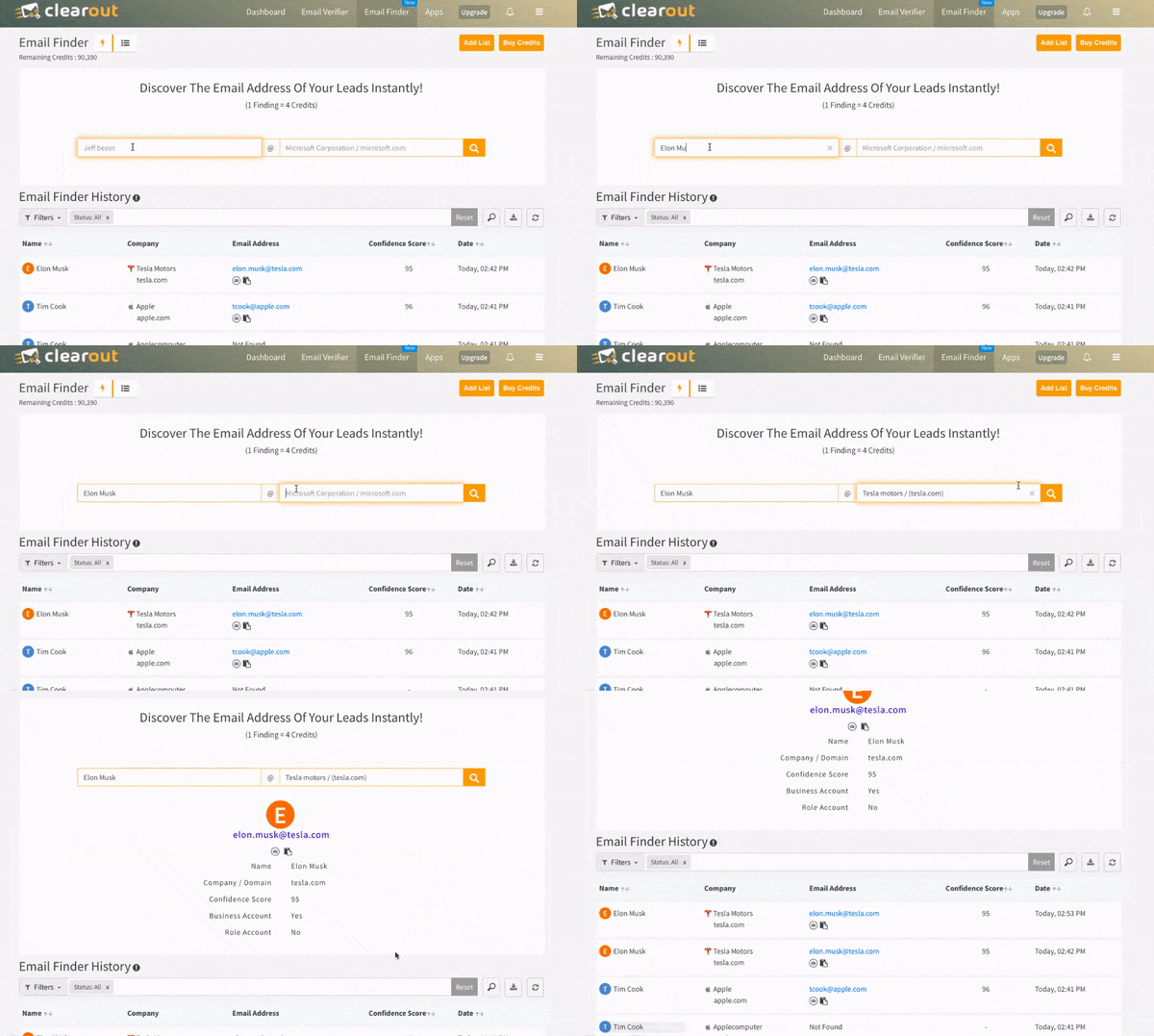
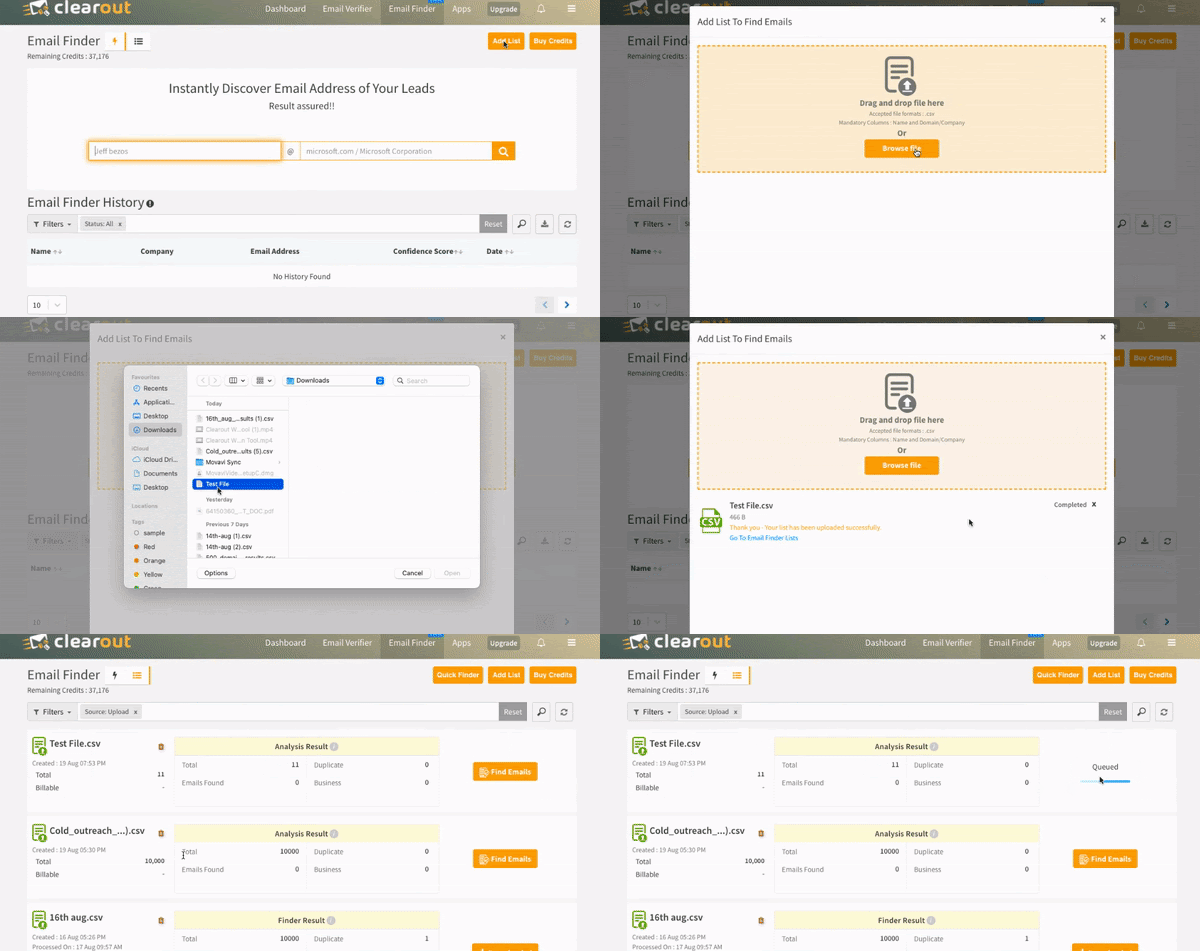
2. Bulk Email Finder:
Upload your prospect list with names and company domains to find their B2B email addresses in bulk. The results include pre-verified email addresses, along with their status and confidence score.
Use Clearout to verify email addresses without sending a message, with 99.73% accuracy.
Check an Email Before You Send
FAQ
1. How can I check if an email exists without sending an email?
You can use an email verification tool such as Clearout. It runs 20+ validation checks to identify the address format, domain, MX records, and mail-server response without sending a message.
2. What does a Catch-All result mean in email verification?
A Catch-All domain accepts email for different addresses under the same domain, so the verifier cannot always confirm whether a specific mailbox exists. Clearout’s Deep Verify performs multilayer analysis to help resolve some Catch-All results into valid and invalid.
3. Can an email be valid but still bounce?
Yes. A valid result means the address appears to exist and accept email during verification, but it does not guarantee future delivery. Mail-server changes, blocking, or other delivery issues can still cause a bounce.