clearout
  • Products
    • Email Verifier Verify emails addresses individually, in bulk or through API, with 99% accuracy
    • Email Finder Find individual or bulk emails by entering the person & company name or domain
    • Form Guard IconForm Guard Protect your forms from spam, bots, and invalid submissions with real-time email, phone, and name verification.
    • Prospect SQL/MQL list building with high levels of personalization, real-time data enrichment and prospect search
    • Clearout For SheetsVerify email addresses directly on Google Sheets with Clearout for sheets add-on
    • Prospect – LinkedIn Chrome ExtensionBuild verified, targeted prospect lists directly from LinkedIn profiles
    • ClearoutPhoneValidate phone numbers across 240+ countries in bulk, quick or real time validation
    • Free Tools
    • Disposable Email Checker
    • Reverse LinkedIn Profile Lookup Tool
    • Reverse Email Lookup Tool
    • Email List Cleaner
    • Company Domain Finder API
  • Resources
      DEVELOPERAPI iconAPI
      Clearout APIs are structured around REST and JSON
      Webhooks iconWebhooks
      Capture real-time events in your application workflow
      Form Guard iconForm Guard
      Real-time form validation to keep bad contacts out of your CRM
      KNOWLEDGE BASEGetting started iconGetting started
      Sending campaigns without bounces is made simple
      FAQ iconFAQ
      Easily find answers to services, security and common questions
      USE CASESLead Generation iconLead Generation
      Learn how professionals generate quality leads
      GUIDESPricing arrow iconTransparent & flexible pricing to support pay-per-use or recurringCompare Email Verification Tools arrow iconAI-powered email verification with 99%+ accuracy, real-time validation, and transparent risk scoringCompare Email Finder Tools arrow iconPre-verified B2B email addresses with confidence scoring, find real person email, not role-based addressBLOGSEmail Verification ToolsFind Anyone’s Email Address
      Most Accurate, Fast & Free Ways
      Form Validation
      Importance, Ways & Best Practices
      View All Blogs
  • Pricing
  • Integrations
  • Enterprise
  • Login
Try it free Book a 1-to-1 demo
Akanksha Mishra / March 18, 2026 March 18, 2026

How to Automate Bulk Email Verification With API (Step-by-Step)


How to Automate Bulk Email Verification With API (Step-by-Step)

Marketing and sales teams keep adding new email contacts every month, often in the thousands. But not all of those emails stay useful for long. People change jobs, inboxes get abandoned, or addresses simply stop working.

When verification is done manually, teams end up uploading lists again and again, waiting for the results, and cleaning the data before every campaign. As the database grows, keeping up with this routine starts taking more time than expected.

Challenges caused by manual verification get worse as databases get bigger. Automated emails had 52% higher open rates and 332% higher click rates than one-off campaigns, according to Omnisend's 2025 eCommerce Marketing Report. Automation brings similar advantages to the email verification process.

This guide shows you how bulk email verification can be automated using an API. It also explains workflow integration, authentication setup, code examples, and practical ways to manage verification as your database grows.

Table of Content


‣ What is Bulk Email Verification?
‣ Why Do Businesses Need Email Verification?
‣ What Makes API Automation Different From Manual Verification?
‣ How Do You Automate Bulk Email Verification Using An API (Step-by-Step)?
‣ Why Should You Automate Email Verification?
‣ What Qualities Should a Bulk Email Verification API Have?
‣ What Are Real-World Automation Use Cases?
‣ How to Automate Your Workflow?
‣ Speed and Scale Benchmarks
‣ Why Clearout Bulk Email Verification API for Automation?
‣ Developer Best Practices for Automation
‣ Automate Email Verification To Keep Your Database Clean At Scale
‣ FAQs
What is Bulk Email Verification?


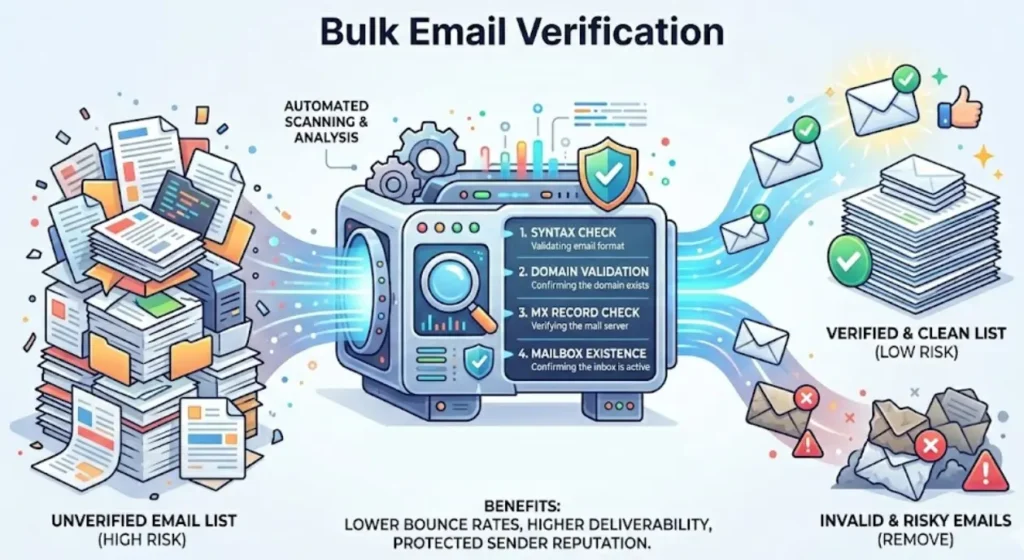
An image explaining bulk email verification.

Bulk email verification checks email addresses in large databases before emails are sent. It reviews format, domain details, MX records, and server response to identify invalid or risky contacts. This helps maintain list quality and protects sender reputation.

Why Do Businesses Need Email Verification?


Clean contact data with email verification directly impacts campaign performance, sender reputation, and customer engagement. Invalid addresses increase bounce rates and reduce deliverability.

Hence, you should start email verification to:

  • Keeping correct databases: Elimination of outdated contacts and record-keeping.
  • Enhance inbox placement: In case your list is clean, email providers are less likely to regard your emails as suspicious.
  • Minimize bounces: Dead or dormant email addresses are eliminated ahead of time prior to campaign delivery.
  • Protect sender reputation: An email should be sent only to legitimate contacts so as to prevent blacklist problems and complaints.
  • Enhance ROI of marketing: Reach out to live contacts.
  • Stop spammy registrations:Signup checks are used to reduce temporary or disposable email.

What Makes API Automation Different From Manual Verification?


Manual verification involves uploading files repeatedly, waiting for processing, and handling the checks yourself each time. Automation removes these steps entirely.

Manual ProcessAutomated Process
Upload lists manuallyVerification runs automatically
Wait for resultsReal-time or scheduled processing
Repeated effortContinuous data hygiene
Higher error riskConsistent Validation

How Do You Automate Bulk Email Verification Using An API (Step-by-Step)?


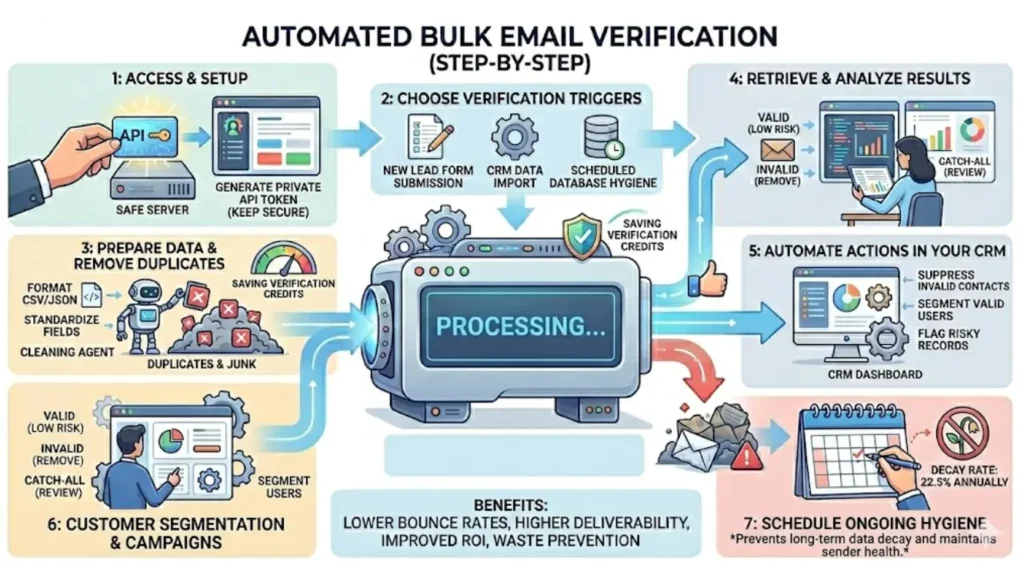
An image on how to automate bulk email verification.

Here’s how businesses usually set up bulk email verification.

Step 1: Create Your Account and Get API Token


First, create your Clearout account and generate your API token from the dashboard.

Steps:

  • Sign up for a Clearout account at clearout.io
  • Log in to your Clearout dashboard
  • Click “Developer” from the top navigation menu
  • Open the “API” tab
  • Click “Create API Token”
  • Give a name and a description to your API token
  • Tap on the “Create” button.

This token acts as a secure key that allows your CRM or backend system to communicate with the verification service.

Once the verification flow is set up for API verification, your system can automatically send email data for verification whenever new contacts are added.

Step 2: Decide When Verification Should Happen


Next, decide when the verification process should run. Different businesses trigger verification at different stages of their workflow.

Common triggers include:

  • Lead form submissions: Emails can be checked the moment someone signs up.
  • CRM data imports: Lists are checked before they’re added to your database.
  • Customer onboarding: Email addresses are verified while new users create their accounts.
  • Scheduled database cleaning: Teams usually run regular checks to keep older data accurate.
  • Pre-campaign validation: Contacts are checked before an email campaign is sent.

Your marketing system will never receive invalid or dangerous email addresses if you select the appropriate trigger.

Step 3: Prepare and Structure Email Data


The data should be arranged accordingly before sending emails to validate them. Organized and clear lists make the verification process more precise and mitigate the risks of errors.

This usually involves:

  • Scheduling email lists in CSV or JSON format
  • Standardizing fields like email, first_name, last_name, and company
  • Removing duplicate records

Step 4: Submit Emails for Bulk Verification


Option 1: Upload Through the Dashboard (Bulk Email Verifier)


If you’re verifying a list directly from the Clearout dashboard, then you should:

  • Log in to your Clearout account
  • Go to Email Verifier
  • Click Add List
  • Select your CSV or XLSX file that contains the email addresses
  • Click Start Verification

Option 2: Submit Emails Using API Integration


Many teams connect Clearout to their existing tools, so verification happens automatically. When a new email comes in through a form, CRM, or backend, the system checks it right away. Invalid addresses are flagged, and only real, working emails get added to your database.

For detailed instructions, check the Clearout API guide:
https://docs.clearout.io/api-overview.html

Step 5: Track the Verification Progress


When you submit your list/an email address for verification, you get a job ID. It’s basically your way of keeping an eye on things. Instead of wondering whether the file is still processing or already done, you can simply check the status using that ID.

Most teams don’t sit and monitor it manually. Instead of having someone sit there refreshing the dashboard, most teams connect simple alerts to their system. Once the file is done, they get a notification automatically over email or with progress status via API, no chasing, no repeated checking.

The time it takes really comes down to how many emails you’re verifying.

Step 6: Retrieve Verification Results


After your emails have been verified, you can get the results straight from your Clearout dashboard or pull them via the API.

To download from the dashboard:

  • Navigate to Email Verifier in your Clearout dashboard
  • Locate your completed verification job
  • Click Download Results
  • Choose your preferred download format:
    • Navigate to Email Verifier in your Clearout dashboard
    • Locate your completed verification job

Along with the verification result, you’ll also notice a Safe‑to‑Send status for each email. It gives a quick idea of which addresses are fine to contact and which ones might need a second look. If you’re running large campaigns, the Guaranteed Deliverables(safe-to-send) feature also helps keep most emails deliverable and keeps bounce rates below 3%.

Teams typically use these results to:

  • Remove invalid email addresses automatically
  • Flag risky contacts for review
  • Segment verified users into campaigns
  • Improve overall database accuracy over time

Step 7: Automate Database Updates and CRM Sync


After the emails are verified, many teams export the results straight to their CRM or marketing tools so their contact lists stay updated. This way, the contact list stays updated without someone having to go in and fix everything by hand.

Clearout integrates with several popular platforms.

HubSpot Integration
  • Connect Clearout directly to HubSpot
  • Verify emails in forms, CRM records, and chatflows/li>
  • Automatically update contact properties with verification status

ActiveCampaign Integration
  • Sync verified contacts automatically
  • Protect sender reputation before launching campaigns/li>
  • Tag contacts based on verification status

Mailchimp Integration
  • Clean email lists before sending campaigns
  • Reduce bounce rates
  • Maintain better audience quality

Why Should You Automate Email Verification?


1. Speed at Scale


Manual verification: upload file → wait 2-4 hours → download results → import to CRM. Automated verification: API call → background processing → automatic CRM update.

Clearout processes bulk emails with zero manual intervention and does real-time validation.

2. Eliminate Human Error


Manual processes create gaps, forgotten re-verification, expired data, and duplicate uploads. Automation runs on schedule consistently. No missed verifications when team members are unavailable. Predefined rules ensure consistent handling of verification results.

3. Maintain List Hygiene


Around 22.5% of email addresses go bad each year as people change jobs or domains expire. Re-verifying automatically keeps your lists clean and deliverability intact. Set-and-forget scheduled validation keeps databases current without manual oversight.

4. Handle Large Email Lists Without Extra Effort


Manual verification becomes difficult as your database grows. Uploading files, waiting for results, and repeating the process before every campaign can slow teams down.

With automation, verification becomes part of your workflow. Once your system connects to the API, new contacts can be verified automatically.

This means your team doesn’t have to manage files or keep checking the verification process. It runs quietly in the background, so your marketing or sales team can focus on campaigns and connecting with leads.

What Qualities Should a Bulk Email Verification API Have?


Give these aspects top priority when assessing solutions:

1. Verification Accuracy


Look for Clearout offering 99.73% accuracy with transparent deliverability guarantees. Check whether they perform real SMTP verification or rely only on syntax and domain checks.

2. Processing Speed


Evaluate both instant API response time (for real-time validation) and bulk processing capacity (for scheduled cleaning). Mode of validation does not compromise accuracy.
Clearout also offers different verification modes, allowing teams to choose between, without compromising the accuracy:

  • Fastest mode: Designed for quicker processing when verifying very large lists
  • Highest accuracy mode: Performs deeper verification checks to provide the most reliable results

These modes allow teams to choose how they want the verification process to run. Depending on the requirement, users can select a faster processing mode or a deeper verification mode that performs additional checks while maintaining accuracy.

3. Flexibility In Integration


Make sure the API supports your tech stack by providing thorough documentation, multilingual code examples, and webhook support for asynchronous workflows.

4. Security Standards


Make sure that the provider is of enterprise quality: 256-bit data encryption is provided. It should be compatible with GDPR, ISO certified, and have clear data retention.

5. Scalability


Ensure that the platform can support your current volume and can be expanded as your database size increases. Check file size limits, concurrent request support, and rate limit structures.

6. Documentation Quality


High-quality documentation reduces implementation time. Look for detailed API references, integration guides, and working code examples.

Comparison guide: Choosing the Right Email Verification API

How to Automate Your Workflow?


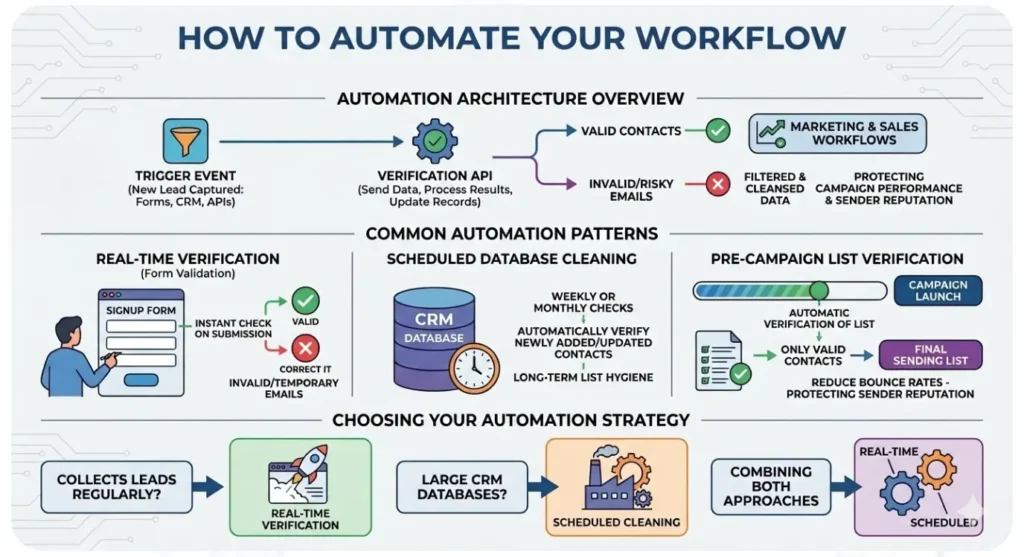
An illustration of How to Automate Bulk Email Verification Workflow.

In this part, we’ll explore how teams automate bulk email verification within their existing systems. Rather than uploading lists manually, verification can happen automatically through forms, CRM imports, or scheduled workflows, keeping email data accurate and up to date with less effort.

Automation Architecture Overview


Bulk email verification can be easily automated. New email addresses are automatically verified as they enter your system, saving you the trouble of constantly uploading lists.

When a lead enters your system through a form, CRM import, contact update, or another integration, the email address is sent for verification. The result then updates the contact record with its verification status (valid, invalid, catch-all, or unknown).

This makes it easier for teams to work with real contacts while problematic or risky emails are caught early, before they affect campaigns or sales outreach.

Common Automation Patterns


Most businesses usually set up bulk email verification in a few common ways:

1. Real-Time Verification (Form Validation)


When someone fills out a signup form, contact form, or demo request, the email address is checked right away. If it turns out to be invalid or temporary, the user can be asked to enter a different email before submitting the form.

2. Scheduled Database Cleaning


Some teams prefer running automated checks on their database every week or month. Any new or recently updated contacts are verified during these checks, helping keep the list clean without needing manual work.

3. Pre-Campaign List Verification


Before launching an email campaign, the system automatically verifies the campaign list. Only valid contacts move to the final sending list, which helps reduce bounce rates and protect sender reputation.

Choosing Your Automation Strategy


Which option works best often depends on how your business collects email data.

If most leads come from your website, checking emails during form submission can help stop invalid addresses from getting into your system.

If you manage a large CRM database, running regular checks helps keep the data accurate over time.

How Does Bulk Email Verification API Work?


Once you send your email list, the system gets to work automatically. It checks each address to make sure it’s real and can receive emails before the results show up in your dashboard. It looks at format, domain, and mailbox details so that by the time results appear in your dashboard, you know which emails are safe to use.

1. Request Submission


For instant verification, an email address is passed to the Instant API for validation. For bulk verification, email lists can be uploaded in CSV or XLSX format. After the file is submitted, it generates a unique list_id. This ID helps you track the verification job and check the results once the process finishes.

2. Queue Processing


Requests are lined up and handled in the order they come in. The system begins validating the emails and uses your credits for the verification.

3. Multi-Stage Verification


Each email undergoes comprehensive validation:

  • Syntax check: Validates RFC 5322 compliance and proper format
  • Domain validation: Performs DNS lookup and confirms MX record existence
  • SMTP verification: Checks mailbox existence without sending an actual email
  • Additional checks: Identifies disposable services, role-based addresses, catch-all servers, spam-trap emails, applies anti-greylisting techniques and can auto-correct domain typos to suggest the correct email domain.

Clearout's proprietary anti-greylisting technology handles mail servers that temporarily reject verification attempts, maintaining speed without compromising accuracy.

4. Result Compilation


Each email receives a status (valid, invalid, catch-all, unknown), sub-status (specific reason), and safe-to-send status. The system runs duplicate detection automatically (free, no credit charge) and compiles results into a downloadable format.

5. Result Delivery


Results are delivered via:

  • List Page: Access from your Clearout account
  • API endpoint: Retrieve programmatically using list_id
  • Webhook: Notifies your system when the verification file is ready to download. The results can then be retrieved via an API download request.

You can download results as the original file with added verification columns or as verification columns only, depending on your integration needs.

What Are Real-World Automation Use Cases?


Workflow 1: New Lead Verification


Trigger: CRM webhook fires when a new contact is created

Process: System sends email to instant API → receives validation result → updates contact record with verification status → adds valid emails to nurture campaign or flags invalid for removal

Use case: Maintains real-time data quality and prevents invalid contacts from entering marketing workflows

Workflow 2: Weekly Database Hygiene


Trigger: Scheduled cron job runs every Sunday at midnight

Process: System exports all contacts added or updated in the past week → submits to bulk API → monitors progress → downloads results when complete → updates CRM with verification status → suppresses invalid contacts from active campaigns

Use case: Maintains a clean database through continuous hygiene cycles

Workflow 3: Pre-Campaign Validation


Trigger: Marketing team creates a campaign segment in the automation platform

Process: Automation exports segment to CSV → system submits for bulk verification → monitors completion → imports only valid emails to send list → campaign launches automatically when verification completes

Use case: Protects sender reputation by ensuring clean lists before every send

Workflow 4: Form Submission Validation


Trigger: User submits email in the signup or contact form

Process: Client-side JavaScript triggers instant API call → API validates email in <500ms → displays error message if invalid → prompts user to correct email → allows submission only for valid addresses

Use case: Prevents bad data from entering the database at the source

Speed and Scale Benchmarks


Performance Metrics


Instant API Speed:


  • Free domains (Gmail, Yahoo): <500ms response
  • Business domains: Fast response times, depending on the recipient server.
  • 99%+ uptime with enterprise SLA

Bulk API Throughput:


For free email domains (such as Gmail, Hotmail, or Yahoo), processing typically takes:

  • 10K emails: 30-60 minutes
  • 50K emails: 2-3 hours
  • 100K emails: 3-4 hours
  • 1M emails: 5-6 hours

Processing time may vary depending on recipient mail servers and domain types.

Accuracy Benchmarks:


  • 99.73% verification accuracy powered by 20+ email validation checks
  • uplicate detection (free, no credit charge)

Scalability:


  • No strict file size or row limit for bulk verification.
  • Recommended file size: 500K-1M emails per file for faster batch processing
  • Very large files may take longer to complete, and results are available once the entire file finishes processing
  • There are limits as per the plan purchased
  • Rate limits scale with plan tier

Why Clearout Bulk Email Verification API for Automation?


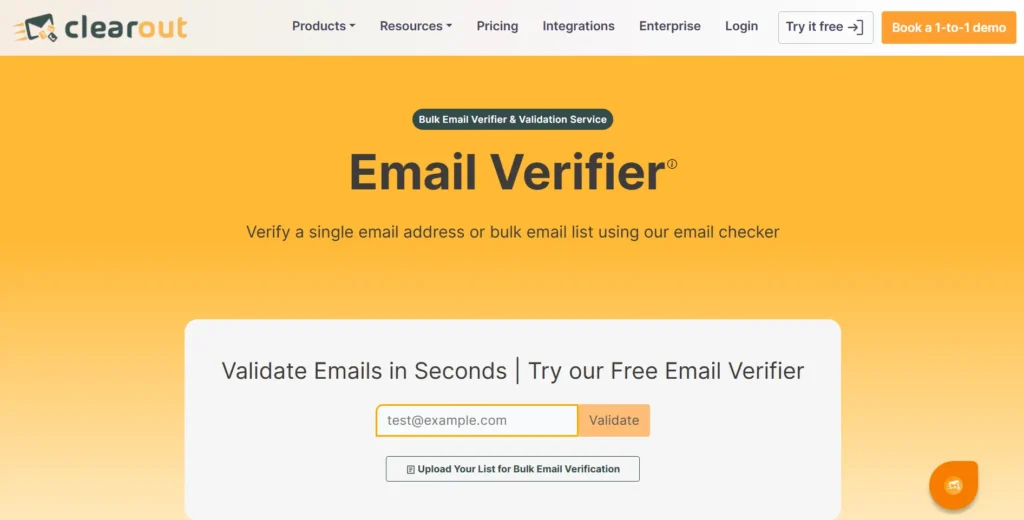
Screenshot of Clearout Email Verifier Page.

Higher Campaign ROI Through Better Deliverability


Bad or risky emails mean more bounces and a weaker sender reputation, which can drag down your campaigns. Clearout cleans your lists so your messages actually reach real mailboxes, helping your marketing and sales get better results. Their Guaranteed Deliverables feature keeps bounces below 3%, which is considered the sweet spot by ISPs.

Save on Customer Costs


Sending to invalid emails wastes money and effort. Clearout checks emails automatically, so you reach real people, get more responses, and spend less to acquire customers.

Protection of Sender Reputation


Poor list quality leads to domain blacklisting and reduced deliverability. Clearout performs 20+ verification checks, such as syntax validation, domain verification, MX record lookup, SMTP validation, disposable email identification, role-based detection, and catch-all detection to protect sender reputation.

Better Data Across Systems


Verified email data improves CRM accuracy, customer segmentation, and sales pipeline performance. Clean data supports better personalization, targeting, and analytics across marketing and sales operations.

Work Smarter and Save Time


Automation removes manual list cleaning tasks and reduces dependency on repetitive processes. Teams focus on campaign strategy and revenue activities instead of database maintenance. One automated workflow replaces hours of weekly manual verification.

Scale Your Operations Easily


As your customer database grows, manual checks become slow and inefficient. Automated verification scales effortlessly to handle more contacts without extra effort. Clearout supports bulk verification for large email lists, helping teams maintain clean data as their marketing operations grow.

Prevention of Fake or Low-Quality Registrations


Real-time verification helps catch invalid or temporary email addresses right when someone signs up. This keeps fake or low-quality registrations out and protects your database from spam traps and disposable emails.

Developer Best Practices for Automation


1. Security


  • Store API tokens in environment variables, never in code
  • Rotate tokens regularly, especially after team changes
  • Use HTTPS only for all API communications
  • Implement access logging for security audits

2. Error Handling


  • Wrap all API calls in try-catch blocks
  • Parse Clearout error codes for specific handling
  • Provide user-friendly error messages
  • Set up alerting when error rates exceed thresholds

3. Rate Limiting


  • Check the rate limit
  • Implement exponential backoff for 429 errors
  • Queue requests locally to manage pacing
  • Monitor consumption against plan limits

4. Performance


  • Batch requests when possible to reduce overhead
  • Use the bulk API for large lists, the instant API for real-time
  • Cache verification results with timestamps
  • Implement parallel processing while respecting rate limits and concurrency limits

5. Monitoring


  • Track verification success rates by source
  • Monitor API response times and availability
  • Set up alerts for credit depletion
  • Review usage patterns quarterly for optimization

6. Data Management


  • Deduplicate lists before sending to save credits
  • Normalize email formats (lowercase, trim whitespace)
  • Store verification timestamps for re-verification scheduling
  • Archive results for audit trails and compliance

Automate Email Verification To Keep Your Database Clean At Scale


Manual verification can work for a small list, sure, but once your database grows, it can quickly become a real pain. With automated bulk email verification, new email addresses are checked as soon as they come in, right into your CRM or marketing tools. You don’t have to keep uploading files, waiting around, or constantly checking results. Everything happens quietly in the background, and your lists stay accurate.

Bounce rates go down, your team spends less time on data chores, and more time actually running campaigns. Verifying emails automatically before every campaign also keeps your outreach smoother and more effective, as you don’t lose time chasing bad addresses.

Verify emails automatically & reduce bounce rates.


Try Clearout

FAQs


1. How long does bulk email verification take via API?
Processing time depends on list size. Clearout typically handles 1M emails in 3-4 hours, while smaller lists (10K-50K) complete in 30-60 minutes. Use the progress_status endpoint to check real-time progress or configure webhooks to receive results automatically when verification completes.
2. What's the difference between instant and bulk verification API?
Instant API verifies one email per request in real-time for form validation and live data entry. Bulk API accepts file uploads or large JSON arrays, processes asynchronously, and handles millions of emails in a single request, ideal for scheduled database cleaning and imported lists.
3. How to automate bulk email verification via API?
You can automate email verification by connecting your CRM, forms, or backend system to a verification API. Once integrated, the system automatically sends new or imported email addresses for validation and updates the results without manual uploads.
4. Can I verify emails in real-time during form submission?
Yes. Email verification can run in real time when someone fills out a signup or contact form. Tools like Clearout Form Guard check the email instantly and flag invalid or disposable addresses before the form is submitted. This helps prevent fake sign-ups and keeps incorrect emails from entering your database.
5. Which is the best email verification api?
Email verification APIs differ based on features and integration support. Tools like Clearout provide bulk verification, real-time validation, and automation that help teams maintain clean and reliable email lists for campaigns.

Share this article

Recent Posts

18 Mar 2026
How to Automate Bulk Email Verification With API (Step-by-Step)

Learn how to automate bulk email verification using an API. Explore this step-by-step guide on setup ...

17 Mar 2026
B2B Investor Outreach: A Step-by-Step Guide for Founders

Learn how to do B2B investor outreach step by step. Discover how to find the right investors, locate ...

16 Mar 2026
Valid vs Active Email Contacts: The Difference Marketers Miss

Learn the difference between valid and active email contacts, why deliverability and engagement matt ...

03 Mar 2026
How AI Is Transforming Email Verification in 2026

Discover AI email verification, how it works, its benefits, tools, limitations, and future trends to ...

26 Feb 2026
Why Finding a CEO’s Email Is Harder Than You Think

Discover how to find a CEO's email address, why most common search methods don't work, and which too ...

Clearout's

Form Guard

Validate email, phone & name on any forms!

  • Real signups only
  • Verified emails
  • Valid phone numbers
  • No fake names
  • Cleaner CRM
  • No devs needed
Try for Free Now

Email Verification, Email Finding Form Guard & Prospecting Service

Expand Your Reach By Finding & Verifying Ideal Prospects.

Sign up & get 100 free credits

No Credit Card required

Create Free Account
Company

Why Clearout?

Pricing

Contact Us

Careers

Press

Enterprise

Sitemap

FAQ

Status

Products

Email Verifier

Email Finder

Form Guard

Prospect

LinkedIn Email Finder

Reverse Lookup

Google Sheets Add-on

WordPress Plugin

ClearoutPhone

What's New?

Resources

Integrations

HubSpot

Team Account

API

Compare Email Verifier

Compare Email Finder

Compare Prospecting

Use Cases

Blog

Help

Legal

Privacy Policy

Terms

DPA

Security

Trust Center

Certification

ISO 27001/2022

SOC 2 Type 2

GDPR

Partnership

HubSpot Certified

Affiliates

Partners

Clearout for browser

⚡ Supercharge Your Prospect Research with Clearout's LinkedIn Chrome Extension - Find and Verify Emails with Confidence!

Clearout Chrome extension

clearout
© 2026 Clearout Inc. All Rights Reserved. Powered by Clearout.
Auto Credit Replenishment is here! Your credits can now recharge automatically. Learn More ➞
X