

- Products
- ResourcesDEVELOPER

 API
API
Clearout APIs are structured around REST and JSON Webhooks
Capture real-time events in your application workflow Form Guard
Real-time form validation to keep bad contacts out of your CRMKNOWLEDGE BASE Getting started
Sending campaigns without bounces is made simple FAQ
FAQ
Easily find answers to services, security and common questionsUSE CASES Lead Generation
Learn how professionals generate quality leadsGUIDESPricing Transparent & flexible pricing to support pay-per-use or recurringCompare Email Verification Tools AI-powered email verification with 99%+ accuracy, real-time validation, and transparent risk scoringCompare Email Finder Tools Pre-verified B2B email addresses with confidence scoring, find real person email, not role-based addressBLOGSEmail Verification ToolsFind Anyone’s Email Address
Most Accurate, Fast & Free WaysForm Validation
Importance, Ways & Best PracticesView All Blogs - Pricing
- Integrations
- Enterprise
- Login


Why Many Email Finders Return Inaccurate Emails | How to Fix
You spend time building a prospect list and run the campaign. Then the bounces start coming in. Most people immediately question their targeting, wrong industry, wrong title, wrong company size. Rarely do they question the tool that found the emails in the first place. But this is where the real problem is.
Industry research shows the average email bounce rate is around 1.98% across marketing programs. The moment you start pulling emails from a finder that doesn't verify its results, the bounce rate climbs fast. Inbox providers like Gmail and Outlook do not wait for you to notice; they start filtering your messages before your prospects ever see them.
This article covers why it happens, how to actually measure whether an email finder is accurate, and what features an accurate email finder must have.
Industry research shows the average email bounce rate is around 1.98% across marketing programs. The moment you start pulling emails from a finder that doesn't verify its results, the bounce rate climbs fast. Inbox providers like Gmail and Outlook do not wait for you to notice; they start filtering your messages before your prospects ever see them.
This article covers why it happens, how to actually measure whether an email finder is accurate, and what features an accurate email finder must have.
Table of Content
Common Reasons Why Email Finders Return Wrong Emails
This is something most people only realize after the fact. Once your bounce rate starts rising, the damage is already in motion, your sender reputation dips, emails start getting filtered, and a campaign you spent weeks on just doesn’t land the way it should. The email finder gets blamed last, but it should have been questioned first.
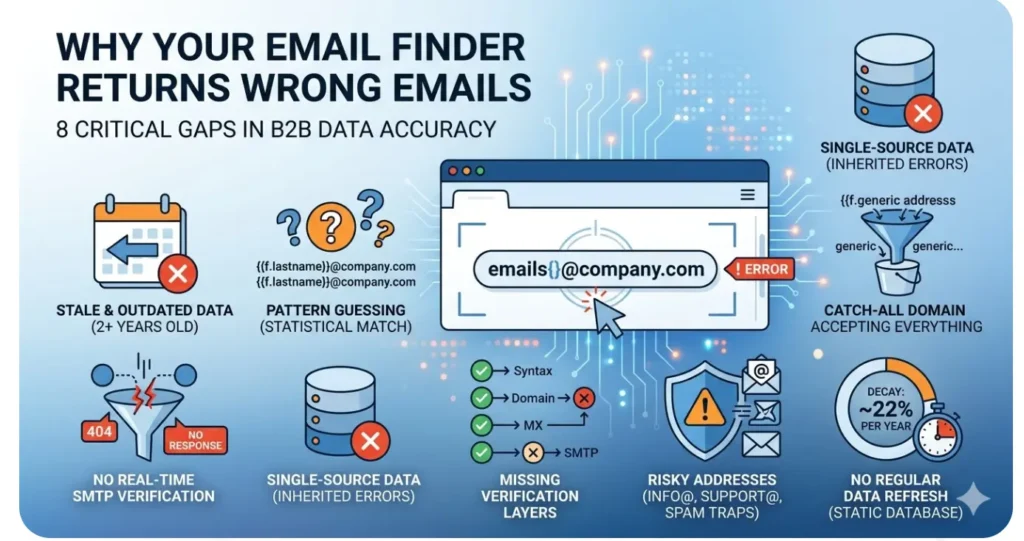
These are the 8 reasons email finders return wrong emails. Not vague possibilities, but actual, specific gaps that show up again and again.
These are the 8 reasons email finders return wrong emails. Not vague possibilities, but actual, specific gaps that show up again and again.
1. Stale and Outdated Data
People move on. Someone who worked as a marketing director in a SaaS firm in 2022 may have changed his job. Their old email remains in a static database somewhere, still flagged as valid.
Most email finder tools do not verify against live mail servers; they pull from a stored snapshot of contact data that nobody is actively maintaining. The address looks fine on the surface. It bounces the moment you send.
Most email finder tools do not verify against live mail servers; they pull from a stored snapshot of contact data that nobody is actively maintaining. The address looks fine on the surface. It bounces the moment you send.
2. Pattern Guessing Without Confirmation
Here’s something most people don’t realize many email finder tools aren’t actually finding emails. They’re guessing them. They look at common company patterns like [email protected] or [email protected] and generate what seems like the closest match.
But there’s no real verification happening. So that guessed email address slips into your list looking perfectly valid… until it bounces and you’re left wondering what went wrong.
But there’s no real verification happening. So that guessed email address slips into your list looking perfectly valid… until it bounces and you’re left wondering what went wrong.
3. No Real-Time SMTP Verification
SMTP verification is how you actually confirm an email address exists. The tool connects directly to the mail server and asks, in effect, whether this specific mailbox is real and accepting messages. It is the only check that confirms whether a specific mailbox exists and accepts mail.
Most tools skip it entirely; it is slower and more expensive to run at scale. Your list gets built without it, meaning no address has been tested against a live server. You are trusting a result that was never confirmed.
Most tools skip it entirely; it is slower and more expensive to run at scale. Your list gets built without it, meaning no address has been tested against a live server. You are trusting a result that was never confirmed.
4. The Catch-All Domain Problem
Some companies set their mail servers to accept every incoming email, no matter what address it is sent to, even made-up ones. These are called catch-all domains. When a tool probes one of these servers to check whether an address is valid, the server says yes.
Even when the mailbox does not exist. The tool logs a positive response, marks the address as verified, and returns it to you. You send. It bounces. The server wasn't rejecting anything; it simply couldn't tell you which mailboxes actually exist.
Even when the mailbox does not exist. The tool logs a positive response, marks the address as verified, and returns it to you. You send. It bounces. The server wasn't rejecting anything; it simply couldn't tell you which mailboxes actually exist.
5. Single-Source Data
If a tool is pulling contact data from one source, it is inheriting everything wrong with that source: outdated records, indexing errors, and missing contacts with no way to catch any of it. There is no second source to compare against, no way to surface a conflict.
A bad record that entered the database three years ago is still a bad record today. Tools that cross-reference multiple sources at least have a mechanism to identify discrepancies. Single-source tools pass errors straight through to you.
A bad record that entered the database three years ago is still a bad record today. Tools that cross-reference multiple sources at least have a mechanism to identify discrepancies. Single-source tools pass errors straight through to you.
6. Missing Verification Layers
Getting an email address from a finder is not a single step. The address needs to pass syntax validation, domain checks, MX record verification, and SMTP response, each one catching a different category of problem.
A tool that runs 2 of these 4 checks is letting a measurable portion of bad addresses through every single time. It is not a rare edge case. It is a consistent and predictable leak in accuracy that compounds across every list you build.
A tool that runs 2 of these 4 checks is letting a measurable portion of bad addresses through every single time. It is not a rare edge case. It is a consistent and predictable leak in accuracy that compounds across every list you build.
7. Treating Risky Addresses as Valid
Role-based addresses like info@, support@, admin@, and sales@ are technically deliverable. That is the problem. They are not personal inboxes. They're often filtered by spam systems, monitored by multiple people, and in many organizations, feed directly into spam complaint queues.
Sending cold outreach to them at volume is a fast way to damage your sender reputation without a single hard bounce to show for it. Disposable email addresses and spam traps work the same way. A tool that does not flag these as risky will treat them as clean, usable contacts.
Sending cold outreach to them at volume is a fast way to damage your sender reputation without a single hard bounce to show for it. Disposable email addresses and spam traps work the same way. A tool that does not flag these as risky will treat them as clean, usable contacts.
8. No Regular Data Refresh
B2B contact data decays at roughly 22% per year bounce rate. If your database hasn’t been re-verified since 2022, a substantial portion of those contacts are likely outdated. Most email finder tools are not running continuous refresh cycles.
They built their database at a point in time and have been serving from it since. The accuracy claim on their website may have been true when they last measured it. Whether it remains accurate today is a different question entirely.
They built their database at a point in time and have been serving from it since. The accuracy claim on their website may have been true when they last measured it. Whether it remains accurate today is a different question entirely.
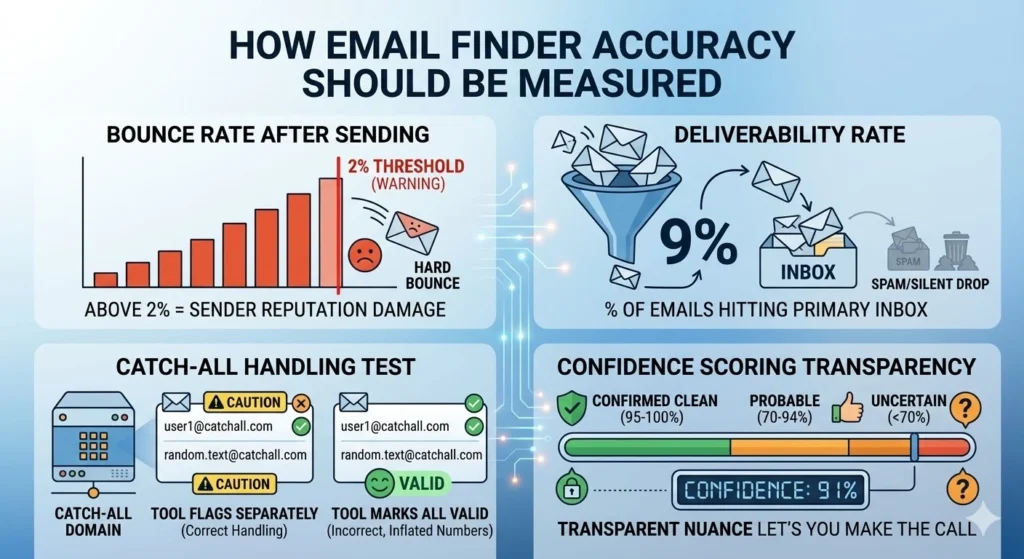
How Email Finder Accuracy Should Be Measured?
1. Bounce Rate After Sending
This is the most honest signal you have. Send a batch of emails found by the tool and watch what happens. Hard bounces above 2% are a problem, not a minor one. Gmail, Microsoft and Outlook use bounce rate as a direct input into whether your future messages get delivered at all. If a tool's results are regularly pushing you past that threshold, no accuracy percentage on their website changes what your inbox provider thinks of you.
2. Deliverability Rate
Emails that do not bounce are not automatically reaching the inbox. Some land in spam. Some get silently dropped. Your deliverability rate tells you whether the list is genuinely working. A tool can have a low bounce rate and still be filling your list with addresses that go nowhere useful. Track both.
3. Catch-all Handling
Run a deliberate test on this one. Take a sample of addresses from catch-all domains and see how the tool categorizes them. A tool that marks them all as valid is inflating its numbers; those domains accept everything, so a positive server response tells you nothing. What you want to see is the tool flagging them separately, not absorbing them into a clean verification count.
4. Confidence scoring Transparency
Not every “valid” email is actually safe to contact and that’s where things get tricky. Most tools stop at a simple valid or invalid label. However, it is not what makes an address invalid and uncertain in the future.
Realistically, email addresses fall into categories like valid, invalid, temporary, and more.
That’s why better tools go a step further. They show confidence levels or smart verdicts that help you understand how reliable an address really is.
Instead of guessing, you get the context to decide how to handle each contact, and avoid problems before they start.
Realistically, email addresses fall into categories like valid, invalid, temporary, and more.
That’s why better tools go a step further. They show confidence levels or smart verdicts that help you understand how reliable an address really is.
Instead of guessing, you get the context to decide how to handle each contact, and avoid problems before they start.
How to Fix Incorrect Email Addresses from an Email Finder?
If you have a list that was built with a tool you no longer fully trust, do not send from it. Clean it first. Here is how to do that properly.
1. Run the entire list through a real-time email verifier.
The fact that a finder returned an address does not mean it is deliverable, those are two different things. An email verifier checks syntax, domain existence, MX records, and SMTP responses. It identifies duplicate, gibberish, temporary, invalid, risky, role-based, and catch-all addresses.
2. Separate catch-all addresses from valid ones.
Do not include them in your list. Catch-all addresses carry real uncertainty; the domain accepted the probe, but the individual mailbox may not exist. Segment them separately. For important campaigns, exclude them entirely. For lower-stakes sends where volume matters, proceed carefully and watch the metrics closely.
3. Remove role-based and disposable addresses.
admin@, noreply@, info@: these are not personal inboxes. Sending cold outreach to them does not just waste a credit; it actively works against your sender reputation. Disposable email addresses are the same story. Scrub both categories completely before you send a single message.
4. Use confidence scores from the email finder to filter data.
If your email finder provides confidence scoring (like Clearout does), set a minimum threshold (e.g., 85%+) and exclude addresses below it.
Why Clearout Is the Most Accurate Email Finder?
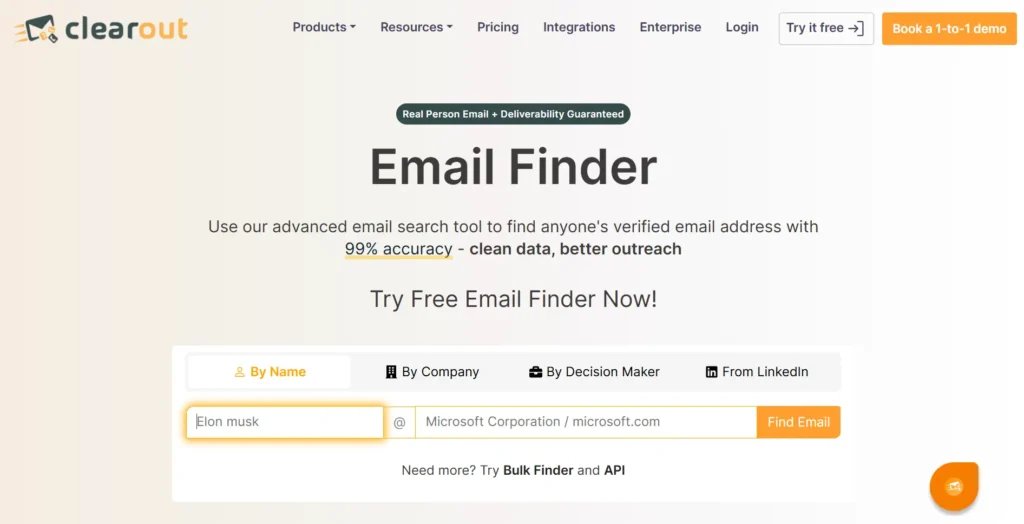
Most email finder tools stop at giving you a possible email address. The problem is, “possible” doesn’t mean usable. Clearout Email Finder is built to go a step further and help you find email addresses that are not just guessed, but verified for real-world use. That means less time cleaning lists later and more confidence in what you’re working with from the start.
1. Pre-Verified Results, Not Just Guesses
With most tools, finding and verifying are two separate steps and two separate charges. Clearout email finder pre-verifies every email in real time before returning the result. What you get is already safe to send. No double spending.
2. Duplicates Removal
Duplicate records are automatically removed across inputs, so you don’t waste credits on the same contact twice and can focus on fresh, usable leads.
3. AI-Based Confidence Scoring for Smarter Decisions
Each email receives a confidence score that makes you know the extent to which the result is reliable.
4. Higher Discovery on Hard-to-Find Contacts
Clearout’s AI-powered system is designed to improve email discovery, especially for hard-to-find B2B contacts where many tools return no results.
5. Integrations Across Your Stack
Clearout can be interconnected with such tools as HubSpot, Apollo.io, Zoho CRM, and others.
The simple access to API, webhooks, and the Google Sheets add-on make it fit in your current workflow with no manual work.
The simple access to API, webhooks, and the Google Sheets add-on make it fit in your current workflow with no manual work.
6. GDPR, SOC 2 Type II, and ISO 27001 Certified
All three. Not just claimed; it is certified. If you sell into enterprise accounts or operate in a regulated industry, this matters more than most features on this list.
7. Faster Prospecting with Built-In Automation
Clearout helps you build highly targeted email lists using advanced filters.
You can:
You can:
- Find business and personal email addresses along with phone numbers
- Extract emails from both individual and company pages
- Get pre-verified emails with high accuracy
- Automate list building to save time on manual prospecting
What Users Are Saying on G2
“The accuracy is the best part. The email verifier is fast and reliable and the email finder helps us quickly find valid emails without much manual work. The interface is simple and results are easy and actionable to understand, unlike other services we used previously.”
Read more reviews on G2
Read more reviews on G2
Use Verified Email Data, Not Assumptions
Email finder inaccuracies arise from specific, identifiable gaps: stale data sources, pattern-based guessing, missing verification layers, and catch-all domains being counted as confirmed addresses. Each of those gaps has a direct fix.
The starting point is choosing a tool that doesn't just locate email addresses but verifies them before delivery. Real-time verification, multi-layer validation, catch-all detection, email discovery, filtering out invalids, spam traps, temporary, risky emails, and confidence scoring determine whether a list is genuinely deliverable or just appears to be.
This can be done by Clearout Email Finder, which returns only pre-verified email addresses and highly accurate results.
The starting point is choosing a tool that doesn't just locate email addresses but verifies them before delivery. Real-time verification, multi-layer validation, catch-all detection, email discovery, filtering out invalids, spam traps, temporary, risky emails, and confidence scoring determine whether a list is genuinely deliverable or just appears to be.
This can be done by Clearout Email Finder, which returns only pre-verified email addresses and highly accurate results.
Build Email Lists That Actually Convert
FAQs
1. Why do email finders return wrong email addresses?
Most finders pull from outdated databases or guess email formats, which neither confirms that the address is actually active. Bad emails make it into your list undetected, and your bounce rate increases the moment you send.
2. Why is the bounce rate of my email high after using an email finder?
Some email finders might be returning email addresses that are invalid or temporary. So, if you use such addresses for your email outreach, you'll have a higher bounce rate. Hence, you must get a highly accurate email finder tool like Clearout to find verified email addresses.
3. How accurate are email finder tools?
Accuracy varies widely among tools using live server validation. Highly accurate email finder tools like Clearout help you find 99.73% accurate email addresses.
4. What causes email finder accuracy problems?
Several things can affect email finder accuracy. Data may be outdated, email formats may be guessed incorrectly, or the tool may skip server-level verification. Catch-all domains also add uncertainty because the server accepts messages even if the mailbox doesn’t actually exist. These factors are common reasons email finders return invalid emails and why some prospect lists end up with poor data quality.
5. How can inaccurate emails from email finders be reduced?
The simplest way is to verify every address before sending a campaign. Running contacts through a Clearout Email Verification process helps identify invalid, risky, or catch-all addresses. This keeps the list cleaner, improves email accuracy, and prevents outreach from being sent to a bad email list with poor quality data.