

- Products
- ResourcesDEVELOPER

 API
API
Clearout APIs are structured around REST and JSON Webhooks
Capture real-time events in your application workflow Form Guard
Real-time form validation to keep bad contacts out of your CRMKNOWLEDGE BASE Getting started
Sending campaigns without bounces is made simple FAQ
FAQ
Easily find answers to services, security and common questionsUSE CASES Lead Generation
Learn how professionals generate quality leadsGUIDESPricing Transparent & flexible pricing to support pay-per-use or recurringCompare Email Verification Tools AI-powered email verification with 99%+ accuracy, real-time validation, and transparent risk scoringCompare Email Finder Tools Pre-verified B2B email addresses with confidence scoring, find real person email, not role-based addressData Pulse & HubSpot Breeze Intelligence Pre-verified B2B email addresses with confidence scoring, find real person email, not role-based addressBLOGSEmail Verification ToolsFind Anyone’s Email Address
Most Accurate, Fast & Free WaysForm Validation
Importance, Ways & Best PracticesView All Blogs - Pricing
- Integrations
- Enterprise
- Login



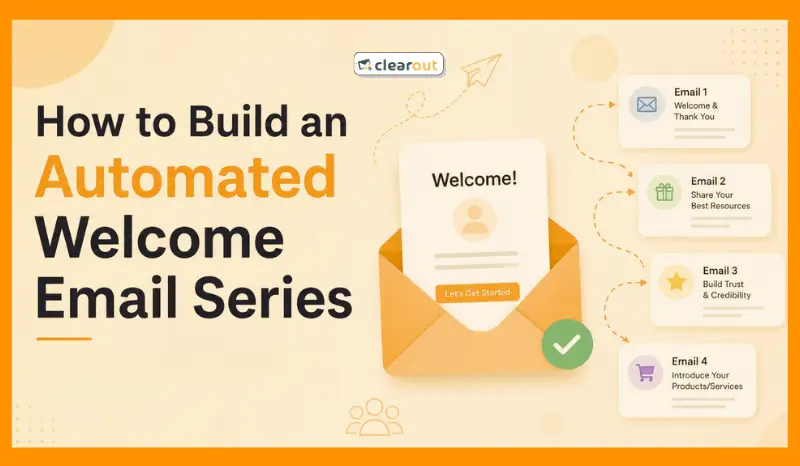
How to Build an Automated Welcome Email Series in 2026
TL;DR
- Build a 3–5 email automated welcome series that starts immediately after signup.
- Verify every new address before the sequence begins to prevent repeated bounces from invalid signups.
- Send the first email within minutes, then space the remaining emails around your audience's buying cycle.
- Give each email one goal, gradually moving from delivery and introduction to value, proof, and conversion.
- Add behavior-based branching so engaged and inactive subscribers follow different paths.
- The right setup layers signup validation, trigger timing, and behavioral branching into a single automated workflow.
- Clearout's email verifier checks syntax, domain records, and mailbox status before a new contact enters the sequence to keep bounce rates low from day one.
Table Of Content
Klaviyo's benchmark report put average welcome-series open rates at 51% but many brands never get close to that number because the problem starts at signup.
An invalid signup slips through, bounces, and sender reputation takes the hit before the series gets tested. Many welcome flows still run on fixed timers. As a result, someone who opens every email receives the same next message as someone who hasn't engaged at all. Meanwhile, personalization is limited to adding a first name in the subject line.
A stronger welcome series starts with real-time signup validation. Then it uses timing, objectives for every email, and behavior-based branching that adapts to subscriber actions. Let's understand how to build that framework, explore ready-to-use welcome email templates, and a lot more details.
A stronger welcome series starts with real-time signup validation. Then it uses timing, objectives for every email, and behavior-based branching that adapts to subscriber actions. Let's understand how to build that framework, explore ready-to-use welcome email templates, and a lot more details.
What is a welcome email workflow?
Welcome email sequence is a set of automated email messages that are sent once someone subscribes to your list. The workflow will be automatically activated when a visitor registers via one of the available registration methods, such as a form, newsletter, pop-up or checkout page.
Automated outbound workflows run three to five emails delivered over one to two weeks. The first email should build trust. The next one shares value. By the third, you're pushing for a purchase. Set up correctly, this sequence becomes one of the highest-performing automations you'll run.
The payoff shows up in the numbers too. The welcome series beats regular campaigns on most metrics that matter. However, the email open rate of this series should be close to 40.55%, but you can aim for a minimum of 34.23%.
Automated outbound workflows run three to five emails delivered over one to two weeks. The first email should build trust. The next one shares value. By the third, you're pushing for a purchase. Set up correctly, this sequence becomes one of the highest-performing automations you'll run.
The payoff shows up in the numbers too. The welcome series beats regular campaigns on most metrics that matter. However, the email open rate of this series should be close to 40.55%, but you can aim for a minimum of 34.23%.
How to write an automated welcome email series?
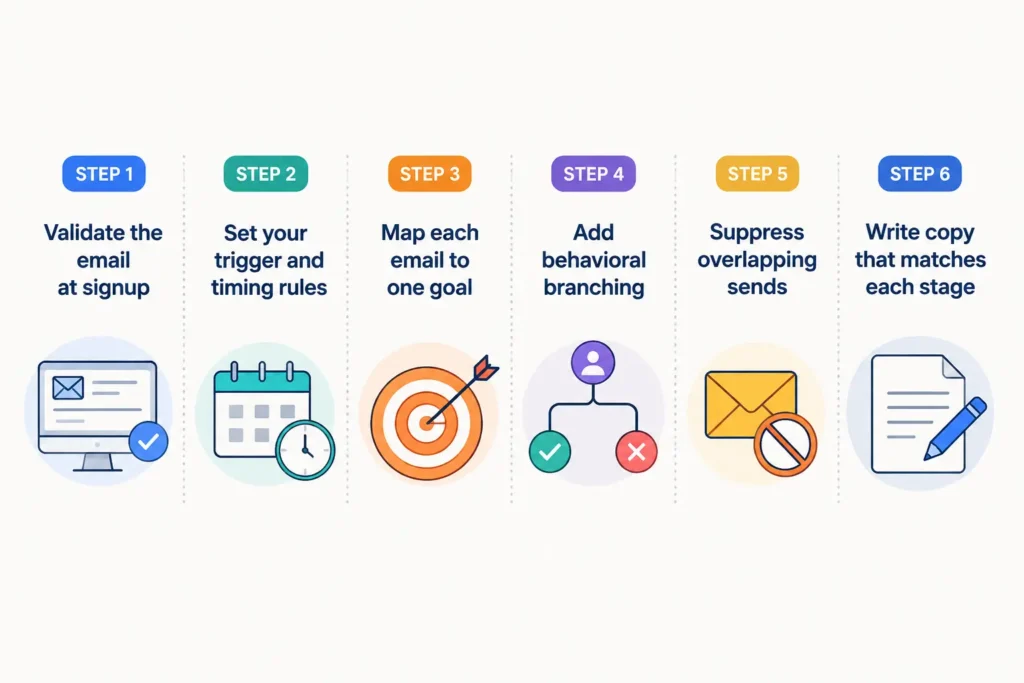
Step 1: Email verification on signup
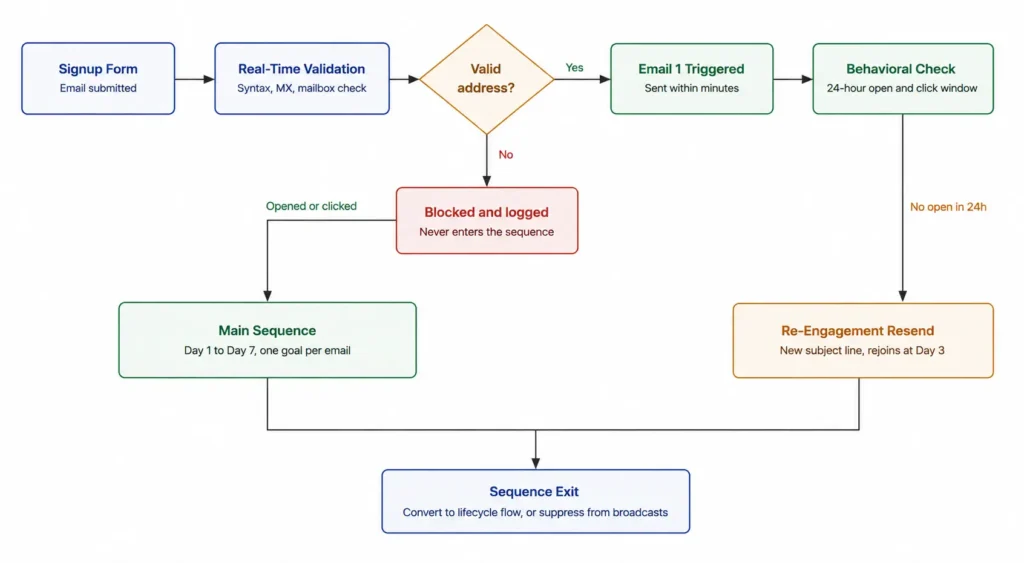
A welcome series runs on autopilot. The moment someone signs up, the first email fires within minutes, without anyone reviewing the list manually. That's what makes a bad address more dangerous here than in a regular campaign. There's no gap for anyone to catch a typo or a fake signup before it gets hit with three to five automated sends in the same week.
One invalid address doesn't bounce once. It bounces on every email in the sequence, three or four times off a single signup. Repeated bounces are what drag sender reputation down, and a dropped reputation pushes future campaigns into spam.
So, run verification the moment someone submits the signup form and before that address ever reaches your list. Clearout check every email address with 20+ checks running at the same time to determine whether it's safe to send to. These checks look at whether the inbox exists, whether the domain can receive emails, the address can accept messages, and if it's a spam trap, disposable, catch-all, or incorrectly formatted address.
One invalid address doesn't bounce once. It bounces on every email in the sequence, three or four times off a single signup. Repeated bounces are what drag sender reputation down, and a dropped reputation pushes future campaigns into spam.
So, run verification the moment someone submits the signup form and before that address ever reaches your list. Clearout check every email address with 20+ checks running at the same time to determine whether it's safe to send to. These checks look at whether the inbox exists, whether the domain can receive emails, the address can accept messages, and if it's a spam trap, disposable, catch-all, or incorrectly formatted address.
Clearout runs all these checks in real time at the point of signup, so a risky address never gets the chance to enter the sequence at all.
Step 2: Set your trigger and timing rules
Send the first email within minutes of signup, while intent is still high. Waiting hours, or worse, a full day, means the subscriber has already moved on mentally. In many cases, an average email sent immediately will outperform a perfectly written email that arrives hours later.
After the first email, space the rest out with intention. A common cadence runs the first email immediately, the second on day one, the third on day three, and the last two across the following week.
Avoid sending daily. Test your spacing against how your specific audience responds, since buying cycles vary by industry.
After the first email, space the rest out with intention. A common cadence runs the first email immediately, the second on day one, the third on day three, and the last two across the following week.
Avoid sending daily. Test your spacing against how your specific audience responds, since buying cycles vary by industry.
Step 3: Map each email to one goal
Each email in the series should serve exactly one purpose. Trying to educate, sell, and build brand stories in a single message dilutes all three. Select one job per email and allow the sequence to build over time.
A typical mapping looks like this:
A typical mapping looks like this:
- The first email delivers what you promised at signup, a discount code or login access.
- From there, the second introduces the brand itself: who you are and why you exist.
- By the third, you're showing a specific product or feature. Reviews or case studies come next, providing social proof before you ask subscribers to take action. The offer or direct CTA is saved for last once trust has actually been built.
Step 4: Add behavioral branching
Static sequences treat every subscriber the same, which limits results. Someone who opens and clicks your first email is ready for different content than someone who ignores it completely. Sending both groups the same next message wastes the opportunity.
Behavioral branching addresses this issue through conditional logic. Those who open your email within 24 hours and show interest in it are more likely to engage than those who don't open a single email. But there are many workflows that still route both subscribers down the same route.
Most automation platforms support this through "if/then" rules or conditional splits, no custom development required. This is what separates a basic automated onboarding email series for users from one that actually adapts to how people behave.
Behavioral branching addresses this issue through conditional logic. Those who open your email within 24 hours and show interest in it are more likely to engage than those who don't open a single email. But there are many workflows that still route both subscribers down the same route.
Most automation platforms support this through "if/then" rules or conditional splits, no custom development required. This is what separates a basic automated onboarding email series for users from one that actually adapts to how people behave.
Step 5: Suppress overlapping sends
A new subscriber shouldn't be getting your welcome series and your regular newsletter at the same time. Two email programs landing in one inbox at once is how you end up with unsubscribes before the welcome series even wraps up.
Suppress welcome-track subscribers from broadcast sends until the sequence ends, either through conversion or by completing all messages.
Suppress welcome-track subscribers from broadcast sends until the sequence ends, either through conversion or by completing all messages.
Step 6: Write copy that matches each stage
Copy comes last for a reason: it only works once the structure underneath it holds. Start with the call to action, since that's what most emails get wrong first. Give each one exactly one, because multiple competing buttons split attention and lower clicks across the board.
Subject lines follow the same discipline. Keep them under seven words, since anything longer gets cut off on mobile before the point even lands. The same logic applies to paragraphs: cap them at three or four sentences, since most openings happen on a phone and long blocks of text just don't get read there.
Plain text matters just as much as either of those. Write an actual plain-text version instead of relying on what your ESP auto-generates. Spam filters weigh it heavily, and a broken auto-generated version can hurt deliverability more than having none at all.
Subject lines follow the same discipline. Keep them under seven words, since anything longer gets cut off on mobile before the point even lands. The same logic applies to paragraphs: cap them at three or four sentences, since most openings happen on a phone and long blocks of text just don't get read there.
Plain text matters just as much as either of those. Write an actual plain-text version instead of relying on what your ESP auto-generates. Spam filters weigh it heavily, and a broken auto-generated version can hurt deliverability more than having none at all.
4 best welcome email templates
Use these structured frameworks for your welcome email templates across different customer acquisition channels.
1. The instant value deliverer (e-commerce & lead magnet)
Subject: Your discount code is inside, [First Name]!
Hi [First Name],
Welcome to [Brand Name]. Here is your exclusive 15% discount code: WELCOME15.
[Button: Shop New Arrivals]
Need help choosing? Check out our top-rated collections below.
2. The SaaS product activation onboarder
Subject: Let's set up your [Product Name] workspace
Hi [First Name],
Thanks for creating an account with [Product Name].
Complete these 3 steps to launch your first project:
1. Import your contact list.
2. Select your default workflow template.
3. Invite your team members.
[Button: Go To Dashboard]
3. The curated resource guide
Subject: New to [Topic]? Start here.
Hi [First Name],
Welcome to our community of [industry professionals].
Here are our 3 most popular resources to get you started:
- Guide 1: [Link to Blog Post]
- Checklist 2: [Link to Asset]
- Video 3: [Link to Tutorial]
[Button: Explore Full Library]
4. The interactive assessment/preference center
Subject: Personalize your [Brand] experience
Hi [First Name],
We want to send content you actually care about.
Tell us what you want to achieve this year:
[Option A: Grow Sales]
[Option B: Automate Workflows]
[Option C: Lower Costs]
Click your goal to customize your updates instantly.
Welcome email automation best practices
A good welcome series needs more than a good copy. These practices apply across every industry and business size.
1. Personalization strategies that actually work
A first name in the subject line is just a basic form of personalization doing its job automatically. It takes no real understanding of the subscriber to pull that off.
Segment by how someone signed up, what page they visited, or what they clicked first. Route enterprise leads differently than self-serve signups. This kind of welcome email personalization strategy drives real engagement.
Segment by how someone signed up, what page they visited, or what they clicked first. Route enterprise leads differently than self-serve signups. This kind of welcome email personalization strategy drives real engagement.
2. Starter templates by business type
A SaaS welcome series should focus on product activation. Highlight setup steps and quick wins that get users to their first success moment.
An ecommerce welcome series should lead with a discount or a bestseller. A small business series can lean more personal, using a founder's voice and a direct ask for feedback.
An ecommerce welcome series should lead with a discount or a bestseller. A small business series can lean more personal, using a founder's voice and a direct ask for feedback.
Common mistakes to avoid
Don't allow bad data to enter your list, as it can make your bounce rate higher before you even find out. Fix this first. Here are more mistakes that you shouldn't make to build a successful workflow:
Don't skip lead verification
Skipping validation is the most common one. It lets bad data into your list and inflates your bounce rate before you even measure results. Fix this first.
Another error is sending too many emails in a short period of time. It will drive away users. The CAN-SPAM Act does not allow the absence of an unsubscribe link to be considered a design issue.
Another error is sending too many emails in a short period of time. It will drive away users. The CAN-SPAM Act does not allow the absence of an unsubscribe link to be considered a design issue.
Record and repeat the sequence
Firstly, try out different subject lines as they make the biggest difference in terms of open rate. After it settles, make sure to test the CTA copy and button placement. This isn't a total redesign; just a few tweaks here will increase the click rates.
Revisit the entire sequence from time to time. Don't add offers that expired, pictures of outdated products, or last quarter's offer.
Revisit the entire sequence from time to time. Don't add offers that expired, pictures of outdated products, or last quarter's offer.
Welcome email metrics to track
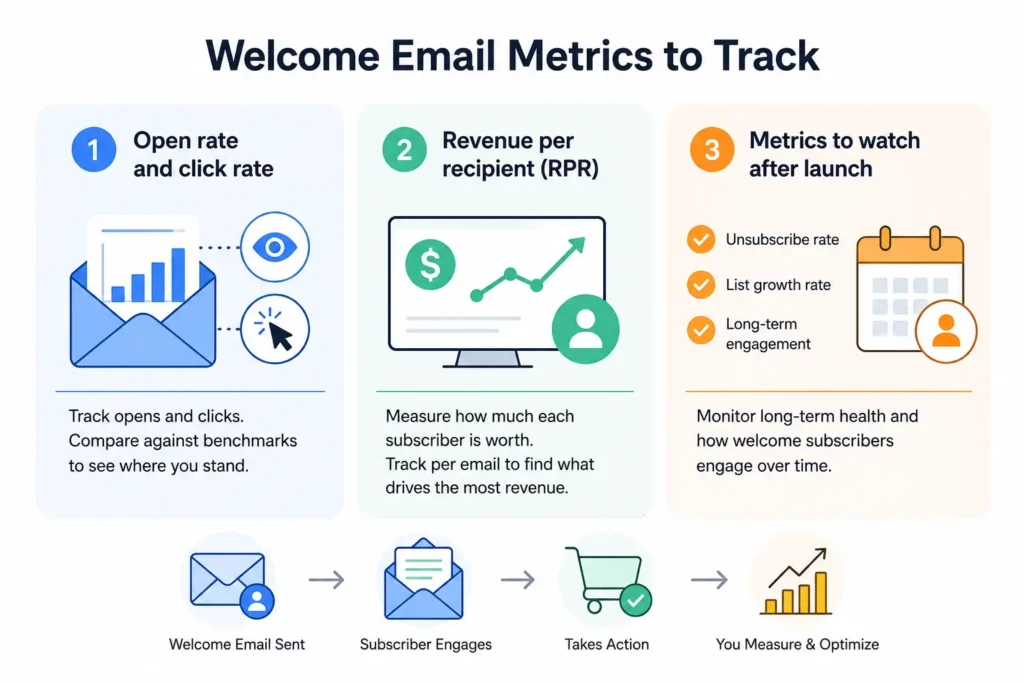
Track these numbers from day one.
1. Open rate and click rate
Open rate and click rate come first because they're the earliest signal of whether the series is even working. The average welcome email open rate sits at 51.26% across industries.
If open rate is low, review your subject line and sender name, first. If the click rates are low, it's likely that you have a weak or hidden call-to-action.
If open rate is low, review your subject line and sender name, first. If the click rates are low, it's likely that you have a weak or hidden call-to-action.
2. Revenue per recipient
RPR, or revenue per recipient, measures what each subscriber is worth across the whole series. The benchmark report lists the average at $2.35. A single series-wide figure won't tell you much on its own. Break it out by email to see which message actually drives revenue.
Trust isn't the only thing a strong welcome series builds. Break out revenue by email in the sequence to see which message is actually driving purchases.
Trust isn't the only thing a strong welcome series builds. Break out revenue by email in the sequence to see which message is actually driving purchases.
3. Metrics to watch after launch
Open and click rates tell you what's happening this week. Longer-term health shows up in unsubscribe rate, list growth rate, and how welcome subscribers behave months later.
Watch whether people who complete the welcome series stay engaged with your regular campaigns. That's a better long-term signal than any single open rate.
Watch whether people who complete the welcome series stay engaged with your regular campaigns. That's a better long-term signal than any single open rate.
Final takeaways
You can run a welcome series on autopilot, firing three to five emails within days of signup. But checking the list first is of utmost importance as bad addresses can drag your sender reputation down and increase bounce rate to above 2% threshold.
So fix it at the source. Use a validation tool like Clearout to validate any address before it makes it into your CRM. Then combine that with behaviour based triggers, and the right message will arrive at the right time to each subscriber. Once both pieces are in place, a routine signup forms will give you only loyal and high-quality leads.
So fix it at the source. Use a validation tool like Clearout to validate any address before it makes it into your CRM. Then combine that with behaviour based triggers, and the right message will arrive at the right time to each subscriber. Once both pieces are in place, a routine signup forms will give you only loyal and high-quality leads.
Verify Your Welcome Email Series List
FAQs
1. How many emails should be in a welcome series?
Most welcome series run three to five emails over one to two weeks. The right number depends on your buying cycle. Products with longer buying cycles can support a longer welcome series.
2. What triggers a welcome email automation?
A valid signup triggers the automation, whether through a form, an app sign-up, or a CRM import. Validation should happen before the trigger fires. Run new contacts through an email verifier like Clearout to catch invalid addresses before they ever start the sequence.
3. How do you personalize a welcome sequence?
You personalize a sequence using signup source, first click behavior, and stated preferences rather than relying on a first name alone. From there, route different segments into different content paths as per what they've actually shown interest in.
4. When should a welcome email be sent?
You want the first email out within minutes of signup, while interest is at its highest, since waiting even a few hours can measurably lower open rates. That speed only works if the address is real to begin with, which is why running it through a verifier like Clearout at signup matters before that first send fires.