

- Products
- ResourcesDEVELOPER

 API
API
Clearout APIs are structured around REST and JSON Webhooks
Capture real-time events in your application workflow Clearout MCP
Verify and find emails from AI assistants like Claude and Cursor Form Guard
Real-time form validation to keep bad contacts out of your CRMKNOWLEDGE BASE Getting started
Sending campaigns without bounces is made simple FAQ
FAQ
Easily find answers to services, security and common questionsUSE CASES Lead Generation
Learn how professionals generate quality leadsGUIDES Clearout Insights Explore original research, industry statistics, and data-backed insights Pricing Transparent & flexible pricing to support pay-per-use or recurringCompare Email Verification Tools AI-powered email verification with 99%+ accuracy, real-time validation, and transparent risk scoringCompare Email Finder Tools Pre-verified B2B email addresses with confidence scoring, find real person email, not role-based addressData Pulse & HubSpot Breeze Intelligence Pre-verified B2B email addresses with confidence scoring, find real person email, not role-based addressBLOGSEmail Verification ToolsFind Anyone’s Email Address
Most Accurate, Fast & Free WaysForm Validation
Importance, Ways & Best PracticesView All Blogs - Pricing
- Integrations
- Enterprise
- Login



How Invalid Catch-All Leads Drain Your Sales Budget
TL;DR
- With catch-all addresses, the cost of the leads becomes higher than the base acquisition cost as it includes SDR time, bounces, and follow-up sequences.
- Cost per usable lead is a more useful metric as it gives a realistic picture of how much you're spending to get leads your sales team can contact and pursue.
- However, the positive impact is not always reflected in the bounce rate as some catch-all accounts accept an email without actually delivering it to the recipient's inbox.
- Clearout Deep Verify can identify catch-all email addresses and resolve some of these into Valid or Invalid during verification.
- You might be wasting money on leads that are good, but have never been verified to check if they have a real mailbox.
Your company may spend money attracting a lead through ads, only to find that the email address they submitted is a catch-all. These costs go unnoticed because ad spend, SDR time, and outreach credits are tracked separately. So no single report shows the full cost of pursuing these leads.
In this guide, we’ll look at how to calculate the cost of catch-all leads and how to prevent these addresses from entering your campaigns through Clearout’s Deep Verify.
In this guide, we’ll look at how to calculate the cost of catch-all leads and how to prevent these addresses from entering your campaigns through Clearout’s Deep Verify.
Table Of Content
What makes catch-all leads a sales budget problem?
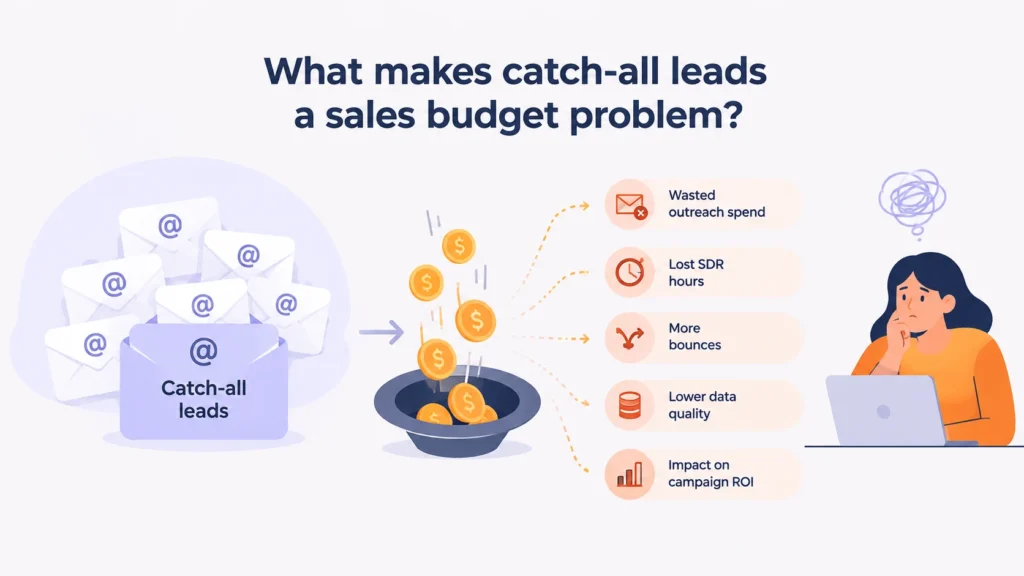
If you invest in the catch-all leads, but have no idea if the mailbox actually exists, then it's a budget concern.
Catch-all status of leads and unresolved mailbox
A catch-all email address is set to receive any email to that domain. When a verification tool sends an SMTP check to [email protected], the server returns an acceptance code. It may respond the same way for an address such as [email protected], even if that individual mailbox doesn't exist. The check cannot distinguish the actual mailbox from one that was never created.
The address is classified as catch-all rather than invalid. A lot of catch-all addresses belong to real buyers. The invalid catch-all leads are the ones with no mailbox behind them, and without further verification, you can't tell the two apart.
This group can be bigger than you'd expect. In a 40+ record prospect list we verified for an earlier Clearout test, more than 20 addresses in a list of over 40 records were classified as catch-all, compared with 14 Valid and 14 Invalid results.
For a deeper look at how these domains work, check our guide on catch-all emails.
The address is classified as catch-all rather than invalid. A lot of catch-all addresses belong to real buyers. The invalid catch-all leads are the ones with no mailbox behind them, and without further verification, you can't tell the two apart.
This group can be bigger than you'd expect. In a 40+ record prospect list we verified for an earlier Clearout test, more than 20 addresses in a list of over 40 records were classified as catch-all, compared with 14 Valid and 14 Invalid results.
For a deeper look at how these domains work, check our guide on catch-all emails.
Ad spend → lead acquired → data processed → SDR outreach → follow-ups → opportunity
You pay at every one of these stages, and you’re still paying before anyone has checked if the mailbox is real.
- Ad spend: The money you spend on ads to acquire leads, including those with invalid email addresses or fake details.
- Lead acquired: A lead that lands in your CRM will add to the cost, even if the email doesn’t work.
- Data processing: Data enrichment and verification tools will charge for each record they process.
- Follow-ups: The sequence sends three to five more emails.
If the email address you got is invalid, that money is already wasted. Even tools that track your metrics might show unusable reports.
What is the real cost of catch-all leads?
It includes the cost of lead acquisition, SDR time, and outreach campaigns targeted to fake or low-intent leads.
To keep things concrete, we'll use one example campaign throughout this guide:
To keep things concrete, we'll use one example campaign throughout this guide:
- $15,000 in ad spend
- 1,000 leads generated
- 250 catch-all leads (25%)
- $0.40 enrichment cost per lead
- 10 minutes of SDR research per lead
- $30 per hour fully loaded SDR cost
- $1 per lead for the outreach sequence
SDR hours spent on catch-all leads
SDR research is the highest cost after acquisition, and the easiest to miss because no invoice ever shows it.
- Researching 250 catch-all leads at 10 minutes each takes 2,500 minutes, or about 41.7 hours. At $30 an hour, the team has spent $1,250 on research alone. In practical terms, one SDR has lost a full working week.
- And research is just the first touch. Personalization and follow-up time push the number higher.
Outreach costs and bounce-related waste
In a five-step sequence, 250 catch-all leads generate 1,250 emails. At $1 per lead, the direct outreach cost is $250.
- When invalid addresses bounce, your bounce rate goes up. Google and Yahoo don’t publish a fixed bounce limit, but a common rule of thumb is to stay under 2%. Consistently higher rates can lead mailbox providers to throttle, delay or block your emails, including the ones going to valid prospects. This is the real bounce rate impact on sales cost: bad addresses can lower the reply rate of good ones. However, email bounce rate recovery is easy and possible in a few days or weeks.
- Additionally, catch-all domains make this harder to spot. Some accept the email and quietly drop it, so no bounce is recorded. The send looks delivered, but nobody receives it.
- We've covered how to handle this in our guide on how to safely contact catch-all emails in cold outreach.
Ad spend wasted on bad leads
At $15 per lead, the 250 catch-all leads account for $3,750 of the $15,000 budget. Add another $100 for enrichment.
- Your ad platform still reports a $15 cost per lead. But only 750 leads are confirmed, so the acquisition cost per confirmed lead is actually $15,000 ÷ 750 = $20.
- That $5 difference never appears in campaign reports, which is why ad spend wasted on bad leads rarely gets questioned.
How do you calculate the cost of catch-all leads?
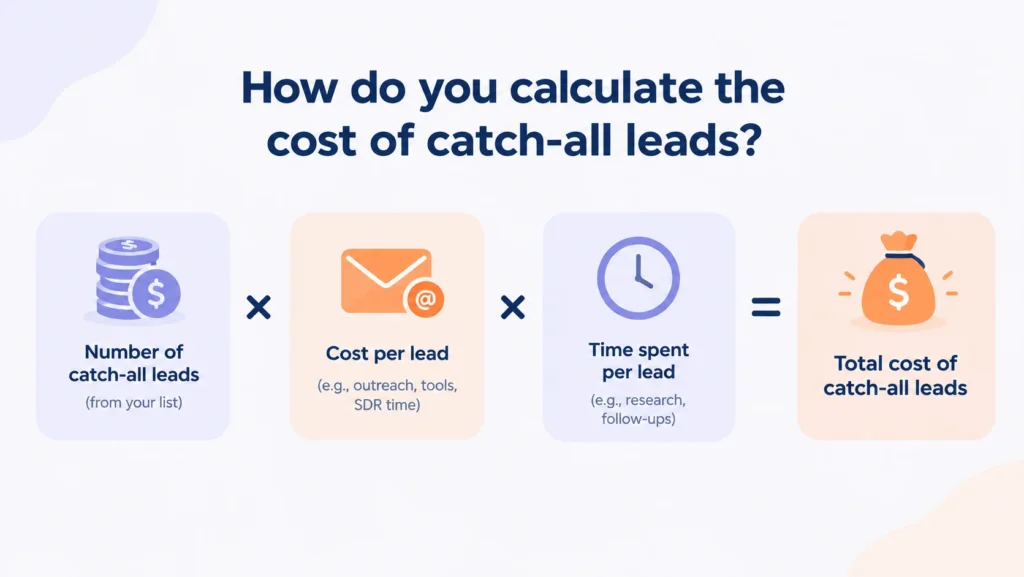
Catch-all lead cost formula
Use this formula to capture the full cost, including the work that happens after a lead arrives:
- Total cost = Acquisition cost + Data cost + SDR cost + Outreach cost
- Most teams stop at acquisition cost, which keeps the true cost of unverified leads hidden. SDR and outreach costs is what makes this a working cost model for bad sales leads.
Cost per lead vs. cost per usable lead
Cost per lead divides your total cost by every lead generated. Cost per usable lead divides it only by the leads your team can work:
- Cost per lead = Total cost ÷ Total leads
- Cost per usable lead = Total cost ÷ Usable leads
- The first treats a catch-all lead the same as a confirmed one. The second doesn't, so it gives you a more honest picture of the cost of invalid email leads.
Example: Calculating catch-all lead costs
Let's apply this to the full campaign, with SDR time and outreach spent on all 1,000 leads.
| Cost item | Calculation | Amount |
|---|---|---|
| Acquisition | Ad spend | $15,000 |
| Data | 1,000 × $0.40 | $400 |
| SDR time | 166.7 hours × $30 | $5,000 |
| Outreach | 1,000 × $1 | $1,000 |
| Total cost | $21,400 |
- So:
- Cost per lead: $21,400 ÷ 1,000 = $21.40
- Cost per usable lead: $21,400 ÷ 750 = $28.53
- Each workable lead costs $7.13 more than the cost per lead suggests. Multiply that by 750 usable leads, and you get $5,350, the exact amount spent on the catch-all segment.
- The higher the catch-all rate, the wider the gap:
| Catch-all rate | Usable leads | Cost per usable lead |
|---|---|---|
| 10% | 900 | $23.78 |
| 25% | 750 | $28.53 |
| 40% | 600 | $35.67 |
- Cost per lead stays at $21.40 in every case. Only cost per usable lead shows the change.
Metrics to track the cost of catch-all leads
Track these numbers for each lead source every month. If one source's catch-all rate goes up, its cost per usable lead usually follows.
| Metric | What it tells you | How to calculate |
|---|---|---|
| Catch-all rate | Share of leads whose mailbox can't be confirmed | Catch-all leads ÷ total leads |
| Usable-lead rate | Share of leads your team can work | Usable leads ÷ total leads |
| Cost per lead | Average total cost of each lead acquired | Total cost ÷ total leads |
| Cost per usable lead | What each workable lead really costs | Total cost ÷ usable leads |
| Bounce rate | How often sends fail, and the risk to sender reputation | Bounced sends ÷ total sends |
| SDR hours per usable lead | Sales time needed to produce one workable lead | Total SDR hours ÷ usable leads |
| Lead-to-opportunity rate | Whether usable leads turn into pipeline | Opportunities ÷ usable leads |
To run this on your last campaign:
- Export the campaign's leads with their source and verification status.
- Add up ad spend, data costs and outreach tool costs. For SDR cost, multiply the hours logged on those leads by your fully loaded hourly rate.
- Calculate the cost per lead and the cost per usable lead.
- Compare the 2 results and shift more budget toward channels that have a low value of cost per usable lead.
How do catch-all emails hurt lead generation ROI?
ROI compares the revenue a campaign brings in with what it costs. Catch-all leads add to the cost right away, while their revenue contribution stays uncertain.
Here's where that shows up.
Here's where that shows up.
Higher cost per usable lead
In our example, a 25% catch-all rate put the cost per usable lead at $28.53, about a third above the $21.40 cost per lead.
- To get the same return, each usable lead now has to bring in roughly a third more pipeline.
Lost SDR capacity
The 41.7 hours spent on catch-all leads could have covered 250 confirmed prospects at the same pace.
- This loss doesn't show up in activity reports. The SDR logs the same number of emails and touches. But fewer of them reach a real person.
- Catch-all leads waste sales budget this way even when nobody overspends. Headcount and hours stay the same. What drops is how much of that time reaches actual buyers.
Distorted lead quality reporting
Let's say you're comparing two lead sources on a volume dashboard:
| Source | Leads | Catch-all rate | Usable leads |
|---|---|---|---|
| Source A | 1,000 | 30% | 700 |
| Source B | 800 | 5% | 760 |
- Source A looks stronger because it brings in more leads. But Source B gives your team more leads to actually work with. A volume dashboard never shows how catch-all emails affect lead quality or pipeline.
- To see how the same problem affects forecasting, read what unresolved catch-alls could cost your pipeline.
How can you reduce wasted spend from catch-all leads?
Identify catch-all leads before expensive outreach
Verify every new lead before it reaches your CRM or sequence tool.
- Clearout Email Verifier runs 20+ validation checks and labels catch-all addresses separately from Valid, Invalid and Unknown results, so you can see how many catch-alls each list contains before anyone starts working on it.
- For catch-all addresses, Clearout's Deep Verify goes a step further. It uses multi-layer SMTP analysis to tell a real mailbox apart from an "accept everything" response, and resolves a portion of catch-all results into Valid or Invalid.
- Resolved as Valid: These move into regular outreach and count as usable leads.
- Resolved as Invalid: These are removed before any SDR time or emails are spent on them.
- Anything still unresolved stays out of sequence until there's a clear reason to work it.
- Using our example, say Deep Verify resolved 100 of the 250 catch-all leads as Valid. Usable leads would go from 750 to 850, and the cost per usable lead would drop from $28.53 to $25.18 (before verification costs). The leads resolved as Invalid would also stop using up SDR hours and outreach credits.
- Deep Verify is available to all Clearout users. For bulk lists, it shows the estimated processing time and credit cost before verification starts, so you can decide whether a list is worth it.
Bottom line
The cost of catch-all leads goes beyond what you paid to acquire them. In our example, the unverified catch-alls made each usable lead cost $28.53, though the cost per lead showed $21.40.
Your next step should be to pull last quarter’s leads by source, calculate cost per usable lead for each source, and verify every new list before it gets to an SDR so your budget goes only to leads that can reply.
Your next step should be to pull last quarter’s leads by source, calculate cost per usable lead for each source, and verify every new list before it gets to an SDR so your budget goes only to leads that can reply.
FAQ
1. How do you verify catch-all emails?
A standard check can only confirm that the domain is catch-all, because the server accepts every address. To go further, Clearout's Deep Verify runs additional SMTP-level checks and resolves a portion of catch-all addresses into Valid or Invalid.
2. How much do catch-all leads cost?
It’s not a fixed amount. Add in what you spend on acquisition, data, SDR time and outreach for those leads. Then compare cost per lead with cost per usable lead. In a 1,000-lead campaign with a 25% catch-all rate, that gap can be more than $7 per workable lead.
3. Do catch-all emails increase bounce rates?
Yes, they can, but not every catch-all email will bounce. A "catch-all" server receives mail to any address on its domain name, no matter if a mailbox exists. Some servers refuse those emails, and others accept them but never send them to the recipient. Therefore, even if you have a low bounce rate, catch-all emails can have a negative impact on your deliverability rates.