
clearout
  • Products
    • Email Verifier Verify emails addresses individually, in bulk or through API, with 99% accuracy
    • Catch-all Email Verification IconCatch-all Email Verification Resolve more catch-all and SEG-protected emails into Valid or Invalid results with Deep Verify.
    • Email Finder Find individual or bulk emails by entering the person & company name or domain
    • Form Guard IconForm Guard Protect your forms from spam, bots, and invalid submissions with real-time email, phone, and name verification.
    • Form Guard IconData Pulse Verify, enrich, and monitor your CRM contacts in real time - heartbeat monitor for your data.
    • ProspectSQL/MQL list building with high levels of personalization, real-time data enrichment and prospect search
    • Clearout For SheetsVerify email addresses directly on Google Sheets with Clearout for sheets add-on
    • Prospect – LinkedIn Chrome ExtensionBuild verified, targeted prospect lists directly from LinkedIn profiles
    • ClearoutPhoneValidate phone numbers across 240+ countries in bulk, quick or real time validation
    • Free Tools
    • Disposable Email Checker
    • Reverse LinkedIn Profile Lookup Tool
    • Reverse Email Lookup Tool
    • Email List Cleaner
    • Company Domain Finder API
  • Resources
      DEVELOPERAPI iconAPI
      Clearout APIs are structured around REST and JSON
      Webhooks iconWebhooks
      Capture real-time events in your application workflow
      Clearout MCP icon Clearout MCP
      Verify and find emails from AI assistants like Claude and Cursor
      Form Guard iconForm Guard
      Real-time form validation to keep bad contacts out of your CRM
      KNOWLEDGE BASEGetting started iconGetting started
      Sending campaigns without bounces is made simple
      FAQ iconFAQ
      Easily find answers to services, security and common questions
      USE CASESLead Generation iconLead Generation
      Learn how professionals generate quality leads
      GUIDES Clearout Insights arrow icon Explore original research, industry statistics, and data-backed insights Pricing arrow iconTransparent & flexible pricing to support pay-per-use or recurringCompare Email Verification Tools arrow iconAI-powered email verification with 99%+ accuracy, real-time validation, and transparent risk scoringCompare Email Finder Tools arrow iconPre-verified B2B email addresses with confidence scoring, find real person email, not role-based addressData Pulse & HubSpot Breeze Intelligence arrow iconPre-verified B2B email addresses with confidence scoring, find real person email, not role-based addressBLOGSEmail Verification ToolsFind Anyone’s Email Address
      Most Accurate, Fast & Free Ways
      Form Validation
      Importance, Ways & Best Practices
      View All Blogs
  • Pricing
  • Integrations
  • Enterprise
  • Login
Try it free Book a 1-to-1 demo
Priyanshi Sharma / November 4, 2026 November 4, 2026

How Sales and SDR Teams Use Email Verification to Protect Quota-Driving Outreach


How Sales and SDR Teams Use Email Verification to Protect Quota-Driving Outreach

TL;DR


  • Sales outreach fails to perform well because of bad data.
  • If one rep sends emails to an unverified list, it negatively affects the reputation of the shared sending domain of all the other reps on the team.
  • The best habit is to verify contacts when you add them in the pipeline with the Clearout Email Verifier.
  • Spend less time chasing invalid contacts and more time connecting with prospects.

Table Of Content


‣ TL;DR
‣ Why does solid outreach still miss quota
‣ How does rep's bad list hurt the whole team
‣ When should sales teams verify contact data
‣ How do SDRs verify without adding a new process
‣ The best email verification workflow for an SDR team
‣ When does email verification becomes an institutional practice
‣ Conclusion
‣ FAQs
Sales teams need a list of highly targeted leads for their outreach. Contact databases bought from Apollo and ZoomInfo will be outdated, invalid, and of no use in a few years. It is estimated that B2B data loses approximately 22 – 30% of its quality yearly due to people changing jobs, domains expiring, departments getting reshuffled, and companies changing their domains.

Out-of-date addresses and bounces will impact sender reputation, inbox placement, and the sales sequences.

Email verification for sales helps avoid receiving invalid addresses in an outreach list. In this guide, I have covered how verification prevents spoofing and deals getting lost before a conversation even begins. Email verification brings more chances to start meaningful conversations to every sales sequence.

Why does solid outreach still miss quota


The decay rate of a list that is exported from LinkedIn or from an intent data platform starts as the changes in company structure occurs.

If an SDR uses this list for outreach without a verification step, what happens is:

  • No record will be created for emails that have an invalid address.
  • Hard bounce rate jumps as emails are sent to bulk records.
  • Once the 2% bounce rate threshold is crossed, the domain-level filter is activated.
  • Inbox placement for the whole team is damaged.

The rate of response declines and meetings slow down.

Of the 49 million addresses that Clearout analyzed, just 29.31% were returned safe to send for a typical unverified outbound list. The others were invalid, catch-all, unknown, or flagged. That is more than half of an unreachable list.

This shows that if working with the sales outreach list, you should run it through an email verification tool like Clearout Email Verifier.

How does rep's bad list hurt the whole team


The majority of outbound teams are deployed from the same sending domain, or a limited number of sending domains. Any sequence that is fired from [email protected] affects that domain's reputation whether it's from Gmail, Outlook or Yahoo. It also increases email bounce rate.

If a rep imports a contact list that has 15% of invalid contacts and executes a 500-contact sequence, they will produce 75 hard bounces. With a few hundred emails sent out per day as part of the team, those 75 bounces can climb into the 2% mark in no time.

To every rep, the consequence lands on. The next day, more emails start landing in spam or promotions instead of primary inboxes. Across the board, there are low reply rates.

What happens and who feels it

What happensWho feels it
The unconfirmed 500 contact list is sent on by one rep.The whole team
Once the bounce rate exceeds 2%, it is considered to be 75 hard bounces.The whole team
Gmail filter at domain levelThe whole team
The team's response rate is below averageThe whole team

Deliverability is a shared infrastructure issue for this reason. The same developer's deployment affects everyone's user; one rep's bad list has an impact on every reply rate. To make it right at the personal level will not work. It needs to be fixed at the workflow level.

When should sales teams verify contact data


The answer is: as soon as you add a contact.

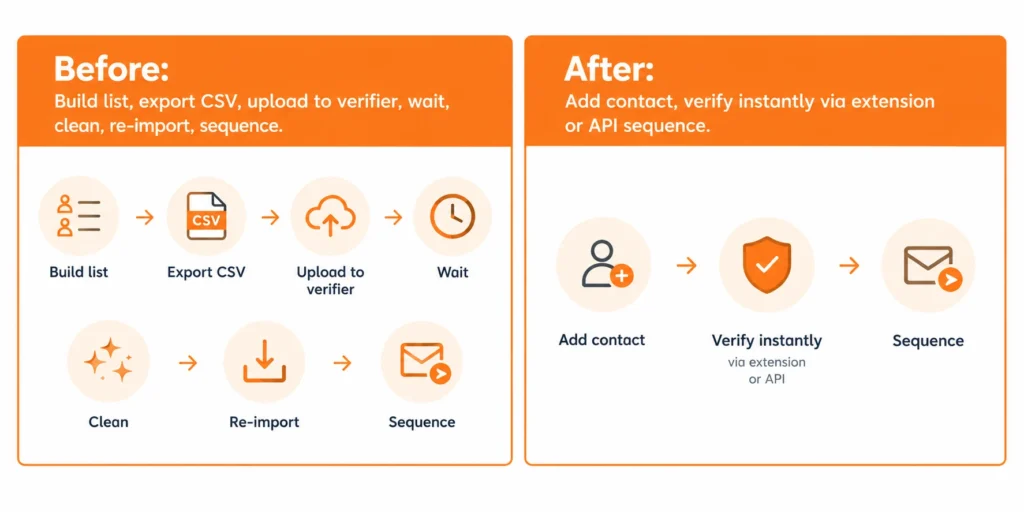
Most teams rely on batch validation. They build a list of 500 contacts over the course of a few days, export as a CSV, upload to a verification tool, clean up the file and import it to their CRM. The list is then run through an enrichment tool like Clay.

Verifying at the point of contact addition changes this process.

Firstly, it stops enrichment credits from going to contacts that are not deliverable. Enrichment tools cost per record. Verifying first means that only the addresses that have been verified use those credits.

Second, it provides a neat start to the CRM. A contact that gets into the system as a “new” contact can get routed, be scored, and be enrolled into sequences without anyone verifying if it is real or not.

If the lists are already in place, re-verification frequency is important:

  • If the segment wasn't contacted within the last 90 days, it should be re-verified prior to the next campaign.
  • Lists created from new sources (new intent platform or event badge scan or inbound form fill) should be checked for accuracy prior to entry to CRM.

How do SDRs verify without adding a new process


The reality for reps is that they have a lot on their plate and adding verification is just another step. It's a fair worry and that's why it should be done at the source, not as a separate step.

Left: Before: Build list, export CSV, upload to verifier, wait, clean, re-import, sequence and After: Add contact, verify instantly via extension or API sequence.

Through Clearout Email Verifier:


Let's say you've built a list of 50 prospects for your next campaign. Before adding them to your sequencer, upload the list to Clearout Email Verifier. It checks the email addresses and gives you the results, so you can identify invalid, risky, and safe-to-send contacts before starting outreach.

You don't have to go through the entire list manually or find out that an address is invalid after sending an email. Just verify the list, review the results, and move the contacts that are safe to send to your sequencer.

Through the API or CRM integration:


Clearout's API validates all addresses at the time of creation for teams who are leveraging inbound forms, intent platforms, or automated contact enrichment. As soon as a contact is made, Clearout Data Pulse will validate the email, phone, and name within seconds and update the same record with the result before any routing rule or sequence enrollment kicks in.

No batch export facility is available. No manual check needed. The verification is carried out within the current workflow when the contact is introduced into the system.

The best email verification workflow for an SDR team


With SDR email verification, it is best to integrate the process into the team's regular contact workflow, rather than doing it as a cleanup task.

This is how to get consistent outbound deliverability:

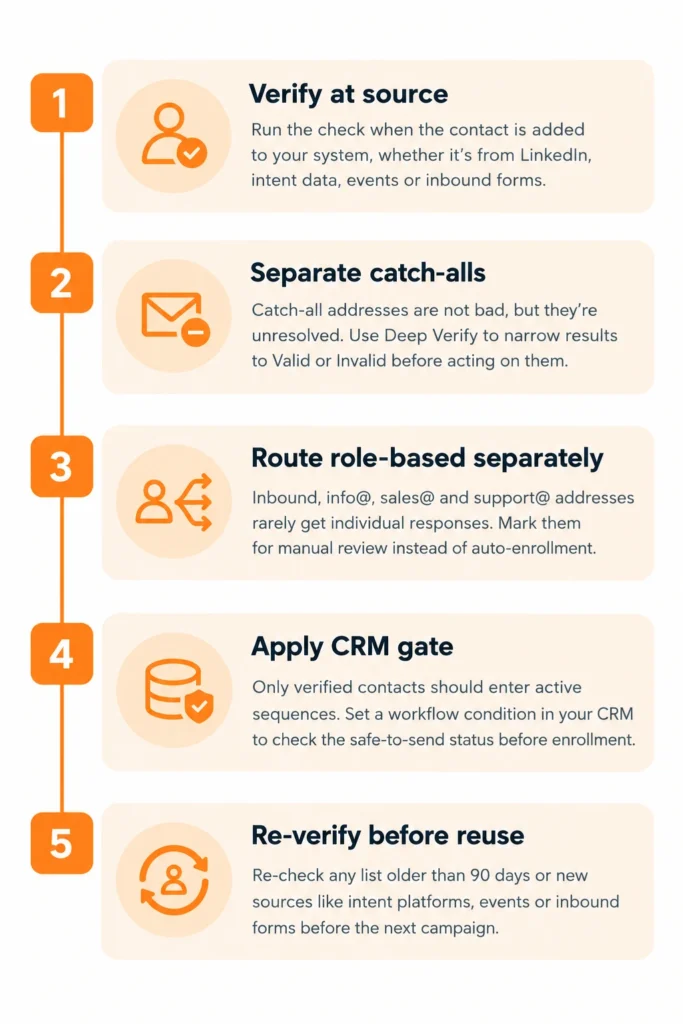
A five-step email verification workflow for an SDR team

Step 1: Check at source


Run a check when the contact is added to your system, regardless of where the contacts originate from (LinkedIn, intent data, events, or inbound forms). Use Clearout Email Verifier to flag risky email addresses.

Step 2: Separate catch-all results before sequencing


Catch-all addresses that remain unresolved, run them through Deep Verify. Come up with a subset of catch-all results, and then use Clearout's Deep Verify to narrow down results to Valid or Invalid, before acting on them. Never block all catch-all results and never sequence all catch-all results the same way as valid addresses.

Step 3: Route role-based addresses separately


Technically deliverable, but rarely results in individual responses in outbound sequences. Don't allow them to be automatically enrolled into the sequence – mark them for manual review.

Step 4: Apply a CRM gate before sequence enrollment


An active sequence should not have any contact that is not marked as verified on their record. Create a workflow condition in your CRM to verify before enrollment. Contacts who don't have an safe-to-send score should not be included in sequences until they get a result.

Step 5: Re-verify Segments prior to re-use


There should be a re-verification check for any contact list older than 90 days prior to the next campaign. Original verification data becomes degraded.

When does email verification becomes an institutional practice


Everyone in the team has a good sender reputation.

If each rep adds verified contacts, no single rep's list will add to the team's bounce debt, helping protect the reputation of the shared sending domain. As a result, inbox placement remains consistent across sequences, reps, and the entire quarter.

SDR capacity shifts to real contacts.

In a team of 5 reps each working 200 contacts per month, a 25% invalid rate means 250 hours of sequence activity goes to unreachable addresses every month. Removing that through email verification does more than just improve reply rates.

In outbound sales, a verified list of 750 contacts that all reach a real inbox will outperform 1,000 contacts where a quarter bounce before anyone reads a word.

Steve Jobs quote on sales.

Successful achievement of the quota becomes predictable.

Once the deliverability is steady and the contact pool is confirmed, the parameters that impact quota are ones that sales leaders can actually control and influence: messaging, targeting and timing. Bad data is purged and shows up nowhere in the report and without being a hidden variable that will impact all metrics.

The biggest difference we've seen in the best sales campaigns is that they now understand the percentage of their email list that will be contacted before the first email is sent, not after. This is only because of email verification.

Conclusion


What you often hear when the outreach doesn't get your "quota" is that it's time to adjust the message. The evidence is typically directed elsewhere.

The hidden cost of most outreach campaigns is bad contact data. It leads to inflated touch count, hurts the sender's reputation that is essential to every rep, and ruins conversion metrics for all intents and purposes.

Email Verification for sales is not a new concept or process to manage. It is a one-step change of habit at the moment of the contact entering the workflow. It is done in one click with Clearout Email Verifier.

Don't wait, add verification to your workflow today!


Start free with Clearout

FAQs


1. How can I improve my outreach efforts if the messaging is on point?
In most cases it is a data quality problem. Unverified lists have a 20–30% invalid or undeliverable rate, meaning a big portion of the outreach will never make it to a genuine email inbox. The invalid bounce can also alert your sending domain, making it less likely to be in the inbox even for contacts who are reached.
2. What's the difference between an invalid email address and a catch-all email address?
If an email is invalid, it has no mailbox and will hard bounce when sending. For a catch-all email, there's no standard verification to check if the particular mailbox is available or not because the domain under which it lives is set to accept all incoming email. Some are from actual buyers. Before deciding whether to send email to catch-all domains, use Clearout's Deep Verify to resolve the portion of the results to Valid or Invalid.

Share this article

Recent Posts

04 Nov 2026
How Sales and SDR Teams Use Email Verification to Protect Quota-Driving Outreach

Learn how sales and SDR teams use email verification to reduce bounces, protect sender reputation, ...

30 Oct 2026
How Invalid Catch-All Leads Drain Your Sales Budget

Learn how catch-all leads waste sales budget on ad spend, SDR time, and outreach. Calculate cost per ...

28 Oct 2026
AI Agents: Why They Are Becoming GTM Infrastructure

Discover how AI agents are transforming GTM workflows through prospecting, outreach, and lead routin ...

27 Oct 2026
How to Add Email Validation to Webflow, Wix, and Squarespace Forms

Add real-time email validation to Webflow, Wix, and Squarespace forms with Clearout Form Guard. Lear ...

26 Oct 2026
Sales Rep Workflow 2026: 5 Steps to Handle Inbound Leads

Learn the 2026 sales rep workflow to validate inbound leads, prioritize qualified prospects, improve ...

Clearout's

Form Guard

Validate email, phone & name on any forms!

  • Real signups only
  • Verified emails
  • Valid phone numbers
  • No fake names
  • Cleaner CRM
  • No devs needed
Try for Free Now

Email Verification, Email Finding Form Guard & Prospecting Service

Expand Your Reach By Finding & Verifying Ideal Prospects.

Sign up & get 100 free credits

No Credit Card required

Create Free Account
Company

Why Clearout?

Pricing

Contact Us

Careers

Press

Enterprise

Sitemap

FAQ

Status

Products

Email Verifier

Catch-all Verification

Email Finder

Form Guard

Data Pulse

Prospect

LinkedIn Email Finder

Reverse Lookup

Google Sheets Add-on

WordPress Plugin

ClearoutPhone

What's New?

Resources

Clearout Insights

Integrations

HubSpot

Team Account

API

Clearout MCP

Compare Email Verifier

Compare Email Finder

Compare Prospecting

Use Cases

Blog

Help

Legal

Privacy Policy

Terms

DPA

Security

Trust Center

Certification

ISO 27001/2022

SOC 2 Type 2

GDPR

Partnership

HubSpot Certified

Affiliates

Partners

Clearout for browser

⚡ Supercharge Your Prospect Research with Clearout's LinkedIn Chrome Extension - Find and Verify Emails with Confidence!

Clearout Chrome extension

Clearout
© 2026 Clearout Inc. All Rights Reserved. Powered by Clearout.
Validate Enrich New Salesforce contacts automatically with Data Pulse. Learn More ➞
X