

- Products
- ResourcesDEVELOPER

 API
Clearout APIs are structured around REST and JSON Webhooks
Capture real-time events in your application workflow Clearout MCP
Verify and find emails from AI assistants like Claude and Cursor Form Guard
Real-time form validation to keep bad contacts out of your CRMKNOWLEDGE BASE Getting started
Sending campaigns without bounces is made simple FAQ
Easily find answers to services, security and common questionsUSE CASES Lead Generation
Learn how professionals generate quality leadsGUIDES Clearout Insights Explore original research, industry statistics, and data-backed insights Pricing Transparent & flexible pricing to support pay-per-use or recurringCompare Email Verification Tools AI-powered email verification with 99%+ accuracy, real-time validation, and transparent risk scoringCompare Email Finder Tools Pre-verified B2B email addresses with confidence scoring, find real person email, not role-based addressData Pulse & HubSpot Breeze Intelligence Pre-verified B2B email addresses with confidence scoring, find real person email, not role-based addressBLOGSEmail Verification ToolsFind Anyone’s Email Address
Most Accurate, Fast & Free WaysForm Validation
Importance, Ways & Best PracticesView All Blogs - Pricing
- Integrations
- Enterprise
- Login



How to Win Back Closed Lost Deals: 6-Step Strategy
TL;DR
- First of all, check your closed lost deals and select the ones with genuine closing potential. Target buyers who really needed it, but were unable to make a move.
- Review your CRM and previous interactions with deals to find out what caused them to not buy your service. This enables you to locate a suitable reason to reconnect.
- Seek out an opportunity to pick up the conversation, like a new decision maker, approved funds, product update or follow up date the buyer mentioned.
- Check the email address of the person through Clearout Email Verifier before sending a win-back email. You wouldn't want to miss a deal because of an invalid address.
- Make it relevant to your last conversation by focusing on what has changed. Bring up the issue that you talked about with the buyer and let them know how they can get assistance now.
- Follow up after buyers' response and interest. Follow up on previous conversations (reopened), meetings (booked), and deals (put back in the pipeline) to determine what is working.
Sometimes a closed-lost deal isn't a lost opportunity. The buyer might have other priorities, there might not be enough budget or it was not the right time. That is why the first step in a closed-lost deal strategy is to know which prospects to pursue, what can make them reach out again, and whether you can reach out to them.
Dixon and McKenna's research, which analyzed 2.5 million sales calls, determined that between 40% and 60% of sales calls ended in no decision. Therefore, don't rule out that old lead list because it might be worth giving another shot to it.
Dixon and McKenna's research, which analyzed 2.5 million sales calls, determined that between 40% and 60% of sales calls ended in no decision. Therefore, don't rule out that old lead list because it might be worth giving another shot to it.
Table Of Content
How to win back closed lost deals
Review the short list of closed lost leads that are still viable, re-read what went wrong with those deals, wait for a call to action, follow up with leads, and verify them!
Step 1: Pull the 1 in 10 worth working
Do not email the entire list – according to win-loss vendor Clozd, around 1 in 10 closed lost opportunities is a real win-back opportunity.
Create a CRM report that will include 4 filters:
Create a CRM report that will include 4 filters:
- Reached demo or proposal stage
- Closed lost 90 days to 18 months ago
- No Open Opportunity at the account.
- A reason for loss is timing, budget, no decision or champion left.
Use those windows as a point of reference and adjust them to your reopen rate.
Step 2: Reread the deal before you write
Use the last three activities on the opportunity to locate the sentence that closed the opportunity. Record the champion, the blocker, and the role that did not participate in a call. Note it, and it will be the first line while connecting back.
Step 3: Select a trigger or wait for the date
A cold "checking in" has no reason to exist. These do:
- The champion's email address bounces or their LinkedIn title gets changed.
- A date that you were given by the lead has come, like budget unlock or "after Q3".
- You delivered the feature that was the blocker
- Your prices or package have been modified.
- A visitor comes back to your pricing page from the account.
No trigger yet? Leave the account in nurture.
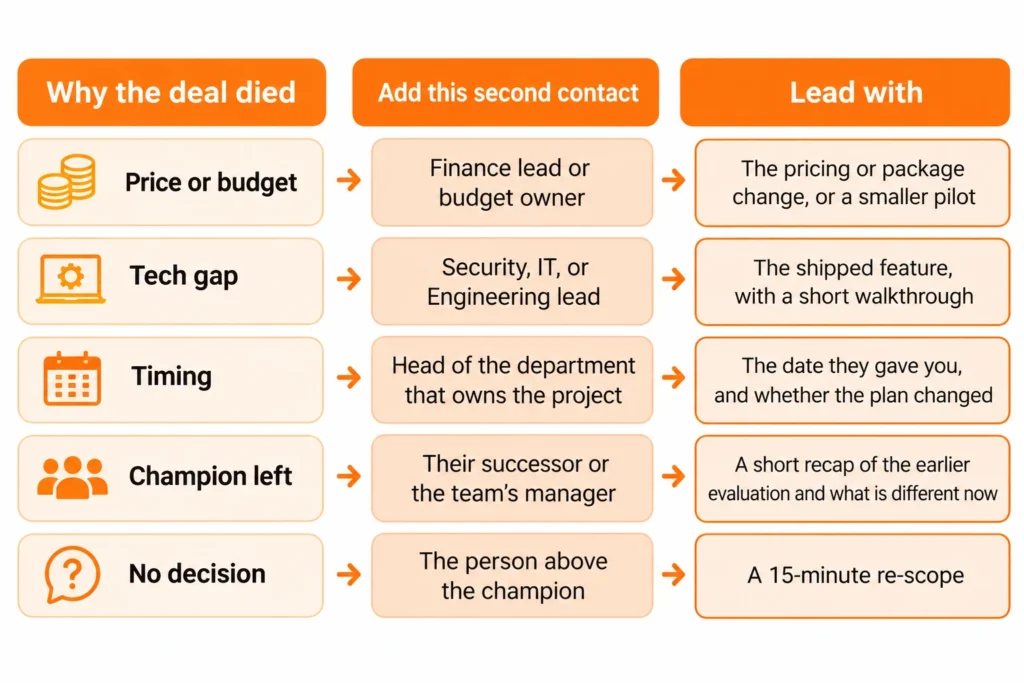
Step 4: Verify, then reach two people
Firstly, run the contact through Clearout Email Verifier. Then, send an email to the original contact and one new stakeholder. To get a complex B2B solution, a buying group contains 6-10 decision-makers. Choose the owning role for the blocker.
Step 5: Write an email
Repeat the date and blocker, followed by a statement about what had changed:
- Security review is a feature that was blocked in March. It shipped on October 14. Here is a 2-minute walkthrough. Would your security lead want to see it?
- "I was told to come back after the Q3 budget lock lifted, which is October 6. Is the plan different now?"
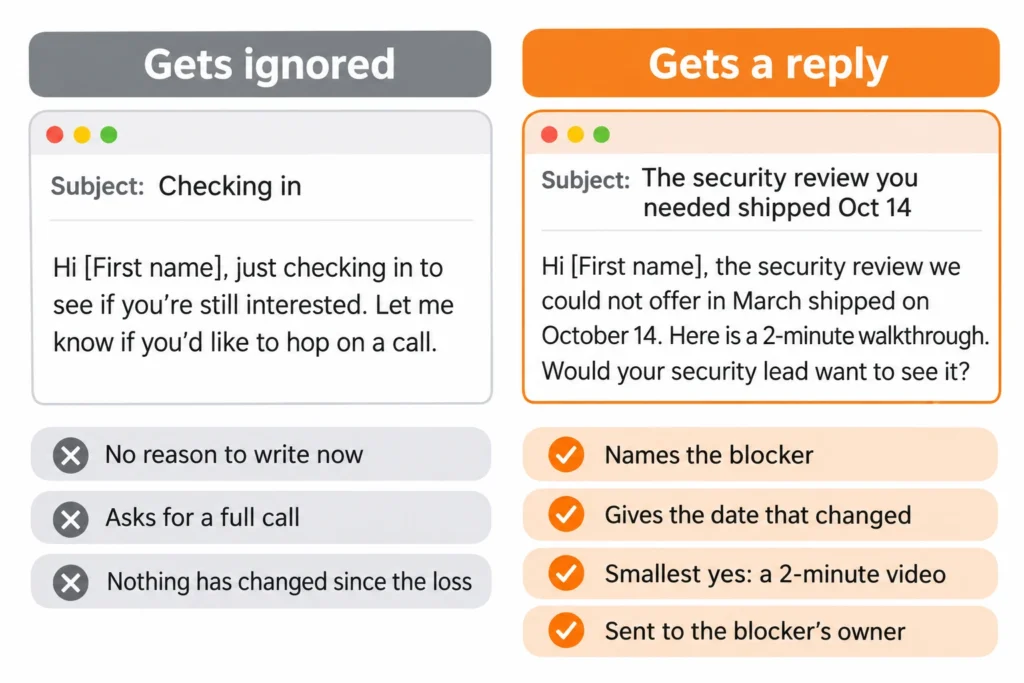
Step 6: Ask for the smallest yes
Provide a 15-minute re-scope, a single team pilot, or written response to the initial objection. If their ask is the complete demo that you have already presented in a closed lost deal win-back, then it's a fail. Record the result with a reason for next quarter's list to be more focused.
Why do closed lost contacts go quiet
Silence has four common causes. Each one leaves a trace you can check in two minutes.
They left the company
Your last email bounces, or their LinkedIn headline shows a new employer. The "no" left with them, and their successor has no stake in the old decision. This is the strongest reason to return.
The address died
Mailboxes close after layoffs and domains change after acquisitions. An invalid address and a “Polite No” look identical in your sequencer, so verify before you interpret anything.
The decision never happened
Check the touch count in the activity history. Two or fewer touches, or a single contact, means the buyer never rejected you. Nobody ran a full evaluation.
The window closed
A budget lock, a fiscal year end, or a competitor contract ended the conversation. Look for the date in your notes. If you never recorded one, that is the field to add before the next loss.
Why verify closed lost contacts before you email them
Old records hold dead addresses, and bounces land on the sending domain every rep shares. Mailbox providers score reputation by sending a domain, so one careless batch hurts the whole team.
How to verify with Clearout Email Verifier
To re-engage closed lost deals, follow these steps:
- Export the filtered accounts from your CRM with email, company, and loss reason.
- Upload the CSV. Clearout runs 20+ checks without sending an email to the contact.
- Filter on the safe-to-send status Clearout returns.
- Import the result back into the CRM so nobody re-sends to a flagged contact.
What to do with each result
| Result | What to do |
|---|---|
| Valid, safe to send | Enter the sequence |
| Invalid | Do not send. Treat it as a job-change signal and find the new owner |
| Catch-all | Hold from core sends. For top accounts, send small batches from a secondary mailbox |
| Unknown | Retry later, then hold |
| Role-based | Use only to find a named buyer |
If an invalid result is returned, find the new owner on LinkedIn, and enter their name and the company domain into Clearout Email Finder. It will return the pre-verified email addresses with a confidence score.
What is the best closed lost deal strategy
Rank before you reach out. Give each account one point for every signal below:
| Signal | Point |
|---|---|
| Reached demo or proposal stage | 1 |
| Champion was active in the 30 days before the loss | 1 |
| Loss reason is timing, budget, no decision, or champion left | 1 |
| A trigger fired in the last 60 days | 1 |
| Contact verified as safe to send | 1 |
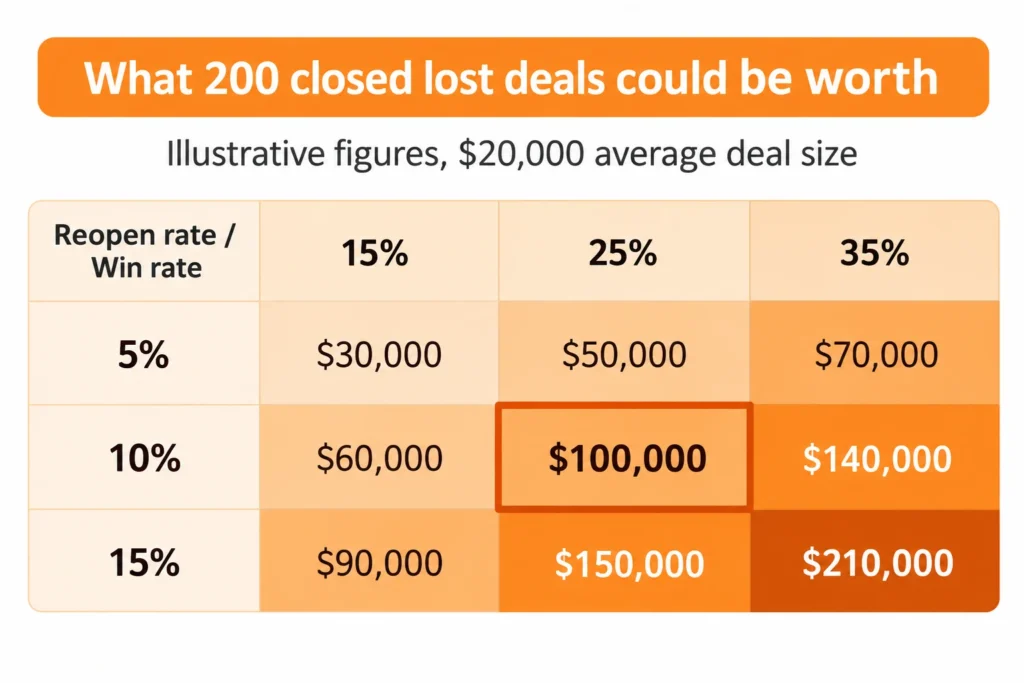
Work scores of 4 and 5 this week, nurture 2 and 3, archive 0 and 1. The size of the prize is determined by closed lost count x reopen rate x win rate x average deal size. Hypothetically, 200 records at a 10% reopen rate, a 25% win rate, and a $20,000 deal is $100,000. Use your own numbers for this.
How to run a win back campaign the right way
Week 1: Verify and score
Verify the full list, rate it and keep 0 and 1 scores. Exclude unopened opportunities, unsubscribes, previous hard bounces, and those who were emailed prior to 30 days ago. Send nothing yet.
Week 2: Send to the top scorers
Send 25 - 50 emails to the best match contact per account, and wait for bounces and responses before the next batch.
Week 3: Add the second stakeholder
Send to the owner of the blocker, in a different angle to the first mail. Double check these contacts before sending.
Week 4: Read the results
Review the Reopen Opportunities per 100 contacts, Bounce rate per batch, and Reply rate by loss reason. Then add required fields like "revisit date" and "blocker" in your closed lost stage.
A closed lost deal strategy works when you filter first, wait for a reason, and email only verified contacts. This week, add "revisit date" and "blocker" to your closed lost stage, pull your first list with the Step 1 filters, and verify it with Clearout Email Verifier.
A closed lost deal strategy works when you filter first, wait for a reason, and email only verified contacts. This week, add "revisit date" and "blocker" to your closed lost stage, pull your first list with the Step 1 filters, and verify it with Clearout Email Verifier.
No credit card required
FAQs
1. Is it possible to re-open a closed-lost deal?
Absolutely. A closed lost deal can turn into an opportunity a few months down the road. Maybe the company has a new executive decision maker, a larger budget or perhaps has finally released the feature the buyer had been waiting for. These changes provide an excuse to reconnect. Identify what has changed since the last talk.
2. How is closed-lost different from no decision?
A closed-lost deal means that the buyer has declined or accepted another vendor. There's nothing like a decision for a decision. In this case, the conversation stalled, the project was placed on hold, or the buyer was not able to receive approval. They might still need your answer but there is something that got in between. That's why it's a great idea to begin your win back list with no decision deals.
3. What should you do with contacts who asked not to be contacted?
Don't send them any more emails. Add all these contacts to a new suppression list and make sure that none of these contacts are in your email verification list. This is important since an email address may still be valid even if someone has chosen not to have it anymore. Before sending a win-back campaign always check the suppression list.