clearout
  • Products
    • Email Verifier Verify emails addresses individually, in bulk or through API, with 99% accuracy
    • Catch-all Email Verification IconCatch-all Email Verification Resolve more catch-all and SEG-protected emails into Valid or Invalid results with Deep Verify.
    • Email Finder Find individual or bulk emails by entering the person & company name or domain
    • Form Guard IconForm Guard Protect your forms from spam, bots, and invalid submissions with real-time email, phone, and name verification.
    • Form Guard IconData Pulse Verify, enrich, and monitor your CRM contacts in real time - heartbeat monitor for your data.
    • ProspectSQL/MQL list building with high levels of personalization, real-time data enrichment and prospect search
    • Clearout For SheetsVerify email addresses directly on Google Sheets with Clearout for sheets add-on
    • Prospect – LinkedIn Chrome ExtensionBuild verified, targeted prospect lists directly from LinkedIn profiles
    • ClearoutPhoneValidate phone numbers across 240+ countries in bulk, quick or real time validation
    • Free Tools
    • Disposable Email Checker
    • Reverse LinkedIn Profile Lookup Tool
    • Reverse Email Lookup Tool
    • Email List Cleaner
    • Company Domain Finder API
  • Resources
      DEVELOPERAPI iconAPI
      Clearout APIs are structured around REST and JSON
      Webhooks iconWebhooks
      Capture real-time events in your application workflow
      Clearout MCP icon Clearout MCP
      Verify and find emails from AI assistants like Claude and Cursor
      Form Guard iconForm Guard
      Real-time form validation to keep bad contacts out of your CRM
      KNOWLEDGE BASEGetting started iconGetting started
      Sending campaigns without bounces is made simple
      FAQ iconFAQ
      Easily find answers to services, security and common questions
      USE CASESLead Generation iconLead Generation
      Learn how professionals generate quality leads
      GUIDES Clearout Insights arrow icon Explore original research, industry statistics, and data-backed insights Pricing arrow iconTransparent & flexible pricing to support pay-per-use or recurringCompare Email Verification Tools arrow iconAI-powered email verification with 99%+ accuracy, real-time validation, and transparent risk scoringCompare Email Finder Tools arrow iconPre-verified B2B email addresses with confidence scoring, find real person email, not role-based addressData Pulse & HubSpot Breeze Intelligence arrow iconPre-verified B2B email addresses with confidence scoring, find real person email, not role-based addressBLOGSEmail Verification ToolsFind Anyone’s Email Address
      Most Accurate, Fast & Free Ways
      Form Validation
      Importance, Ways & Best Practices
      View All Blogs
  • Pricing
  • Integrations
  • Enterprise
  • Login
Try it free Book a 1-to-1 demo
Priyanshi Sharma / October 27, 2026 October 27, 2026

How to Add Email Validation to Webflow, Wix, and Squarespace Forms


How to Add Email Validation to Webflow, Wix, and Squarespace Forms

TL;DR


  • The 3 platforms: Webflow, Wix, and Squarespace, let you add third-party form validation through custom code injection.
  • There is a lightweight JavaScript snippet i.e. Clearout Form Guard to add real-time email validation to any of these forms.
  • The snippet checks the syntax, MX records, and disposable addresses of an email address before adding a contact.
  • Setup is quick, easy, and does not need a developer on all three platforms. It takes less than 10 minutes.
  • By default, no code forms will accept fake, mistyped, and temporary email addresses without validation.

No-code builders speed up the publishing of forms. But they don't make those forms accurate.

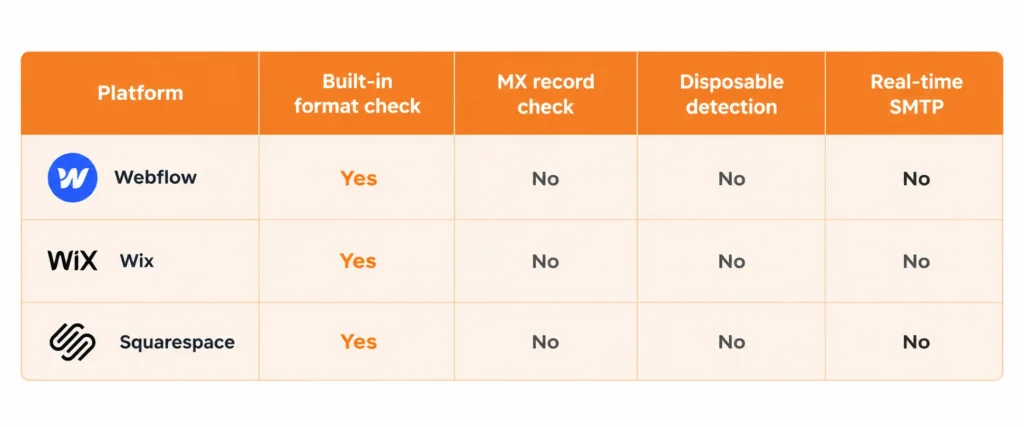
Webflow, Wix, and Squarespace include basic email address check functionality. None of them test if the provided email address is valid, deliverable or safe to send to. That's why so many marketing lists slowly grow with addresses that will never open one email.

If you want to add email validation to forms built on these platforms, you can do it in under 10 minutes using Clearout Form Guard. This guide covers the exact steps on how to add Form Guard to each form builder.

Table Of Content


‣ TL;DR
‣ Why do no-code forms need email validation?
‣ How do you add email validation to Webflow forms?
‣ How to add email validation to Wix forms?
‣ How to add email validation to Squarespace forms?
‣ What does Clearout Form Guard validate on each form field?
‣ What types of email addresses should forms block?
‣ FAQ
Why do no-code forms need email validation?


No-code platforms verify email format but do not verify if there are any active mailboxes or if the address is for a temporary service that is going to expire in minutes.

The outcome is a CRM that can take in entries such as:

  • [email protected] (strings only need to make sense to people and not computers)
  • [email protected] (disposable and will expire soon)
  • [email protected] (no MX, hard bounce assured)

Clearout analyzed 49 million addresses on a typical unverified list, and found that only 29.31% were returned for safe delivery. The difference between "looks valid" and "is deliverable" is greater than teams realize, and every form submission that doesn't get validated is another chance for bad data.

In addition to this, email validation checks go beyond format:

  • MX record lookup: does the domain have active mail exchange records?
  • SMTP check: does the specific mailbox exist at that domain?
  • Disposable detection: is the domain associated with a temporary address service?
  • Catch-all flag: does the domain accept all mail regardless of whether the mailbox exists?

All of these are not activated in Webflow forms, Wix forms and Squarespace forms.

Three-column comparison table comparing Webflow, Wix, and Squarespace.

How do you add email validation to Webflow forms?


You can add custom code using Project Settings in Webflow. A JavaScript code snippet can be inserted into the site-wide head tag for use on all pages, including the pages containing your forms.

To validate Webflow forms with Form Guard, follow these steps:


1) In Clearout, click Create Guard.

2) Choose the fields to validate and set your rules.

3) Copy the generated snippet.

4) Paste it into Webflow forms setting.

5) Publish.

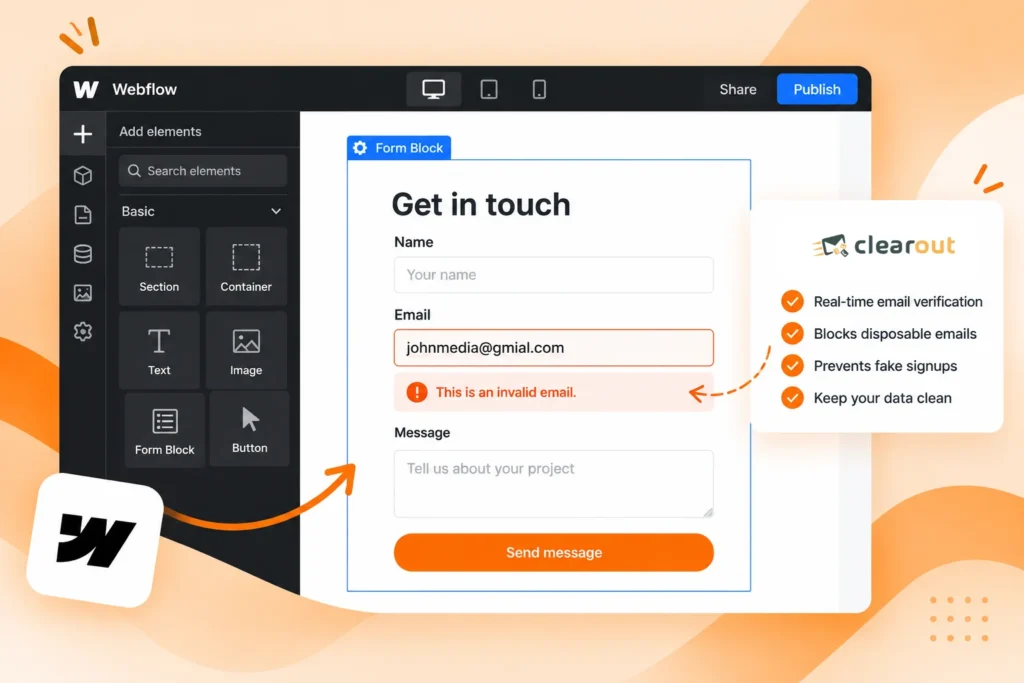
Form Guard automatically recognizes the email input field. Validation takes place real-time when a visitor enters an address and clicks on to the next field. Error message is shown in-line if the address fails. This is important because once submitted, if it is rejected, it means that it will be abandoned. Real visitors can fix typos in Inline Feedback without having to start over again.

Learn more about real-time email verification and how it helps identify invalid addresses before they enter your CRM.

To validate only specific pages, add the snippet in that page's Page Settings → Custom Code instead of Project Settings.

Webflow form builder shows a contact form with an email field displaying an inline validation message.

How to add email validation to Wix forms?


Step by step: Validate email addresses with Form Guard (Wix)


  1. In the Wix dashboard, select Settings.
  2. Select Advanced and then Custom Code.
  3. Click on Add Custom Code.
  4. Add your Form Guard snippet, place in the Head section and select if you want to use it on All Pages.
  5. Select Apply and publish.

Use the Wix HTML Embed block.

  1. From the Wix Editor, select Add Elements and select Embed Code.
  2. Place an HTML iframe block in your page.
  3. Place the Form Guard snippet in the block.

The custom code panel approach is cleaner for site-wide use. If you wish to only validate on one particular page, use the embed block.

Wix forms use the type of the input fields to identify them as email fields. Form Guard reads automatically in most cases and applies validation rules without manually mapping anything. If your form was created by you, make sure to verify that the field was detected prior to live on the Clearout dashboard.

How to add email validation to Squarespace forms?


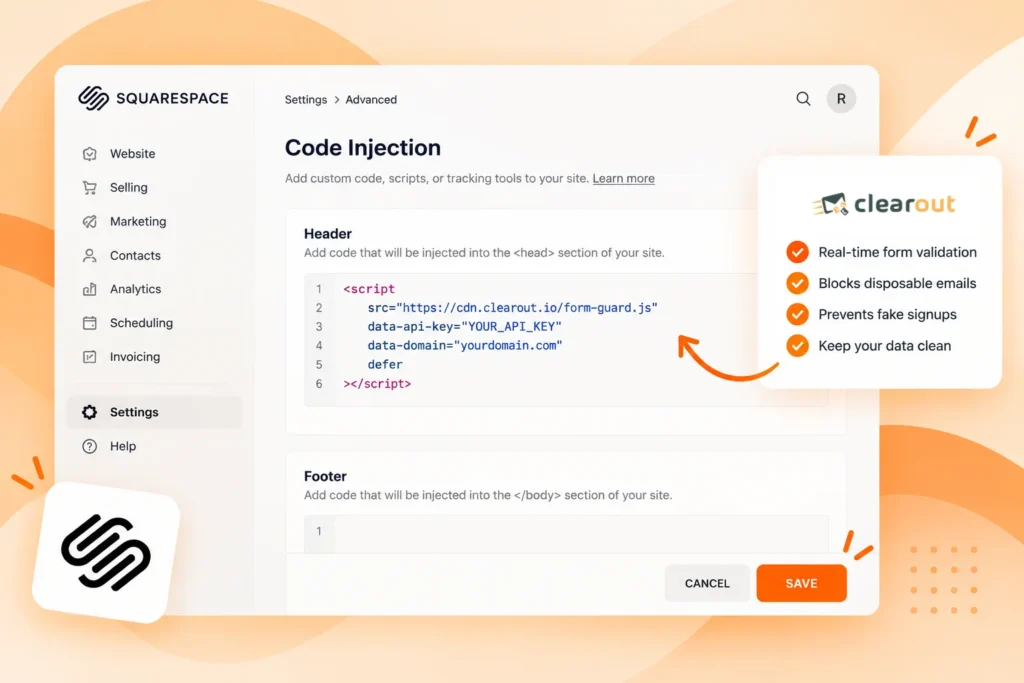
Squarespace has a Code Injection area in the Advanced settings. This is the usual way to add 3rd-party scripts.

Validate emails for your Squarespace forms using Form Guard.


  1. From your Squarespace dashboard, click Settings.
  2. Click on Advanced and then Code Injection.
  3. Copy and paste Form Guard into the Header section.
  4. Click Save.
  5. In Clearout, go to Form Guard and ensure that you have integrated it with Squarespace.

Code Injection on Squarespace will happen on all pages, meaning all forms throughout the site will be valid. Rules apply per Guard. For different requirements on different forms, create separate Guards or use custom selectors/options in the snippet.

Squarespace Code Injection settings panel showing the Header field with a script tag pasted in.

Try Clearout Form Guard Free

What does Clearout Form Guard validate on each form field?


Form Guard's 3 checks are concurrently activated: email, phone and name. All three happen as the visitor fills in the form and in real time.

FieldWhat Form Guard looks for
EmailSyntax, MX records, disposable, role-based, gibberish, catch-all detection, and Safe To Send status suggestions
PhoneNumber format, country code, carrier, line type (mobile/landline/VoIP)
NameRandom words, characters, "test," "asdf," etc.

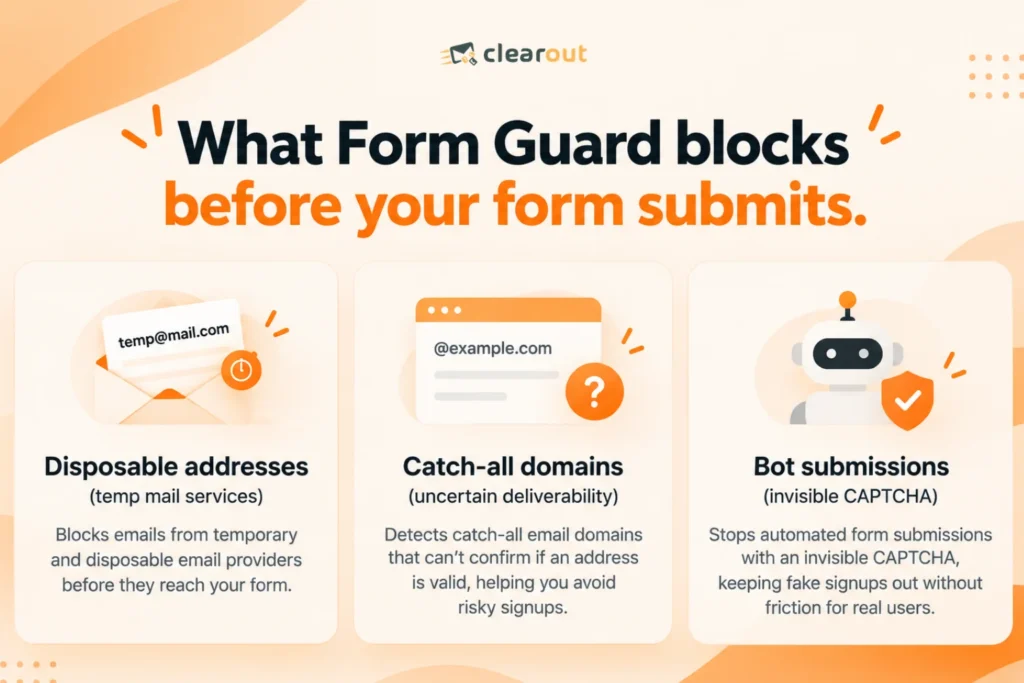
Separate bot protection, in the background, with an invisible CAPTCHA. In reality, there is no additional step for the real visitors. Bots will not show anything when the challenge fails, before the form is submitted.

Form Guard will return an inline error message when a field has input.

What types of email addresses should forms block?


Disposable addresses


The most common trouble or issue on marketing forms is disposable addresses. Services such as Mailinator, Guerrilla Mail and 10 Minute Mail provide addresses that are valid for just a few minutes. They even pass the format checks, since the domain is real. Form Guard's disposable detection database has thousands of known temporary mail providers.

Catch-all addresses


If the mailbox has no such name, then the SMTP check will fail, but it will not be detected at the domain level. An address with a catch-all domain won't bounce right away. It might end up in an unchecked inbox or an archiving system.

Role-based addresses


Address@ is for info, support, sales, etc., not for individual users. They tend to be standard on a business contact page and are not really used for a marketing or lead nurture campaign. They are detected and flagged optionally by Form Guard, so that you can choose per campaign whether to include them or not.

What Form Guard blocks before your form submits.

Validating Webflow, Wix, and Squarespace forms with email just takes a one-snippet change and is less than 10 minutes. If you don't use Form Guard, all forms become a source of fake, disposable, and undeliverable addresses that inflate the contact count without any real pipeline.

Clearout Form Guard, the best form validation tool, seals that door at the gate. It does not let fake entries or bots enter your CRM or sequences.

The setup steps above are platform-specific and tested. Once the snippet is in, Form Guard handles the rest automatically.

Add Form Guard to your forms in minutes


Explore Form Guard | Book A Demo

FAQ


Is Form Guard compatible with Webflow, Wix and Squarespace?
Yes. All three platforms support custom code injection, which is how Form Guard runs. Webflow has Project Settings, Wix has a Custom Code panel and Squarespace has Code Injection under Advanced. Copy paste it once and it will work for all your forms on your site.
Will Form Guard alter my current form design?
No. Form Guard enhances the functionality of your form without altering its visuals. The inline messages will show below the field, in the same style you use for your form.
What happens if a visitor enters a disposable email?
Form Guard prevent disposable email addresses from being submitted to your CRM. The visitor will be shown a line error message asking for the personal email address. The form is not submitted and the contact record is not created.

Share this article

Recent Posts

27 Oct 2026
How to Add Email Validation to Webflow, Wix, and Squarespace Forms

Add real-time email validation to Webflow, Wix, and Squarespace forms with Clearout Form Guard. Lear ...

26 Oct 2026
Sales Rep Workflow 2026: 5 Steps to Handle Inbound Leads

Learn the 2026 sales rep workflow to validate inbound leads, prioritize qualified prospects, improve ...

24 Oct 2026
What Is a Secure Email Gateway? Why It Breaks Email Verifiers

Secure email gateways like Proofpoint and Mimecast hide which mailboxes exist. Learn why emails retu ...

24 Oct 2026
Email Verification ROI: How Long Until It Pays for Itself?

Learn how to calculate email verification ROI, measure savings from fewer bounces and wasted SDR hou ...

21 Oct 2026
B2B Intent Data: How to Use It for Cold Outreach in 7 Steps

Learn what B2B intent data is, how to prioritize accounts with it, and how to turn intent signals in ...

Clearout's

Form Guard

Validate email, phone & name on any forms!

  • Real signups only
  • Verified emails
  • Valid phone numbers
  • No fake names
  • Cleaner CRM
  • No devs needed
Try for Free Now

Email Verification, Email Finding Form Guard & Prospecting Service

Expand Your Reach By Finding & Verifying Ideal Prospects.

Sign up & get 100 free credits

No Credit Card required

Create Free Account
Company

Why Clearout?

Pricing

Contact Us

Careers

Press

Enterprise

Sitemap

FAQ

Status

Products

Email Verifier

Catch-all Verification

Email Finder

Form Guard

Data Pulse

Prospect

LinkedIn Email Finder

Reverse Lookup

Google Sheets Add-on

WordPress Plugin

ClearoutPhone

What's New?

Resources

Clearout Insights

Integrations

HubSpot

Team Account

API

Clearout MCP

Compare Email Verifier

Compare Email Finder

Compare Prospecting

Use Cases

Blog

Help

Legal

Privacy Policy

Terms

DPA

Security

Trust Center

Certification

ISO 27001/2022

SOC 2 Type 2

GDPR

Partnership

HubSpot Certified

Affiliates

Partners

Clearout for browser

⚡ Supercharge Your Prospect Research with Clearout's LinkedIn Chrome Extension - Find and Verify Emails with Confidence!

Clearout Chrome extension

Clearout
© 2026 Clearout Inc. All Rights Reserved. Powered by Clearout.
Validate Enrich New Salesforce contacts automatically with Data Pulse. Learn More ➞
X