clearout
  • Products
    • Email Verifier Verify emails addresses individually, in bulk or through API, with 99% accuracy
    • Email Finder Find individual or bulk emails by entering the person & company name or domain
    • Form Guard IconForm Guard Protect your forms from spam, bots, and invalid submissions with real-time email, phone, and name verification.
    • Form Guard IconData Pulse Verify, enrich, and monitor your CRM contacts in real time - heartbeat monitor for your data.
    • Prospect SQL/MQL list building with high levels of personalization, real-time data enrichment and prospect search
    • Clearout For SheetsVerify email addresses directly on Google Sheets with Clearout for sheets add-on
    • Prospect – LinkedIn Chrome ExtensionBuild verified, targeted prospect lists directly from LinkedIn profiles
    • ClearoutPhoneValidate phone numbers across 240+ countries in bulk, quick or real time validation
    • Free Tools
    • Disposable Email Checker
    • Reverse LinkedIn Profile Lookup Tool
    • Reverse Email Lookup Tool
    • Email List Cleaner
    • Company Domain Finder API
  • Resources
      DEVELOPERAPI iconAPI
      Clearout APIs are structured around REST and JSON
      Webhooks iconWebhooks
      Capture real-time events in your application workflow
      Form Guard iconForm Guard
      Real-time form validation to keep bad contacts out of your CRM
      KNOWLEDGE BASEGetting started iconGetting started
      Sending campaigns without bounces is made simple
      FAQ iconFAQ
      Easily find answers to services, security and common questions
      USE CASESLead Generation iconLead Generation
      Learn how professionals generate quality leads
      GUIDESPricing arrow iconTransparent & flexible pricing to support pay-per-use or recurringCompare Email Verification Tools arrow iconAI-powered email verification with 99%+ accuracy, real-time validation, and transparent risk scoringCompare Email Finder Tools arrow iconPre-verified B2B email addresses with confidence scoring, find real person email, not role-based addressBLOGSEmail Verification ToolsFind Anyone’s Email Address
      Most Accurate, Fast & Free Ways
      Form Validation
      Importance, Ways & Best Practices
      View All Blogs
  • Pricing
  • Integrations
  • Enterprise
  • Login
Try it free Book a 1-to-1 demo
Akanksha Mishra / June 17, 2026 June 17, 2026

How To Build an Automated Email Finding Workflow in n8n?


How To Build an Automated Email Finding Workflow in n8n?

SDRs configure triggers, map CRM fields, and set follow-up timing in n8n with precision. What gets skipped is email validation. Invalid addresses, role-based inboxes, and decayed contacts enter the sequence unchecked. Bounce rates climb, sender domains get flagged, and outreach stops delivering. Every hour spent building a sequence that never lands is directly wasted.

This guide covers how to build an email finding workflow inside n8n using Clearout's API, so every contact that reaches your outreach sequence has a confirmed email before it gets there.

Table of Content


‣ What does this workflow do?
‣ Workflow walkthrough: SDR list enrichment
‣ Why use n8n for email automation?
‣ What do you need before you build an n8n workflow?
‣ How do you build this Email Finding workflow in n8n?
‣ Where else can you use this workflow? Advanced use cases
‣ FAQs

What does this workflow do?


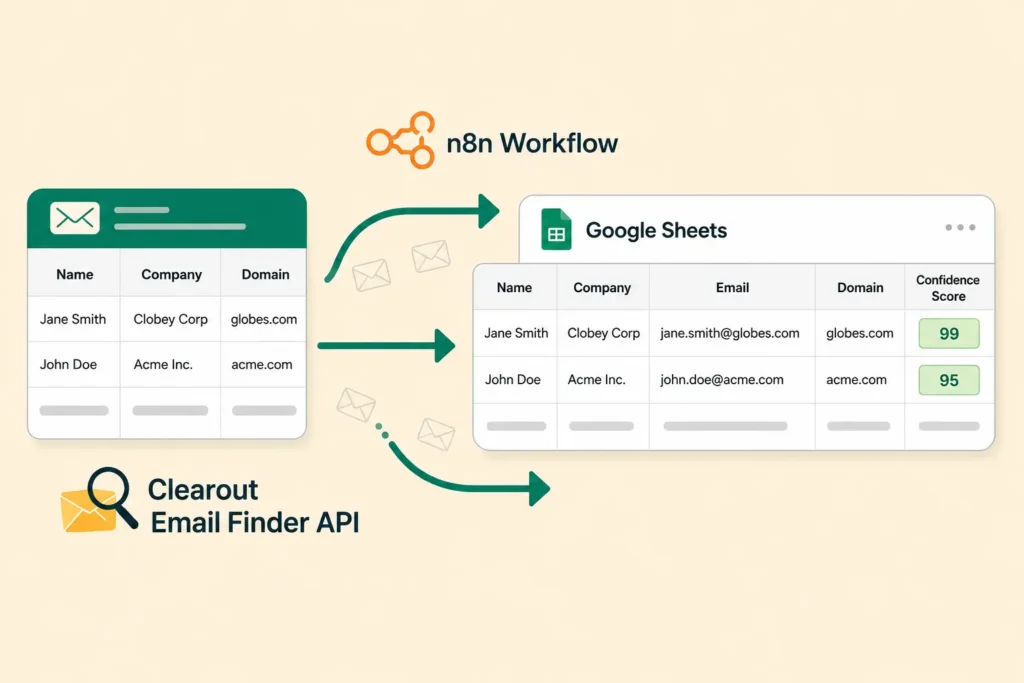
Clearout Email Finder workflow in n8n.

This workflow handles the full email discovery process inside n8n, from reading raw prospect data to writing verified emails back into your sheet.

Here is exactly what it does:

  • Finds email addresses from a list of names and company domains using Clearout's Email Finder API
  • Returns a pre-verified email address with an AI-based confidence score for each prospect
  • Write the discovered email and confidence score back into your Google Sheet row by row

Workflow walkthrough: SDR list enrichment


This blog uses a common SDR scenario to walk through how the workflow is built and where each node fits in.

An SDR scrapes 400 LinkedIn profiles with names, companies, and job titles into a Google Sheet. The automation layer is ready. What is missing is a verified email address for each contact.

This workflow reads each row, passes the name and company domain to Clearout's Email Finder API, and writes the verified email back into the sheet. Each step in the walkthrough below maps directly to this scenario.

Why use n8n for email automation?


n8n gives you direct access to any REST API through its HTTP Request node. For teams running email finding workflows, that means no middleware, no extra tools, and full control over how data moves.

Here are the 4 reasons it works well for this use case:

1. HTTP request node covers any REST API


n8n's HTTP Request node connects to any REST endpoint directly. Clearout doesn't have a native n8n node. It doesn't need one. You specify the endpoint URL, add your API token as a Bearer header, include the JSON body and it works.

2. Built-in data transformation without extra code


n8n's Set node and expression editor let you clean, reformat, and restructure data between steps directly on the canvas. Strip https:// from a domain, extract only the fields Clearout needs, rename columns to match your sheet headers. All of it happens inline, without a single line of custom code or a separate cleaning pipeline

3. Automatic data handling between steps


When the Google Sheets node runs, n8n automatically splits each row into a separate JSON item and passes it through the rest of the workflow individually. No loops, no manual iteration, no extra configuration. Every contact gets processed through the HTTP Request node and written back to the sheet without you touching the flow logic.

4. Self-hosted means your data stays put


You can run this entire n8n workflow automation on your own server. Scraped LinkedIn data never passes through a third-party platform outside your control. That matters for teams handling large contact volumes or working under data compliance requirements.

What do you need before you build an n8n workflow?


Before building the workflow, make sure you have these three things in place. Each one is required for the n8n email finding workflow to run end to end.

  • n8n instance cloud or self-hosted

  • You need an active n8n workspace, either cloud at n8n.io or self-hosted via Docker or npm. Both work for this workflow. Self-hosting is the better option if data residency is a concern.


  • Clearout account and API key

  • Sign up at app.clearout.io/register. Free credits are included on signup. After logging in,


go to Settings → API Token to get your key.

This token goes into every HTTP Request header as a Bearer token for the clearout n8n integration.

  • Google Sheet with prospect data

  • Your sheet needs two columns at minimum: prospect full name and company domain (for example, acme.com). This is the exact input Clearout's Email Finder API takes. Use domains over company names where possible domain-based lookups return more accurate results.


  • Basic familiarity with n8n's canvas and HTTP Request node

  • You don't have to be an n8n super user, but you should be familiar with adding nodes, connecting them, and configuring an HTTP Request node by adding a method, URL, headers, and a JSON body. This workflow is mostly based on that. If you haven't used the HTTP Request node before, run through one test call against any public API before starting.


How do you build this Email Finding workflow in n8n?
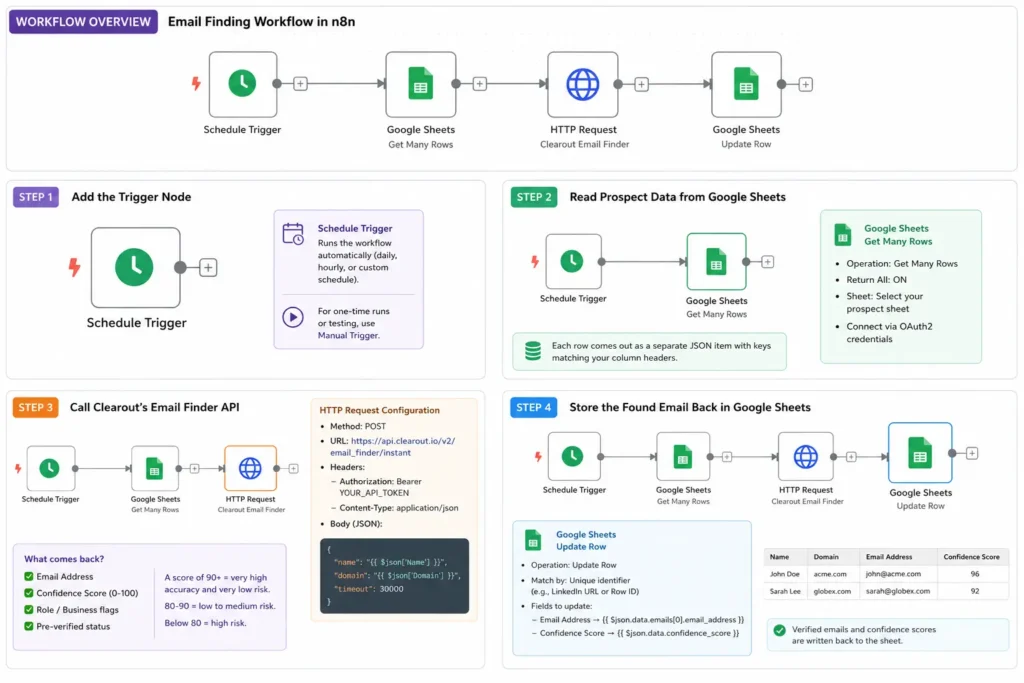

Automated email discovery workflow in n8n

This section walks through each node in the n8n email finding workflow in order. Each step builds on the previous one. The full flow goes from trigger to Google Sheets read, to Clearout API call, to sheet update.

Step 1: Add the trigger node


Open a blank workflow in n8n. You need to add a Schedule Trigger if you want the workflow to run automatically, daily, or hourly. Also use the Manual Trigger node instead for one-time runs or testing. The trigger has one job: start the workflow.

Step 2: Read prospect data from Google Sheets


Add a Google Sheets node after the trigger. Configure it:

  • Operation: Get Many Rows
  • Return All: On
  • Sheet: Select your prospect sheet

Connect via OAuth2 credentials. When this node runs, each row comes out as a separate JSON item with keys matching your column headers. n8n processes every item through the next node automatically.


Step 3: Call Clearout's Email Finder API


Add an HTTP Request node. This is the core of the n8n email finding workflow. The Clearout Email Finder API accepts a name and domain, pre-verifies the discovered address, and returns a confidence score in a single call.

Configuration:

  • Method: POST
  • URL: https://api.clearout.io/v2/email_finder/instant
  • Header, Authorization: Bearer YOUR_API_TOKEN
  • Header, Content-Type: application/json

Request body:

{
"name": "{{ $json['Name'] }}",
"domain": "{{ $json['Domain'] }}",
"timeout": 30000

}

Replace Name and Domain with your exact column header names.

What comes back:

Clearout returns a JSON response with the discovered email, a numeric confidence score (0-100), and flags for whether the address is role-based or a business account. The Email Finder pre-verifies the address during the finding process itself. No separate verification call is needed. The confidence score reflects that real-time check.

Clearout's confidence score is an AI-driven indicator calculated in real time. A score of 90 and above means very high accuracy and very low deliverability risk, safe for sales sequences and important campaigns.

Scores between 80 and 90 are generally accurate with low to medium risk, suitable for prospecting and warming sequences. Scores below 80 indicate low accuracy and high deliverability risk best reserved for low-priority tasks only.

Step 4: Store the found email back in Google Sheets


Add another Google Sheets node after the HTTP Request node.

  • Operation: Update Row
  • Matching Column: A unique identifier. LinkedIn URL or row ID works well.
  • Fields to update:
    • Email Address → {{ $json.data.emails[0].email_address }}
    • Confidence Score → {{ $json.data.confidence_score }}

The sheet now has a verified email and confidence score per row. Your team can filter by score threshold and push qualified contacts directly into the outreach sequence.

Where else can you use this workflow? Advanced use cases
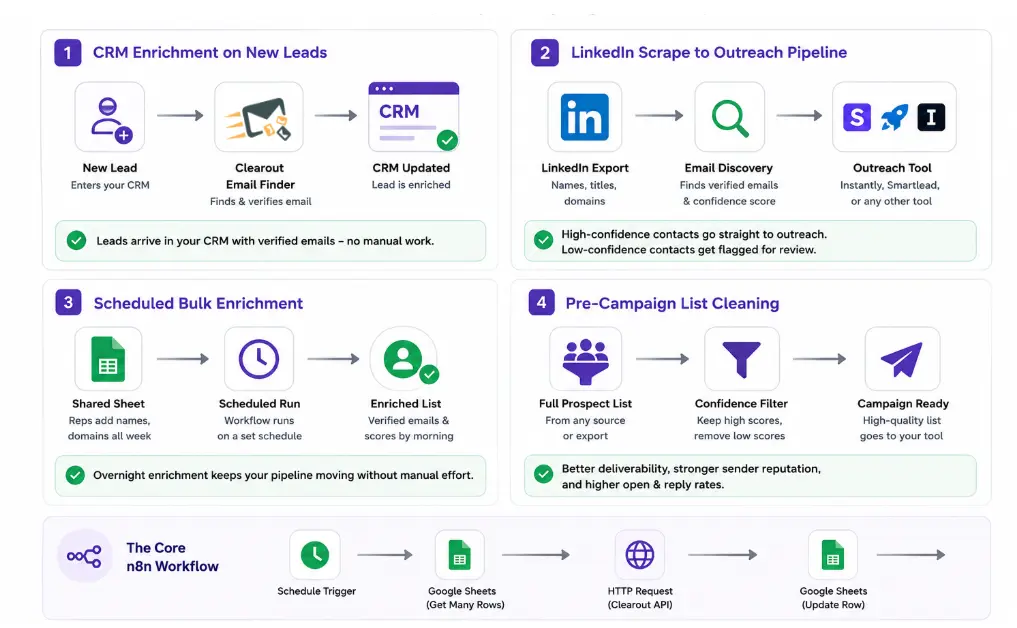

CRM and outreach automation using n8n

The same n8n workflow for email campaigns and CRM enrichment applies beyond the LinkedIn scrape scenario. These are the most common extensions teams build on top of this base workflow.

  • CRM enrichment on new leads

  • Trigger the workflow via webhook when a new lead enters your CRM. Clearout finds the email and n8n pushes it back to the right CRM field automatically. The lead arrives enriched before any rep sees it. No manual lookup, no enrichment queue, no data entry.


  • LinkedIn scrape to outreach pipeline

  • LinkedIn exports give you names, titles, and domains. They don't give you verified emails. Run those exports through this workflow before they reach your sequencing tool. Contacts above your confidence threshold go directly into Instantly, Smartlead, or whichever tool your team uses. Contacts below get flagged for review before they touch your sender domain.


  • Scheduled bulk enrichment

  • Reps add names and domains to a shared sheet throughout the week as they prospect. The workflow runs on a set schedule overnight, finds every email, scores it, and writes results back into the sheet. By morning, the list is enriched and ready. No waiting on a dedicated ops person, no manual enrichment requests, no tool switching.


  • Pre-campaign list cleaning

  • Run your full prospect list through this workflow before any large send. High-confidence contacts go into the campaign. Low-confidence contacts get filtered out before they reach your sending tool. Bounce rates stay controlled, your sender domain stays out of spam filters, and your open and reply rates reflect actual engagement instead of failed deliveries.


Find Pre-verified Emails Inside n8n


Try Clearout for Free

FAQs


1. What is email verification within n8n?
n8n doesn't have built-in email verification. You access Clearout's verification directly through n8n's HTTP Request node by calling Clearout's Email Verify API endpoint, which runs SMTP checks, domain validation, and spam trap detection and returns a result that flows into the next node in your workflow.
2. How does n8n work?
N8n allows you to design custom workflows to verify if email addresses are valid. These flows can be configured to validate individual emails or to process entire lists of contacts.
3. How can n8n help your business?
n8n cuts out the manual work between your tools. Reps stop jumping between a spreadsheet, an email finder, and a CRM to enrich one contact. Instead, n8n runs the entire sequence automatically, connects to any REST API, processes data between steps without code, and triggers on a schedule or an event. Lists get enriched faster, CRM data stays clean, and outreach sequences run on verified contacts instead of raw exports.

Share this article

Recent Posts

17 Jun 2026
How To Build an Automated Email Finding Workflow in n8n?

Build an automated email finding workflow in n8n with Clearout Email Finder API. Find and verify ema ...

15 Jun 2026
Cold Email Automation Setup To Protect Sender Reputation

Learn how to set up cold email automation without hurting sender reputation. Discover domain warmup, ...

11 Jun 2026
5 Signs Your HubSpot CRM Needs Real-Time Data Validation

Dirty data in your HubSpot CRM costs more than you think. Explore 5 warning signs your HubSpot data ...

04 Jun 2026
Sales Funnel Metrics & KPIs You Must Track in 2026

Discover the sales funnel metrics in 2026, including MQL-to-SQL rate, pipeline velocity, CAC, conver ...

02 Jun 2026
Top 11 LinkedIn Automation Tools in 2026 (By Use Case)

Explore the top LinkedIn automation tools of 2026 for prospecting, outreach, content and workflow au ...

Clearout's

Form Guard

Validate email, phone & name on any forms!

  • Real signups only
  • Verified emails
  • Valid phone numbers
  • No fake names
  • Cleaner CRM
  • No devs needed
Try for Free Now

Email Verification, Email Finding Form Guard & Prospecting Service

Expand Your Reach By Finding & Verifying Ideal Prospects.

Sign up & get 100 free credits

No Credit Card required

Create Free Account
Company

Why Clearout?

Pricing

Contact Us

Careers

Press

Enterprise

Sitemap

FAQ

Status

Products

Email Verifier

Email Finder

Form Guard

Data Pulse

Prospect

LinkedIn Email Finder

Reverse Lookup

Google Sheets Add-on

WordPress Plugin

ClearoutPhone

What's New?

Resources

Integrations

HubSpot

Team Account

API

Compare Email Verifier

Compare Email Finder

Compare Prospecting

Use Cases

Blog

Help

Legal

Privacy Policy

Terms

DPA

Security

Trust Center

Certification

ISO 27001/2022

SOC 2 Type 2

GDPR

Partnership

HubSpot Certified

Affiliates

Partners

Clearout for browser

⚡ Supercharge Your Prospect Research with Clearout's LinkedIn Chrome Extension - Find and Verify Emails with Confidence!

Clearout Chrome extension

clearout
© 2026 Clearout Inc. All Rights Reserved. Powered by Clearout.
Keep HubSpot data clean on autopilot — validate, enrich, and sync contacts in real time with Data Pulse. Learn More ➞
X