

- Products
- ResourcesDEVELOPER

 API
Clearout APIs are structured around REST and JSON Webhooks
Capture real-time events in your application workflow Clearout MCP
Verify and find emails from AI assistants like Claude and Cursor Form Guard
Real-time form validation to keep bad contacts out of your CRMKNOWLEDGE BASE Getting started
Sending campaigns without bounces is made simple FAQ
Easily find answers to services, security and common questionsUSE CASES Lead Generation
Learn how professionals generate quality leadsGUIDES Clearout Insights Explore original research, industry statistics, and data-backed insights Pricing Transparent & flexible pricing to support pay-per-use or recurringCompare Email Verification Tools AI-powered email verification with 99%+ accuracy, real-time validation, and transparent risk scoringCompare Email Finder Tools Pre-verified B2B email addresses with confidence scoring, find real person email, not role-based addressData Pulse & HubSpot Breeze Intelligence Pre-verified B2B email addresses with confidence scoring, find real person email, not role-based addressBLOGSEmail Verification ToolsFind Anyone’s Email Address
Most Accurate, Fast & Free WaysForm Validation
Importance, Ways & Best PracticesView All Blogs - Pricing
- Integrations
- Enterprise
- Login



Sales Multithreading: Reach Multiple Decision-Makers
TL;DR
- Multithreading sales involves developing connections with various potential buyers within the same account.
- The first 7 roles you should map out are the economic buyer, the decision maker, the champion, the influencer, the procurement, the IT/security and the end user.
- Request names from your champion, then use your CRM, LinkedIn, and job postings to verify those contacts.
- Get business email addresses through Clearout Email Finder along with the confidence score.
- Change the subject of your initial email, send them out on different days and inform your champion before connecting with their colleagues.
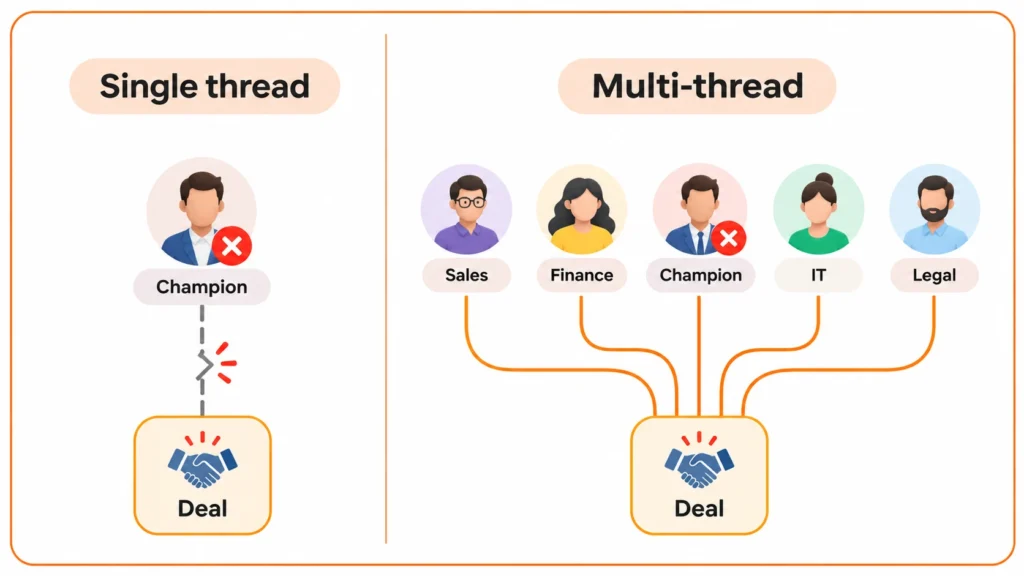
Sales multithreading involves building relationships with multiple people in the same company rather than relying on just one contact. If your champion decides to drop out of the deal, switch roles or goes silent, the deal can still move forward.
Gong Labs found that for every 1.8 million opportunities analyzed, won deals generated nearly twice as many buyer contacts as lost deals and multi-threading increased win rates by 130% on deals that were greater than $50K.
It's not always sufficient to get to one person in a target account in sales. You need to communicate with a number of stakeholders, understand their role and make sure your message gets into the right inboxes.
Let's delve deeper into multithreading sales.
Gong Labs found that for every 1.8 million opportunities analyzed, won deals generated nearly twice as many buyer contacts as lost deals and multi-threading increased win rates by 130% on deals that were greater than $50K.
It's not always sufficient to get to one person in a target account in sales. You need to communicate with a number of stakeholders, understand their role and make sure your message gets into the right inboxes.
Let's delve deeper into multithreading sales.
Table Of Content
What is multithreading in sales
Multithreading in sales means that you maintain direct contact with several individuals at a single account. When the main thread ceases responding, goes on vacation or changes jobs, the other threads pick up the deal.
According to Gartner, a buying group for a complex B2B solution is made up of 6-10 decision makers and a multistakeholder deal breaks at its weakest link.
Below, you'll find the 7 B2B sales stakeholders that found their way into most mid-market and enterprise projects. However, decision-makers in sales cycles are rarely one person since the economic buyer is responsible for budget and the decision maker is responsible for the results.
According to Gartner, a buying group for a complex B2B solution is made up of 6-10 decision makers and a multistakeholder deal breaks at its weakest link.
Below, you'll find the 7 B2B sales stakeholders that found their way into most mid-market and enterprise projects. However, decision-makers in sales cycles are rarely one person since the economic buyer is responsible for budget and the decision maker is responsible for the results.
| Role | What they care about | How to start the thread |
|---|---|---|
| Economic buyer | Cost, risk, payback | A short business case, introduced by your champion |
| Decision-maker | Fit with strategy and timing | An outcome-led email tied to the champion's goal |
| Champion | Making their case look good | An internal one-pager, plus the question "who else must agree?" |
| Influencer | Credibility of the recommendation | A peer reference or a technical call |
| Procurement | Terms, vendor risk, price comparison | Pricing structure and security documents, shared early |
| IT or security | Data handling, integration, compliance | The security summary, sent before they ask |
| End user | Fit with their daily workflow | A hands-on session |
How to find multiple stakeholders in a sales account
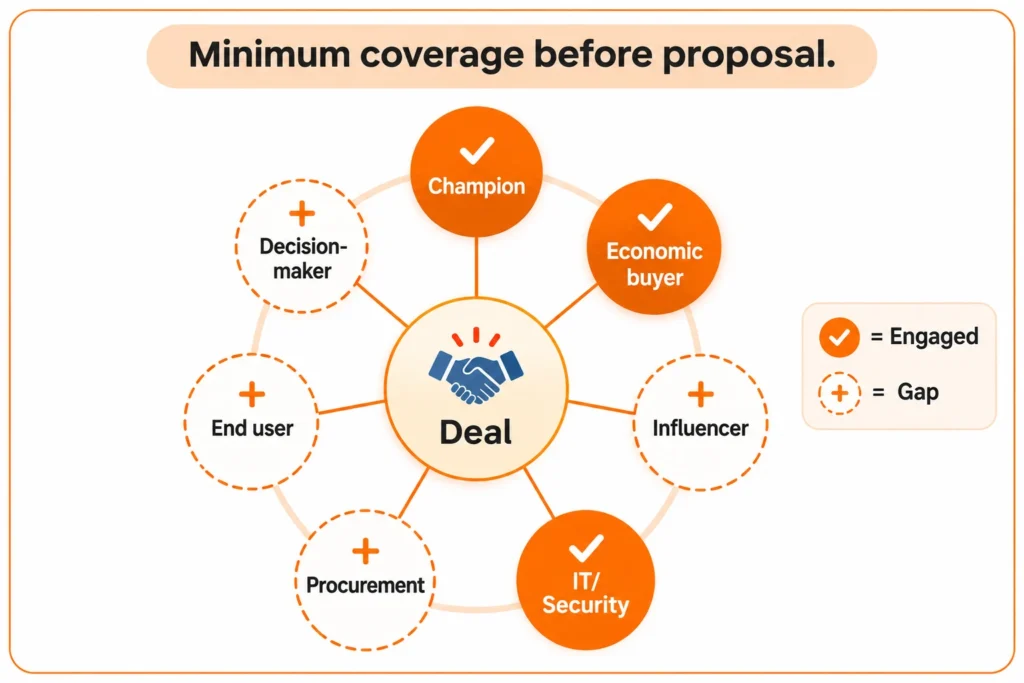
Map out the buying committee with the help of your champion, verify their data, establish roles and check a coverage goal before the proposal.
Step 1: Ask the champion 2 questions
The first step is to ask the champion these questions:
- "Besides you, who has to say yes?"
- "Who will ask the hardest question?”
Step 2: Search your own data first
Look through past opportunities, company domain, trial sign-ups, webinars and your CRM. You can also add contacts from previous opportunities that were lost, but then recovered, such as accounts you've won back from closed lost deals.
There are already two or three individuals connected on many accounts who you would never have crossed paths with. Make sure to check those old records before you use them again: contact details such as addresses and phone numbers change with time.
Before using a pre-existing record, review those records as people move and an address that worked a year ago may not be available now.
There are already two or three individuals connected on many accounts who you would never have crossed paths with. Make sure to check those old records before you use them again: contact details such as addresses and phone numbers change with time.
Before using a pre-existing record, review those records as people move and an address that worked a year ago may not be available now.
Step 3: Fill the gaps with public signals
- In LinkedIn: for each missing role, filter by company, function, and seniority.
- Job postings: if someone has a posting for a security analyst or a procurement manager, it indicates that there is a team and who it reports to.
- Changes in leadership: it's time for a new function leader to get a thread of their own.
- Speaker lists: individuals that speak on your topic at different events own it internally.
Step 4: Give each person a role and a reason
Match each name with one row at the top of the table, and write one line in what that person needs in order to say “yes.”
Step 5: Set a coverage target
Before the proposal, involve the champion, economic buyer, and one technical/security stakeholder. If less than three contacts are engaged in a deal, and the amount is over $50K, flag it. If more than three contacts are engaged in a deal, review it weekly.
Step 6: Adjust for small accounts
In a small firm with less than 50, roles are frequently performed by a single individual. There should be two verified threads there (the founder and the person operating the tool day to day).
How does Clearout Email Finder help you map the buying committee
Finance, IT and procurement contacts cannot be found in the CRM easily and it takes hours of searching. This is the point at which sales multithreading typically slows down. Clearout Email Finder finds the business email address of your leads and makes you map a reachable contact list.
Find the email for each stakeholder
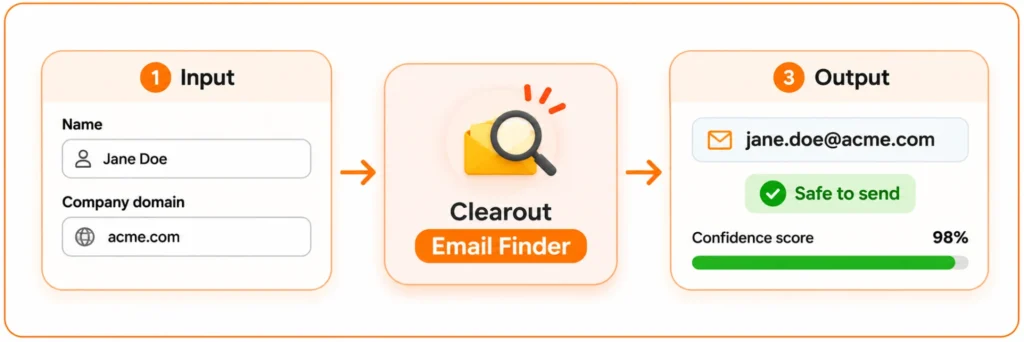
Type in the name of the person and the company domain into Clearout Email Finder. It will provide the pre-verified email address and a confidence score.
Confidence score:
Confidence score:
- High: A good match of the name, company and email address.
- Medium: Possible match, but some details are uncertain.
- Low: Weak match with no supporting information.
Build your buying committee contact map in minutes
Find each stakeholder's work email
How to reach multiple decision-makers at one account
Inform your champion ahead of time, write one email per role, and make sure to delay sending.
Let the champion know first
Please do not reach out to their colleagues without prior discussion. Say: "I would like to discuss our security summary with your IT lead. Shall I send his/her an email?"
Write one email per role
- Economic buyer: the consequences of not solving the problem and the payback period.
- IT or security: data handling, hosting and certifications in IT and security.
- End user: the weekly task your product is able to reduce.
One email to the whole committee invites every recipient to assume someone else will answer.
Stagger the threads
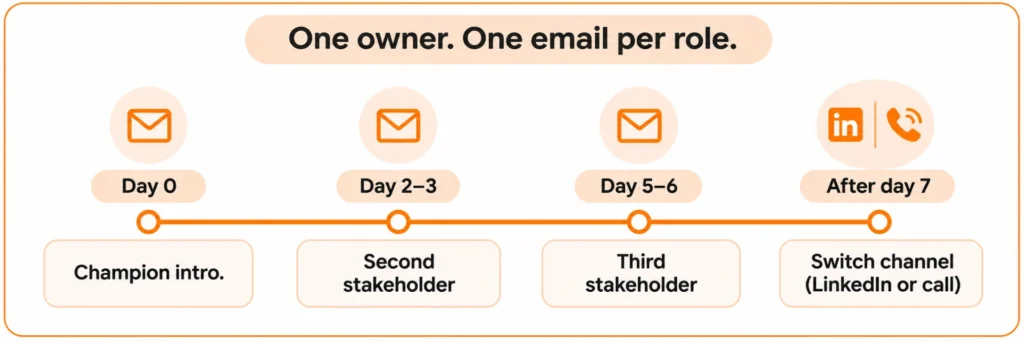
Send an introduction via email to the champion first, then two to three days later a second, then a third. Assign one account owner to avoid conflicting responses from two reps to the same stakeholder, and document each person's open question.
Verify first, then protect stakeholder engagement
When you're multi-threading B2B sales, you're sending more emails per deal and one bounce can kill a thread before it begins. Send 2 emails for each person, and then change channels; LinkedIn or a telephone call.
How do you measure stakeholder engagement across threads?
A simple tracker per account is enough:
| Role | Contact | Email status | Last touch | Owner |
|---|---|---|---|---|
| Champion | [Name] | Safe to send | [Date] | [Rep] |
| Economic buyer | [Name] | Safe to send | [Date] | [Rep] |
| IT or security | Not found yet |
Three numbers show whether multithreading in sales is working on a deal:
- Roles covered: how many of the 7 roles have a contact that is verified?
- Active threads: contacts who replied or opened in the last 14 days.
- The champion test: Who would you call tomorrow if your champion left?
Multi-threading deals come down to two jobs: find every stakeholder, and reach each one with an email that delivers.
Find the missing pre-verified emails for your largest open deal this week with Clearout Email Finder. Be aware of stakeholder engagement by role and introduce a thread when your champion is silent.
Find the missing pre-verified emails for your largest open deal this week with Clearout Email Finder. Be aware of stakeholder engagement by role and introduce a thread when your champion is silent.
FAQs
1. How to find multiple contacts at one company?
Search your own data by domain and ask your champion who else has to agree. Then filter by each job type that you don't have and find their business emails via Clearout.
2. How many contacts do you need for sales multithreading?
At least three contacts will be needed for sales multithreading before the proposal, covering the champion, an economic buyer, and a technical stakeholder. Gong's data shows won deals carry about twice as many buyer contacts as lost ones.
3. When should you start multithreading in sales?
Start multithreading in sales on the second call. Waiting for a stall means searching for stakeholders after your champion has already gone quiet.
4. Can you multi-thread too much?
Yes. Uncoordinated outreach confuses the account. Keep one owner, one shared note, and two emails per person before switching channels.
5. What if your champion does not want you to contact their colleagues?
Ask what the concern is and offer to route material through them. If they still refuse, treat it as a risk signal: they may be a gatekeeper, not a champion.