

- Products
- ResourcesDEVELOPER

 API
API
Clearout APIs are structured around REST and JSON Webhooks
Capture real-time events in your application workflow Form Guard
Real-time form validation to keep bad contacts out of your CRMKNOWLEDGE BASE Getting started
Sending campaigns without bounces is made simple FAQ
FAQ
Easily find answers to services, security and common questionsUSE CASES Lead Generation
Learn how professionals generate quality leadsGUIDESPricing Transparent & flexible pricing to support pay-per-use or recurringCompare Email Verification Tools AI-powered email verification with 99%+ accuracy, real-time validation, and transparent risk scoringCompare Email Finder Tools Pre-verified B2B email addresses with confidence scoring, find real person email, not role-based addressData Pulse & HubSpot Breeze Intelligence Pre-verified B2B email addresses with confidence scoring, find real person email, not role-based addressBLOGSEmail Verification ToolsFind Anyone’s Email Address
Most Accurate, Fast & Free WaysForm Validation
Importance, Ways & Best PracticesView All Blogs - Pricing
- Integrations
- Enterprise
- Login



Email Verification Use Cases by Role and Industry
More than 78% of U.S. marketers use at least one email verification tool because invalid contacts reduce deliverability, waste budget, and disrupt workflows.
The good news is that all these problems related to email deliverability and sender reputation can be fixed by email verification tools.
This guide breaks down real-world email verification use cases by role and industry, so every team knows exactly where high data quality can make the difference.
The good news is that all these problems related to email deliverability and sender reputation can be fixed by email verification tools.
This guide breaks down real-world email verification use cases by role and industry, so every team knows exactly where high data quality can make the difference.
Table Of Content
Email Verification Use Cases by Business Role
Email verification is needed before you start outreach, build lists, or manage contact data.
Here's how each department benefits from using email verification within their workflows.
Here's how each department benefits from using email verification within their workflows.
1. Marketing Teams
List quality makes or breaks an email marketing campaign. You can do everything right, segmentation, copy, timing and tests and still perform poorly. With 1 out of every 7 email addresses being invalid, your deliverability suffers a blow even before your message is even brought up. The campaign will not be successful.
So what must the marketing teams do?
So what must the marketing teams do?
- Verify email addresses before sending to lower bounces, spam traps, and invalid email addresses in your list. It is what campaigns are all about.
- Validate at the point of entry. When someone signs up, check the address immediately. Don't let bad data into your CRM in the first place.
- Before any re-engagement campaign, verify emails first. Many lapsed contacts simply have dead inboxes. There's no point trying to win someone back if the email never lands.
- Dirty lists distort your metrics. Open rates, click rates, conversions, all of it gets skewed. Clean data gives you numbers you can actually act on.
- Keep your segments current. Audience groups go stale over time. Regular hygiene means your personalization stays relevant and your emails reach real people.
- Reducing ESP costs: Removing invalid addresses from your active list directly reduces monthly costs, sometimes significantly on larger databases.
2. Sales Teams
Email outreach can only be effective when you arrive on actual inboxes. When your list is dead, you aren't reaching as many people and each bounce is hurting your sending domain.
What steps should the sales team take?
What steps should the sales team take?
- Outbound sequence preparation: Before loading contacts into Outreach, Salesloft, or Apollo, verify them with Clearout email verifier. Bad emails in a sequence don't just bounce; they erode your sending domain's reputation and reduce deliverability for all the valid contacts in that same sequence.
- Imported prospect lists from ZoomInfo, LinkedIn Sales Navigator, or purchased sources need verification before they go anywhere near a campaign.
- Pipeline contact monitoring: Verifying pipeline contacts weekly means your reps know to pivot before a deal stalls entirely.
- SDR onboarding: New reps inherit territory lists that may not have been touched in months. A full validation run before they begin outreach sets them up with a clean baseline and prevents burning their sending domain from day one.
- Domain protection: When multiple reps share sending domains, one SDR with a dirty list affects everyone's deliverability. Systematic validation at the sequence level is a team-wide safeguard.
3. CRM & Data Management Teams
The CRM is the system of record every team pulls from. When the contact information is incorrect there, all the teams will receive the same information. A CRM manager who authenticates addresses on the source avoids downstream issues in campaigns, pipelines, billing and support.
Steps your CRM team should take:
Steps your CRM team should take:
- Quarterly database cleanse: CRM data hygiene should be treated as an ongoing process. Hence, run a full database validation every 90 days minimum to remove invalid addresses.
- Deduplication assistance: Validating email addresses across duplicate records helps identify which contact record is actually active.
- Data enrichment preparation: Before pushing CRM data into enrichment tools or syncing to a data warehouse, validate first with Clearout. Bad input data amplifies into bad enriched data.
- Import quality control: Create a validation checkpoint for every list imported into the CRM, from trade shows, list vendors, or sales team uploads. Nothing enters the CRM without passing through validation.
- Maintaining segmentation accuracy: Lifecycle stages, lead scores, and persona tags all become unreliable when built on contacts who can't receive emails. Validation keeps your segments meaningful.
- Compliance support: Some data governance requirements (GDPR, CCPA) are easier to manage when contact records are accurate. Validation helps ensure you're not maintaining records on contacts who no longer exist at those addresses.
4. IT & Security Teams
For IT and security teams, the risk of invalid email addresses has nothing to do with bounce rates or open rates. It starts the moment a bad address enters your system and creates problems in audits, access logs, and compliance reviews.
- Unverified signups are an open door for abuse. When someone registers with a fake or disposable address, there's no real identity attached to that account. That makes it untraceable.
- Dormant accounts from departed employees are a compliance risk. GDPR and SOC 2 both require organizations to manage and audit user data actively. Inactive accounts sitting unreviewed in your system are a liability during audits.
- Unmonitored role-based addresses create access control gaps. Role-based addresses like admin@ or noreply@ with no named owner are a security gap. During incident response or access reviews, you need to know who was behind each account.
- Bad data compounds across integrated systems. Your CRM, marketing platform, and support tools pull from the same database. Hence, one unverified address that enters at registration moves across connected systems.
5. Product & Engineering Teams
Bad address data breaks automated workflows and distorts user data. The most common email verification use case is that of product and engineering teams who use email addresses to activate flows, reset passwords, and provide user analytics.
- Validate addresses at the point of entry. A real-time API check on form submissions keeps bad data out from the start.
- Protecting transactional email deliverability: Password resets, order confirmations, and billing alerts are your most important outgoing emails. Sending them to invalid addresses damages the sender reputation of your transactional domain separate from your marketing domain. However, email verification can protect it
- Accurate product analytics: MAU counts, activation rates, and retention cohorts are all corrupted by users who registered with fake emails. Email verification makes sure your analytics reflect real user behavior.
- Webhook and automation integrity: Many product workflows fire webhooks, trigger Zapier automations, or send data downstream based on user email. An invalid email flowing through these pipelines causes failures that are expensive to debug.
6. Customer Support Teams
Support operations depend on accurate contact records. When an AI agent reaches out by email and the message bounces or lands in the wrong inbox, resolution time doubles and CSAT scores take the hit.
Here's what support teams should do:
Here's what support teams should do:
- Ticket routing accuracy: Only works if the email on file is one the customer actually checks. An outdated address means missed follow-ups, open tickets, and a customer who feels ignored.
- Proactive outreach for known issues: When something goes wrong, an outage, a billing issue, a data incident, you are only as effective as your contact data. Validating your customer list before sending means fewer "I never got that email" tickets.
- Many of these trace back to invalid or typo-filled addresses entered at signup. Validation at the source dramatically reduces this category of ticket.
- Merging duplicate accounts: When a customer opens tickets from multiple email addresses, then validating an active one helps identify the canonical account.
7. Finance & Billing Teams
Revenue communications can't afford to go missing. Every invoice that doesn't arrive at a real inbox is a delayed payment. Every invalid email that bounces means your AR team spends time chasing contacts that can't hear them. However, the financial impact of bad contact data in billing workflows is entirely preventable.
As a member of the finance team in your company, you should follow these steps:
As a member of the finance team in your company, you should follow these steps:
- Payment recovery email integrity: When a payment fails and you need to reach the customer, the dunning sequence is time-sensitive. An invalid email on file means that sequence fires into a void. Validate before each billing cycle, not after the payment fails.
- Vendor and contractor communications: Finance doesn't just communicate with customers. Purchase orders, payment confirmations, and tax documents sent to vendors via bad addresses create administrative backlogs and accounting complications.
- Audit trail accuracy: Financial communications often need to be demonstrably delivered. Sending to valid, active addresses is a prerequisite for establishing that an invoice or notice was properly issued.
8. Operations Teams
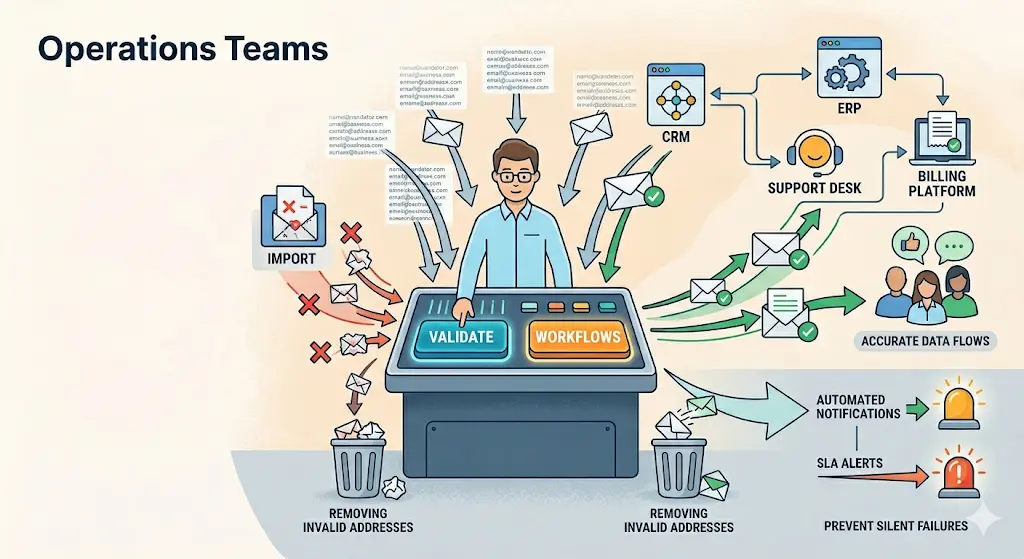
Clean data is what keeps every business system running in sync. Sitting at the intersection of CRM, ERP, support desk, billing, and HR tools, operations teams feel the impact of bad contact data faster than anyone. One invalid address does not stay contained. It spreads across systems.
- When someone leaves, update your workflows. Inactive email addresses break automated notifications quietly.
- Before any event or outreach, validate your list. Not after problems arise, before.
- SLA alerts and system notifications are only useful if they reach a real person. Bad addresses don't just bounce. They create gaps nobody notices until something goes wrong. Validating the contact list behind each automation prevents failures.
What are the Email Verification Applications by Industry
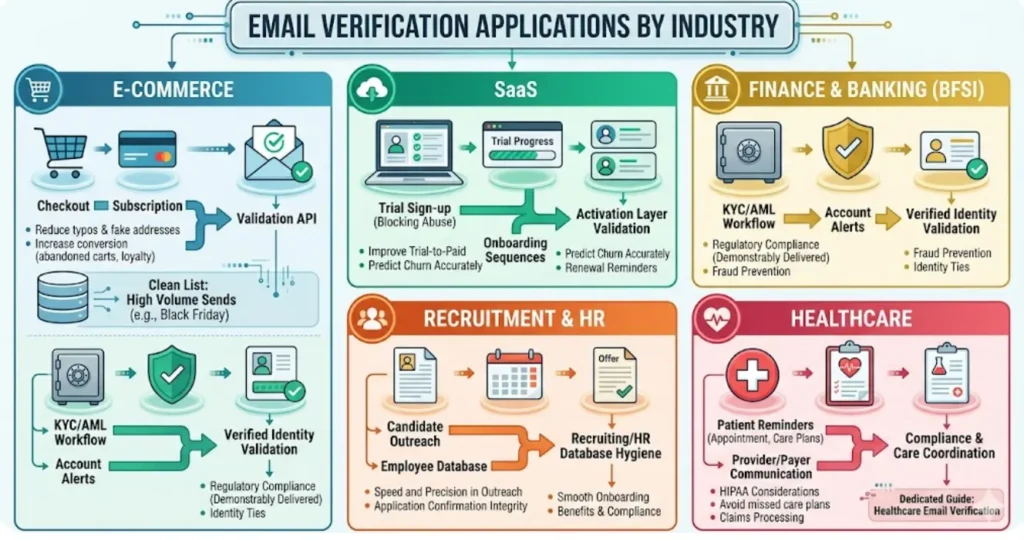
Bad email data doesn't affect every industry the same way. Beyond role-specific workflows, some sectors deal with structural challenges that make contact quality especially hard to maintain. These are 5 of them, and the specific issues each one runs into.
1. E-Commerce
E-commerce businesses collect email at checkout, account creation, and subscription sign-up, 3 of the highest-volume, lowest-friction points in any customer journey. That volume comes with a significant percentage of typos, fake addresses, and temporary emails.
Consequences of Invalid Contacts
The consequences include:
- Abandoned cart emails that never arrive
- Post-purchase sequences fire into voids
- Loyalty program communications miss their audience
Key applications
- Checkout form validation
- Post-purchase sequence hygiene
- Abandoned cart list scrubbing
- Loyalty program contact maintenance
- Promotional list cleaning before peak sending periods (Black Friday, holiday campaigns)
2. SaaS
Every stage of the user journey depends on emails in SaaS companies. Welcome emails, onboarding sequences, feature nudges, usage alerts, renewal reminders, none of it works if the message never lands.
Challenges
SaaS companies also face a specific challenge with trial abuse users signing up with fake emails to access multiple trials. Real-time validation at registration blocks this behavior before it inflates your trial numbers and wastes your CS team's attention.
Key applications
- Real-time API validation at signup
- Trial-to-paid conversion optimization
- Onboarding sequence integrity
- Churn prediction accuracy
- Renewal and expansion communication reliability.
3. Finance & Banking (BFSI)
Financial institutions face a dual challenge: regulatory requirements demand that communications be demonstrably delivered, and fraud prevention requires that accounts be tied to verified, real identities. Invalid email addresses undermine both.
Account alerts, statement notifications, fraud warnings, and compliance-required disclosures depend on email reaching the right person. The regulatory stakes make this more than an operational problem. When institutions are required to demonstrate that a communication was issued to the right person, an invalid address isn't just a delivery failure, it's a compliance gap.
Account alerts, statement notifications, fraud warnings, and compliance-required disclosures depend on email reaching the right person. The regulatory stakes make this more than an operational problem. When institutions are required to demonstrate that a communication was issued to the right person, an invalid address isn't just a delivery failure, it's a compliance gap.
Key applications
- Account registration validation
- KYC/AML workflow support
- Fraud alert delivery
- Regulatory disclosure integrity
- Customer onboarding flow verification.
4. Recruitment & HR
Recruiting operates on speed and precision. A candidate whose email bounces misses an interview invitation. An offer letter that goes undelivered creates a candidate experience failure. Contact data quality in recruitment is a competitive differentiator.
Challenges
HR teams have the same problem, just with their own people. If the email on file is outdated, compliance notices do not land, benefits deadlines get missed, and offboarding becomes a mess.
Key applications
- Candidate contact list validation
- Application confirmation integrity
- Interview scheduling reliability
- New hire onboarding communications
- Employee database hygiene
- Contractor and vendor contact maintenance.
5. Healthcare
Healthcare organizations communicate on a different axis than other industries. Email reminders of appointments, prescription refills, lab results, and follow-ups rely on email being received in a valid inbox.
Challenges
It is not just patients. Billing teams, administrators, and referral networks all need email to work, or the whole system slows down. Stale addresses in any of these channels create delays in care coordination and claims processing.
Healthcare email verification has its own distinct requirements and compliance considerations, we've covered them in depth in a dedicated guide.
Healthcare email verification has its own distinct requirements and compliance considerations, we've covered them in depth in a dedicated guide.
Top Benefits of Email Verification for Business Teams
Here's what consistent cleaning of contact data can deliver across your entire organization.
1. Protected Sender Reputation
A strong sender reputation means your emails arrive when they matter most, during a campaign launch, a time-sensitive offer, or a transactional alert.
Lose it, and even your best content never gets seen. ISPs and mailbox providers make that call before your subject line is ever read.
Lose it, and even your best content never gets seen. ISPs and mailbox providers make that call before your subject line is ever read.
2. Dramatically Lower Bounce Rates
Systematic validation before every major send removes the addresses most likely to bounce before ISPs use those bounces against you.
3. Reduced Wasted Spend
ESP pricing, outreach tool seats, and CRM contact limits all scale with list size. Removing invalid contacts from your active database reduces costs directly, often recovering the cost of validation many times over.
4. Accurate Performance Metrics
Open rates, click rates, conversion rates, all of these are calculated against your total send volume. When every address on your list is valid and active, those numbers reflect reality.
A 25% open rate on a clean list means a quarter of your real audience is engaged. That's a number you can build strategy on, optimize from, and report with confidence.
A 25% open rate on a clean list means a quarter of your real audience is engaged. That's a number you can build strategy on, optimize from, and report with confidence.
5. Fraud and Abuse Prevention
Disposable emails, fake registrations, and role-based addresses are common vectors for account abuse, trial manipulation, and form spam.
Validation at the point of entry with Clearout Form Guard can block the majority of automated abuse before it touches your system.
Validation at the point of entry with Clearout Form Guard can block the majority of automated abuse before it touches your system.
6. Better Workflow Automation
Every automated flow, onboarding sequences, billing alerts, support follow-ups, depends on emails reaching real inboxes. When the contacts feeding those workflows are verified, automation runs the way it was designed to.
Onboarding sequences complete in full, billing alerts reach the right person before a payment lapses, and support follow-ups close tickets faster.
Onboarding sequences complete in full, billing alerts reach the right person before a payment lapses, and support follow-ups close tickets faster.
7. Stronger Customer Relationships
Communications that consistently reach customers, confirmations, updates, renewals, build trust. Customers who receive what they expect, when they expect it, are more likely to stay and expand.
Why Email Verification Works - Across Every Role, Every Industry
Every role covered in this guide faces a different challenge, but they all trace back to the same root cause i.e. having invalid contacts in their system.
Clearout helps teams maintain clean contact data with bulk verification, real-time checks, and API integrations that fit into existing workflows.
Join over 100,000+ businesses already sending with confidence, because clean data can help you close more deals.
Clearout helps teams maintain clean contact data with bulk verification, real-time checks, and API integrations that fit into existing workflows.
Join over 100,000+ businesses already sending with confidence, because clean data can help you close more deals.
Start with 100 Free Credits
FAQs
1. What are the most common email verification use cases for businesses?
From scrubbing campaign lists before a send to validating signups in real time, the email verification use cases span to every team. Marketing, sales, CRM, finance, and product all depend on accurate contact data to do their jobs without harming email deliverability.
2. When should a business use email verification API instead of a bulk tool?
Use the email verification API when addresses are entering your system continuously through signups, form fills, CRM. Bulk email verification tools like Clearout are better for cleaning your existing email lists.
3. What should you look for in email verification tools?
The basics are not enough on their own things like syntax checks and MX record lookups. You need to find tools that can do more like catch spam traps and detect addresses. These tools should also be able to handle catch-all domains. It is better to get a confidence score than just a pass or fail result. Clearout does all of these things. It has 99.73% accuracy and works in real-time. This makes Clearout a tool that your teams can really rely on.
4. How often should businesses use email verification tools to clean their lists?
At a minimum, run a full email list verification every 90 days as contact data decays at roughly 22-30% annually. Every bad address you send damages your sender reputation and drains your ROI.
5. What are the real benefits of email verification beyond reducing bounces?
The benefits of email verification go far beyond reducing bounces. Clean lists protect your sender reputation, lower ESP costs, fix low engagement metrics, block fake signups, and ensure every automated workflow, from onboarding to billing, runs without interruption.