


clearout
  • Products
    • Email Verifier Verify emails addresses individually, in bulk or through API, with 99% accuracy
    • Email Finder Find individual or bulk emails by entering the person & company name or domain
    • Form Guard IconForm Guard Protect your forms from spam, bots, and invalid submissions with real-time email, phone, and name verification.
    • Form Guard IconData Pulse Verify, enrich, and monitor your CRM contacts in real time - heartbeat monitor for your data.
    • Prospect SQL/MQL list building with high levels of personalization, real-time data enrichment and prospect search
    • Clearout For SheetsVerify email addresses directly on Google Sheets with Clearout for sheets add-on
    • Prospect – LinkedIn Chrome ExtensionBuild verified, targeted prospect lists directly from LinkedIn profiles
    • ClearoutPhoneValidate phone numbers across 240+ countries in bulk, quick or real time validation
    • Free Tools
    • Disposable Email Checker
    • Reverse LinkedIn Profile Lookup Tool
    • Reverse Email Lookup Tool
    • Email List Cleaner
    • Company Domain Finder API
  • Resources
      DEVELOPERAPI iconAPI
      Clearout APIs are structured around REST and JSON
      Webhooks iconWebhooks
      Capture real-time events in your application workflow
      Form Guard iconForm Guard
      Real-time form validation to keep bad contacts out of your CRM
      KNOWLEDGE BASEGetting started iconGetting started
      Sending campaigns without bounces is made simple
      FAQ iconFAQ
      Easily find answers to services, security and common questions
      USE CASESLead Generation iconLead Generation
      Learn how professionals generate quality leads
      GUIDESPricing arrow iconTransparent & flexible pricing to support pay-per-use or recurringCompare Email Verification Tools arrow iconAI-powered email verification with 99%+ accuracy, real-time validation, and transparent risk scoringCompare Email Finder Tools arrow iconPre-verified B2B email addresses with confidence scoring, find real person email, not role-based addressData Pulse & HubSpot Breeze Intelligence arrow iconPre-verified B2B email addresses with confidence scoring, find real person email, not role-based addressBLOGSEmail Verification ToolsFind Anyone’s Email Address
      Most Accurate, Fast & Free Ways
      Form Validation
      Importance, Ways & Best Practices
      View All Blogs
  • Pricing
  • Integrations
  • Enterprise
  • Login
Try it free Book a 1-to-1 demo
Priyanshi Sharma / July 15, 2026 July 15, 2026

A Detailed GTM Framework From Day 1 to Day 90


A Detailed GTM Framework From Day 1 to Day 90

Launching a product is exciting until everyone starts asking, "What's the plan?" Surprisingly, 15.4% of companies still don't have a documented go-to-market strategy, meaning that the majority of launches operate by chance!

I have come to understand that there are plenty of successful launches that involve a smaller budget. It's just about getting the fundamentals down and doing them over and over. When marketing, sales, and product are on the same page, things get done quicker and there is a little less confusion.

In this guide, I'll walk you through a 90 day go-to market framework that will help you break up the complicated process of launching products. It can be followed on a weekly basis and the framework can help you avoid all the pitfalls of a slow product launch.

Table of Content


‣ What is a GTM framework?
‣ GTM framework vs. marketing strategy: What's the difference?
‣ A guide to the GTM framework from day 1 to day 90
‣ Phase 1: Day 1–30 — Foundation
‣ Phase 2: Day 31–60 — Build & Align
‣ Phase 3: Day 61–90 — Launch & Execute
‣ Common GTM mistakes that derail launches
‣ GTM metrics that actually matter at each phase
‣ Final thoughts
‣ FAQs
What is a GTM framework?


A go-to-market framework is a structured and repeatable process for bringing a product, feature, or service to a defined market with minimal wasted effort. It answers four questions in order: who you're selling to, what problem you solve for them, how you'll reach them, and when each motion needs to happen.

Core Components of a GTM Framework

ComponentQuestion It AnswersOwner
ICP & Buying CenterWho are we selling to, and who influences the decision?Product Marketing
Positioning & MessagingWhy should they care, and why us?Product Marketing / Marketing
Channel StrategyWhere do we reach them?Marketing / Sales
Pricing & PackagingWhat will they pay, and how is it structured?Product / Sales
EnablementHow does sales sell it?Sales Enablement
Metrics & Feedback LoopHow do we know it's working?RevOps / Leadership

GTM framework vs. marketing strategy: What's the difference?


This trips up a lot of first-time founders, so let's clear it up early. A marketing strategy is ongoing and brand-wide. It covers how you build awareness and demand over quarters and years. A go-to-market strategy framework is narrower and time-boxed: it's the specific plan for introducing one offering to one market segment, with a defined start and a defined "we've launched" endpoint.

A guide to the GTM framework from day 1 to day 90


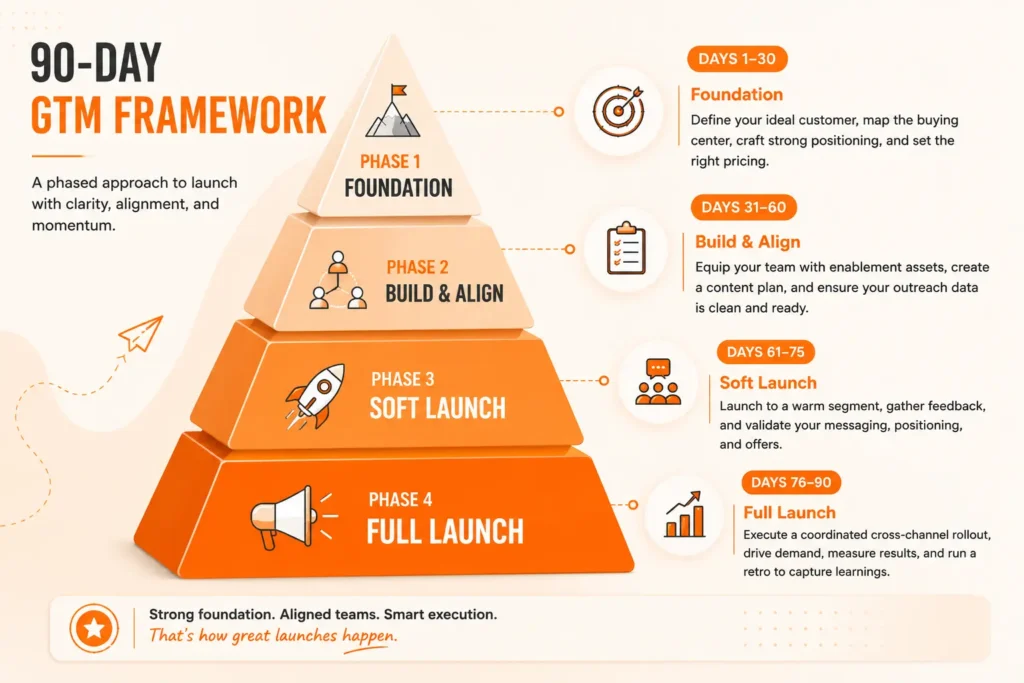
 A GTM framework in phases from day 1 to day 90.

90 days is long enough to do real research and alignment work, but short enough to create urgency. I've watched launches stretch to six or eight months simply because there was no forcing function. By the time they were shipped, the market had shifted. So, here's the GTM framework you should follow in different phases.

Phase 1: Day 1–30 — Foundation


This phase is all about minimizing risk and not spending a dollar on execution. Don't do it, and you'll be wasting Day 45 to rebuild messages that should have been checked on Day 10.

Week 1–2: Define your ICP and buying center


Your Ideal Customer Profile is a specific, testable definition of the accounts most likely to buy, renew, and refer. You also need to map the buying center for B2B motions, the group of individuals that make a purchase decision.

The majority of teams develop their ICP with a gut instinct based on their experience: “our best customers are mid-market SaaS businesses.” a defensible ICP is made through an analysis of your current customers (or closest approximation) in three ways at once:

  • Business fit: Company size, industry, geographies, funding stage, and tech stack. These are the ones that filter your total addressable market.
  • Behavioral fit: What did they do prior to purchase? Did they download a particular content, watch a webinar, or go through a trigger event? These inform you about the people who are actively in-market at the moment.
  • Outcome fit: Who were the customers that had the fastest time-to-value and didn't need to re-enter a discount conversation?

Sample B2B Buying Center Breakdown


RoleQuestion They AskWhat They Need From You
Economic BuyerIs this worth the budget?ROI model, business case
ChampionWill this make me look good?Internal talking points, proof
Technical EvaluatorDoes it actually work?Docs, security review, demo
End UserWill this make my job easier?UX walkthrough, onboarding
Blocker/InfluencerWhat's the risk of switching?Comparison data, references

Tier your ICP before you build any motion


Not every ICP account deserves the same sales effort. Tiering is how GTM teams avoid burning resources on accounts that will take twelve months to close and churn in month fourteen.

  • Tier 1 accounts match every firmographic and behavioral criteria and have a high-value trigger event (new funding, new executive hire, recent tech stack change, regulatory change in their industry).
  • Tier 2 accounts are matched by firmographic data, but don't have significant behavioral indicators or recent triggers.
  • Tier 3 accounts are general, but lower priority due to deal size or competition. These are nurtured in an automatic nurture until a signal pulls them up.

Most B2B sales teams find that 20 Tier 1, 100-200 Tier 2, and the rest Tier 3 is a good ratio. After the first 90 days, you cannot run an account-based motion on 500 accounts.

Week 3: Validate positioning with real conversations


Discuss with 10-15 individuals that fit your ICP. You are listening for exactly the words they use to talk about their issue – these become your language!

  • Know the market you're entering


    Before you build landing pages or launch campaigns, answer one question.


    Are buyers already looking for a solution like yours?


    If they are, your job is to help them choose you. Focus on comparison pages, customer stories, feature differences, and migration content.


    If they're not, don't start by talking about your product. Start by explaining the problem.


  • Category entry versus category creation


    Before you build your launch plan, answer one simple question.


    Are you entering an existing category, or creating a new one?


    The answer changes your entire GTM strategy.


    If you have a new protein powder, skin-care line, or new running shoe, people know the issue. They are making a choice about which brand they'll invest in. Your task is to simplify the decision for them.


    Begin with a problem first.


    Make people understand the consequences of dehydration on their energy, concentration and recuperation. Let them know what they are missing and why the old way isn't working. When the buyer thinks the issue is worth addressing, your product appears to be the logical reply to the problem, rather than yet another gadget vying for attention.


Week 4: Lock pricing and packaging


Pricing is a positioning decision. Before you finalize numbers, map three tiers against the buying center you defined in Weeks 1–2: what does the economic buyer need to justify, what does the end user need to feel is fair, and what does the technical evaluator need to see included versus gated.

A quick Foundation checklist before you move on:

  • ICP is written down with specific firmographic and behavioral criteria
  • Buying center roles are mapped with the specific questions each role needs to be answered
  • Positioning statement has been tested against real buyer language from at least 10 calls
  • Pricing and packaging are locked, with tiers mapped to buying center needs

Phase 2: Day 31–60 — Build & Align


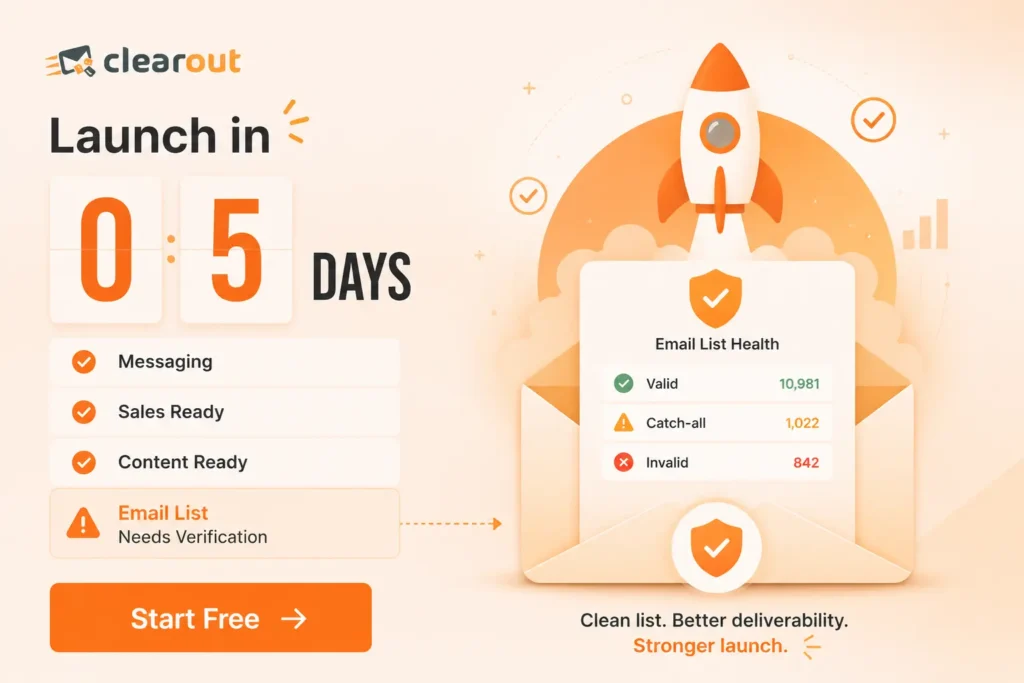
Clearout email verification before GTM launch countdown.

Phase 2 is where strategy becomes assets and where cross-functional teams actually get on the same page.

1. Build your sales enablement kit


Sales needs more than a slide deck. A complete enablement kit includes a one-page battlecard, an objection handling guide, a demo script, and 2 to 3 customer proof points, even if they're from beta users.

2. Build your content and channel plan


Map content to each stage of the buying journey: awareness, consideration, and decision. Then assign it to the channel where your ICP actually spends time. A framework for a go-to-market strategy only works if the channels match where the buying center actually looks for answers.

3. Clean your data before you scale outreach


This is the step most teams skip, and it wrecks Phase 3. Before sales or marketing sends a single cold email at scale, your list needs to be clean. Bounced emails do not just waste sends. They damage your sender reputation and can get your domain flagged right as you're trying to launch.

This is exactly where a tool like Clearout earns its place in the stack. Running your prospect list through Clearout's email verification before your first outbound sequence means your open and reply rates reflect real interest. It's a five-minute step in Week 6 that saves you weeks of "why isn't outbound working" debugging in Week 10.

Ready to protect your Day 61 launch numbers?


Verify your outreach list with Clearout

Internal Alignment Meeting (End of Week 8)


Have sales, marketing, product, and customer success all in the same room. Go through the ICP, messaging, enablement kit, and launch date. Each team should have an answer to this question: What does Week 9 involve?

Phase 3: Day 61–90 — Launch & Execute


Week 9: Soft launch to a warm segment


This week is dedicated to soft launching to a warm segment.

Go with your smallest segment first (existing, waitlist or a nice beta group). This is the final opportunity to detect the missed messages before they spread to a larger audience.

Week 10 to 11: Full launch across channels


Take your content and channel plans as a coordinated initiative: website updates, email notifications, sales outreach, paid channels and PR/community posts. If the launch is staggered, there is less momentum and it will be harder to measure the results.

Week 12: Measure, report, and decide what's next


By Day 90, you should have some decent data to make a good decision: double down, tweak it or go with a new segment. Write a launch "retro. This is the playbook for your next go-to-market plan cycle.

Extract numbers from your metrics table and then match them with some qualitative notes from sales calls and support tickets.

Another activity that you could do in Week 12 is to speak directly to 2 to 3 of your first customers. What stopped them from purchasing, and almost caused them to walk away onboarding. This is usually the true feedback you'll receive on your entire go-to-market strategy.

90-Day Launch Roadmap at a Glance

DaysPhaseKey Deliverable
1–30FoundationICP, buying center map, positioning, pricing
31–60Build & AlignEnablement kit, content plan, and clean outreach data
61–75Soft LaunchValidated messaging with a warm segment
76–90Full LaunchCoordinated cross-channel rollout + retro

Assuming that Phase 3 was executed successfully, your Day 91 challenge isn't to begin a new campaign. It's the job of your first group of customers to become the fuel for the next group.

Common GTM mistakes that derail launches


  • Building sales enablement last, leaving reps to improvise in front of real prospects.
  • Sending outbound campaigns to unverified lists, hurting deliverability right when it matters most. That is why running your list through Clearout before a major campaign is well worth the few minutes it takes.
  • Launching across too many channels at once without the content or team capacity to support them.
  • Treating Day 90 as the finish line instead of the beginning of the flywheel.

GTM metrics that actually matter at each phase


Here are the GTM metrics you should check during each stage. But for more details, check out our complete GTM metrics guide.
PhaseLeading IndicatorLagging Indicator
FoundationNumber of ICP validation calls completedMessaging test win-rate
Build & AlignSales enablement adoption rateList deliverability/bounce rate
Launch & ExecutePipeline created, demo requestsClosed-won revenue, CAC payback

Final thoughts


A good go to market strategy is never truly complete. Each launch offers insights into your market, messaging and buyers. Record successes, correct failures and apply learning to the next launch.

There is one key element that's important to get right from the beginning, and that is your data. When launching outbound campaigns or email campaigns, be sure to have a clean list.

Check your email list before the next GTM. Validation takes 3-5 minutes today.

Start free with Clearout

FAQs


1. What is a GTM framework?
GTM framework is a sequence of steps towards product/feature/service launch. It will enable your team to be on the same page about your target, positioning, channels, and what a success will look like from launch to early growth.
2. How long should a GTM framework take to execute?
The timeframe may vary to execute a GTM framework. But for most B2B launches, 90 days is a good amount of time. It allows you to test your hypotheses, get your teams ready, and then deliver without losing momentum of the launch.
3. Is a GTM framework the same as a marketing plan?
Not quite. A marketing plan is designed to help long-term brand growth and demand generation. A GTM framework starts with a clear objective, timeline and target audience and is centered around a specific launch.
4. Who should own the GTM framework inside a company?
Product marketing leads the process of owning the GTM framework. However, GTM is never a one person job. Sales, product, customer success, and leadership all need to stay aligned for the launch to work.

Share this article

Recent Posts

15 Jul 2026
A Detailed GTM Framework From Day 1 to Day 90

Learn how to build a step-by-step 90 days go-to-market framework covering ICP, positioning, enableme ...

14 Jul 2026
How to Stop Fake Signups on Your Shopify Store

Learn how to stop fake signups on Shopify. Block bot registrations, disposable emails, fake phone nu ...

08 Jul 2026
Does Jotform Validate Emails? (And What To Do If It Doesn't)

Prevent fake leads from entering your Jotform forms. Learn what Jotform's email validation checks, w ...

03 Jul 2026
Clearout vs EmailListVerify on Accuracy and False Positives

Clearout vs EmailListVerify compared on accuracy, false positives, catch-all handling, validation ch ...

01 Jul 2026
GTM Trends 2026: 7 Shifts Shaping B2B Go-to-Market

Explore the top Go-To-Market trends for 2026, including micro-campaigns, vertical AI, content-led pr ...

Clearout's

Form Guard

Validate email, phone & name on any forms!

  • Real signups only
  • Verified emails
  • Valid phone numbers
  • No fake names
  • Cleaner CRM
  • No devs needed
Try for Free Now

Email Verification, Email Finding Form Guard & Prospecting Service

Expand Your Reach By Finding & Verifying Ideal Prospects.

Sign up & get 100 free credits

No Credit Card required

Create Free Account
Company

Why Clearout?

Pricing

Contact Us

Careers

Press

Enterprise

Sitemap

FAQ

Status

Products

Email Verifier

Email Finder

Form Guard

Data Pulse

Prospect

LinkedIn Email Finder

Reverse Lookup

Google Sheets Add-on

WordPress Plugin

ClearoutPhone

What's New?

Resources

Integrations

HubSpot

Team Account

API

Compare Email Verifier

Compare Email Finder

Compare Prospecting

Use Cases

Blog

Help

Legal

Privacy Policy

Terms

DPA

Security

Trust Center

Certification

ISO 27001/2022

SOC 2 Type 2

GDPR

Partnership

HubSpot Certified

Affiliates

Partners

Clearout for browser

⚡ Supercharge Your Prospect Research with Clearout's LinkedIn Chrome Extension - Find and Verify Emails with Confidence!

Clearout Chrome extension

clearout
© 2026 Clearout Inc. All Rights Reserved. Powered by Clearout.
Keep HubSpot data clean on autopilot — validate, enrich, and sync contacts in real time with Data Pulse. Learn More ➞
X