

- Products
- ResourcesDEVELOPER

 API
API
Clearout APIs are structured around REST and JSON Webhooks
Capture real-time events in your application workflow Clearout MCP
Verify and find emails from AI assistants like Claude and Cursor Form Guard
Real-time form validation to keep bad contacts out of your CRMKNOWLEDGE BASE Getting started
Sending campaigns without bounces is made simple FAQ
FAQ
Easily find answers to services, security and common questionsUSE CASES Lead Generation
Learn how professionals generate quality leadsGUIDES Clearout Insights Explore original research, industry statistics, and data-backed insights Pricing Transparent & flexible pricing to support pay-per-use or recurringCompare Email Verification Tools AI-powered email verification with 99%+ accuracy, real-time validation, and transparent risk scoringCompare Email Finder Tools Pre-verified B2B email addresses with confidence scoring, find real person email, not role-based addressData Pulse & HubSpot Breeze Intelligence Pre-verified B2B email addresses with confidence scoring, find real person email, not role-based addressBLOGSEmail Verification ToolsFind Anyone’s Email Address
Most Accurate, Fast & Free WaysForm Validation
Importance, Ways & Best PracticesView All Blogs - Pricing
- Integrations
- Enterprise
- Login



How to Enrich Outbound Leads Automatically: A 4-Step Workflow
There comes a point in every outbound team's growth when hiring more SDRs stops solving the pipeline problem.
The pipeline looks healthy, but reps spend more time fixing lead data than actually speaking with prospects.
That's what made me look more closely at lead enrichment workflows. Teams already have tools for finding prospects, sending emails, and managing their CRM. Yet the handoff between those systems is where things break. Missing data can slow and even break your outreach.
The more I looked into high-performing RevOps and sales teams, the clearer the pattern became. They don't wait until their CRM is full of incomplete records before fixing them. They enrich leads the moment they enter the system.
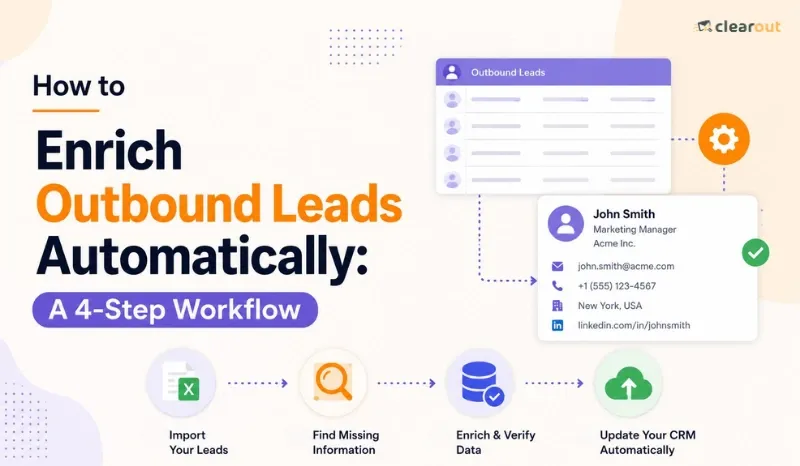
This is the function of this workflow. This workflow has 4 phases: grow your lead list, fill in missing data, sync with your CRM, and automatically send out outreach. These steps form a repeatable system to keep your pipeline moving without manual effort.
The pipeline looks healthy, but reps spend more time fixing lead data than actually speaking with prospects.
That's what made me look more closely at lead enrichment workflows. Teams already have tools for finding prospects, sending emails, and managing their CRM. Yet the handoff between those systems is where things break. Missing data can slow and even break your outreach.
The more I looked into high-performing RevOps and sales teams, the clearer the pattern became. They don't wait until their CRM is full of incomplete records before fixing them. They enrich leads the moment they enter the system.
This is the function of this workflow. This workflow has 4 phases: grow your lead list, fill in missing data, sync with your CRM, and automatically send out outreach. These steps form a repeatable system to keep your pipeline moving without manual effort.
Table of Content
What is automated lead enrichment?
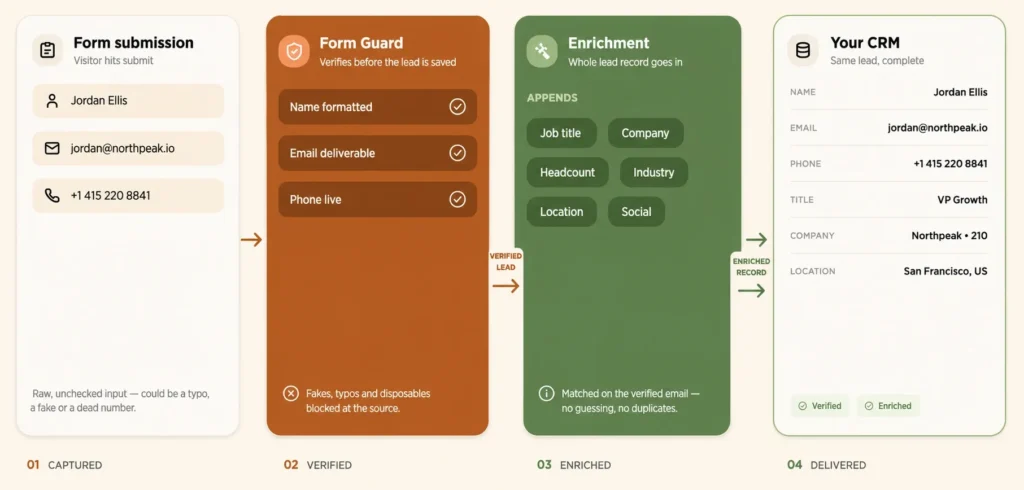
Automated lead enrichment fills in missing lead details, like email, title, and company size. It runs the moment a lead lands, with no manual lookup required. It replaces the copy-paste work between spreadsheets, LinkedIn, and the CRM.
Most automated lead management setups start enrichment at the point of capture. So, when a a new lead enters the CRM with just a name and email, the system appends firmographic and contact fields based on that email or domain instantly. This is when a lead is ready for scoring and routing within seconds of entry.
Most automated lead management setups start enrichment at the point of capture. So, when a a new lead enters the CRM with just a name and email, the system appends firmographic and contact fields based on that email or domain instantly. This is when a lead is ready for scoring and routing within seconds of entry.
How to reduce manual prospecting with automation?
Manual prospecting produces inconsistent results. Different reps follow different research methods, use different data sources, and update CRM records differently. Automation standardizes the process so every lead goes through the same verification, enrichment, and quality checks before outreach begins.
For a complete breakdown of the enrichment process before you automate it, check out this guide to lead enrichment that covers the fundamentals.
So, here’s how to reduce manual prospecting with automation:
For a complete breakdown of the enrichment process before you automate it, check out this guide to lead enrichment that covers the fundamentals.
So, here’s how to reduce manual prospecting with automation:
Automate data entry at capture
Automating entry at capture removes duplicate records and inconsistent formatting instantly. This alone frees up hours of manual research every week. Gartner puts the cost of poor data quality at $12.9 million a year for the average company.
Refresh contact data automatically
B2B contact data decays close to 22.5% a year, per MarketingSherpa. Tools like Clearout Data Pulse refresh records on a set cycle when a contact enter the CRM through an API or forms. before decay sets in. This keeps prospecting lists usable instead of stale.
How to automatically enrich leads?
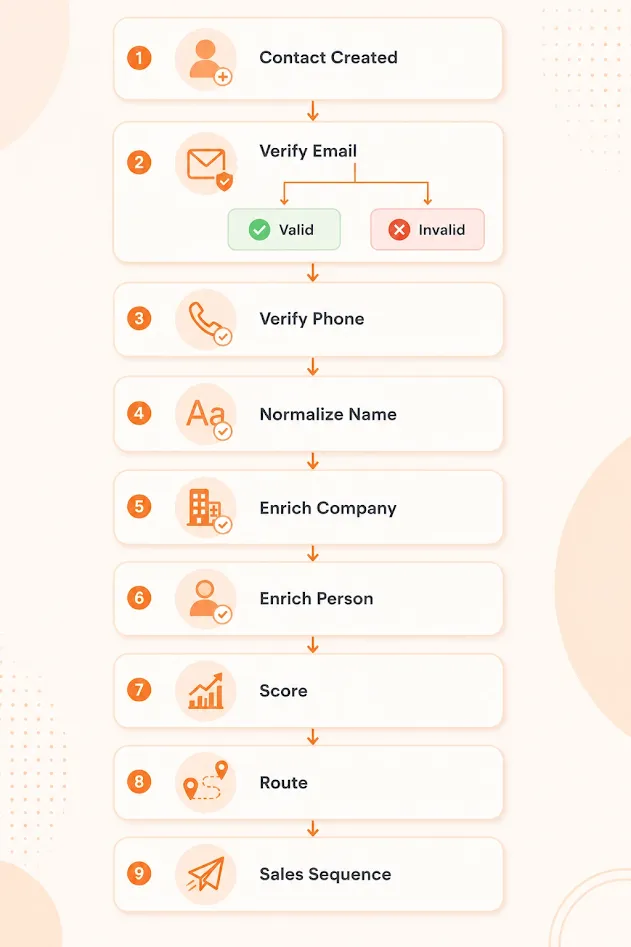
There are 4 steps to automating lead enrichment: build, enrich, sync and route. The complete workflow is described below.
Step 1: Build a targeted lead list
Before creating a list, know your ideal customer profile. Provide a definition of industry, company size, location, and the specific job titles that convert.
Use these two tools to build the list, depending on your starting point:
Use these two tools to build the list, depending on your starting point:
- LinkedIn extension: Use this when you want to do prospecting directly from LinkedIn or Sales Navigator search results. It pulls verified contacts in bulk matched against your ICP filters without manual exports. The key advantage is that LinkedIn profile data is updated and this makes it the most reliable source for job title and current employer accuracy.
- Email Finder: Use this when you already have names and company domains but no verified email. It helps you creates a list of verified emails of your prospects so that every message you send them reaches. The result is a list where every exported contact has a deliverable email before it becomes usable for marketing campaigns.
Step 2: Automate lead enrichment on trigger
Configure your verification and enrichment workflow to trigger whenever a new contact is created or when key fields are missing. Validate email addresses and phone numbers first, then enrich the remaining contact and company attributes before writing the results back to your CRM. The trigger should be the contact creation event.
The enrichment itself should run on waterfall logic: query the highest-accuracy provider first, accept the result if confidence meets your threshold, and move to the next provider only when the field remains empty after the first pass.
Sequence your waterfall by accuracy for your specific ICP. A provider with 95% coverage for enterprise US contacts may have 40% coverage for EMEA mid-market. Run a sample of 500 real records from your target segment through each provider before committing to a waterfall order.
Never trigger enrichment on fields already marked as verified by a higher-confidence source. This single configuration error causes teams to overwrite accurate emails with unverified ones, invalidate phone numbers that have already been validated, and corrupt lead scores built on data that was correct before enrichment ran over it.
Set these priority rules explicitly in your CRM's field mapping. Do not leave it to default behavior.
The enrichment itself should run on waterfall logic: query the highest-accuracy provider first, accept the result if confidence meets your threshold, and move to the next provider only when the field remains empty after the first pass.
Sequence your waterfall by accuracy for your specific ICP. A provider with 95% coverage for enterprise US contacts may have 40% coverage for EMEA mid-market. Run a sample of 500 real records from your target segment through each provider before committing to a waterfall order.
Never trigger enrichment on fields already marked as verified by a higher-confidence source. This single configuration error causes teams to overwrite accurate emails with unverified ones, invalidate phone numbers that have already been validated, and corrupt lead scores built on data that was correct before enrichment ran over it.
Set these priority rules explicitly in your CRM's field mapping. Do not leave it to default behavior.
Step 3: Sync, score, and route in your CRM
Your enrichment tool writes new fields back to the CRM as soon as they're found. This keeps routing rules working off current data. Lead routing needs those enriched fields to run accurately in the first place. So, set field-priority rules: this stops a lower-confidence provider from overwriting a verified email or phone number.
After syncing, score each lead based upon firmographic fit and behavioral signals into a single number. A typical setting: hot (above 80), warm (50–80), and monitor-only (below 50). Connect hot leads to a Rep ASAP. Add warm leads to a nurture list rather than a rep's queue.
After syncing, score each lead based upon firmographic fit and behavioral signals into a single number. A typical setting: hot (above 80), warm (50–80), and monitor-only (below 50). Connect hot leads to a Rep ASAP. Add warm leads to a nurture list rather than a rep's queue.
Step 4: Trigger outreach on enrichment status
After scoring and routing, your CRM should seamlessly pass the lead to your team's outreach automation: email sequencer, dialer or LinkedIn automation. No manual step in between. A status change on the record should be enough to start the cadence.
Build the logic around engagement, not the channel. A reply, a call answered, or a LinkedIn message opened can add a follow-up task to a rep's queue. No response after three touches, across any mix of email, calls, or LinkedIn, can pause the cadence and flag the record for manual review instead of letting it run cold.
Build the logic around engagement, not the channel. A reply, a call answered, or a LinkedIn message opened can add a follow-up task to a rep's queue. No response after three touches, across any mix of email, calls, or LinkedIn, can pause the cadence and flag the record for manual review instead of letting it run cold.
Real example: Automated lead enrichment in action
A B2B lead generation agency carries out outbound marketing activities for 4 SaaS companies simultaneously. Clients require 300 – 400 new prospects per week based on their ideal customer profile. Manually, that means exporting contacts from LinkedIn Sales Navigator, checking their fit, then verifying every email. Hence, this is exactly what automated lead management is designed to remove from the process.
With lead enrichment automation running end to end:
With lead enrichment automation running end to end:
- Build: Sales reps use LinkedIn Sales Navigator filters to identify prospects that match each client's ideal customer profile. A LinkedIn extension retrieves verified business email addresses before the contacts are imported into the CRM.
- Verify and enrich: As new contacts enter the CRM, verification confirms email and phone validity. Enrichment then fills missing fields such as phone number, company information, and firmographic attributes. Waterfall logic queries multiple providers until a confidence threshold is met, while verified fields are protected from being overwritten by lower-confidence data.
- Sync and score: Verified and enriched data is written back to the CRM immediately. Lead scoring, segmentation, and routing rules always operate on the latest trusted information.
- Route and engage: Once a lead meets the qualification criteria, it is automatically assigned to the appropriate sales rep and enrolled in the configured sales engagement sequence, whether that's an email cadence, a calling workflow, or LinkedIn outreach.
How to find missing lead information?
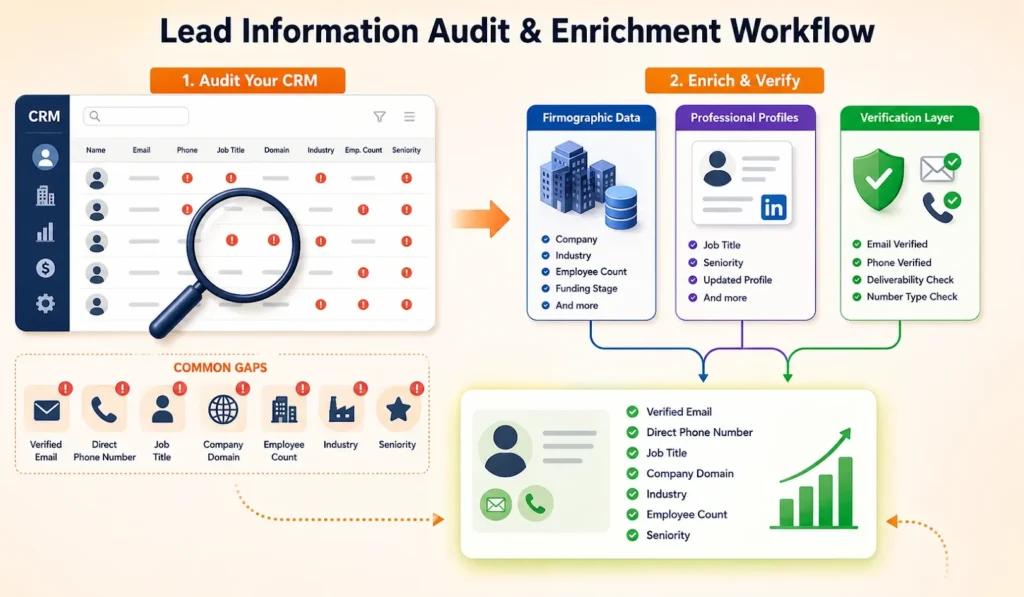
Compare your CRM's current fields against the fields scoring and routing logic they actually run on. Most teams find gaps concentrated in five fields: domain, employee count, industry, title, and seniority. Fix these first, since routing and scoring break without them.
1. Audit your CRM against these gaps
- Verified email: Without verified email, you'll not be able to get your outreach sequences firing, and you'll see a rise in your bounce rates.
- Direct phone number: This prevents call based outreach and phone verified lead scoring.
- Job title: Missing titles break both personalization tokens and seniority-based lead scoring at once.
- Company domain:A missing domain breaks every firmographic field pulled from it like industry, employee count, and tech stack.
2. Pick your providers
Not every enrichment provider covers the same ground, and picking one to do it all is where most workflows fall short. You're pulling from three categories in practice, and most setups need at least two running together.
- Firmographics and contact databases such as ZoomInfo, Apollo, and Cognism manage the company level aspect: industry, size of companies, funding stage.
- Titles and seniority expire quickly, so sourcing contact details from Clearout's Prospecting and Lusha tends to last longer.
- Then there's the layer that doesn't add anything new at all: Verification (Clearout, NeverBounce, ZeroBounce for email; ClearoutPhone for numbers) just to confirm if an email or phone number is actually reachable before it enters a sequence.
Run a firmographic database and a verification layer together and you will get more out of both than either gives you alone. One fills the gap. The other checks your work.
How to improve outbound lead quality?
Enrichment is not complete when a field is populated. Without reviewing an output after each run, you will not discover the errors until they find their way into a prospect's inbox, and by then the damage will have been done.
Quality checks after enrichment
- Verify email deliverability separately from enrichment. An enriched email address isn't guaranteed to be deliverable, so verify it before using it for outreach.
- Audit enriched records regularly. Spot-check a sample against trusted source data each month to monitor enrichment accuracy.
- Flag incomplete records. If enrichment failed to fill a required field, go for a manual review.
- Track bounce rate. It's the clearest signal to identify issues before they affect campaigns.
Measuring enrichment accuracy
Review and test your records against reliable sources of information. Go through each of the important fields one-by-one (email, phone, job title, company name, industry), and then find out what percentage of each of these areas is accurate.
The bottom line
Your outreach can slow down before you have even sent the first message due to stale contact information, bounced email sequences and deliverability problems. The workflow above aims at avoiding all those issues by automating verification, enrichment and CRM updates rather than manual ones.
First, you should create a prospect list using Clearout Email Finder to discover verified business email addresses. Then automatically enrich new records as they are added to your CRM. All leads go through the same data quality process before they end up in your sales team.
First, you should create a prospect list using Clearout Email Finder to discover verified business email addresses. Then automatically enrich new records as they are added to your CRM. All leads go through the same data quality process before they end up in your sales team.
Start Finding Verified Leads
FAQ
1. How do I choose a lead enrichment tool?
Choose a tool by how well it fills your actual data gaps. Check coverage for your target industries and regions using a sample of real leads. Confirm it supports trigger-based enrichment, native CRM sync, and real-time email verification before committing to a provider. Compare pricing per credit against your expected monthly enrichment volume.
2. Why should B2B teams use lead enrichment tools?
Enrichment tools fix incomplete records before they reach a rep's queue. They cut the manual research time reps spend per lead. They also improve routing and scoring accuracy, since both depend on complete data. Teams using enrichment report higher lead conversion rates and shorter sales cycles.
3. What is automated lead enrichment in an outbound workflow?
Automated lead enrichment adds contact and company details to a lead when the contact enters into your CRM. It works with real-time triggers, rather than manual research or batch uploads. This keeps every new lead ready for scoring and routing within seconds. Automation is what turns a one-time enrichment run into a repeatable outbound workflow.
4. What is a lead enrichment API?
A lead enrichment API lets your CRM or workflow tool request data programmatically from a provider. It returns fields like email, phone, and firmographic data in real time. APIs are what make trigger-based, in-workflow enrichment possible at scale. Most modern enrichment platforms offer one alongside their dashboard.