

- Products
- ResourcesDEVELOPER

 API
API
Clearout APIs are structured around REST and JSON Webhooks
Capture real-time events in your application workflow Clearout MCP
Verify and find emails from AI assistants like Claude and Cursor Form Guard
Real-time form validation to keep bad contacts out of your CRMKNOWLEDGE BASE Getting started
Sending campaigns without bounces is made simple FAQ
FAQ
Easily find answers to services, security and common questionsUSE CASES Lead Generation
Learn how professionals generate quality leadsGUIDES Clearout Insights Explore original research, industry statistics, and data-backed insights Pricing Transparent & flexible pricing to support pay-per-use or recurringCompare Email Verification Tools AI-powered email verification with 99%+ accuracy, real-time validation, and transparent risk scoringCompare Email Finder Tools Pre-verified B2B email addresses with confidence scoring, find real person email, not role-based addressData Pulse & HubSpot Breeze Intelligence Pre-verified B2B email addresses with confidence scoring, find real person email, not role-based addressBLOGSEmail Verification ToolsFind Anyone’s Email Address
Most Accurate, Fast & Free WaysForm Validation
Importance, Ways & Best PracticesView All Blogs - Pricing
- Integrations
- Enterprise
- Login



How RevOps Teams Protect HubSpot CRM Data Integrity

TL;DR
- Bad data in HubSpot is a revenue issue because fake leads are scored, routed, and reported just like real leads.
- Contacts with no real human behind them get stuck in lifecycle stages forever, dragging down funnel velocity and conversion numbers for everyone else in the pipeline.
- Fixing HubSpot CRM data integrity at scale means treating HubSpot CRM integrity as ongoing RevOps data quality work.
- Clearout Form Guard stops fake leads in HubSpot forms before a contact record exists. Clearout Email Verification handles CRM data cleansing on every import.
- The right setup is layered: Form Guard on every form, Clearout Email Verifier on every import, both feeding one HubSpot data quality management process.
Table of Content
How to stop fake leads from entering HubSpot?
If you run a HubSpot portal at any real volume, you already know this pain point. Your MQL count climbs, marketing celebrates in the Monday standup, and then close rates from that exact cohort come in at half your historical average. It's your job to tell your board about the difference, and "the leads just weren't good" is not a situation your board will want to hear twice.
I have seen this situation with a lot of HubSpot portals. It's usually HubSpot fake leads filling out a signup form with no validation, sitting in your CRM, being scored and directed like legitimate leads, and wrecking any report that's based on them.
If you are looking for ways to stop fake leads in HubSpot forms, or prevent bad data in HubSpot, here’s everything you need to know. Let's break down where fake leads enter HubSpot, what they disrupt, and how to stop them at the source.
I have seen this situation with a lot of HubSpot portals. It's usually HubSpot fake leads filling out a signup form with no validation, sitting in your CRM, being scored and directed like legitimate leads, and wrecking any report that's based on them.
If you are looking for ways to stop fake leads in HubSpot forms, or prevent bad data in HubSpot, here’s everything you need to know. Let's break down where fake leads enter HubSpot, what they disrupt, and how to stop them at the source.
What problems do fake leads cause in HubSpot?
B2B contact data decays at roughly 22.5% a year, about 2.1% a month, just from people changing jobs and emails going stale. Stack fake and mistyped submissions on top of that, and your "source of truth" stops being true faster than most teams realize. Poor CRM data quality costs organizations an average of $12.9 million annually, and reps lose most of their time cleaning up bad data instead of selling.
There's a cost curve worth remembering. There is a $1 cost to verify it at check-in, $10 to clean it up later and $100 if you leave it to your CRM to make decisions for you. The entire point of prevention is that you will save money by building integrity upstream.
There's a cost curve worth remembering. There is a $1 cost to verify it at check-in, $10 to clean it up later and $100 if you leave it to your CRM to make decisions for you. The entire point of prevention is that you will save money by building integrity upstream.
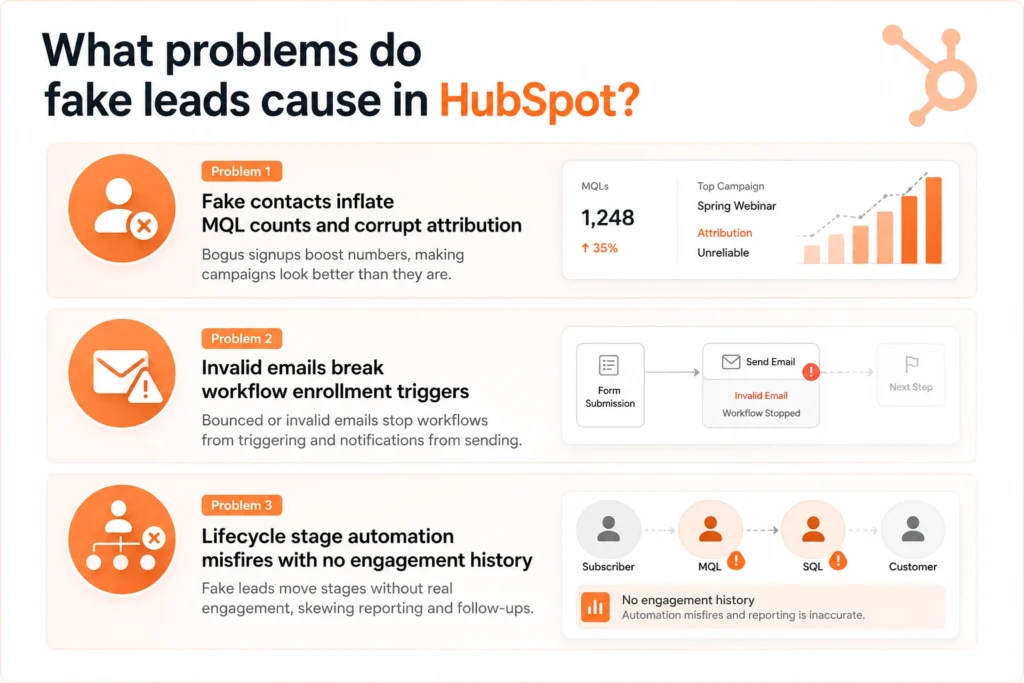
Problem 1: Fake contacts inflate MQL counts and corrupt attribution
Here's the scenario every RevOps leader dreads. MQL volume is up 25% quarter over quarter, marketing is thrilled, and then the close rate from that cohort comes in at half the historical average. Someone has to explain the gap, and it's usually you.
In most cases, that gap is bad data in HubSpot. Bots, competitors doing research, students testing forms for class projects, and people using disposable emails to unlock gated content all get scored and routed exactly like real prospects. HubSpot's lead scoring can't tell a real VP of Marketing from a throwaway address unless something stops it first.
The downstream damage compounds fast:
In most cases, that gap is bad data in HubSpot. Bots, competitors doing research, students testing forms for class projects, and people using disposable emails to unlock gated content all get scored and routed exactly like real prospects. HubSpot's lead scoring can't tell a real VP of Marketing from a throwaway address unless something stops it first.
The downstream damage compounds fast:
- Attribution skews toward noisy channels. If it's the most expensive and lowest quality traffic, whether it's paid social or content downloads, then it appears to be performing pretty efficiently but really it's just spam.
- Sales productivity numbers are reduced by salespeople chasing down contacts that were never really prospects.
- Your board sees a false pipeline. A number inflated by contacts who will never convert is a forecasting liability you'll have to walk back later.
This is exactly why HubSpot CRM data integrity belongs on a revenue leader's dashboard. The fix has to live at the point of capture. You must use a form validation tool like Form Guard to stop spam submissions in HubSpot forms.
Problem 2: Invalid emails break workflow enrollment triggers
This is a failure mode which is the most difficult to detect since it does not throw an error. It simply shuts down when all the dashboards say it's OK.
The typical use case for nurturing workflows in HubSpot is to enroll a contact when a form property is set, after which you send an email. Even if the address is invalid, if it is a disposable address, or if it is a typos of the real address, the sign up step will still complete successfully. HubSpot adds the contact as enrolled, but the email when sent might bounce or never lands.
From the outside, your workflow reporting shows healthy enrollment numbers. In reality, a meaningful share of "enrolled" contacts never received a single touch, and you won't know until a rep asks why a hot lead never replied to a sequence they were supposedly on.
There's a second cost too. A high volume of hard bounces can hurt your sending domain's deliverability score. That doesn't just break one workflow; it can suppress inbox placement for real prospects sharing that same domain reputation.
The typical use case for nurturing workflows in HubSpot is to enroll a contact when a form property is set, after which you send an email. Even if the address is invalid, if it is a disposable address, or if it is a typos of the real address, the sign up step will still complete successfully. HubSpot adds the contact as enrolled, but the email when sent might bounce or never lands.
From the outside, your workflow reporting shows healthy enrollment numbers. In reality, a meaningful share of "enrolled" contacts never received a single touch, and you won't know until a rep asks why a hot lead never replied to a sequence they were supposedly on.
There's a second cost too. A high volume of hard bounces can hurt your sending domain's deliverability score. That doesn't just break one workflow; it can suppress inbox placement for real prospects sharing that same domain reputation.
Quick check: Open one of your core nurture workflows right now and compare enrolled contacts against actual sends for the last 30 days. If those numbers don't roughly match, you likely have HubSpot fake leads sitting in that workflow today.
Problem 3: Lifecycle stage automation misfires with no engagement history
HubSpot's lifecycle stage automation works by tracking a contact's activity on their form, email engagement, and page activity, which transitions them from Subscriber to Lead to MQL to SQL. Fake and bot-generated contacts break this in a specific way.
They submit a form, which triggers a lifecycle stage change, then generate zero real engagement afterward because there's no human behind the record. The result is a growing population of contacts permanently stuck at "MQL" or "SQL," not because sales dropped the ball, but because there was never a real buyer there.
Over months, this pollutes your lifecycle distribution enough that velocity and conversion reporting becomes unreliable for the entire funnel, not just the fake records inside it. If a lifecycle report has ever contradicted what your reps tell you on a pipeline call, this is often why.
They submit a form, which triggers a lifecycle stage change, then generate zero real engagement afterward because there's no human behind the record. The result is a growing population of contacts permanently stuck at "MQL" or "SQL," not because sales dropped the ball, but because there was never a real buyer there.
Over months, this pollutes your lifecycle distribution enough that velocity and conversion reporting becomes unreliable for the entire funnel, not just the fake records inside it. If a lifecycle report has ever contradicted what your reps tell you on a pipeline call, this is often why.
Is this actually happening in your portal?
| Signal | Healthy Portal | At-Risk Portal |
|---|---|---|
| Email bounce rate on new contacts | Under 2% | 8% or higher |
| MQL to SQL conversion trend | Stable or improving | Declining despite volume growth |
| Workflow enrollment vs. actual sends | Match closely | Noticeable gap |
| Contacts with zero engagement after 30 days | Low, expected for cold leads | High and growing |
| Sales rep trust in MQL quality | High | Reps routinely disqualify on the first call |
If two or more rows on the right describe your portal, the issue is very likely upstream at the form.
See exactly which HubSpot contacts are fake before they touch your pipeline reports.
Try Clearout Form Guard free and watch invalid submissions get blocked in real time, with a full analytics breakdown of what got caught and why.
How can you identify invalid contacts in HubSpot?
One of the most useful things about real-time validation is that it leaves an audit trail your team can filter and report on.
Blocked submissions never become contacts. If the field is invalid (such as an email address, VoIP number, or gibberish name), Clearout Form Guard prevents it from entering the form and no HubSpot record is generated.
Contacts that do sync carry a verification record with them. Genuine submissions flow into the HubSpot CRM along with their validation result, and Clearout Data Pulse writes that result back to the CRM.
Blocked submissions never become contacts. If the field is invalid (such as an email address, VoIP number, or gibberish name), Clearout Form Guard prevents it from entering the form and no HubSpot record is generated.
Contacts that do sync carry a verification record with them. Genuine submissions flow into the HubSpot CRM along with their validation result, and Clearout Data Pulse writes that result back to the CRM.
Typical properties in that group, and how RevOps teams actually use them:
| Property | What It Captures | RevOps Use Case |
|---|---|---|
| Clearout Verification Status | Valid, invalid, risky, or disposable | Filter or suppress contacts from workflows |
| Safe to Send | Yes or No | Gate contacts out of nurture and sales sequences automatically |
| Verified On | Timestamp of the validation event | Track data freshness and build an audit trail |
| Phone Status | Mobile, fixed, or VoIP | Route dialer and SMS campaigns to the right numbers |
How to prevent fake leads in HubSpot?
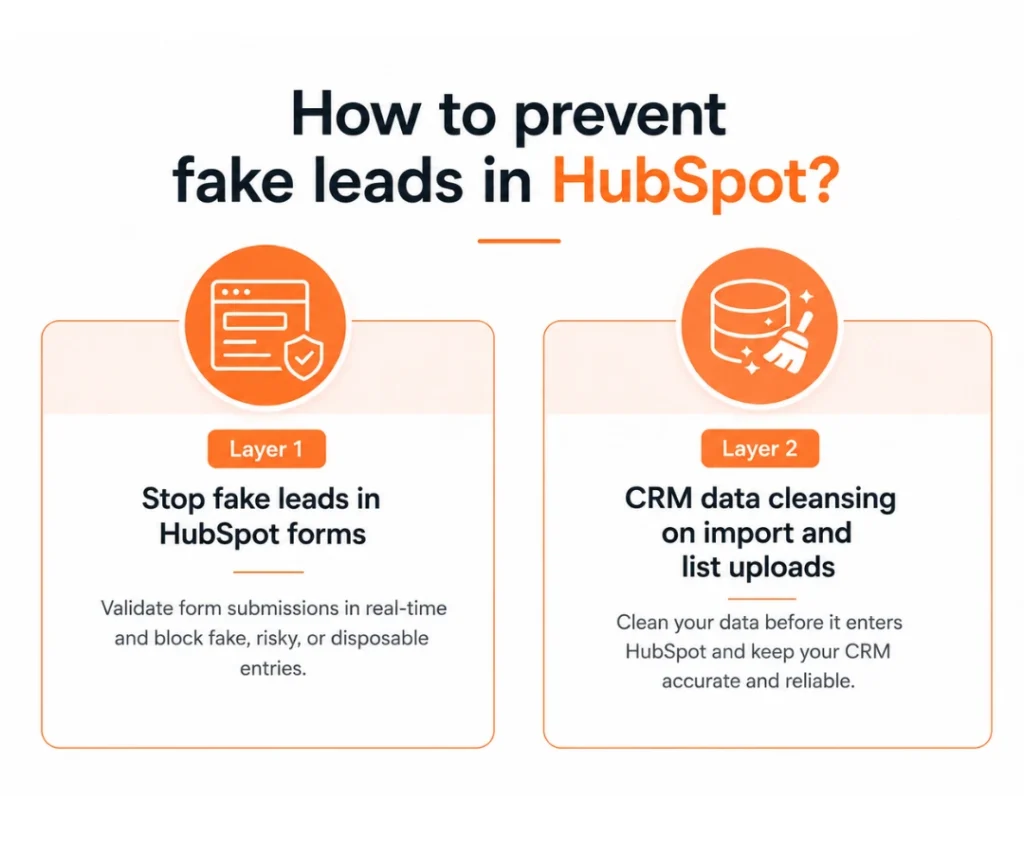
Bad data gets into HubSpot through more than one door, and each door needs its own layer of protection. Treating this as a single tool problem is usually where implementations to prevent fake leads from entering HubSpot CRM fall short, so here are both layers you actually need.
Layer 1: Stop fake leads in HubSpot forms
Clearout Form Guard validates email, phone, & name fields in real time as a visitor types and before submission.
- Blocks fake, disposable, and suspicious submissions before they enter HubSpot.
- Captures abandoned leads by identifying visitors who leave the form before submitting, helping you recover potential opportunities.
- Let genuine leads flow into your CRM with validation details attached.
- Maintains accurate contact information to support better lead scoring, routing and reporting.
- Prevents bad data at capture, minimising manual CRM cleanup.
- Works alongside your existing HubSpot forms and workflows without changing your lead capture process.
Layer 2: CRM data cleansing on import and list uploads
Form Guard protects new submissions, but it can't retroactively clean a CRM full of records imported years ago, purchased from a list vendor, or synced in from another tool. That's exactly what Clearout Email Verification is built for.
Run any CSV or bulk import through email verification before it touches HubSpot. This catches invalid, catch-all, unknown, risky, and disposable addresses.
Together, these two layers cover both doors and bad data used to get into your portal.
Run any CSV or bulk import through email verification before it touches HubSpot. This catches invalid, catch-all, unknown, risky, and disposable addresses.
Together, these two layers cover both doors and bad data used to get into your portal.
A HubSpot data quality checklist RevOps can run this week
- Audit the bounce rate on contacts created in the last 30 days
- Check which HubSpot forms are CTA-type forms lacking validation coverage
- Confirm Form Guard is live on your highest-traffic forms first
- Add Clearout Verification Status and Contact Quality Score to your lead scoring model
- Build a saved list view filtered on "Invalid" or "Risky" status for ongoing monitoring
- Run your next list import through Clearout Email Verifier before syncing it to HubSpot
- Revisit this checklist quarterly as a standing RevOps data quality process
If a list import or database consolidation is on your calendar this quarter, that's exactly the moment stale and invalid records tend to slip back in.
The bottom line
As fake leads build-up over time, they can impact lead scoring, routing, reporting, and even the sales team's trust in HubSpot. That's why CRM protection is an essential component of good RevOps.
Start with your highest-traffic forms and stop bad data before it enters HubSpot. Then verify every list you import so outdated or invalid contacts don't make their way into your CRM. When you cover both entry points, your workflows will work on high-quality data.
If you're interested in understanding this in a live HubSpot portal, schedule a demo with Clearout. We will demonstrate how Form Guard and Email Verification can be used together to prevent fake leads from entering and make sure that your CRM data remains accurate on day one.
Start with your highest-traffic forms and stop bad data before it enters HubSpot. Then verify every list you import so outdated or invalid contacts don't make their way into your CRM. When you cover both entry points, your workflows will work on high-quality data.
If you're interested in understanding this in a live HubSpot portal, schedule a demo with Clearout. We will demonstrate how Form Guard and Email Verification can be used together to prevent fake leads from entering and make sure that your CRM data remains accurate on day one.
Keep your HubSpot CRM clean
FAQ
How do you clean up CRM data in HubSpot?
The majority of the CRM admins who have done this before agree that the best way to clean up CRM data in HubSpot is to do a one-off clean-up followed by a layer of prevention at the point of entry. CRM data cleansing without prevention just means you're back to the same mess in six months.
What causes fake leads to enter a HubSpot CRM in the first place?
Most HubSpot fake leads come from bots, form-testing scripts, competitors doing research, or people using disposable emails to access gated content. Without validation at the point of entry, HubSpot can't tell these apart from real prospects.
How is preventing fake leads from entering HubSpot CRM different from cleaning up after the fact?
Prevention stops a bad record from ever being created, using tools like Form Guard. Cleanup, like a bulk CRM data cleansing pass, only fixes what's already inside your CRM and repeats every time a new junk gets in.
How do I know if there is a data quality issue with my HubSpot portal?
You will need to pay attention to the following indicators to determine if there is a problem with data quality in your HubSpot portal: increasing bounce rate, increasing number of leads in your workflows versus leads sent, decreasing MQL to SQL conversion rate despite growth in volume, or reps disqualifying leads on the first call. These signal that HubSpot data quality management is breaking down upstream.