clearout
  • Products
    • Email Verifier Verify emails addresses individually, in bulk or through API, with 99% accuracy
    • Email Finder Find individual or bulk emails by entering the person & company name or domain
    • Form Guard IconForm Guard Protect your forms from spam, bots, and invalid submissions with real-time email, phone, and name verification.
    • Prospect SQL/MQL list building with high levels of personalization, real-time data enrichment and prospect search
    • Clearout For SheetsVerify email addresses directly on Google Sheets with Clearout for sheets add-on
    • Prospect – LinkedIn Chrome ExtensionBuild verified, targeted prospect lists directly from LinkedIn profiles
    • ClearoutPhoneValidate phone numbers across 240+ countries in bulk, quick or real time validation
    • Free Tools
    • Disposable Email Checker
    • Reverse LinkedIn Profile Lookup Tool
    • Reverse Email Lookup Tool
    • Email List Cleaner
    • Company Domain Finder API
  • Resources
      DEVELOPERAPI iconAPI
      Clearout APIs are structured around REST and JSON
      Webhooks iconWebhooks
      Capture real-time events in your application workflow
      Form Guard iconForm Guard
      Real-time form validation to keep bad contacts out of your CRM
      KNOWLEDGE BASEGetting started iconGetting started
      Sending campaigns without bounces is made simple
      FAQ iconFAQ
      Easily find answers to services, security and common questions
      USE CASESLead Generation iconLead Generation
      Learn how professionals generate quality leads
      GUIDESPricing arrow iconTransparent & flexible pricing to support pay-per-use or recurringCompare Email Verification Tools arrow iconAI-powered email verification with 99%+ accuracy, real-time validation, and transparent risk scoringCompare Email Finder Tools arrow iconPre-verified B2B email addresses with confidence scoring, find real person email, not role-based addressBLOGSEmail Verification ToolsFind Anyone’s Email Address
      Most Accurate, Fast & Free Ways
      Form Validation
      Importance, Ways & Best Practices
      View All Blogs
  • Pricing
  • Integrations
  • Enterprise
  • Login
Try it free Book a 1-to-1 demo
Priyanshi Sharma / June 2, 2026 June 2, 2026

Top 11 LinkedIn Automation Tools in 2026 (By Use Case)


Top 11 LinkedIn Automation Tools in 2026 (By Use Case)

I tested each LinkedIn automation tool with a real B2B audience consisting of decision-makers from mid-market companies. I used the exact type of prospects our team reaches out to every day. What surprised me was how some tools completely changed the way I look at LinkedIn outreach.

So in this guide, you’ll find everything organized by category so you can quickly jump to the tools that match your use case.

If your main goal is finding emails from LinkedIn profiles, you can check out our guide on LinkedIn email finder tools instead. The list below is focused specifically on LinkedIn automation and outreach workflows.

Table of Content


‣ LinkedIn Automation Tools That Actually Work in 2026
‣ Use case 1: LinkedIn email finder & prospect list building
‣ Use case 2: LinkedIn outreach automation
‣ Use case 3: Prospect targeting & account research
‣ Use case 4: LinkedIn content scheduling & personal brand
‣ Use case 5: Content inspiration & research
‣ Use case 6: Advanced workflow automation
‣ Bottom line
‣ FAQs
Before you choose a LinkedIn automation tool, read this first.

  • LinkedIn keeps a close eye on automation activity, so cloud-based tools are usually the safer choice for long-term use.
  • Even if a tool says you can send hundreds of connection requests daily, don’t push it. Keep your requests around 20–30 per day per account.
  • If your LinkedIn account is new, don’t jump into automation immediately. Spend at least 2–3 weeks warming it up by posting, engaging, and sending manual requests first.
  • People instantly ignore copy-paste outreach and get your account flagged.

LinkedIn Automation Tools That Actually Work in 2026


Some automation tools are better for agencies, while others are built for solo founders, SDR teams, or large outbound operations. So rather than creating a random list, we tested and grouped these tools by use case to help you find the right option faster.

ToolPrimary Use CaseBest ForKey StrengthLimitationPricing
ClearoutLinkedIn email finder & verified prospect list buildingSDR teams, outbound sales, B2B lead generationPre-verified emails at 99.73% accuracy from LinkedIn & Sales NavigatorChrome-only; high-volume use requires smart LinkedIn usage limitsFree (100 credits). Starter from $16/mo
WizaLinkedIn email finder via Sales Navigator exportSales Nav power users, teams doing bulk list exportsPay-per-valid-email model; direct Sales Navigator integrationReal-time accuracy is 97%Free (20 emails/mo). Paid from $99/mo
ExpandiCloud-based LinkedIn outreach automationSDR teams, B2B SaaS, multi-step sequencesSafe cloud-based multichannel outreach with image + GIF personalisationPricing is higher than than beginner toolsFrom $99/mo, 7-day trial
Dux-SoupLinkedIn outreach automation (browser + cloud)SDR teams, agencies, and multi-account prospectingAll-in-one LinkedIn automation with CRM sync and team campaign sharingUI feels dated; personalisation is less advanced than ExpandiFrom $14.99/mo, 14-day trial
Sales NavigatorProspect targeting & account researchB2B sales teams, enterprise SDR teamsLinkedIn targeting filters and saved search alertsNo outreach automation; expensive for smaller teamsFrom $119.99/mo, free trial
Apollo.ioB2B prospecting database & account intelligenceABM teams, RevOps, and teams needing technographic filtersTechnographic and intent data filtersEmail accuracy is lower on niche lists; steep for small teamsFree plan. Paid from $49/mo
TaplioLinkedIn content scheduling & personal brandFounders, marketers, and content-led demand genContent planning, carousel builder, and engagement trackingNot for outreach automation; AI content needs heavy editingFrom $39/mo, free trial
KleoContent inspiration & LinkedIn post researchCreators, GTM teams, personal brand buildersFast hook and post performance analysis directly inside LinkedInLimited analytics depth; not for outreachFrom $99/mo
SupergrowAI-powered LinkedIn post drafting & inspirationFounders and reps posting regularly, teams without copywritersViral post library and fast drafting interfaceAI output still needs editingFree plan. Paid from $16/mo
PhantombusterAdvanced no-code LinkedIn workflow automationGrowth marketers, RevOps, lead gen specialists100+ LinkedIn phantoms with Clay/Zapier/Make integrationHigher learning curve; browser session setup requires careFrom $59/mo, free plan
ClayData enrichment & AI-powered outbound automationRevOps and GTM engineers building outbound infrastructure75+ enrichment sources and AI personalisationSteep learning curveFree (100 credits). Paid from $167/mo

Use case 1: LinkedIn email finder & prospect list building


1. Clearout LinkedIn chrome extension


LinkedIn email finder and prospect list building extension

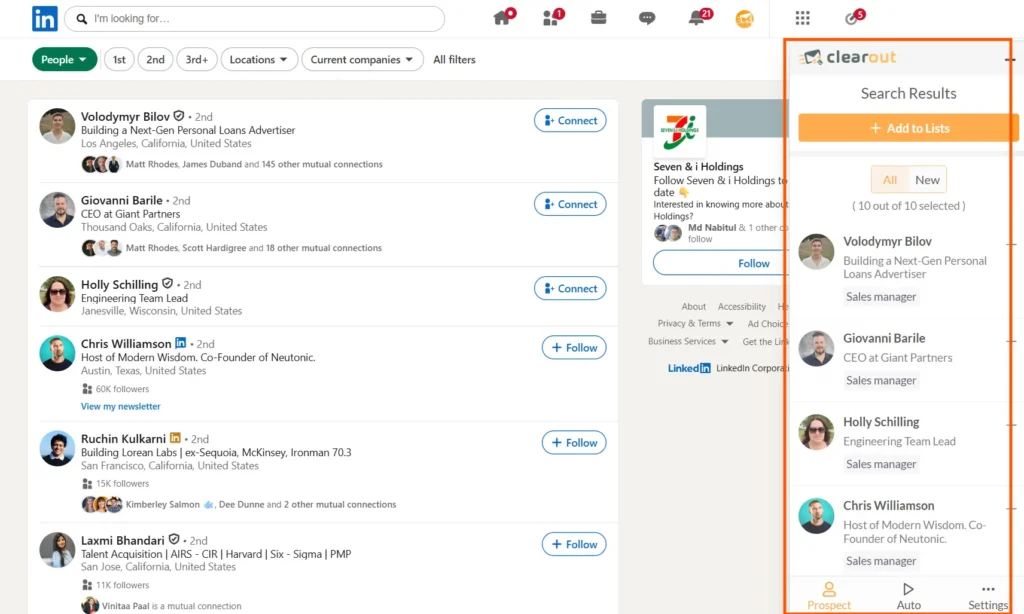
If your LinkedIn workflow still involves manually copying email addresses or chasing InMails, Clearout’s LinkedIn Chrome Extension makes the process much faster for you. It helps sales and marketing teams extract pre-verified emails directly from LinkedIn profiles. So, it has made building targeted prospect lists much easier in real time.

Find Emails Instantly

Clearout LinkedIn Chrome Extension showing bulk data extraction from a search results page.

My review


The workflow is for outbound prospecting. I tested it with Sales Navigator searches for mid-market SaaS leads, and the bulk extraction workflow saved a huge amount of manual research time. The pre-verification layer is also useful because it reduces the usual back-and-forth between prospecting and separate email validation tools.

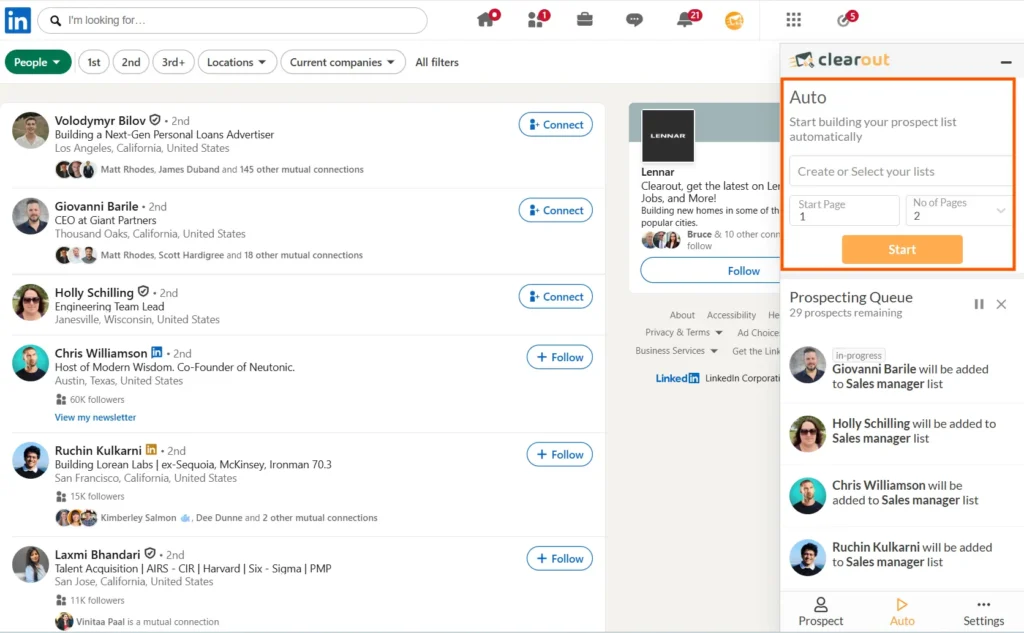
Clearout LinkedIn chrome extension auto-extraction feature.

The auto-extraction feature is probably the biggest advantage for SDR teams doing high-volume outbound. You can define your ICP filters in LinkedIn, run the extraction, and continue working while the extension builds the list in the background.

Another thing I liked is that you get pre-verified emails with 99.73% accuracy. You can export directly into CSV or Google Sheets, enrich lead records, and combine the workflow with outbound sequencing tools easily.

What I liked


  • Finds pre-verified emails directly from LinkedIn
  • 99.73% accuracy
  • Works with LinkedIn profiles, company pages, and Sales Navigator
  • Bulk extraction saves hours of manual prospecting
  • CSV and Google Sheets exports are simple
  • Auto-extraction helps scale outbound workflows
  • Pay only for extracted contacts

Things that could be better


  • Chrome-only experience currently
  • High-volume extraction still requires smart LinkedIn usage limits

Best for


  • SDR teams
  • LinkedIn prospecting
  • Outbound sales workflows
  • Sales Navigator prospecting
  • Lead list building
  • B2B lead generation

Pricing: 100 free credits available. Starter plans begin at $16/month, with enterprise plans available for larger teams.

2. Wiza


LinkedIn Email Finder & Prospect Exporter

What it is

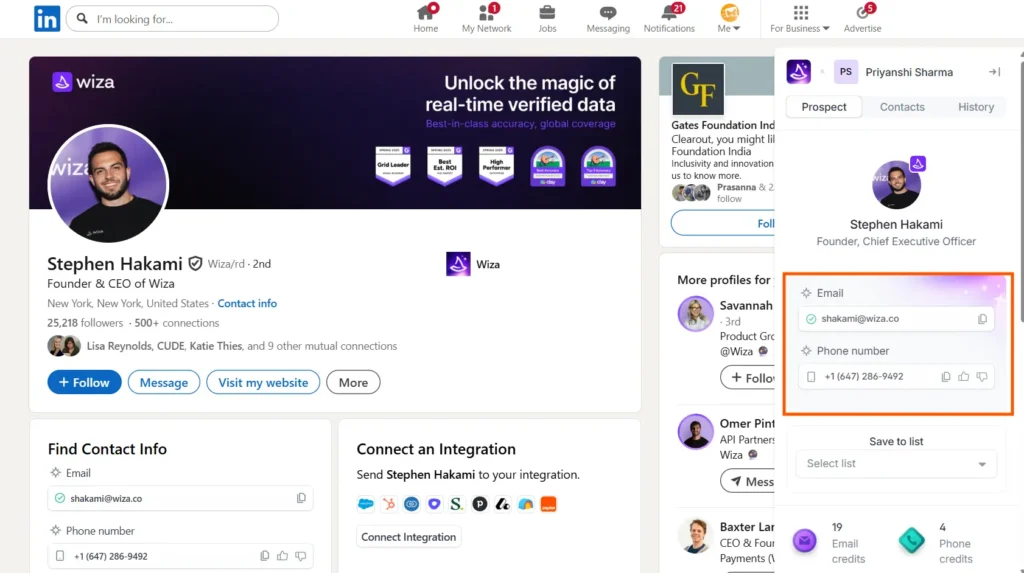
Wiza is a LinkedIn prospecting tool built around Sales Navigator exports. It converts Sales Navigator searches and saved lead lists into verified contact records, including work email addresses and phone numbers, without requiring manual copy-paste.

Screenshot of Wiza LinkedIn contact intelligence dashboard.

My review


I tested Wiza using the same mid-market SaaS ICP I used for Clearout. The focus was on decision-makers at companies with 50 to 500 employees across the US and UK.

Wiza sits at a different stage of the prospecting workflow compared to Clearout. While Clearout works directly from LinkedIn browsing sessions and profile-level extraction, Wiza is built around bulk exports from Sales Navigator searches.

For teams that spend most of their time inside Sales Navigator, that workflow feels efficient. You can build filtered searches, save lists, and export them directly into enriched lead records. Wiza handles the enrichment and verification process in the background. On my test list, around 68% of contacts returned valid work emails. The remaining records were marked as catch-all, unverifiable, or unavailable.

What I liked


  • Direct Sales Navigator integration with minimal setup
  • Pay-per-valid-email pricing helps reduce wasted credits
  • Exports include emails, phone numbers, LinkedIn URLs, and job titles
  • Simple workspace management for SDR teams
  • Lightweight Chrome extension with smooth performance

Things that could be better


  • Real-time accuracy is slightly lower on niche prospect listsy
  • No extraction workflow for individual LinkedIn profiles outside Sales Navigator
  • Phone number coverage varies depending on the region

Best for


  • Sales Navigator power users
  • SDR teams are doing large-scale list exports
  • Teams that prefer pay-per-result pricing models

Pricing: Free plan available with 20 emails per month. Paid plans start at $99/month. Pay-as-you-go credits are also available.

Use case 2: LinkedIn outreach automation


3. Expandi


Cloud-based outreach automation for LinkedIn and Email

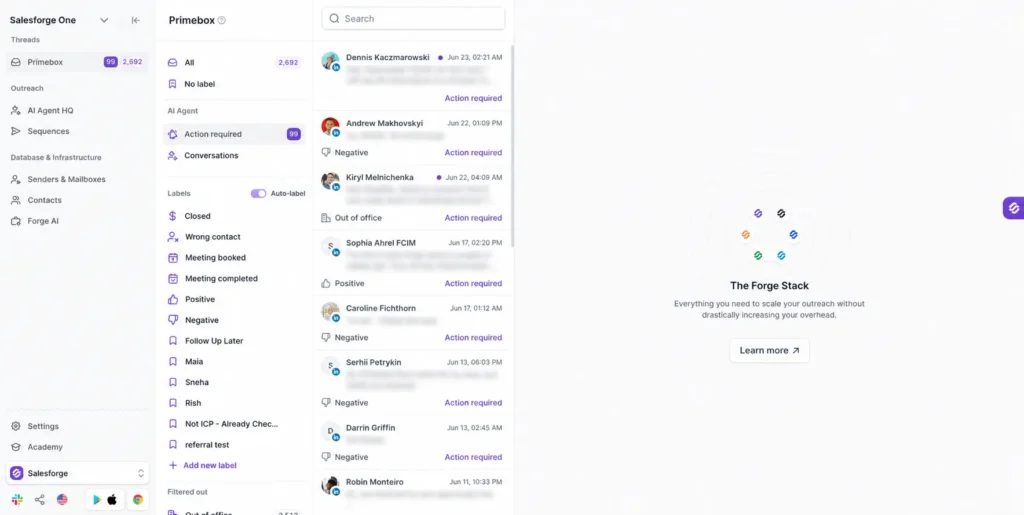
If you're dedicated to LinkedIn outreach, then Expandi is likely one of the initial tools that you should examine. It's cloud-based and therefore is safer than browser extensions. Meanwhile, you get personalization options, such as custom images, GIFs, and dynamic outbound message sequences that make your outreach engaging.

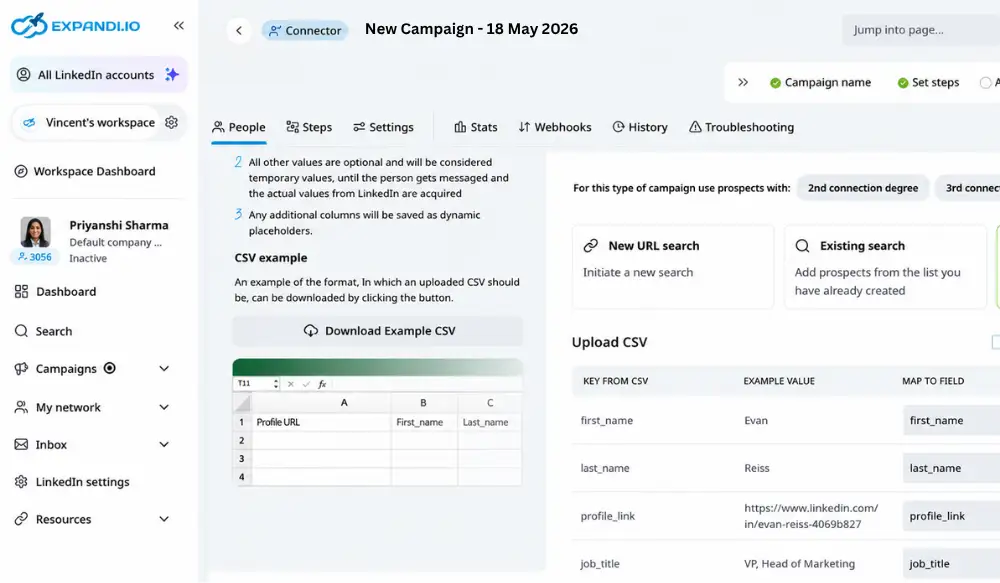
Expandi campaign sequence builder showing connection request step.

My review


I rebuilt the workflow inside Expandi with a proper sequence. We first made a connection request, then sent a value-based message based on what a prospect has been doing on LinkedIn recently, and then followed up with a hard pitch. After two weeks, the responses for the same audience became 14%.

I enjoyed the customization options for its pictures. Created a template that would automatically download the image of each prospect's LinkedIn profile and insert it into a branded "visual. It actually was the most successful component of the whole campaign.

Here's what I loved


  • Personalized images and GIFs improve engagement
  • Dedicated IP setup feels safer for long-term outreach
  • Inbox management is clean and easy to handle
  • Campaigns can branch automatically based on prospect actions
  • Integrations with Zapier and webhooks work reliably

Things that could be better


  • Initial setup takes time if you are new to automation
  • Analytics could offer deeper reporting
  • Pricing is slightly higher compared to beginner-level tools

Best for


  • SDR teams
  • B2B SaaS outreach
  • Multi-step sequences
  • LinkedIn messaging automation

Pricing: From $99/mo/seat, 7-day free trial available

4. Dux-Soup


LinkedIn automation tool for lead generation & scalable outreach

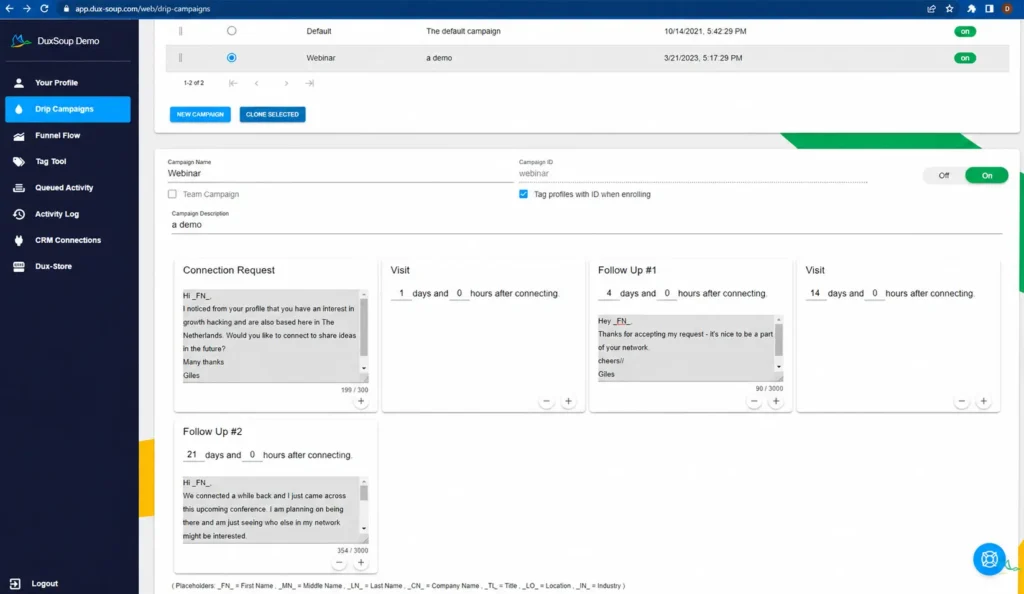
If you work on outbound automation frequently, Dux-Soup is the best available for you. It integrates LinkedIn automation, campaign management, lead tracking, and CRM syncing in a single workflow. You can automate profile visits, connection requests, follow-ups, endorsements, InMails, and multi-step campaigns.

 LinkedIn drip campaign workflow dashboard showing automated follow-up sequence builder.

My review


One thing I liked immediately was how easy Dux-Soup was to build outreach sequences directly inside LinkedIn. The response detection works well enough that prospects automatically drop out once they reply, which keeps follow-ups cleaner.

I also liked the audience management side. Pulling prospects from Sales Navigator searches and automatically feeding them into campaigns saved a lot of manual prospecting time. The browser-based workflows require more careful usage and monitoring.

What I liked


  • Works with LinkedIn, Recruiter, and Sales Navigator
  • Multi-step LinkedIn outreach automation is easy to manage
  • CRM integrations simplify lead routing
  • Team campaign sharing works well for agencies
  • Good balance between automation and LinkedIn safety

Things that could be better


  • UI feels slightly outdated compared to newer tools
  • Reporting is useful but not deeply advanced
  • Browser automation setup takes some learning initially
  • Personalization features are less advanced than Expandi

Best for


  • LinkedIn lead generation
  • SDR and outbound sales teams
  • Agencies managing client outreach
  • Sales Navigator automation workflows
  • Multi-account LinkedIn prospecting

Pricing: 14-day free trial available. Paid plans start around $14.99/month.

Use case 3: Prospect targeting & account research


5. LinkedIn Sales Navigator (Sales Nav)


Native prospecting intelligence that works with all automation tools

If you are serious about LinkedIn outreach, Sales Navigator is not optional anymore.

In fact, most LinkedIn automation tools become far more effective when paired with Sales Navigator. Without it, you are basically automating outreach without strong targeting. It’s similar to running ads without knowing who you actually want to reach.

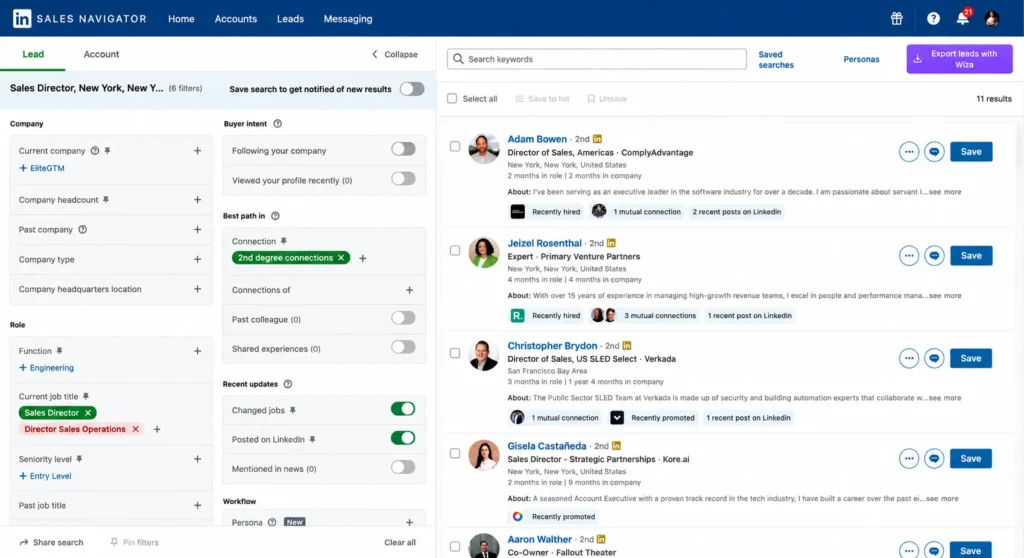
LinkedIn Sales Navigator lead search dashboard.

My review


I’ve used Sales Navigator almost every day for the past year and a half, and honestly, it sits at the center of nearly every outreach workflow I build. The biggest advantage for me has been saved search alerts. Rather than manually checking for new prospects, LinkedIn automatically notifies me when someone in my target accounts becomes active or matches a filter I’ve set.

I pair Sales Navigator with Expandi for outreach campaigns, and together they work extremely well. Sales Navigator handles targeting while Expandi handles automation and follow-ups. Another feature I rely on heavily is Account Lists. You can organize warm accounts, segment them properly, and push them directly into outreach workflows. It saves a lot of manual work for SDR teams.

Here's what I loved


  • Saved search alerts help you spot active buyers in real time
  • Spotlight filters make prospecting much smarter
  • Account Lists work smoothly with most automation tools
  • InMail credits are useful for reaching people outside your network
  • TeamLink helps uncover warm introductions through colleagues

Things that could be better


  • Pricing can feel expensive for smaller teams
  • CRM sync occasionally creates duplicate records
  • You still need a separate automation tool for outreach campaigns

Best for


  • B2B sales teams
  • Account-based prospecting
  • Sales Nav automation stacks
  • Enterprise SDR teams

Pricing: Starts around $119.99/month per seat with a free trial available.

6. Apollo.io


B2B Prospecting Database & Account Intelligence

What it is

Apollo.io is a B2B prospecting platform that combines contact data, company intelligence, technographic filtering, and outbound sequencing in one system. Unlike Sales Navigator, which relies on LinkedIn-native activity and profile data, Apollo operates from its own database of more than 275 million contacts enriched with intent and company insights.

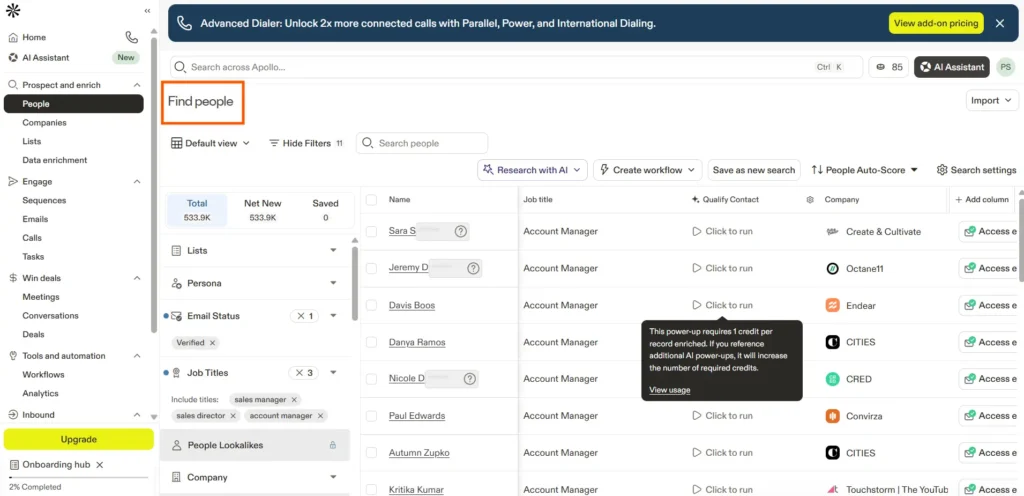
Apollo.io dashboard interface showing the prospecting platform's "Find people" search tool.

My review


I use Apollo and Sales Navigator for very different workflows. Sales Navigator is better when I want to research a specific account, understand organisation structure, or identify recent role changes and buying signals from LinkedIn activity.

Apollo is more useful when the goal is to scale with deeper filtering capabilities that LinkedIn simply does not provide. The technographic filters are the biggest advantage. You can search for companies based on the software they already use, which changes how precisely you can build outbound lists. For example, filtering companies using HubSpot and Salesforce within a certain employee range or geography becomes straightforward.

The intent data can also be valuable when the signals are accurate. Being able to identify accounts actively researching relevant categories helps prioritize outreach before competitors have already started conversations.

Where Apollo struggles is with data freshness. The database is large, but contact accuracy on smaller regional businesses or recently promoted decision-makers can vary. For outbound campaigns where accuracy matters, I still verify Apollo-sourced emails through Clearout before adding them into sequences.

Features I liked


  • Strong technographic and intent-based targeting filters
  • Built-in sequencing removes the need for a separate outreach tool
  • Account scoring helps prioritize ICP-fit accounts for ABM
  • Generous free plan for testing contact quality
  • Chrome extension works across multiple websites, not just LinkedIn

Things that could be better


  • Email accuracy is lower than that of dedicated enrichment tools on niche lists
  • Intent data quality depends heavily on industry coverage
  • The platform can feel overwhelming for smaller teams with simple workflows

Best for


  • Account-based marketing and outbound teams
  • RevOps teams building ICP-driven prospect lists at scale
  • Companies relying on technographic targeting and buying signals

Pricing: Free plan available with limited credits. Paid plans start at $49/month per seat.

Use case 4: LinkedIn content scheduling & personal brand


7. Taplio


AI-powered LinkedIn content scheduling & personal brand growth

If your strategy depends on building a personal brand on LinkedIn, Taplio is one of the better tools you can use right now. Unlike outreach tools, Taplio focuses on the content side of LinkedIn growth. So instead of automating DMs and connection requests, it helps you manage post scheduling, content ideas, analytics, and audience engagement from one place.

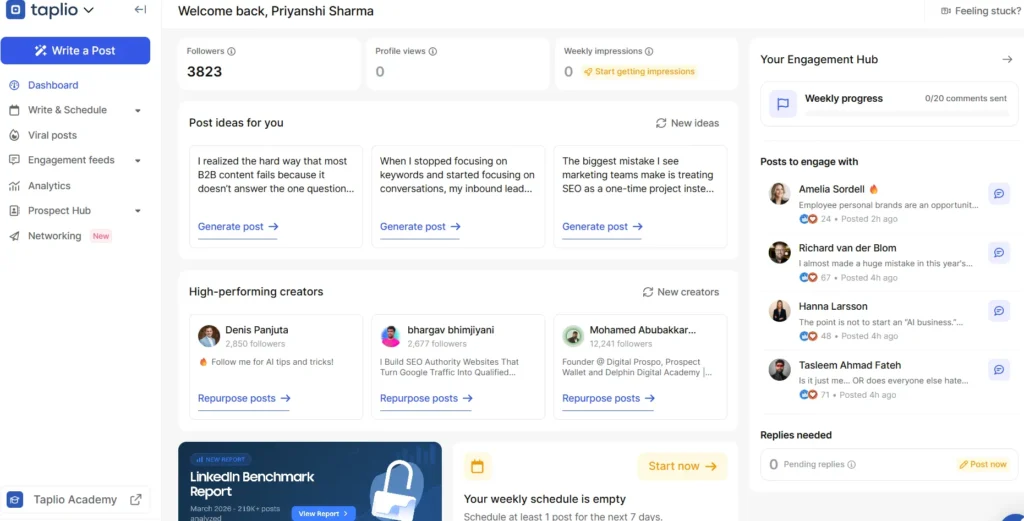
Taplio interface showing analytics and post ideas.

My review


Honestly, I didn’t expect to include a content tool in this list at first. But after using Taplio for a few weeks, I understood why so many founders and marketers swear by it.

We run a content-led demand generation strategy where our senior sales reps post regularly on LinkedIn. The scheduling system is organized. We could queue posts in advance, collaborate on drafts, and manage multiple LinkedIn accounts without jumping between tools.

Taplio helped surface conversations from people interacting with similar content in our niche. Another feature I ended up using a lot was the carousel creator. It saves a ridiculous amount of time if you regularly create LinkedIn carousels for thought leadership posts.

Features I liked


  • Comment engagement helps surface warm prospects naturally
  • Great source of post ideas from top-performing LinkedIn creators
  • Post analytics are much more detailed than LinkedIn’s native insights
  • Scheduling multiple authors is easy and organized
  • Carousel builder saves time on content design

Things that could be better


  • AI-generated content still needs strong editing
  • Not built for LinkedIn outreach automation
  • A few features still feel slightly unfinished at times

Best for


  • Founders and executives
  • Personal brand building
  • Marketing teams
  • Content-led demand generation strategies

Pricing: Starts at around $39/month with a free trial available.

Use case 5: Content inspiration & research


8. Kleo


LinkedIn content inspiration and post performance research tool

If your LinkedIn strategy depends on understanding what content actually performs well in your niche, Kleo is one of the most useful lightweight tools available right now. Unlike scheduling platforms, Kleo focuses more on content research, creator analysis, and post inspiration directly inside LinkedIn.

It works as a Chrome extension and helps you quickly break down high-performing posts, save content ideas, study engagement patterns, and organize inspiration without manually tracking everything in spreadsheets.

Kleo interface showing AI-powered LinkedIn content.

My review


When I first explored Kleo, I wanted to test their personal brand tool for LinkedIn post ideas. But as a first-time user, I couldn’t access much without upgrading. I feel giving a few trial credits or limited access would help users understand the product better before paying.

That said, once you’re inside the paid plan, the workflow becomes much smoother. You can draft posts faster, refine them, create supporting graphics, and even schedule content at the right time. So if your LinkedIn growth relies heavily on content-led demand generation, Kleo is definitely worth considering.

What I liked


  • Makes LinkedIn content research much faster
  • Great for saving and organizing post inspiration
  • Helpful for analyzing hooks and engagement patterns
  • Lightweight and simple to use
  • Useful for founders and content teams building personal brand

Things that could be better


  • Limited analytics compared to enterprise tools
  • Not built for outreach automation
  • Works best alongside scheduling tools

Best for


  • Content marketers
  • Founders building on LinkedIn
  • Personal branding workflows
  • LinkedIn content research

Pricing: From $99/month

9. Supergrow


AI LinkedIn Post Writer & Inspiration Engine

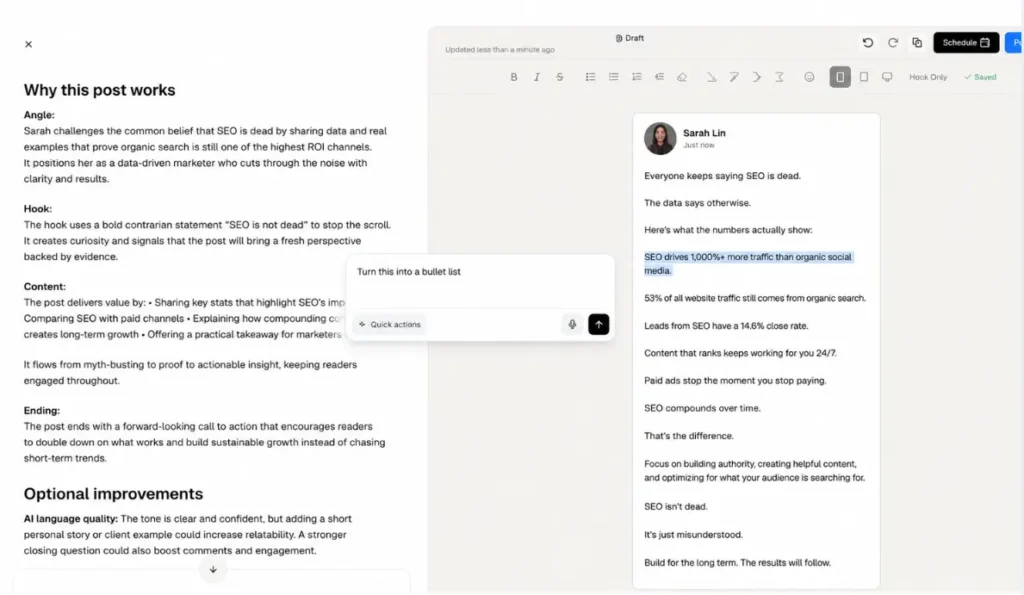
Supergrow is an AI-powered LinkedIn content tool help you write posts faster. It combines hook generation, viral post inspiration, drafting assistance, and repurposing workflows in one place. Unlike tools like Kleo, which focus more on research and analysis, Supergrow is built around actually helping you create content.

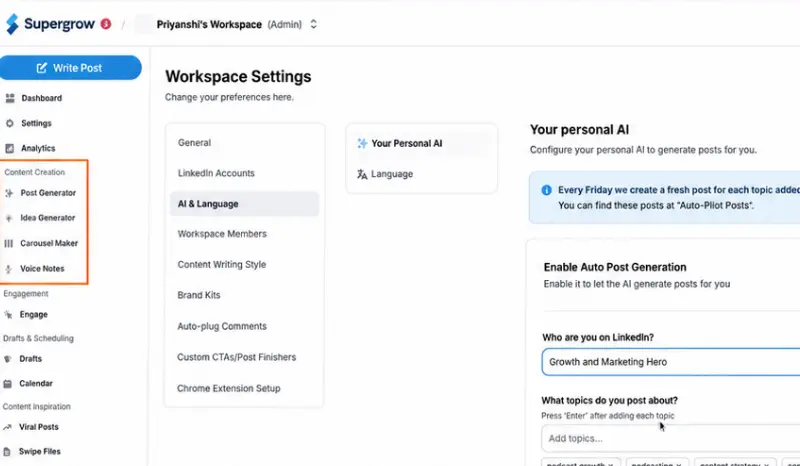
Supergrow interface showing personal AI workspace settings.

My review


I originally started using Supergrow because I kept running into the same problem. I knew what I wanted to say in the posts, but turning the idea into a strong LinkedIn post took way too long.

The viral post library helped a lot with that. You can browse posts by niche, format, and engagement level, then use those structures as inspiration for your own content. It makes starting much easier when you are stuck staring at a blank draft.

The hook generator ended up being the feature I used most. Since the first line usually decides whether someone keeps reading, being able to generate multiple hook variations from a single idea is genuinely useful. Supergrow gives you several different angles quickly, which feels more helpful than forcing one AI-written version that sounds robotic.

Compared to Kleo, Supergrow is much stronger for drafting and speed. Kleo is better if you want to analyse why posts perform well. Supergrow is better if you already know the topic and just want help turning it into a publishable post faster.

What I liked


  • The hook generator creates multiple opening angles quickly
  • Viral posts library organised by niche and content format
  • Fast drafting workflow that keeps everything inside one interface
  • Helpful for repurposing newsletters and long-form content into LinkedIn posts
  • Cleaner onboarding experience than many AI writing tools

Things that could be better


  • AI-generated content still needs editing
  • Analytics are limited compared to tools like Shield
  • Some features still feel slightly early-stage compared to more mature platforms

Best for


  • Founders
  • Sales reps
  • Teams without copywriters
  • Anyone who struggles with starting the first draft

Pricing: Free plan available. Paid plans start from $16/month.

Use case 6: Advanced workflow automation


10. Phantombuster


No-code automation workflows with 100+ LinkedIn phantoms

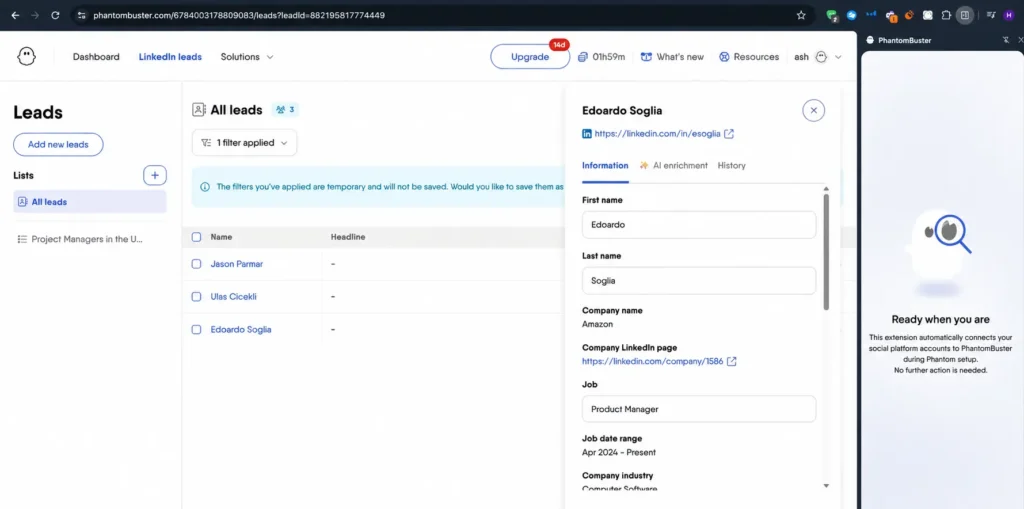
Phantombuster interface showing extracted LinkedIn lead data.

If you want more than simple LinkedIn outreach automation, Phantombuster becomes really interesting. Unlike most tools on this list, it is not built around one fixed workflow. Instead, it gives you a huge library of automation “Phantoms” that you can combine to create custom lead generation systems.

So rather than only sending connection requests or follow-ups, you can extract LinkedIn event attendees, scrape group members, pull search results, enrich lead data, and connect everything with tools like Clay, Zapier, or Make.

My review


I mainly used Phantombuster for extracting LinkedIn event attendees and pulling members from niche industry groups. Then I connected that data to enrichment workflows and outbound campaigns. Even something as simple as the LinkedIn Search Export phantom saved hours of manual prospecting every week.

Let’s say you want to collect attendees from multiple LinkedIn events, enrich the company data, and automatically send those leads into your outreach platform. Most tools cannot handle that without engineering support. Phantombuster can.

That said, this is definitely not the easiest tool on the list. You need to spend some time understanding how the workflows connect together. If your only goal is basic LinkedIn outreach, tools like Expandi are much simpler.

What I liked


  • Extremely flexible for custom LinkedIn workflows
  • Event attendee and group member extraction is incredibly useful
  • Works smoothly with Clay, Zapier, and Make
  • The free plan is generous
  • Huge library of automation workflows for different use cases

Things that could be better


  • The learning curve is higher compared to most outreach tools
  • Browser session setup takes extra effort
  • Needs careful usage to stay safe on LinkedIn

Best for


  • Growth marketers
  • Lead generation specialists
  • RevOps teams
  • Advanced LinkedIn lead generation workflows

Pricing: Free plan available. Paid plans start around $59/month.

11. Clay


Data Enrichment & AI-Powered Outbound Automation

What it is

Clay is one of those tools that sits right in the middle of a modern outbound stack. It pulls data from 75+ providers, enriches leads with buying signals and company insights, and helps automate personalised outbound workflows using AI.

Instead of juggling multiple enrichment tools, spreadsheets, and Zapier automations, Clay brings everything into one place.

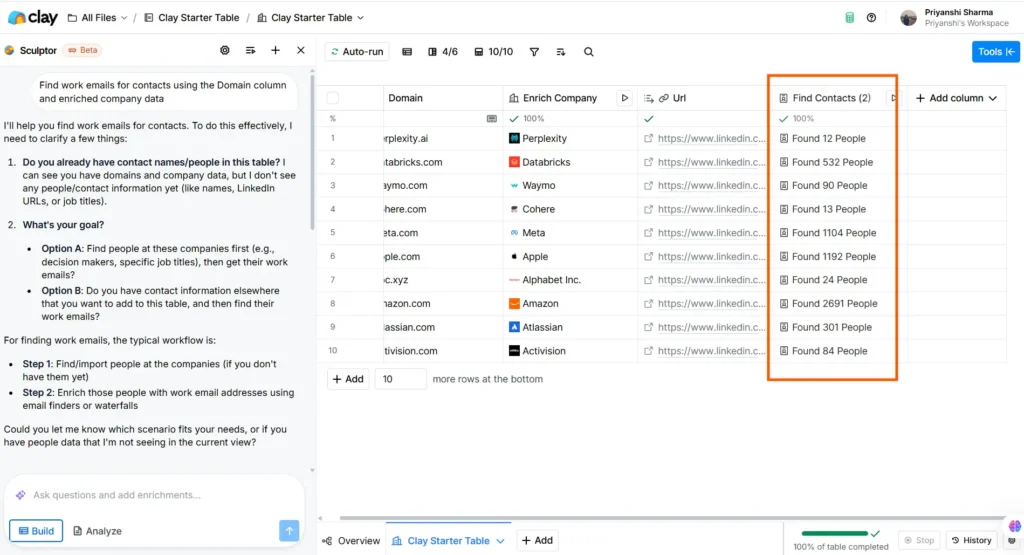
Clay interface showing contacts found using company data.

My review


Clay feels less like a prospecting tool and more like outbound infrastructure.

If tools like Phantombuster help you scrape or collect data, Clay helps you turn that data into actual outreach campaigns that are personalised and scalable.

One workflow I tested targeted recently funded SaaS companies that had opened SDR roles in the last 30 days. Clay pulled funding signals from Crunchbase, hiring signals from LinkedIn, verified emails through Clearout’s API, and then used AI to generate custom first lines mentioning both triggers. That entire workflow happened inside one table.

At the same time, Clay definitely is not beginner-friendly. The spreadsheet-style setup and waterfall enrichment logic take time to understand. If someone is brand new to outbound automation, the platform can feel overwhelming initially.

The credit system also needs careful management. Since every enrichment step consumes credits, costs can rise quickly if workflows are not tightly scoped around a clear ICP.

What I liked


  • Huge enrichment ecosystem with 75+ providers in one workflow
  • AI personalisation actually feels useful when paired with strong signals
  • Waterfall enrichment helps reduce unnecessary credit usage
  • Native integrations with tools like Clearout work reliably
  • Strong community with lots of templates and workflow examples

Things that could be better


  • Steep learning curve for first-time users
  • Credit usage can scale up fast on large workflows
  • Some enrichment sources still return inconsistent data occasionally

Best for


  • RevOps and GTM teams are building advanced outbound systems
  • Teams running signal-based personalised outreach
  • Operators who have outgrown simple prospecting tools

Pricing: Free plan available with 100 credits. Paid plans start at $167/month.

Bottom Line


After testing all the tools in this list, one thing became pretty clear. There is no single LinkedIn tool that handles prospecting, enrichment, outreach, analytics, and automation perfectly on its own. The best setups usually combine multiple tools based on the workflow you are trying to build.

Recommended stacks


Solo founder
  • Clearout
  • Sales Nav
  • Expandi

Agency
  • Sales Nav
  • Phantombuster
  • Clay

Even the best outbound system breaks when contact data is inaccurate. Emails bounce, campaigns underperform, and automation loses effectiveness quickly.

That is where tools like Clearout become useful. The Clearout LinkedIn Chrome Extension helps teams find pre-verified email addresses directly from LinkedIn profiles. So, you can now start campaigns with high-quality lead data.

Use Clearout for Smarter LinkedIn Outreach


Start Free Now

FAQs


1. What triggers a LinkedIn automation warning?
Usually, it is not one action that gets you flagged. If you suddenly start sending hundreds of connection requests, running aggressive profile visits, or automating follow-ups at unnatural speeds, LinkedIn notices the behavior. The safer approach is to keep activity paced, personalize outreach, and use tools that prioritize account safety over volume.
2. Are LinkedIn automation tools still effective for lead generation in 2026?
Yes, but only when the workflow behind them is solid. The best LinkedIn automation setups today combine prospect research, personalization, CRM sync, and email outreach together. So, you can use Clearout for prospect research as it even integrates with various CRMs smoothly. Additionally, if your outreach feels personalized, automation works extremely well for pipeline generation.
3. What should you look for in a LinkedIn automation tool?
Most comparison lists of LinkedIn automation tools focus on features. But you should ask: Can the tool personalize outreach properly? Does it support multichannel sequences? Can your team safely scale campaigns without risking account restrictions? If your automation stack is pulling outdated LinkedIn data, your reply rates drop. The stronger setups combine LinkedIn automation with data enrichment tools for a better outcome.
4. Are free LinkedIn automation tools worth trying?
For testing workflows, yes. For scaling outreach, do not use free tools. They come with heavy restrictions, limited personalization, or weak safety controls. They are useful if you want to understand how LinkedIn automation works before investing in a proper setup. But once campaigns start driving pipeline, account safety becomes necessary far more than saving a few dollars.

Share this article

Recent Posts

02 Jun 2026
Top 11 LinkedIn Automation Tools in 2026 (By Use Case)

Explore the top LinkedIn automation tools of 2026 for prospecting, outreach, content and workflow au ...

29 May 2026
Email Verification for Startups vs Enterprises: What Changes at Scale

Explore startup vs enterprise email verification as businesses scale. Learn how requirements differ ...

22 May 2026
8 Best Email Tracking Tools in 2026

Discover the 8 best email tracking tools in 2026 for Gmail, Outlook, and team performance tracking. ...

21 May 2026
How Fake Form Submissions Are Wasting Your PPC Budget

Fake form submissions inflate CPL, and waste your PPC budget. Discover how to block spam form submis ...

18 May 2026
13 Go-To-Market Metrics to Track Across Every Funnel Stage

Explore the most important GTM metrics to track across every funnel stage, from awareness to revenue ...

Clearout's

Form Guard

Validate email, phone & name on any forms!

  • Real signups only
  • Verified emails
  • Valid phone numbers
  • No fake names
  • Cleaner CRM
  • No devs needed
Try for Free Now

Email Verification, Email Finding Form Guard & Prospecting Service

Expand Your Reach By Finding & Verifying Ideal Prospects.

Sign up & get 100 free credits

No Credit Card required

Create Free Account
Company

Why Clearout?

Pricing

Contact Us

Careers

Press

Enterprise

Sitemap

FAQ

Status

Products

Email Verifier

Email Finder

Form Guard

Prospect

LinkedIn Email Finder

Reverse Lookup

Google Sheets Add-on

WordPress Plugin

ClearoutPhone

What's New?

Resources

Integrations

HubSpot

Team Account

API

Compare Email Verifier

Compare Email Finder

Compare Prospecting

Use Cases

Blog

Help

Legal

Privacy Policy

Terms

DPA

Security

Trust Center

Certification

ISO 27001/2022

SOC 2 Type 2

GDPR

Partnership

HubSpot Certified

Affiliates

Partners

Clearout for browser

⚡ Supercharge Your Prospect Research with Clearout's LinkedIn Chrome Extension - Find and Verify Emails with Confidence!

Clearout Chrome extension

clearout
© 2026 Clearout Inc. All Rights Reserved. Powered by Clearout.
Auto Credit Replenishment is here! Your credits can now recharge automatically. Learn More ➞
X