

- Products
- ResourcesDEVELOPER

 API
API
Clearout APIs are structured around REST and JSON Webhooks
Capture real-time events in your application workflow Form Guard
Real-time form validation to keep bad contacts out of your CRMKNOWLEDGE BASE Getting started
Sending campaigns without bounces is made simple FAQ
FAQ
Easily find answers to services, security and common questionsUSE CASES Lead Generation
Learn how professionals generate quality leadsGUIDES Clearout Insights Explore original research, industry statistics, and data-backed insights Pricing Transparent & flexible pricing to support pay-per-use or recurringCompare Email Verification Tools AI-powered email verification with 99%+ accuracy, real-time validation, and transparent risk scoringCompare Email Finder Tools Pre-verified B2B email addresses with confidence scoring, find real person email, not role-based addressData Pulse & HubSpot Breeze Intelligence Pre-verified B2B email addresses with confidence scoring, find real person email, not role-based addressBLOGSEmail Verification ToolsFind Anyone’s Email Address
Most Accurate, Fast & Free WaysForm Validation
Importance, Ways & Best PracticesView All Blogs - Pricing
- Integrations
- Enterprise
- Login



How to Remove Invalid Emails from Klaviyo (Step-by-Step)
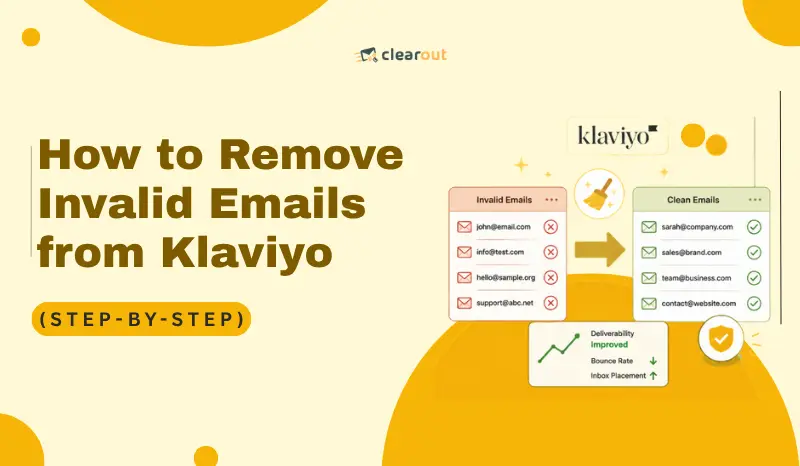
Your Klaviyo campaign report doesn't tell you what's already broken. A hard bounce fires off, Postmaster Tools logs it to your domain, and your score drops before Klaviyo suppresses that address. Klaviyo waits for seven consecutive soft bounces before acting.
Gmail and Yahoo limit spam complaints to 0.3% per send. Cross that and your inbox placement will go down in all future campaigns. Catch-all domains make it harder to spot: the server accepts every email, no bounce is triggered, and your list looks healthier than it is.
This guide will take you through auditing your list, verifying with Clearout, suppressing bad addresses, and reimporting contacts.
Gmail and Yahoo limit spam complaints to 0.3% per send. Cross that and your inbox placement will go down in all future campaigns. Catch-all domains make it harder to spot: the server accepts every email, no bounce is triggered, and your list looks healthier than it is.
This guide will take you through auditing your list, verifying with Clearout, suppressing bad addresses, and reimporting contacts.
Table of Content
Why can't Klaviyo catch invalid emails on its own?
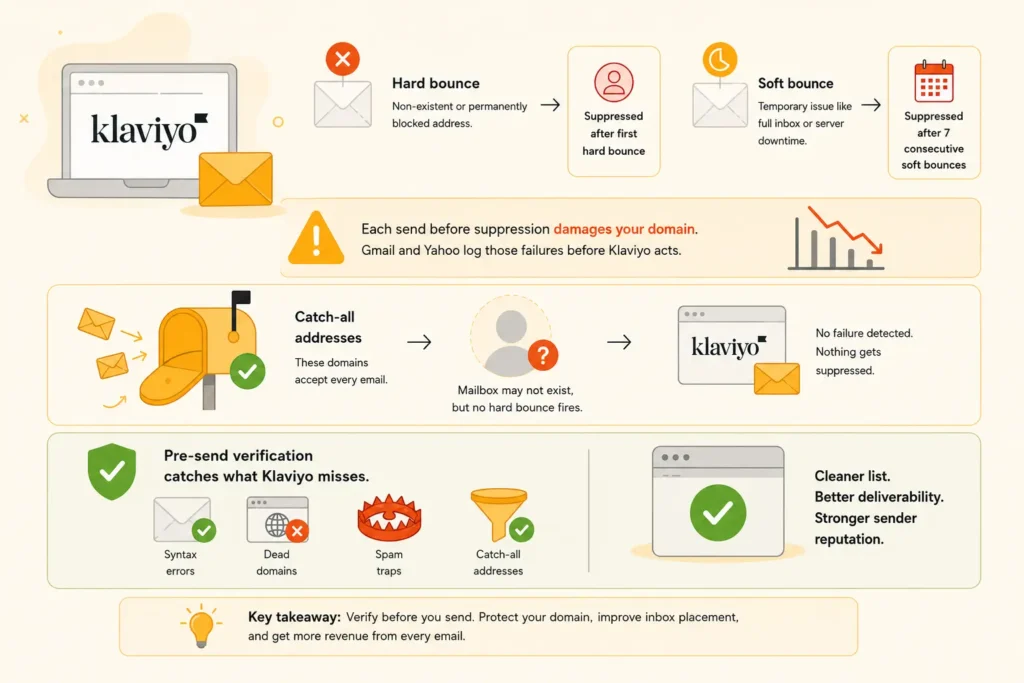
Klaviyo reacts to delivery failures after they occur. It has no pre-send validation layer, which means invalid addresses enter your active list and stay there until a bounce event triggers suppression.
By default, Klaviyo treats bounces as follows:
1. Hard bounce: A hard bounce occurs when the email address is invalid or permanently unreachable. Klaviyo suppresses that profile immediately after the first hard bounce.
2. Soft bounce: A soft bounce is a temporary failure - full inbox, server downtime. Klaviyo only suppresses after 7 consecutive soft bounces.
Every send before suppression damages your domain. Gmail and Yahoo log those failures before Klaviyo acts.
Catch-all addresses create another gap klaviyo cannot close. Catch-all domains accept every incoming email at the server level. Even if the individual mailbox doesn't exist, no hard bounce fires. Klaviyo suppresses nothing.
Pre-send verification runs your list through an email validator before any campaign goes out. It catches syntax errors, dead domains, spam traps, and catch-all addresses.
2. Soft bounce: A soft bounce is a temporary failure - full inbox, server downtime. Klaviyo only suppresses after 7 consecutive soft bounces.
Every send before suppression damages your domain. Gmail and Yahoo log those failures before Klaviyo acts.
Catch-all addresses create another gap klaviyo cannot close. Catch-all domains accept every incoming email at the server level. Even if the individual mailbox doesn't exist, no hard bounce fires. Klaviyo suppresses nothing.
Pre-send verification runs your list through an email validator before any campaign goes out. It catches syntax errors, dead domains, spam traps, and catch-all addresses.
How to audit your Klaviyo list before cleaning?
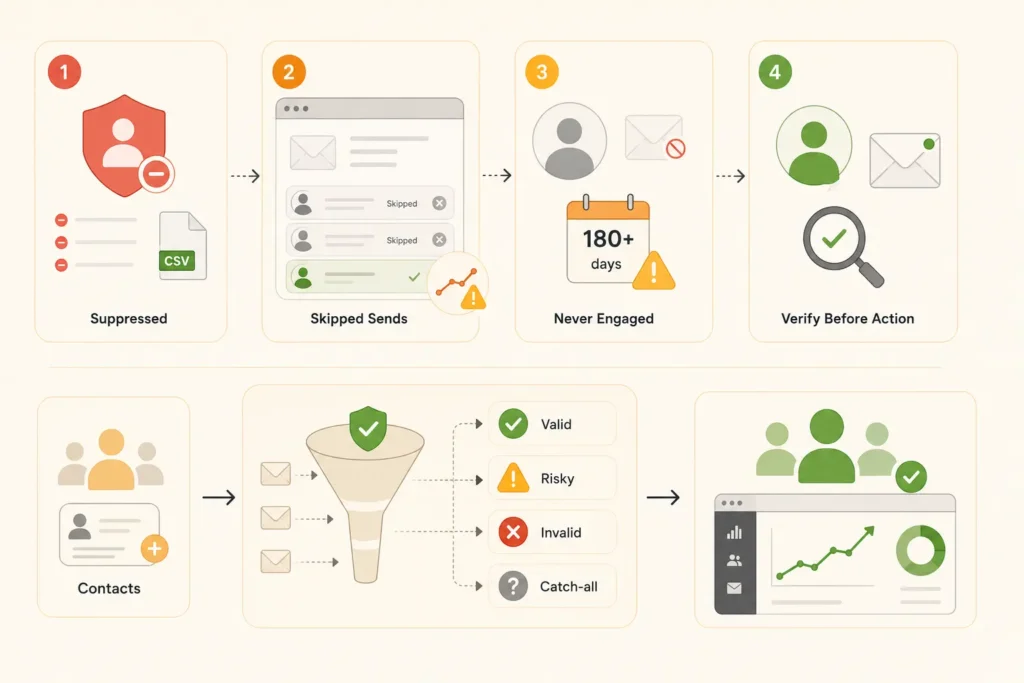
Before exporting, audit your existing account data. Contact categories that are mixed together cause over-suppression or under-suppression in your list.
1. Check your existing suppression list
Go to Audience > Profiles > View suppressed profiles.
Filter by suppression reason. Look specifically for deliverability suppressions, which include hard bounces and invalid address flags.
Export this list to CSV. These contacts are already out of your hands. Reviewing the volume shows how many invalid addresses got through before bouncing.
Export this list to CSV. These contacts are already out of your hands. Reviewing the volume shows how many invalid addresses got through before bouncing.
2. Review campaign skip data
Go to Analytics → Deliverability and open the relevant campaign performance data.
Klaviyo shows recipients skipped at send time, which is usually due to existing suppression. A rising skip count on a growing list signals accumulating invalid contacts.
3. Identify never-engaged profiles
Build a segment with these conditions:
- If someone can or cannot receive marketing → can receive email marketing
- What someone has done or not done → Received email → is at least 5 → in the last 180 days
- What someone has done or not done → Opened email → 0 times → over all time
- What someone has done or not done → Clicked email → 0 times → over all time
- What someone has done or not done → Viewed Product → 0 times → over all time
- What someone has done or not done → Placed Order → 0 times → over all time
Contacts who received 5+ emails in 180 days but never opened are high-risk. They show zero clicks, zero product views, and zero orders too. This often includes fake signups, typos, and role-based inboxes like info@ or noreply@. Flag this segment for verification before any send.
4. Identify unengaged profiles separately from invalid ones
An unengaged subscriber has a real and active mailbox. They've just stopped opening. An invalid address will bounce. The fix for each is different.
Build a second segment:
Build a second segment:
- What someone has done → Has not opened email → at least once → in the last 180 days
- Properties about someone → Created → is before → 180 days ago
Do not suppress this group yet. Some addresses here are perfectly valid. Run them through verification first to determine which are worth a re-engagement campaign.
Step-by-step guide: How to remove invalid emails from Klaviyo
Step 1: Export your list from Klaviyo
Go to Audience > Lists & Segments. Open your target list or segment.
Click the Manage List or Manage segment dropdown. Select Export List to CSV or Export Segment to CSV.
To export your full account, create an all-inclusive segment first. Set the condition to: can receive email marketing.
On the export screen, choose to export only the Email property. This cuts download time versus exporting every property.
Exports take a few minutes to process, depending on list size. Download the file from Settings > Other > Downloads. Exports stay available for 30 days.
Note: Only Owner, Admin, and Analyst roles can export lists or segments. If you don't see the export option, this permission is likely why.
To export your full account, create an all-inclusive segment first. Set the condition to: can receive email marketing.
On the export screen, choose to export only the Email property. This cuts download time versus exporting every property.
Exports take a few minutes to process, depending on list size. Download the file from Settings > Other > Downloads. Exports stay available for 30 days.
Note: Only Owner, Admin, and Analyst roles can export lists or segments. If you don't see the export option, this permission is likely why.
Step 2: Verify your Klaviyo emails with Clearout
Clearout is a pre-send email verification tool. It validates addresses for presence of MX records, SMTP mailbox, address syntax and more, with 20+ address validation checks per address. It also detects invalid, spam traps, disposable email and catch-all domains.
How to run bulk verification on your Klaviyo export:
- Log into Clearout and go to Email Verifier → Bulk Verify
- Upload the CSV exported from Klaviyo: CSV and XLSX are both supported
- Select Highest Accuracy mode, the right setting for pre-campaign Klaviyo email hygiene
- Download results once complete. Clearout appends its output columns to your original file
Understanding Clearout's verification results:
Clearout assigns each address a primary status and a Safe-to-Send flag. These two fields drive your suppression decisions.
Primary Status 4 values:
| Status | What it means | Action |
|---|---|---|
| Valid | Mailbox exists and accepts email | Keep - safe to send |
| Invalid | Mailbox doesn't exist or is permanently blocked | Suppress immediately |
| Catch-all | Domain accepts all email individual mailbox uncertain | Check Safe-to-Send flag |
| Unknown | Mail server didn't respond at verification time | Exclude from current send; re-verify later |
Safe-to-Send Flag 4 values:
| Safe-to send | What it means | Action |
|---|---|---|
| Yes | Address is verified safe | Send |
| Risky | Uncertainty present: catch-all, unusual SMTP response | Exclude from large or cold sends |
| No | Invalid - do not send | Suppress |
| Unknown | Status cannot be determined | Exclude from current campaign |
Associated flags Clearout appends per address:
- Disposable: Temporary throwaway address suppress
- Role-Based: Functional inbox like info@ or support@ exclude from marketing sends
- Gibberish: Random character strings that aren't real addresses suppress
These results tell you who's safe to email and who isn't. Clearout also backs some of these results with a deliverability guarantee.
On Clearout's Guaranteed Deliverability: It applies to addresses where Safe-to-Send = Yes. The email must be sent within 24 hours of verification. The list must be opt-in acquired.It does not include free services such as Yahoo or AOL, but some Microsoft 365 domains that are configured to block spam.
Verification does not need to be a one-time, manual process. You can now do it automatically for the future.
Klaviyo + Clearout: This integration is available via the Zapier app.
One example workflow: when a new profile is created in Klaviyo, Zapier triggers a Clearout verification on the email address. If the address returns as invalid, a follow-up Zap action suppresses the contact in Klaviyo before any campaign fires. Note that Zapier uses a polling trigger for Klaviyo, which checks for new profiles every 15 minutes on the free plan.
On Clearout's Guaranteed Deliverability: It applies to addresses where Safe-to-Send = Yes. The email must be sent within 24 hours of verification. The list must be opt-in acquired.It does not include free services such as Yahoo or AOL, but some Microsoft 365 domains that are configured to block spam.
Verification does not need to be a one-time, manual process. You can now do it automatically for the future.
Klaviyo + Clearout: This integration is available via the Zapier app.
One example workflow: when a new profile is created in Klaviyo, Zapier triggers a Clearout verification on the email address. If the address returns as invalid, a follow-up Zap action suppresses the contact in Klaviyo before any campaign fires. Note that Zapier uses a polling trigger for Klaviyo, which checks for new profiles every 15 minutes on the free plan.
Step 3: Prepare your suppression file
From Clearout results, filter for addresses meeting any of these conditions:
- Primary Status = Invalid
- Primary Status = Invalid
- Disposable flag = Yes
- Gibberish flag = Yes
- Role-Based flag = Yes (for marketing sends)
Export the filtered list. Open the file and delete every column except Email. The header must read exactly: Email.
Extra columns cause Klaviyo's suppression import to fail. You will not get an error message. The file simply will not process correctly.
Extra columns cause Klaviyo's suppression import to fail. You will not get an error message. The file simply will not process correctly.
Step 4: Upload to Klaviyo's suppression list
For suppressing a CSV of invalid emails from Clearout verification results:
Navigate to Audience → Profiles → View Suppressed Profiles. Upload the single-column CSV file containing only the Email column header and the invalid addresses.
This bulk suppresses every invalid address from your Clearout results. Suppressed profiles stay in Klaviyo. They just can't receive marketing emails. They still count toward your billing. To reduce your active profile count and billing, delete them entirely from the suppressed profiles view.
Note: suppression applies only to email. It does not affect SMS or push notification status.
Note: suppression applies only to email. It does not affect SMS or push notification status.
Step 5: Reimport only verified clean contacts
Go to Audience > Lists & Segments and open your target list. Click Upload Contacts.
During import, Klaviyo asks whether to update subscription status for these contacts. Choose "No, import without updating subscription status." This keeps each contact's existing consent state unchanged.
Choosing the override instead re-marks every contact as subscribed. This includes anyone who previously unsubscribed. That creates both a compliance risk and a deliverability risk.
Your active list now contains only valid email addresses. Each one passed 20+ verification checks.
Choosing the override instead re-marks every contact as subscribed. This includes anyone who previously unsubscribed. That creates both a compliance risk and a deliverability risk.
Your active list now contains only valid email addresses. Each one passed 20+ verification checks.
How often should you clean your Klaviyo list?
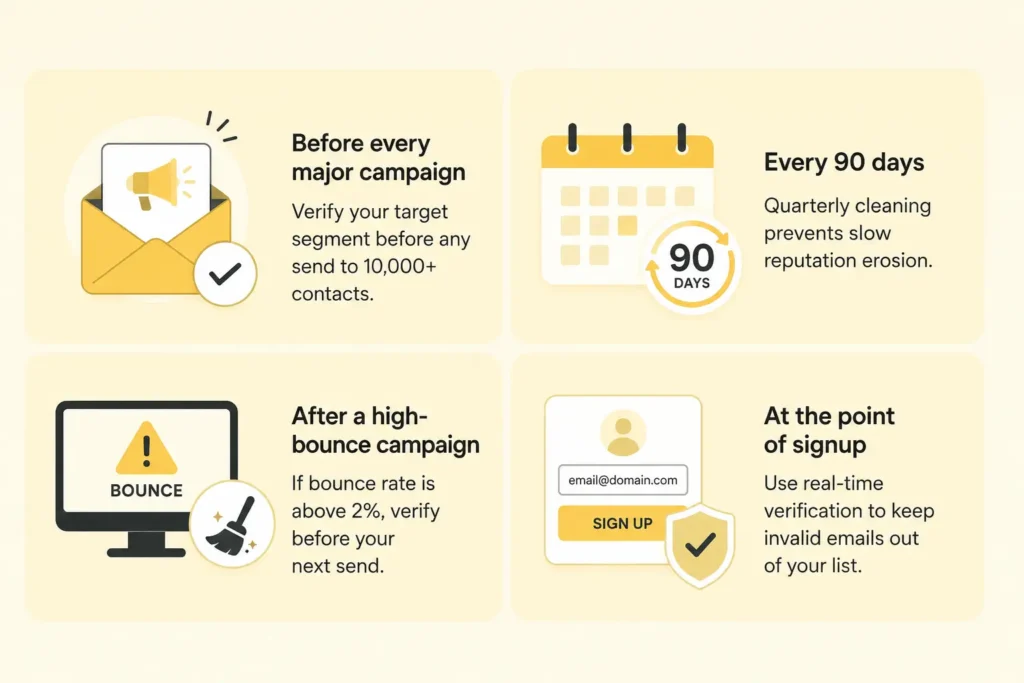
There's no fixed schedule. It depends on the list growth rate and send frequency. Here's a practical framework:
- Before every major campaign. Verify your target segment before sending to 10,000+ contacts. This applies to lists with new additions since the last send, and any re-engagement campaign targeting cold subscribers.
- Every 90 days for active lists. Email addresses go outdated over time: job changes, abandoned accounts, shut-down domains. Quarterly list cleaning protects sender score and inbox placement.
- Immediately after a high-bounce campaign. If a campaign returns a bounce rate above 2%, verify the entire email list. Repeated high-bounces drop your domain’s inbox placement and trigger spam filtering.
The bottom line
A 2% bounce rate is the threshold most ISPs use to restrict inbox placement. One unverified send can push you past it.
This five-step process exists to keep your domain under that threshold. Export your list and verify it with Clearout. Suppress every address flagged Invalid or Safe-to-Send = No. Reimport only what's left clean. Reputation recovery can take 2 to 12 weeks, depending on how severe the damage is.
This five-step process exists to keep your domain under that threshold. Export your list and verify it with Clearout. Suppress every address flagged Invalid or Safe-to-Send = No. Reimport only what's left clean. Reputation recovery can take 2 to 12 weeks, depending on how severe the damage is.
Verify your Klaviyo list in seconds
FAQs
1. How do I remove invalid email addresses from Klaviyo?
Download your Klaviyo list and upload it to Clearout to verify in bulk. When verified, filter email addresses with a primary status of Invalid or Safe-to-Send marked No. Keep only the Email column and save the file. Upload it in Klaviyo under Audience → Profiles → View Suppressed Profiles → Upload File. The invalid email addresses will then be suppressed from your account.
2. How do I clean a Klaviyo email list?
Export your active contacts as a CSV. Run them through Clearout to find invalid and risky addresses. Suppress what fails before your next send. Contacts with valid addresses who stopped opening need a re-engagement campaign first, and not suppression.
3. What is the best way to verify Klaviyo emails before sending?
Export your list from Klaviyo, then upload the CSV to Clearout. Select Highest Accuracy mode. Clearout runs 20+ checks per address: SMTP ping, MX lookup, catch-all detection, and spam trap detection. It returns a primary status and Safe-to-Send flag per address. Suppress anything Invalid or Safe-to-Send = No.
4. How do I remove bounced emails from Klaviyo?
Klaviyo suppresses hard bounces after the first failure and soft bounces after 7 consecutive failures. To see existing bounce suppressions, go to Audience > Profiles > View suppressed profiles. Filter by "Deliverability." Run Clearout verification before each campaign to catch bad addresses early.
5. How do I remove suppressed profiles in Klaviyo?
Go to Audience > Profiles > View suppressed profiles and export the list to CSV. Filter by suppression reason and date, then delete profiles in bulk from that view. Suppressed profiles still count toward billing. Deleting them reduces your active profile count and lowers your plan cost.