


clearout
  • Products
    • Email Verifier Verify emails addresses individually, in bulk or through API, with 99% accuracy
    • Catch-all Email Verification IconCatch-all Email Verification Resolve more catch-all and SEG-protected emails into Valid or Invalid results with Deep Verify.
    • Email Finder Find individual or bulk emails by entering the person & company name or domain
    • Form Guard IconForm Guard Protect your forms from spam, bots, and invalid submissions with real-time email, phone, and name verification.
    • Form Guard IconData Pulse Verify, enrich, and monitor your CRM contacts in real time - heartbeat monitor for your data.
    • ProspectSQL/MQL list building with high levels of personalization, real-time data enrichment and prospect search
    • Clearout For SheetsVerify email addresses directly on Google Sheets with Clearout for sheets add-on
    • Prospect – LinkedIn Chrome ExtensionBuild verified, targeted prospect lists directly from LinkedIn profiles
    • ClearoutPhoneValidate phone numbers across 240+ countries in bulk, quick or real time validation
    • Free Tools
    • Disposable Email Checker
    • Reverse LinkedIn Profile Lookup Tool
    • Reverse Email Lookup Tool
    • Email List Cleaner
    • Company Domain Finder API
  • Resources
      DEVELOPERAPI iconAPI
      Clearout APIs are structured around REST and JSON
      Webhooks iconWebhooks
      Capture real-time events in your application workflow
      Clearout MCP icon Clearout MCP
      Verify and find emails from AI assistants like Claude and Cursor
      Form Guard iconForm Guard
      Real-time form validation to keep bad contacts out of your CRM
      KNOWLEDGE BASEGetting started iconGetting started
      Sending campaigns without bounces is made simple
      FAQ iconFAQ
      Easily find answers to services, security and common questions
      USE CASESLead Generation iconLead Generation
      Learn how professionals generate quality leads
      GUIDES Clearout Insights arrow icon Explore original research, industry statistics, and data-backed insights Pricing arrow iconTransparent & flexible pricing to support pay-per-use or recurringCompare Email Verification Tools arrow iconAI-powered email verification with 99%+ accuracy, real-time validation, and transparent risk scoringCompare Email Finder Tools arrow iconPre-verified B2B email addresses with confidence scoring, find real person email, not role-based addressData Pulse & HubSpot Breeze Intelligence arrow iconPre-verified B2B email addresses with confidence scoring, find real person email, not role-based addressBLOGSEmail Verification ToolsFind Anyone’s Email Address
      Most Accurate, Fast & Free Ways
      Form Validation
      Importance, Ways & Best Practices
      View All Blogs
  • Pricing
  • Integrations
  • Enterprise
  • Login
Try it free Book a 1-to-1 demo
Akanksha Mishra / October 24, 2026 October 24, 2026

What Is a Secure Email Gateway? Why It Breaks Email Verifiers


What Is a Secure Email Gateway? Why It Breaks Email Verifiers

TL;DR


  • An SEG stays in front of a company’s mail server and screens incoming email for spam, phishing, and malware first.
  • You’ll mostly find SEGs at banks, hospitals, law firms, and other companies where one bad email can be costly.
  • When a verifier checks an address, the gateway replies instead of the mail server, so there’s no clear way to tell if that mailbox is real.
  • As a result, SEG-protected addresses often come back as misleading Valid, Catch-All, or Unknown results.
  • Clearout's Deep Verify uses SEG signature detection and multi-layer SMTP analysis to resolve these results into Valid or Invalid.

A secure email gateway checks every email coming into a company before its mail server ever sees it. If you’ve dealt with Proofpoint, Mimecast, Barracuda, or Microsoft EOP, you’ve already run into one.

The problem for email verifiers is simple: when they ask whether a mailbox exists, the gateway answers. So the result reflects the gateway's security policy instead of the mailbox's real status. If you've been seeing unexplained Catch-All or Unknown results on corporate domains, this is usually why.

In this guide, we'll look at how SEGs respond to verification, why standard tools mislead those responses and how Clearout's Deep Verify resolves them.

Table Of Content


‣ TL;DR
‣ What is a secure email gateway (SEG)?
‣ Which secure email gateways show up often?
‣ Why do secure email gateways change email verification results?
‣ What are the three ways an SEG can respond to verification attempts?
‣ How does Deep Verify handle SEG-protected email verification?
‣ How accurate is Deep Verify for catch-all and SEG-protected emails?
‣ When should you pick Deep Verify?
‣ Why to use Deep Verify for SEG-protected emails
‣ FAQ
What is a secure email gateway (SEG)?


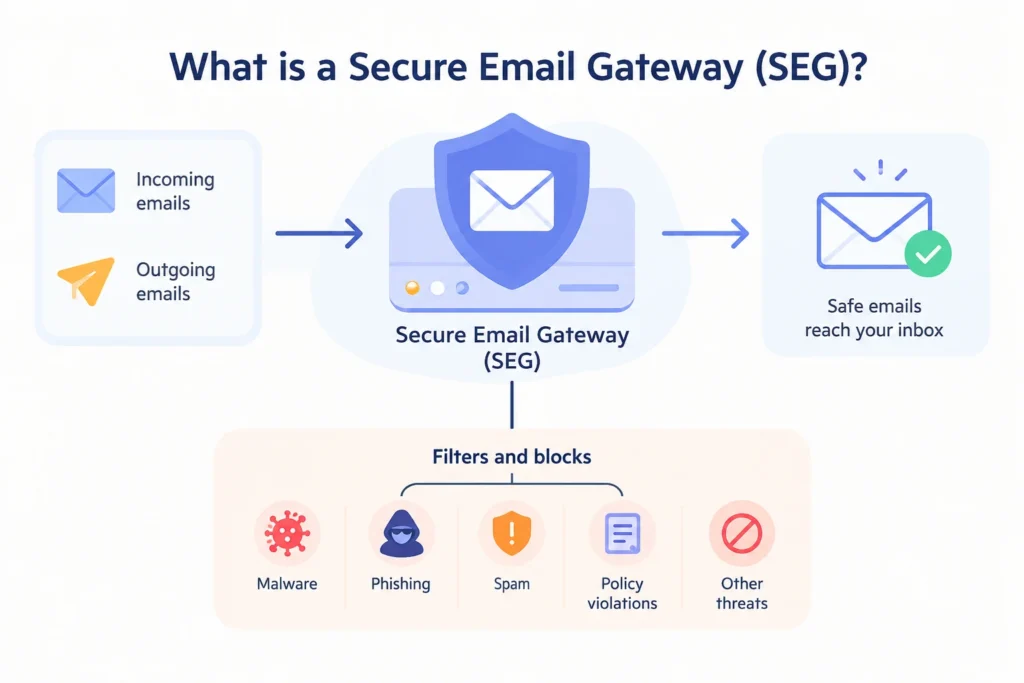
What is a secure email gateway?

A secure email gateway (or SEG) is similar to a first gatekeeper to incoming email. All emails are scanned before they ever get to your team. Don't pass through if it looks like spam, a phishing attempt or malware.

How does a secure email gateway work?


The sending server connects to the gateway and starts an SMTP session. Then the gateway processes the message, and also examines the behavior of the sender. It then compares them to its security rules.

If the message looks okay, it is permitted to go on to the company mail system. It could be Microsoft 365 or Google Workspace.

If the message is inappropriate based on the rules, it is immediately rejected. Or it is quarantined for review at a later time. Typical problems arise while verifying. An email verifier opens a fresh SMTP connection and sends the RCPT TO command to test whether the mailbox exists. It reads the server’s reply code, then closes the connection.

Which secure email gateways show up often?


Proofpoint, Mimecast, Barracuda, and Microsoft Exchange Online Protection (EOP) show more frequently. You can usually tell which one protects a domain from its MX record.

GatewayCommonly used byMX record usually contains
ProofpointLarge enterprises, financial services, healthcare, law firmspphosted.com (Proofpoint Essentials: ppe-hosted.com)
MimecastMid-size and large organizations, with strong adoption in the UK and Europemimecast.com
BarracudaMid-market companies, education, and the public sectorbarracudanetworks.com
Microsoft EOPEvery Microsoft 365 tenant, since EOP is built into Exchange Onlinemail.protection.outlook.com

To check a domain yourself, run nslookup -type=mx company.com on Windows or dig mx company.com on Mac or Linux, then match the hostname to the table.

No matter which gateway a company uses, it's the same outcome. Microsoft EOP can look different. That is mostly because each tenant can set how it treats unknown recipients.

Why do secure email gateways change email verification results?


SEG changes email verification results because the gateway replies to the verifier during the SMTP test. The gateway is built to avoid telling the verifier which mailbox names are real. A typical verifier connects using the MX record. Then it asks the server if it would accept mail for a given address. This happens with the RCPT TO command.

It then reads the reply code:

  • 250: The address is accepted.
  • 5xx (including 550): The mailbox does not exist or the transaction was rejected permanently.
  • 4xx: A temporary failure.

Attackers use this check to find employee email addresses that actually exist and collect them for future attacks. This is called a directory harvest attack. To stop this, secure email gateways (SEGs) may give the same response for every email address or hide the result completely. Standard email verification can't confirm if such addresses exist.

What are the three ways an SEG can respond to verification attempts?


An SEG can respond in 3 ways: it may accept every address, delay the check, or block the request.

SEG responseWhat the gateway doesWhat a generic verifier reportsWhat's actually true
Accepts every addressReturns 250 for any address and filters mail after accepting itValid or Catch-AllThe mailbox may not exist. A false Valid can bounce once the gateway processes the real email.
Delays the checkReturns a temporary 4xx reply through greylisting or rate limitingUnknownThe address hasn't been checked at all, so it could be valid or invalid.
Blocks the checkRejects the connection with a policy error or drops itInvalid or UnknownThe rejection is aimed at the verifier, not the mailbox. A real contact can be marked Invalid and removed.

Of the three, accepting every address causes the most damage. A false Valid looks safe, so it goes straight into your campaign and only shows up later as a bounce.

How does Deep Verify handle SEG-protected email verification?


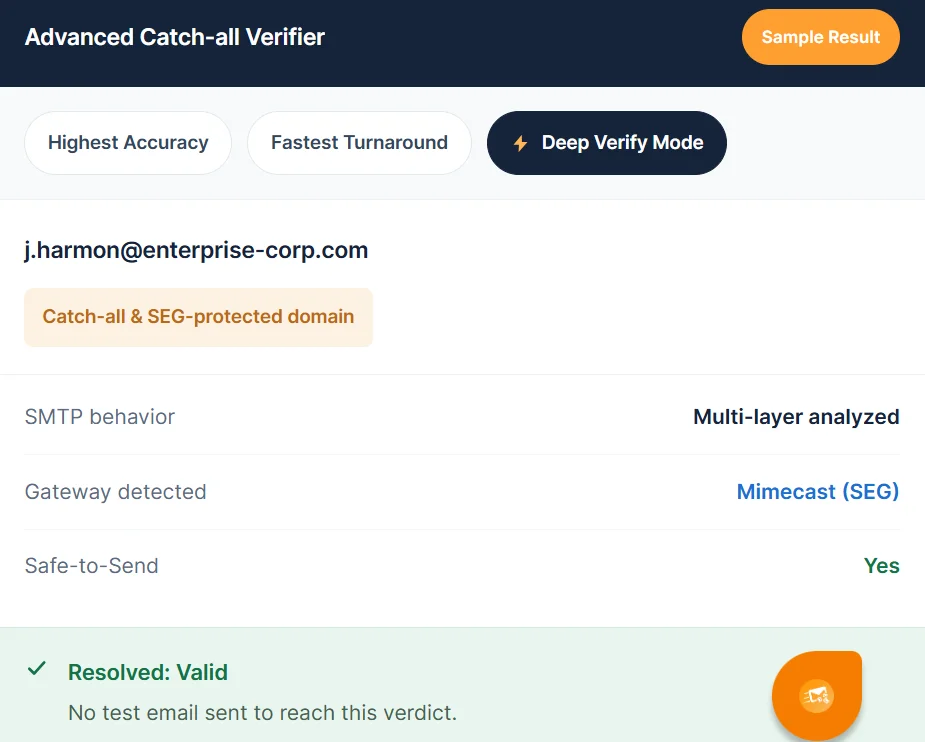
Clearout Deep Verify Mode identifying a valid email on a SEG-protected domain.

Deep Verify first checks which security gateway handles the email request. Then, it checks the server's replies to see what they mean.

Proofpoint may return a 250 response without confirming that the email address exists. A company's own mail server may use the same response to accept the request. Basic verification tools may read both responses the same way and give you the wrong result.

  • SEG signature detection


  • Proofpoint, Mimecast, Barracuda, and Microsoft EOP each handle SMTP connections in recognizable ways. Clearout's Deep Verify uses SEG signature detection to recognize which of these gateways it's dealing with, then applies logic built for that gateway.

  • Multi-layer SMTP analysis


  • Multi-layer SMTP analysis means reading the entire SMTP conversation. You do not just check the last message after RCPT TO.

    Deep Verify checks 3 things:

    • First is command timing. It looks at how fast the server answers at each part of the session.
    • Second is the banner. That’s the first message the server sends when a connection starts, before the verification commands begin.
    • Third, the system checks whether the server’s reply is about the specific email address being tested or if it gives the same reply for all addresses.

    Looking at all three helps identify servers that accept every email address without checking if the mailbox actually exists.

Deep Verify investigation of catch-all and Unknown results


  • Deep Verify checks the email addresses that regular checks could not confirm. After it processes an address, you get a result of Valid or Invalid. You also get a Safe-to-Send call set to Yes, No, or Risky.
  • No messages get sent. Deep Verify only looks at the address, so there is no touch to your sender reputation.
  • You can run it in bulk or as you get leads. Import contacts via CSV or XLSX file or use Clearout’s API.
  • Unresolved addresses will be displayed as unresolved.

Once the file is finished, you get a complete email list with catch-alls divided into valid and invalid.

Distinguishing SEG behavior from true catch-all behavior


A true catch-all domain and an SEG-protected domain can return the same result, but the cause is different. Deep Verify separates the two because each needs a different reading.

True catch-all domainSEG-protected domain
Who answers the checkThe company's own mail serverThe security gateway
Why every address is acceptedThe company chose to accept mail for any address so nothing gets lostThe gateway hides which mailboxes exist to block directory harvesting
MX record points toThe company's mail server or email hostA gateway hostname, such as pphosted.com or mimecast.com
How Deep Verify reads itMulti-layer SMTP analysis of the server's responsesGateway-specific logic, informed by SEG signature detection

How accurate is Deep Verify for catch-all and SEG-protected emails?


Clearout has 99.73% verification accuracy for catch-all and SEG-protected emails with Deep Verify.

Deep Verify's 99.73% catch-all and SEG accuracy


A single accuracy number doesn't tell you everything about a catch-all tool. That's why Clearout measures Deep Verify against 6 separate metrics:

MetricWhat it tells you
Resolution rateHow much of the catch-all pile gets converted to Valid or Invalid
Valid recovery rateHow many unusable addresses become safe to send
False-positive rateHow often a Valid verdict turns out to be wrong, the number that protects your domain
Actual bounce rateWhat happens when addresses marked safe are actually mailed
Unresolved rateWhat still can't be determined, reported openly
Cost and speedProcessing time and cost for each 1,000 catch-all tries

No tool can fix every address. The mail system itself cannot reach some addresses, even when they look fine at first. So when you compare providers, do not look only at the main number. Ask for the false alerts rate and the unresolved rate too.

When should you pick Deep Verify?


Use Deep Verify when standard verification leaves a large share of your list as Catch-All or Unknown unresolved.

If your listWhat to do
Is mostly B2B or enterprise domainsStart verification first, then send the Catch-All and Unknown results through Deep Verify
Has MX recordsDeep Verify those addresses before any outreach
Shows a high Catch-All or Unknown share after verificationResolve them with Deep Verify instead of suppressing them all
Is an older CRM listRe-run past catch-all records to recover addresses that were marked unusable
Is mostly free webmail (Gmail, Yahoo)Standard verification is usually enough

Why to use Deep Verify for SEG-protected emails


Deep Verify was built for secure email gateway verification: it reads how each gateway behaves instead of trusting one reply code.

Your next step is to check which gateways sit behind your top accounts, then run their Catch-All and Unknown results through Deep Verify before your next send.

Resolve SEG-protected emails with Deep Verify

FAQ


1. What is a secure email gateway (SEG)?
A secure email gateway (SEG) screens a company’s incoming email before the mail server receives it. Companies set it up by pointing their domain’s MX record to the gateway, so all mail goes through it first. Spam and malware get filtered out along the way.
2. What is the purpose of an email gateway?
Email gateway keeps harmful emails away from employees. It also applies the company’s email rules. Many gateways check outgoing mail too, so sensitive information doesn’t leave the company by accident.
3. What is multi-layer SMTP analysis?
Multi-layer SMTP analysis is an email verification method that checks the full SMTP conversation with a mail server, not just its final reply. It looks at response timing, the server’s greeting, and whether replies refer to the specific mailbox. Together, these signals show whether the mailbox is real or the gateway is accepting every address.

Share this article

Recent Posts

24 Oct 2026
What Is a Secure Email Gateway? Why It Breaks Email Verifiers

Secure email gateways like Proofpoint and Mimecast hide which mailboxes exist. Learn why emails retu ...

24 Oct 2026
Email Verification ROI: How Long Until It Pays for Itself?

Learn how to calculate email verification ROI, measure savings from fewer bounces and wasted SDR hou ...

21 Oct 2026
B2B Intent Data: How to Use It for Cold Outreach in 7 Steps

Learn what B2B intent data is, how to prioritize accounts with it, and how to turn intent signals in ...

19 Oct 2026
Clearout vs MillionVerifier: Pricing, Accuracy & Catch-All Handling

Compare Clearout vs MillionVerifier for email verification accuracy, pricing, features, and catch-al ...

13 Oct 2026
AI Lead Generation: A 4-Layer Multipoint Verification Workflow

AI lead generation needs multipoint verification. Learn how to verify identities, emails, and phone ...

READY TO VERIFY?

Catch-all emails
in your list?

Find out which ones are actually safe to send. Clearout Deep Verify runs real-time checks, so you know exactly which addresses to contact and which ones to skip.

Start for free Book a demo

Company

Why Clearout?

Pricing

Contact Us

Careers

Press

Enterprise

Sitemap

FAQ

Status

Products

Email Verifier

Catch-all Verification

Email Finder

Form Guard

Data Pulse

Prospect

LinkedIn Email Finder

Reverse Lookup

Google Sheets Add-on

WordPress Plugin

ClearoutPhone

What's New?

Resources

Clearout Insights

Integrations

HubSpot

Team Account

API

Clearout MCP

Compare Email Verifier

Compare Email Finder

Compare Prospecting

Use Cases

Blog

Help

Legal

Privacy Policy

Terms

DPA

Security

Trust Center

Certification

ISO 27001/2022

SOC 2 Type 2

GDPR

Partnership

HubSpot Certified

Affiliates

Partners

Clearout for browser

⚡ Supercharge Your Prospect Research with Clearout's LinkedIn Chrome Extension - Find and Verify Emails with Confidence!

Clearout Chrome extension

Clearout
© 2026 Clearout Inc. All Rights Reserved. Powered by Clearout.
Validate Enrich New Salesforce contacts automatically with Data Pulse. Learn More ➞
X