


clearout
  • Products
    • Email Verifier Verify emails addresses individually, in bulk or through API, with 99% accuracy
    • Email Finder Find individual or bulk emails by entering the person & company name or domain
    • Form Guard IconForm Guard Protect your forms from spam, bots, and invalid submissions with real-time email, phone, and name verification.
    • Form Guard IconData Pulse Verify, enrich, and monitor your CRM contacts in real time - heartbeat monitor for your data.
    • Prospect SQL/MQL list building with high levels of personalization, real-time data enrichment and prospect search
    • Clearout For SheetsVerify email addresses directly on Google Sheets with Clearout for sheets add-on
    • Prospect – LinkedIn Chrome ExtensionBuild verified, targeted prospect lists directly from LinkedIn profiles
    • ClearoutPhoneValidate phone numbers across 240+ countries in bulk, quick or real time validation
    • Free Tools
    • Disposable Email Checker
    • Reverse LinkedIn Profile Lookup Tool
    • Reverse Email Lookup Tool
    • Email List Cleaner
    • Company Domain Finder API
  • Resources
      DEVELOPERAPI iconAPI
      Clearout APIs are structured around REST and JSON
      Webhooks iconWebhooks
      Capture real-time events in your application workflow
      Form Guard iconForm Guard
      Real-time form validation to keep bad contacts out of your CRM
      KNOWLEDGE BASEGetting started iconGetting started
      Sending campaigns without bounces is made simple
      FAQ iconFAQ
      Easily find answers to services, security and common questions
      USE CASESLead Generation iconLead Generation
      Learn how professionals generate quality leads
      GUIDESPricing arrow iconTransparent & flexible pricing to support pay-per-use or recurringCompare Email Verification Tools arrow iconAI-powered email verification with 99%+ accuracy, real-time validation, and transparent risk scoringCompare Email Finder Tools arrow iconPre-verified B2B email addresses with confidence scoring, find real person email, not role-based addressData Pulse & HubSpot Breeze Intelligence arrow iconPre-verified B2B email addresses with confidence scoring, find real person email, not role-based addressBLOGSEmail Verification ToolsFind Anyone’s Email Address
      Most Accurate, Fast & Free Ways
      Form Validation
      Importance, Ways & Best Practices
      View All Blogs
  • Pricing
  • Integrations
  • Enterprise
  • Login
Try it free Book a 1-to-1 demo
Priyanshi Sharma / August 6, 2026 August 6, 2026

How GTM Teams Build Waterfall Enrichment Workflows


How GTM Teams Build Waterfall Enrichment Workflows

TL;DR


  • Waterfall enrichment sends a record through multiple data providers in sequence. This is the foundation of most modern GTM waterfall enrichment workflow design.
  • High-performing GTM teams don't chain providers randomly. They tier them by cost and reliability, order them by ICP fit, and automate the full sequence with a tool before syncing to the CRM.
  • Bad data flowing into sales and marketing systems corrupts routing, scoring, and outbound before anyone notices. Fixing it downstream is significantly more expensive than preventing it at the point of enrichment.
  • Verification should be the final step in every waterfall enrichment workflow. Running email and phone verification before CRM sync or outreach helps confirm that enriched contact data is accurate.

Table Of Content


‣ TL;DR
‣ What is waterfall enrichment?
‣ How do GTM teams use waterfall enrichment to sequence providers?
‣ How do you automate a waterfall enrichment workflow?
‣ Why does verification matter as the final step before outreach?
‣ A quick self-check for whether your current setup needs waterfall enrichment
‣ What are the best practices for waterfall enrichment?
‣ Build a waterfall workflow your GTM team can trust
‣ Frequently Asked Questions About Waterfall Enrichment
What is waterfall enrichment?


Waterfall enrichment is a data process that queries multiple enrichment providers in a set order, for each missing field, accepting the first valid result and only moving to the next provider when the current one returns nothing usable. It's a specific method inside the broader practice of data enrichment, built to maximize coverage without paying every vendor for every record.

No single provider covers every geography, job function, or contact field on its own. One vendor might be strong on US mid-market emails and weak on EMEA mobile numbers, and another does the opposite.

Waterfall enrichment is the operational fix for that gap. GTM data enrichment fails when teams rely on one flawed source and assume the gaps are random rather than systemic.

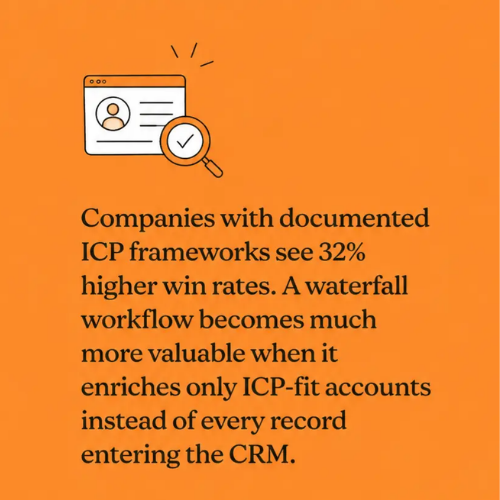
ICP-based waterfall enrichment improving GTM win rates by focusing on qualified accounts.

What does a waterfall actually improve?


MetricSingle-Provider ApproachWaterfall Approach
Field CoverageLimited to one provider's database, leaving more gaps in contact records.Pulls data from multiple providers, increasing overall field coverage.
Verified Contact RateLower success rate when a record isn't available from the primary source.Higher success rate by querying another provider when the first one fails.
Cost per Verified ContactEvery lookup consumes credits, even if no usable data is returned.Credits are only used on fallback providers when required, reducing wasted spend.
Connect RatesOutreach depends on the accuracy of a single data source.Better contact quality can improve connect rates
BDR Research TimeReps spend time manually filling missing contact details.Pre-enriched records reduce manual research time
Data AccuracyAccuracy varies based on one vendor's data freshness.Multiple data sources increase the chances of finding fresh, verified information.
ScalabilityPerformance drops when prospecting across diverse markets or industries.Scales more effectively by combining strengths of multiple data providers.

These gains compound. Better coverage means fewer records get skipped for outreach and less manual research means reps spend more time actually selling.

How do GTM teams use waterfall enrichment to sequence providers?


Randomly chaining providers without a cost or reliability tier wastes money because it does not necessarily improve coverage. When waterfall enrichment is taken seriously as a discipline and not just a list of vendors, here's how GTM teams do waterfall enrichment.

A tiering structure looks like this:

TierSource TypeExample ProvidersTypical Use CaseCost
Tier 1Free or Internal SourcesCRM history, past form fills, website activityCheck existing customer and first-party data before paying for enrichment.$0
Tier 2High-Volume ProvidersFindymail, Datagma, Prospeo, DropcontactFill common contact fields at scale.Low
Tier 3Mid-Tier B2B DatabasesApollo, HunterEnrich contacts with business emails, firmographics, and additional prospect details.Moderate
Tier 4Premium & Niche ProvidersZoomInfo, Cognism, People Data LabsFill hard-to-find records, enterprise contacts, or niche market data only when needed.High
Final StepContact ValidationClearoutVerify every email and phone number before outreach.Low

GTM waterfall enrichment works best when the sequence is built around your ICP. A few principles behind that structure are as follows:

  • Check records you already have. A proper waterfall enrichment process always starts with a lookup against your own CRM. There's no point paying to enrich a record you already have.
  • Order providers from lowest cost to highest value. Let lower-cost providers find the easy matches first. Save premium credits for contacts that couldn't be enriched earlier in the sequence.
  • Use niche providers where they perform best. If you're prospecting in a specific industry or region, bring in providers that are known for stronger coverage there instead of placing them at the top of every workflow.
  • Build field-specific enrichment paths. Your best provider for finding a CEO's mobile number may not be the best one for a VP of Engineering's email address. Treat each field separately for better coverage and accuracy.

How do you automate a waterfall enrichment workflow?


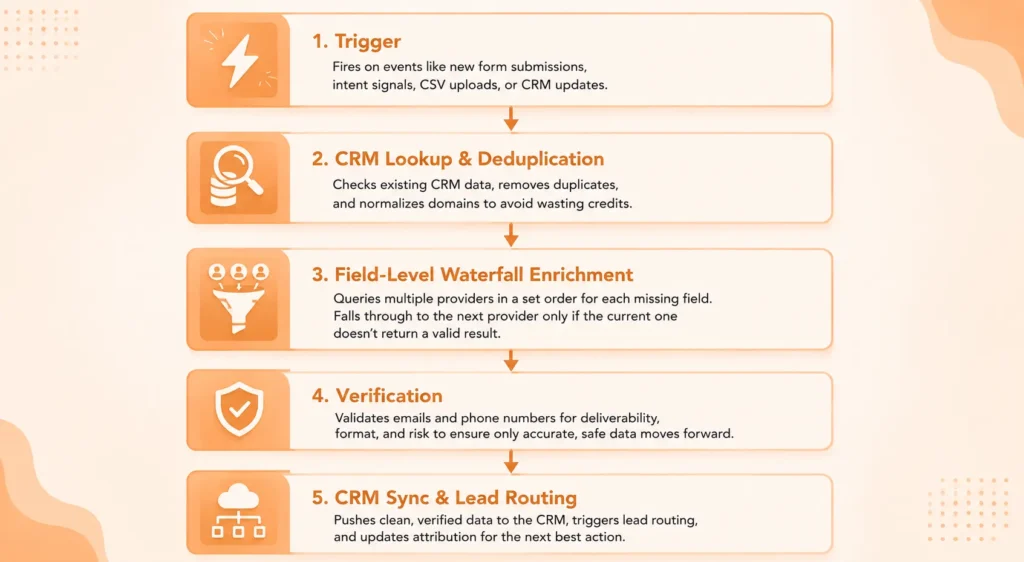
A waterfall enrichment workflow is only effective when every stage reduces uncertainty before the next one begins. It is a series of quality gates rather than a chain of enrichment providers. Every gate either improves the record, rejects it, or decides no further enrichment is required.

Every mature workflow follows the same architecture


Although every company customizes its implementation, most successful workflows follow the same sequence.

A 5-step waterfall enrichment workflow.

Skipping any stage usually creates downstream problems that are far more expensive than the enrichment itself. Let's understand how you can automate a waterfall enrichment workflow:

Stage 1: Start enrichment only when it creates value


One of the biggest mistakes GTM teams make is enriching every contact as soon as it appears in the CRM. The problem is that many of those records never reach sales. By the time an SDR works through them, the data may already be outdated.

Instead, mature teams trigger data enrichment only when a meaningful event occurs. That could be a demo request, a pricing page visit, an intent signal, an SDR accepting ownership, or a scheduled CRM refresh. This keeps enrichment costs lower while improving data freshness when outreach actually begins.

Stage 2: Treat your CRM as the first provider


Before calling any enrichment vendor, check your existing CRM. This sounds obvious, but many organizations repeatedly purchase information they already own because different workflows operate independently.

Look for verified emails, recently enriched phone numbers, existing firmographic data, and duplicate records. If the information already exists and is still fresh, stop the workflow. Every lookup you avoid directly reduces your enrichment spend.

Stage 3: Build waterfalls around fields


This is where experienced RevOps teams separate themselves. Average workflows ask one provider to complete an entire contact record. High-performing teams treat every field independently.

For example, Apollo may return a verified business email, while another provider consistently performs better for direct dials. A third source may have stronger company revenue data.

Instead of restarting the entire lookup, the workflow only requests the missing field from another provider. That simple change improves coverage while keeping API usage under control.

Choosing providers strategically


Different providers perform better for different datasets.

Data TypeCommon First Choice
Business emailsClearout Email Finder
Direct dialsCognism, Lusha
FirmographicsZoomInfo
TechnographicsBuiltWith

The provider order should be based on your ICP, geography, historical match rate, and lookup cost. It should never remain static. Most mature GTM teams review provider performance every quarter and reorder their waterfall as coverage changes.

Stage 4: Verification is the quality checkpoint


Finding an email address or phone number does not automatically make it usable.

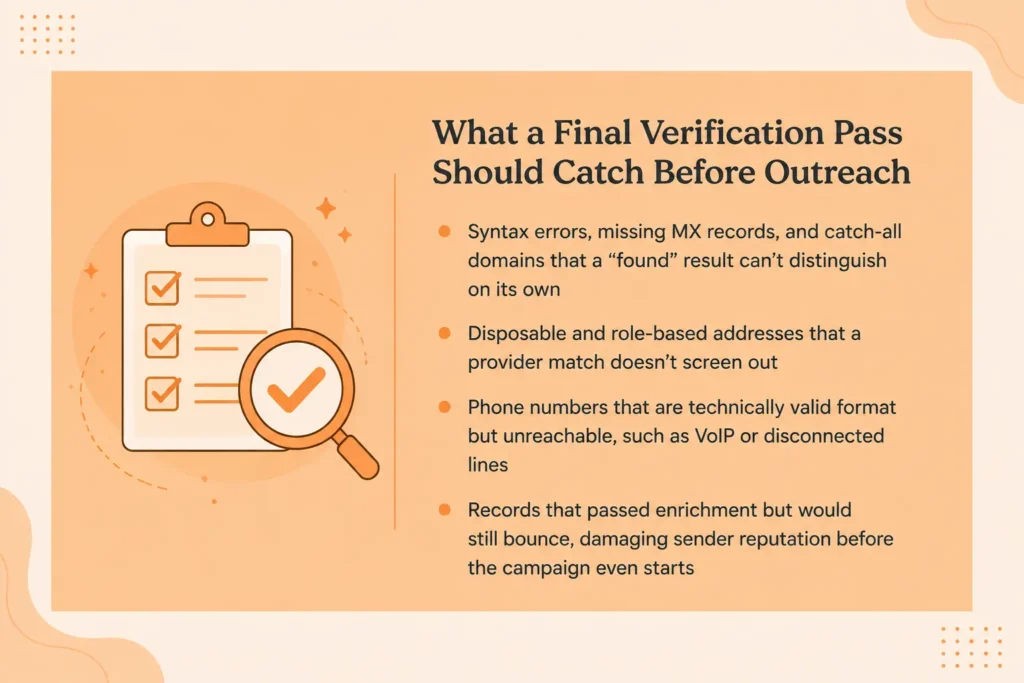
An enrichment provider tells you where an email probably exists and what number is associated with a contact. It does not confirm that the mailbox is active, that the phone number is a reachable mobile rather than a disconnected landline, or that either contact point is free from delivery risk.

That is why many teams place Clearout immediately after enrichment as a contact validation layer covering both fields. All found emails run through Clearout Email Verifier before being received by HubSpot, Salesforce, or an outbound sequencing tool. All found phone numbers run through ClearoutPhone to confirm line type and reachability.

Verification prevents spoofed or disposable mailboxes, risky domains, and deliverability problems from impacting sender reputation and campaign performance. For phone numbers, it identifies landlines, NonFixedVoIP numbers associated with disposable services, and disconnected numbers before they reach a rep's call queue.

Stage 5: Protect CRM quality after enrichment


Enrichment gives you a snapshot of today's data. Unfortunately, B2B data changes constantly. People change companies, departments, job titles, and phone numbers throughout the year.

Rather than waiting for quarterly cleanup projects, many GTM teams use Clearout Data Pulse to continuously validate email, phone number, and name fields as contacts are created or updated inside the CRM. This keeps routing rules, lead scoring models, and segmentation working with current data instead of outdated records.

Why does verification matter as the final step before outreach?


Every downstream workflow makes decisions based on data that could be incorrect if unverified information flows directly into HubSpot, Salesforce, or your sequencing platform. Bad data can impact your GTM strategy negatively.

This is where the cost starts to add up.

  • SDRs waste time chasing unreachable prospects
  • Bounce rates increase
  • Lead routing assigns accounts to the wrong owners
  • Reporting gradually becomes less reliable.

What looks like a prospecting problem is often a data quality problem that entered the workflow much earlier.

Everything that a verification tool should catch before outreach.

This is where Clearout sits in a well-built GTM stack. It can be added at the checkpoint every enriched record passes through before it's synced to HubSpot or Salesforce and loaded into a sequence.

Whether records arrive from a Clay waterfall, a bulk CSV export, or a Google Sheet full of newly found emails, running them through Clearout Email Verification will confirm better email deliverability.

A quick self-check for whether your current setup needs waterfall enrichment


SignalHealthy WaterfallAt-Risk Waterfall
Field coverage on new records80%+ of required contact and company fields are consistently populated.Contacts regularly enter the CRM with missing emails, phone numbers, or firmographics.
Email bounce rate on enriched campaignsStays below 2%, indicating verified and deliverable contacts.Bounce rates continue rising even after enrichment, pointing to poor verification or stale data.
Cost per verified contactStable and predictable because only fallback providers are queried when needed.Credit usage keeps increasing without a noticeable improvement in contact quality.
CRM sync accuracyContacts sync cleanly with correct field mapping and minimal duplicate creation.Frequent field conflicts, duplicate records, and manual cleanup after every sync.
Spam and junk contactsVery few fake or low-quality records reach the CRM.Fake leads, disposable emails, and bot submissions keep entering the pipeline.

If two or more rows on the right match your team, the fix is tightening the waterfall enrichment framework you already have and adding verification at two points: at the form level to block invalid contacts from entering the pipeline, and at the end of enrichment before records sync to your CRM or outreach tool.

What are the best practices for waterfall enrichment?


Following best practices for waterfall enrichment requires discipline. So, here are the top ones that the GTM teams should stick to.

  • Anchor with your most reliable provider first: A waterfall data enrichment strategy is only as strong as its starting point. Select the provider that works best for your ICP, no matter the cost. First-pass matches will decrease fallback lookups and help lower your overall enrichment cost.
  • Keep the waterfall field-specific: Build separate enrichment paths for emails, phone numbers, and firmographic data. The provider that performs best for business emails may not be the strongest for direct dials or company attributes.
  • Track fall-through rate: Final field coverage tells you what you found. The fall-through rate tells you how much you paid to find it. If too many records reach the fourth or fifth provider, it's time to rethink your provider order.
  • Review provider performance every quarter: As your ICP expands into new industries or regions, provider accuracy changes. Reordering your waterfall based on fresh performance data keeps costs low and coverage high.
  • Never skip verification: Verification should be the final quality checkpoint before a record enters your CRM or outbound sequence. It prevents invalid, risky, and disposable email addresses from affecting deliverability and sales productivity.
  • Protect your intake channels too: Don't spend enrichment credits on fake leads that should never have entered your pipeline. Real-time form validation tool like Clearout Form Guard prevents bots, disposable emails, and fake submissions.

Build a waterfall workflow your GTM team can trust


A well-designed waterfall enrichment workflow helps your sales team work with verified data, reduces wasted enrichment spend, and gives your CRM cleaner records from day one. The right workflow doesn't stop after finding an email. It verifies, enriches, and keeps your data accurate as it moves through your revenue systems.

Clearout makes the process easier. Its Email Verifier confirms only verified email reaches your CRM or outreach platform, and ClearoutPhone provides reachable and correctly classified phone numbers by line type. Capture only high-quality leads in your CRM and grow your revenue.

Try Clearout for free


Get 100 Free Credits

Frequently Asked Questions About Waterfall Enrichment

1. What does waterfall enrichment mean?
Waterfall enrichment is a sequential data process that queries multiple enrichment providers, in a set order, for the same missing field, accepting the first valid result and only moving to the next provider when the current one comes up empty. It maximizes coverage without paying every vendor for every record.
2. What are the best waterfall enrichment tools for GTM teams?
Clay is the most widely used orchestration layer for building custom waterfall sequences across dozens of providers, commonly paired with data sources like Apollo, Hunter, Lusha, Cognism, or ZoomInfo depending on your ICP and geography. Verification is the last step that ties the whole waterfall together. There's no value in enriching contact data if it can't be used. With Clearout Email Verifier and ClearoutPhone, you can automate verifying email addresses and phone numbers.
3. How do GTM teams decide the order of providers in a waterfall enrichment workflow?
The order is driven by ICP fit, historical provider performance, and cost. Lower-cost, high-volume providers usually run first to capture easy matches, while premium or niche providers are reserved for records earlier tiers couldn't complete. Many GTM teams also build separate waterfalls for emails, phone numbers, and firmographic data because the strongest provider for one field is rarely the strongest for another.
4. What is GTM waterfall enrichment used for beyond email finding?
Although email discovery is the most common use case, GTM teams also use waterfall enrichment to populate direct phone numbers, job titles, company size, revenue, technologies, funding data, LinkedIn profiles, and other firmographic attributes. Each field can follow its own provider sequence, allowing routing, lead scoring, segmentation, and personalization to run on more complete and accurate data.

Share this article

Recent Posts

06 Aug 2026
How GTM Teams Build Waterfall Enrichment Workflows

Learn how leading GTM teams sequence providers, automate waterfall enrichment workflows, and verify ...

31 Jul 2026
How RevOps Teams Protect HubSpot CRM Data Integrity

Prevent fake leads in HubSpot with real-time validation. Learn how RevOps teams protect CRM data int ...

30 Jul 2026
How to Enrich Outbound Leads Automatically: A 4-Step Workflow

Stop chasing bad data. Learn the 4-step automated outbound lead enrichment workflow reps use to buil ...

30 Jul 2026
Best Google Sheets Add-ons to Automate Workflows in 2026

Discover the best Google Sheets add-ons to automate workflows in 2026. Compare CRM sync, data sync, ...

29 Jul 2026
Targeted vs Bulk Email Marketing: Which Wins for B2B SaaS?

Compare targeted email marketing vs bulk email marketing across deliverability, open rates, reply ra ...

Clearout's

Form Guard

Validate email, phone & name on any forms!

  • Real signups only
  • Verified emails
  • Valid phone numbers
  • No fake names
  • Cleaner CRM
  • No devs needed
Try for Free Now

Email Verification, Email Finding Form Guard & Prospecting Service

Expand Your Reach By Finding & Verifying Ideal Prospects.

Sign up & get 100 free credits

No Credit Card required

Create Free Account
Company

Why Clearout?

Pricing

Contact Us

Careers

Press

Enterprise

Sitemap

FAQ

Status

Products

Email Verifier

Email Finder

Form Guard

Data Pulse

Prospect

LinkedIn Email Finder

Reverse Lookup

Google Sheets Add-on

WordPress Plugin

ClearoutPhone

What's New?

Resources

Integrations

HubSpot

Team Account

API

Compare Email Verifier

Compare Email Finder

Compare Prospecting

Use Cases

Blog

Help

Legal

Privacy Policy

Terms

DPA

Security

Trust Center

Certification

ISO 27001/2022

SOC 2 Type 2

GDPR

Partnership

HubSpot Certified

Affiliates

Partners

Clearout for browser

⚡ Supercharge Your Prospect Research with Clearout's LinkedIn Chrome Extension - Find and Verify Emails with Confidence!

Clearout Chrome extension

clearout
© 2026 Clearout Inc. All Rights Reserved. Powered by Clearout.
Keep HubSpot data clean on autopilot — validate, enrich, and sync contacts in real time with Data Pulse. Learn More ➞
X