clearout
  • Products
    • Email Verifier Verify emails addresses individually, in bulk or through API, with 99% accuracy
    • Email Finder Find individual or bulk emails by entering the person & company name or domain
    • Form Guard IconForm Guard Protect your forms from spam, bots, and invalid submissions with real-time email, phone, and name verification.
    • Form Guard IconData Pulse Verify, enrich, and monitor your CRM contacts in real time - heartbeat monitor for your data.
    • Prospect SQL/MQL list building with high levels of personalization, real-time data enrichment and prospect search
    • Clearout For SheetsVerify email addresses directly on Google Sheets with Clearout for sheets add-on
    • Prospect – LinkedIn Chrome ExtensionBuild verified, targeted prospect lists directly from LinkedIn profiles
    • ClearoutPhoneValidate phone numbers across 240+ countries in bulk, quick or real time validation
    • Free Tools
    • Disposable Email Checker
    • Reverse LinkedIn Profile Lookup Tool
    • Reverse Email Lookup Tool
    • Email List Cleaner
    • Company Domain Finder API
  • Resources
      DEVELOPERAPI iconAPI
      Clearout APIs are structured around REST and JSON
      Webhooks iconWebhooks
      Capture real-time events in your application workflow
      Form Guard iconForm Guard
      Real-time form validation to keep bad contacts out of your CRM
      KNOWLEDGE BASEGetting started iconGetting started
      Sending campaigns without bounces is made simple
      FAQ iconFAQ
      Easily find answers to services, security and common questions
      USE CASESLead Generation iconLead Generation
      Learn how professionals generate quality leads
      GUIDESPricing arrow iconTransparent & flexible pricing to support pay-per-use or recurringCompare Email Verification Tools arrow iconAI-powered email verification with 99%+ accuracy, real-time validation, and transparent risk scoringCompare Email Finder Tools arrow iconPre-verified B2B email addresses with confidence scoring, find real person email, not role-based addressData Pulse & HubSpot Breeze Intelligence arrow iconPre-verified B2B email addresses with confidence scoring, find real person email, not role-based addressBLOGSEmail Verification ToolsFind Anyone’s Email Address
      Most Accurate, Fast & Free Ways
      Form Validation
      Importance, Ways & Best Practices
      View All Blogs
  • Pricing
  • Integrations
  • Enterprise
  • Login
Try it free Book a 1-to-1 demo
Akanksha Mishra / August 31, 2026 August 31, 2026

Why Is My Email Click Rate Dropping In 2026?


Why Is My Email Click Rate Dropping In 2026?

Why is your email click rate dropping even when your content, CTA, and audience haven't changed much? I want to tell you that the problem may not be your email at all. It could be bot clicks from email security scanners.

Email security systems scan links to protect users from phishing and malicious websites. But when those scanners follow the links in your emails, your ESP can record those actions as clicks. M3AAWG's Non-Human Interactions study found that automated activity can account for 20% to 80% of recorded clicks on B2B email, compared with under 10% on B2C sends.

The problem starts when you use those inflated numbers as your benchmark. A campaign can appear to have strong engagement because scanners are clicking your links, and then look like it is underperforming when that scanning activity changes. Your real audience may not have changed at all.

In this article, I explain why security scanners create these false clicks, how to identify them using timestamps, IPs, and other signals, and how to filter them from your reports.

Table of Content


‣ What does email click rate mean?
‣ What is a good email click rate in 2026?
‣ Why is your click rate dropping?
‣ What are bot clicks in email marketing?
‣ How do email security scanners create fake clicks?
‣ How to filter bot clicks from email analytics?
‣ Best practices for improving your email click rate
‣ Final takeaways
‣ FAQ
What does email click rate mean?


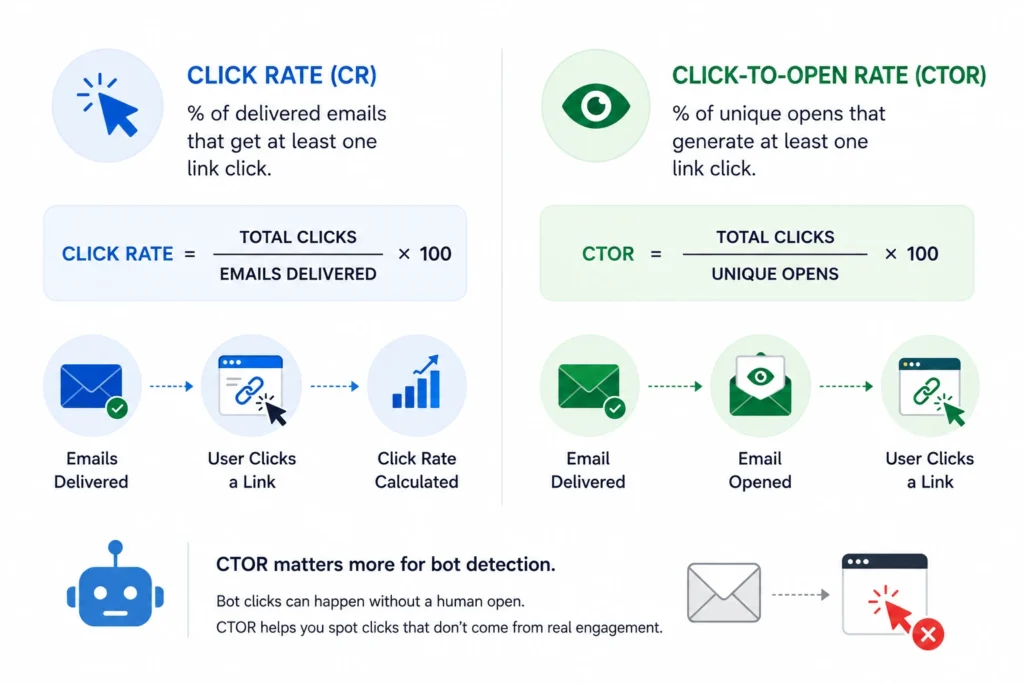
Click rate vs. CTOR formulas and bot-click detection.

One of the numbers most misunderstood in email marketing is the email click rate. When click numbers start falling, many marketing teams assume something is wrong. They rewrite subject lines, redesign templates, or attribute the offer to the sender. But before making changes, look deeper at what the metric actually is telling you.

Email click rate is the percentage of emails that were delivered and resulted in one or more clicks. Put another way, did your email provide them with a strong enough reason to continue the conversation?

A low click rate does not automatically point to a deliverability problem. Sometimes the offer is not compelling enough. In other cases, the CTA is easy to miss, the messaging misses the mark, or the content simply doesn't match what subscribers expected.

So, what is a good email click rate you must look at? Let's get into it.

What is a good email click rate in 2026?


Benchmarks vary by industry and device, but most reported averages include unfiltered email bot traffic. Treat these numbers as a starting point when setting your own email click rate benchmark.

Average click-through rate sits at 2.44% across industries, with legal leads in all sectors at 4.90%. These industry averages already include bot-inflated data, so they are not a clean target. For your own reporting, compare click rates after removing clicks you have identified as likely scanner activity.

For benchmarks by device and industry, see this click-through rate guide.

Why is your click rate dropping?


A low email click rate does not always mean your content quality has changed. It is falling because the bot traffic that once inflated it has shifted or dropped.

1. The false baseline problem


Every marketing link runs through your ESP's tracking domain before it redirects to the real page. A security gateway may treat the tracked redirect like any other URL it needs to inspect for potential threats.

Time-of-click systems like Safe Links add a second layer of scanning. They recheck the same link the moment a human actually clicks it. One email interaction can generate multiple logged clicks from a combination of automated scans and human activity. That inflated number becomes your team's baseline within a few campaigns, and no dashboard separates scanner activity from reader activity.

2. Corporate email gateways


Gateways like Mimecast, Proofpoint, and Barracuda inspect every inbound message before it reaches a mailbox. They open embedded links to check destination reputation against threat databases. Proofpoint's URL Defense, for example, rewrites links and routes every click through a sandbox first. That sandbox visit can register as a click in your ESP within seconds of send.

A campaign sent to enterprise inboxes shows more email bot traffic than personal Gmail or Yahoo accounts. This can make B2B click rates look unusually high when scanning activity is heavy, then appear to drop when that activity decreases.

3. Outlook Safe Links prefetching


Microsoft Defender Safe Links can rewrite links in inbound email to a Safe Links URL for inspection. At delivery, Defender can prefetch that rewritten link to check it before the message lands. Safe Links also runs a second, time-of-click scan when a user actually selects the link. Both events can log as separate clicks depending on your ESP's tracking setup.

Organizations with strict Safe Links policies generate more prefetch activity than those with lighter settings. For lists heavy in Outlook and Microsoft 365 users, this is usually the single largest source of inflated clicks. Microsoft's own advanced-hunting data confirms these events originate from Microsoft-owned IP ranges.

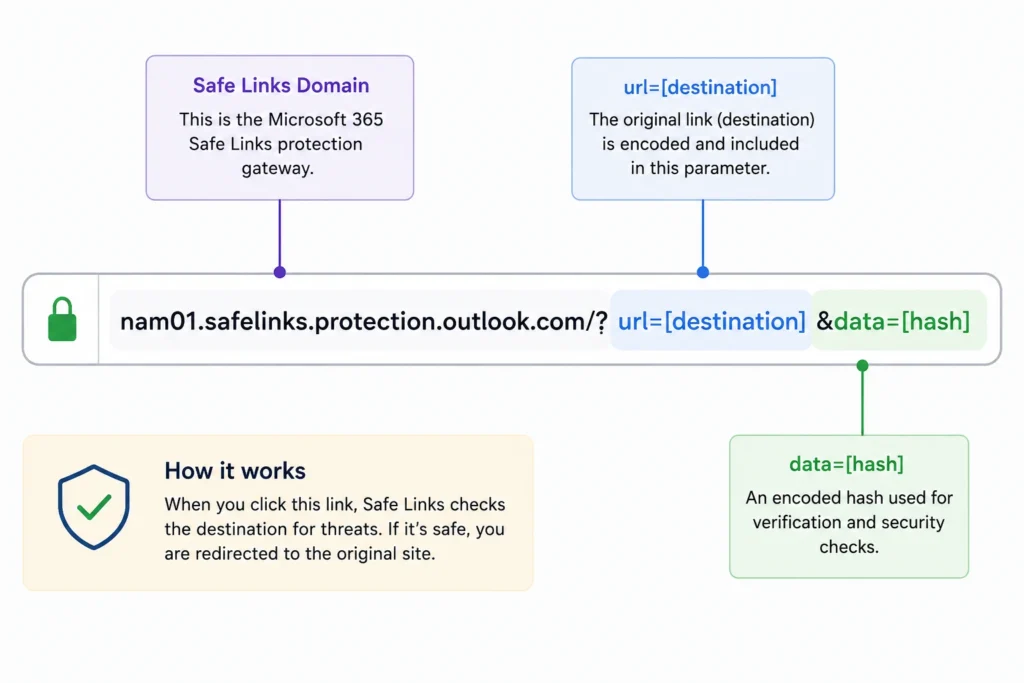
Wrapped links follow a fixed and matchable structure:

Safe Links URL structure with destination and security hash parameters.

Flag any click landing on this domain pattern before it reaches your engagement report.

4. Antivirus and sandbox scanners


Endpoint antivirus tools and network appliances also crawl links found in incoming email. Some detonate a link in an isolated sandbox to observe its behavior before allowing delivery. This check often runs independently of gateway-level scanning.

A single email can pass through three or four scanning layers: gateway, sandbox, endpoint, and time-of-click re-check. Each layer can register its own click event. Stack these on top of real human clicks, and the total bears little resemblance to actual engagement.

What are bot clicks in email marketing?


Bot clicks in email marketing happen when automated software opens links instead of a human recipient. The four scanner types above account for most of this activity. There are two additional sources that contribute to that.

  • Some gateways access the domain reputation databases to all the links, even when the full page load does not occur, as that is considered a request.
  • Tools for collaboration and detonation testing that open links in a preview or sandbox.

There are no systems here that require human reading of your subject line, nor do they require human determination of click. In many cases, these clicks are recorded almost immediately after the email lands in the inbox, long before a real person reads the message.

How do email security scanners create fake clicks?


The process is fairly consistent. The email is delivered, a security system scans the link, the URL is opened automatically, and your tracking system records the event as a click.

Four signals expose this pattern in raw data. A click timestamp lands within seconds of delivery, faster than any human opens a message. The click's IP address falls inside a known data center or hosting range instead of a residential ISP.

A CTOR above 100% is unusual and can be a signal that automated activity or tracking differences are affecting your data. When every link in the same send fires within milliseconds, a sandbox may be scanning them in sequence.

100 real clicks + 50 automated clicks = 150 recorded clicks

In this example, your dashboard reports a 50% lift in engagement that does not exist. If scanner volume drops to 20 next time, the report can show an email click rate decline. Real clicks stayed flat at 100 the whole time.

How to filter bot clicks from email analytics?


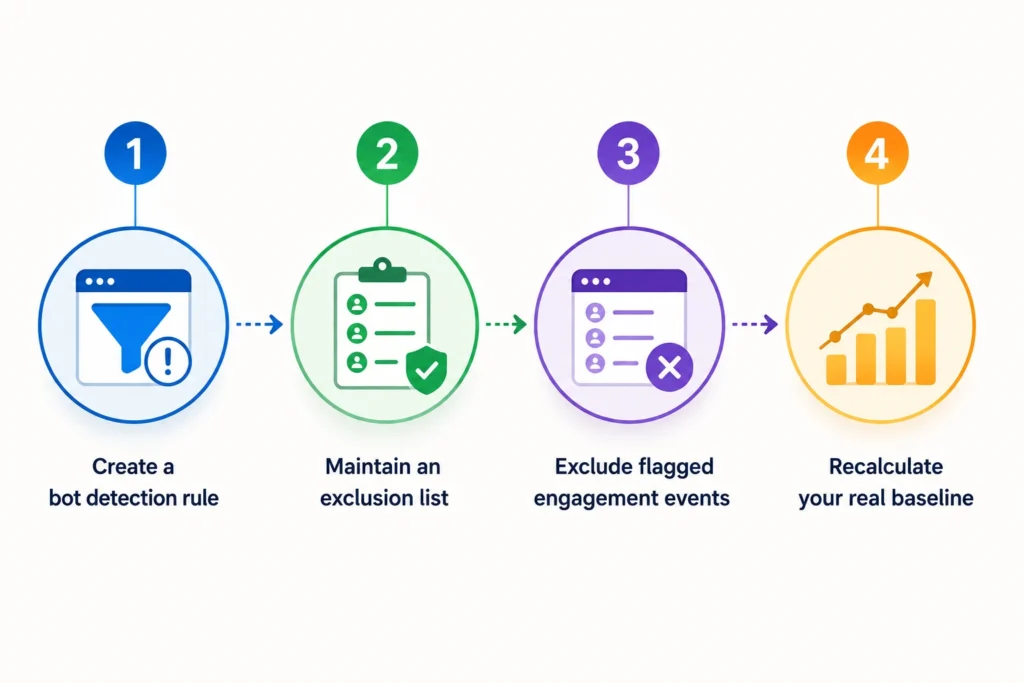
Four-step process for filtering bot clicks from email analytics.

Knowing how to identify bot clicks in email campaigns makes filtering easier and more consistent. These four steps turn that detection into a repeatable filtering process you can run on every campaign.

Step 1: Create a bot detection rule


Start by flagging clicks that happen within 5 seconds of send as suspect. Clicks that occur almost immediately after delivery are often automated, although timing alone should not be used as definitive proof. Compare the click time with the delivery time for each item in your log file. Most ESPs, including HubSpot and Klaviyo, reveal this timestamp information that can be explored to compare with delivery and click events.

Step 2: Maintain an exclusion list


Create a list of user-agent strings for known security vendors such as Mimecast, Proofpoint and Microsoft ATP. Combine with a data-center IP range list, filtered by ASN, from MaxMind or IP2Location. Also, update both lists quarterly as vendors change infrastructure and introduce new scanning services.

Step 3: Exclude flagged engagement events


Use your detection rule and exclusion list before clicks go into your engagement reports. Almost all ESPs have custom segments or filtered views for just this reason. If your platform doesn't support this, you can filter raw click exports in a spreadsheet or BI tool.

Step 4: Recalculate your real baseline


Once bot clicks are excluded, recalculate your click rate and CTOR from the filtered data. This filtered number is your real baseline. Compare future campaigns against this new baseline. Expect this filtered number to be lower than what you are used to seeing.

A clean list is another part of the equation. Invalid or risky email addresses can be a headache. They can cause bounces and, over time, affect your email deliverability. Before hitting send, Clearout Email Verifier helps you check your list and catch bad addresses. This means you can clean them out beforehand and focus on reaching subscribers who are actually there. That creates a healthier starting point for improving click rates.

Best practices for improving your email click rate


Once your baseline is real, optimization actually works. These four practices target genuine human engagement instead of chasing inflated scanner activity.

1. Reset your baseline metric


Document the filtered click rate as your new internal benchmark going forward. Share this number with stakeholders so nobody compares future reports to the old inflated figure. A clear baseline reset prevents false alarm reporting when bot volume naturally fluctuates.

2. Track human-only CTOR trend


Monitor click-to-open ratio using clicks and opens after removing suspected scanner activity. This trend line is a more reliable signal of content performance than raw click rate. A rising human CTOR over time means your subject lines and content are actually working.

3. Flag high-bot domains


Identify which domains in your list generate the highest bot-click share. Outlook, Hotmail, and large corporate domains usually top this list. Report on these domains separately so their scanner noise does not skew your overall numbers.

4. Separate reporting for B2B sends


B2B emails sent to corporate inboxes are more likely to encounter security scanners and link-checking tools than B2C emails sent to personal inboxes. So, click metrics in B2B campaigns can be inflated by automated activity.

Final takeaways


Leaving bot clicks in your reporting has real costs. Sales teams waste hours chasing "engaged" leads that were actually security scanners. Marketing budgets get allocated based on inflated engagement, and stakeholders lose confidence when click metrics fail to match pipeline results.

Filter bot clicks before evaluating campaign performance or content quality. Once you have a good engagement baseline, make sure you're also sending valid contacts. A verified email list helps reduce bounce rates, protect deliverability, and keep future campaign data accurate.

Try Clearout Email Verifier

FAQ


1. What is a good click rate?
A click rate between 2% and 5% can be a useful benchmark for many industries. B2B and finance campaigns often run lower, even after accounting for scanner activity.
2. Why is my click rate suddenly dropping?
A sudden drop can happen when security scanners change their scanning frequency, reducing the number of automated clicks recorded by your ESP. Check click timestamps against delivery time to confirm possible bot activity.
3. Can bot clicks hurt sender reputation?
Yes, bot clicks can trigger lead-scoring rules and nurture workflows that were meant for real engagement, causing teams to act on misleading signals. Click filtering and email verification serve different purposes. Click filtering improves reporting accuracy, while Clearout helps identify invalid and risky email addresses before they impact deliverability and campaign performance.
4. Is click-to-open ratio over 100% normal?
No. A CTOR above 100% is unusual and can indicate bot activity, tracking differences, or other measurement issues. Check your click and open data before drawing conclusions.

Share this article

Recent Posts

31 Aug 2026
Why Is My Email Click Rate Dropping In 2026?

Discover why your email click rate is dropping in 2026, how security bots inflate clicks, and how to ...

22 Aug 2026
Why Validating Contact Information Matters for Shopify Checkouts

Shopify checkout validation catches typos, fake numbers, and disposable emails. See how Clearout's F ...

21 Aug 2026
Email Data Quality Benchmark Report (2026)

Explore 2026 email data quality benchmarks for bounce rates, list decay, and deliverability by indus ...

14 Aug 2026
How to Build an Automated Welcome Email Series in 2026

Learn how to build an automated welcome email series in 2026 with real-time email verification, trig ...

06 Aug 2026
How GTM Teams Build Waterfall Enrichment Workflows

Learn how leading GTM teams sequence providers, automate waterfall enrichment workflows, and verify ...

Clearout's

Form Guard

Validate email, phone & name on any forms!

  • Real signups only
  • Verified emails
  • Valid phone numbers
  • No fake names
  • Cleaner CRM
  • No devs needed
Try for Free Now

Email Verification, Email Finding Form Guard & Prospecting Service

Expand Your Reach By Finding & Verifying Ideal Prospects.

Sign up & get 100 free credits

No Credit Card required

Create Free Account
Company

Why Clearout?

Pricing

Contact Us

Careers

Press

Enterprise

Sitemap

FAQ

Status

Products

Email Verifier

Email Finder

Form Guard

Data Pulse

Prospect

LinkedIn Email Finder

Reverse Lookup

Google Sheets Add-on

WordPress Plugin

ClearoutPhone

What's New?

Resources

Integrations

HubSpot

Team Account

API

Compare Email Verifier

Compare Email Finder

Compare Prospecting

Use Cases

Blog

Help

Legal

Privacy Policy

Terms

DPA

Security

Trust Center

Certification

ISO 27001/2022

SOC 2 Type 2

GDPR

Partnership

HubSpot Certified

Affiliates

Partners

Clearout for browser

⚡ Supercharge Your Prospect Research with Clearout's LinkedIn Chrome Extension - Find and Verify Emails with Confidence!

Clearout Chrome extension

clearout
© 2026 Clearout Inc. All Rights Reserved. Powered by Clearout.
Validate Enrich New Salesforce contacts automatically with Data Pulse. Learn More ➞
X