



clearout
  • Products
    • Email Verifier Verify emails addresses individually, in bulk or through API, with 99% accuracy
    • Catch-all Email Verification IconCatch-all Email Verification Resolve more catch-all and SEG-protected emails into Valid or Invalid results with Deep Verify.
    • Email Finder Find individual or bulk emails by entering the person & company name or domain
    • Form Guard IconForm Guard Protect your forms from spam, bots, and invalid submissions with real-time email, phone, and name verification.
    • Form Guard IconData Pulse Verify, enrich, and monitor your CRM contacts in real time - heartbeat monitor for your data.
    • ProspectSQL/MQL list building with high levels of personalization, real-time data enrichment and prospect search
    • Clearout For SheetsVerify email addresses directly on Google Sheets with Clearout for sheets add-on
    • Prospect – LinkedIn Chrome ExtensionBuild verified, targeted prospect lists directly from LinkedIn profiles
    • ClearoutPhoneValidate phone numbers across 240+ countries in bulk, quick or real time validation
    • Free Tools
    • Disposable Email Checker
    • Reverse LinkedIn Profile Lookup Tool
    • Reverse Email Lookup Tool
    • Email List Cleaner
    • Company Domain Finder API
  • Resources
      DEVELOPERAPI iconAPI
      Clearout APIs are structured around REST and JSON
      Webhooks iconWebhooks
      Capture real-time events in your application workflow
      Form Guard iconForm Guard
      Real-time form validation to keep bad contacts out of your CRM
      KNOWLEDGE BASEGetting started iconGetting started
      Sending campaigns without bounces is made simple
      FAQ iconFAQ
      Easily find answers to services, security and common questions
      USE CASESLead Generation iconLead Generation
      Learn how professionals generate quality leads
      GUIDESPricing arrow iconTransparent & flexible pricing to support pay-per-use or recurringCompare Email Verification Tools arrow iconAI-powered email verification with 99%+ accuracy, real-time validation, and transparent risk scoringCompare Email Finder Tools arrow iconPre-verified B2B email addresses with confidence scoring, find real person email, not role-based addressData Pulse & HubSpot Breeze Intelligence arrow iconPre-verified B2B email addresses with confidence scoring, find real person email, not role-based addressBLOGSEmail Verification ToolsFind Anyone’s Email Address
      Most Accurate, Fast & Free Ways
      Form Validation
      Importance, Ways & Best Practices
      View All Blogs
  • Pricing
  • Integrations
  • Enterprise
  • Login
Try it free Book a 1-to-1 demo
Akanksha Mishra / October 13, 2026 October 13, 2026

AI Lead Generation: A 4-Layer Multipoint Verification Workflow


AI Lead Generation: A 4-Layer Multipoint Verification Workflow

TL;DR


  • AI can help you generate leads faster but the lead information might not be enriched or updated.
  • All AI-generated leads should be treated as unverified until you’ve confirmed the person’s identity, company, role, email, and phone details.
  • Before outreach, verify the contact details of AI-generated leads through Clearout Email Verifier and ClearoutPhone, which check lead data quality like email and phone numbers.
  • Filter out risky records from your outreach and add verified contacts to the CRM.
  • Recheck older records because contact information can become outdated.

AI-generated records may include information from various sources that may not always be current or consistent. It could be that someone is with the wrong company. Or someone’s title doesn’t match their current role.

This article is about the verification layer, after AI-powered prospecting and enrichment. It describes what needs to be verified in an AI lead generation process, what data points to verify at each step and how multipoint verification reduces the chances of erroneous records reaching sales.

Table Of Content


‣ TL;DR
‣ What is AI-driven lead generation
‣ Why is multipoint verification important for AI-generated leads
‣ What is multipoint verification and how to do it
‣ Build an AI lead verification workflow
‣ Email & Phone verification: Why you need both
‣ How to measure AI prospecting accuracy
‣ Final takeaway
‣ FAQ
What is AI-driven lead generation


AI lead generation is the application of artificial intelligence to find potential prospects and enrich their records with information. These tools can help you find companies, suggest contacts, find job titles, enrich company info and provide contact info. This reduces the manual work involved in prospecting research. But the information generated still needs to be checked before sales teams use it.

AI-generated contact data should be treated as a starting point for verification.

Why is multipoint verification important for AI-generated leads


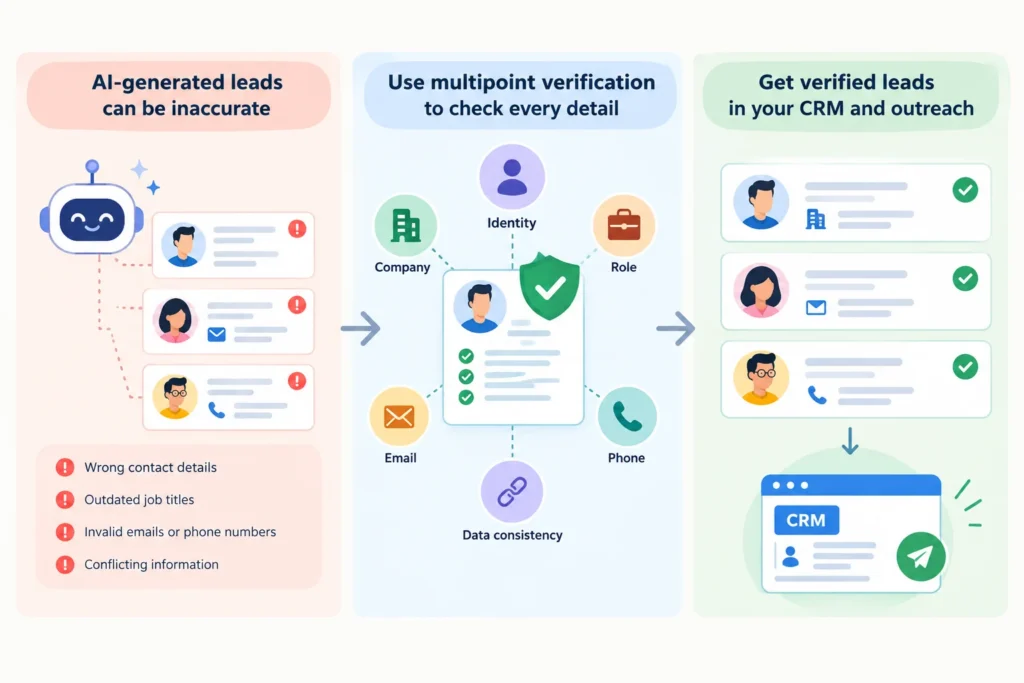
AI-generated leads moving through multipoint verification into CRM and outreach.

AI may find the right company but match it with the wrong person. The job title might be out of date, the email address might not be valid or the phone number might not be with that person anymore.

AI-generated records can come from various sources, some of which might not be updated. These can be checked via a verification tool before they get into your CRM or outreach process.

Why does more lead volume make verification more important?


AI is able to generate and revamp a large volume of leads in a short span of time. But as the lead volume increases, it gets harder to verify the accuracy of AI-generated leads, as each record needs to be verified for identity, company, role, email and phone data.

At lower volumes, teams may manually review these fields before a lead moves to the next stage. That approach becomes more difficult to sustain as volume grows. Outdated role, wrong company, invalid email, wrong phone number can get into the CRM without a review from anyone.

That’s one reason why AI-generated leads need to be vetted before they’re sent into downstream workflows. AI errors can propagate through lead enrichment, segmentation, routing and outreach as fast as accurate records.

A structured AI lead enrichment workflow adds checkpoints before those records hit sales or outreach. Each checkpoint can validate a specific piece of the lead and flag missing, conflicting or risky data for further review.

What is multipoint verification and how to do it


Multipoint verification is the process of checking an AI-generated lead against several layers of verification before it can enter your CRM or outreach workflow.

AI is able to create a record that appears complete, but there are many different ways different fields can fail. Sometimes it’s the wrong company, the wrong role, an invalid email, or a phone number that no longer matches the record.

A multipoint workflow checks the lead at following stages:

  • Deterministic checks: Confirm that contact details are technically usable.
  • Waterfall enrichment: Cross-check AI-generated information against additional sources.
  • Behavioral cross-check: Does the account look like your ICP and have relevant current signals?

Each layer is looking for a different risk before the lead can go to the next phase.

Layer 1: Deterministic testing


The first layer checks the technical usability of the AI-generated or AI-enriched contact details.

AI emails may look legitimate but be fake, disposable, a role-based email, or tied to a catch-all domain. The phone number might be complete but invalid, related to an unexpected line type, or not matching any available telecom data.

This is where separate email and phone verification is necessary. Clearout Email Verifier checks email addresses with 20+ real-time checks and flags conditions like invalid, disposable, role-based and catch-all. ClearoutPhone checks if a phone number is valid and identifies line type, carrier and location. If the basic phone number data isn’t enough, Smart Validation helps with a deeper telecom check.

These checks are to address a specific problem in AI lead generation: they test if the contact information is valid for the channel of outreach before that information is put into a sequence.

Layer 2: Waterfall enrichment


The technical contact validation does not verify the correctness of the data for the person, company and role.

AI tools are trained on a variety of sources, some of which may have conflicting or out-of-date information. For instance, an AI-generated record could find the right person but assign them to the wrong company or job title.

This is waterfall enrichment by cross-referencing key fields against other sources.

Waterfall enrichment does this by cross-referencing key fields against other sources. If sources disagree, take the information that is more certain and indicate the disagreements.

For instance, before you send an AI record to outreach, if it is about a VP in Company A, you should verify that position on their professional profile or from a company source.

Layer 3: Verification activity


A contact could be correct but not ready for active outreach.

Verify the person, company, role, email and phone. Compare the account to your ICP and current signals you have at your disposal. They could be hiring, funding events or conducting research in a relevant category.

A verified decision maker at a target company may still need to stay in nurture if there’s no current signal that justifies active outreach.

This layer adds an extra check to the AI lead generation workflow: Does this verified contact correspond to a contact now?

Layer 4: Human review


Not all records are required to go through automated checks.

If there are leads with high value or company/role information, they may be reviewed manually before any outreach. The reviewer can verify that the person is still in the stated position or that the information can be used safely.

Build an AI lead verification workflow


AI prospecting → enrichment → identity and company checks → email and phone verification → consistency check → CRM → outreach


A different type of risk is removed at each step before the record advances.

1. Write or improve the lead


AI can help you discover prospects and fill in their details in the record. But it is unverified until the correct checks are made.

So, what kind of checks are needed and how to automate them? Let's dive in!

2. Check email and phone data


You can run email addresses through Clearout Email Verifier, while phone number verification can be done via ClearoutPhone. Email Verifier helps you verify that the email is valid, invalid, disposable, role-based and catch-all. ClearoutPhone validates a phone number, shows what kind of line type it has, the carrier and location as well.

3. Verify name, company and position


Make sure the person is real and their identity can be confirmed using sources such as LinkedIn or the company's website. If any of these checks are not met, mark this record for review rather than making it a valid contact.

4. Consistency of records


Compare validated fields to each other.

For instance, if a person uses a company domain, then their email domain should be the same as company’s domain. If there's conflicting information, this indicates that it's time to review the information manually or otherwise verify it.

5. Mark or delete suspicious records


Sort out the verified contacts from the records to be reviewed. If the same hiring manager appears under two email addresses or company records, merge the useful details into one record to avoid contacting them twice. If someone has moved to another company, don't automatically discard them. Check whether their new role is your ICP and update the record accordingly.

6. Send verified records to the CRM


Where possible, keep the verification status to let the sales team know which contacts have already been verified.

Email & Phone verification: Why you need both


Below we have listed why you need phone and email verification if generating leads through an AI tool:

CheckEmail verificationPhone verification
Primary purposeChecks if an email address is valid or riskyChecks if a phone number is valid and understands its telecom details.
What it can checkEmail syntax, domain information, mailbox signals, disposable status, role-based status, and catch-all behavior.Number validity, line type, carrier, and location.
Where it fitsBefore email outreach, sequencing, or using an address for campaign communication.Before calling or using a number for sales communication.
Tool to useClearout Email VerifierClearoutPhone, with Smart Validation for a deeper telecom check

How to measure AI prospecting accuracy


Monitor metrics like:

  • Success rate of identity verification: Percentage of leads where the person’s identity matches information on record.
  • Company & role match rate: Number of records where the individual’s current company and role match your targeting criteria.
  • Email verification pass rate: The percentage of emails that do pass verification and aren’t identified as invalid or risky to outreach.
  • Phone verification success rate: Percentage of phone numbers that were successfully verified with regards to their validity and relevant telecom data.
  • Verified leads going into outreach: The number of leads that have passed the required checks to be put into an outreach workflow.
  • Outreach contact bad rate: Contacts later identified as no longer usable due to hard bounces, failed calls, or other contact issues.

These metrics show where lead enrichment accuracy and AI prospecting accuracy need to be addressed. They can also track these over time to show if your AI lead generation verification process needs to be altered or if older records need to be re-verified.

Final takeaway


AI can increase lead generation speed but you might not have contact records in the list that are ready for outreach and sales. So, you must confirm if the person, their role, company, phone and email details are valid.

To verify email address, you can run it through Clearout Email Verifier as it can see email validity and risk signals for the contact details. Additionally, ClearoutPhone can help in identifying phone validity, line type, carrier and location. Re-check this information if you are reusing old records or their contact information has changed.

Verify AI-generated Leads Before Outreach


Try Clearout Today

FAQ


1. What is multipoint verification for AI-generated leads?
Multipoint verification means checking parts of an AI-generated lead at different times. First, lead enrichment confirms the person’s identity, company and job title. Then email and phone verification happens to make sure those details are correct. Finally a consistency check looks for any mismatches, like a domain that doesn’t match the company listed as the employer. This helps catch errors before outreach.
2. Why do AI-generated leads need to be verified?
Artificial intelligence can create a “complete” lead record, even when some of the information is stale, incorrect, or belongs to the wrong person. Verification catches these errors before they hit the sales floor.
3. How do you check the accuracy of AI-generated leads?
Check the accuracy of AI-generated leads by verifying the person’s identity, company and current position. Then verify the contact details separately. Clearout Email Verifier checks email validity and risk signals, while ClearoutPhone checks phone validity and telecom details. Finally, compare the verified information across the record to catch mismatches before outreach.

Share this article

Recent Posts

13 Oct 2026
AI Lead Generation: A 4-Layer Multipoint Verification Workflow

AI lead generation needs multipoint verification. Learn how to verify identities, emails, and phone ...

08 Oct 2026
How Fake Signups Distort Marketing Attribution and Funnels

Learn how fake signups can distort marketing attribution, funnel conversion rates, MQL reporting, an ...

06 Oct 2026
How Do GTM Teams Turn Buyer Signals Into High-ACV Deals?

Most buyer signals fail at the contact layer. See how GTM teams map, verify, and route buying commit ...

01 Oct 2026
Automate Catch-All Verification in HubSpot, Salesforce, and CRM Workflows

Learn how to automate catch-all verification across HubSpot, Salesforce, and CRM workflows using API ...

30 Sep 2026
How to Safely Contact Catch-All Emails In Cold Outreach

Discover how to manage catch-all emails in cold outreach, monitor bounce signals, verify contacts, a ...

Clearout's

Form Guard

Validate email, phone & name on any forms!

  • Real signups only
  • Verified emails
  • Valid phone numbers
  • No fake names
  • Cleaner CRM
  • No devs needed
Try for Free Now

Email Verification, Email Finding Form Guard & Prospecting Service

Expand Your Reach By Finding & Verifying Ideal Prospects.

Sign up & get 100 free credits

No Credit Card required

Create Free Account
Company

Why Clearout?

Pricing

Contact Us

Careers

Press

Enterprise

Sitemap

FAQ

Status

Products

Email Verifier

Catch-all Verification

Email Finder

Form Guard

Data Pulse

Prospect

LinkedIn Email Finder

Reverse Lookup

Google Sheets Add-on

WordPress Plugin

ClearoutPhone

What's New?

Resources

Integrations

HubSpot

Team Account

API

Compare Email Verifier

Compare Email Finder

Compare Prospecting

Use Cases

Blog

Help

Legal

Privacy Policy

Terms

DPA

Security

Trust Center

Certification

ISO 27001/2022

SOC 2 Type 2

GDPR

Partnership

HubSpot Certified

Affiliates

Partners

Clearout for browser

⚡ Supercharge Your Prospect Research with Clearout's LinkedIn Chrome Extension - Find and Verify Emails with Confidence!

Clearout Chrome extension

Clearout
© 2026 Clearout Inc. All Rights Reserved. Powered by Clearout.
Validate Enrich New Salesforce contacts automatically with Data Pulse. Learn More ➞
X