



clearout
  • Products
    • Email Verifier Verify emails addresses individually, in bulk or through API, with 99% accuracy
    • Catch-all Email Verification IconCatch-all Email Verification Resolve more catch-all and SEG-protected emails into Valid or Invalid results with Deep Verify.
    • Email Finder Find individual or bulk emails by entering the person & company name or domain
    • Form Guard IconForm Guard Protect your forms from spam, bots, and invalid submissions with real-time email, phone, and name verification.
    • Form Guard IconData Pulse Verify, enrich, and monitor your CRM contacts in real time - heartbeat monitor for your data.
    • ProspectSQL/MQL list building with high levels of personalization, real-time data enrichment and prospect search
    • Clearout For SheetsVerify email addresses directly on Google Sheets with Clearout for sheets add-on
    • Prospect – LinkedIn Chrome ExtensionBuild verified, targeted prospect lists directly from LinkedIn profiles
    • ClearoutPhoneValidate phone numbers across 240+ countries in bulk, quick or real time validation
    • Free Tools
    • Disposable Email Checker
    • Reverse LinkedIn Profile Lookup Tool
    • Reverse Email Lookup Tool
    • Email List Cleaner
    • Company Domain Finder API
  • Resources
      DEVELOPERAPI iconAPI
      Clearout APIs are structured around REST and JSON
      Webhooks iconWebhooks
      Capture real-time events in your application workflow
      Form Guard iconForm Guard
      Real-time form validation to keep bad contacts out of your CRM
      KNOWLEDGE BASEGetting started iconGetting started
      Sending campaigns without bounces is made simple
      FAQ iconFAQ
      Easily find answers to services, security and common questions
      USE CASESLead Generation iconLead Generation
      Learn how professionals generate quality leads
      GUIDESPricing arrow iconTransparent & flexible pricing to support pay-per-use or recurringCompare Email Verification Tools arrow iconAI-powered email verification with 99%+ accuracy, real-time validation, and transparent risk scoringCompare Email Finder Tools arrow iconPre-verified B2B email addresses with confidence scoring, find real person email, not role-based addressData Pulse & HubSpot Breeze Intelligence arrow iconPre-verified B2B email addresses with confidence scoring, find real person email, not role-based addressBLOGSEmail Verification ToolsFind Anyone’s Email Address
      Most Accurate, Fast & Free Ways
      Form Validation
      Importance, Ways & Best Practices
      View All Blogs
  • Pricing
  • Integrations
  • Enterprise
  • Login
Try it free Book a 1-to-1 demo
Priyanshi Sharma / October 1, 2026 October 1, 2026

How to Automate Catch-All Verification in HubSpot, Salesforce, and CRM Workflows?


How to Automate Catch-All Verification in HubSpot, Salesforce, and CRM Workflows?

TL;DR


  • Catch-all verification checks whether a domain accepts every email address sent to it, even ones that do not exist. This makes catch-all contacts a hidden risk in any CRM.
  • You can automate catch-all verification with Deep Verify in any CRM using workflows, webhooks, or custom code actions connected to the Clearout API.
  • Clearout Email Verifier is designed to analyze catch-all emails further through its deep verify feature and classify them as valid or invalid.
  • In Salesforce, the same result comes from a Flow that fires a callout through an External Service or Named Credential, then writes the response back to the lead or contact record.
  • Catch-all addresses are not automatically bad. They need a confidence score and a routing rule.
  • Re-verify catch-all addresses on a cadence based on how the contact entered your CRM.

If you landed here because a portion of your CRM contains unresolved catch-all email addresses and nobody wants to manually recheck them every week, you're in the right place.

You'll learn how to set up catch-all verification as an automated step inside HubSpot workflows and Salesforce Flow using Clearout Email Verifier. We have also included the right triggers to use, how to handle verification results, and how to automatically re-run checks.

Table Of Content


‣ TL;DR
‣ What is catch-all verification, and why does it need to be automated
‣ How does catch-all email verification actually work
‣ Why is catch-all verification still a problem for many teams
‣ How do you automate catch-all verification in HubSpot
‣ What should the API call send and receive
‣ What makes automated catch-all workflows more accurate
‣ How do you automate catch-all verification in Salesforce
‣ How should you re-verify catch-all email addresses
‣ What should happen to each verification result inside the workflow
‣ How do you know if the automation is actually working
‣ Why do teams use Clearout for catch-all verification
‣ FAQs
What is catch-all verification, and why does it need to be automated


Catch-all verification is the process of checking whether a mail server is configured to accept every message sent to its domain, regardless of whether the specific mailbox exists.

A catch-all domain will say "yes, I'll take that" to almost any address, including ones that were never created. That single behavior is why catch-all addresses cannot be judged as simply valid or invalid the way a normal inbox can.

Here's why manual checking falls apart quickly. A sales team adding 200 to 2,000 leads a week cannot pause and manually inspect each domain's mail server configuration. And even if someone did check today, that same domain could flip its catch-all setting next month with zero notice.

That is the entire case for automation. You need the check running every time a contact enters your CRM, and you need it running again on a schedule, not just once at import.

How does catch-all email verification actually work


A verification tool connects to the domain's mail server and simulates the delivery attempt without actually sending an email. If the server accepts a message to a clearly fake, randomly generated address at that same domain, the tool knows the domain is a catch-all.

From there, it looks at supporting signals such as domain age, mailbox activity patterns, and historical deliverability data to assign a confidence score to the specific address you are checking.

This is why a good verification result for a catch-all address looks different from a normal valid or invalid flag. Instead of a flat yes or no, you get a status plus a score that tells you how likely that particular mailbox is to be real.

Why is catch-all verification still a problem for many teams


The challenge is that most email verification tools stop at identifying a catch-all domain.

They can tell you that the domain accepts all incoming email addresses, but they often cannot tell you whether the specific mailbox you're trying to reach actually exists.

That leaves sales and marketing teams with an uncomfortable choice:

  • Send the email and accept the risk.
  • Suppress the contact and potentially lose a legitimate opportunity.

This is where Clearout Deep Verify becomes useful.

Deep Verify is designed specifically for catch-all email addresses. Instead of leaving the address in an uncertain catch-all category, it performs additional analysis to determine whether the mailbox is more likely to be valid or invalid.

For teams running outbound campaigns, lead qualification workflows, or CRM automations, that additional layer of confidence can make routing decisions significantly easier.

Resolve Catch-All Emails Faster

How do you automate catch-all verification in HubSpot


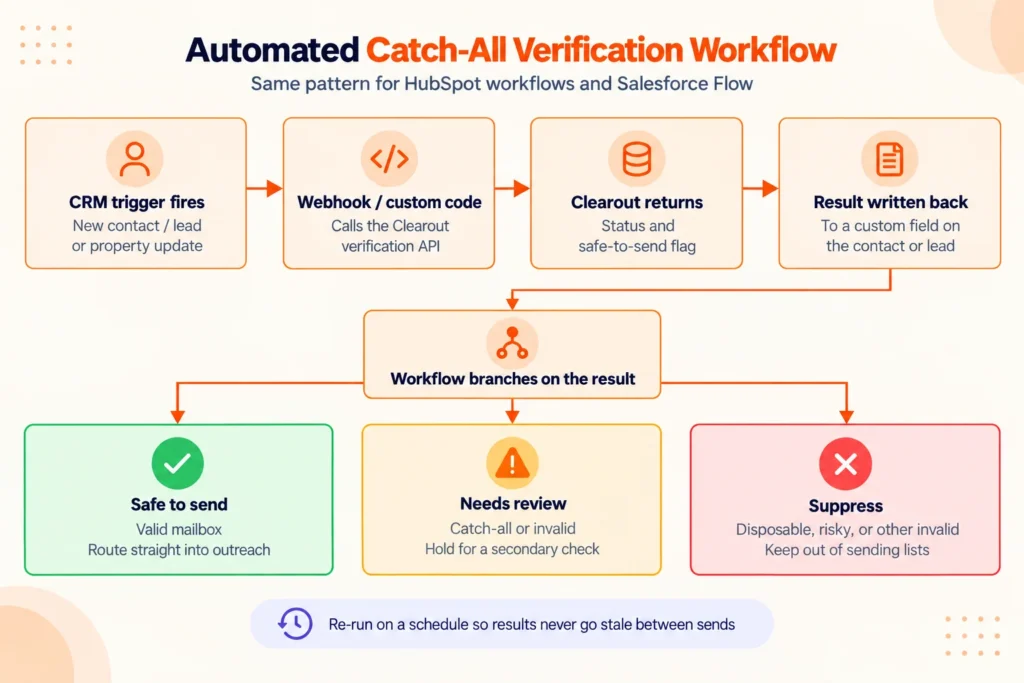
You automate catch-all verification in HubSpot by building a workflow that triggers on contact creation or property change, then calls the Clearout API through a webhook or custom code action before the contact moves any further down your pipeline. The API response gets written back into a custom contact property, and the workflow branches from there.

Here is what that looks like in practice.

An automated catch-all verification workflow in HubSpot.

HubSpot catch-all verification automation workflow


1. Create a contact-based workflow: Set the enrollment trigger to "Contact is created" or "Email address is known" for existing databases you are cleaning retroactively.

2. Add a filter for unverified contacts: Avoid re-running the check on records that have already passed by using a criterion such as "Verification Status is unknown".

3. Add a webhook or custom code action: An email address will be sent through Clearout Email Verifier. In addition to the typical validations, Clearout can detect disposable email addresses, role addresses, spam traps, and catch-all domains. It comes with a deep verification feature that runs multi-layer SMTP analysis. This detects the difference between a real mailbox and an "accept everything" reply.

4. Map the response to custom properties: Store the verification status, Deep Verify result, catch-all indicator, and safe-to-send flag as separate properties. These fields become the foundation for workflow branching, lead scoring, and routing decisions.

5. Branch the workflow based on those fields: Route valid and safe-to-send contacts forward, hold catch-all contacts for review, and suppress invalid ones from any sending list.

The webhook and custom code actions are available in HubSpot's paid workflow tiers, so check your plan before building this out. If your plan doesn't feature those actions, you can use a different middleware solution such as Zapier or Make, and connect HubSpot and Clearout API with the same trigger and branch logic.

What should the API call send and receive


The API call itself only needs the email address as input. What comes back matters more. You need the verification status, catch-all flag specifically, a numeric or categorical confidence score, and the safe-to-send indicator. All should be written into properties your reps and your other workflows can reference later.

HubSpot triggers for automated catch-all verification


HubSpot TriggerBest Used ForAction to Pair With It
Contact is createdNew inbound leads, form submissions, CSV imports, and integration-based contact creationTrigger a webhook or custom code action that sends the email address to the verification API before marketing or sales workflows begin
Email property is updatedReps correcting typos, updating contact records, or replacing old email addressesRe-run email verification automatically on the new email value and update validation status fields
Contact joins a listCleaning and validating existing databases, imported contact segments, or re-engagement listsUse a batch verification workflow with rate limiting and update contact records before campaign enrollment

What makes automated catch-all workflows more accurate


Many CRM workflows treat catch-all emails as a single category.

Unfortunately, not each catch-all is at the same risk. Some come with high confidence scores and may be safe to outreach while a low-confidence catch-all will require further review.

Hence, verification should happen when a record is created, when an email address changes, and during periodic database hygiene reviews. Catch-all status can change over time as mailbox and domain configurations change.

Book a Demo

See how Clearout Email Verifier resolves catch-all emails

Accuracy also improves when verification is triggered throughout the contact lifecycle instead of only at the point of capture.

Trigger points include:

  • New contact creation
  • Email address updates
  • List imports
  • Periodic CRM hygiene reviews
  • Pre-campaign validation checks

How do you automate catch-all verification in Salesforce


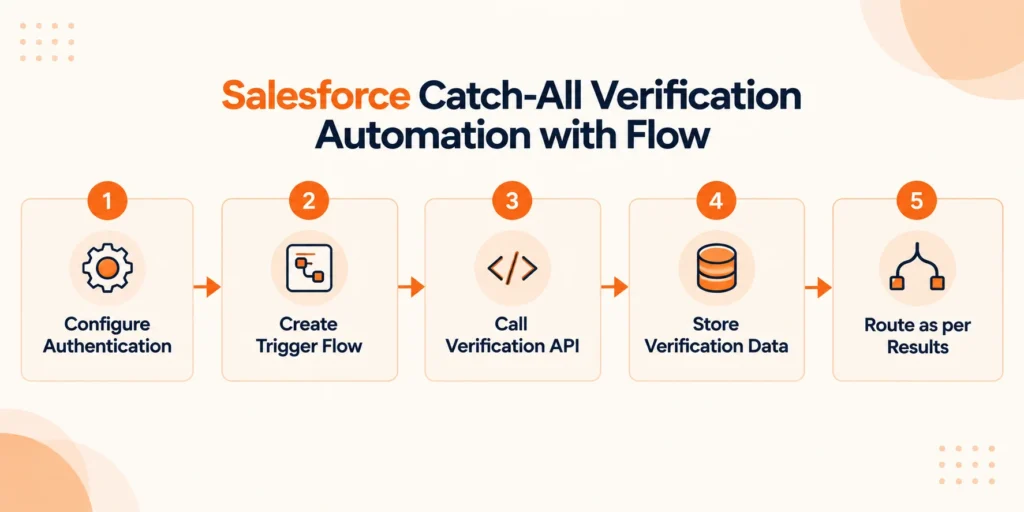
Salesforce catch-all verification automation runs through Flow Builder rather than a native workflow tool. You build a record-triggered Flow on the Lead or Contact object, call out to the Clearout API through an External Service or a Named Credential plus HTTP callout, and update fields on the record with the result.

Salesforce catch-all verification automation with flow


Salesforce catch-all verification automation with flow.

1. Configure authentication: Set up a named credential pointing to Clearout's API endpoint, so your org handles authentication securely instead of hardcoding a token in Apex.

2. Create trigger flow: Add a trigger to the flow, with the trigger set to on Create or on Update when the email field changes.

3. Call verification API: Add an Apex action or External Service call inside the Flow to send the email address and receive the verification response.

4. Store verification data: Analyse the output fields, such as Verification Status and Safe To Send.

5. Route as per results: Add decision elements after the callout so the Flow routes the record into the right queue, campaign, or list based on those field values.

One thing to flag here. Flow callouts to external services need to run asynchronously in most orgs, since synchronous callouts from a record-triggered Flow can hit governor limits if you are processing leads in bulk. Talk to whoever manages your org's Apex limits before rolling this out to a high-volume lead source.

How should you re-verify catch-all email addresses


Re-verify catch-all addresses based on how the lead entered your CRM and how long it has sat there, not on one fixed interval for your entire database.

One reason re-verification matters is that catch-all domains can change behavior over time.

An address that looked safe three months ago may carry a very different confidence level today. Running periodic verification through a service such as Clearout helps ensure routing decisions continue to reflect current mailbox conditions rather than historical assumptions.

Industry data consistently shows B2B email lists losing roughly 22.5 to 30% of valid addresses every year, which works out to a couple thousand dead contacts annually on a 10,000-record list. Catch-all addresses decay even less predictably, since a domain's mail server settings can change independent of whether the specific person still works there.

Recommended verification frequency for different contact types


Lead Source or StatusRecommended Re-Verification CadenceWhy
New inbound leadAt the moment of captureCatches typos, disposable emails, and fake signups before they enter your CRM
Active sequence or campaignWithin 24–48 hours before sendingMailbox status, deliverability signals, and confidence levels can change quickly
Dormant contact (60+ days inactive)Every 60–90 daysJob changes, company switches, and domain changes often happen without notice
Imported or purchased listImmediately before any outreachPurchased lists typically contain the highest volume of invalid, outdated, and risky contacts

What should happen to each verification result inside the workflow


Here's a simple decision structure you can copy into your own workflow logic.

  • Valid, safe-to-send: Route directly into outreach campaigns, sales sequences, or marketing automation workflows.
  • Catch-all: Run Deep Verify to get catch-all resolved into valid and invalid. Allow valid ones into outreach, but tag the contact record so sales and marketing teams can monitor engagement and bounce activity. Remove invalid or do a manual review.
  • Invalid or disposable: Suppress from all email outreach immediately and flag the record for an alternate contact discovery process.
  • Role-based addresses: Use only for company-level outreach and exclude from campaigns that require engagement.

How do you know if the automation is actually working


Before you trust this automation on your full pipeline, run it against a smaller, known sample first. Pull a batch of 200 to 500 contacts you already have some signal on, a handful you suspect are stale, and a few catch-all domains you have flagged before. Run them through the workflow exactly as you built it and compare the output against what you already know.

Here is what to check specifically:

  • Trigger reliability: Verify that every contact in the test group successfully triggered the workflow and that no records were skipped because of enrollment filters or workflow conditions.
  • Field mapping: Confirm that verification status, confidence score, and safe-to-send indicators are being written to the correct HubSpot properties without missing, blank, or malformed values.
  • Routing accuracy: Ensure that contacts are being routed to the appropriate lists, queues or workflows, depending on their verification outcome, particularly catch-all contacts and low confidence contacts.
  • Processing time: Record the time between creation of a contact and a change of their verification status. Even a few minutes can affect the real-time routing of leads and form follow-up processes.

Repeat this check whenever you alter your workflow logic or CRM's API version. If one of these gets updated and nobody notices, automation drifts quietly.

Why do teams use Clearout for catch-all verification


Most CRM workflows are good at moving data. Very few are good at evaluating email risk.

Clearout Email Verifier help you automate verification before contacts enter sales and marketing workflows by providing:

  • Real-time email verification
  • Catch-all email detection
  • Deep Verify for catch-all resolution
  • Disposable email detection
  • Spam trap detection
  • Role-based email identification
  • Safe-to-send indicators
  • API access for HubSpot, Salesforce, and custom workflows

Ready to automate catch-all verification inside your CRM?


Start Free with 100 Credits

FAQs


What is a catch-all email address?
A catch-all email address is an email address that is set to receive email from any address, even if the mailbox does not exist. This means traditional verification checks are not always effective at providing a surety of these addresses being verified. But Clearout Email Verifier's deep verification feature can help resolve catch-alls into valid and invalid.
How to verify catch-all emails?
To verify catch-all emails, you need more than a standard email verification check. First, identify whether the domain is configured as a catch-all. Then, use advanced verification methods that analyze additional deliverability signals and confidence scores. This helps you understand whether the address is likely to be a real mailbox and whether it is safe to include in your campaigns.
How should you re-verify catch-all email addresses?
You should re-verify catch-all email addresses regularly because email data changes over time. For active campaigns, checking them within 24 to 48 hours before sending is a good practice. Meanwhile, dormant contacts can be re-verified every 60 to 90 days. This helps you maintain cleaner data and reduce unnecessary deliverability risks.

Share this article

Recent Posts

01 Oct 2026
Automate Catch-All Verification in HubSpot, Salesforce, and CRM Workflows

Learn how to automate catch-all verification across HubSpot, Salesforce, and CRM workflows using API ...

30 Sep 2026
How to Safely Contact Catch-All Emails In Cold Outreach

Discover how to manage catch-all emails in cold outreach, monitor bounce signals, verify contacts, a ...

29 Sep 2026
What Unresolved Catch-Alls Could Cost Your Pipeline

Learn how unresolved catch-all emails can affect pipeline estimates, calculate potential exposure, a ...

28 Sep 2026
How to Set Up Lead Routing Rules in Lofty CRM

Learn how to set up lead routing rules in Lofty CRM, from conditions and rule order to Round Robin, ...

25 Sep 2026
Post-Event Outreach: Find Emails From Conference Contacts

Learn how to build a post-event outreach list from badge scans, business cards, and LinkedIn, and fi ...

READY TO VERIFY?

Catch-all emails
in your list?

Find out which ones are actually safe to send. Clearout Deep Verify runs real-time checks, so you know exactly which addresses to contact and which ones to skip.

Start for free Book a demo

Company

Why Clearout?

Pricing

Contact Us

Careers

Press

Enterprise

Sitemap

FAQ

Status

Products

Email Verifier

Catch-all Verification

Email Finder

Form Guard

Data Pulse

Prospect

LinkedIn Email Finder

Reverse Lookup

Google Sheets Add-on

WordPress Plugin

ClearoutPhone

What's New?

Resources

Integrations

HubSpot

Team Account

API

Compare Email Verifier

Compare Email Finder

Compare Prospecting

Use Cases

Blog

Help

Legal

Privacy Policy

Terms

DPA

Security

Trust Center

Certification

ISO 27001/2022

SOC 2 Type 2

GDPR

Partnership

HubSpot Certified

Affiliates

Partners

Clearout for browser

⚡ Supercharge Your Prospect Research with Clearout's LinkedIn Chrome Extension - Find and Verify Emails with Confidence!

Clearout Chrome extension

Clearout
© 2026 Clearout Inc. All Rights Reserved. Powered by Clearout.
Validate Enrich New Salesforce contacts automatically with Data Pulse. Learn More ➞
X