



• Products
    • FindEmail FinderFind verified business emails from a name and companyLinkedIn Email ExtractorExtract person and company details enriched with emails and phone numbers from LinkedIn profilesProspectBuild SQL and MQL lists with real-time enrichment
      VerifyEmail VerifierAI-powered email verification in real time, in bulk or through APICatch-all Email VerificationResolve catch-all and SEG-protected addresses with Deep VerifyClearout for SheetsVerify emails inside Google Sheets
      Protect & maintainForm GuardCapture intent leads, block fake or bot entries, and differentiate human vs. AI agent submissionsData PulseVerify, enrich and monitor CRM contacts continuously
  • Solutions
    • Sales teamsFind and verify buyer emails for outboundEmail marketersProtect sender reputation before every send
  • Resources
    • DeveloperAPIReference and quick-start guidesWebhooksReal-time event notificationsForm Guard SDKReal-time form validationMCP ServerConnect AI assistants to Clearout
      Knowledge baseGetting startedSet up your account in minutesFAQAnswers to common questionsLead generationBuild clean, verified lead lists
      GuidesPricing guideHow credits and plans workCompare email verifiersHow email verification tools compareCompare email findersHow email finder tools compareData Pulse & HubSpot BreezeKeep Breeze Intelligence data reliable
      BlogEmail verification toolsA guide to choosing a verifierFind anyone's email addressPractical ways to find a business emailForm validationBest practices for cleaner formsView all postsLatest articles and updates
      IntegrationsHubSpotTwo-way sync with Data PulseSalesforceValidate and enrich CRM recordsZohoKeep Zoho CRM contacts cleanApolloVerify contacts before outreachView all integrationsBrowse every connected tool
  • Free Tools
    • Disposable Email CheckerSpot throwaway addresses instantlyReverse LinkedIn Profile LookupLook up details from a LinkedIn profileReverse Email LookupFind who is behind an email addressEmail List CleanerRemove invalid emails from your listCompany Domain Finder APIFind a company domain from its name
  • Pricing
  • Login
Try it free Book a 1-to-1 demo
Priyanshi Sharma / November 24, 2026 November 24, 2026

Clearout MCP: How to Verify and Find Emails Inside Your AI Assistant


Clearout MCP: How to Verify and Find Emails Inside Your AI Assistant

TL;DR


  • Clearout MCP connects with any AI assistant (Claude, ChatGPT, Cursor, VS Code or Perplexity) to find and verify email addresses.
  • Following one simple step in your AI assistant, Clearout MCP can create prospect lists with 99% accuracy.
  • If you're in sales or email marketing and automate the task of obtaining high intent lead data, then Clearout MCP is for you.

Clearout MCP is the best for finding business emails and getting rid of invalid, risky, unknown or disposable email addresses from your outreach campaigns. Once you add Clearout as a connector to your AI assistant, you're ready to go! The assistant will execute the prompt you enter and provide you with the result in the same chat within a few minutes.

Since the cost of poor data quality that organizations need to bear is an average of $12.9 million, the least expensive fix is verifying the data.

For detailed information on the process and how to use Clearout MCP to find emails and what prompts to add, read this detailed guide. So let's get started now!

Table Of Content


‣ TL;DR
‣ What is Clearout MCP?
‣ What can you make the assistant do with Clearout?
‣ How to connect Clearout MCP with Claude?
‣ Which prompts can you use?
‣ How to verify a bulk email list in Clearout MCP?
‣ How do you find emails with Clearout MCP?
‣ How are credits charged, and what are the limits?
‣ Clearout MCP or Clearout API: which should you use?
‣ Is it safe to connect Clearout to an AI assistant?
‣ Find and verify emails with your AI assistant
‣ FAQs
What is Clearout MCP?


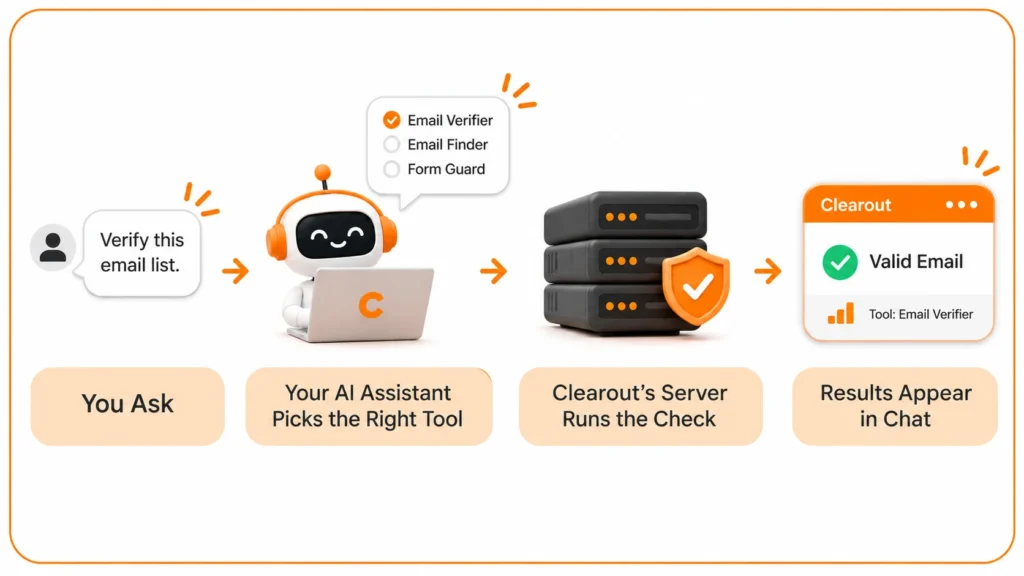
Model Context Protocol (MCP) is an open standard made for AI assistants to use external tools and data. You can get your assistant to perform your email checks with Clearout's server. With this, you can turn your assistant into an AI email verification solution with additional capabilities of finding an email address.

Flow diagram showing AI assistant picks the right tool and results appear in chat.

What can you make the assistant do with Clearout?


You can check one email, find a business email by name and company domain, remove a name that is gibberish, check your credit balance and run whole lists of million records in CSV or XLSX format.

PromptThe assistant will do
"Verify [email protected]"Instant email verification
"Find the email for Sane Joe at naturals.com"Email finder
How many credits are left in my Clearout account?Account check
Clean up all emails listed in this CSV file.Bulk verification
Find emails for the contacts in the spreadsheet attachedFind bulk email addresses

How to connect Clearout MCP with Claude?


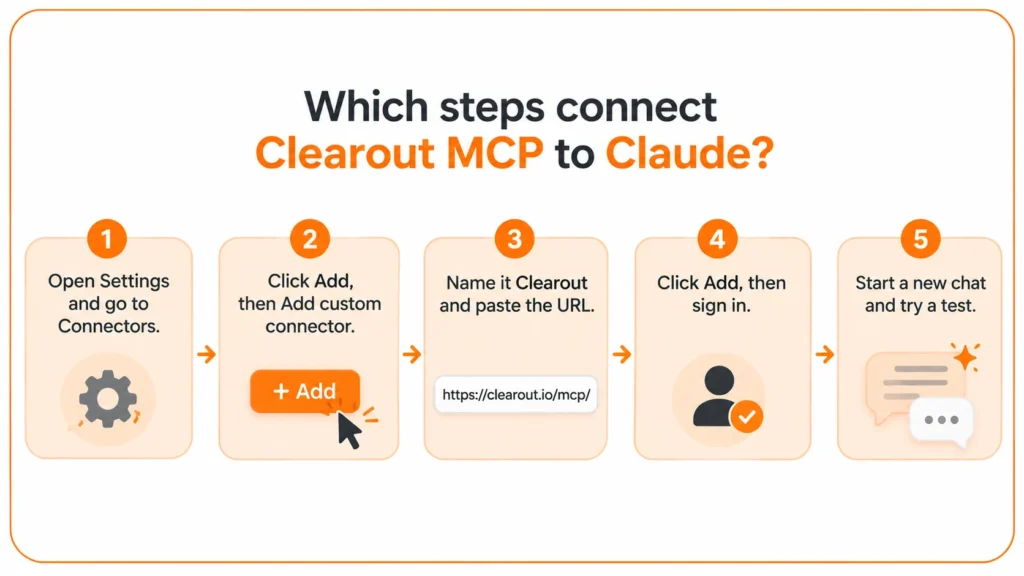
  1. Open “Settings,” and then go to “Browse Connectors.”
  2. Type Clearout MCP in the search and click on “Connect.”
  3. Add a prompt of your choice or you can also test it with: "Check my Clearout credits."

Connect Clearout with Claude

Five steps to add the Clearout connector in Claude.

Which prompts can you use?


This list is of the 4 prompts you can use to get the best output from the Clearout MCP Claude connection.

  • Confirm one address: "Check that this address is valid: Clearout [email address] - please confirm if this is acceptable for me to send to?”
  • Get a business email address: “Use Clearout to determine the business email for "[full name]" from the domain [company domain].”
  • Clean a list: "Verify emails in this CSV file, then sort the list by verification status, using Clearout.”
  • Screen Names: "Check these names with Clearout and flag any that appear to be gibberish.”

How to verify a bulk email list in Clearout MCP?


Add a CSV or XLSX file to your chat and request it be checked. The assistant begins a job, obtains the job status, and provides a link for downloading the job results once it finishes. With an email verification MCP that entire process can happen in the chat and not in any separate tool.

If you are planning a large project, here are some points you should consider:

  • Check credits first. The output fails immediately after uploading raw data because of insufficient credit.
  • Get results in speed or accuracy: The default will give the highest accuracy. If the time is critical, make sure to ask for the fastest turnaround.
  • Make sure that no two jobs start concurrently: If you start a job twice, two jobs will be created; if you re-upload a file of the same size and name immediately after a job is being started, it will not be allowed. You need to give the assistant permission to do so.

How do you find emails with Clearout MCP?


You must feed your AI assistant with information like the name of the person, the domain of their company website, and then initiate a prompt. AI will give the business email address of the person. The email address will be returned with the Clearout MCP. You can upload a CSV file from the same chat window to search for emails in bulk, or search for one email address.

How to locate a person's email with AI


There are two details needed for a lookup:

What you giveExampleWhy needed
Full nameSane JoeProvides Clearout with the person to look for
Company domainnaturals.comIndicates the precise company

Copy the prompt below and substitute your own details:

Use Clearout to search for the business email address of Sane Joe from naturals.com.

With this prompt you can get business emails along with the confidence score and the confidence score given by Email Finder indicates that personal emails are safe to send or can be added to the outreach list. The bounce rate will be below 3% or 0% if cold emails are being sent to the addresses that have a confidence score above 91.

The addresses given by Clearout Email Finder are pre-verified with 99% accuracy. It supports different countries, languages, and email domains and follows GDPR requirements so it's safer to use these pre-verified email addresses for outreach. Apart from this you won't get any duplicate records in the list.

Finding emails for a list of contacts


If you have a long list of names (an event list, for example, or one from LinkedIn), use this.

  1. Prepare your file. Place one individual in each row with their respective name and the domain name of the company in separate columns with distinct column labels. Save it in a CSV or XLSX file.
  2. Attach it and ask. For instance: "Get business emails of the people in this file with Clearout."
  3. Follow the progress. The assistant starts a finder job, which you can request updates for until it's done.
  4. Download the results. Once completed, the assistant provides you a link to the results gathered.

After you have the results file, upload it and have the assistant double check it, so that only safe addresses get listed in your campaign.

Job rules used in the verification section apply here also: Start each job once, and treat cancel and delete as permanent. There is one finding-specific tip: Save your results before you remove the list. When you delete, the list is deleted from Clearout, along with the results, and cannot be recovered, and deleting while a download is ongoing requires explicit instructions.

What happens behind the scenes when you find emails?


You don't have to specify these tools. For some actions an assistant will ask for your confirmation, as indicated in the table.

What you askTool usedDoes it change anything?
Locate the email address of one person.Instant Email FinderNo, read-only
Start a list jobBulk Email FinderCreates a job. Two runs create two jobs.
Check progress—No, read-only
Get the results link—No, read-only
Stop a running job—Yes, it cannot be undone
Remove a list and its results—Yes, can't be undone

Some assistants consider any action that is not read-only as a write action. For instance, ChatGPT might ask if you're sure about starting a list job, or canceling or deleting a list.

How are credits charged, and what are the limits?


It costs nothing extra. The server is free to use and each check costs the same amount of Clearout credits as dashboard or API.

ItemWhat to know
Extra MCP feeNone
Credit chargeSame as the dashboard and API. A bulk job will be equal to the cost of uploading it yourself.
PlansAll plans are valid, even the free one.
Free start100 credits, no credit card required
Rate limits/plan entitlementsThe same as the other sections of Clearout.
Bulk file formatsCSV and XLSX
Balance checkAsk "Check my remaining Clearout credits"

There are three limits that are important to be aware of before depending on the results:

  • Verification reduces risk but cannot guarantee delivery. A valid address can still reach a full inbox or a strict filter.
  • Name validation is a screening process, not an authentication process. It detects gibberish and cursing, and cannot confirm that a person exists.
  • Your Plan and Client Matter. The availability of the connector depends on what plan you have with your AI provider, so if it's not there, look into your plan.

Clearout MCP or Clearout API: which should you use?


Use MCP for interactive checks in a chat and the API for automated checks in the backend. Both employ Clearout's verification engine. For those who work in chat, the email verification MCP is perfect, but for apps that operate on their own, the API is just right.

Clearout MCPClearout API
How you use itNatural language in an AI assistantCustom code and REST calls.
SetupAdd the link and sign in on supported hosted clients.API key plus an integration/pipeline
Best forAd hoc checks, list cleaning, prospect research.Apps and continuous workflows.

Is it safe to connect Clearout to an AI assistant?


Yes. The hosted email verification MCP server uses an OAuth sign-in, which means you won't paste an API key or share your password. Your assistant receives a scoped access token, which will expire, and you can revoke your access from your Clearout account at any time.

Clearout lists its certifications and compliance as ISO 27001:2022, SOC 2 Type II and GDPR on its Trust Center. If your assistant doesn't support remote servers, or you'd like the server to be on your own machine, Clearout also has a local version which uses an API token. Treat the token like a password and don't share it in files.

Find and verify emails with your AI assistant


Email finding, AI email verification, and name screening are integrated into the AI chats you already use. It's as simple as that: insert it, ask for your credit balance as a first step and then run a small test of your list before cleaning the file.

Do that before your next campaign and your bounce rate will be a reflection of true inboxes and not list decay.

Connect Clearout MCP now

FAQs


How to find email addresses in AI assistants with Clearout MCP?
Type the name and company domain of the desired business email address into Clearout and connect it to your assistant. The assistant replies with the address in the chat. To create a list, upload a CSV or XLSX file, and then ask the same question.
What can I do with Clearout MCP to improve my leads and verify emails?
Have assistant search business emails by name and company domain, and categorize by confidence score. In addition to screening for gibberish, Clearout MCP also screens for names. It doesn't contain other information such as job titles or company size.

Share this article

Recent Posts

24 Nov 2026
Salesforce Email Tracking: A Complete Guide

Learn how Salesforce email tracking works, enable tracking, understand open data limitations, and im ...

24 Nov 2026
Clearout MCP: How to Verify and Find Emails Inside Your AI Assistant

Connect Clearout MCP to Claude, ChatGPT and other AI assistants to find business emails, verify addr ...

24 Nov 2026
Email Marketing Tips for Insurance Agents: A Complete Guide

Learn email marketing tips for insurance agents, from campaign examples and list verification to pre ...

19 Nov 2026
6 Email Finder Tools for AI Agents

Explore 6 email finder tools for AI agents. Compare features, verification, APIs and MCP integratio ...

17 Nov 2026
Best Inbound Email APIs: Features, Pricing, and Comparison (2026)

Compare the best inbound email APIs in 2026 by features, pricing, and use case. Learn how Clearout ...

Black Friday Sale - Up to 50% Off GRAB THE DEAL

Email Verification, Email Finding Form Guard & Prospecting Service

Expand Your Reach By Finding & Verifying Ideal Prospects.

Sign up & get 100 free credits

No Credit Card required

Create Free Account
Company

Why Clearout?

Pricing

Contact Us

Careers

Press

Enterprise

Sitemap

FAQ

Status

Products

Email Verifier

Catch-all Verification

Email Finder

Form Guard

Data Pulse

Prospect

LinkedIn Email Finder

Reverse Lookup

Google Sheets Add-on

WordPress Plugin

ClearoutPhone

What's New?

Resources

Clearout Insights

Integrations

HubSpot

Team Account

API

Clearout MCP

Compare Email Verifier

Compare Email Finder

Compare Prospecting

Use Cases

Blog

Help

Legal

Privacy Policy

Terms

DPA

Security

Trust Center

Certification

ISO 27001/2022

SOC 2 Type 2

GDPR

Partnership

HubSpot Certified

Affiliates

Partners

Clearout for browser

⚡ Supercharge Your Prospect Research with Clearout's LinkedIn Chrome Extension - Find and Verify Emails with Confidence!

Clearout Chrome extension

Clearout
© 2026 Clearout Inc. All Rights Reserved. Powered by Clearout.
Validate Enrich New Salesforce contacts automatically with Data Pulse. Learn More ➞
X