




• Products
    • FindEmail FinderFind verified business emails from a name and companyLinkedIn Email ExtractorExtract person and company details enriched with emails and phone numbers from LinkedIn profilesProspectBuild SQL and MQL lists with real-time enrichment
      VerifyEmail VerifierAI-powered email verification in real time, in bulk or through APICatch-all Email VerificationResolve catch-all and SEG-protected addresses with Deep VerifyClearout for SheetsVerify emails inside Google Sheets
      Protect & maintainForm GuardCapture intent leads, block fake or bot entries, and differentiate human vs. AI agent submissionsData PulseVerify, enrich and monitor CRM contacts continuously
  • Solutions
    • Sales teamsFind and verify buyer emails for outboundEmail marketersProtect sender reputation before every send
  • Resources
    • DeveloperAPIReference and quick-start guidesWebhooksReal-time event notificationsForm Guard SDKReal-time form validationMCP ServerConnect AI assistants to Clearout
      Knowledge baseGetting startedSet up your account in minutesFAQAnswers to common questionsLead generationBuild clean, verified lead lists
      GuidesPricing guideHow credits and plans workCompare email verifiersHow email verification tools compareCompare email findersHow email finder tools compareData Pulse & HubSpot BreezeKeep Breeze Intelligence data reliable
      BlogEmail verification toolsA guide to choosing a verifierFind anyone's email addressPractical ways to find a business emailForm validationBest practices for cleaner formsView all postsLatest articles and updates
      IntegrationsHubSpotTwo-way sync with Data PulseSalesforceValidate and enrich CRM recordsZohoKeep Zoho CRM contacts cleanApolloVerify contacts before outreachView all integrationsBrowse every connected tool
  • Free Tools
    • Disposable Email CheckerSpot throwaway addresses instantlyReverse LinkedIn Profile LookupLook up details from a LinkedIn profileReverse Email LookupFind who is behind an email addressEmail List CleanerRemove invalid emails from your listCompany Domain Finder APIFind a company domain from its name
  • Pricing
  • Login
Try it free Book a 1-to-1 demo
Akanksha Mishra / November 24, 2026 November 24, 2026

Email Marketing Tips for Insurance Agents: A Complete Guide


Email Marketing Tips for Insurance Agents: A Complete Guide

TL;DR


  • There are incorrect or out-of-date emails in bought email lists. Check them before adding the contacts to a campaign.
  • Forms that collect quotes can register incorrect email addresses, phone numbers, and names.
  • Use Clearout Email Verifier to check existing contacts and send marketing emails only to verified addresses.
  • Enable validation of contact data as the form is filled out by adding Clearout Form Guard to quote forms.
  • Create campaigns based on quote requests, policy renewals, coverage evaluations, and information that policyholders are interested in.

Insurance agents have prospects on their list who are interested in their services but just can't reach out to them. There may be outdated email addresses in purchased lead lists, and quote forms may have mis-typed or bogus contact information. All these can lead to rejection of mail, unmet inquiries, and wasted time in chasing inquiries that are not received.

The subject of your email is not enough for a well-thought-out email marketing campaign. Agents must have correct contact information and messages geared towards the recipient.

The following examples include tips on insurance email campaigns, the types of email campaigns, list verification, and how Clearout Form Guard can help prevent inaccurate information at the form entry point.

Table Of Content


‣ TL;DR
‣ What is email marketing for insurance agents?
‣ The best examples of insurance email marketing
‣ Different email marketing campaigns for insurance agents
‣ How to create an email marketing campaign for insurance agents?
‣ Why email verification matters for email marketing for insurance agents?
‣ How can insurance agents prevent false leads in quote forms?
‣ How insurance agencies can measure email campaign performance?
‣ Bottom line
‣ FAQ

What is email marketing for insurance agents?


Email marketing provides insurance agents with a way to follow-up with prospects and communicate with policyholders. This may be a follow-up on an initial quote, policy updates, a reminder to renew a policy, and even future coverage reviews.

An agent may follow up on an inquiry with a quote confirmation and remind you to renew a policy before it expires. It is also an opportunity for an agency to provide updates on their policies or to encourage clients to take a look at their policies. The message should be appropriate to the receiver's relationship with the agency.

Insurance firms can find that email marketing entails greater customer bases and more extensive campaigns. This guide deals with the practical needs of independent agents and insurance agencies.

The best examples of insurance email marketing


Here are some examples of how agents can compose mail for common customer communications.

These are just 3 templates to get you started. Customize the specifics to the customer's question and the coverage in question.

1. Quote request follow-up


To: Your insurance company

Hi [First Name],

Thanks for requesting a quote for [Insurance Type]. We've received your details and will review your requirements.

We've received your request. We will look into this and get back to you with suggestions on what to do next.

While you're waiting, please write back to this e-mail or give us a call at [Phone Number] if you have any questions.

[Agent Name]

2. Policy renewal reminder


Subject: Your policy will expire on [Date]

Hi [First Name],

The [Policy Type] policy is coming up for renewal on [Date].

Before the renewal, let us know if anything has changed since your last review. We can discuss your current coverage and answer any questions you have.

Respond to this e-mail message or call [Agent Name] on [Phone Number].

[Agency Name]

3. Coverage review invitation


Subject: Any change in coverage needs?

Hi [First Name],

Have there been any changes since we last reviewed your coverage? For example, have you moved, purchased a vehicle, or made another change that could affect your insurance needs?

It may be worth reviewing your existing policy to see whether it still reflects your situation.

To schedule an appointment for a review, please respond to this email to the agent listed above.

[Agency Name]

Different email marketing campaigns for insurance agents


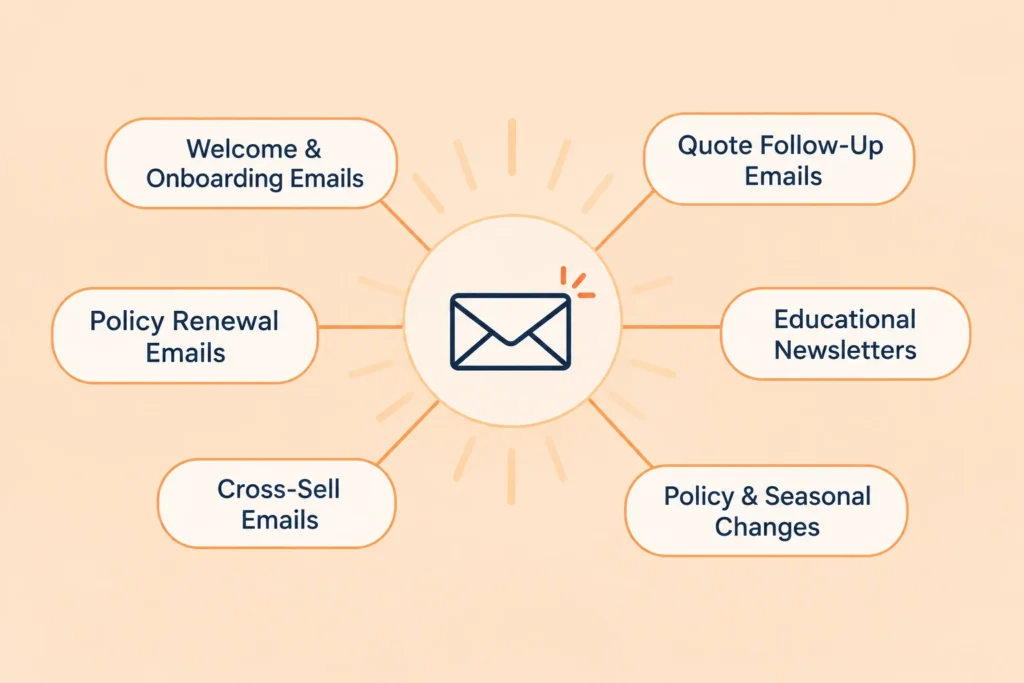
Types of email marketing campaigns for insurance agencies

The email's context should mirror the recipient’s interaction with the agency. A prospect might request a new quote, while a current policyholder may receive a policy renewal reminder.

  • Welcome and onboarding emails


Send an introduction to the agency with contact information. Clients will also appreciate instructions on how to access agency support.

Include the agency welcome letter along with the client’s welcome pack. Explain the policy document location, how to contact the agency with any questions, and include additional helpful insurance resources.

  • Quote follow-up emails


Use these emails when a prospective client has requested a quote and has not yet made a decision. These can be used to reconfirm their original request, answer a specific question, or to offer assistance for their next step.

Prior to starting an additional follow-up sequence, make sure to check their status and make sure they haven't already responded or declined to accept the quote.

  • Policy renewal emails


The purpose of these emails is to provide sufficient advance notice to a client before the policy is scheduled to renew. Give clients time to review the policy details and get in touch with you.

These emails should take into consideration the policy insurer’s policy renewal processing time. The email content, renewal dates, and information must be accurate.

  • Educational newsletters


Include information that demystifies insurance. Focus on topics such as policy coverage questions, risk mitigation, or explanations of insurance industry terms. Each newsletter should be relevant and of interest to the subscribers, as indicated by a clear subject line.

For example, if the agency’s niche is commercial insurance for small businesses, they can educate small business owners about common questions related to commercial insurance. Encourage the reader to refer back to their own policy or their insurance agent for more specific advice.

  • Cross-sell emails


Introduce another type of coverage when it relates to a client's circumstances. For example, an agent working with an existing car insurance customer could explain relevant home insurance options.

Explain why the coverage may be relevant to the client. Do not assume every policyholder needs another product.

  • Policy and seasonal changes


Send these emails to inform clients about policy changes or seasonal risks. For example, a property insurance agency can share tips on checking roof leaks and clearing gutters before the rainy season.

Verify all information before sending, as coverage terms and exclusions vary by policy.

How to create an email marketing campaign for insurance agents?


There are several steps in planning an effective email campaign that will improve conversion rates for every email contact list. The goal should be singular, as well as the audience, and there should be one call-to-action per campaign. The following steps should be used to plan all campaigns.

Step 1: Set the goal for email marketing campaigns


First, decide what you want the customer to do once they have read your email. You could follow up on a quote and ask them for any additional information. Or, you could send a renewal notice to schedule a review of their policy.

Step 2: Segregate the list by customer status


The prospect status should be different than that of the policyholder, as well as the past client status. Use the list for a specific campaign, then sort and filter again for each new campaign.

Relevant status segments:

  • Inquiries for a new quote.
  • Prospects in the “waiting for a reply” status.
  • Policyholders.
  • Customers near renewal status.
  • Prospects who have an interest in a particular type of insurance.

Step 3: Capture a customer need, write around it


Use a different copy for each segment. You need to update a prospect who is waiting for a quote. When a policy is coming up for renewal, a policyholder should have accurate dates and a means of contacting the agent.

Be specific in the subject line. State the purpose of the e-mail in the beginning and describe the next steps.

Step 4: Select the time to send


Send confirmations of quotes as soon as possible after the inquiry is received. Set up reminders for the policy renewal around the policy date. Configure newsletter frequency based on the preferences of subscribers.

Check to see if somebody has already done the requested action. Stop them from being followed up by another message that is no longer relevant.

Step 5: Verify the campaign prior to launching


Check the recipient segment, email addresses, dates, links, and personalization fields. Use Clearout Email Verifier to verify recipient email addresses before launching the campaign. Test the email on desktop and mobile to see how it looks.

Make sure your marketing emails have a functional unsubscribe link. Ensure that sender information and agency contact are correct.

Why email verification matters for email marketing for insurance agents?


Older CRM records and purchased lists should be addressed prior to a campaign. While a contact may appear complete in a spreadsheet, this doesn't mean that the mailbox exists or can receive email.

  • Verify lead lists that have been paid for


First, take a look at the source of the contacts. Request the provider's statistics and ask him/her where they are from, how they got there, and the fact that he/she can provide proof that you are legally authorized to communicate with them.

Listed addresses may be incorrect, misspelled, duplicate, or disposable inbox addresses. Don't assume that because you purchased a list, you can send marketing emails.

After determining the source and permission, check the addresses before importing them into your email program.

  • View previous CRM contacts


This email address may have been inactive in previous inquiries. People get a new job or a new provider, or they don't use an inbox anymore.

Check previous records before resending to them. Eliminate duplicates; update information when clients provide new information.

Don't assume that an old contact record constitutes an ongoing marketing permission. Do not keep consent and unsubscribe records with verification results.

  • Understand the verification results


Email verification evaluates various indications to gauge an address. These include syntax, domain records, and mailbox-related responses.

Clearout Email Verifier is a bulk email list verification tool. Common statuses include:

ResultWhat it meansWhat to do
ValidThe address looks to be deliverable.Keep it if it is legally possible to send it by email.
InvalidThe address provided is not a valid address or is closed to email.Do not include it in campaign mailing.
Catch-allEmails to the domain are not sent to individual mailboxes.Consider the result to be unknown.
UnknownThe verification was not able to make a conclusive result.Review or verify again later.

How can insurance agents prevent false leads in quote forms?


Insurance agents can prevent false leads by adding real-time email and phone validation to quote forms before accepting submissions. Let's get into it:

  • Identify bad form submissions


When requesting a quote, a visitor can enter an incorrect email address. Another party may type in a temporary email address or a number that is not completed. Automated submissions can also be used to complete forms with fake information.

These records can end up in the CRM if the form collects all the fields. Other agents can then call or send e-mails to non-contacts.

  • Allow visitors to validate fields while they are entering them


Clearout Form Guard validates email, phone, and name fields on supported forms.

  • Email: Checks email deliverability and can identify disposable, role-based, business, and gibberish addresses.
  • Phone: Checks phone number format, length, and structure.
  • Name: Flags entries containing profanity, gibberish, or suspicious characters and numbers.

Form Guard warns users and blocks failed submissions, keeping problematic contact details out of agency lead pipelines. It can also detect AI-agent-filled forms, helping agencies prevent automated submissions from entering their lead pipeline.

Try Form Guard

GIF showing Form Guard flags invalid quote form entries in real time

  • How to add Form Guard to quote forms


In your Clearout dashboard, create a Form Guard, and choose the fields that you want to validate. Clearout then creates a JavaScript fragment to be included in your site.

Copy and paste it into your page that contains the quote form. Form Guard supports a variety of forms, such as standard HTML forms and WordPress forms. Can also be added from Google Tag Manager if that is supported.

  • Recapture lost enquiries of quotes


Some visitors start a quotation and then don't finish it. Form Guard's Lost Leads feature can be useful when trying to find those who didn't complete their forms. It stores a session when a visitor has given legitimate contact information.

This provides the agency with information on any inquiries that are not completed via the form. Review the consent/communication requirements prior to contacting any individual.

How insurance agencies can measure email campaign performance?


When measuring email marketing for insurance agencies, don't just consider open rates. An email can be opened, but the real question is whether it results in a quote inquiry, a policy review, a scheduled call, or whether it results in renewal.

  • Monitor bounces


Review the bounce rate post campaign. If the hard bounce count increased, then there may be an error with a newly added address list, or the addresses are invalid.

Compare bounce rates within and across campaigns and by source of leads. Before reusing it, look at that list if one of the providers is responsible for a significant amount of bounces.

  • Monitor clicks and reactions


Monitor the responses of recipients and whether prospects respond. These can mean that they are interested in a quote, policy review, or some other next step.

Make comparisons, segment by segment. These are two different types of email; a renewal email and an education newsletter. They both achieve different goals, so they should not be evaluated in the same manner.

  • Monitor inquiries and renewals


Manage quote appointments, applications completed, policy reviews, and renewals using CRM. Attach campaign tags to all those actions to make sure they relate to the email that prompted them to do so.

This will give the agency greater insight into the effectiveness of the campaigns in terms of actual business activity. It can also help uncover a message and/or audience or call to action that is different.

Bottom line


If there are invalid addresses that spoil an insurance campaign before it reaches the prospects, it's not worth the effort. Bad data comes with purchased lists and quote forms, causing wasted follow-ups and bounces. If you're getting new forms that you are also filling out with the wrong information, it's going to be a problem forever.

Confirm contacts prior to each ‘send’ and validate new contacts on collection. Clearout Email Verifier verifies email lists in bulk; Form Guard validates fields in your quote-form in real time. Maintain campaign messages and consent records that are relevant.

Verify your insurance leads

FAQ


1. How often should insurance agents send marketing emails?
The schedule depends on the email type and the recipient's expectations. Send quote follow-ups promptly, schedule renewal reminders around policy dates, and set a consistent frequency for newsletters.
2. Why is email verification important for insurance marketing?
It helps identify invalid, disposable, and uncertain addresses before campaigns go out. This can reduce avoidable bounces and keep contact records cleaner. Verification does not confirm marketing consent or guarantee inbox placement.
3. How can insurance agents prevent invalid email addresses from quote forms?
Use real-time form validation while visitors enter their details. Clearout Form Guard checks email, phone, and name fields and can flag problematic entries before submission.

Share this article

Recent Posts

24 Nov 2026
Salesforce Email Tracking: A Complete Guide

Learn how Salesforce email tracking works, enable tracking, understand open data limitations, and im ...

24 Nov 2026
Clearout MCP: How to Verify and Find Emails Inside Your AI Assistant

Connect Clearout MCP to Claude, ChatGPT and other AI assistants to find business emails, verify addr ...

24 Nov 2026
Email Marketing Tips for Insurance Agents: A Complete Guide

Learn email marketing tips for insurance agents, from campaign examples and list verification to pre ...

19 Nov 2026
6 Email Finder Tools for AI Agents

Explore 6 email finder tools for AI agents. Compare features, verification, APIs and MCP integratio ...

17 Nov 2026
Best Inbound Email APIs: Features, Pricing, and Comparison (2026)

Compare the best inbound email APIs in 2026 by features, pricing, and use case. Learn how Clearout ...

Black Friday Sale - Up to 50% Off GRAB THE DEAL

Email Verification, Email Finding Form Guard & Prospecting Service

Expand Your Reach By Finding & Verifying Ideal Prospects.

Sign up & get 100 free credits

No Credit Card required

Create Free Account
Company

Why Clearout?

Pricing

Contact Us

Careers

Press

Enterprise

Sitemap

FAQ

Status

Products

Email Verifier

Catch-all Verification

Email Finder

Form Guard

Data Pulse

Prospect

LinkedIn Email Finder

Reverse Lookup

Google Sheets Add-on

WordPress Plugin

ClearoutPhone

What's New?

Resources

Clearout Insights

Integrations

HubSpot

Team Account

API

Clearout MCP

Compare Email Verifier

Compare Email Finder

Compare Prospecting

Use Cases

Blog

Help

Legal

Privacy Policy

Terms

DPA

Security

Trust Center

Certification

ISO 27001/2022

SOC 2 Type 2

GDPR

Partnership

HubSpot Certified

Affiliates

Partners

Clearout for browser

⚡ Supercharge Your Prospect Research with Clearout's LinkedIn Chrome Extension - Find and Verify Emails with Confidence!

Clearout Chrome extension

Clearout
© 2026 Clearout Inc. All Rights Reserved. Powered by Clearout.
Validate Enrich New Salesforce contacts automatically with Data Pulse. Learn More ➞
X