

- Products
- ResourcesDEVELOPER

 API
API
Clearout APIs are structured around REST and JSON Webhooks
Capture real-time events in your application workflow Form Guard
Real-time form validation to keep bad contacts out of your CRMKNOWLEDGE BASE Getting started
Sending campaigns without bounces is made simple FAQ
FAQ
Easily find answers to services, security and common questionsUSE CASES Lead Generation
Learn how professionals generate quality leadsGUIDESPricing Transparent & flexible pricing to support pay-per-use or recurringCompare Email Verification Tools AI-powered email verification with 99%+ accuracy, real-time validation, and transparent risk scoringCompare Email Finder Tools Pre-verified B2B email addresses with confidence scoring, find real person email, not role-based addressData Pulse & HubSpot Breeze Intelligence Pre-verified B2B email addresses with confidence scoring, find real person email, not role-based addressBLOGSEmail Verification ToolsFind Anyone’s Email Address
Most Accurate, Fast & Free WaysForm Validation
Importance, Ways & Best PracticesView All Blogs - Pricing
- Integrations
- Enterprise
- Login



Clearout vs EmailListVerify on Accuracy and False Positives

Most email tools promise three things: high accuracy, low bounce rates, and budget pricing. Yet, one metric separates tools that save money from those costing you leads. That metric is the false positive rate.
A false positive happens when valid emails get flagged as invalid. You lose a real connection, and more importantly, you lose direct revenue.
That’s exactly what this benchmark puts to the test. Clearout and EmailListVerify are two widely used tools for high-volume outbound teams. Both compete on accuracy and price. This comparison breaks down which one actually delivers.
A false positive happens when valid emails get flagged as invalid. You lose a real connection, and more importantly, you lose direct revenue.
That’s exactly what this benchmark puts to the test. Clearout and EmailListVerify are two widely used tools for high-volume outbound teams. Both compete on accuracy and price. This comparison breaks down which one actually delivers.
Table of Content
TL;DR: Clearout vs EmailListVerify at a glance
| Feature | Clearout | EmailListVerify |
|---|---|---|
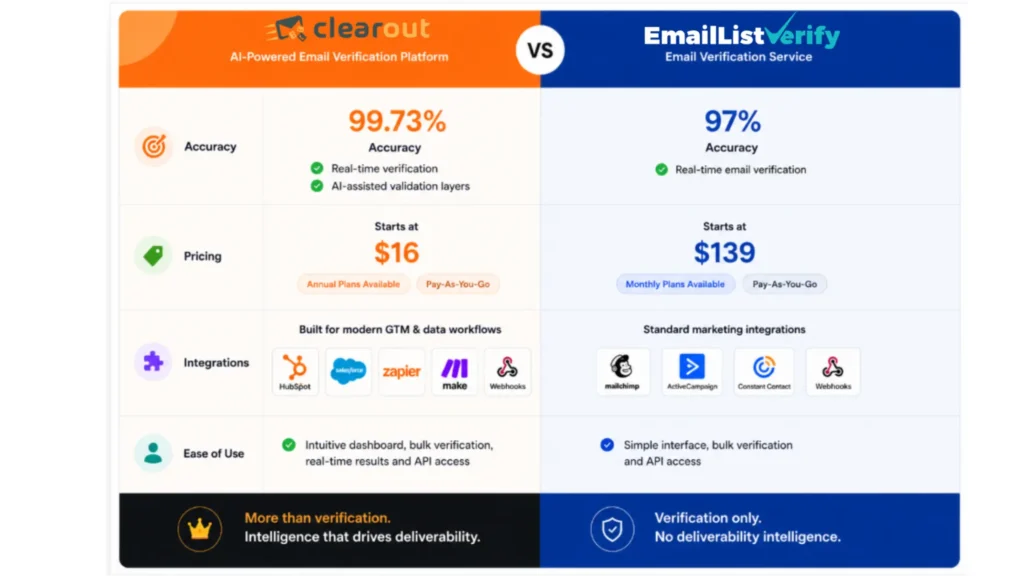
| Accuracy | 99.73% | 97% |
| Validation Checks | 20+ | 8 |
| AI verdict layer | Yes | No |
| Anti-Greylisting Technology | Yes | No |
| Role-based email detection | Yes | Limited |
| Catch-all detection | Yes | Yes |
| Guaranteed deliverables | Yes | No |
| Spam trap detection | Yes | Yes |
| Disposable email detection | Yes | Yes |
| Real-Time API verification | Yes | Yes |
| Bulk verification | Yes | Yes |
| Processing Speed | ~10-15 min per 10K emails | 100K+/hr |
| Price per 10k emails | ~$65 | ~$24 |
| Price per 100k emails | ~$400 | ~$169–$186 |
| Pricing Model | PAYG + Monthly + Annual | PAYG + Monthly |
| Credits expiry | Never expire | Never expire (PAYG) |
| Free Trial | 100 free credits | 100 free credits |
| Native integrations | 20+ | 9 |
| Google Sheets Add-on | Yes | No |
| Chrome Extension | Yes | Yes |
| Security Certifications | ISO 27001:2022 and SOC 2 Type II certified, GDPR compliant | GDPR, DPA |
| Support Availability | 24/7 | NA |
| Support Channels | Live chat, email, demos | |
| G2 Rating | 4.6 | 4.5 |
| Capterra Rating | 4.7 | 4.4 |
| Best Suited For | B2B outreach, complex lists, high-accuracy needs | High-volume B2C list hygiene, budget-focused teams |
How I compared Clearout vs EmailListVerify?
Comparing two email verification tools accurately requires looking beyond homepage claims. For this comparison, I relied on:
- Official feature and pricing data from clearout.io and EmailListVerify.com
- Independent third-party audits from List Cleaning Advice and ColdEmailKit
- User reviews on G2, Capterra, and Trustpilot
- Head-to-head accuracy tests
- Pricing calculations verified across multiple review sources

Clearout is an AI-powered email verification, find email and B2B sales prospecting solution designed for teams with high-volume messaging.
How Clearout verifies emails
Every email address processed by Clearout Email Verifier goes through 20+ validation checks:
How Clearout verifies emails
Every email address processed by Clearout Email Verifier goes through 20+ validation checks:
- Syntax / format validation: If the address is malformed, it gets caught here before wasting any resources downstream.
- MX record check: Confirms the domain has valid mail exchange records
- SMTP validation: Verifies the mailbox actually accepts incoming mail
- Catch-all domain check: Flags domains that accept every address regardless of validity
- Disposable email detection: Removes throwaway addresses at source
- Role-based email detection: Identifies addresses like admin@, support@, sales@
- Gibberish email detection: Filters out random character strings that aren't real addresses
- Spam trap detection: Filters addresses that damage sender reputation
- Greylisting verification: Handles temporary server rejections without false flags
- Proprietary AI verdict layer: A final accuracy pass that sits on top of all checks above
That combination is why Clearout guarantees a bounce rate of 3% or less on verified lists. More than 80,000 businesses use it. It processes over 15 million verifications per day.
In addition to the core email verifier, Clearout includes:
In addition to the core email verifier, Clearout includes:
- Email Finder: Enter the name of a prospect, their company domain and get an email address with a confidence score.
- Sales Prospecting Tool: Search and create accurate B2B prospects lists with 15+ filters such as industry, role and technology. Look for pre-verified contacts or conduct lookalike search. Can work directly within the Clearout app or through the LinkedIn Chrome Extension
- Form Guard: Blocks fake, disposable and invalid emails coming from sign-up forms, web forms and landing pages.
- Data Pulse: Check the data entering your CRM from forms, APIs, etc. It enriches contacts automatically and writes the clean record back to the same fields.
- LinkedIn Chrome Extension: Extract verified contact data from LinkedIn profiles without having to leave the web browser.
Works with HubSpot, Mailchimp, ActiveCampaign, Salesforce, Zapier, Google Sheets, and 20+ native integrations in total.
- Pricing
| Plan | Starting Price | Credits | Savings |
|---|---|---|---|
| Pay-As-You-Go | $3.50 / 500 credits | Never expire | - |
| Subscription | Custom | Never expire | Up to 20% off PAYG |
| Free Account | $0 | 100 credits | No card required |
Security and Compliance
Clearout is ISO 27001:2022 and SOC 2 Type II certified, GDPR compliant, and Okta-enabled. Data is transmitted over 256-bit SSL encryption.
Who should use Clearout?
Clearout works best for teams where bad contact data directly hurts pipeline or deliverability.
SDRs and BDRs: Building outbound lists daily and need verified emails before any sequence goes live. Fewer bounces means better sender reputation and more replies
High volume outbound sales team: If your domain bounces 5% of your emails you will be blacklisted from sending more to it.
Retailers, eCommerce businesses, and other email marketers: Maintaining email lists, lifecycle email campaigns, or outbound email programs that rely on the inbox to drive ROI
Marketing agencies: Cleaning client lists at scale before campaign launches. Form Guard also stops bad leads from entering client CRMs at signup
Recruiters and talent acquisition teams: Reaching candidates reliably with verified contact data pulled directly from LinkedIn.
Clearout excels with lists heavy on catch-all or greylisted domains. These are the exact cases where cheaper tools over-flag valid emails or let risky ones through.
High volume outbound sales team: If your domain bounces 5% of your emails you will be blacklisted from sending more to it.
Retailers, eCommerce businesses, and other email marketers: Maintaining email lists, lifecycle email campaigns, or outbound email programs that rely on the inbox to drive ROI
Marketing agencies: Cleaning client lists at scale before campaign launches. Form Guard also stops bad leads from entering client CRMs at signup
Recruiters and talent acquisition teams: Reaching candidates reliably with verified contact data pulled directly from LinkedIn.
Clearout excels with lists heavy on catch-all or greylisted domains. These are the exact cases where cheaper tools over-flag valid emails or let risky ones through.
EmailListVerify is a bulk email verification service positioned as a low-cost alternative to premium tools. It runs 8 verification checks only like domain and SMTP validation, spam trap detection, and syntax validation.
The platform markets itself as a full-featured service. It costs roughly half the price of competitors like NeverBounce or ZeroBounce.
How EmailListVerify verifies emails
Every address goes through 8 verification checks:
The platform markets itself as a full-featured service. It costs roughly half the price of competitors like NeverBounce or ZeroBounce.
How EmailListVerify verifies emails
Every address goes through 8 verification checks:
- Domain and SMTP validation: Removes emails tied to invalid, inactive, or parked domains and invalid accounts
- Spam trap checker: Identifies addresses planted to catch senders with poor list hygiene
- Disposable email cleaner: Detects temporary inboxes that won't be around when your campaign lands
- Catch-all domain checker: Spots domains that return valid for every address sent to them
- Syntax error validator: Removes addresses with formatting errors before they waste credits
- Hard bounce checker: Sends undetectable pings to confirm the mailbox actually exists
- MTA validator: Checks whether an active mail server is set up to accept incoming messages
- Duplicate email remover: Strips duplicate addresses so you don't verify the same contact twice
Pricing
| Plan | Starting Price | Credits | Savings |
|---|---|---|---|
| Pay-As-You-Go | $5 for 1,000 credits | Never expire | Up to 63% off at higher volumes |
| Monthly Subscription | $16/month for 5,000 credits | Reset monthly | 10% vs PAYG |
| Free Account | $0 | 100 credits on signup | No card required |
Integrations
EmailListVerify connects with nine platforms out of the box: Mailchimp, HubSpot, AWeber, MailerLite, ActiveCampaign, Gist, Sendloop, SparkPost, and MailGun. This includes the most popular ESPs and CRMs that are being used by most teams for outbound. A REST API is also available for teams that need custom workflow integration outside these platforms.
Who should use EmailListVerify?
EmailListVerify works best for teams where cost-per-email is the primary constraint.
- Small business owners: Need basic list cleaning without committing to premium pricing
- Solo marketers: Running straightforward campaigns without complex domain edge cases
- Freelancers and consultants: Verifying client lists occasionally without a monthly subscription
- Early-stage startups: Cleaning lean outbound lists on a tight budget
- Email marketing teams: Managing consumer lists where catch-all and greylisting issues are minimal
Clearout vs EmailListVerify: Comparison
Accuracy
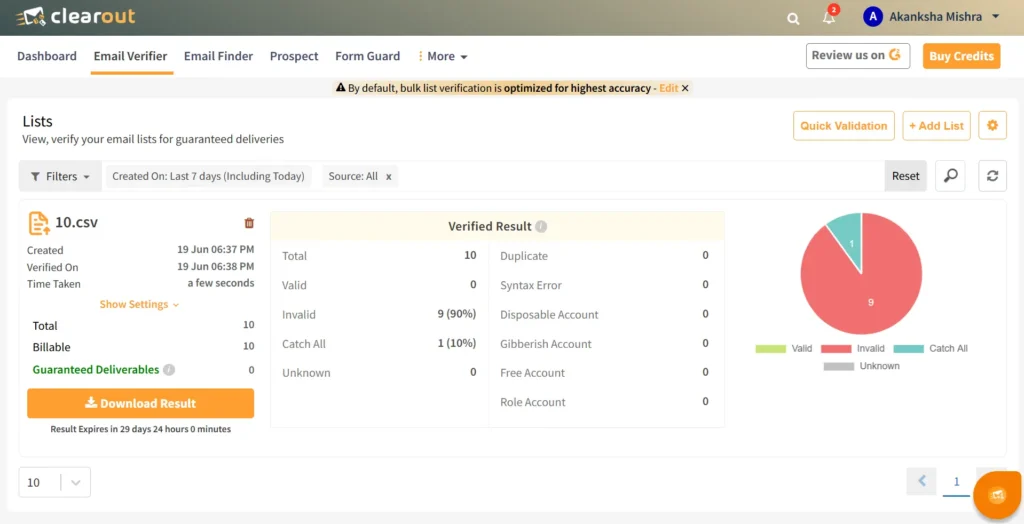
I tested Clearout on a 10-email CSV list. Results were returned in seconds. The dashboard categorized every address across valid, invalid, catch-all, duplicate, syntax error, disposable, gibberish, free, and role accounts. Zero unknowns. That level of granularity is what separates it from tools running basic SMTP checks.
I ran Clearout against 10 email addresses and logged results in a Google Sheet. It returned 9 invalid (90%) and 1 catch-all (10%) with zero unknowns in seconds.
I ran Clearout against 10 email addresses and logged results in a Google Sheet. It returned 9 invalid (90%) and 1 catch-all (10%) with zero unknowns in seconds.
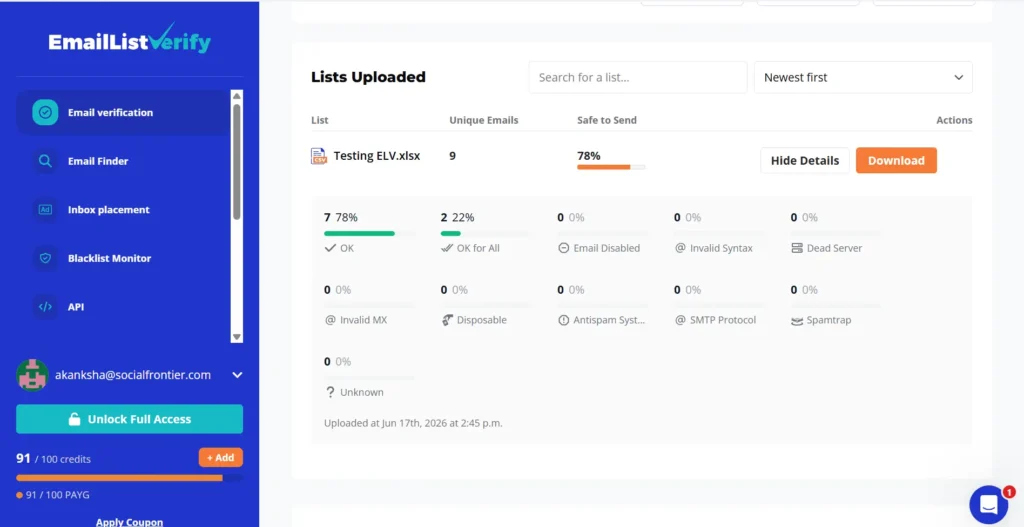
I tested EmailListVerify with nine specific email addresses. The list included valid, catch-all, and potentially risky contacts. The verification finished quickly, and the results were easy to review. Seven emails were marked OK.
No invalid, disposable, or spam trap emails appeared in this sample. The dashboard provides a clear breakdown of the verification results. It highlights the percentage of contacts considered safe to send to. In this test, 78% of the list was marked safe for sending. Unlike Clearout, EmailListVerify has no AI verdict layer.
No invalid, disposable, or spam trap emails appeared in this sample. The dashboard provides a clear breakdown of the verification results. It highlights the percentage of contacts considered safe to send to. In this test, 78% of the list was marked safe for sending. Unlike Clearout, EmailListVerify has no AI verdict layer.
False positive rates
A false positive flags a valid email as invalid. This metric directly costs you valuable leads.
Clearout uses dual-layer validation for syntax checks and server-level verification. Its anti-greylisting technology retries verification instead of flagging errors.
Furthermore, the AI layer provides deeper signals than binary valid/invalid outcomes. This approach significantly reduces false positives on complex email.
Conversely, EmailListVerify lacks greylisting support. Audits found it struggles to verify role-based and greylisted addresses. It flags these as risky or invalid by default, which creates false positives. Clearout's technology offers a clear advantage here.
Clearout uses dual-layer validation for syntax checks and server-level verification. Its anti-greylisting technology retries verification instead of flagging errors.
Furthermore, the AI layer provides deeper signals than binary valid/invalid outcomes. This approach significantly reduces false positives on complex email.
Conversely, EmailListVerify lacks greylisting support. Audits found it struggles to verify role-based and greylisted addresses. It flags these as risky or invalid by default, which creates false positives. Clearout's technology offers a clear advantage here.
Catch-all handling
Catch-all domains accept any email sent to them. Standard SMTP verification often returns false positives for these servers. Thus, catch-all domains are unreliable without extra logic.
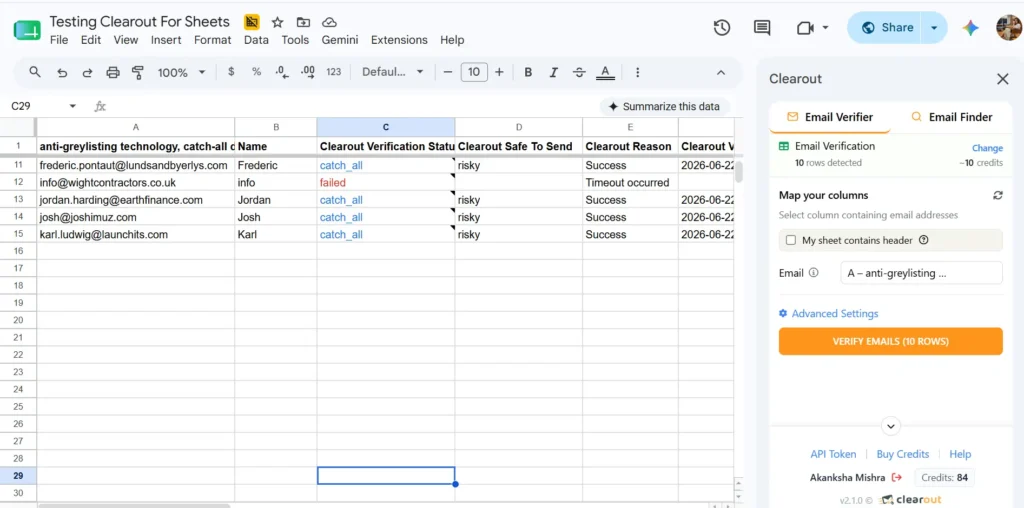
Clearout detects catch-all addresses clearly for easy management. An audit showed Clearout detects these with 74% accuracy. Meanwhile, EmailListVerify detects them with only 63% accuracy.
Neither tool performs probability-weighted catch-all resolution. Both simply flag catch-all as a binary category. However, Clearout's higher detection rate provides more actionable signal.
Neither tool performs probability-weighted catch-all resolution. Both simply flag catch-all as a binary category. However, Clearout's higher detection rate provides more actionable signal.
- Price comparison
| Volume | Clearout | EmailListVerify |
|---|---|---|
| 10,000 emails | ~$65 | ~$24 |
| 100,000 emails | ~$400 | ~$169–$186 |
| Pricing model | Pay-as-you-go, Monthly, Annual | Pay-as-you-go, Monthly |
| Credits expiry | Never | Never (PAYG) |
- User reviews on G2
“What I like best about Clearout.io is how easy it is to enrich and verify lead data without jumping between tools. Being able to find and validate email addresses quickly, clean lists in bulk, and enrich leads from LinkedIn saves a lot of manual effort. The accuracy of the email verification is especially useful for keeping databases healthy and reducing bounce rates, and the integrations make it simple to fit into existing workflows.”
“We have found the verification process to be simple and accurate. We've even compared it to several competitors to make sure that we're getting similar results. We like the speed, and flexible pricing (subscription, banking, etc.) and have found the service to be very easy to use with very few issues reported by our team.”
- Pros and cons
Clearout
Pros: Includes 20+ validation checks, AI verdict layer, and anti-greylisting technology.It ensures a bounce rate no higher than 3% on verified lists. Clearout is also GDPR, ISO 27001 and SOC 2 certified.
Cons: Higher per-email cost than competitors. Pricing can be steep for high volumes without a custom plan.
Cons: Higher per-email cost than competitors. Pricing can be steep for high volumes without a custom plan.
EmailListVerify
Pros: Offers the lowest market pricing and a simple interface. It processes 100K/hour and include free tools. It is also GDPR compliant.
Cons: Lacks greylisting support and advanced role-based email detection. Audited accuracy is lower than claimed, and it has limited integrations. Support response times are slower than competing tools.
Cons: Lacks greylisting support and advanced role-based email detection. Audited accuracy is lower than claimed, and it has limited integrations. Support response times are slower than competing tools.
Clearout vs EmailListVerify: My test and final verdict
- My Clearout test
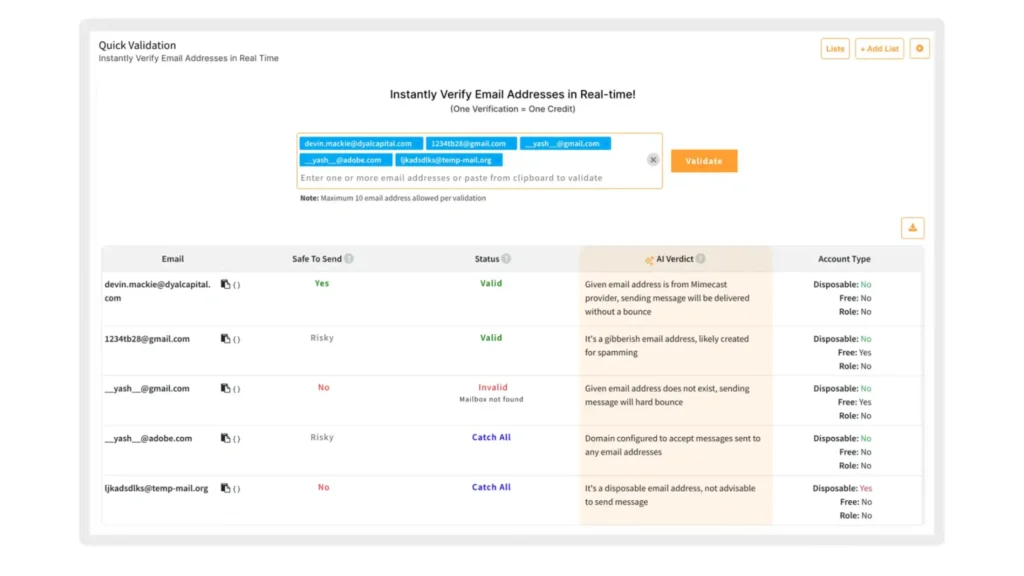
I tested Clearout with a batch of corporate and role-based email addresses across varied domains, specifically to see how it handles different segment types.
The results were clear. Clearout assigned each address a status like Valid or Risky. It also provided a "Safe-to-Send" flag for every contact. This simplifies my suppression decisions.
The "AI Verdict" column stood out most. It explained the logic behind each classification. For instance, it flagged specific corporate contacts that other tools might miss.
Verification was impressively fast, with output appearing in seconds even for complex domains. This speed helps manage large, urgent outreach lists easily.
The results were clear. Clearout assigned each address a status like Valid or Risky. It also provided a "Safe-to-Send" flag for every contact. This simplifies my suppression decisions.
The "AI Verdict" column stood out most. It explained the logic behind each classification. For instance, it flagged specific corporate contacts that other tools might miss.
Verification was impressively fast, with output appearing in seconds even for complex domains. This speed helps manage large, urgent outreach lists easily.
- My EmailListVerify test
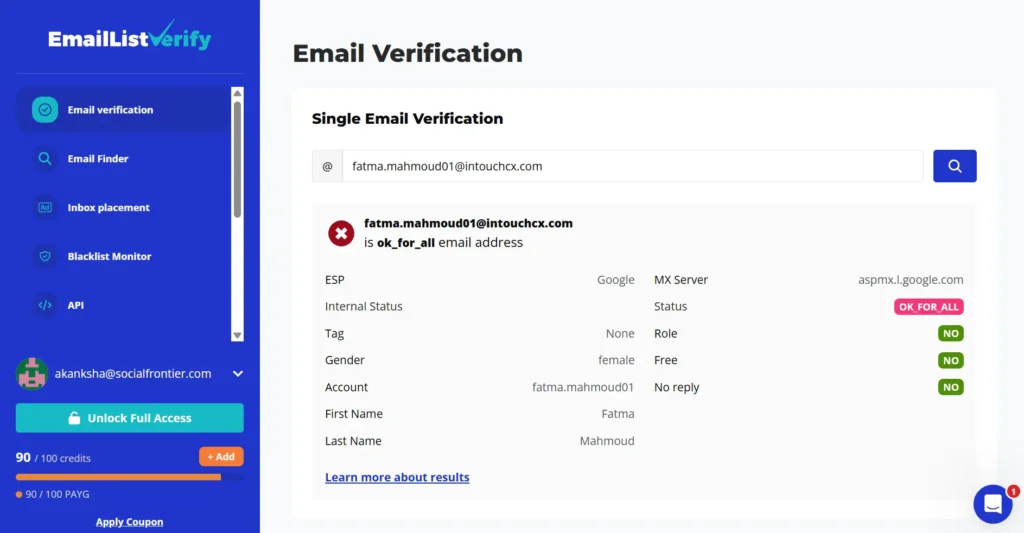
I verified a corporate email on EmailListVerify. It returned an OK_FOR_ALL status. The domain accepts all incoming emails regardless of whether the mailbox exists.
EmailListVerify has no mechanism to resolve this further. That address enters your pipeline as unverified with no risk signal attached. Any bounce it generates counts directly against your sender reputation.
B2C list hygiene absorbs a margin of error. B2B outbound does not. A single compromised campaign can suppress your domain for weeks and invalidate the pipeline built around it.
EmailListVerify has no mechanism to resolve this further. That address enters your pipeline as unverified with no risk signal attached. Any bounce it generates counts directly against your sender reputation.
B2C list hygiene absorbs a margin of error. B2B outbound does not. A single compromised campaign can suppress your domain for weeks and invalidate the pipeline built around it.
- My verdict
Both tests confirm that Clearout and EmailListVerify serve meaningfully different use cases. Clearout wins on accuracy and risk management. It is the best choice for bulk email verification. It identified complex domains that standard checks often missed.
Clearout’s AI verdicts and anti-greylisting tech are true game-changers. It protects your B2B list from bad addresses that other tools miss. This avoids costly false positives for your sales pipeline.
EmailListVerify returned OK_FOR_ALL on a corporate address with no further resolution. No risk signal. No classification depth. That address would enter any outbound sequence completely unvalidated.
For B2C lists with straightforward domains, EmailListVerify gets the job done at a lower cost. For B2B outbound where catch-all domains, greylisted servers, and role-based emails are common, Clearout is the only tool that gives you actionable output. The cost difference does not outweigh the pipeline risk of sending on unresolved addresses.
Clearout’s AI verdicts and anti-greylisting tech are true game-changers. It protects your B2B list from bad addresses that other tools miss. This avoids costly false positives for your sales pipeline.
EmailListVerify returned OK_FOR_ALL on a corporate address with no further resolution. No risk signal. No classification depth. That address would enter any outbound sequence completely unvalidated.
For B2C lists with straightforward domains, EmailListVerify gets the job done at a lower cost. For B2B outbound where catch-all domains, greylisted servers, and role-based emails are common, Clearout is the only tool that gives you actionable output. The cost difference does not outweigh the pipeline risk of sending on unresolved addresses.
Bottom line
Clearout and EmailListVerify solve the same core problem but serve different risk levels. Clearout runs over 20+ checks. It adds AI verdicts, resolves catch-all domains, flags greylisted servers, and delivers a 4x higher ROI on verified lists. Teams that switch to Clearout report fewer bounces, stronger sender reputation, and cleaner pipelines going into every campaign.
Verified lists directly improve deliverability, response rates, and pipeline output without increasing outbound volume.
Verified lists directly improve deliverability, response rates, and pipeline output without increasing outbound volume.
Verify your list
No credit card required
FAQs
1. Are email verification tools GDPR compliant?
Yes, Clearout is fully GDPR compliant with ISO 27001 and SOC 2 certifications that go beyond standard regulatory requirements, providing enterprise-grade data protection.
2. How do I verify a large email list?
Clearout handles large list verification via CSV or XLSX upload. Its bulk engine and API support automated workflows at scale. This reduces false positives across high-volume B2B outreach without manual intervention.
3. How accurate is clearout email verification?
Clearout delivers 99.73%+ accuracy across email verification. It runs 20+ checks per address, including catch-all domain resolution and greylisting detection. Bounce rate stays at 3% or below. That means fewer undeliverable contacts entering your outbound sequence and less damage to sender reputation.
4. What is the main difference between Clearout and EmailListVerify?
The main difference is validation depth and accuracy. Clearout runs 20+ checks per address including an AI verdict layer and anti-greylisting technology, achieving 99.73% accuracy. EmailListVerify runs 8 checks with no AI layer or greylisting support, achieving 97% accuracy. Clearout adds real-time API verification, letting teams validate contacts at the point of capture. This prevents bad data from entering your CRM or outbound sequence in the first place. EmailListVerify handles post-collection cleanup but lacks entry-point validation.