- Products
- Solutions
- Resources
- DeveloperAPIReference and quick-start guidesWebhooksReal-time event notificationsForm Guard SDKReal-time form validationMCP ServerConnect AI assistants to ClearoutKnowledge baseGetting startedSet up your account in minutesFAQAnswers to common questionsLead generationBuild clean, verified lead listsGuidesPricing guideHow credits and plans workCompare email verifiersHow email verification tools compareCompare email findersHow email finder tools compareData Pulse & HubSpot BreezeKeep Breeze Intelligence data reliable
- Free Tools
- Pricing
- Login





Clearout Email Finder vs. Mailmeteor: Email Finder Comparison
Finding a professional email address is only useful when it helps you reach the right person. Email finder tools make this easier, but they differ in how they find email addresses, handle bulk searches, and verify results. Their pricing models and features can also vary, making it important to compare them before choosing one.
In this Clearout Email Finder vs. Mailmeteor comparison, I'll look at search results, features, bulk email-finding capabilities, pricing, and user reviews. This will help you understand how the two tools differ and which one is better suited to your needs.
Table Of Content
How I tested Clearout and Mailmeteor
To compare both tools, I tested their individual email-finding features and used Clearout's Bulk Email Finder to upload an Excel spreadsheet containing 20 contacts. I then reviewed the returned email addresses, confidence scores, result statuses, and credit usage displayed on the dashboards.
Clearout vs. Mailmeteor at a glance
Clearout supports both individual and bulk email finding. Mailmeteor’s public Email Finder is designed for individual searches.
| Comparison | Clearout Email Finder | Mailmeteor Email Finder |
|---|---|---|
| Individual email search | Yes | Yes |
| Bulk email finding | Yes | Through the bulk enrichment API |
| Search details | Name, company, & domain | First name, last name, & company or domain |
| Bulk file upload | Excel/CSV list support | Not available in the public individual finder |
| Type of results | Personal & role-based email addresses | Depends on search results |
| Confidence score | Yes | - |
| Role-based email results | Identified separately | Not confirmed |
| No result charges | No credits charged | Free individual searches |
| Credit usage | 4 credits for non-role emails; 2 for role-based emails | No charge for individual public searches |
| Free access | 100 free credits | Free individual searches |
| Pricing model | Credit-based | Free individual searches |
| Best suited for | Individual & bulk B2B email discovery | Occasional individual email searches |
Clearout vs. Mailmeteor: Which tool is better?
Clearout is more suitable for finding business emails individually or in bulk. Mailmeteor is a simpler option when you need to look up one professional email address at a time.
G2 rating: 4.6/5

Clearout is a contact data solution that offers email finding, email verification, prospecting, and data enrichment. Its email finder supports both individual searches and bulk uploads.
Pros
- Finds single and multiple emails.
- Supplies confidence ratings for email addresses found.
- Charges fewer credits for role-based email addresses.
- Does not add credits if there is no email address.
Cons
- Credits are used for a successful bulk search.
- A result may be a role-based address instead of the person's actual email.
- Users should be aware of how the credit is being used before running large lists.
Test results I got
I tested Clearout using both Quick Email Finder and Bulk Email Finder.
1. Quick Email Finder
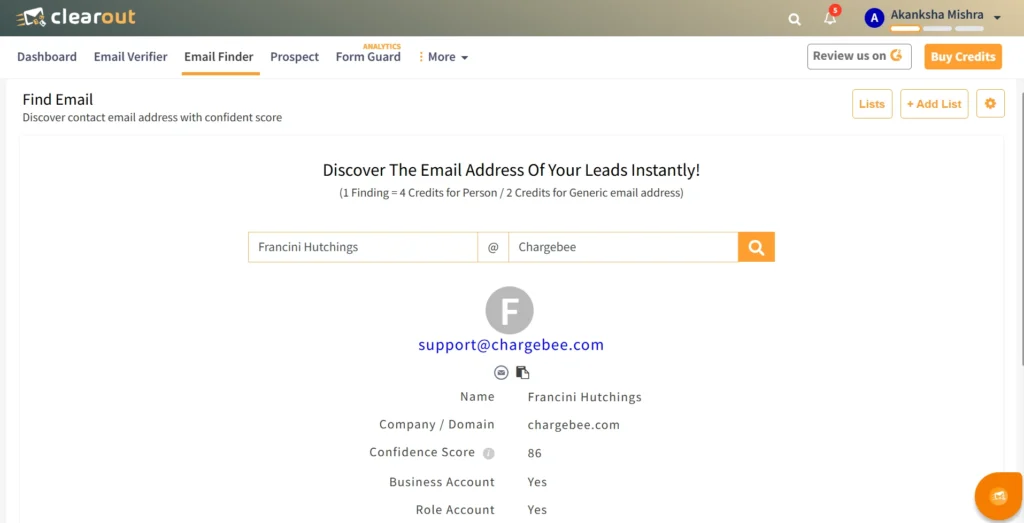
Using Clearout's Quick Email Finder, I searched for a professional email address with the contact and company details. The tool returned [email protected] with an 86 confidence score and identified it as a business and role-based email.
2. Bulk Email Finder
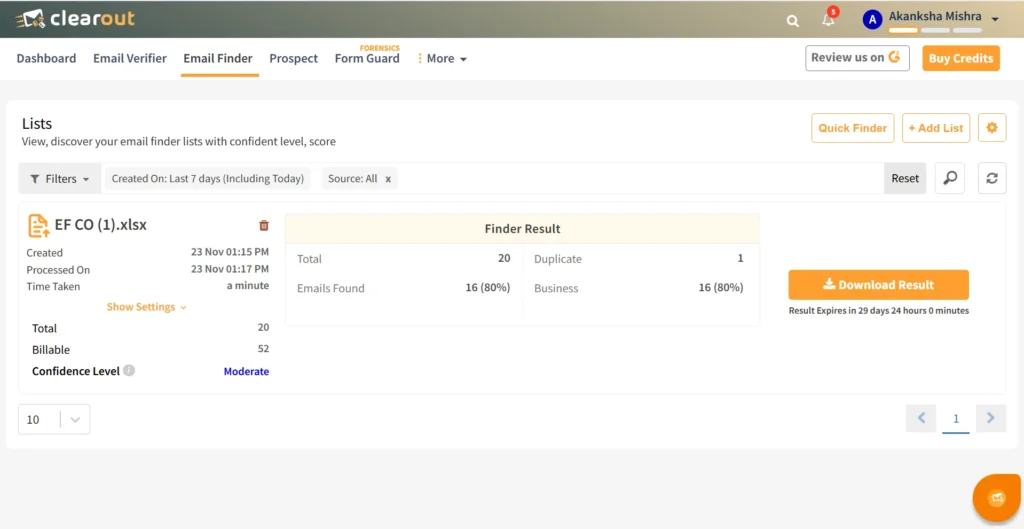
I uploaded an Excel file containing 20 records to Clearout's Bulk Email Finder. Here are the results shown on the dashboard:
- Total records: 20
- Emails found: 16
- Find rate: 80%
- Business emails: 16
- Duplicates: 1
- Billable credits: 52
Clearout found 16 email addresses from 20 uploaded records, an 80% find rate. However, this doesn't confirm that all 16 addresses belonged to the intended contacts or were deliverable. The dashboard also showed one duplicate and 52 billable credits.
My review
I tried Clearout's Quick Email Finder and Bulk Email Finder to determine their performance in finding single and multiple contacts.
The Quick Email Finder returned a result for an individual search. In the bulk test, Clearout identified 16 email addresses from 20 records. The results dashboard also showed the number of duplicates and credits used, making it easier to review the results and track credit consumption.
I like that it combines email finding and email verification in one platform. Its LinkedIn email finder is also useful for our team to find our targeted prospects' contact details. The interface is also easy to understand and use.
G2 rating: 4.1/5

Mailmeteor offers email outreach tools and free online email utilities. Its public email finder searches for a professional email address using a person's name and company details.
Pros
- Free individual email searches, with no signup required.
- Verifies email addresses before displaying results.
- Simple and easy-to-use interface.
Cons
- Lets you search for only one email address at a time.
- Doesn't let you upload a list of contacts for bulk searches.
- Bulk email finding requires access to Mailmeteor's API.
- May not find an email address for every contact.
Test results I got
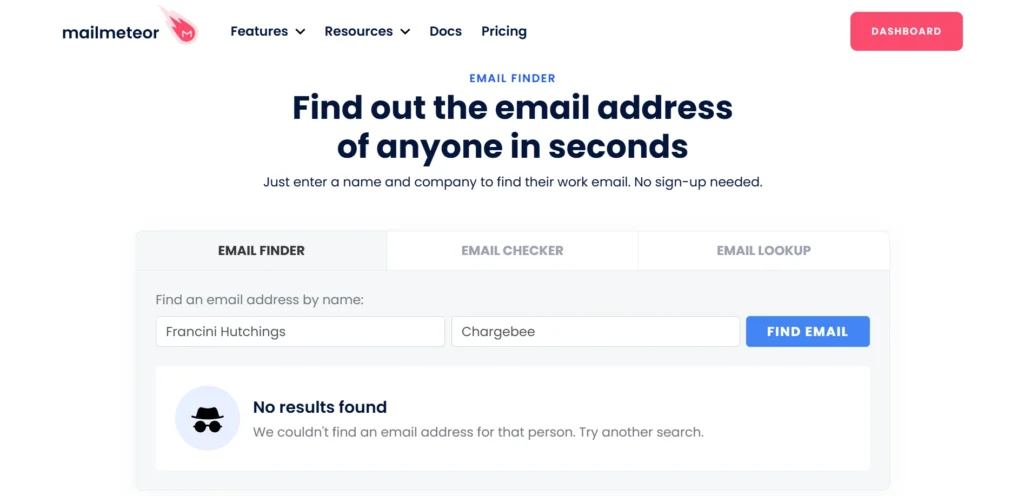
To compare the results, I used the same contact and company details in Mailmeteor that I had used in Clearout. However, Mailmeteor displayed 'No results found' and didn't provide an email address or confidence score.
My review
Mailmeteor's Email Finder is limited to individual searches, so I couldn't run the same 20-record bulk test that I conducted with Clearout. In my individual search, Mailmeteor displayed "No results found" and didn't provide an email address or confidence score.
Mailmeteor states that it verifies email addresses before displaying them, which may explain why no result was returned. Clearout, in comparison, provided a role-based email address along with a confidence score.
This is an amazing tool; just schedule it and you will get all the analysis. In addition, you can search and verify the email.
Clearout vs. Mailmeteor features
Clearout provides individual and mass email finding. Mailmeteor's public Email Finder is geared towards individual searches. Here's how their features compare.
1. Individual email finding
Clearout email finder features are a tool that finds a professional email address. It uses a person's name and company name or domain. It provides pre-verified results with a confidence score, as well as role-based addresses.
Mailmeteor's Email Finder searches for email addresses based on an individual's first, last, and company name or domain. It checks the result before displaying the email address.
2. Bulk email finding
Clearout enables you to upload a CSV or Excel file containing contact information and then retrieve email addresses in bulk. It includes a result dashboard that displays the number of emails found, duplicates, and credits used.
Note that the public version of the Mailmeteor service does not accept bulk e-mail data upload. It provides a separate API for bulk email enrichment, which you have to request from its team.
3. Email verification
Clearout's Email Finder provides pre-validated email addresses. It additionally features an individual email verifier that can be used to check current email lists.
Mailmeteor filters email addresses to be displayed in its finder. It also offers a separate Mailmeteor Email Checker to verify existing email addresses.
4. Email checker and spam checker
Mailmeteor offers two separate tools:
- Mailmeteor Email Checker: Checks whether an existing email address is valid.
- Mailmeteor Spam Checker: Reviews your email content for words and phrases that may trigger spam filters.
These tools don't find email addresses. Clearout focuses on email finding and verification rather than checking email content for spam-related words.
5. APIs and integrations
Clearout offers an Email Finder API for individual and bulk searches, along with integrations for platforms such as HubSpot, Salesforce, and Zapier.
Mailmeteor offers a separate bulk enrichment API. Its Gmail and Google Sheets tools, along with the Mailmeteor extension, support email campaigns rather than email discovery.
Clearout vs. Mailmeteor pricing
Clearout uses credits for email finding, while Mailmeteor's public Email Finder is free for individual searches. Both platforms also offer paid plans, but those plans cover different services.
Here's a breakdown of their pricing:
| Plan | Clearout | Mailmeteor |
|---|---|---|
| Free | 100 lifetime credits - $0 | Hobby: 500 emails/month - Free |
| Starter | 3,000 credits/month - $23/month | 5,000 emails/month - $3/user/month (regularly $5.99) |
| Premium | — | 30,000 emails/month - $8.99/user/month (regularly $17.99) |
| Pro/Professional | 500,000 credits/month - $900/month | 60,000 emails/month - $18/user/month (regularly $35.99) |
| Email Finder | 4 credits per non-role email; 2 credits per role-based email | Free individual searches |
Clearout also offers monthly and annual subscriptions, which are included in their pricing. According to its pricing guide, bought credits will not expire, and unused subscription credits will carry over. If no e-mail is found, no credits will be charged.
Mailmeteor's public individual email finder is free. Its paid plans expand email-sending permits each month. They also include more of its outreach highlights, including email warmup, email verification, follow-ups, and Autopilot.
The two paid-plan prices are not directly comparable, as they are for different services. Mailmeteor’s free finder lets you search for one or two items occasionally without paying per search. Clearout adopts a credit model for bulk email discovery.
See the Clearout pricing guide for a detailed break-up of Clearout's credit usage.
Which one to choose between Clearout and Mailmeteor?
Use Clearout for bulk business email searches, prospect lists, email verification, and CRM workflows. It also has a credit model, which ensures that unsuccessful searches are not charged.
If you just want to find one professional email address and don't want to pay for searching each, then you'd want to choose Mailmeteor. Its other free tools can be used to check an email address or the content of a message before sending it.
If you're looking for bulk email finding, then Clearout is something to consider when you're looking for alternatives to Mailmeteor. If you're looking to send personalized campaigns via Gmail or Google Sheets, then Mailmeteor's outreach features are more applicable.
Bottom line
Choosing the wrong email finder can result in incomplete prospect lists, wasted research time, and lost sales opportunities. In my test, Clearout found 16 addresses from 20 records, while Mailmeteor returned no result for the individual search.
If you regularly build prospect lists, Clearout's bulk finder is worth considering. If you only need individual email addresses, Mailmeteor's free Email Finder lets you search without paying per lookup.
FAQ
1. Is it possible to extract email addresses from many email files?
Clearout can support bulk emails being found using CSV or Excel uploads. Mailmeteor's public Email Finder is used to search for individual emails, but bulk email enrichment requires API access.
2. Do you have a technique to verify email addresses before displaying results?
Yes. Pre-verifies the email addresses found and gives a confidence score. Mailmeteor also checks addresses before displaying finder results.
3. What is the price of the Clearout Email Finder and Mailmeteor?
Clearout takes the following credits: 4 for a non-role email and 2 for an email found based on the role. Mailmeteor's individual Email Finder is available for free, and their paid plans include email outreach.
Recent Posts
27 Nov 2026
Clearout Email Finder vs. Mailmeteor: Email Finder Comparison
Compare Clearout vs. Mailmeteor Email Finder features, bulk search, accuracy, pricing and test resul ...
26 Nov 2026
Laravel Contact Form: How to Build, Validate, and Send Email Without Spam
Build a Laravel contact form, validate emails, send messages with Mailables, and prevent fake submi ...
24 Nov 2026
Salesforce Email Tracking: A Complete Guide
Learn how Salesforce email tracking works, enable tracking, understand open data limitations, and im ...
24 Nov 2026
Clearout MCP: How to Verify and Find Emails Inside Your AI Assistant
Connect Clearout MCP to Claude, ChatGPT and other AI assistants to find business emails, verify addr ...
24 Nov 2026
Email Marketing Tips for Insurance Agents: A Complete Guide
Learn email marketing tips for insurance agents, from campaign examples and list verification to pre ...