- Products
- Solutions
- Resources
- DeveloperAPIReference and quick-start guidesWebhooksReal-time event notificationsForm Guard SDKReal-time form validationMCP ServerConnect AI assistants to ClearoutKnowledge baseGetting startedSet up your account in minutesFAQAnswers to common questionsLead generationBuild clean, verified lead listsGuidesPricing guideHow credits and plans workCompare email verifiersHow email verification tools compareCompare email findersHow email finder tools compareData Pulse & HubSpot BreezeKeep Breeze Intelligence data reliable
- Free Tools
- Pricing
- Login





Laravel Contact Form: How to Build, Validate, and Send Email Without Spam
TL;DR
- A Laravel Contact Form has 4-parts: a route, a form page, a controller to validate the form data, and a Mailable to send the message to your email.
- However, Laravel's built-in email checks that the address appears correct and that the domain is accepting emails. It will not know whether the inbox is the real one or a fake one.
- You can add Clearout Form Guard to prevent bots, AI agents, gibberish names, junk phone numbers, and fake emails from filling out your form. All you need to do is copy and paste one snippet code.
- Before the launch, queue your emails, cap the frequency of sending the form, include a hidden trap field, and test.
There are two things a Laravel contact form requires to function properly – code to receive or send each message, and filters to stop junk email. The first part is easy as Laravel can do that. But it cannot do advanced checks on contact details, bots, or prevent fake form submissions. If you add Clearout Form Guard, all these checks are possible with its advanced validation.
This guide will help you go through how to set up Laravel form and add form validation in it, what Laravel validates and what it doesn't.
This guide will help you go through how to set up Laravel form and add form validation in it, what Laravel validates and what it doesn't.
Table Of Content
How to build a contact form in Laravel?
There are 5 components required: a route for the page, a route to receive the form, a Blade form, a controller, and a Mailable. The following setup is for Laravel 11.38 and above.
Step 1: Add the routes
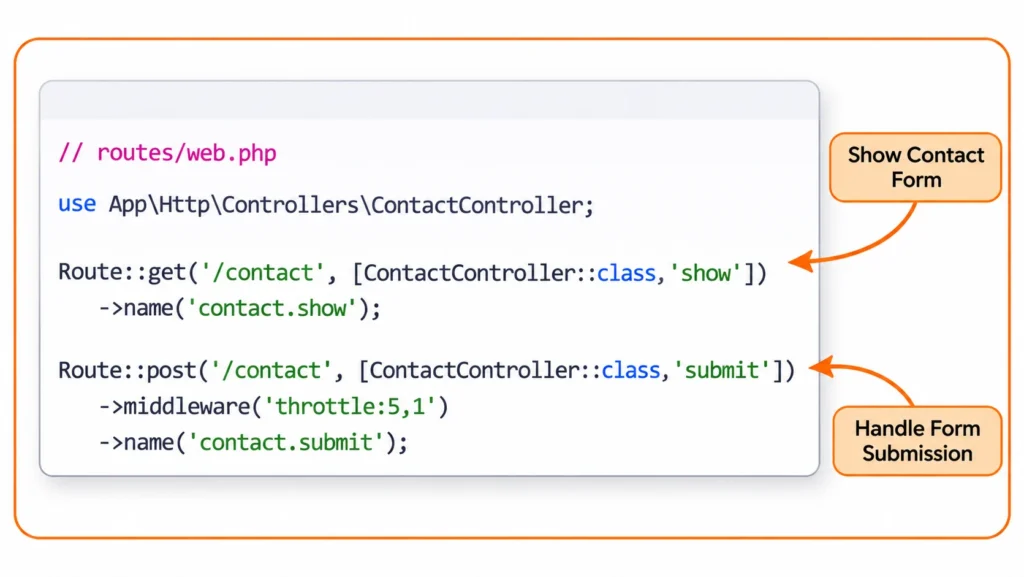
First, make two routes in your Laravel application. One will display the contact page, the other will accept forms.
Rate limiting should also be added to the submission route. For instance, allowing five submissions per minute from each visitor helps stop simple form flooding before your application processes the request.
Rate limiting should also be added to the submission route. For instance, allowing five submissions per minute from each visitor helps stop simple form flooding before your application processes the request.
Step 2: Build the Blade form
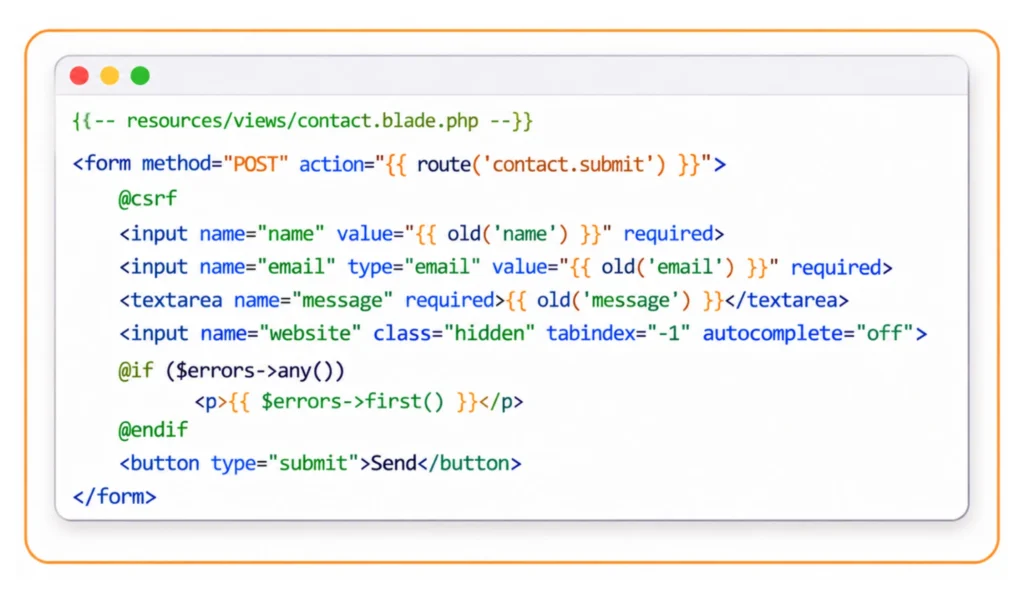
Then, you need to develop a form for the visitor to fill out: a Blade form containing fields for the visitor's name, email, and message.
Add CSRF protection to forms to protect against unauthorized submission. If there is a failure in validation, it's important to also retain the values that have been entered, so visitors don't have to re-enter everything.
Include another hidden honeypot field, too. This is a decoy for basic bots. It will not be visible or usable by real users, but can be triggered by bots that automatically complete all of the available fields.
Step 3: Sending Emails from a Laravel Contact Form
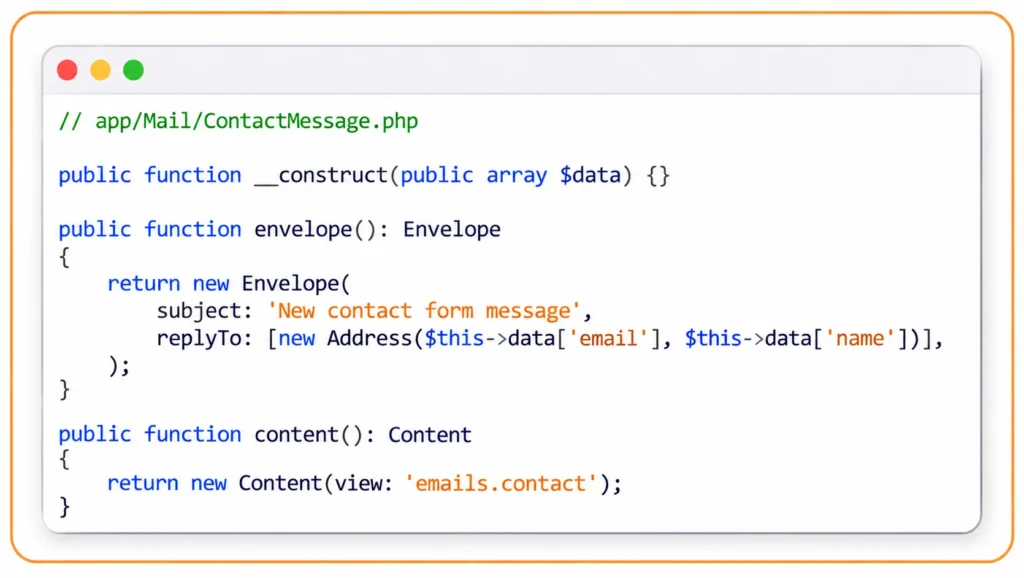
There is a class called Mailables that helps you organise the outgoing email messages in Laravel. The Mailable specifies the subject, message content, and other details of the email sent to your inbox.
An important note: Use the EMAIL ADDRESS of the visitor in the REPLY TO field, not the FROM field.
When using the visitor's address as the sender in an email, the email providers may mark it down since it doesn't match your domain. However, reply-to can be used to reply directly to your visitor, without causing the issue.
Step 4: Wire up the controller
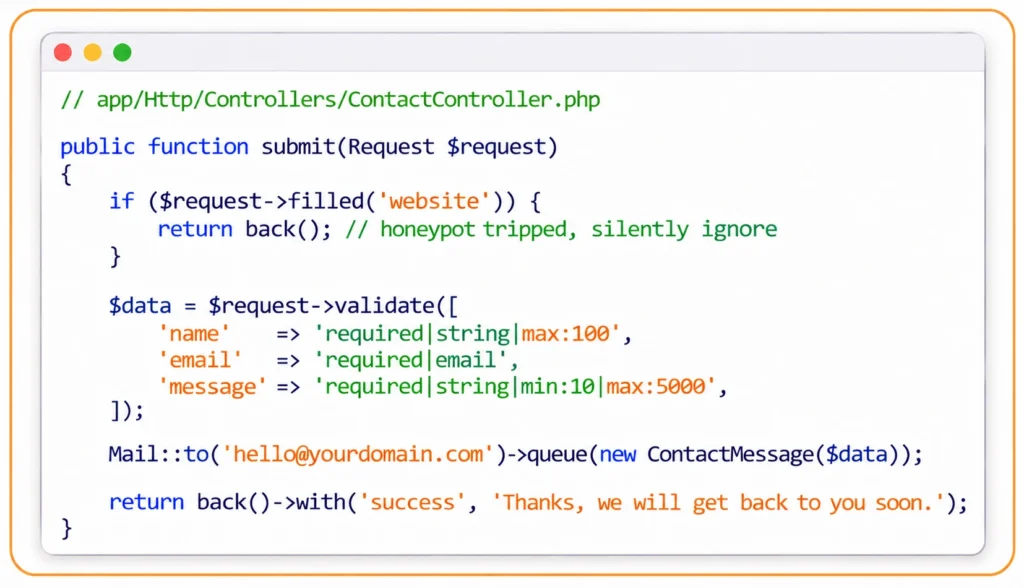
The submitted information is sent to the controller's system where the fields are checked and then relayed to your inbox.
Check the honeypot field before processing the submitted data. If it has been filled, simply ignore the request without saying anything.
Check visitors' name, email address and message before sending anything. Once the information is validated, Laravel sends the email through its queue system.
The queue sends the email in the background, so visitors don't have to wait for the mail service to finish processing it.
Laravel's log mailer is used for local testing. It writes outgoing e-mail to your application logs instead of sending them.
You are now able to capture messages and send email in your Laravel Contact Form. However, there's still one limitation: email validation.
What is checked by the Laravel email validation?
Laravel email validation verifies two things: If the email address was written correctly and whether or not the domain is accepting email, if requested. It does not check if there is an inbox at all.
The email validation rule comes with a number of modes:
The email validation rule comes with a number of modes:
| Mode | What it is checking | What it's not checking |
|---|---|---|
rfc (default) | The address is formatted properly | Mailbox actually exists |
| Strict | The address format contains unusual or disallowed characters | Any fake address that resembles an actual one |
dns | If the domain has a mail server | Throwaway domains, which have real mail servers |
spoof | Look-alike letters, such as putting a Cyrillic "а" instead of "a", etc. | Ordinary fake addresses |
filter | PHP's built-in email check | The same as rfc |
Laravel contact form rules
You may include your validation rules in a Form Request. This keeps the validation separate from the controller, simplifying application maintenance.
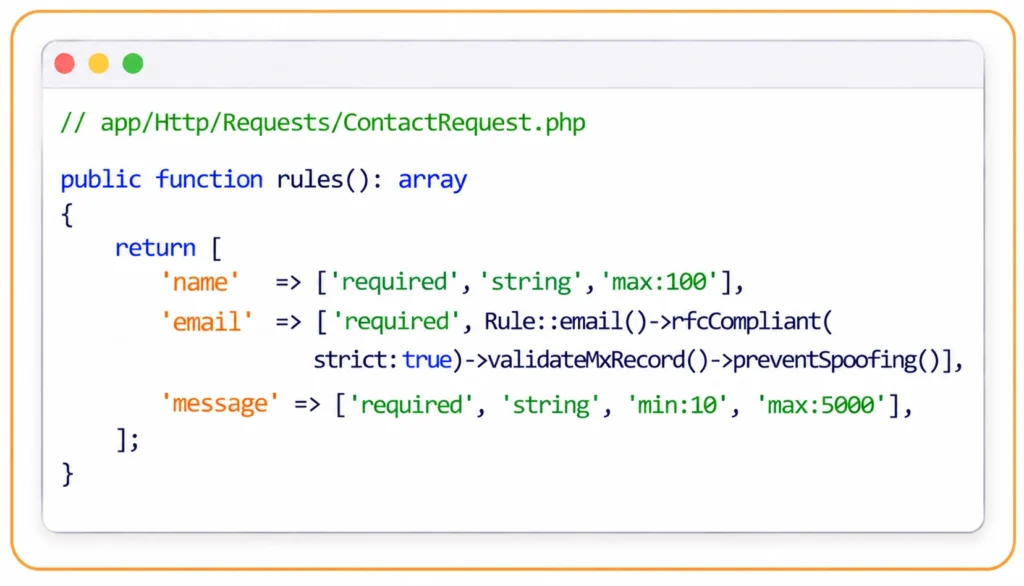
Laravel also lets you combine stricter email checks to validate the address format, ensure that the domain has an MX record, and prevent spoofed addresses.
After creating the Form Request, link it to your controller, and utilize the validated data for additional processing.
After creating the Form Request, link it to your controller, and utilize the validated data for additional processing.
What built-in rules can't catch
Even with every mode turned on, these types of addresses and entries can still pass:
- Fake inboxes:
[email protected]looks good, and Gmail is real. Only Gmail knows that the inbox doesn't exist. - Throwaway addresses - Mailinator and other such sites run real mail servers, so they pass. The inbox disappears in minutes.
- Shared addresses (
info@oradmin@) are not assigned to an individual, but to a team inbox. - Catch-all domains. Some companies will take mail for any name, which means that you can't determine if the person is real.
- Laravel will not flag a name like "asdf" or a toll-free phone number.
The DNS mode can also cause a delay in every submission as it performs a DNS lookup of the domain. These gaps need to be plugged with a tool which checks the inbox itself.
How to prevent spam and fake emails in Laravel contact form?
Use two layers: check the form as users type and check the e-mail again on your server. Each layer is complementary to the other.
Layer 1: Add Clearout Form Guard to your form
Form Guard validates email, phone and name fields in real-time while visitors are entering them. There is no need to modify your PHP code.
Here's how to set it up:
Here's how to set it up:
Part A: Create a Form Guard
- Log in to https://app.clearout.io/ and open the Form Guard tab.
- Click Create Guard.
- Select the Email, Name and Phone fields to validate on your Laravel contact form, then click Next.
- On the Advanced Settings page, click Create.
- Copy the generated Form Guard code snippet.
Part B: Embed Form Guard in Laravel
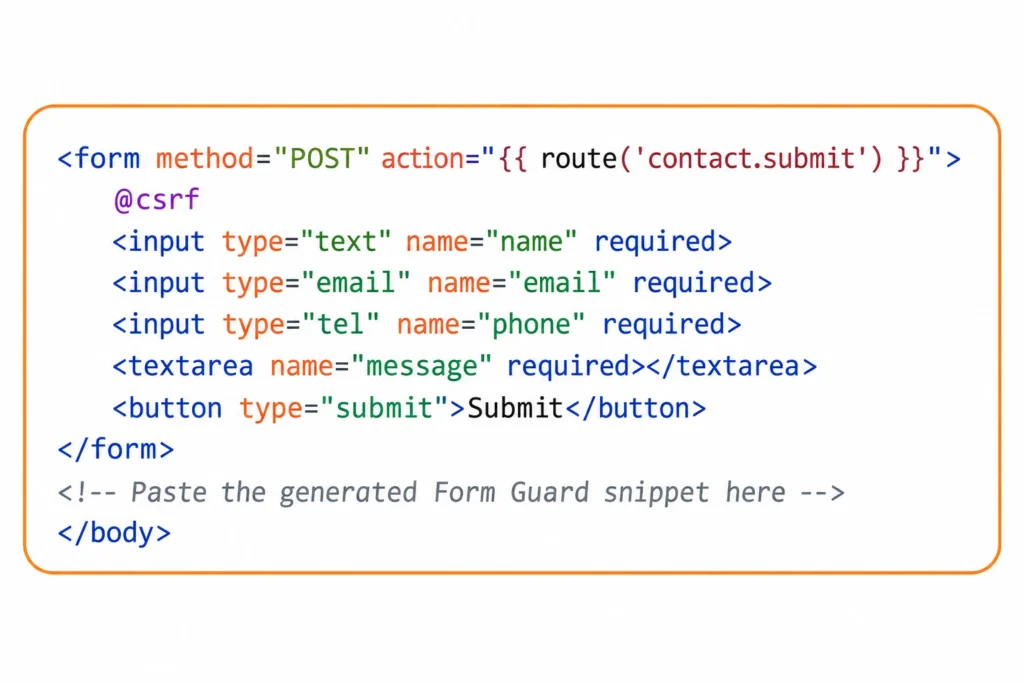
- Open the Laravel project and go to
resources/views/contact.blade.php, the Blade file that holds your contact form. - Paste the generated snippet immediately before the closing
</body>tag, unless the generated snippet or Clearout's installation instructions specify a different placement. - Save the Blade file.
Example (your own form will also include the honeypot field from Step 2):
Form Guard also lets you know what occurred on every form:
- Who filled it. CAPTCHAs may fail to catch the forms that AI agents submit. Form Guard classifies each entry as a human, bot or AI agent.
- Lost leads. Those who typed a valid email, but didn't finish it and left before submitting the form, will be saved for 30 days.
- Forensics. Check any email, phone or name to find out if it was permitted or denied.
Layer 2: Review email in controller
Bots can bypass your form and send submissions directly to your contact form endpoint. That is why your server needs its own email check.
The Clearout Email Verifier API can check email addresses and identify disposable addresses. It is server based and thus perfectly suited for your Laravel based forms.
A custom validation rule can be written that will pass the submitted email address to the Clearout API and validate the result.
The Clearout Email Verifier API can check email addresses and identify disposable addresses. It is server based and thus perfectly suited for your Laravel based forms.
A custom validation rule can be written that will pass the submitted email address to the Clearout API and validate the result.
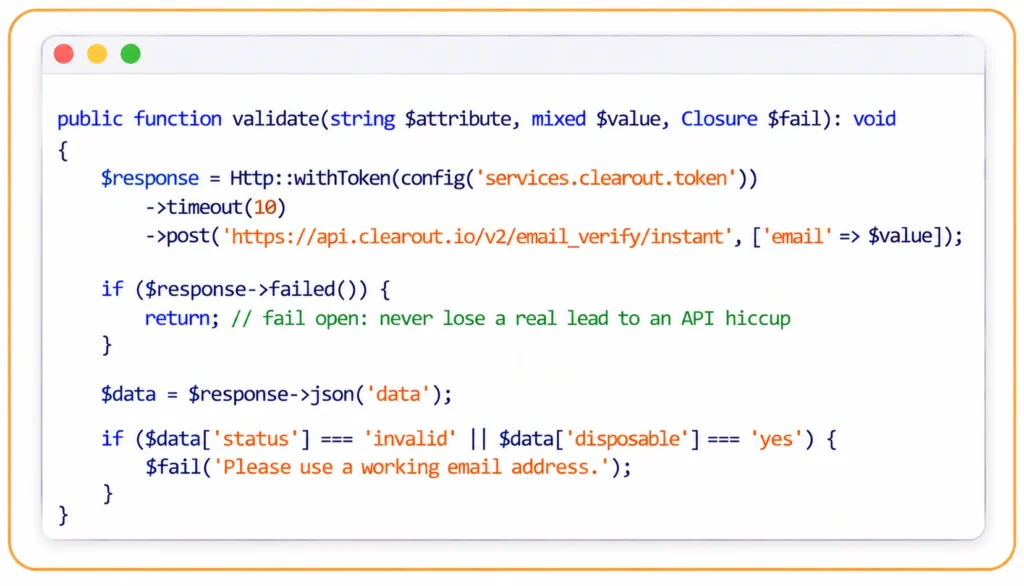
If the API is slow or down, the rule lets the email through, so you never lose a real lead. Add
Once both are in place, visitors don't know the difference. The benefit is that your form can filter out more fake and invalid submissions.
DeliverableEmail rule after the built-in email rules in ContactRequest, so badly formatted addresses don't use API credits. Keep your API token in .env and load it through config/services.php.Once both are in place, visitors don't know the difference. The benefit is that your form can filter out more fake and invalid submissions.
Now, you should check this before contact form goes live
Before your Laravel contact form becomes public, go through this list:
- Emails are sent out from your own domain and SPF / DKIM / DMARC are set up.
- The
replyToaddress is the visitor's email address and not theFromaddress. - Emails are in a queue and a queue worker is running on the server.
- Rate limiting is used on the submit route.
- Validation is performed using a Form Request which uses the Laravel email rules and Clearout checks.
- The Form Guard snippet is pasted before the closing
</body>tag inresources/views/contact.blade.php, and the form loads without errors. - You've tested a good submission, a failed one, the honeypot, and the rate limit.
Build a Laravel contact form that only lets real people through
It only takes a few minutes to set up the Laravel form. What makes this contact form useful is what information it lets through. Laravel can verify if an address is correct, but not if there's an actual person behind it.
Next, add the Form Request and custom email validation rule described in this guide and paste the Form Guard snippet into your contact Blade view. Your Laravel contact form code can remain unchanged while adding these validation checks to filter out fake and invalid submissions.
Next, add the Form Request and custom email validation rule described in this guide and paste the Form Guard snippet into your contact Blade view. Your Laravel contact form code can remain unchanged while adding these validation checks to filter out fake and invalid submissions.
Identify human vs AI agent submissions, stop bot and spam submissions in your form
Start with 100 free credits
FAQs
How can I make a Laravel contact form?
Create a GET route to display the page, a POST route for submitting it and create a Blade form protected with CSRF. A simple Laravel contact form also needs a controller to validate data submitted to it, and a Mailable to send it. Add Clearout Form Guard and a honeypot to it to remove low quality submissions from your pipeline.
How to validate email address in a Laravel contact form?
Apply Laravel validation rules on email in a Form Request. You can validate the format, check the MX record of the domain, and prevent spoofing. Laravel email validation, however, only validates the format and the domain. Add a server-side check, such as the Clearout Email Verifier API to identify fake and throwaway inboxes.
How to use Mailables to send emails from a Laravel contact form?
Make a Mailable, pass the data for the form, and route the email through Laravel's mail system. Use the email address of the visitor in the "ReplyTo" field and send the email from your domain name. This Laravel Contact Form Email setup can be used with any SMTP or API Mail service.
Recent Posts
26 Nov 2026
Laravel Contact Form: How to Build, Validate, and Send Email Without Spam
Build a Laravel contact form, validate emails, send messages with Mailables, and prevent fake submi ...
24 Nov 2026
Salesforce Email Tracking: A Complete Guide
Learn how Salesforce email tracking works, enable tracking, understand open data limitations, and im ...
24 Nov 2026
Clearout MCP: How to Verify and Find Emails Inside Your AI Assistant
Connect Clearout MCP to Claude, ChatGPT and other AI assistants to find business emails, verify addr ...
24 Nov 2026
Email Marketing Tips for Insurance Agents: A Complete Guide
Learn email marketing tips for insurance agents, from campaign examples and list verification to pre ...
19 Nov 2026
6 Email Finder Tools for AI Agents
Explore 6 email finder tools for AI agents. Compare features, verification, APIs and MCP integratio ...