clearout
  • Products
    • Email Verifier Verify emails addresses individually, in bulk or through API, with 99% accuracy
    • Email Finder Find individual or bulk emails by entering the person & company name or domain
    • Form Guard IconForm Guard Protect your forms from spam, bots, and invalid submissions with real-time email, phone, and name verification.
    • Prospect SQL/MQL list building with high levels of personalization, real-time data enrichment and prospect search
    • Clearout For SheetsVerify email addresses directly on Google Sheets with Clearout for sheets add-on
    • Prospect – LinkedIn Chrome ExtensionBuild verified, targeted prospect lists directly from LinkedIn profiles
    • ClearoutPhoneValidate phone numbers across 240+ countries in bulk, quick or real time validation
    • Free Tools
    • Disposable Email Checker
    • Reverse LinkedIn Profile Lookup Tool
    • Reverse Email Lookup Tool
    • Email List Cleaner
    • Company Domain Finder API
  • Resources
      DEVELOPERAPI iconAPI
      Clearout APIs are structured around REST and JSON
      Webhooks iconWebhooks
      Capture real-time events in your application workflow
      Form Guard iconForm Guard
      Real-time form validation to keep bad contacts out of your CRM
      KNOWLEDGE BASEGetting started iconGetting started
      Sending campaigns without bounces is made simple
      FAQ iconFAQ
      Easily find answers to services, security and common questions
      USE CASESLead Generation iconLead Generation
      Learn how professionals generate quality leads
      GUIDESPricing arrow iconTransparent & flexible pricing to support pay-per-use or recurringCompare Email Verification Tools arrow iconAI-powered email verification with 99%+ accuracy, real-time validation, and transparent risk scoringCompare Email Finder Tools arrow iconPre-verified B2B email addresses with confidence scoring, find real person email, not role-based addressBLOGSEmail Verification ToolsFind Anyone’s Email Address
      Most Accurate, Fast & Free Ways
      Form Validation
      Importance, Ways & Best Practices
      View All Blogs
  • Pricing
  • Integrations
  • Enterprise
  • Login
Try it free Book a 1-to-1 demo
Akanksha Mishra / June 15, 2026 June 15, 2026

Cold Email Automation Setup To Protect Sender Reputation


Cold Email Automation Setup To Protect Sender Reputation

In 2026, cold email response rates have fallen to 3.43% compared to 8.5% in 2019. Inboxes are more difficult to access. Emails that used to make it into inboxes are getting rejected due to the stricter requirements for bulk senders by Google and Yahoo in 2024 and improved spam filters.

If you want to book 10 meetings per month, you need to send about 300 emails per month. And this cannot be done manually across follow up sequences, various prospects and stages.

But automation without the right infrastructure, verified lists, warmed domains, and authenticated sending, compounds the problem instead of solving it. This guide covers the setup that makes automation work without destroying the domain running it.

Table of Content


‣ Why do most cold email automation setups destroy sender reputation?
‣ How will Google, Microsoft, and Yahoo evaluate senders in 2026?
‣ Step 1: Register a dedicated cold email sending domain
‣ Step 2: Warm up the domain before any campaign starts
‣ Step 3: Verify and clean the lead list before it enters the tool
‣ Step 4: Configure the automation tool
‣ Step 5: Monitor deliverability metrics and re-verify the list
‣ The complete cold email automation stack you need
‣ Case study
‣ Wrap up
‣ FAQs
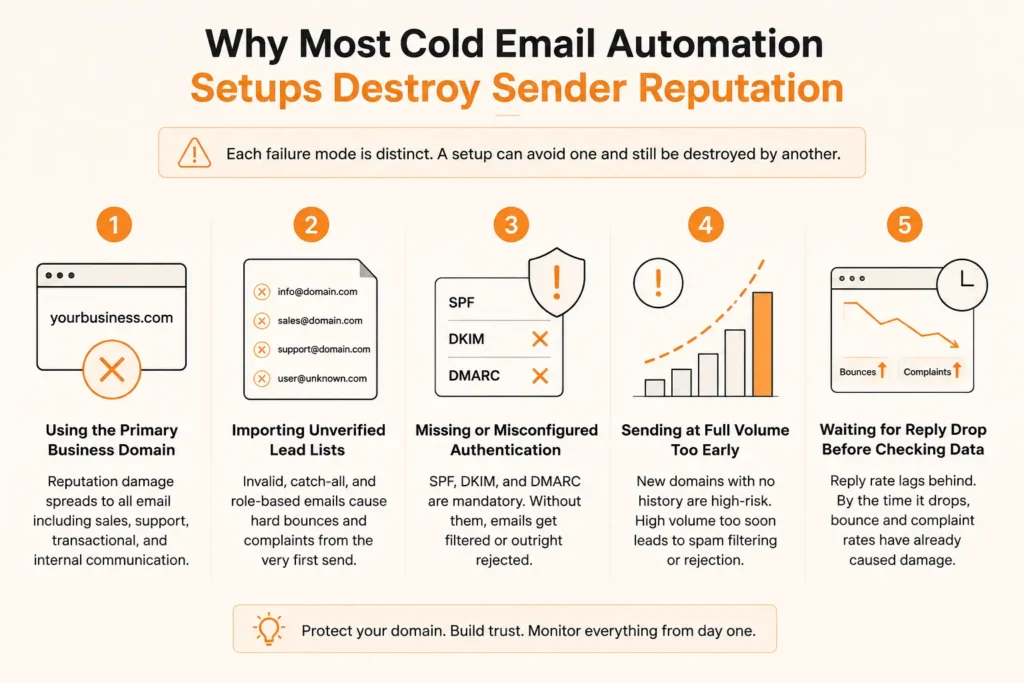
Why do most cold email automation setups destroy sender reputation?


Infographic showing 5 common cold email automation mistakes.

Most cold email setups don't fail because of bad copy or weak targeting. They fail because the infrastructure underneath is misconfigured from the start. These 5 mistakes are where the sender reputation gets damaged before a single reply comes in.

1. Campaigns running on the primary domain


Every spam complaint, hard bounce, and low-engagement send goes on record against the sending domain. Reputation damage does not stay contained when the domain also handles sales and internal communication.

Transactional emails, billing notifications, and internal mail degrade when cold outreach pulls the domain reputation down. Cold email must run on a dedicated sending domain, separate from the primary business domain.

2. Sending to unverified lead lists


A purchased or scraped list carries no validity guarantee at import. Role-based addresses, catch-all domains, and invalid addresses make up a significant portion of unverified lists.

When unverified addresses enter a sequence, hard bounces show up immediately. At 500 sends per day, a 5% invalid rate alone is enough to cross provider penalty thresholds within days.

3. Authentication records missing before first send


SPF, DKIM, and DMARC are non-negotiable for cold email in 2026. Google and Yahoo's bulk sender requirements, enforced since 2024, require all 3 for senders crossing 5,000 messages per day.

Microsoft enforces equivalent standards for Outlook and Hotmail inboxes. Sending without valid authentication risks outright rejection at the receiving mail server.

4. Sending at full volume too early


A newly registered domain with no sending history is classified as high-risk by inbox providers. Gmail, Microsoft SmartScreen, and equivalent systems score mail against the domain's historical behavior.

A domain sending 500 emails on day one has no trust signal for providers to evaluate. The result is aggressive spam filtering or outright rejection.

5. Monitoring only reply rates


Reply rate is a lagging indicator. Bounce rate and complaint rate typically cross provider thresholds before reply rates show any decline.

Both metrics must be tracked from the first send. Spam complaint rate and hard bounce rate are the two most significant figures that help campaigns to thrive or cause the domains to be flagged.

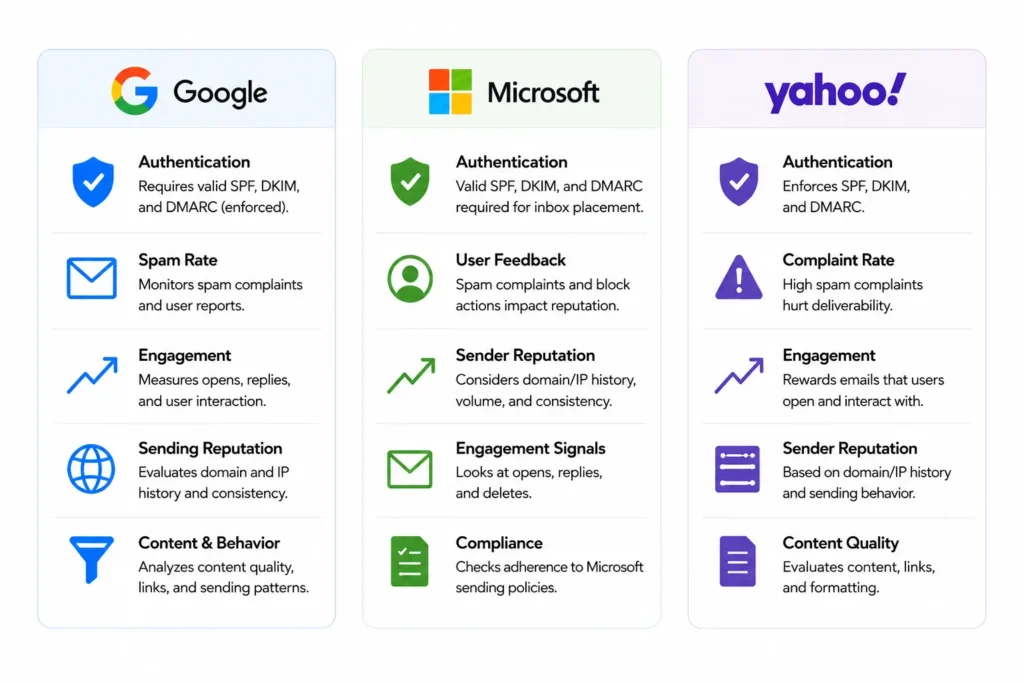
How will Google, Microsoft, and Yahoo evaluate senders in 2026?


Google, Microsoft, and Yahoo email sender evaluation criteria.

What inbox providers check has changed. It is not just about email content anymore. Google, Microsoft, and Yahoo factor in authentication, complaint rates, engagement, and sending patterns before an email reaches the inbox.

1. Authentication is now mandatory


All 3 main inbox providers mandate that sending domains have valid SPF, DKIM and DMARC records. For cold email specifically:

  • SPF authorizes which mail servers can send on behalf of the domain.
  • DKIM puts a digital signature on every email you send. If anything changes in transit, inbox providers catch it.
  • DMARC sets the rules for what happens when SPF and DKIM checks do not pass, and delivers those failure reports back to you.

A missing or misconfigured record on any of the three is sufficient grounds for rejection by compliant mail servers.

See how to implement Gmail & Yahoo Authentication requirements


2. The hard thresholds every cold sender must stay under


Google, Microsoft, and Yahoo each publish hard thresholds for bounce rate, spam complaints, and authentication alignment. Crossing these limits triggers automatic penalties. No manual review process exists; the algorithm acts on the data directly.

MetricSafe RangeDanger Threshold
Spam complaint rateBelow 0.08%Above 0.10% triggers filtering; above 0.30% triggers suspension
Hard bounce rateBelow 2%Above 5% damages domain reputation significantly
DMARC alignmentPassAny fail is flagged

Microsoft and Yahoo enforce comparable thresholds. Cross these thresholds and the algorithm acts automatically. There is no manual review buffer.

3. Implications for cold email sending domains


Cold email reaches recipients who have not opted into communication. Complaint rates for cold outreach are structurally higher than for opted-in marketing email. Operating under the thresholds above while running cold campaigns requires dedicated sending domains, verified lead lists, and enforced per-inbox daily volume limits.

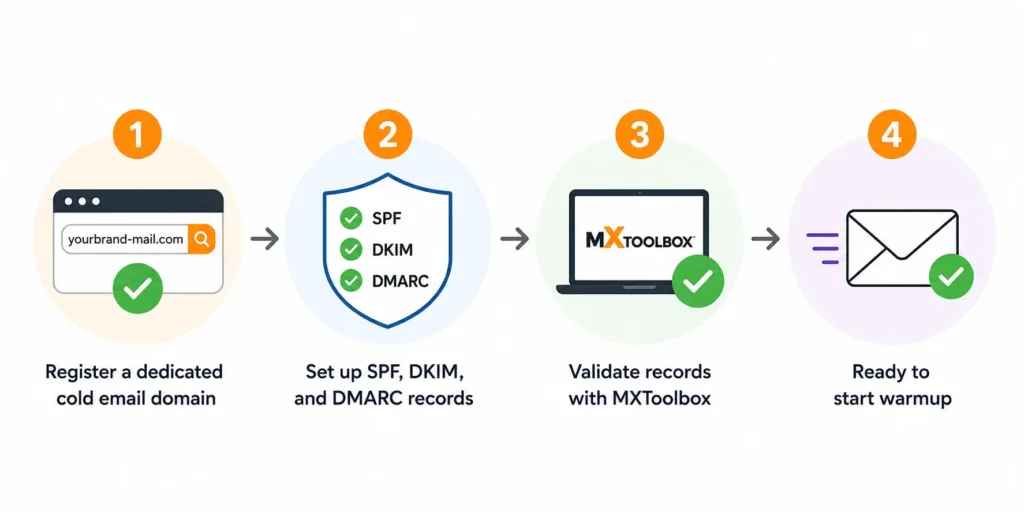
Step 1: Register a dedicated cold email sending domain


Cold email infrastructure setup.

The sending domain for cold email needs to be registered solely for that purpose. Not the primary business domain, not a subdomain of it.

The sending domain may be getcompany.com, hellocompany.com, or company-hq.com, if the primary domain is company.com. The domain should be professionally formatted and plausibly associated with the company, while remaining isolated so any reputation damage does not transfer to the primary domain.

1. Sending inboxes to create per domain based on volume


Each inbox on a warmed domain should send no more than 50 emails per day.
Use the following to determine how many inboxes the operation requires:

Daily Send VolumeInboxes RequiredDomains Required (at 3 inboxes/domain)
Up to 150/day31
150-300/day62
300-600/day124
600-1,000/day207

Increasing per-inbox volume beyond the 50/day ceiling raises flag probability without increasing reliable throughput. Higher send volume requires additional inboxes across additional domains.

2. Publish SPF, DKIM, and DMARC records in the correct order


Authentication records must be published in DNS before any mail leaves the domain. Configuration order:

SPF record - Add a TXT record to the domain's DNS:

v=spf1 include:[your-sending-provider.com] ~all


Replace [your-sending-provider.com] with the SPF include string from the email platform (Instantly, Smartlead, or whichever tool is in use). If a server is not present, then the ~all qualifier will return a soft-fail (not a hard-fail). This is the ideal time for configuration when it's still possible to get it wrong.

DKIM record: The sending platform creates a pair of public and private keys. The public key gets published as a TXT record in DNS under a selector subdomain, for example, selector1._domainkey.yourdomain.com. The private key is stored by the mail server and uses it to sign every message sent.

DMARC record: Add a TXT record at _dmarc.yourdomain.com with this value: v=DMARC1; p=none; rua=mailto:[email protected]

Start with p=none. This generates failure reports without rejecting or quarantining mail, allowing configuration issues to be identified before they affect deliverability. After 30 days of clean authentication data, advance to

p=quarantine, then to p=reject.


3. Validate authentication records with MXToolbox


Before any mail is sent, confirm all three records resolve correctly:

  • Go to mxtoolbox.com/SuperTool.aspx
  • Run an SPF lookup, DKIM lookup (with the selector value), and DMARC lookup for the sending domain
  • All three must return valid records with no errors

If any record returns an error, do not proceed to warmup. Correct the DNS entry, allow up to 48 hours for propagation, and re-validate.

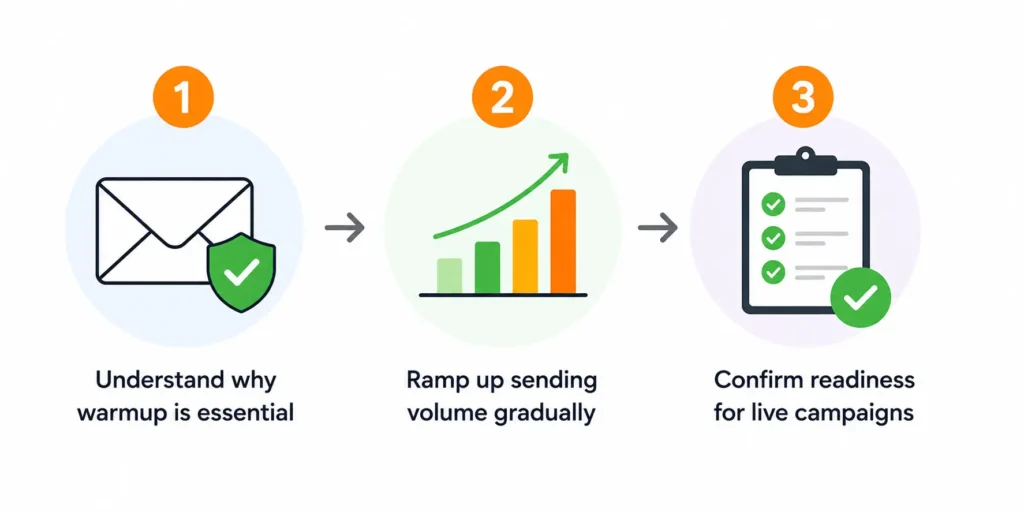
Step 2: Warm up the domain before any campaign starts


Cold email domain warmup process from setup to campaign readiness.

A newly registered domain starts with no trust history. Warmup builds it through controlled, low-volume sending before any cold outreach begins.

1. Warmup impact on inbox providers scoring


Inbox providers assign new domains maximum risk classification by default. Warmup builds a sending history: the domain sends low volumes of mail that gets opened, replied to, and not marked as spam. Over 3-4 weeks, this history gives inbox provider algorithms positive behavioral data to evaluate. Without warmup, a new domain sending cold outreach at scale lands in spam. Low engagement and complaint accumulation follow, and domain reputation deteriorates fast.

2. Week-by-week send volume ramp


Use a dedicated warmup tool to manage the ramp. Mailreach, Warmup Inbox, or the native warmup feature in Instantly or Smartlead all work for this.

WeekEmails per inbox per dayType
Week 110-15Warmup traffic only (tool-to-tool)
Week 220-30Warmup traffic only
Week 330-40Warmup + initial cold sends (low volume)
Week 4Up to 50Full cold outreach volume
Warmup tools send to a network of other warmed inboxes and automatically open, reply to, and remove messages from spam folders. This establishes positive engagement patterns. Compressing the warmup timeline, completing it in 2 weeks rather than 4, does not produce equivalent domain trust.

3. Signs the domain is ready for live campaigns


The domain is ready for cold outreach when all of the following are true:

  • Google Postmaster Tools reports domain reputation as Medium or High
  • The warmup tool reports inbox placement rates above 90%
  • SPF, DKIM, and DMARC are all passing in the warmup tool's authentication diagnostics
  • A minimum of 3 full weeks of warmup have been completed

Read the full email warmup checklist.

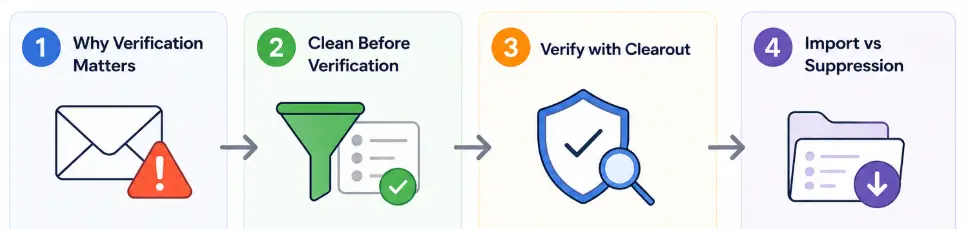
Step 3: Verify and clean the lead list before it enters the tool


Email list verification and cleaning workflow before cold outreach.

An unverified list directly affects bounce rate, spam complaint rate, and inbox placement rate simultaneously. Bounce rate above 2% triggers provider penalties. A complaint rate above 0.08% initiates filtering. Invalid and role-based addresses dilute the active recipient pool. Engagement rate drops, and inbox placement follows. Cleaning the list before import keeps all three metrics within a safe range.

1. Unverified list and bounce rate impact


A raw lead list from a purchased database, scraped source, or enrichment tool is never clean. Here is what that means when you are sending at scale:

Unverified lists are deemed to have 5-15% invalid email addresses. This means you can buy or have a list of 1,000 contacts, but as early as you start sending campaigns out, 50-150 of those emails may not be accessible. Suppose that you send an email to 500 people from that list, and 10% of these people are invalid addresses. You could end up with around 50 bounced emails.

  • Domain damage builds quietly. Most senders only notice it when deliverability has already dropped.
  • A bounce rate above 2% puts your domain reputation at risk. Cross 5% and inbox providers like Google and Microsoft begin actively penalizing your sending domain. Future campaigns land in spam even when the list is clean.
  • Catch-all addresses do not bounce. They simply disappear. A catch-all domain will receive any email sent to it even if the mailbox doesn't exist. But no one receives it, so [email protected] is delivered. The bounce rate is high, engagement is low and the inbox providers still consider it a pattern.

2. List cleanup before verification


Most senders run manual cleanup before verification. Clearout's email verifier handles all of this automatically. No manual pre-processing required.

  • Role-Based Addresses: Clearout identifies and flags addresses like info@, support@, sales@, admin@, and noreply@. These routes go to group inboxes, not individual recipients. Spam complaints from role-based addresses carry elevated weight with inbox providers.
  • Syntax Errors: Clearout catches addresses missing an @ symbol, containing spaces, or carrying formatting errors from enrichment tools.
  • Duplicates: Clearout deduplicates by email address automatically. This prevents the same contact from entering a sequence more than once.
  • Known Spam Traps: Clearout flags known spam trap addresses during verification. All flagged entries are removed before your list is cleared for use.

3. Running Clearout verification


Upload your list as a CSV or XLSX file into Clearout. It runs 20+ validation checks automatically. Syntax, domain, MX records, SMTP verification, spam trap detection, disposable email detection, and catch-all behavior are all covered. No manual setup required.

Clearout verification status

Every address receives one of four primary verification statuses after the check is complete:

  • Valid: The mailbox exists and is actively accepting email. These addresses are deliverable. Import them into your sequencing tool.
  • Catch-All: The domain accepts every inbound email regardless of whether the specific mailbox exists. Messages may be rejected later by spam filters or mailbox limits. Exclude catch-all addresses or cap them at 10% of any campaign send.
  • Unknown: Clearout could not receive a response from the mail server at verification time. This happens due to server timeouts or temporary unavailability. Do not include unknown addresses in high-volume sends. Clearout does not charge credits for unknown results.
  • Invalid: The address does not exist or is not accepting email. It will result in a bounce. Remove all invalid addresses before import. Clearout also flags whether the bounce is hard or soft.

Safe to Send Flag

Each address also receives a Safe to Send flag: Yes, Risky, No, or Unknown. This tells you the actual sending risk beyond just the status. Only send to addresses where Safe to Send is marked Yes.

4. What gets imported vs what goes on the suppression list


  • Import: Addresses that are safe to send are marked Yes only.
  • Suppression list: Addresses where Safe to Send shows No, Risky, or Unknown. All previous unsubscribes across campaigns also go here. Load the suppression list into the sequencing tool before any campaign launches.

Step 4: Configure the automation tool


When you have your sending infrastructure in place, the next step is to make sure that the automation platform is set up properly.

1. Daily send limit per inbox: 50 is the ceiling


Gmail allows up to 2,000 sends per day for Workspace accounts at the technical level. That limit is irrelevant for cold email. Inbox provider spam filters treat abrupt high-volume sends from domains with limited history as anomalous behavior. A domain that completes warmup and sends 300 emails from one inbox triggers behavioral signals. These signals increase spam placement rates, regardless of authentication status.

At 50 emails per inbox per day, the correct approach to scaling volume is adding inboxes across additional domains, not increasing per-inbox volume.

2. Inbox rotation across multiple inboxes


Tools like Instantly, Smartlead, and Lemlist support inbox rotation natively. Here is how to set it up:

  • Add all sending inboxes to the campaign's sending pool.
  • Set per-inbox daily limit to 50.
  • Enable rotation so the platform distributes sends across all active inboxes rather than filling them sequentially.
  • Set a minimum send gap of 3-5 minutes per inbox. Extending to 5-10 minutes reduces flag risk further.

Rotation prevents any single inbox from accumulating a disproportionate share of complaints or bounces. If one inbox develops a deliverability problem, rotation contains the impact to that inbox.

3. Sequence structure, timing, and exit conditions


3-5 touches per prospect is standard for cold B2B outreach. Sequences exceeding 5 steps without a response generate low engagement signals that inbox providers use to downgrade domain reputation.

Timing:

  • Step 1 (Initial email): Day 1
  • Step 2 (First follow-up): Day 3-4
  • Step 3 (Second follow-up): Day 7-8
  • Step 4 (Third follow-up, if used): Day 14
  • Step 5 (Final touch, if used): Day 21

Exit conditions: Configure these before the campaign launches:

  • Reply received: Remove from sequence immediately. Continued sending after a reply generates complaints.
  • Hard bounce: Remove from sequence and add to the suppression list.
  • Unsubscribe: Remove from the sequence and add to the global suppression list across all active campaigns.
  • Out-of-office auto-reply: Pause the sequence for the duration specified in the auto-reply, then resume.

4. AI in cold email automation


AI features in tools like Smartlead, Instantly, and Clay have expanded significantly in 2026. These features work at the messaging level only.

What AI handles in cold email automation:

  • Personalization at scale: AI pulls variables from LinkedIn activity, company news, or role to generate individualized opening lines.
  • Subject line and copy variants: AI generates and A/B tests multiple subject lines and body copy across different audience segments.
  • Sequence timing optimization: Some platforms adjust follow-up intervals per prospect based on engagement signals.

Before running automated personalized cold emails at volume, confirm:

  • Every personalization variable has a fallback value defined in the tool
  • A sample of 50-100 test sends has been reviewed for correct variable population
  • AI-generated content has been audited for factual accuracy; incorrect company details or wrong job title references produce complaints and damage reply rates

AI cold email tools by feature (2026):

ToolAI CapabilityDeliverability Feature
Clay + GPT-4oResearch-driven personalization at scaleIntegrates with Instantly/Smartlead for sending
Smartlead AIAI-generated follow-up variantsNative inbox rotation and warmup
Instantly AIAI sequence builderBuilt-in warmup network
LemlistAI icebreaker generationDeliverability dashboard

5. Disable open tracking pixels


Open tracking embeds a 1×1 invisible image pixel in the email body. When the email loads, the pixel fires a request to the tracking server. This registers an open event.

Inbox providers scan outbound mail for tracking pixels. Every outgoing message with a third-party tracking pixel is a pattern associated with bulk email and phishing campaigns. Gmail and equivalent providers treat this as a negative reputation signal.

For cold email, there is an additional data reliability problem. Most corporate email environments block remote image loading by default. This means the tracking pixel never fires, even when the email is opened. Open tracking generates unreliable data and contributes to deliverability degradation. Disable it and measure campaign performance through reply rate, click rate, and meeting booking rate.

Step 5: Monitor deliverability metrics and re-verify the list


1. Metrics to track continuously


MetricSafe TargetAction Threshold
Hard bounce rateBelow 2%Above 3%: pause campaign, re-verify list
Spam complaint rateBelow 0.08%Above 0.10%: pause campaign, audit sequence and targeting
Reply rate (positive)Above 2% for well-targeted campaignsBelow 0.5%: audit targeting, messaging, and deliverability
Domain reputation (Google Postmaster)Medium or HighLow or Bad: pause immediately, investigate root cause
Inbox placement rateAbove 90%Below 80%: audit authentication records, reduce send volume

2. What to do when a metric crosses the danger line


  • Bounce rate above 3%: Stop the active campaign. Re-run the list through Clearout. Audit the import process to identify how invalid addresses entered the campaign. Resume only when the cleaned list projects a bounce rate under 2%.
  • Complaint rate above 0.10%: Pause the campaign. Review sequence messaging for content that recipients may flag as deceptive or irrelevant. Review targeting, complaint rates increase when the message does not match the audience. Confirm that all prior unsubscribes are on the suppression list. Resume after the root cause is identified and corrected.
  • Domain reputation drops to Low or Bad in Google Postmaster Tools: Stop all sends from that domain immediately. Move active campaigns to a backup sending domain. The affected domain requires a full recovery warmup: 30-90 days of low-volume, high-engagement sends before it can support cold outreach again.

3. When to re-verify the list: 90-day rule and bounce-rate triggers


  • 90-day rule: Any list segment unused for 90 or more days requires re-verification before the next campaign. At 22-30% annual decay, a list accumulates roughly 5-7% invalid addresses per 90-day period. A segment verified three months ago carries a deliverability risk at next use.
  • Bounce-rate trigger: If bounce rate exceeds 2% mid-campaign, re-verify the active send list immediately. A mid-campaign bounce rate spike indicates list quality has degraded. Stop the campaign and re-verify the list before resuming.

The complete cold email automation stack you need


LayerPurposeTool TypeClearout’s Role
Domain and inbox setupIsolate cold email from primary domainDomain registrar + Google Workspace or Microsoft 365—
AuthenticationSPF, DKIM, DMARC configuration and validationDNS management + MXToolbox—
Domain warmupEstablish a sending reputation before campaignsWarmup tool (Mailreach, Warmup Inbox, or native feature in Instantly/Smartlead)—
List verificationRemove invalid, risky, and role-based addresses before importClearoutMulti-step verification; Safe/Risky/Invalid classification; catch-all and spam trap detection
AI personalizationGenerate individualized cold email content at scaleClay + GPT-4o, Smartlead AI, Instantly AIEnsures only verified addresses enter the AI personalization workflow
Campaign sequencingSend and manage multi-step outreach sequencesCold email automation software (Instantly, Smartlead, Lemlist)Suppression list is built from Invalid and Risky addresses flagged during verification
Deliverability monitoringTrack bounce rate, complaint rate, and inbox placement continuouslyGoogle Postmaster Tools + platform analyticsRe-verification triggered by bounce-rate thresholds

Case study


How a leading B2B SaaS company lost its entire Q2 outbound window?


A compliance software company targeting legal and finance teams ran 3 domains and 9 inboxes. Daily send volume was ~450 emails through Instantly. The 18,000-contact list came from Apollo and a LinkedIn scrape. It was imported directly without verification.

6 weeks in:

MetricBeforeAfter
Bounce rate1.4%4.2%
Domain reputation (Google Postmaster)—2 of 3 flagged low

When the full list ran through Clearout:

StatusCount
Invalid3,200
Risky2,100
Role- based2,160
Sendable~12,400

Business ImpactDetail
Recovery warmup required6 weeks per flagged domain
Season affectedQ2 - peak outbound
Enterprise deals gone cold2
Deals recovered1 of 2
Root causeNo verification before import
Prevention timeUnder 24 hours via Clearout

Wrap up


B2B pipelines run on outbound. Without automation, the volume of cold emails required is simply not executable. But automation without the right setup does more damage than manual sending ever could. Flagged domains, burned lists, lost pipeline.

The difference is what happens before the first send. Verified lists, warmed domains, enforced limits.

Clearout handles the verification layer that determines whether campaigns run or domains recover.

Try Clearout Now

FAQs


1. What is cold email automation?
Cold email automation is the use of software to send pre-written outreach sequences to prospects automatically, including follow-ups, without manual sending. It handles scheduling, personalization, inbox rotation, and delivery timing, but only works as intended when the sending infrastructure is set up correctly first.
2. How many cold emails can you send per day without getting flagged?
The safe limit is 50 emails per inbox per day on a fully warmed account, not the 2,000 Gmail technically allows. To send higher volumes, add more warmed inboxes across secondary domains rather than pushing one inbox past its daily ceiling.
3. How long does it take to repair a damaged sender reputation?
Minor damage takes 2-4 weeks to recover with clean sending. Moderate issues need 4-8 weeks. Severe blacklisting can require 3-6 months of disciplined warmup before reputation stabilizes. Verifying your list through Clearout before every campaign takes minutes. Recovery takes months.
4. Does cold email automation hurt deliverability?
Automation itself does not hurt deliverability; unmanaged automation does. The damage comes from unverified lists, unwarmed domains, and uncapped sending volume. Use Clearout to verify your list before any campaign launches and eliminate the primary risk upfront.
5. What is the sender's reputation in email?
Sender reputation is a score inbox providers like Gmail and Outlook assign to your sending domain based on bounce rates, spam complaints, engagement, and authentication setup. A poor score means emails go to spam or get rejected outright before any prospect ever sees them.

Share this article

Recent Posts

15 Jun 2026
Cold Email Automation Setup To Protect Sender Reputation

Learn how to set up cold email automation without hurting sender reputation. Discover domain warmup, ...

11 Jun 2026
5 Signs Your HubSpot CRM Needs Real-Time Data Validation

Dirty data in your HubSpot CRM costs more than you think. Explore 5 warning signs your HubSpot data ...

04 Jun 2026
Sales Funnel Metrics & KPIs You Must Track in 2026

Discover the sales funnel metrics in 2026, including MQL-to-SQL rate, pipeline velocity, CAC, conver ...

02 Jun 2026
Top 11 LinkedIn Automation Tools in 2026 (By Use Case)

Explore the top LinkedIn automation tools of 2026 for prospecting, outreach, content and workflow au ...

29 May 2026
Email Verification for Startups vs Enterprises: What Changes at Scale

Explore startup vs enterprise email verification as businesses scale. Learn how requirements differ ...

Clearout's

Form Guard

Validate email, phone & name on any forms!

  • Real signups only
  • Verified emails
  • Valid phone numbers
  • No fake names
  • Cleaner CRM
  • No devs needed
Try for Free Now

Email Verification, Email Finding Form Guard & Prospecting Service

Expand Your Reach By Finding & Verifying Ideal Prospects.

Sign up & get 100 free credits

No Credit Card required

Create Free Account
Company

Why Clearout?

Pricing

Contact Us

Careers

Press

Enterprise

Sitemap

FAQ

Status

Products

Email Verifier

Email Finder

Form Guard

Prospect

LinkedIn Email Finder

Reverse Lookup

Google Sheets Add-on

WordPress Plugin

ClearoutPhone

What's New?

Resources

Integrations

HubSpot

Team Account

API

Compare Email Verifier

Compare Email Finder

Compare Prospecting

Use Cases

Blog

Help

Legal

Privacy Policy

Terms

DPA

Security

Trust Center

Certification

ISO 27001/2022

SOC 2 Type 2

GDPR

Partnership

HubSpot Certified

Affiliates

Partners

Clearout for browser

⚡ Supercharge Your Prospect Research with Clearout's LinkedIn Chrome Extension - Find and Verify Emails with Confidence!

Clearout Chrome extension

clearout
© 2026 Clearout Inc. All Rights Reserved. Powered by Clearout.
Keep HubSpot data clean on autopilot — validate, enrich, and sync contacts in real time with Data Pulse. Learn More ➞
X