

- Products
- ResourcesDEVELOPER

 API
API
Clearout APIs are structured around REST and JSON Webhooks
Capture real-time events in your application workflow Form Guard
Real-time form validation to keep bad contacts out of your CRMKNOWLEDGE BASE Getting started
Sending campaigns without bounces is made simple FAQ
FAQ
Easily find answers to services, security and common questionsUSE CASES Lead Generation
Learn how professionals generate quality leadsGUIDES Clearout Insights Explore original research, industry statistics, and data-backed insights Pricing Transparent & flexible pricing to support pay-per-use or recurringCompare Email Verification Tools AI-powered email verification with 99%+ accuracy, real-time validation, and transparent risk scoringCompare Email Finder Tools Pre-verified B2B email addresses with confidence scoring, find real person email, not role-based addressData Pulse & HubSpot Breeze Intelligence Pre-verified B2B email addresses with confidence scoring, find real person email, not role-based addressBLOGSEmail Verification ToolsFind Anyone’s Email Address
Most Accurate, Fast & Free WaysForm Validation
Importance, Ways & Best PracticesView All Blogs - Pricing
- Integrations
- Enterprise
- Login



Email Warmup Checklist for New Domains (2026 Guide)

Starting cold reach with a new domain? When you are in a rush to send a lot of emails in a short time interval, your messages might end up in spam before they reach their target audience.
Nevertheless, you can attain an excellent inbox delivery rate of 85 to 95% of your emails if properly configured by your domain and by sending more emails.
Gmail, Outlook and Yahoo are the email providers that will consider how credible you are as a sender. When a domain appears not to be trustworthy, then the email will likely go into the spam mail even though the content is good.
That’s why email warmup becomes a necessity here.
But before you even send your first warmup email, you need to follow a complete checklist to expect direct inbox placement and get replies.
This guide will help you learn exactly this. We have covered how to help build trust with email providers, set up your domain, how many emails you should send, and the secret step you always miss before email warmup.
Nevertheless, you can attain an excellent inbox delivery rate of 85 to 95% of your emails if properly configured by your domain and by sending more emails.
Gmail, Outlook and Yahoo are the email providers that will consider how credible you are as a sender. When a domain appears not to be trustworthy, then the email will likely go into the spam mail even though the content is good.
That’s why email warmup becomes a necessity here.
But before you even send your first warmup email, you need to follow a complete checklist to expect direct inbox placement and get replies.
This guide will help you learn exactly this. We have covered how to help build trust with email providers, set up your domain, how many emails you should send, and the secret step you always miss before email warmup.
Table of Content
What Is Email Warmup and Why Does It Matter?
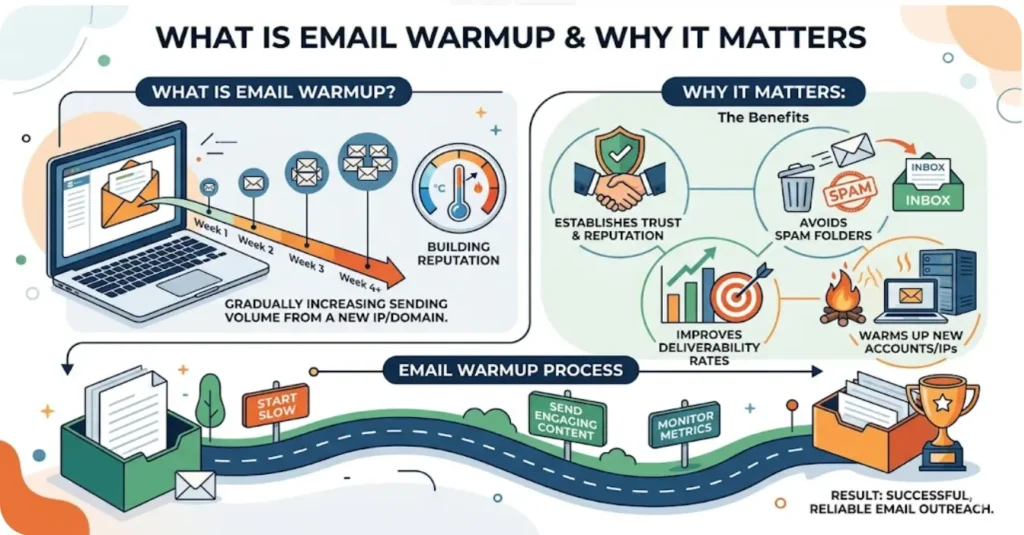
Email warmup is a process that helps build trust with email providers. It is used when you start using an email account or domain.
If you start sending emails at scale from a new domain, Gmail can flag it as suspicious due to a lack of history. This is because the domain has no history of sending emails. So it doesn't have the trust signals needed to land in inboxes. This email warmup starts with a number of emails. The volume is increased gradually to build a natural sending pattern. This makes the sending pattern look natural.
If you start sending emails at scale from a new domain, Gmail can flag it as suspicious due to a lack of history. This is because the domain has no history of sending emails. So it doesn't have the trust signals needed to land in inboxes. This email warmup starts with a number of emails. The volume is increased gradually to build a natural sending pattern. This makes the sending pattern look natural.
Why Is Email Warmup Important?
- Helps prevent emails from landing in spam
- Builds sender reputation with email providers
- Reduces the risk of blacklisting
- Improves inbox placement over time
- Ensures consistent email deliverability
- Helps you spot issues like bounces and spam complaints before increasing volume
How to Warm Up Your Emails: A Complete Checklist
The steps below cover what actually needs to be done to warm up your emails and have a reliable sender reputation.
Tip 1: Pre-Warmup Domain Setup
Getting your domain ready before a single warmup email goes out is the part most people skip, and it is exactly why their warmup fails.
1. Choose the Right Domain and TLD
Do not send cold outreach from your primary business domain. Instead, use a separate domain or subdomain. If deliverability issues come up, they can impact all your emails, including transactional messages and client communication.
Keep your main domain out of this. a separate subdomain or domain for outreach, like outreach.yourcompany.com or yourcompany-hq.com. Whatever happens during warmup stays contained there.
And when picking a TLD, stick to .com. Extensions like .biz, .info, and .xyz carry a spam association that neither ESPs nor recipients look past easily.
Keep your main domain out of this. a separate subdomain or domain for outreach, like outreach.yourcompany.com or yourcompany-hq.com. Whatever happens during warmup stays contained there.
And when picking a TLD, stick to .com. Extensions like .biz, .info, and .xyz carry a spam association that neither ESPs nor recipients look past easily.
2. Configure Email Authentication Records (Non-Negotiable)
These 3 records must be present before the first warmup email is sent:
- SPF: Publishes email providers a list of authorized servers that can send emails on behalf of your domain. It is necessary because when you send your emails, they will be considered as potentially fraudulent before being received.
- DKIM: Signs each outgoing email with a cryptographic signature. Receiving servers take it to ensure that the mail is actually sent by you and that it comes in its original form.
- DMARC: Sets the rules for what happens when SPF or DKIM checks fail, and keeps you in the loop on how your domain is being used, or abused, across the internet.
3. Set Up a Custom Tracking Domain
If you're using tracking links or pixels, point them to a custom domain instead of the shared tracking domain your email tool uses by default. Shared domains are used by thousands of senders, including spammers.
Because of this, your emails can pick up a poor reputation before they even leave your inbox. A custom tracking domain helps keep your link reputation tied only to your own sending behavior.
Because of this, your emails can pick up a poor reputation before they even leave your inbox. A custom tracking domain helps keep your link reputation tied only to your own sending behavior.
4. Set Up a Professional Mailbox
A warmup domain needs a complete and professional-looking mailbox setup. This includes a proper display name, a professional email signature, and a mailbox that has been active before outreach begins.
Additionally, if you’re sending from a completely empty inbox with no history, it can look suspicious. So before you start, send a few internal emails so the mailbox has basic activity before outreach begins.
Additionally, if you’re sending from a completely empty inbox with no history, it can look suspicious. So before you start, send a few internal emails so the mailbox has basic activity before outreach begins.
5. Verify Your Sending Infrastructure Is Clean
Before warmup, check that:
- Your domain is not on any known blacklists
- Your IP address has no prior spam history
- Your DNS records have fully propagated and are resolving correctly
Tip 2: Clean Your Contact List Before You Send
6. Why List Quality Is the Foundation of Warmup Success
A clean list supports your warmup and protects your sending reputation. A warmed domain sending to a bad list will still generate bounces, spam complaints, and deliverability damage; it just happens a little more slowly.
Hard bounces signal to ESPs that your data is low-quality. Spam traps can get your domain blacklisted. And unverified contacts waste your warmup budget on emails that will never be seen.
The list you send during warmup matters just as much as the domain you are sending from.
Hard bounces signal to ESPs that your data is low-quality. Spam traps can get your domain blacklisted. And unverified contacts waste your warmup budget on emails that will never be seen.
The list you send during warmup matters just as much as the domain you are sending from.
7. Use an Email Verification Tool
Before any warmup email touches a real contact, run your list through a verification tool like Clearout.
Real verification goes deeper than syntax. Clearout checks domain health, validates MX records, and uses SMTP-level protocols to confirm the mailbox actually exists.
Every address it processes is checked in real time, catching invalid addresses, disposable emails, spam traps, temporary, gibberish, catch-all and role-based addresses before they make it onto your list.
Real verification goes deeper than syntax. Clearout checks domain health, validates MX records, and uses SMTP-level protocols to confirm the mailbox actually exists.
Every address it processes is checked in real time, catching invalid addresses, disposable emails, spam traps, temporary, gibberish, catch-all and role-based addresses before they make it onto your list.
Tip 3: The Warmup Process - Week-by-Week Schedule
8. Start With Warm Contacts (Weeks 1-2)
For the first two weeks, stick to people:-
- Who already know you
- Colleagues, existing clients
- Anyone expecting to hear from you
When those contacts open and reply, it tells ESPs your emails are wanted. That's the fastest way to start building a positive sending history.
Avoid cold contacts entirely in the first two weeks. A wave of cold opens and no replies looks suspicious from a brand new domain.
Avoid cold contacts entirely in the first two weeks. A wave of cold opens and no replies looks suspicious from a brand new domain.
9. Gradual Volume Ramp Schedule
| Week | Daily Send Volume |
|---|---|
| 1 | 5-10 emails/day |
| 2 | 15-20 emails/day |
| 3 | 25-40 emails/day |
| 4 | 50-75 emails/day |
| 5+ | 100+ emails/day (based on engagement metrics) |
10. Use Manual Warmup or an Automated Warmup Tool
Manual warmup means sending emails to real contacts who reply, which builds strong engagement signals. But it takes time and doesn’t scale easily.
Tools like Instantly.ai, Snov.io, Lemwarm, Warmy.io, and Mailreach automate this by simulating engagement across inboxes. They send warmup emails on your behalf, generate opens, replies, and spam rescues, and gradually ramp your volume according to a schedule.
The key is picking a tool with a high-quality warmup network.
However, low-quality warmup networks (burner accounts, free inboxes, custom SMTP relays) produce engagement signals that Gmail and Outlook do not fully credit, since these providers primarily evaluate engagement from within their own ecosystems.
See the section below for the 5 warmup tools worth considering in 2026.
Tools like Instantly.ai, Snov.io, Lemwarm, Warmy.io, and Mailreach automate this by simulating engagement across inboxes. They send warmup emails on your behalf, generate opens, replies, and spam rescues, and gradually ramp your volume according to a schedule.
The key is picking a tool with a high-quality warmup network.
However, low-quality warmup networks (burner accounts, free inboxes, custom SMTP relays) produce engagement signals that Gmail and Outlook do not fully credit, since these providers primarily evaluate engagement from within their own ecosystems.
See the section below for the 5 warmup tools worth considering in 2026.
11. Diversify Your Sending Infrastructure
If you are planning to send at any meaningful volume, do not concentrate all of it through a single inbox. Distribute your sending across multiple warmed inboxes using inbox rotation.
This keeps volume per mailbox within safe limits and reduces overall risk. It also gives you backup if one inbox gets flagged.
This keeps volume per mailbox within safe limits and reduces overall risk. It also gives you backup if one inbox gets flagged.
Tip 4: Content Best Practices During Warmup
12. Write Like a Human - Not a Marketer
During warmup, your emails should appear as one-to-one communication rather than campaign-driven messages. In practice, this means:
- Skip HTML templates and heavy formatting; plain text performs better during warmup
- You should also try to avoid using tracking pixels at the beginning
- The subject line should not sound like an advertisement for something
- Keep sentences short, and the message specific; generic copy triggers spam filters
- Vary your content between sends; identical emails sent at scale are a spam signal
- Avoid heavy marketing-style unsubscribe formatting during early warmup emails
13. Vary Your Content Strategically
Rotating your warmup email content prevents pattern detection by spam filters. Good warmup tools handle this automatically through spintax, generating slightly different versions of each email so no two sends look identical.
If you are warming up manually, prepare 5-10 different email variations and rotate between them throughout the warmup period.
If you are warming up manually, prepare 5-10 different email variations and rotate between them throughout the warmup period.
14. Include the Legal Basics
Also, in warmup, ensure that your emails meet the requirements of CAN-SPAM, GDPR, and CASL. This implies that a valid address should be provided, the content should be truthful and not misleading.
15. Keep Cleaning Your List Continuously
When your list has been checked once, you are not done with your warmup. It implies that contacts that you checked at the beginning of your warmup can be stale by the time that you are ready to send full volume.
Establish a periodic checking schedule, at least, recheck lists after every 90 days. Where lists have not been utilized within the past month, recheck it again prior to the next send.
Using Clearout, you can maintain a clean list with bulk verification, API integration and real-time checks, ensuring that invalid data never gets into your list.
Get to know more about the frequency of verifying your email lists.
Establish a periodic checking schedule, at least, recheck lists after every 90 days. Where lists have not been utilized within the past month, recheck it again prior to the next send.
Using Clearout, you can maintain a clean list with bulk verification, API integration and real-time checks, ensuring that invalid data never gets into your list.
Get to know more about the frequency of verifying your email lists.
16. Continue Monitoring Deliverability
Warmup develops your reputation as a sender. It is maintained by continuous surveillance. Install Google Postmaster Tools in Gmail and Microsoft SNDS in Outlook to monitor your domain reputation and spam complaint rates in real time.
Don’t wait until a deliverability drop is reflected in your open rates since early identification of issues prevents them from becoming campaign-killing problems.
Don’t wait until a deliverability drop is reflected in your open rates since early identification of issues prevents them from becoming campaign-killing problems.
Tip 5: Monitoring Your Warmup Performance
17. Check These Key Metrics Daily
Do not start warmup and ignore performance. The following are the metrics that will indicate that the warmup is effective:
- Bounce rate: Above 2% are hard bounce, which is a red flag; it informs ESPs that your list is of low quality.
- Spam complaint rate: This should not exceed 0.1% at any given time.
- Open and reply rates: Low engagement in warmup indicates that your warmup network is not creating valuable interactions.
- Blacklist status: Check daily; a blacklist hit during warmup can set you back significantly
18. Watch for Red Flags
Stop and diagnose immediately if you see:
- A sudden spike in hard bounces
- Warmup emails consistently land in spam rather than the inbox
- A drop in inbox placement rate over consecutive days
- Any blacklist notification
19. Do Not Rush the Timeline
A standard warmup takes 4-6 weeks.
One of the most prevalent (and expensive) errors in cold email outreach is to cut it short so as to get things started quicker.
Although your inbox placement may be good at week three, the reputation of your domain remains compromised. A single violent message prior to warming up can erase months of hard work.
One of the most prevalent (and expensive) errors in cold email outreach is to cut it short so as to get things started quicker.
Although your inbox placement may be good at week three, the reputation of your domain remains compromised. A single violent message prior to warming up can erase months of hard work.
What are the Best Email Warm-Up Tools to Increase Your Deliverability
Each email warm-up tool approaches things differently. Getting the right email warm-up tool depends on the volume of emails you send and your budget.
1. Instantly.ai
Best for: Sales teams running large-scale cold email outreach who want a warmup and sending in one platform.
Instantly.ai is primarily a cold email outreach platform that includes a built-in warmup feature as part of every plan. It includes a native email warm-up feature with no extra tools required, supports unlimited inbox rotation, and uses AI personalization to help increase reply rates.
Pros:
Instantly.ai is primarily a cold email outreach platform that includes a built-in warmup feature as part of every plan. It includes a native email warm-up feature with no extra tools required, supports unlimited inbox rotation, and uses AI personalization to help increase reply rates.
Pros:
- Unlimited email accounts and warmup
- One-click warmup activation
- AI-generated warmup emails
- Inbox rotation is built in
- Built-in B2B lead database
- Warmup alone doesn’t prevent bounce spikes or spam issues
- Limited insight into what went wrong if issues occur
- No checks for DNS, MX records, or blacklist status
- No visibility into the quality of the warmup network
- Only supports email, no LinkedIn or SMS integration
"Instantly sends emails directly to inboxes with its DFY service, and I can easily create different campaigns. It's simple to insert leads with the API and track replies. The warmup feature ensures my domain stays healthy." - G2 reviewer
2. Snov.io
Best for: Teams that want to find email addresses, check if they are valid, and warm up their email accounts in one place without having to use many different tools.
Snov.io is a platform that helps with sales. It has a feature that helps warm up your email account. The warmup feature is separate from your outreach efforts. This means your live campaigns and emails to prospects are not affected.
Pros:
Snov.io is a platform that helps with sales. It has a feature that helps warm up your email account. The warmup feature is separate from your outreach efforts. This means your live campaigns and emails to prospects are not affected.
Pros:
- Warmup cannot be paused or scheduled separately
- Limited deliverability insights beyond basic metrics
- Can get expensive as your usage grows
- Warmup depends on plan-based mailbox limits
- Warmup alone doesn’t prevent bounce spikes or spam issues
- Limited insight into what went wrong if issues occur
- No checks for DNS, MX records, or blacklist status
- No visibility into the quality of the warmup network
- Only supports email, no LinkedIn or SMS integration
"Recently, they launched the Email Warmup service, but SMTP integration is limited for specific ESPs. But it is in beta so maybe they will support all SMTP clients soon." - G2 reviewer
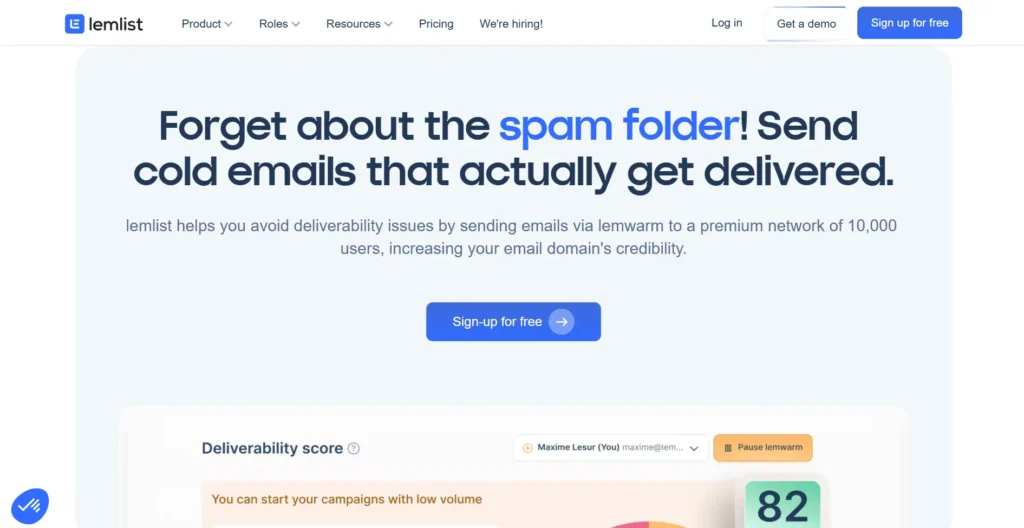
Best for: Teams already using Lemlist for outreach who want warmup and campaigns managed under one roof.
Lemwarm is Lemlist's built-in warmup engine. It works directly with your live campaigns, warming the same inboxes you use for outreach rather than isolated test accounts, and automatically pauses warmup when a campaign is running.
Pros:
Lemwarm is Lemlist's built-in warmup engine. It works directly with your live campaigns, warming the same inboxes you use for outreach rather than isolated test accounts, and automatically pauses warmup when a campaign is running.
Pros:
- Works smoothly with Lemlist, no extra setup needed
- Uses industry-based warmup for more natural engagement
- Lets you warm up your actual email templates
- Reliable deliverability testing with a strong network
- Automatically pauses during active campaigns
- Can get expensive since pricing is per inbox
- Smaller network compared to some competitors
- Works best within the Lemlist ecosystem
- Limited support for DNS and technical setup
"The combination of LinkedIn and e-mail is very nice. The UX is pretty easy to use once you know where everything is. Also very handy that email warmup is included. For now I am very happy with Lemlist; it does exactly what I would expect it to do!" - G2 reviewer
4. Warmy.io

Best for: Agencies and teams sending high volumes who need control over warmup and deliverability.
Warmy.io focuses fully on email warmup and deliverability, not as an add-on. It uses AI and a network of 35,000+ inboxes to improve inbox placement. This makes it a strong fit for teams where consistent delivery really matters.
Pros:
Warmy.io focuses fully on email warmup and deliverability, not as an add-on. It uses AI and a network of 35,000+ inboxes to improve inbox placement. This makes it a strong fit for teams where consistent delivery really matters.
Pros:
- Flexible warmup settings across language, topic, and patterns
- Supports click-based warmup, not just opens and replies
- Tracks blacklists, DNS setup, and domain health regularly
- Works with many email providers and custom SMTP
- Includes free SPF and DMARC tools
- More expensive than basic warmup tools
- May be too advanced for smaller teams
- Takes time to learn and set up properly
"The warmup status for multiple teams can be managed in one dashboard, which is what I liked most about Warmy. The interface is also easy to use, and it’s straightforward to configure email sending." - G2 reviewer
5. Mailreach

Best for: Teams that need precise inbox placement visibility and detailed deliverability diagnostics alongside warmup.
Mailreach is a tool that helps with warmup and monitors email placement. It checks how well the warmup is working for Gmail, Outlook and Yahoo. Then it gives information on how each inbox is doing.
This makes Mailreach a good choice for companies that manage inboxes and need to see what is going on, have control over it, and get signals that people can trust.
Pros:
Mailreach is a tool that helps with warmup and monitors email placement. It checks how well the warmup is working for Gmail, Outlook and Yahoo. Then it gives information on how each inbox is doing.
This makes Mailreach a good choice for companies that manage inboxes and need to see what is going on, have control over it, and get signals that people can trust.
Pros:
- Tracks inbox placement and sender reputation in real time
- Alerts you to issues like DNS errors or blacklists
- Large warmup network with real mailboxes
- Works with major providers and custom SMTP
- Includes a quick spam test
- Pricing can get high with multiple inboxes
- No built-in support for SPF, DKIM, or DMARC setup
- Spam test is limited to a one-time snapshot
- The interface may feel complex for simple use cases
"A friend talked to me about MailReach, saying that I should use a tool that only does email warmup as it tends to be the best in the market. Since then, I have a way better view of my email outreach campaign performance. Love this tool !" - G2 reviewer
Final Takeaways
Warming up a new email domain cannot be ignored if you are doing cold outreach for your business. By following this checklist, from DNS setup and list verification to gradual volume scaling and ongoing monitoring, you protect your sender reputation.
However, you will only get replies if your email list is clean and free from duplicate, invalid, or temporary email addresses. That is why it is important to verify your list before you even start email warmup.
Clearout verifies domain health, validates MX records, and uses SMTP-level checks to confirm whether an email can receive messages. This helps identify invalid, disposable, catch-all, and role-based addresses before sending.
However, you will only get replies if your email list is clean and free from duplicate, invalid, or temporary email addresses. That is why it is important to verify your list before you even start email warmup.
Clearout verifies domain health, validates MX records, and uses SMTP-level checks to confirm whether an email can receive messages. This helps identify invalid, disposable, catch-all, and role-based addresses before sending.
FAQs
How long does it take to warm up a new email domain?
A standard email warmup takes 4-6 weeks, starting at 5-10 emails per day and gradually scaling to 100+ daily sends. The exact timeline depends on your engagement rates, bounce rates, and how consistently you follow the warmup schedule. Never rush it; jumping to high volumes too quickly can permanently damage the sender's reputation.
What is the difference between warming up a domain and warming up an IP address?
Domain warmup builds sending reputation for your specific domain name (e.g., outreach.yourcompany.com). IP warmup applies when you are using a dedicated address. If you are on a dedicated IP, you need to warm up both the IP and the domain simultaneously. Shared IP users inherit some existing reputation from the provider's infrastructure, but domain warmup is still required.
Can I use automated email warmup tools safely?
Yes, if set up correctly. Automated warmup tools simulate real sending activity and help build sender reputation faster. For better results, use automated email verification. Tools like Clearout remove invalid, duplicate, and temporary emails, so your warmup runs on clean data.
Why are my emails still going to spam after warming up my domain?
The most common causes of emails going into spam folders are misconfigured SPF, DKIM, or DMARC records; a bounce rate from an unverified list > 2%; a spam complaint rate > 0.1% or a sudden spike in sending volume after the warmup period. Run your list through a verification tool like Clearout, double-check your DNS authentication records, and reduce your daily sending volume while you diagnose the issue.
How many emails per day should I send during the warmup period?
For email warmup, you should start with 5-10 emails per day in week one and increase gradually. By week 4, you can typically reach 50-100 per day. Even after full warmup, most email deliverability experts recommend staying within 20-50 emails per inbox per day for sustainable cold outreach, prioritizing engagement quality over raw volume.