

- Products
- ResourcesDEVELOPER

 API
API
Clearout APIs are structured around REST and JSON Webhooks
Capture real-time events in your application workflow Clearout MCP
Verify and find emails from AI assistants like Claude and Cursor Form Guard
Real-time form validation to keep bad contacts out of your CRMKNOWLEDGE BASE Getting started
Sending campaigns without bounces is made simple FAQ
FAQ
Easily find answers to services, security and common questionsUSE CASES Lead Generation
Learn how professionals generate quality leadsGUIDES Clearout Insights Explore original research, industry statistics, and data-backed insights Pricing Transparent & flexible pricing to support pay-per-use or recurringCompare Email Verification Tools AI-powered email verification with 99%+ accuracy, real-time validation, and transparent risk scoringCompare Email Finder Tools Pre-verified B2B email addresses with confidence scoring, find real person email, not role-based addressData Pulse & HubSpot Breeze Intelligence Pre-verified B2B email addresses with confidence scoring, find real person email, not role-based addressBLOGSEmail Verification ToolsFind Anyone’s Email Address
Most Accurate, Fast & Free WaysForm Validation
Importance, Ways & Best PracticesView All Blogs - Pricing
- Integrations
- Enterprise
- Login



Email Verification ROI: How Long Until It Pays for Itself?
TL;DR
- The ROI of email verification is based on the measurable cost of bad addresses across your campaigns and sales workflows.
- Cost savings from outbound list verification can be larger as cold or scraped lists usually contain more invalid email addresses.
- Payback is reduced to two numbers: verification costs and bounce savings, less wasted SDR time, and few failed campaigns.
- Don't send emails to contacts who have addresses that are invalid or risky - you won't get a response from them and your budget will be wasted.
ROI of an email campaign is the value it generates in terms of replies, meetings, pipeline, etc and it is measured against the costs of the campaign, such as SDR time.
Every invalid address adds to that cost without any chance of a reply. That’s why email verification ROI directly affects the return on your investment for every campaign.
So, removing bad addresses before sending an email helps you avoid unnecessary bounces, wasted SDR hours, and sender reputation issues that can be carried into future campaigns.
In this guide, we’ll look at how to calculate email verification ROI and how to increase ROI of your email campaigns.
Every invalid address adds to that cost without any chance of a reply. That’s why email verification ROI directly affects the return on your investment for every campaign.
So, removing bad addresses before sending an email helps you avoid unnecessary bounces, wasted SDR hours, and sender reputation issues that can be carried into future campaigns.
In this guide, we’ll look at how to calculate email verification ROI and how to increase ROI of your email campaigns.
Table Of Content
What does poor email data really cost?
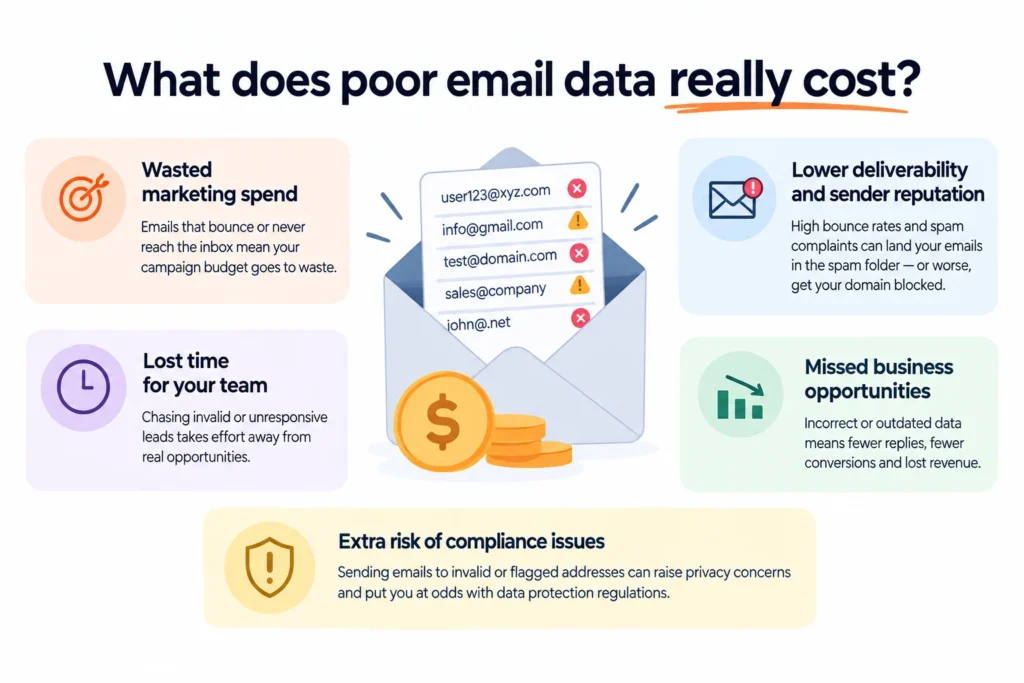
Bad email data generates costs before, during and after a campaign. This can result in excessive bounce rates, wasted marketing budgets and SDR efforts on invalid contacts.
For most teams, there are three costs worth measuring: needless sends and bounces, campaign losses from delivery issues, and SDR time spent on unusable contacts. These three costs are the inputs we’ll use later to calculate your email verification ROI, so it’s worth knowing what each one looks like for your team.
For most teams, there are three costs worth measuring: needless sends and bounces, campaign losses from delivery issues, and SDR time spent on unusable contacts. These three costs are the inputs we’ll use later to calculate your email verification ROI, so it’s worth knowing what each one looks like for your team.
1. Wasted sends and avoidable bounces
An invalid address cannot reply to your campaign or become a meeting.
Consider a list of 10,000 contacts and 10% invalid contacts. That leaves 1,000 addresses that can’t generate an email reply. The cost of sending those emails themselves might be small. A more serious problem is the recycling of the same waste through several campaigns.
Gmail sender requirements ask you to confirm each recipient’s address before subscribing them and monitor spam rates. Yahoo’s sender recommendations ask you to remove invalid recipients promptly and track spam complaint rates.
You can calculate the direct cost using the following formula:
Consider a list of 10,000 contacts and 10% invalid contacts. That leaves 1,000 addresses that can’t generate an email reply. The cost of sending those emails themselves might be small. A more serious problem is the recycling of the same waste through several campaigns.
Gmail sender requirements ask you to confirm each recipient’s address before subscribing them and monitor spam rates. Yahoo’s sender recommendations ask you to remove invalid recipients promptly and track spam complaint rates.
You can calculate the direct cost using the following formula:
Avoidable sending cost = invalid emails × cost per send
If your sending platform charges very little per email, this number may not move your ROI much. The calculation should show you where the real cost sits rather than making the bounce cost look larger than it is.
2. Reputation and campaign losses
This is where calculating email verification ROI gets harder.
A poor-quality list can contribute to more bounces and poor engagement. Sender reputation can then affect how future messages are handled.
Gmail says high spam rates can lead to increased spam classification, and its current enforcement guidance says non-compliant traffic can face temporary or permanent rejection. Gmail also notes that improvements in spam rate can take time to affect spam classification.
Yahoo also requires bulk senders to keep their spam rate below 0.3%. These requirements are broader than email verification. Authentication, unsubscribe handling, recipient engagement, sending behavior, and complaint rates all affect delivery.
Rather than assigning an estimated dollar value to reputation damage, track changes in delivery rates, replies, qualified meetings, and opportunities.
Track:
A poor-quality list can contribute to more bounces and poor engagement. Sender reputation can then affect how future messages are handled.
Gmail says high spam rates can lead to increased spam classification, and its current enforcement guidance says non-compliant traffic can face temporary or permanent rejection. Gmail also notes that improvements in spam rate can take time to affect spam classification.
Yahoo also requires bulk senders to keep their spam rate below 0.3%. These requirements are broader than email verification. Authentication, unsubscribe handling, recipient engagement, sending behavior, and complaint rates all affect delivery.
Rather than assigning an estimated dollar value to reputation damage, track changes in delivery rates, replies, qualified meetings, and opportunities.
Track:
- Normal delivery rate
- Reply rate
- Qualified meetings
- Opportunities created
- Average opportunity value
- Time taken for campaign performance to recover
Gmail states that senders with high spam rates may need to reduce spam and allow their domain or IP reputation to recover. Its Postmaster guidance states that spam rates may take time to positively impact classification.
3. Wasted SDR hours
An SDR often spends several minutes researching a prospect before the first email goes out. If the address is invalid, all of that work attaches to a contact who will never enter the conversation.
Let’s take an example. Say 1,000 invalid contacts each take four minutes to research, and an SDR costs your team $35 an hour.
1,000 × 4 ÷ 60 = 66.7 hours
At an internal SDR cost of $35 per hour:
66.7 × $35 = $2,334
That is $2,334 of labor tied to bad addresses.
Use this formula for your team:
Wasted SDR cost = invalid contacts × minutes per contact ÷ 60 × SDR hourly cost
The number changes quickly when SDRs do deeper account research or personalized outreach.
Let’s take an example. Say 1,000 invalid contacts each take four minutes to research, and an SDR costs your team $35 an hour.
1,000 × 4 ÷ 60 = 66.7 hours
At an internal SDR cost of $35 per hour:
66.7 × $35 = $2,334
That is $2,334 of labor tied to bad addresses.
Use this formula for your team:
Wasted SDR cost = invalid contacts × minutes per contact ÷ 60 × SDR hourly cost
The number changes quickly when SDRs do deeper account research or personalized outreach.
How to calculate Email Verification ROI
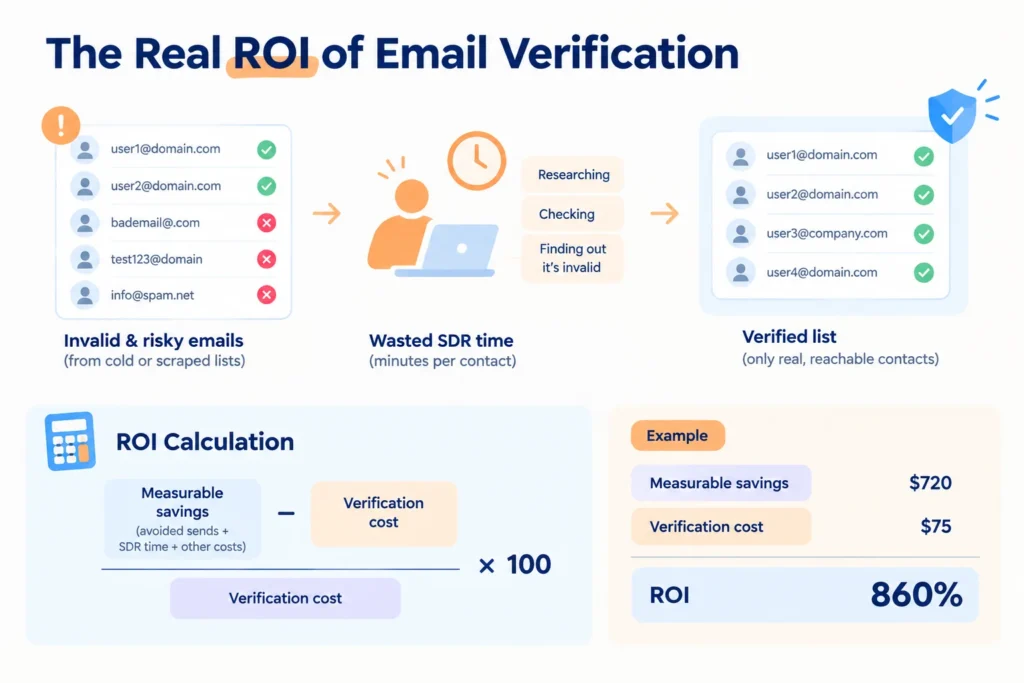
Calculate Email Verification ROI by comparing the measurable costs avoided through verification with the verification cost. Let's check the process below:
ROI calculation
Use this formula:
Email Verification ROI = (Measurable savings − Verification cost) ÷ Verification cost × 100
Suppose you spend $75 verifying a list.
After verification, you calculate:
After verification, you calculate:
- $120 saved by removing addresses you would have otherwise sent to
- $600 saved in SDR research time
- $720 total measurable savings
Your ROI would be
($720 − $75) ÷ $75 × 100 = 860%
860% ROI means $8.60 in net return per $1 invested, while total savings were $9.60 per $1.
($720 − $75) ÷ $75 × 100 = 860%
860% ROI means $8.60 in net return per $1 invested, while total savings were $9.60 per $1.
The payback period
The email verification payback period tells you how quickly you recovered that cost.
Use:
Use:
Payback period = Verification cost ÷ Average monthly savings
If verification costs $75 and the workflow saves an average of $150 per month:
$75 ÷ $150 = 0.5 months
This results in a payback time of about 15 days.
If it's a one-time campaign, measure the savings that come from that campaign and compute the payback. If it's a recurring verification, use the savings on a number of campaigns rather than on one.
Do not count revenue simply because an address was verified. If verification contributes to additional campaign revenue, calculate that value separately using your existing attribution method.
$75 ÷ $150 = 0.5 months
This results in a payback time of about 15 days.
If it's a one-time campaign, measure the savings that come from that campaign and compute the payback. If it's a recurring verification, use the savings on a number of campaigns rather than on one.
Do not count revenue simply because an address was verified. If verification contributes to additional campaign revenue, calculate that value separately using your existing attribution method.
Email Verification ROI Calculator
The calculator measures the cost savings from email verification against what you pay for it. In the examples below, we’ll focus on SDR time. Consider two teams verifying 10,000 contacts. They pay the same verification cost, but the lists are very different.
Scenario 1: Cold scraped list
Assume 15% of the list is invalid.
10,000 × 15% = 1,500 invalid addresses
An SDR spends four minutes researching each contact before the address is discovered to be unusable.
1,500 × 4 ÷ 60 = 100 SDR hours
At $35 per hour:
100 × $35 = $3,500
Now assume the verification cost is $58.
The net labor savings are:
$3,500 - $58 = $3,442
The labor-only ROI is
($3,500 - $58) ÷ $58 × 100 = 5,934%
The high ROI comes from the amount of SDR time attached to each unusable contact. This calculation does not include avoiding sending costs or any campaign value protected by better list quality.
10,000 × 15% = 1,500 invalid addresses
An SDR spends four minutes researching each contact before the address is discovered to be unusable.
1,500 × 4 ÷ 60 = 100 SDR hours
At $35 per hour:
100 × $35 = $3,500
Now assume the verification cost is $58.
The net labor savings are:
$3,500 - $58 = $3,442
The labor-only ROI is
($3,500 - $58) ÷ $58 × 100 = 5,934%
The high ROI comes from the amount of SDR time attached to each unusable contact. This calculation does not include avoiding sending costs or any campaign value protected by better list quality.
Scenario 2: Recent inbound list
Now take another 10,000 contacts from a recent inbound database.
Assume only 2% are invalid.
10,000 × 2% = 200 invalid addresses
At four minutes per contact:
200 × 4 ÷ 60 = 13.33 SDR hours
At $35 per hour:
13.33 × $35 = $466.67
After the same $58 verification cost:
$466.67 - $58 = $408.67
The labor-only ROI is
($466.67 - $58) ÷ $58 × 100 = 705%
The return is still positive. It is simply lower because the inbound list started with less bad data.
That’s the ROI of clean email lists at work. A recent inbound list has less waste to remove, so verification saves less than it does on a scraped list.
That difference is why one calculator can’t fit every campaign. The verification price may stay the same, but the cost of leaving the list unverified changes.
Assume only 2% are invalid.
10,000 × 2% = 200 invalid addresses
At four minutes per contact:
200 × 4 ÷ 60 = 13.33 SDR hours
At $35 per hour:
13.33 × $35 = $466.67
After the same $58 verification cost:
$466.67 - $58 = $408.67
The labor-only ROI is
($466.67 - $58) ÷ $58 × 100 = 705%
The return is still positive. It is simply lower because the inbound list started with less bad data.
That’s the ROI of clean email lists at work. A recent inbound list has less waste to remove, so verification saves less than it does on a scraped list.
That difference is why one calculator can’t fit every campaign. The verification price may stay the same, but the cost of leaving the list unverified changes.
What should your calculator include?
Your calculator should include:
- Total contacts
- Invalid rate
- Verification cost
- Average SDR minutes per contact
- SDR hourly cost
- Cost per email send
- Expected campaign value, if measurable
Then calculate the direct savings first.
Direct savings = avoided SDR cost + avoided sending cost
If you have reliable campaign data, add measurable value separately. This keeps the model useful without turning every verified address into an assumed revenue figure.
Factors that affect email verification ROI
There are a number of factors that determine your email verification ROI. The condition of your list, the number of contacts you email, and the time your sales team spends on each contact all play a part. Let's examine some of them that you should keep in mind.
1. List quality
Use your list as a starting point. What is the number of invalid email addresses?
Let's understand with an example. A list containing 15% bad addresses has more bad data than one with only 2% bad addresses. The more you can check the first list, the more bad addresses you will have to catch before you send your campaign. This will result in additional savings as well.
Let's understand with an example. A list containing 15% bad addresses has more bad data than one with only 2% bad addresses. The more you can check the first list, the more bad addresses you will have to catch before you send your campaign. This will result in additional savings as well.
2. Campaign volume
The size of your list is just as important. The larger the email list, the more bad email addresses you will encounter.
For example, if you are sending 1,000 emails and 5% of them are incorrect, this means that 50 of them are invalid. That's 50 bad addresses. Now send to 100,000 contacts at the same rate and you've got 5,000 invalid addresses.
It's quite a leap. So, before you measure ROI, consider the number of contacts you are reaching and the time and money you may spend on unqualified addresses.
For example, if you are sending 1,000 emails and 5% of them are incorrect, this means that 50 of them are invalid. That's 50 bad addresses. Now send to 100,000 contacts at the same rate and you've got 5,000 invalid addresses.
It's quite a leap. So, before you measure ROI, consider the number of contacts you are reaching and the time and money you may spend on unqualified addresses.
3. Email verification cost
The cost of verification is an important part of ROI, but that's not the only factor to consider. Different results may have different costs, depending on how the provider charges for them. Check the duplicate email, unknown return, catch-all, repeat check, bulk checking, and API usage pricing.
Clearout, for instance, doesn't count duplicate emails or unknown emails as credits. One credit is used to get one of the three results: Valid, Invalid, and Catch-All. So the actual cost of verification might be less than what you think.
Clearout, for instance, doesn't count duplicate emails or unknown emails as credits. One credit is used to get one of the three results: Valid, Invalid, and Catch-All. So the actual cost of verification might be less than what you think.
4. List freshness
Your email list won't be accurate forever. Employees leave, businesses change their websites and email inboxes go unused. As time passes, addresses that used to work earlier could fail and you may find yourself with email list decay.
How does Clearout improve email campaign ROI?

Clearout helps improve email campaign ROI by catching invalid and difficult-to-verify addresses before they reach your campaigns or SDR workflows. That means less SDR time spent on contacts who can’t be reached, fewer unnecessary sends, clearer answers on catch-all and SEG-protected addresses, and less waste across each campaign.
You can verify email addresses without sending emails with Clearout Email Verifier. Each one then lands in a group like Valid, Invalid, Catch-All, Disposable, Gibberish, Free, or Role-Based. That way, you know exactly what you’re working with. To verify an email list in bulk, just upload a CSV or XLSX file to Clearout. If new contacts come in every day, the API checks them as they arrive.
You can verify email addresses without sending emails with Clearout Email Verifier. Each one then lands in a group like Valid, Invalid, Catch-All, Disposable, Gibberish, Free, or Role-Based. That way, you know exactly what you’re working with. To verify an email list in bulk, just upload a CSV or XLSX file to Clearout. If new contacts come in every day, the API checks them as they arrive.
1. Check before SDR outreach
Verification can be a time-saver for outbound teams who would otherwise spend time researching contacts who can’t be used.
Let's continue with the earlier example of 1,000 bad addresses. At four minutes of research per contact, that’s 66.7 hours and about $2,333 in SDR time spent on people your emails could never reach.
Clearout fits in before that research starts. Verify the list first, and invalid addresses are flagged before they’re assigned to an SDR, so your team only researches contacts who can actually receive an email.
A practical workflow is:
Let's continue with the earlier example of 1,000 bad addresses. At four minutes of research per contact, that’s 66.7 hours and about $2,333 in SDR time spent on people your emails could never reach.
Clearout fits in before that research starts. Verify the list first, and invalid addresses are flagged before they’re assigned to an SDR, so your team only researches contacts who can actually receive an email.
A practical workflow is:
Source contacts → verify emails → review results → assign usable contacts → start outreach
2. Get more information from difficult results
A Catch-All domain can accept mail for addresses without confirming whether a specific mailbox exists. Security gateways can also make standard verification less conclusive.
Clearout's Deep Verify mode uses multi-layer SMTP analysis and Secure Email Gateway signature detection to analyze difficult Catch-All and SEG-protected addresses without sending a test email.
You can send email to an address, suppress them, place them in a separate segment, or review them further. That can prevent loss of usable contacts.
Clearout's Deep Verify mode uses multi-layer SMTP analysis and Secure Email Gateway signature detection to analyze difficult Catch-All and SEG-protected addresses without sending a test email.
You can send email to an address, suppress them, place them in a separate segment, or review them further. That can prevent loss of usable contacts.
3. Measure the return after the campaign
Track:
- Verification cost
- Invalid addresses removed
- SDR hours saved
- Sending cost avoided
- Bounce rate
- Delivered emails
- Replies
- Qualified meetings
- Opportunities
- Campaign revenue
For example, suppose verification costs $75 and removes enough unusable contacts to save 40 SDR hours.
At a loaded SDR cost of $30 per hour:
40 × $30 = $1,200 saved
The verification ROI is
($1,200 − $75) ÷ $75 × 100 = 1,500%
At a loaded SDR cost of $30 per hour:
40 × $30 = $1,200 saved
The verification ROI is
($1,200 − $75) ÷ $75 × 100 = 1,500%
The bottom line
Email verification can save you money, but the actual return depends on your list. Start by checking how many invalid addresses you're working with. Then add up the SDR time wasted on those contacts, unnecessary sending costs, and any other savings you can measure.
Of course, every list is different. A scraped list with more invalid addresses may deliver greater savings than a recently collected inbound list. So, track your results across campaigns to see where verification gives you the best return.
Of course, every list is different. A scraped list with more invalid addresses may deliver greater savings than a recently collected inbound list. So, track your results across campaigns to see where verification gives you the best return.
Find the invalid emails in your list
FAQ
1. How can you measure the ROI of email verification?
You can measure email verification ROI by comparing what you spend on verification with what you save. Removing invalid addresses before outreach can save SDR research time and avoid unnecessary sending costs. This is one of the best ways to calculate the ROI.
2. How does email verification improve ROI?
Email verification improves ROI by removing problematic addresses before they create unnecessary sending costs or consume SDR time. Clearout helps identify these addresses before outreach, so teams can measure the resulting savings against their verification spend.
3. What factors affect the ROI of email verification?
The main factors are list quality, campaign volume, email verification cost, SDR productivity, list freshness, and campaign value. A cold scraped list can have a faster payback than a recent inbound list because it may contain more problematic addresses.