clearout
  • Products
    • Email Verifier Verify emails addresses individually, in bulk or through API, with 99% accuracy
    • Email Finder Find individual or bulk emails by entering the person & company name or domain
    • Form Guard IconForm Guard Protect your forms from spam, bots, and invalid submissions with real-time email, phone, and name verification.
    • Form Guard IconData Pulse Verify, enrich, and monitor your CRM contacts in real time - heartbeat monitor for your data.
    • Prospect SQL/MQL list building with high levels of personalization, real-time data enrichment and prospect search
    • Clearout For SheetsVerify email addresses directly on Google Sheets with Clearout for sheets add-on
    • Prospect – LinkedIn Chrome ExtensionBuild verified, targeted prospect lists directly from LinkedIn profiles
    • ClearoutPhoneValidate phone numbers across 240+ countries in bulk, quick or real time validation
    • Free Tools
    • Disposable Email Checker
    • Reverse LinkedIn Profile Lookup Tool
    • Reverse Email Lookup Tool
    • Email List Cleaner
    • Company Domain Finder API
  • Resources
      DEVELOPERAPI iconAPI
      Clearout APIs are structured around REST and JSON
      Webhooks iconWebhooks
      Capture real-time events in your application workflow
      Form Guard iconForm Guard
      Real-time form validation to keep bad contacts out of your CRM
      KNOWLEDGE BASEGetting started iconGetting started
      Sending campaigns without bounces is made simple
      FAQ iconFAQ
      Easily find answers to services, security and common questions
      USE CASESLead Generation iconLead Generation
      Learn how professionals generate quality leads
      GUIDESPricing arrow iconTransparent & flexible pricing to support pay-per-use or recurringCompare Email Verification Tools arrow iconAI-powered email verification with 99%+ accuracy, real-time validation, and transparent risk scoringCompare Email Finder Tools arrow iconPre-verified B2B email addresses with confidence scoring, find real person email, not role-based addressData Pulse & HubSpot Breeze Intelligence arrow iconPre-verified B2B email addresses with confidence scoring, find real person email, not role-based addressBLOGSEmail Verification ToolsFind Anyone’s Email Address
      Most Accurate, Fast & Free Ways
      Form Validation
      Importance, Ways & Best Practices
      View All Blogs
  • Pricing
  • Integrations
  • Enterprise
  • Login
Try it free Book a 1-to-1 demo
Priyanshi Sharma / September 7, 2026 September 7, 2026

Form Abandonment: Why Leads Drop Off & How to Recover Them


Form Abandonment: Why Leads Drop Off & How to Recover Them

Form abandonment happens when leads start filling out a form, then leave before hitting submit. They can enter a valid email or phone number, get distracted, and close the tab midway. And with nearly 68% of form starts ending this way, you’re likely losing more leads than you realize.

However, you can reduce it by validating their details as they type and capturing verified contact information from abandoned sessions. This is only possible with a form validation tool. Let’s walk you through the complete process.

Table of Content


‣ What is form abandonment?
‣ What causes form abandonment across different form types?
‣ How does real-time validation reduce form abandonment?
‣ How does Clearout Form Guard reduce form abandonment while protecting your pipeline?
‣ What is form abandonment tracking and how do you measure it accurately?
‣ How does friction cause visitors to leave forms before submitting?
‣ Why do trust issues cause form abandonment on online forms?
‣ What technical errors cause form submission drops that you might be missing?
‣ What is a partial submission and how do you use it to recover lost leads?
‣ How to improve form completion rates: the numbers that benchmark your progress?
‣ Best practices to improve form completion rates across all form types
‣ Frequently asked questions
What is form abandonment?


Every time a visitor leaves your form without submitting, you lose a lead you already paid for. You paid for the ad, the content, or the SEO to get them there. You built the landing page to convert them. Then they left before submitting. That’s a lead you paid for but never got to keep.

The real cost compounds further. Consider this:

  • You lose the lead's contact data permanently if no partial capture is in place
  • Your cost per acquisition rises as fewer form conversions dilute your ad spend
  • Your sales pipeline shrinks without your team knowing why

What causes form abandonment across different form types?


The four-category taxonomy of form abandonment causes

CategoryRoot CauseSignal You'll SeePrimary Fix
Friction-basedToo many fields, unclear required markersDrop-off after field 3 or 4 in form analyticsProgressive profiling, field reduction
Trust-basedPremature phone request, no privacy noteDrop-off on phone/email fields specificallyField reordering, inline trust signals
TechnicalValidation errors post-submit, mobile mismatchHigh mobile abandonment vs. desktopReal-time inline validation
Intent-basedVisitor was never a real prospectHigh start rate, very low submit rateSmarter targeting, form qualification logic

Understanding which category is driving your form abandonment rate determines everything about your recovery strategy. A friction fix will not help a trust problem. A technical fix will not close an intent gap. Diagnose first, then act.

How does real-time validation reduce form abandonment?


One of the highest-ROI form changes is to implement real-time inline validation. It cuts down on technical abandons, increases the quality of data, and eliminates the post-submit frustration cycle.

A good form validation will highlight errors as soon as they are made while completing the form and will provide helpful information and instructions on how to fix the error.

What real-time validation should catch on each field


  • Email field
  • Phone field
  • Name field

If you're new to validation check out our guide on real-time email verification to understand how email addresses are verified instantly while users are still filling out your forms.

How does Clearout Form Guard reduce form abandonment while protecting your pipeline?


Clearout Form Guard validates contact information in real time while visitors are filling out the form, helps them correct mistakes immediately, and captures verified contact details from abandoned sessions.

So you can reduce unnecessary abandonment without opening the door to fake, disposable, or unreachable leads.

What Form Guard validates on each field


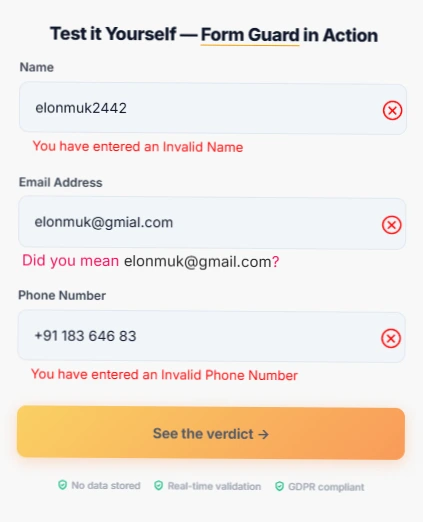
Clearout Form Guard interface demonstrating real-time inline validation with error messages.

Email validation:


  • Checks syntax, domain, and MX records in real time
  • Flags disposable and temporary email addresses instantly
  • Stops spam traps, invalid domains, and risky addresses
  • Protects your sender reputation and deliverability

A visitor who types [email protected] can be prompted to correct the typo before they ever hit Submit. A disposable address can be stopped before it becomes a CRM contact.

The visitor gets a chance to fix the problem instead of being rejected after completing the entire form.

Phone validation:


  • Validates format, country code, and carrier in milliseconds

  • Blocks fake and mistyped numbers at the source

  • Detects line type (mobile, landline, VoIP) where relevant

  • Auto-fills the country dial code to reduce user typing errors and reduce abandonment


Name validation:


  • Filters gibberish, symbols, and profanity automatically
  • Ensures every lead is tied to a real person, not a bot entry
  • Keeps your CRM personalisation tokens from breaking

So a contact like asdfghjkl doesn't make its way into your CRM and break personalization later.

What about visitors who still don't submit?


You can see details such as:

  • Verified contact information
  • The page they were on
  • Their form activity
  • Available email or phone data

Then route those contacts to your CRM or SDR workflow.

Rather than treating every abandonment as a lost lead, you can recover the ones where the visitor already gave you usable contact information.

How to know where and why visitors abandon?


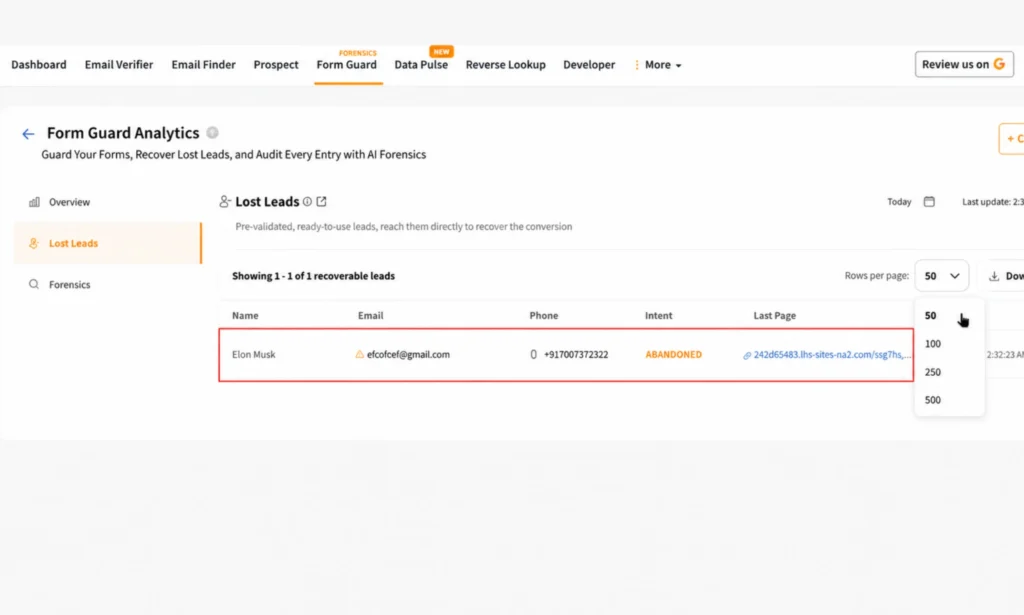
Clearout Form Guard Analytics dashboard displaying a recovered lost lead with its details.

Reducing abandonment requires more than knowing that a visitor left. You need to know where and why. Form Guard's Forensics gives you field-level visibility into form activity.

You can see:

  • Which fields caused problems
  • Why submissions were blocked
  • Which pages have high block rates
  • When interactions happened
  • Device-level patterns
  • Traffic-source patterns
  • Exact validation reasons

Form Guard setup


One lightweight JavaScript snippet drops into any form builder. Form Guard works natively with WordPress, HubSpot, Zoho, Leadpages, Unbounce, and every major form builder. No developer required. Set up in minutes. Set your validation rules from the Clearout dashboard and monitor lead quality in real time.

Your pipeline fills with real, reachable leads. Your CRM stops accumulating junk. Your sales team stops calling numbers that do not exist. And your form analytics reflect accurate engagement because bots and disposables are no longer counted.

Recover lost leads with Clearout Form Guard

If you'd like step-by-step implementation instructions, check out the Form Guard Setup Documentation.

What is form abandonment tracking and how do you measure it accurately?


  • The form abandonment rate tells you how many people start but never finish. So, if 1,000 visitors start your form and 680 leave, you’re looking at a 68% abandonment rate.
  • Form completion rate is the other side of the same story. It shows how many of those starts actually turn into successful submissions.
  • Then comes the metric I’d pay the most attention to: field-level drop-off. If most visitors leave when they reach the phone number or company size field, you’ve found something you can actually fix.
  • Finally, track your partial submission rate. When someone fills in one or more fields but never submits, there’s clearly some intent there. You just need to figure out what stopped them.

How to set up form abandonment tracking?


  • Enable field-level tracking in your form tool or analytics platform
  • Tag every form start as an event in Google Analytics 4
  • Track time-on-field to identify fields causing hesitation
  • Use session replay tools to watch real abandonment moments
  • Set up a partial lead capture webhook before users exit

Form abandonment tracking gives you the data. The next sections give you the interpretation.

How does friction cause visitors to leave forms before submitting?


Friction is the most common reason why visitors leave forms before submitting. It is also the most fixable once you know where it lives. Friction accumulates field by field, and most forms have far more of it than their designers realise.

The specific friction causes and their fixes


HubSpot found that cutting a form from 4 fields to 3 can increase conversions by 50%. So before making another field required, ask yourself: do you really need it right now?

Fix this with progressive profiling:

  • Show 3 to 4 fields on the first form visit
  • Capture additional fields on subsequent visits or post-signup
  • Use dynamic field logic to skip fields already answered in your CRM
  • Never ask for information you can enrich automatically after capture

Lack of clear required field markers: Users leave forms unfilled if they are unclear about which fields to fill. If there is no asterisk or if the label is confusing, it means the same thing.

Fix this with:

  • Clear asterisk markers on every required field
  • Inline helper text explaining why each field is needed
  • Greyed-out optional fields to visually separate them from required ones

Form length vs. perceived value mismatch: If your form asks for 10 fields to download a checklist, visitors will abandon it. The perceived value of the resource must be proportional to the effort you are asking for.

Why do trust issues cause form abandonment on online forms?


The trust triggers that cause form abandonment:

Asking for a phone number too early: Phone numbers carry a higher perceived risk than email addresses. Visitors associate a phone number request with aggressive follow-up calls. If you ask for a phone number before establishing trust, many visitors will leave.

Baymard Institute found that unexpected requests for sensitive information are a top reason visitors abandon online forms.

Fix this specifically:

  • Move the phone field to the second or third step of a multi-step form
  • Add "optional" to the phone field label where your process allows it
  • Add a one-line note explaining why you need it: "We'll only call if your download link fails"
  • Use real-time phone validation so users know you accept their format correctly

No visible privacy assurance: A form that collects email addresses with no privacy policy link or reassurance statement creates doubt. The fix is not a full GDPR disclaimer. A single line: "We respect your privacy. Unsubscribe anytime." reduces abandonment meaningfully.

Generic or corporate-sounding form copy: When your form labels read like legal documents, visitors disengage. Replace "Please enter your primary business email address" with "Work email." Conversational, specific labels reduce cognitive load and increase completion rates.

What technical errors cause form submission drops that you might be missing?


Technical causes of form abandonment are the most underreported category. Most teams look at conversion data but never see the underlying technical friction. Yet technical errors frequently account for 10 to 20 percentage points of abandonment on mobile.

The technical causes and their fixes


Post-submit validation errors: You finally finish the form, hit submit, and only then find out something is wrong. Now you have to scroll back, find the field, fix it, and submit again. That extra effort is often enough to make you give up, so it’s much better to catch errors while you’re filling the form instead.

Fix this with real-time inline validation:

  • Validate each field the moment the user moves to the next one
  • Show a green checkmark for fields that pass
  • Show a specific, helpful error message immediately rather than waiting for submission
  • Never show vague errors like "An error occurred" without explaining what to fix

Mobile keyboard mismatches: When your email field triggers a standard keyboard rather than an email keyboard on mobile, users have to manually navigate to the @ symbol. When your phone field triggers a text keyboard rather than a numeric keypad, the same problem occurs.

Fix this by making sure each field is set up correctly for mobile:

  • Email fields should bring up the email keyboard (with the @ symbol easy to reach)
  • Phone fields should bring up the number pad, not a full keyboard
  • Autofill should be turned on for name and email so returning visitors don't retype anything

What is a partial submission and how do you use it to recover lost leads?


A partial submission occurs when a visitor fills in at least one form field but does not complete the form. This is one of the most valuable lead recovery signals you have. A person who typed their name and email into your form has demonstrated intent. They are not cold visitors. They are a warm lead who got stopped by something.

Why partial submissions matter for lead recovery


Most forms discard partial submission data entirely. The visitor leaves, the CRM never receives a record, and the lead is gone. But if you capture the email from a partial submission before the visitor exits, you have the ability to follow up with a recovery sequence.

How to capture partial submissions:

  • Use a form tool that saves field data server-side as users type
  • Set up a browser before unload event that fires a webhook on exit with whatever fields are populated
  • Use Hotjar or FullStory to identify which fields were completed at the point of abandonment
  • Integrate partial lead data into a separate CRM pipeline for recovery sequences

The partial submission recovery workflow


  1. User fills email field and one other field, then abandons
  2. Your partial capture webhook fires and saves the email and field data
  3. CRM creates a contact tagged as "partial form submission"
  4. An automated recovery sequence triggers within 30 minutes
  5. Email 1 is a simple, non-pushy prompt: "Were you looking for X? Here is the link again."
  6. Email 2 (sent 24 hours later) addresses the most common friction: "Our form asks for Y because Z"
  7. Email 3 (sent 3 days later) offers a lower-friction conversion path if available

How to improve form completion rates: the numbers that benchmark your progress?


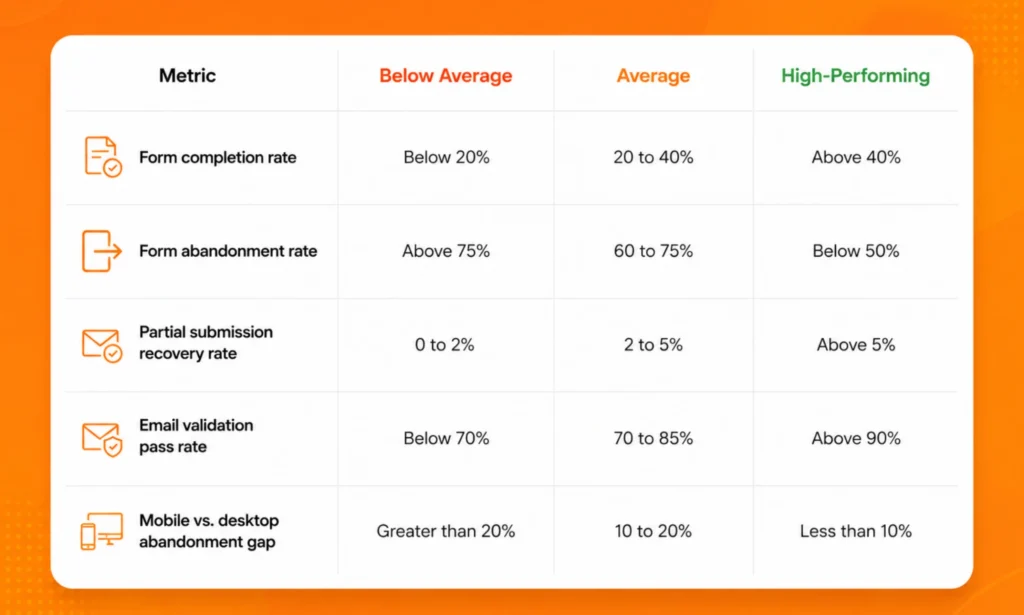
A comparative table outlining benchmark ranges.

If your form completion rate sits below 20%, start with friction and technical fixes. If it sits between 20 and 40%, start with trust signals and partial lead recovery. If it sits above 40%, optimise your lost lead recovery sequences to capture the remaining gap.

Best practices to improve form completion rates across all form types


Pull everything together with this implementation checklist. Each item is drawn from the causes and tactics covered above. Work through it field by field on your highest-traffic forms first.

Form completion rate optimisation checklist


Reduce friction:

  • [ ] Audit every required field. Remove any field you can enrich post-submission.
  • [ ] Reduce your form to 3 to 4 fields for first-time visitors.
  • [ ] Implement progressive profiling for returning visitors.
  • [ ] Use smart defaults and autofill attributes to reduce typing.

Build trust:

  • [ ] Move the phone field to a later step in multi-step forms.
  • [ ] Show a trust badge or social proof counter near the form.

Fix technical issues:

  • [ ] Set correct HTML input types for email and phone.
  • [ ] Switch validation trigger from onSubmit to onBlur.
  • [ ] Test your form on both iOS and Android before every campaign launch.

Capture and recover lost leads:

  • [ ] Enable partial submission capture on your form tool.
  • [ ] Set up an exit-intent trigger with a reduced-friction alternative offer.
  • [ ] Build a partial lead recovery sequence in your CRM.
  • [ ] Tag partial submissions separately from complete submissions for segmentation.

Protect data quality:

  • [ ] Install Clearout Form Guard to validate email, phone, and name in real time.
  • [ ] Enable bot protection with invisible CAPTCHA.
  • [ ] Review your form analytics weekly for field-level drop-off changes.
  • [ ] Run a partial submission audit monthly to identify recovered lost leads opportunities.

Everything in the checklist above takes time to implement piece by piece. Form Guard handles validation, disposable email detection, and bot blocking in one lightweight snippet, live in minutes.

Try Clearout Form Guard free

100 credits included. No credit card required.

Frequently asked questions


What is form abandonment and how is it measured?
Form abandonment occurs when a visitor begins filling out a form but leaves the page without completing and submitting it. You measure it with the form abandonment rate, which is calculated by dividing the number of users who started the form but did not submit it by the total number of users who started the form, then multiplying by 100.
What causes form abandonment on lead generation forms?
Form abandonment on lead generation forms is caused by four distinct categories. Friction-based causes include too many required fields and unclear field labels. Trust-based causes include asking for a phone number too early and having no visible privacy assurance.
How do you recover lost leads from abandoned forms?
You recover lost leads from abandoned forms through three primary methods. The first is partial lead capture, where you save field data server-side as users type. The second is exit-intent triggers, where you detect cursor movement toward the browser close button. Next go for automated recovery sequences, where partial leads receive a short email sequence within 30 minutes of abandonment.

Share this article

Recent Posts

07 Sep 2026
Form Abandonment: Why Leads Drop Off & How to Recover Them

Learn why visitors abandon forms and how Clearout Form Guard reduces drop-offs with real-time valida ...

02 Sep 2026
Bounce Rate Above 2%? What to do in the Next 24 Hours

Bounce rate above 2%? See what to do in the next 24 hours, spot hard and soft bounces, verify contac ...

31 Aug 2026
HubSpot Data Quality Audit Framework for New Clients

Learn how agencies can audit HubSpot CRM data, identify critical issues, score data quality, and bui ...

31 Aug 2026
Why Is My Email Click Rate Dropping In 2026?

Discover why your email click rate is dropping in 2026, how security bots inflate clicks, and how to ...

22 Aug 2026
Why Validating Contact Information Matters for Shopify Checkouts

Shopify checkout validation catches typos, fake numbers, and disposable emails. See how Clearout's F ...

Clearout's

Form Guard

Validate email, phone & name on any forms!

  • Real signups only
  • Verified emails
  • Valid phone numbers
  • No fake names
  • Cleaner CRM
  • No devs needed
Try for Free Now

Email Verification, Email Finding Form Guard & Prospecting Service

Expand Your Reach By Finding & Verifying Ideal Prospects.

Sign up & get 100 free credits

No Credit Card required

Create Free Account
Company

Why Clearout?

Pricing

Contact Us

Careers

Press

Enterprise

Sitemap

FAQ

Status

Products

Email Verifier

Email Finder

Form Guard

Data Pulse

Prospect

LinkedIn Email Finder

Reverse Lookup

Google Sheets Add-on

WordPress Plugin

ClearoutPhone

What's New?

Resources

Integrations

HubSpot

Team Account

API

Compare Email Verifier

Compare Email Finder

Compare Prospecting

Use Cases

Blog

Help

Legal

Privacy Policy

Terms

DPA

Security

Trust Center

Certification

ISO 27001/2022

SOC 2 Type 2

GDPR

Partnership

HubSpot Certified

Affiliates

Partners

Clearout for browser

⚡ Supercharge Your Prospect Research with Clearout's LinkedIn Chrome Extension - Find and Verify Emails with Confidence!

Clearout Chrome extension

clearout
© 2026 Clearout Inc. All Rights Reserved. Powered by Clearout.
Validate Enrich New Salesforce contacts automatically with Data Pulse. Learn More ➞
X