clearout
  • Products
    • Email Verifier Verify emails addresses individually, in bulk or through API, with 99% accuracy
    • Email Finder Find individual or bulk emails by entering the person & company name or domain
    • Form Guard IconForm Guard Protect your forms from spam, bots, and invalid submissions with real-time email, phone, and name verification.
    • Form Guard IconData Pulse Verify, enrich, and monitor your CRM contacts in real time - heartbeat monitor for your data.
    • Prospect SQL/MQL list building with high levels of personalization, real-time data enrichment and prospect search
    • Clearout For SheetsVerify email addresses directly on Google Sheets with Clearout for sheets add-on
    • Prospect – LinkedIn Chrome ExtensionBuild verified, targeted prospect lists directly from LinkedIn profiles
    • ClearoutPhoneValidate phone numbers across 240+ countries in bulk, quick or real time validation
    • Free Tools
    • Disposable Email Checker
    • Reverse LinkedIn Profile Lookup Tool
    • Reverse Email Lookup Tool
    • Email List Cleaner
    • Company Domain Finder API
  • Resources
      DEVELOPERAPI iconAPI
      Clearout APIs are structured around REST and JSON
      Webhooks iconWebhooks
      Capture real-time events in your application workflow
      Form Guard iconForm Guard
      Real-time form validation to keep bad contacts out of your CRM
      KNOWLEDGE BASEGetting started iconGetting started
      Sending campaigns without bounces is made simple
      FAQ iconFAQ
      Easily find answers to services, security and common questions
      USE CASESLead Generation iconLead Generation
      Learn how professionals generate quality leads
      GUIDESPricing arrow iconTransparent & flexible pricing to support pay-per-use or recurringCompare Email Verification Tools arrow iconAI-powered email verification with 99%+ accuracy, real-time validation, and transparent risk scoringCompare Email Finder Tools arrow iconPre-verified B2B email addresses with confidence scoring, find real person email, not role-based addressData Pulse & HubSpot Breeze Intelligence arrow iconPre-verified B2B email addresses with confidence scoring, find real person email, not role-based addressBLOGSEmail Verification ToolsFind Anyone’s Email Address
      Most Accurate, Fast & Free Ways
      Form Validation
      Importance, Ways & Best Practices
      View All Blogs
  • Pricing
  • Integrations
  • Enterprise
  • Login
Try it free Book a 1-to-1 demo
Akanksha Mishra / August 22, 2026 August 22, 2026

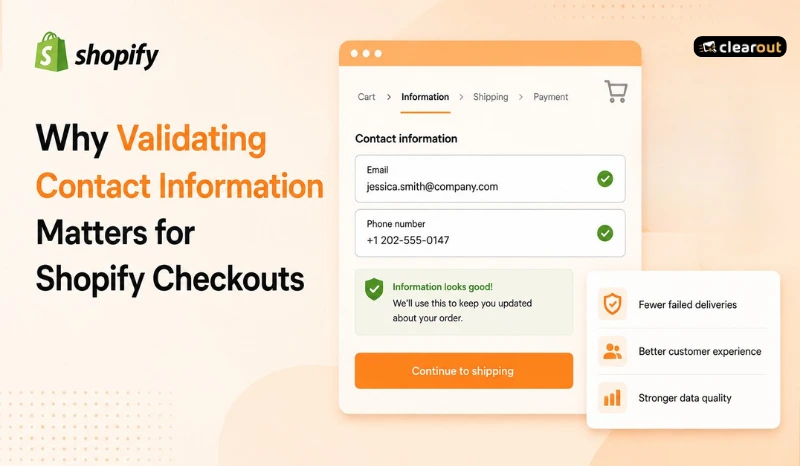
Why Validating Contact Information Matters for Shopify Checkouts


Why Validating Contact Information Matters for Shopify Checkouts

A customer reaches your Shopify checkout page, enters their details, and places an order. Sale completed, right? Not always.

What if the email address contains a typo? What if the phone number is invalid? Or worse, what if someone uses a disposable email address they'll never check again?

You probably won't notice immediately.
Bad contact data means abandoned cart reminders never get delivered. Furthermore, upsell campaigns are ineffective in reaching customers and that's why customer lifetime value suffers.

Shopify doesn't check if the email address or phone number you provide on checkout is deliverable or if the contact details are valid. Clearout Form Guard is one of the tools that checks these contact details before they are submitted in a form for an order. It eliminates communication errors, decreases support tickets and safeguards lost revenues due to poor customer data.

Table of Content


‣ Why don't customers get Shopify order confirmation emails?
‣ What causes invalid customer information during Shopify checkout?
‣ Why does Shopify's default validation fail?
‣ How to validate customer data on Shopify at the checkout?
‣ Why use Clearout Form Guard for Shopify checkout validation?
‣ How does Shopify phone number validation improve customer communication?
‣ How can you prevent invalid email addresses in Shopify checkout?
‣ Final takeaways
‣ FAQ
Why don't customers get Shopify order confirmation emails?


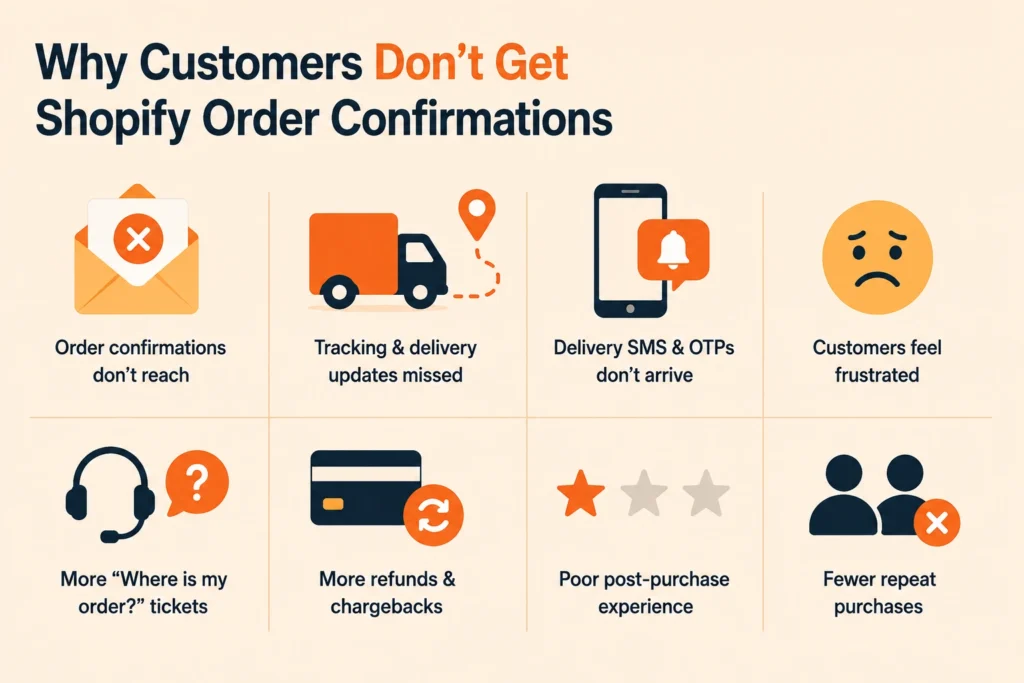
Shopify order confirmation issues caused by incorrect checkout contact details.

A Shopify order confirmation should reach the customer soon after checkout. If the email or phone number they entered is incorrect, the message can fail to reach them and cause issues afterward.

Common issues caused by invalid checkout details include:

  • Failed order confirmation emails: A small email typo can stop customers from receiving purchase confirmations. They may not know whether their order was successful.
  • Missing shipping updates: Tracking links and delivery updates depend on accurate customer information. Incorrect details prevent customers from receiving important order notifications.
  • Failed SMS notifications: Invalid phone numbers can block delivery alerts, OTPs, and other SMS updates. This creates confusion during the fulfillment process.
  • More WISMO tickets: Often, there are more “Where is my order?” inquiries without confirmations and tracking updates. Support teams waste precious time answering questions that could have been avoided with simple communication.
  • Refunds and chargebacks: Some customers think that their order wasn’t processed if they don’t get a confirmation. This results in more refund requests and payment disputes even before the shipment reaches its destination.
  • Poor customer experience: How you communicate with customers after purchase makes a huge impression on the customer’s view of your store. Customers may feel disconnected from the purchase process when they stop receiving updates.

Many of these issues begin with incorrect customer information entered during checkout. Strengthening Shopify checkout validation helps merchants prevent communication failures before the order is placed.

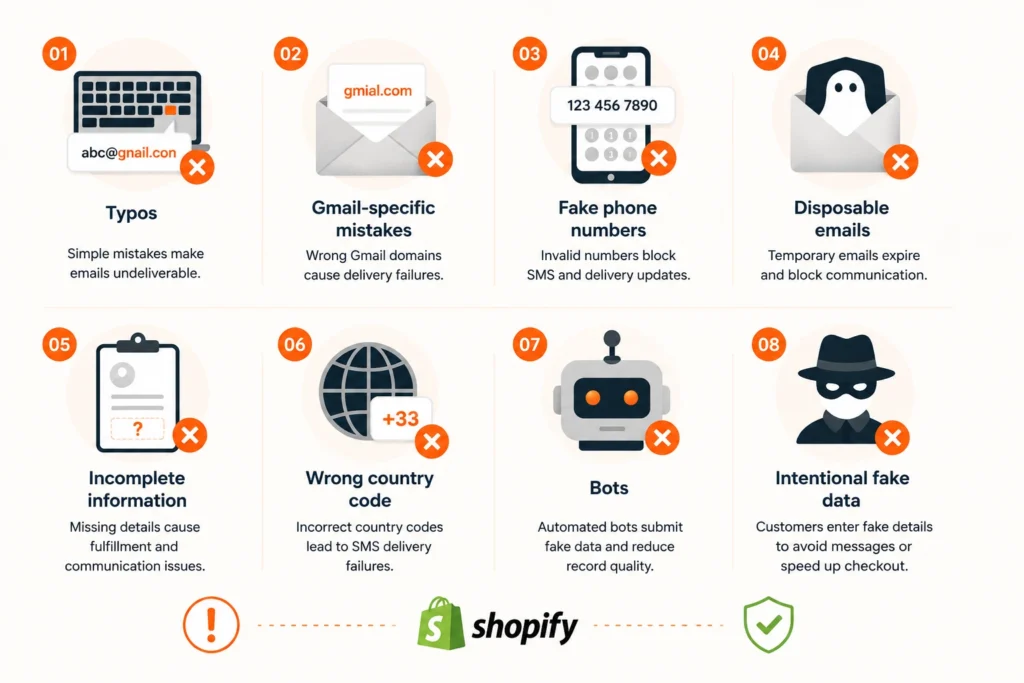
What causes invalid customer information during Shopify checkout?


Shopify checkout issues caused by invalid customer information.

Invalid customer information enters checkout for many reasons. While some mistakes happen accidentally, others are intentional. Identifying these issues helps merchants improve contact validation before inaccurate records reach Shopify and connected systems.

1. Typos


The most frequent cause of invalid contact information is still typing errors. An email address can be completely undeliverable if it has missing characters, bad domains, or extra letters.

2. Gmail-specific mistakes


Because Gmail is widely used, mistakes like gmial.com, gmail.con, and gmai.com appear frequently during checkout. These addresses pass unnoticed by customers but fail when order confirmations are sent.

3. Fake phone numbers


Some customers accidentally enter incorrect digits, while others use placeholder numbers to complete checkout faster. These numbers cannot receive SMS notifications, delivery updates, or verification messages.

4. Incomplete customer information


Missing apartment numbers, postal codes, or contact details create fulfillment and communication issues. Even valid orders become difficult to manage when important customer information is incomplete.

5. Bots and fake information


Automated submissions can create fake customer records with random details. This reduces data quality inside Shopify and connected tools. Fake signups follow the same pattern, just earlier in the funnel, before checkout even starts.

Without proper Shopify checkout validation, inaccurate customer information can spread across CRMs, email platforms, and marketing systems.

Why does Shopify's default validation fail?


Shopify includes basic validation during checkout, but it focuses on format instead of data quality. An email containing the correct structure can still belong to a non-existent mailbox. Likewise, a phone number may match the expected format while remaining unreachable.

This limitation allows incorrect customer information to enter your store. Temporary email addresses, typo domains, invalid phone numbers, and incomplete contact details can all pass standard validation. Merchants often discover these problems only after customers miss confirmation emails or shipping notifications.

Effective Shopify checkout validation goes beyond checking whether information looks correct. It verifies whether contact details can actually support post-purchase communication. That additional validation helps merchants reduce failed emails, improve delivery updates, and maintain cleaner customer records across connected systems.

How to validate customer data on Shopify at the checkout?


Shopify collects the data you enter at checkout. It never checks if it's correct. Catching errors before the order goes through takes real-time validation, layered on top of Shopify's checkout.

1. Validate information while customers complete the checkout


Waiting until after checkout makes customer data errors much harder to correct. Customers rarely return to update incorrect details after placing an order.

Real-time validation checks every supported field as customers type. When an issue appears, they get immediate feedback and can fix it before moving forward.

Clearout Form Guard runs this validation at checkout. It flags invalid emails, phone numbers, and names before the order goes through.

2. Detect common email typing mistakes instantly


A small typo can stop important emails from reaching customers. Common mistakes include typo domains, missing characters, or accidental spelling errors. Addresses like gmial.com or gmail.con may look correct but cannot receive emails.

Shopify’s default validation checks email format only. It does not confirm whether the mailbox exists or can receive messages.

Clearout Form Guard checks email details in real time as the customer types, before the order is submitted. It flags known typo patterns like gmial.com or gmail.con and suggests the correct domain instantly. It also confirms the mailbox is real by checking MX records and pinging the server directly. This catches what Shopify's native validation misses and keeps bad email data out of your records from the start.

3. Validate phone numbers before they reach Shopify


Phone numbers support delivery updates, SMS notifications, and customer communication. Incorrect numbers can prevent important messages from reaching customers.

Customers may enter wrong digits, incomplete numbers, or incorrect country formats. These errors can affect doorstep delivery coordination and SMS communication.

So, phone validation helps identify these issues before the information reaches Shopify. Merchants can reduce failed notifications and maintain more reliable customer records.

Clearout Form Guard validates phone details during form completion. It checks the number against the selected country's format and flags mismatches, like a US area code entered with a UK country selector. It also confirms the number is active and can receive SMS. This helps merchants capture usable phone numbers without adding extra steps for customers.

4. Prevent disposable and unreliable contact information


Some customers use temporary email addresses during checkout. These addresses may work temporarily but often become inactive shortly after checkout.

Disposable emails can affect order updates, customer retention campaigns, and marketing performance. They create customer records that cannot support long-term communication.

Real-time validation helps identify disposable email addresses before they enter Shopify. This allows merchants to maintain a cleaner customer database.

5. Keep customer data accurate across connected systems


Shopify customer information often moves into other business tools. These include CRMs, email marketing platforms, analytics systems, and customer support software.

When inaccurate information enters Shopify, the same errors spread across connected platforms. This affects reporting, engagement, and campaign performance.

Why use Clearout Form Guard for Shopify checkout validation?


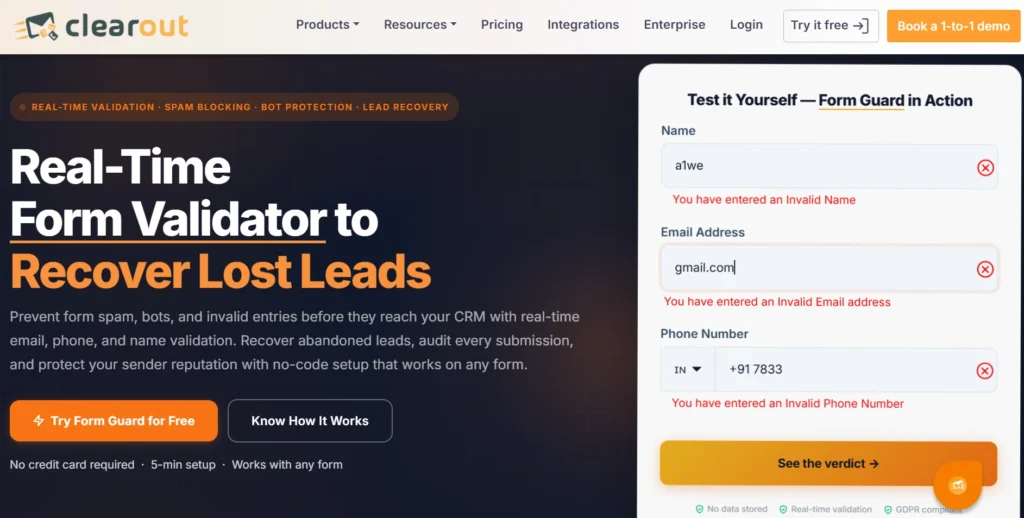
Clearout Form Guard test results.

Clearout Form Guard provides real-time validation for customer information entered through online forms. It helps merchants check email addresses, phone numbers, and name fields before submission.

Instead of relying only on Shopify’s basic checks, merchants can add another layer of data validation. This helps prevent incorrect customer information from entering their systems.

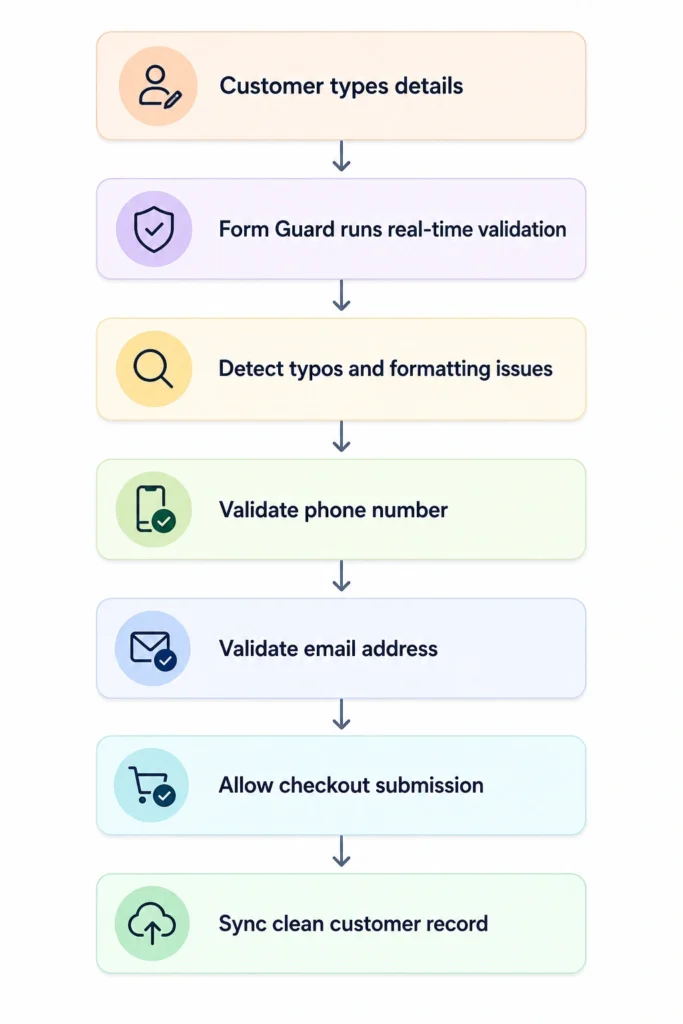
A typical validation flow looks like this:

 Form Guard customer validation flow

By validating information before submission, merchants send fewer failed order confirmations, spend less time on manual fixes, and keep cleaner records across every connected tool.

How does Shopify phone number validation improve customer communication?


  • Country detection

    Customers often shop from different regions. Validating phone numbers against the selected country helps identify formatting mismatches before checkout is completed. This prevents delivery delays for international orders.

  • Invalid numbers

    Typing mistakes, missing digits, and placeholder numbers create invalid customer records. Validating phone numbers during checkout prevents these errors from entering Shopify and disrupting future outreach.

  • Unreachable phones

    A correctly formatted number may still be unreachable. Identifying invalid or inactive numbers helps merchants avoid failed delivery updates after an order is placed.

  • SMS failures

    When it comes to order confirmations, OTPs, and promotional messages, having accurate phone numbers is essential. If the wrong number is entered, customers will miss out on OTPs, delivery notifications, discount codes, and promotional updates. This will lead to a gradual decrease in engagement over time.

  • Delivery notifications

    Valid phone numbers are crucial for delivery partners to provide shipping updates and arrange deliveries. The right customer details enable customers to be informed of the fulfillment process in a timely manner.

How can you prevent invalid email addresses in Shopify checkout?


Preventing invalid email addresses starts with validating customer information before checkout is completed. Instead of fixing incorrect records later, merchants can stop them from entering Shopify in the first place.

Catch typing mistakes instantly


Real-time validation identifies common typing errors such as gmial.com or gmail.con while customers complete the checkout form. Simple correction prompts help customers fix mistakes immediately.

Block disposable email addresses


Temporary email addresses rarely support long-term customer communication. Blocking disposable domains keeps them out of your list before they ever get the chance to bounce later.

Verify email domains


Checking whether the email domain can receive messages adds another layer of Shopify email validation. This prevents undeliverable addresses from entering customer records.

Validate before submission


Real-time Shopify checkout validation checks customer details before the order goes through. Catching mistakes at this point helps keep your customer list clean instead of fixing those errors later.

Final takeaways


Having the correct customer contact details is what is required for a seamless post-purchasing experience. But Shopify's default validation just validates based on the format. It can't catch bad emails, invalid telephone numbers or typo names until after an order has been placed.

The earlier bad data is caught, the less it costs a business. Clearout Form Guard prevents fake form submissions by validating customer details before an order is submitted. So, now merchants can identify and stop invalid data during checkout itself, have fewer delivery issues, and cleaner records across the store.

Prevent Invalid Customer Data at Shopify Checkout


Try Clearout Form Guard

FAQ


1. How can I validate customer information during Shopify checkout?
You can use Clearout Form Guard to validate email addresses, phone numbers, and name fields in real time. This helps capture accurate customer information before it enters your Shopify customer records.
2. What is validation in Shopify checkout?
Shopify native checkout validation runs a basic syntax check. It only confirms the field format looks correct. Advanced validation goes a step further: it verifies the email or phone number is real and reachable, so order updates actually land where they're supposed to.
3. How do I use Shopify functions?
Shopify Functions let developers customize parts of the checkout and store experience using server-side logic. They support use cases like discounts, shipping, payment customization, and validation.
4. How to modify Shopify checkout information?
Depending on your plan and available customization options, you can update checkout settings from your Shopify admin. For more sophisticated validation, you can also use third-party tools like Clearout that extend the capabilities of Shopify’s native checkout.

Share this article

Recent Posts

22 Aug 2026
Why Validating Contact Information Matters for Shopify Checkouts

Shopify checkout validation catches typos, fake numbers, and disposable emails. See how Clearout's F ...

21 Aug 2026
Email Data Quality Benchmark Report (2026)

Explore 2026 email data quality benchmarks for bounce rates, list decay, and deliverability by indus ...

14 Aug 2026
How to Build an Automated Welcome Email Series in 2026

Learn how to build an automated welcome email series in 2026 with real-time email verification, trig ...

06 Aug 2026
How GTM Teams Build Waterfall Enrichment Workflows

Learn how leading GTM teams sequence providers, automate waterfall enrichment workflows, and verify ...

31 Jul 2026
How RevOps Teams Protect HubSpot CRM Data Integrity

Prevent fake leads in HubSpot with real-time validation. Learn how RevOps teams protect CRM data int ...

Clearout's

Form Guard

Validate email, phone & name on any forms!

  • Real signups only
  • Verified emails
  • Valid phone numbers
  • No fake names
  • Cleaner CRM
  • No devs needed
Try for Free Now

Email Verification, Email Finding Form Guard & Prospecting Service

Expand Your Reach By Finding & Verifying Ideal Prospects.

Sign up & get 100 free credits

No Credit Card required

Create Free Account
Company

Why Clearout?

Pricing

Contact Us

Careers

Press

Enterprise

Sitemap

FAQ

Status

Products

Email Verifier

Email Finder

Form Guard

Data Pulse

Prospect

LinkedIn Email Finder

Reverse Lookup

Google Sheets Add-on

WordPress Plugin

ClearoutPhone

What's New?

Resources

Integrations

HubSpot

Team Account

API

Compare Email Verifier

Compare Email Finder

Compare Prospecting

Use Cases

Blog

Help

Legal

Privacy Policy

Terms

DPA

Security

Trust Center

Certification

ISO 27001/2022

SOC 2 Type 2

GDPR

Partnership

HubSpot Certified

Affiliates

Partners

Clearout for browser

⚡ Supercharge Your Prospect Research with Clearout's LinkedIn Chrome Extension - Find and Verify Emails with Confidence!

Clearout Chrome extension

clearout
© 2026 Clearout Inc. All Rights Reserved. Powered by Clearout.
Validate Enrich New Salesforce contacts automatically with Data Pulse. Learn More ➞
X