



clearout
  • Products
    • Email Verifier Verify emails addresses individually, in bulk or through API, with 99% accuracy
    • Email Finder Find individual or bulk emails by entering the person & company name or domain
    • Form Guard IconForm Guard Protect your forms from spam, bots, and invalid submissions with real-time email, phone, and name verification.
    • Form Guard IconData Pulse Verify, enrich, and monitor your CRM contacts in real time - heartbeat monitor for your data.
    • Prospect SQL/MQL list building with high levels of personalization, real-time data enrichment and prospect search
    • Clearout For SheetsVerify email addresses directly on Google Sheets with Clearout for sheets add-on
    • Prospect – LinkedIn Chrome ExtensionBuild verified, targeted prospect lists directly from LinkedIn profiles
    • ClearoutPhoneValidate phone numbers across 240+ countries in bulk, quick or real time validation
    • Free Tools
    • Disposable Email Checker
    • Reverse LinkedIn Profile Lookup Tool
    • Reverse Email Lookup Tool
    • Email List Cleaner
    • Company Domain Finder API
  • Resources
      DEVELOPERAPI iconAPI
      Clearout APIs are structured around REST and JSON
      Webhooks iconWebhooks
      Capture real-time events in your application workflow
      Form Guard iconForm Guard
      Real-time form validation to keep bad contacts out of your CRM
      KNOWLEDGE BASEGetting started iconGetting started
      Sending campaigns without bounces is made simple
      FAQ iconFAQ
      Easily find answers to services, security and common questions
      USE CASESLead Generation iconLead Generation
      Learn how professionals generate quality leads
      GUIDESPricing arrow iconTransparent & flexible pricing to support pay-per-use or recurringCompare Email Verification Tools arrow iconAI-powered email verification with 99%+ accuracy, real-time validation, and transparent risk scoringCompare Email Finder Tools arrow iconPre-verified B2B email addresses with confidence scoring, find real person email, not role-based addressData Pulse & HubSpot Breeze Intelligence arrow iconPre-verified B2B email addresses with confidence scoring, find real person email, not role-based addressBLOGSEmail Verification ToolsFind Anyone’s Email Address
      Most Accurate, Fast & Free Ways
      Form Validation
      Importance, Ways & Best Practices
      View All Blogs
  • Pricing
  • Integrations
  • Enterprise
  • Login
Try it free Book a 1-to-1 demo
Akanksha Mishra / August 31, 2026 August 31, 2026

HubSpot Data Quality Audit Framework for New Clients


HubSpot Data Quality Audit Framework for New Clients

TL;DR


  • Start with the client's business goals, critical processes, and CRM data sources before reviewing individual records.
  • Use five core audit areas to assess lifecycle stages, critical properties, duplicate exposure, contactability, and revenue reporting.
  • Score findings against client- requirements rather than using generic data quality benchmarks.
  • Turn your audit findings into a clear action plan and fix the issues that have the biggest business impact first.
  • More importantly, make sure the same problems don't creep back into your CRM a few months later. That's where ongoing validation helps.
  • Tools like Clearout Data Pulse can help by validating email, phone, and name data as contacts are created in HubSpot.

Table Of Content


‣ TL;DR
‣ What is a HubSpot data quality audit?
‣ Why do an agency data quality audit?
‣ How should agencies structure a HubSpot audit?
‣ What should agencies check during a HubSpot data quality audit?
‣ How can agencies perform a HubSpot health check in under one hour?
‣ How should agencies present audit findings?
‣ What benchmarks should agencies reference?
‣ Which issues should agencies fix first?
‣ Why should lifecycle fixes come before outreach?
‣ Which tools should agencies use during a HubSpot data quality audit?
‣ HubSpot data quality audit checklist for agencies
‣ A repeatable HubSpot audit framework agencies can productize
‣ FAQ
When an agency takes over a client's HubSpot portal, the first priority should be understanding whether the CRM can support the work planned on it. However, duplicate records, incorrect lifecycle stages and missing data can quickly lead to problems.

When campaigns, workflows, routing, or reports rely on unreliable records, the agency spends time fixing downstream problems instead of addressing the source. An organized HubSpot CRM audit will help you identify the real problems before you begin cleaning up.

This guide takes you through a repeatable HubSpot CRM audit framework: the five core areas to audit, how to score them, and how to turn findings into a remediation plan that a client will actually sign off on.

What is a HubSpot data quality audit?


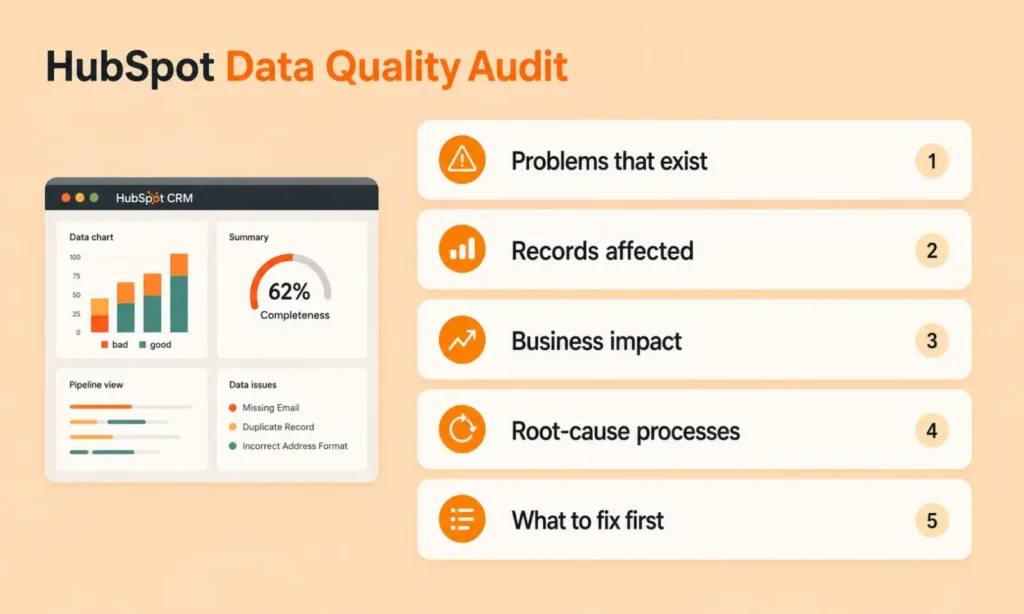
An infographic outlining 5 key steps of a HubSpot Data Quality Audit.

A HubSpot data quality audit reviews records, properties, and processes inside a portal to check overall reliability. It confirms whether that data can be trusted for segmentation, reporting, automation, and outbound outreach. The audit focuses on data problems that actively affect critical business processes.

A useful HubSpot CRM data quality audit should determine:

  • Which data problems exist
  • How many records are affected
  • Which problems create the greatest business impact
  • What processes contribute to those problems
  • Which issues need attention first
  • Will the same data problems reappear as new records are added to the CRM

Why do an agency data quality audit?


Many agencies inherit HubSpot portals with inconsistent data, duplicate records, outdated information and missing properties. These issues impact segmentation, lead routing, reporting, targeting campaigns and following up with sales. Typically best not to clean it all at once. First, agencies need to get a sense of what issues matter most to the client's business.

Here's a systematic HubSpot audit an agency should do:

  • Not all data problems have the same priority

An incorrect lifecycle stage can quietly break reporting and disrupt marketing automation. A property with incomplete values may be low priority if no workflow, report, routing rule, or segmentation depends on it.

  • Skipping the audit means fixing symptoms

Cleaning a duplicate without understanding why it was created can leave the underlying process unchanged. It resurfaces the moment new records enter through forms, imports, or manual entry.

An audit traces each issue back to the process creating it. That's what stops agencies from repeating identical cleanup work after every campaign.

How should agencies structure a HubSpot audit?


Say you've just taken over a 40,000-contact HubSpot portal, for a client. You don't know yet which contacts are usable, how many are duplicates or whether the lifecycle stages match how the client actually sells. A structured HubSpot audit framework helps you find what needs attention first and turn those findings into a plan.

1. Establish the audit scope


Start by understanding how the client actually uses HubSpot.

Not every object in HubSpot needs attention on day one. If revenue depends on sales follow-up, start with contacts, companies, lifecycle stages, and deal associations. Confirm with the client's team where their data comes from: forms, imports, integrations, or manual entry.

A portal built on one bulk import years ago usually means duplicates cluster around that import date. Know the source before you touch a single record.

2. Set data quality criteria


Decide what "good data" means for the client before measuring anything. A sales-ready contact may need an email, owner, territory, or industry, depending on how leads are routed.

Ask the team how they use data and what fields they need. Their workflow should define the data standard.

For more details, check 5 Signs Your HubSpot CRM Needs Real-Time Data Validation guide.

3. Run the five-report health check


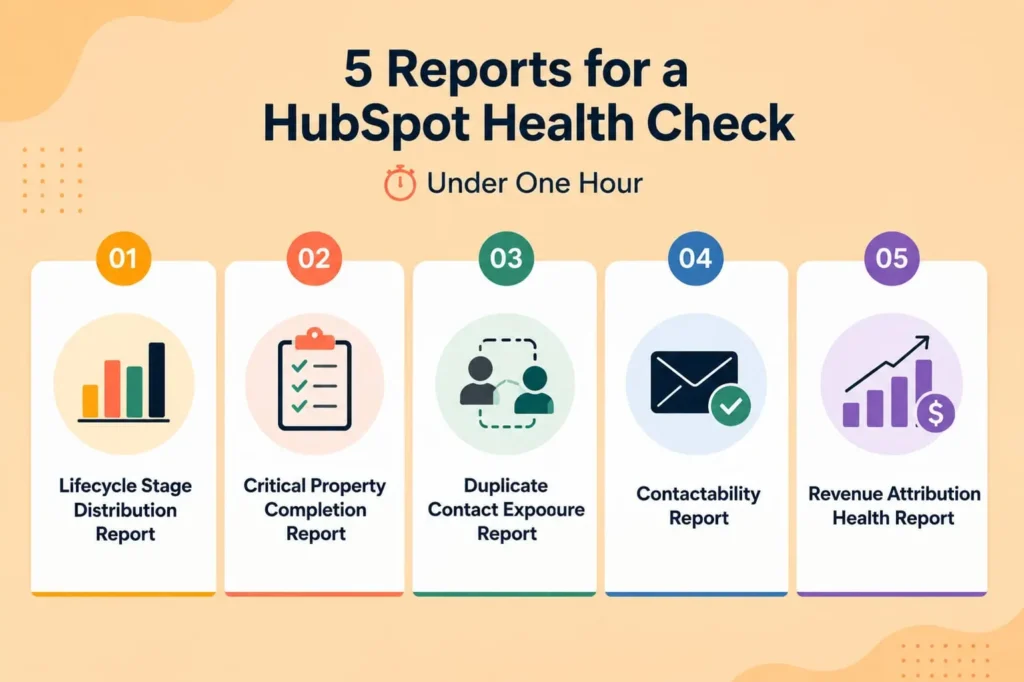
Pull five reports through HubSpot's native reporting: Lifecycle Stage Distribution, Critical Property Completion, Duplicate Contact Exposure, Contactability, and Revenue Attribution Health. This gives a fast view of where the biggest risks sit.

Treat what you find here as a lead, not a conclusion. A spike in one lifecycle stage points to a problem; it doesn't confirm one.

4. Validate the findings


Sample the records behind each flagged pattern and check them against actual deal history or contact behavior. Check duplicate exposure here too, using HubSpot's native duplicate management or Data Pulse for ongoing validation.

Skipping this step is how a harmless, unused field ends up treated as a critical issue. Confirm before it reaches the client.

5. Build the remediation roadmap


Group findings into practical remediation workstreams. Prioritize issues affecting revenue, reporting, outreach, automation, or sales operations. Separate immediate fixes from structural improvements. This gives clients a clearer understanding of what needs to happen first.

What should agencies check during a HubSpot data quality audit?


A structured audit should cover six core areas of CRM data quality. These areas help agencies identify what needs to be checked before they decide what to fix.

1. Contact data quality


Check email addresses, phone numbers, names, company associations, owners, and segmentation properties for accuracy. Invalid values, inconsistent formats, and outdated records tend to hide in exactly these fields.

Differentiate missing data from invalid data because they require different fixes. For ongoing validation, Clearout Data Pulse can validate email, phone, and name data as new HubSpot contacts enter the CRM.

2. Company data quality


Company names, domains, industries, locations, owners, and contact associations all deserve a pass here. Watch for multiple records that actually represent the same organization under slightly different names.

Contacts sitting without a company association are just as much a problem, since that gap quietly breaks account reporting, segmentation, routing, and sales visibility all at once.

3. Lifecycle stage accuracy


Lifecycle stage definitions should match the client's real sales and marketing process. Flag any record sitting in the wrong stage or missing one entirely. You can check the workflows that create or update these values in the first place.

Get this wrong, and outreach lists end up pulling in contacts who don't belong there. This means irrelevant messaging and campaign reports nobody can trust.

4. Contactability and outreach readiness


Usable email and phone information is the baseline here, alongside suppression records, consent requirements, and any outreach rules specific to this client. Missing information isn't automatically invalid information.

Contactability data also goes stale, so confirm it's current enough for whatever campaign is actually planned. That split, outreach-ready contacts on one side and records needing work on the other, is what this step is really producing.

5. Duplicate records


Potential duplicate contacts and companies need a look before any large-scale cleanup gets recommended, since imports, forms, integrations and manual entry all create their own versions of the same problem. Clearout Data Pulse can flag duplicate contact risk during email validation, which catches part of this automatically.

Identifying the duplicate records matters, but identifying what's creating them matters more. Fix the source, and the same cleanup problem stops reappearing after every batch of new contacts.

6. Revenue and reporting integrity


Contacts, companies, and deals need to actually connect the way the client's reports assume they do. Lifecycle stages, revenue-related properties, and record associations are where that connection usually breaks.

Compare the reports with the actual CRM data directly instead of just believing the dashboard by itself.

How can agencies perform a HubSpot health check in under one hour?


Five-report HubSpot health check for faster portal scoring.

You can create an initial portal health score using five reports as part of a fast HubSpot CRM audit. The reports should identify major risks without attempting full remediation.

In the first pass, you can review the five reports, sample the major issues, and assign scores within one hour. The goal is to identify where you need a deeper audit.

Report 1: Lifecycle stage distribution report


Show the number of contacts across each lifecycle stage. Look for unusually large populations, missing stages, and records that appear incorrectly classified. Compare the results against the client's established lifecycle process.

Report 2: Critical property completion report


Identify the properties you require for important business processes. Measure completion across those properties. For example, sales-ready contacts may require an owner, lifecycle stage, company association, and email. Focus on fields that influence routing, segmentation, reporting, or outreach.

Report 3: Duplicate contact exposure report


Identify potential duplicate contacts and estimate the affected population. Check a sample of records to confirm whether the matches are genuine. Then identify where those duplicates originate. This makes your cleanup plan more useful because it addresses both records and causes.

Report 4: Contactability report


Measure how many contacts are usable for the client's intended outreach. Review email validity, phone availability, suppression fields, and relevant contactability information. Separate invalid records from contacts that simply lack information.

Report 5: Revenue attribution health report


Confirm whether important contacts, companies, and deals have the relationships required for reporting. Check for missing associations and inconsistent revenue-related information. Then compare key revenue reports against the underlying CRM records. This helps you determine whether the portal can support reliable revenue analysis.

Create the portal health score


Once the five-report health check is complete, agencies can score each area from 0 to 4 to create an initial portal health score.

AreaScore
Lifecycle stage accuracy/4
Critical property completion/4
Duplicate exposure/4
Contactability/4
Revenue reporting integrity/4
Total/20

This is an agency-defined scoring framework.

How should agencies present audit findings?


Keep the audit separate from cleanup. The audit finds problems, the cleanup decides what gets fixed, and the two are mixed together allowing for scope creep before the client agrees to anything.

Once that's decided, cover the health score first, followed by the highest-impact findings in order of number of records affected. Because behind every finding, there's a specific cause to be named, a property, a duplicate cluster, a workflow or an integration. Those are the things that make a number actionable.

To judge how much it matters, benchmark against the client's own numbers. Their required-field completeness, their duplicate rate, and how quality compares to their last audit cycle say more than a flat "90% clean" target, since they reflect what this portal actually needs.

From there, use the scored findings to scope cleanup and estimate effort. That's where the audit becomes a proposal, an initial audit, a cleanup project, or ongoing monitoring, each with its own deliverables.

What benchmarks should agencies reference?


Agencies should benchmark HubSpot data quality against these client-specific measures:

  • Required-field completeness: Share of records meeting the client's required-property standards.
  • Data accuracy: Match with verified customer or business information.
  • Duplicate rate: Number and percentage of duplicate records across relevant CRM objects.
  • Historical performance: Changes in data quality compared with previous audits or cleanup cycles.
  • Process requirements: Data quality needed for critical workflows, routing, segmentation, and automation.
  • Reporting requirements: Data completeness and consistency required for accurate dashboards and reports.
  • Validation: Compliance with defined email, phone, and other validation standards.

Which issues should agencies fix first?


Not every data problem requires immediate cleanup. If revenue reports can't be trusted or lifecycle stages are inaccurate, fix those first. These issues affect reporting, segmentation, lead routing, and automation.

If your lifecycle stages and routing logic are working as expected, look at contactability. You must clean email and phone data if contacts are still being classified or routed incorrectly. After that, move on to duplicate cleanup and enrichment.

Why should lifecycle fixes come before outreach?


Incorrect lifecycle stages can add customers, opportunities, and unqualified contacts to the same outreach lists as prospects.

When that happens, workflows may enroll the wrong contacts, messaging may not be as relevant, and campaign reporting may be less accurate.

Then, outreach teams first lock down lifecycle definitions and workflow rules. This leads to cleaner segmentation and less time rebuilding lists down the line.

Which tools should agencies use during a HubSpot data quality audit?


  • HubSpot reporting: Check lifecycle, property, funnel, and revenue trends in CRM data with HubSpot reports.
  • HubSpot duplicate management: HubSpot duplicate manager tools can find and fix possible duplicate records.
  • HubSpot workflows: This helps to review automation that creates, updates, assigns, or routes important CRM data.
  • CRM hygiene and cleanup: Use Data Pulse when email, phone, name, and duplicate validation are part of the client's data quality requirements. Data Pulse connects natively with HubSpot and validates new contacts in real time. It performs 20+ validation checks and writes validated fields back into the CRM.
  • Spreadsheets: Controlled exports can still be useful for sampling, issue analysis, record-level review, and cleanup planning.

Each tool should have a specific purpose within the audit or remediation process.

HubSpot data quality audit checklist for agencies


Use this data audit checklist alongside the HubSpot CRM cleanup checklist after the initial assessment.

1. Before the audit


  • Confirm audit objectives
  • Set audit scope
  • Map critical HubSpot processes
  • List important reports
  • Document major data sources
  • Confirm lifecycle stage definitions
  • Identify critical properties
  • Define outreach requirements
  • Establish the scoring method

2. During the audit


  • Analyze lifecycle stage distribution
  • Assess critical property completion
  • Measure duplicate exposure
  • Evaluate contactability
  • Check company associations
  • Validate revenue reporting
  • Examine relevant workflows
  • Validate major findings
  • Identify root causes
  • Score each audit area

3. After the audit


  • Present the health score
  • Highlight the highest-impact findings
  • Quantify affected records
  • Explain business impact
  • Prioritize remediation
  • Outline cleanup workstreams
  • Estimate project scope
  • Define success criteria
  • Recommend ongoing monitoring

A repeatable HubSpot audit framework agencies can productize


A repeatable HubSpot audit gives agencies a consistent way to assess data quality, explain risks, prioritize remediation, and scope cleanup work. The five-report health check creates a practical starting point, while structured remediation turns findings into measurable improvements.

From there, agencies can add ongoing validation to maintain data quality as new records enter HubSpot. This approach makes CRM audits easier to deliver, easier to scope, and easier to turn into a productized service.

Audit your client's HubSpot CRM with a structured framework


Explore Clearout Data Pulse

FAQ


1. What is a HubSpot CRM audit?
A HubSpot CRM audit evaluates whether a portal's data and processes support business requirements. A data quality audit focuses specifically on record accuracy, completeness, consistency, duplication, contactability, and reporting.
2. What should a HubSpot audit include?
A HubSpot audit should review critical data, lifecycle stages, duplicates, contactability, company associations, and reporting integrity. It should also see if any process is creating recurring data problems.
3. How do you audit HubSpot data quality?
Start by defining the client's critical processes and required data. Then review lifecycle stages, critical properties, duplicates, contactability, and revenue reporting. Validate contacts with tools like Clearout to understand how much of your CRM is usable for sales and marketing activities.

Share this article

Recent Posts

31 Aug 2026
HubSpot Data Quality Audit Framework for New Clients

Learn how agencies can audit HubSpot CRM data, identify critical issues, score data quality, and bui ...

31 Aug 2026
Why Is My Email Click Rate Dropping In 2026?

Discover why your email click rate is dropping in 2026, how security bots inflate clicks, and how to ...

22 Aug 2026
Why Validating Contact Information Matters for Shopify Checkouts

Shopify checkout validation catches typos, fake numbers, and disposable emails. See how Clearout's F ...

21 Aug 2026
Email Data Quality Benchmark Report (2026)

Explore 2026 email data quality benchmarks for bounce rates, list decay, and deliverability by indus ...

14 Aug 2026
How to Build an Automated Welcome Email Series in 2026

Learn how to build an automated welcome email series in 2026 with real-time email verification, trig ...

Clearout's

Form Guard

Validate email, phone & name on any forms!

  • Real signups only
  • Verified emails
  • Valid phone numbers
  • No fake names
  • Cleaner CRM
  • No devs needed
Try for Free Now

Email Verification, Email Finding Form Guard & Prospecting Service

Expand Your Reach By Finding & Verifying Ideal Prospects.

Sign up & get 100 free credits

No Credit Card required

Create Free Account
Company

Why Clearout?

Pricing

Contact Us

Careers

Press

Enterprise

Sitemap

FAQ

Status

Products

Email Verifier

Email Finder

Form Guard

Data Pulse

Prospect

LinkedIn Email Finder

Reverse Lookup

Google Sheets Add-on

WordPress Plugin

ClearoutPhone

What's New?

Resources

Integrations

HubSpot

Team Account

API

Compare Email Verifier

Compare Email Finder

Compare Prospecting

Use Cases

Blog

Help

Legal

Privacy Policy

Terms

DPA

Security

Trust Center

Certification

ISO 27001/2022

SOC 2 Type 2

GDPR

Partnership

HubSpot Certified

Affiliates

Partners

Clearout for browser

⚡ Supercharge Your Prospect Research with Clearout's LinkedIn Chrome Extension - Find and Verify Emails with Confidence!

Clearout Chrome extension

clearout
© 2026 Clearout Inc. All Rights Reserved. Powered by Clearout.
Validate Enrich New Salesforce contacts automatically with Data Pulse. Learn More ➞
X