

- Products
- ResourcesDEVELOPER

 API
API
Clearout APIs are structured around REST and JSON Webhooks
Capture real-time events in your application workflow Clearout MCP
Verify and find emails from AI assistants like Claude and Cursor Form Guard
Real-time form validation to keep bad contacts out of your CRMKNOWLEDGE BASE Getting started
Sending campaigns without bounces is made simple FAQ
FAQ
Easily find answers to services, security and common questionsUSE CASES Lead Generation
Learn how professionals generate quality leadsGUIDES Clearout Insights Explore original research, industry statistics, and data-backed insights Pricing Transparent & flexible pricing to support pay-per-use or recurringCompare Email Verification Tools AI-powered email verification with 99%+ accuracy, real-time validation, and transparent risk scoringCompare Email Finder Tools Pre-verified B2B email addresses with confidence scoring, find real person email, not role-based addressData Pulse & HubSpot Breeze Intelligence Pre-verified B2B email addresses with confidence scoring, find real person email, not role-based addressBLOGSEmail Verification ToolsFind Anyone’s Email Address
Most Accurate, Fast & Free WaysForm Validation
Importance, Ways & Best PracticesView All Blogs - Pricing
- Integrations
- Enterprise
- Login



How to find phone numbers From LinkedIn (2026 Guide)
Trying to connect with someone on LinkedIn, but unable to figure out how to reach them? 😥
You're not alone!
LinkedIn is useful for B2B prospecting and networking since it has 1.3 billion members. It means LinkedIn remains the leading B2B sales and advertising channel, but finding direct contact details can still be difficult. Not every user makes their phone number publicly available.
This guide explains how to get phone numbers from LinkedIn, including manual methods, LinkedIn Sales Navigator, Chrome extensions, and reverse lookup tools.
We will also cover what to consider when using contact information for prospecting.
You're not alone!
LinkedIn is useful for B2B prospecting and networking since it has 1.3 billion members. It means LinkedIn remains the leading B2B sales and advertising channel, but finding direct contact details can still be difficult. Not every user makes their phone number publicly available.
This guide explains how to get phone numbers from LinkedIn, including manual methods, LinkedIn Sales Navigator, Chrome extensions, and reverse lookup tools.
We will also cover what to consider when using contact information for prospecting.
Table of Contents:
How to get phone numbers from LinkedIn: Manual and automated methods
There are several ways to find phone numbers from LinkedIn profiles. You can either search manually for details the person has already made public, or use prospecting and reverse lookup tools to automate the process and find contacts with higher accuracy.
Manual methods
1. Checking the LinkedIn contact info section:
The simplest way to find a phone number from a LinkedIn profile is to check the Contact Info section.
Open the person's LinkedIn profile and select Contact Info. If they have chosen to make their phone number available, you may find it there.
Open the person's LinkedIn profile and select Contact Info. If they have chosen to make their phone number available, you may find it there.
2. Use LinkedIn search to find the right person:
LinkedIn search can help you narrow down prospects by factors such as:
- Company
- Location
- Industry
- Job title
Once you identify the right person, you can check their profile and Contact Info section for any available contact details.
LinkedIn search itself does not display private phone numbers. Use it to narrow down the right prospect, then open their profile and check the Contact Info section for any details they've chosen to share.
Limitation with manual methods: Phone numbers are not automatically visible on LinkedIn. Members must add a number to their Contact Info and choose who can view it, so manual searches often return limited phone data.
LinkedIn search itself does not display private phone numbers. Use it to narrow down the right prospect, then open their profile and check the Contact Info section for any details they've chosen to share.
Limitation with manual methods: Phone numbers are not automatically visible on LinkedIn. Members must add a number to their Contact Info and choose who can view it, so manual searches often return limited phone data.
Automated methods
3. LinkedIn Sales Navigator:
LinkedIn Sales Navigator provides advanced search and lead-generation features that can help you identify relevant prospects.
You can use its search capabilities to narrow down your target audience and build a more focused prospect list.
However, Sales Navigator does not provide private phone numbers simply because you can find someone's profile. You still need another source or method to find additional contact information.
You can use its search capabilities to narrow down your target audience and build a more focused prospect list.
However, Sales Navigator does not provide private phone numbers simply because you can find someone's profile. You still need another source or method to find additional contact information.
4. Use a LinkedIn Chrome extension to find phone numbers:
With Clearout’s LinkedIn Chrome Extension, you can find phone numbers, verified business and personal email addresses, job titles, company details, and other prospect information directly from LinkedIn. It works with individual profiles, search results, connections, invitations, and LinkedIn Sales Navigator.
The process is simple:
The process is simple:
- Find your prospects: Use LinkedIn or Sales Navigator filters to identify people who match your target audience.
- Open the extension: View the available contact details and add the prospects you want to your Clearout list.
- Build your list: Save the prospects and export the data to CSV or Google Sheets when needed.
- Work in bulk: For larger searches, use the Auto option to process multiple pages and build your list with less manual work.
Clearout verifies contact information before it is shown, with its current extension page reporting 99.73% accuracy for its verification process.
Find verified emails and phone numbers instantly with Clearout → Try it free
Additional techniques
5. Reverse Lookup:
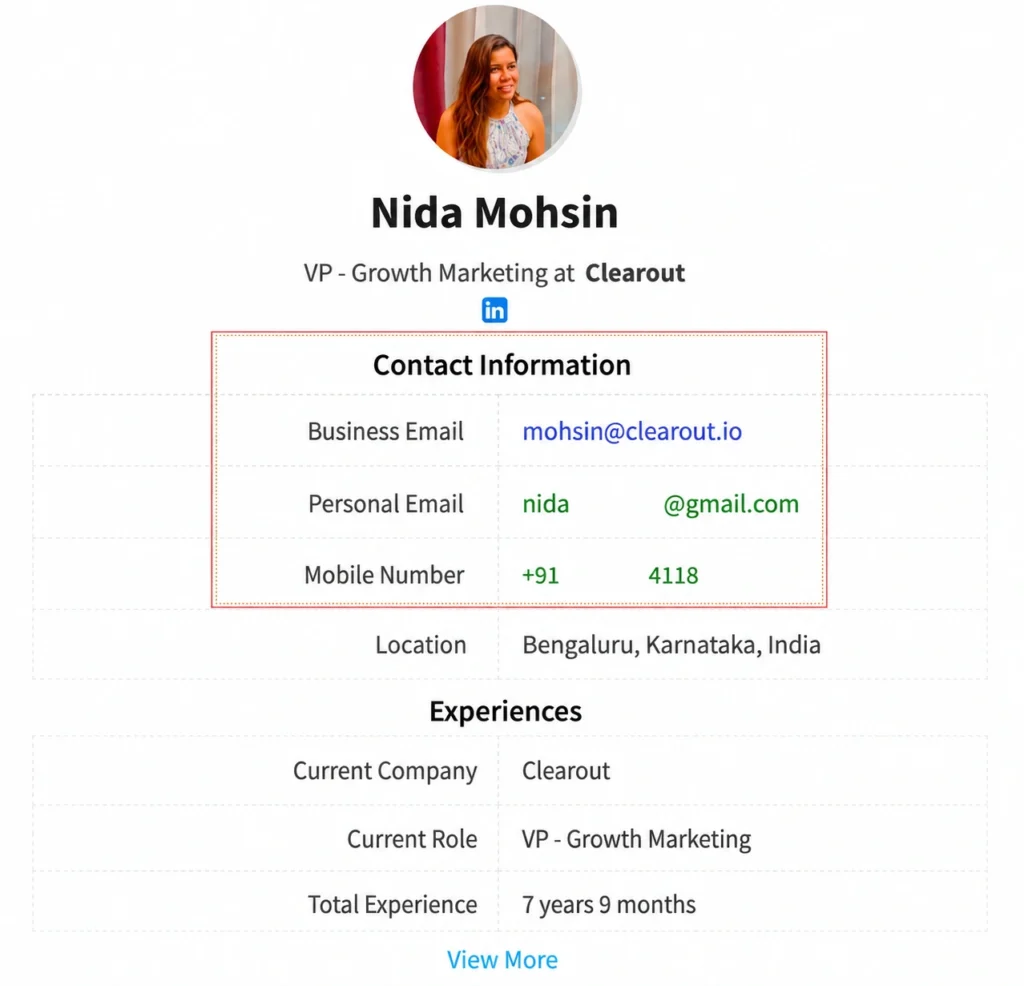
Already have a prospect's LinkedIn profile but need their contact details? LinkedIn Reverse Lookup lets you use the profile URL to find available email addresses, phone numbers, and other prospect information.
With Clearout, you can:
With Clearout, you can:
- Copy the prospect’s LinkedIn or Sales Navigator profile URL.
- Paste it into the LinkedIn Reverse Lookup tool.
- View available email addresses, phone numbers, job details, company information, and profile signals such as roles, experiences, and interests.
- Download the results as a CSV file or export them to Google Sheets.
Clearout also performs real-time validation on the retrieved email addresses and phone numbers, helping you assess the contact data before using it for outreach.
Important considerations while finding phone numbers from LinkedIn
- Respect user privacy: Not everyone chooses to share their phone number on LinkedIn. It's crucial to respect user privacy and avoid using aggressive tactics to find private contact information.
- Data accuracy: Contact information can become outdated. Before using a phone number for outreach, verify that it is still valid and belongs to the right prospect.
- LinkedIn terms of service: Be mindful of LinkedIn's terms of service. Scraping data or using unauthorized methods to extract information can violate their policies and lead to account suspension.
Finding phone numbers with Clearout’s LinkedIn Chrome Extension
Clearout helps you build targeted prospect lists directly from LinkedIn by finding and verifying contact information while you research potential customers. Its LinkedIn Chrome Extension works with LinkedIn profiles, search results, connections, invitations, and Sales Navigator.
Want to understand how Clearout Prospecting works before you start? See the Clearout Prospecting documentation for an overview of the workflow and available prospecting features.
Here’s how you can use Clearout to find phone numbers from LinkedIn:
Want to understand how Clearout Prospecting works before you start? See the Clearout Prospecting documentation for an overview of the workflow and available prospecting features.
Here’s how you can use Clearout to find phone numbers from LinkedIn:
1. Install the Clearout Chrome Extension
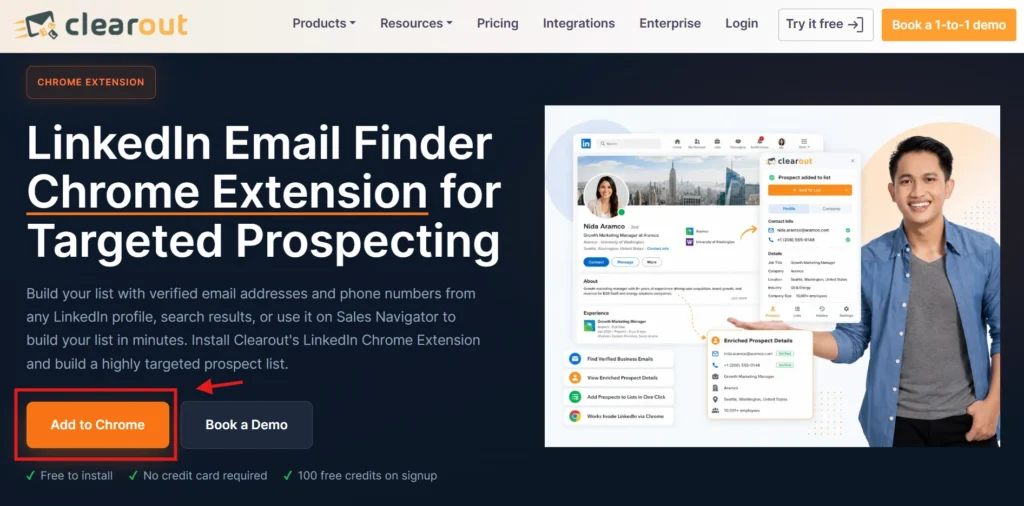
Visit the Clearout LinkedIn Chrome Extension page and click Add to Chrome. The extension is free to install, and new users can sign up for a Clearout account with 100 free credits.
2. Sign in to your Clearout account
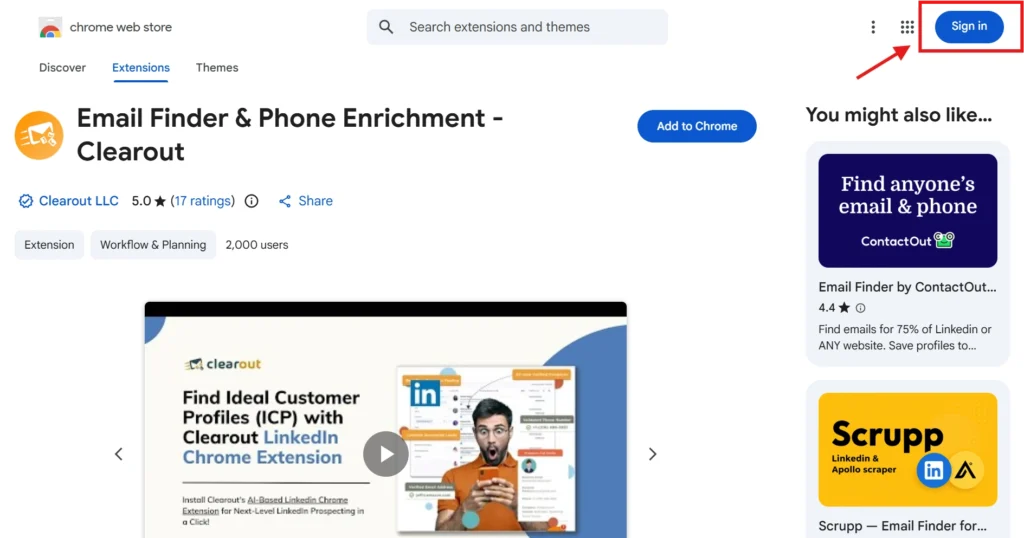
After installing the extension, log in to your Clearout account. If you do not have an account, create one and use the free credits to start prospecting.
3. Find the right prospects on LinkedIn
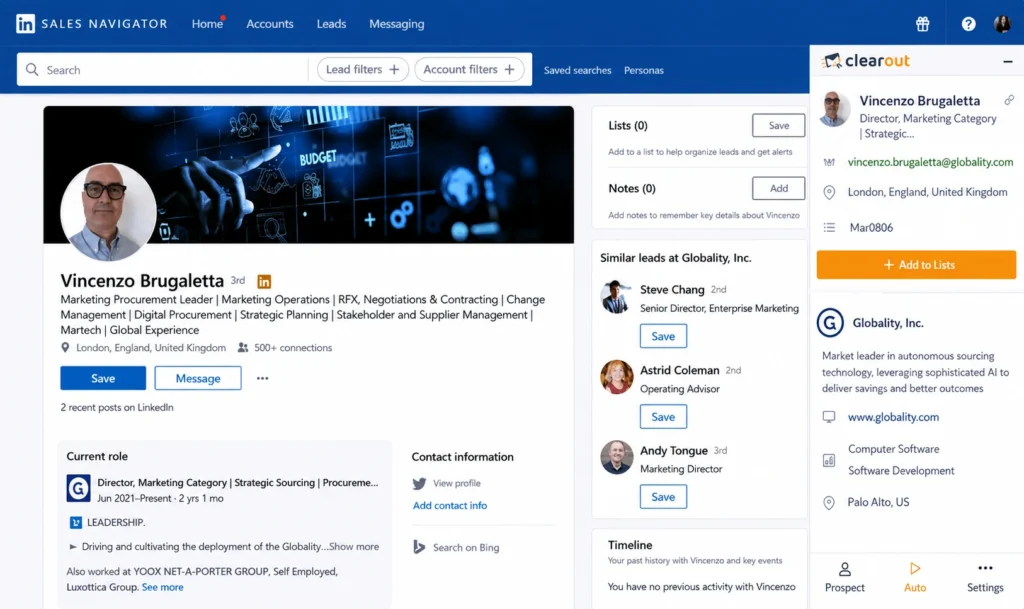
Open LinkedIn and search for people who match your ideal customer profile. Use LinkedIn's filters, such as job title, company, industry, and location, to narrow your search.
If you use Sales Navigator, you can apply its advanced filters to build a more targeted list before using the extension.
If you use Sales Navigator, you can apply its advanced filters to build a more targeted list before using the extension.
4. Open the Clearout sidebar
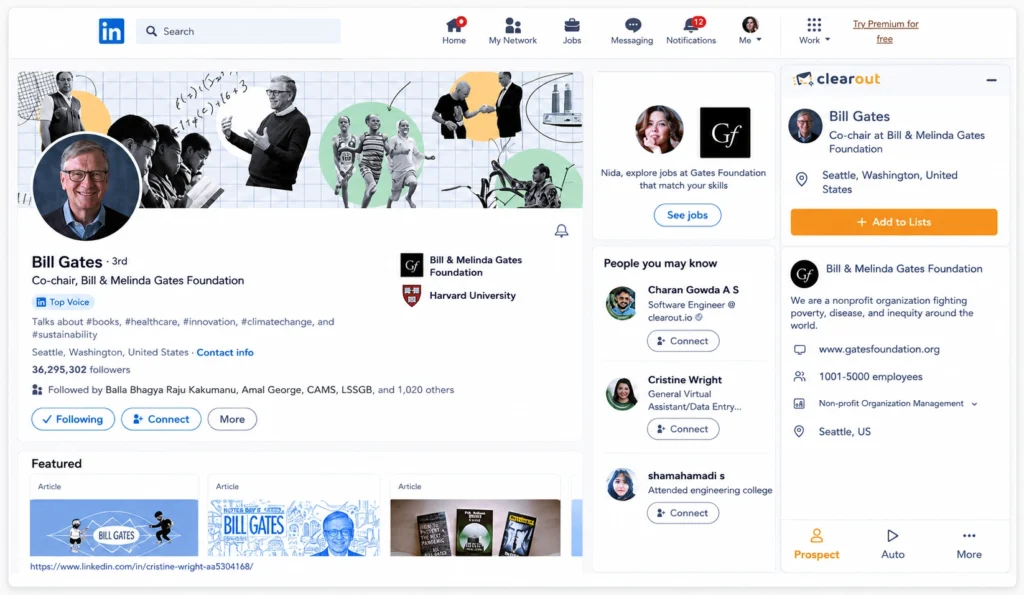
Open a prospect's LinkedIn profile and launch the Clearout extension. The sidebar will show the contact information available for that profile.
Clearout can provide details such as:
Clearout can provide details such as:
- Business and personal email addresses
- Phone numbers
- Job title
- Location
- Company name
- Company URL
- Company size
- Industry
- Other prospect and company information
5. Add the prospect to your list
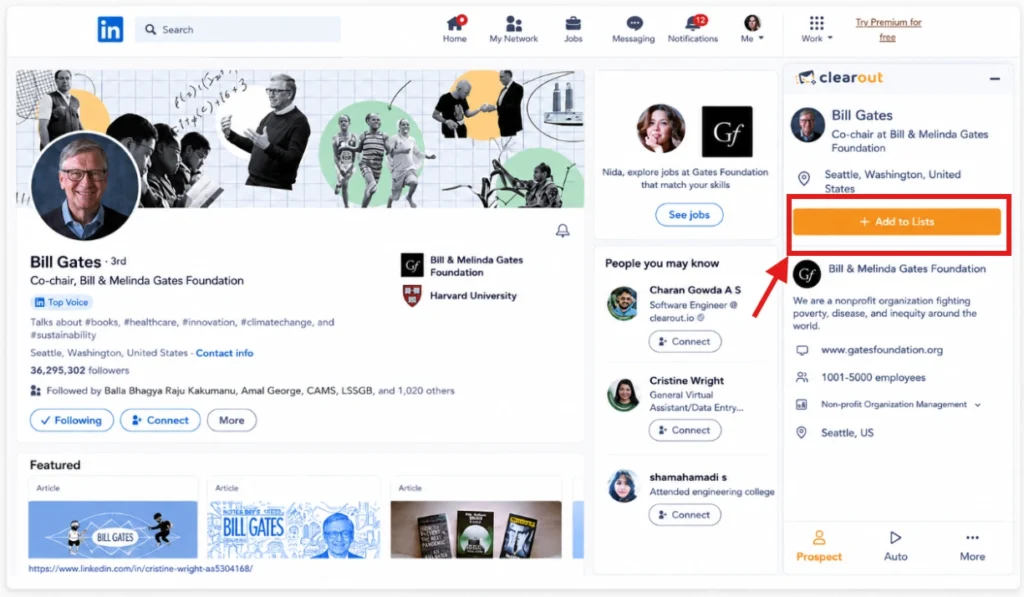
Review the available contact information and click Add to List to save the prospect. You can continue opening relevant profiles and adding prospects to the same list as you build your pipeline.
6. Find prospects in bulk
You do not have to open every profile individually. From a LinkedIn search results page or Sales Navigator, define your search criteria and use Clearout's Auto option to process multiple pages.
Choose or create a list, select the starting page and the number of pages you want to process, then click Start. Clearout will collect the available prospect information and add the results to your list.
Choose or create a list, select the starting page and the number of pages you want to process, then click Start. Clearout will collect the available prospect information and add the results to your list.
7. Export your prospect list
Once you have built your list, you can export the prospect data to CSV or Google Sheets for further prospecting and outreach.
This workflow lets you move from finding the right LinkedIn prospects to collecting their available contact details without manually copying information from each profile.
This workflow lets you move from finding the right LinkedIn prospects to collecting their available contact details without manually copying information from each profile.
Here’s the smart tip we promised 😉
To find the details of ideal prospects on LinkedIn, the easiest way is to:
- Define all the filters that suit your ICP. If you are using Sales Navigator, there are even more filters to find high-intent leads.
- Then open the Clearout LinkedIn Chrome extension and select 'Auto' on the sidebar. Provide a list name or create a new one, set your starting page, and choose the number of pages to extract.
- Click “Start” to process the selected pages automatically while you work on other parts of your prospecting.
That’s all! You will now have a high-quality list of prospects with all the details you need for a personalized outreach.
What if you cannot find a phone number from LinkedIn?
Not every prospect will have a phone number available. If you cannot find a phone number, you can try another contact path instead.
For example, you can look for a verified professional email address associated with the prospect. Read our guide on how to find emails from LinkedIn profiles to learn more.
Using both email and phone prospecting gives you more ways to reach relevant prospects without relying on one source of contact information.
For example, you can look for a verified professional email address associated with the prospect. Read our guide on how to find emails from LinkedIn profiles to learn more.
Using both email and phone prospecting gives you more ways to reach relevant prospects without relying on one source of contact information.
What users say about Clearout
“A Game-Changer for Lead Quality with Exceptional Support.”
- Joanna S.
“A great working tool to work with. We´ve tested it since the first day and worked great.”
- Leandro Artesi
“One of the most economical & accurate email enrichment tools.”
- Rohit C.
👉 Check more reviews on G2
- Joanna S.
“A great working tool to work with. We´ve tested it since the first day and worked great.”
- Leandro Artesi
“One of the most economical & accurate email enrichment tools.”
- Rohit C.
👉 Check more reviews on G2
FAQ
1. How to find phone numbers from a LinkedIn profile in 2026?
Start by opening the person's LinkedIn profile and checking the Contact Info section. If they haven't shared a phone number there, you can use a prospecting or contact-enrichment tool such as Clearout to look for available contact details like phone number, email address, job title, and more.
2. Does LinkedIn show phone numbers?
LinkedIn can show phone numbers when members add them to Contact Info and choose to share them. If someone hasn't shared their number, you generally won't find it on their LinkedIn profile directly either. The Contact Info section is the first place to check when looking for someone's phone number there.