

- Products
- ResourcesDEVELOPER

 API
API
Clearout APIs are structured around REST and JSON Webhooks
Capture real-time events in your application workflow Clearout MCP
Verify and find emails from AI assistants like Claude and Cursor Form Guard
Real-time form validation to keep bad contacts out of your CRMKNOWLEDGE BASE Getting started
Sending campaigns without bounces is made simple FAQ
FAQ
Easily find answers to services, security and common questionsUSE CASES Lead Generation
Learn how professionals generate quality leadsGUIDES Clearout Insights Explore original research, industry statistics, and data-backed insights Pricing Transparent & flexible pricing to support pay-per-use or recurringCompare Email Verification Tools AI-powered email verification with 99%+ accuracy, real-time validation, and transparent risk scoringCompare Email Finder Tools Pre-verified B2B email addresses with confidence scoring, find real person email, not role-based addressData Pulse & HubSpot Breeze Intelligence Pre-verified B2B email addresses with confidence scoring, find real person email, not role-based addressBLOGSEmail Verification ToolsFind Anyone’s Email Address
Most Accurate, Fast & Free WaysForm Validation
Importance, Ways & Best PracticesView All Blogs - Pricing
- Integrations
- Enterprise
- Login



How to Find Emails of Authors or SEO Professionals for Backlink Outreach
To find an author’s or SEO professional’s email address for backlink outreach, start with the website’s author bio, contact page, or team page. If the email is not listed, use LinkedIn or an email-finding tool to identify a professional contact.
Before reaching out, make sure the person is relevant to the page or topic you want to promote. You should also verify the email address before sending your outreach to reduce the chance of reaching an invalid address.
This guide covers more ways to find relevant websites, find their professional email address, and personalize your backlink outreach.
Before reaching out, make sure the person is relevant to the page or topic you want to promote. You should also verify the email address before sending your outreach to reduce the chance of reaching an invalid address.
This guide covers more ways to find relevant websites, find their professional email address, and personalize your backlink outreach.
Table Of Content
Why is Backlink Outreach Important in SEO?
Backlinks are links from another websites to a page on your website. For example, a blog may link to your research report, guide, or other useful resource.
Backlink outreach is the process of identifying relevant websites and contacting their authors, editors, website owners, or SEO professionals about content that may add value to their existing pages.
For example, if an author has published an article on email deliverability, you can reach out with a relevant research report, guide, or data-backed resource that adds information to that article.
Links also help search engines discover pages and understand the relationships between web pages. Google uses link analysis systems, including PageRank, as part of its ranking systems.
Backlink outreach is the process of identifying relevant websites and contacting their authors, editors, website owners, or SEO professionals about content that may add value to their existing pages.
For example, if an author has published an article on email deliverability, you can reach out with a relevant research report, guide, or data-backed resource that adds information to that article.
Links also help search engines discover pages and understand the relationships between web pages. Google uses link analysis systems, including PageRank, as part of its ranking systems.
The Steps Involved in Link-Building Outreach
Now that we understand the importance of backlink outreach, let's break down the process into actionable steps.
Step 1: Find Relevant Websites or Blogs
The first step is to find relevant websites or blogs that align with your content. While you will find many pages and websites similar to your niche or subject, focus on websites that are relevant to your topic and audience.
You can use SEO tools such as Ahrefs, Semrush, or Moz to research potential websites and review metrics such as Domain Authority (DA). However, DA is a third-party metric, so it should not be the only factor when choosing a website for outreach.
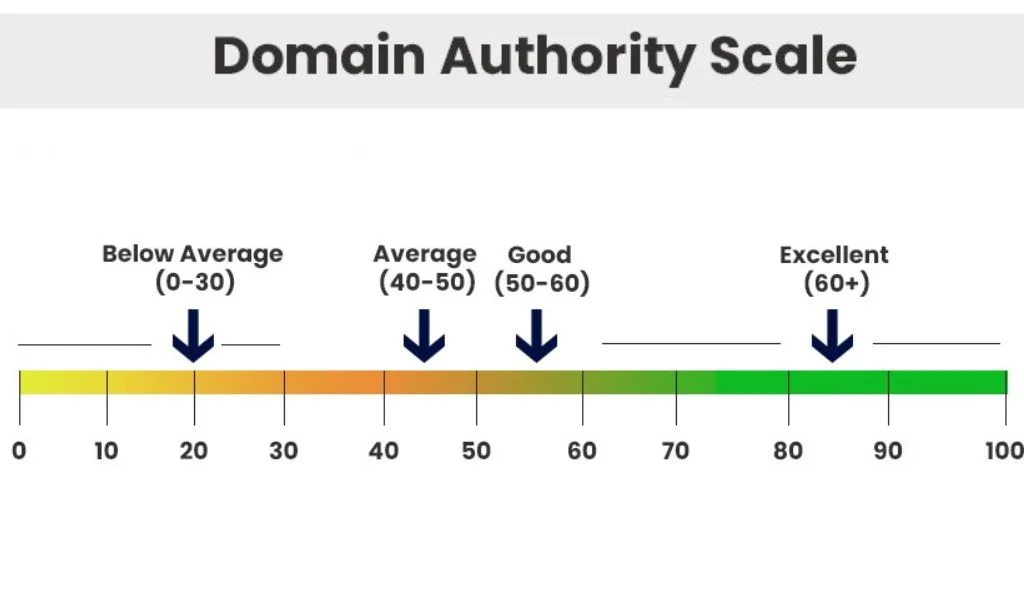
To check the DA score, you can use SEO tools like Moz's Free Domain Authority Checker. Make a list of websites using the following DA scale:
You can use SEO tools such as Ahrefs, Semrush, or Moz to research potential websites and review metrics such as Domain Authority (DA). However, DA is a third-party metric, so it should not be the only factor when choosing a website for outreach.
To check the DA score, you can use SEO tools like Moz's Free Domain Authority Checker. Make a list of websites using the following DA scale:
- Excellent DA Score of 60+
- Good DA Scores (50-60)
- Average DA Score (40-50)
Anything below average, you may skip.
Step 2: Discover Relevant Professionals or Bloggers / Authors
Once you've identified potential websites, find the authors or SEO professionals associated with them. Check the 'About' page or author portals for relevant information.
Step 3: Find Their Social Handle or Email To Contact Them
Next, you need to know the best way to contact them. You can try to find them on social media or email them.
When you know who is the author of the blog, it might be easier to spot them on social platforms like LinkedIn as most author bios have links to their social platforms and sometimes their email too.
If you want to reach out to the content manager or the SEO manager about your content, email is often the most direct option.
When you know who is the author of the blog, it might be easier to spot them on social platforms like LinkedIn as most author bios have links to their social platforms and sometimes their email too.
If you want to reach out to the content manager or the SEO manager about your content, email is often the most direct option.
Step 4: Craft Your Message for Link-Building Outreach
Once you have their email address, craft a message. This should include key pointers like:
- Why are you reaching out to them?
- Why should they care about you?
- What action would you like them to take?
- Why is your resource relevant to their content?
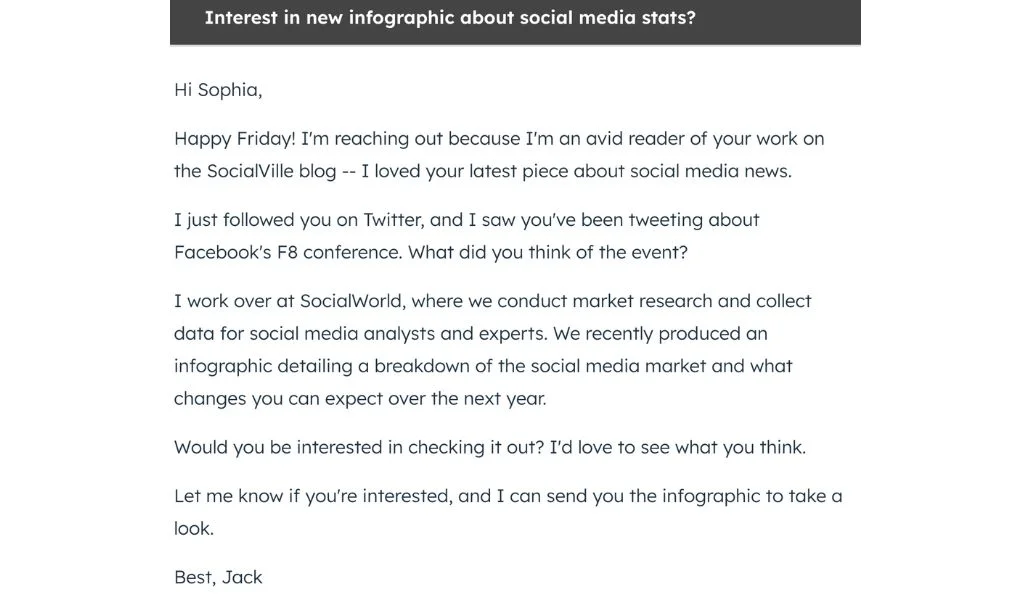
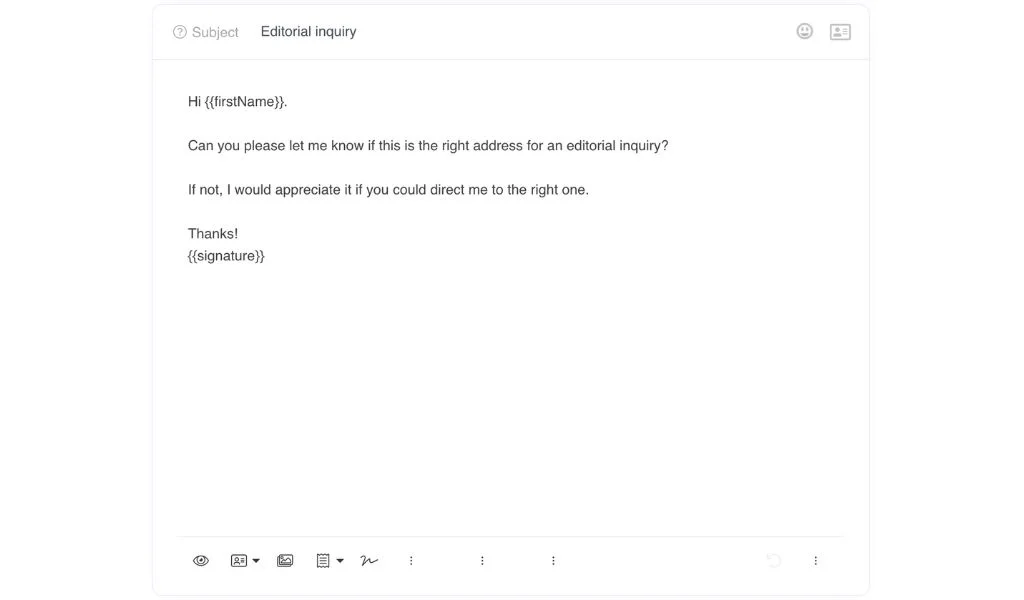
For example, if you have an infographic about social media stats, you can share an email such as:
Step 5: Make an Offer They Cannot Refuse
Craft an irresistible proposal for a backlink exchange. What can you offer in return? Make it valuable and personalized.
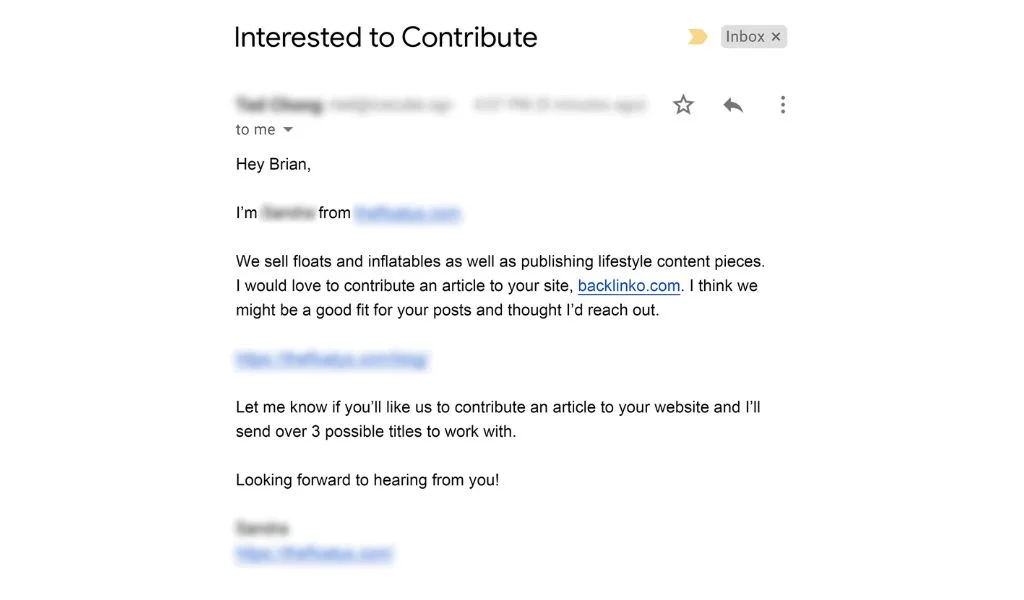
For example, media agencies are always looking for credible authors to contribute to their websites (remember, the extra e in E-E-A-T). If you have a solid background in a particular field, you can offer your services in exchange for a backlink.
For example, media agencies are always looking for credible authors to contribute to their websites (remember, the extra e in E-E-A-T). If you have a solid background in a particular field, you can offer your services in exchange for a backlink.
Step 6: Create and Customize Link-Building Outreach Template
Once you start having a solid list to reach out to, do not create content from scratch. Instead, you can create templates that focus on particular actions. However, make sure that you personalize the email before you send it out.
For example, you may use the general template for our emails but use subtle personalization to make it unique and directed for the reader. This includes:
For example, you may use the general template for our emails but use subtle personalization to make it unique and directed for the reader. This includes:
- Including the name of the person you are emailing
- Having a powerful subject line
- Mentioning something about their work, website, or a social media post
- Adding specific details about the content you are referring to and why your resource is relevant
- Use a proper email signature so they know the email is genuine
Step 7: Follow up
Once you send the email, wait for the response. However, sending the email is not the end of this exercise.
If you do not receive a response, send a short follow-up after a few days and refer back to your original message.
If you do not receive a response, send a short follow-up after a few days and refer back to your original message.
5 Easy Ways to Find Emails of Authors and SEO Professionals for Backlink Outreach
Sometimes you might have to work a bit to get your hands on the right person’s email address. Here are some of the ways to find their email address:
1. Google Search: Search for the person's name along with terms such as "email" or "contact." You may also find their email through their personal website or company profile.
2. LinkedIn: Search for the person's name, company, and role. Their LinkedIn profile can help you confirm that you have identified the right person and may also provide additional contact information.
Learn how to find email addresses from LinkedIn profiles
3. Contact or Author Page: Check the website's Contact Us page, author bio, or team page. Some websites publish contact details for their authors or content teams.
4. Clearout Email Finder: If you know the person's name, company, or domain name, Clearout Email Finder can help you find their professional email address.
1. Google Search: Search for the person's name along with terms such as "email" or "contact." You may also find their email through their personal website or company profile.
2. LinkedIn: Search for the person's name, company, and role. Their LinkedIn profile can help you confirm that you have identified the right person and may also provide additional contact information.
Learn how to find email addresses from LinkedIn profiles
3. Contact or Author Page: Check the website's Contact Us page, author bio, or team page. Some websites publish contact details for their authors or content teams.
4. Clearout Email Finder: If you know the person's name, company, or domain name, Clearout Email Finder can help you find their professional email address.
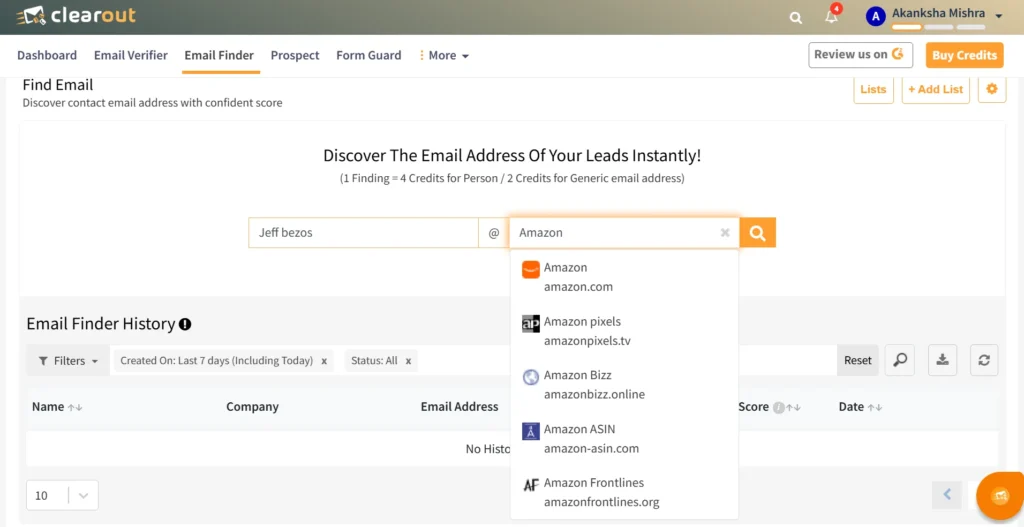
You can search for contacts individually or find emails in bulk. Clearout also provides a confidence score with the result, which can help you review the discovered email before starting your outreach.
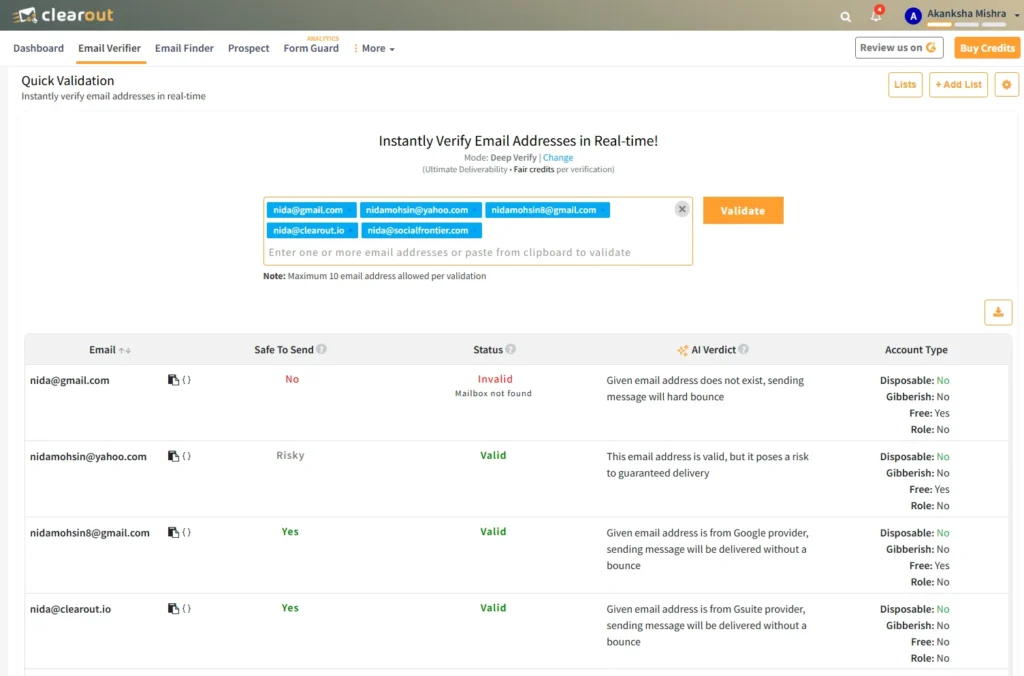
If you have already found an email from any of the manual methods you can also run it through Clearout’s Email Verifier, and it will let you know:
If you have already found an email from any of the manual methods you can also run it through Clearout’s Email Verifier, and it will let you know:
- If it is safe to send an email.
- Current status of the email address (whether it is valid or no longer valid).
- Auto-suggest spelling errors or typos in emails if you have the wrong one.
5. Clearout LinkedIn Chrome Extension: Another method is to use Clearout’s LinkedIn Chrome Extension to help you find leads and their contact information directly from LinkedIn.
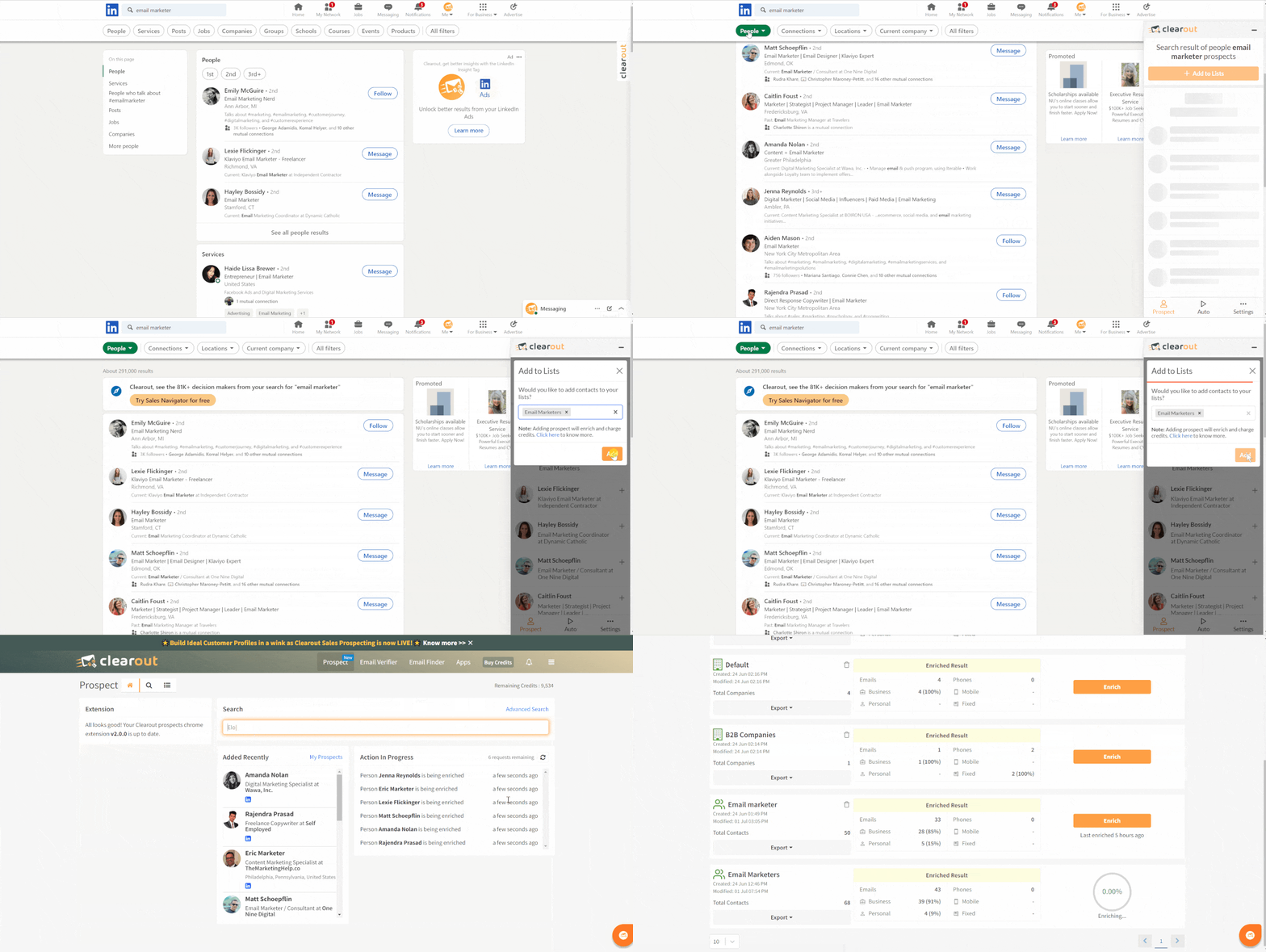
You can search for a specific person and find their contact details. Moreover, you can also build a list of authors, content managers, SEO professionals, and other relevant contacts using LinkedIn search criteria.
How to prepare and personalize your backlink outreach?
A good backlink pitch should be relevant to the recipient’s content, offer something useful, and reach the person who can actually review or add the link.
Before sending your email, check these 4 things:
Before sending your email, check these 4 things:
- Choose a relevant pitch: Explain why your resource fits the specific article or page you are contacting them about. Avoid sending the same pitch to every website.
- Offer useful content: Your guide, research, data, or resource should add something that is useful to their readers. A backlink request without a clear reason to link is easy to ignore.
- Contact the right person: Reach out to the author, editor, content manager, SEO professional, or website owner who handles the relevant content.
- Follow up at a sensible pace: If you do not get a response, send a short follow-up after a few days. One or two follow-ups are usually enough. Avoid sending repeated messages if there is no response.
Personalization does not mean rewriting the entire email for every prospect. Mention the specific page, explain why your resource is relevant, and make the requested action clear.
Streamline Your Link-building Outreach Process
Along with the strategies and ways to find authors & SEO professionals to reach out to, always remember to:
- Focus on building genuine connections.
- Personalize your outreach, express authentic interest in collaboration, and offer value to your prospective partners.
- Stay informed about industry trends, algorithm changes, and emerging tools.
Personalization does not mean rewriting the entire email for every prospect. Mention the specific page, explain why your resource is relevant, and make the requested action clear.
Find Emails For Free
FAQ
1. How do I find an author's email?
Start with the author's bio, website contact page, or company/team page. If the email is not publicly listed, search for the author on LinkedIn or use tools like Clearout to find emails with their name and company domain. Once you find an address, verify it before sending your outreach.
2. What should I do if a target website has no public contact information?
Look for the author on LinkedIn or their company website to find another way to contact them. If you know their name and company or domain, you can also use Clearout Email Finder to find their professional email.
3. How do I verify if an author's email address is valid before sending?
Check the address with an email verification tool before sending your outreach. Clearout Email Verifier can show whether the address is valid, invalid, a catch-all, or needs further caution.