


clearout
  • Products
    • Email Verifier Verify emails addresses individually, in bulk or through API, with 99% accuracy
    • Catch-all Email Verification IconCatch-all Email Verification Resolve more catch-all and SEG-protected emails into Valid or Invalid results with Deep Verify.
    • Email Finder Find individual or bulk emails by entering the person & company name or domain
    • Form Guard IconForm Guard Protect your forms from spam, bots, and invalid submissions with real-time email, phone, and name verification.
    • Form Guard IconData Pulse Verify, enrich, and monitor your CRM contacts in real time - heartbeat monitor for your data.
    • ProspectSQL/MQL list building with high levels of personalization, real-time data enrichment and prospect search
    • Clearout For SheetsVerify email addresses directly on Google Sheets with Clearout for sheets add-on
    • Prospect – LinkedIn Chrome ExtensionBuild verified, targeted prospect lists directly from LinkedIn profiles
    • ClearoutPhoneValidate phone numbers across 240+ countries in bulk, quick or real time validation
    • Free Tools
    • Disposable Email Checker
    • Reverse LinkedIn Profile Lookup Tool
    • Reverse Email Lookup Tool
    • Email List Cleaner
    • Company Domain Finder API
  • Resources
      DEVELOPERAPI iconAPI
      Clearout APIs are structured around REST and JSON
      Webhooks iconWebhooks
      Capture real-time events in your application workflow
      Form Guard iconForm Guard
      Real-time form validation to keep bad contacts out of your CRM
      KNOWLEDGE BASEGetting started iconGetting started
      Sending campaigns without bounces is made simple
      FAQ iconFAQ
      Easily find answers to services, security and common questions
      USE CASESLead Generation iconLead Generation
      Learn how professionals generate quality leads
      GUIDESPricing arrow iconTransparent & flexible pricing to support pay-per-use or recurringCompare Email Verification Tools arrow iconAI-powered email verification with 99%+ accuracy, real-time validation, and transparent risk scoringCompare Email Finder Tools arrow iconPre-verified B2B email addresses with confidence scoring, find real person email, not role-based addressData Pulse & HubSpot Breeze Intelligence arrow iconPre-verified B2B email addresses with confidence scoring, find real person email, not role-based addressBLOGSEmail Verification ToolsFind Anyone’s Email Address
      Most Accurate, Fast & Free Ways
      Form Validation
      Importance, Ways & Best Practices
      View All Blogs
  • Pricing
  • Integrations
  • Enterprise
  • Login
Try it free Book a 1-to-1 demo
Akanksha Mishra / September 25, 2026 September 25, 2026

Post-Event Outreach: Find Emails From Conference Contacts


Post-Event Outreach: Find Emails From Conference Contacts

TL;DR


  • Clean and organize the list you have created for event outreach. Remove duplicate contacts and fix missing or incorrect details before outreach. This helps you see which records still need information.
  • Find missing business emails using a person's name and company or domain with Clearout Email Finder. For larger lists, use bulk email finding to process multiple contacts.
  • Segment contacts by conversation topic, buying intent, job role, and company type.
  • Use conversation notes, buying intent, and job role to decide how each contact should be approached after the event.

Table Of Content


‣ TL;DR
‣ What is a post-event outreach list?
‣ What raw event contact lists actually look like?
‣ How to build a post-event outreach list?
‣ How to find business emails from event and conference contacts?
‣ How to segment a post-event outreach list?
‣ How to write a post-conference outreach email?
‣ Common post-event outreach mistakes to avoid
‣ How does Clearout Email Finder help with conference email finding?
‣ Key takeaway
‣ Frequently asked questions about post-event outreach
Finding business emails after an event can be tricky. You may have someone's name from a badge scan, their company from an event app, or their LinkedIn profile, but still have no business email or phone number to use for follow-up.

Other information that can be found from the registration list includes information about the attendees, but there might not be the email address and phone number that are reachable.

Compile the information from these sources into one list before you begin outreach. Find duplicate contacts, standardize company names and domains, and identify records with missing information.

Missing an email address? Start with the information you already have about the person. You can get their business email by their name, company, domain, role, or by their LinkedIn profile. When working with a long list of event contacts, this can take a little longer if you check each contact individually. Bulk email finding can help you fill those gaps across multiple records.

After that, you can sort the contacts based on what happened at the event. Someone who asked about a specific product may need a different follow-up from someone who only exchanged business cards with you.

Keep the conversation, buying interest, job role, and company type with the contact record. That context gives you something to work with as you start writing the follow-up.

What is a post-event outreach list?


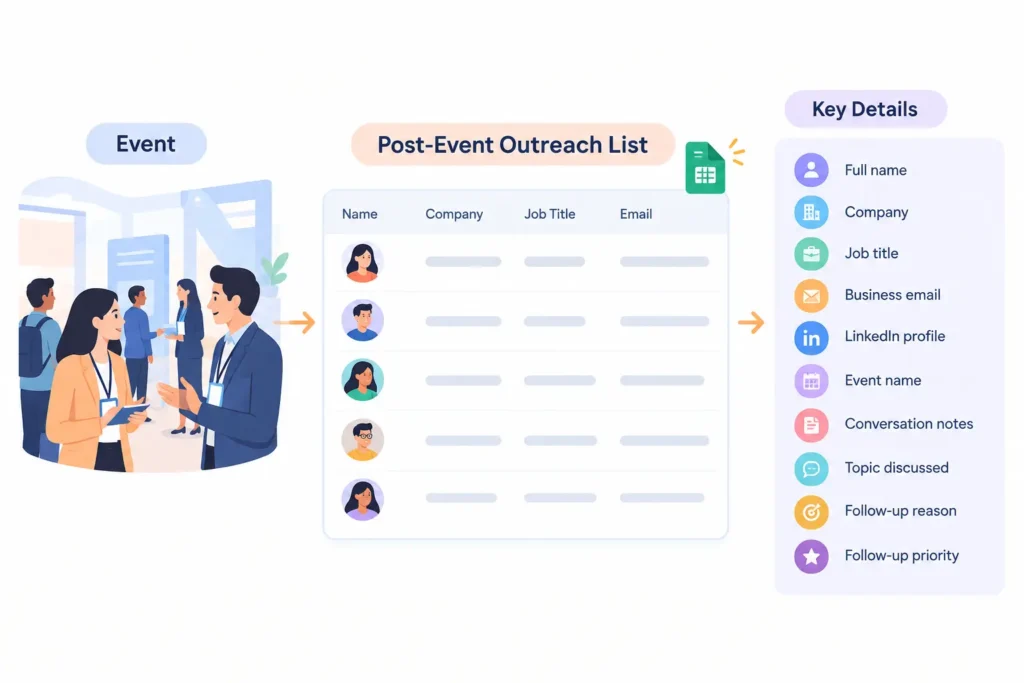
Post-event outreach list with contact details and follow-up information.

A post-event outreach list is a list of individuals who you connected with during a conference, trade show, networking event or meet up in your industry. It includes contact details, company details, event source, and conversation context.

A basic list might include:

  • Full name
  • Company
  • Job title
  • Business email
  • LinkedIn profile
  • Event name
  • Conversation notes
  • Topic discussed
  • Follow-up reason
  • Follow-up priority

The exact fields depend on how your team plans to use the list, but the important part is preserving enough context to understand why each person belongs in your follow-up sequence.

What raw event contact lists actually look like?


Raw event contacts usually arrive across several sources instead of one complete list. Each source can contain useful information, but the fields may not match.

Badge scans


You can collect attendees' data at your booth, or when they interact with your team, by using badge scans. The fields you can use depend on the scanning system of the event. You can get names, companies, job titles or email addresses. Some records may still need additional details before outreach.

Event app contacts


Event apps can contain attendee profiles, connection requests, messages, and meeting details. They can help identify a person's company and role.

However, an attendee profile may not include a business email. Keep the event app information with the rest of the contact record.

LinkedIn connections


LinkedIn connections can provide a person's name, current company, role, and profile. They are useful when an event conversation continues on LinkedIn.

A LinkedIn connection does not automatically give you a business email. You may need additional information to complete the contact record.

Business cards


Business cards can include information that still needs to be put into a structured system. Spelling mistakes or duplicate records can also be a result of manual entry. Digitizing these cards early makes later list cleanup easier.

Registration lists


Registration data can help you identify attendees before you start sorting your event contacts. They can contain names, companies, roles, and other registration details. Keep registration data separate from actual interaction details.

Meeting notes


Meeting notes add context that contact databases often cannot capture. They can record a problem discussed, a project, a question, or something they asked you to follow up on.

This information can make a later follow-up much more specific. Keep useful notes attached to the relevant contact.

How to build a post-event outreach list?


Begin by merging your sources, then clean the records and determine which contacts warrant follow-up.

Step 1: Gather all contact sources


Unify badge scans, event apps, business cards, LinkedIn connections and registration data. Don't remove contacts because they don't have email addresses. Use their name, company, LinkedIn profile, or domain. First, make one master list and then add the missing fields.

Useful columns include:

  • Full name
  • Job title
  • Company
  • Company domain
  • Business email
  • LinkedIn profile
  • Event name
  • Event date
  • Source
  • Conversation topic
  • Buying interest
  • Next step

Step 2: Find and organize missing event data


Remove duplicate records, compare and normalize names, company names, job titles and domains. Then determine what are the missing fields.

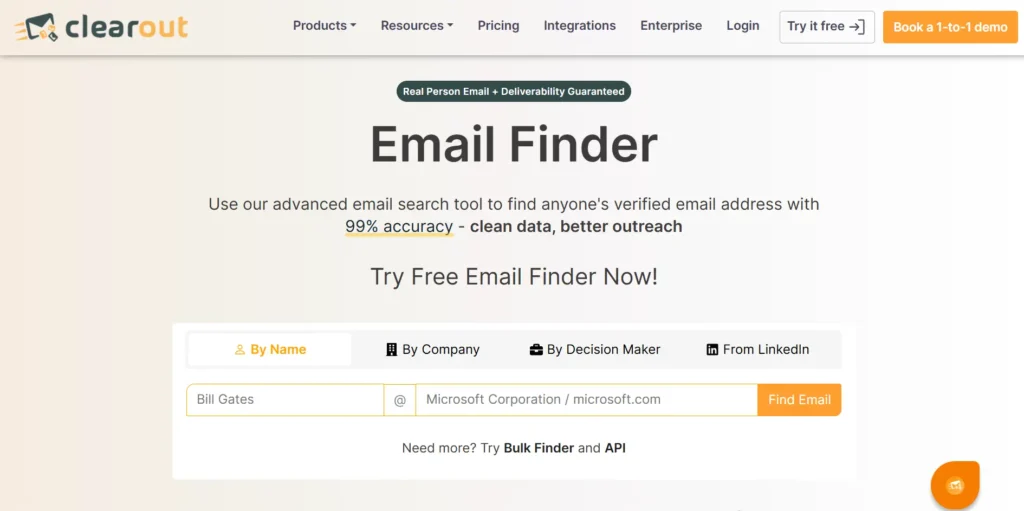
Clearout Email Finder landing page.

Use Clearout Email Finder for contacts that don't have business email addresses, put in the name and company or domain. You can upload a CSV or XLSX file for multiple contacts to search for emails in bulk. The results are pre-checked and come with a confidence score. It shows how reliable the discovered email list is in terms of accuracy and how safely you can use it for event outreach.

For instance, if someone for a conference is named John Smith and Acme is his company, and he doesn't have a business email, enter his name and company or domain into the Clearout Email Finder tool. It will give you his email address, and that too a verified one.

Step 3: Identify relevant contacts


Not every person collected at an event belongs in your outreach sequence. Review each contact against your actual follow-up purpose.

Consider their role, company, conversation, topic of interest, and any agreed next step.

A simple follow-up classification can include:

  • Follow up now
  • Follow up later
  • Nurture
  • No follow-up
  • Needs more information

How to find business emails from event and conference contacts?


Once the event list is organized, the next problem is filling missing business emails. Start with the information you already have about the contact.

What information do you need for email finding?


The more identifying information you have, the easier it is to match the correct person.

Details that help find emails:

  1. Full name
  2. Company name
  3. Company domain
  4. Job title or function
  5. LinkedIn profile, if available

The company domain matters because similar company names can lead to incorrect email addresses.

A current job title also helps distinguish people with similar names.

How to turn LinkedIn connections into an outreach list?


Start with the contact's current LinkedIn profile. Confirm their company and role before trying to find a business email. The company domain can also help narrow the search.

This approach can turn LinkedIn connections into an email list when you have the person's current company and role. Clearout also supports LinkedIn-based email finding, so the profile can provide a starting point for finding the business email. For a detailed process, see how to find emails from LinkedIn profiles.

How to segment a post-event outreach list?


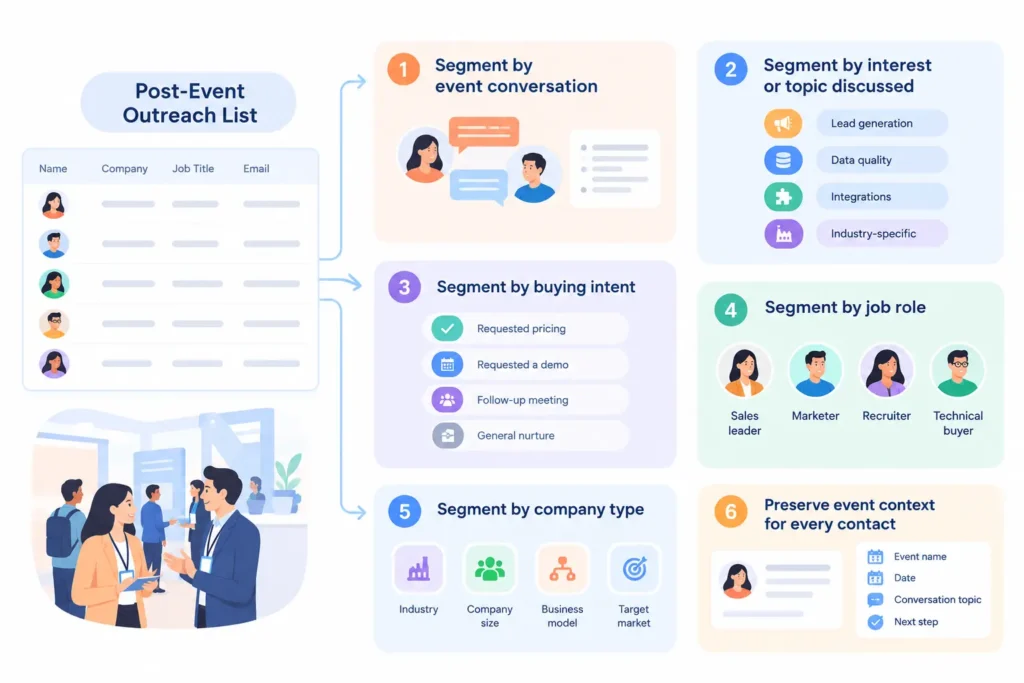
Post-event outreach list segmentation.

Segment your event contacts by what happened at the conference. Details such as what you discussed, what they do, how engaged they appeared, if they requested any follow-up, etc. And that gives you a reason to divide each contact into a specific outreach segment.

  • Segment by event conversation


  • Take notes about what you actually discussed with each contact at the event. Note any specific questions, requests, objections or commitments made during the conversation. Use these details in the first follow-up message.

  • Segment by interest or topic discussed


  • Group contacts by the broader topics or problems they care about. For example, create segments for lead generation, data quality, integrations, or industry-specific challenges. Use these topics to make your post-event email outreach relevant to each group.

  • Segment by buying intent


  • Classify contacts by the next action they showed interest in taking. A contact who has initiated a price request, demo request or a follow-up meeting can be added to an active follow up segment. Contacts who did not exhibit a clear next-step interest may remain in the general nurture segment.

  • Segment by job role


  • Group contacts by their function and responsibilities. A sales leader, marketer, recruiter, and technical buyer may need different information in the follow-up.

  • Segment by company type


  • Use company characteristics that matter to your outreach. These can include industry, company size, business model, or target market.

  • Preserve event context for every contact


  • Keep the event name, date, conversation topic, and agreed next step attached to each contact. This prevents useful context from being lost when the list moves into your CRM or outreach workflow.

How to write a post-conference outreach email?


The post-conference outreach email should be very brief and should remind the recipient who you are, where you met, and why the conversation is relevant to them. The event itself provides a natural context to the message.

  • Reference the actual interaction


  • Mention the specific topic you discussed when there is one. If you talked about a data-quality problem, then make that the starting point. Don't send an email to everyone who was in the event.

  • Match the follow-up to the contact's intent


  • The next step should relate to what the contact showed interest in. Someone who requested a resource may need the promised information first, while someone discussing an active project may need a specific next step. The contact's event context should determine the message rather than the event name alone.

Common post-event outreach mistakes to avoid


A large event list can create pressure to contact everyone immediately. That can lead to poor targeting and generic follow-ups.

Common mistakes include:

  • Treating every attendee as a qualified lead
  • Sending the same email to every contact
  • Ignoring conversation notes
  • Using outdated company information
  • Leaving missing emails unresolved
  • Keeping duplicate contact records
  • Removing event context after importing contacts
  • Mixing contacts with different levels of buying relevance
  • Treating a LinkedIn connection as an email opt-in

How does Clearout Email Finder help with conference email finding?


If an event contact doesn't have a business email, obtain it with Clearout Email Finder using the name, company, domain, or LinkedIn profile you already have. You can get pre-verified email addresses for your event outreach.

Clearout also assigns a confidence score to each result and filters invalid and risky email addresses. For event workflows, this is useful when a contact record has a name and company but no business email. You can then add the result to the event contact record alongside the event and conversation details.

Key takeaway


For an event outreach list, get information on who you are contacting, what you spoke about and what will be your next actions. Use conversation notes, buying intent, role, and company details to decide how each contact should be approached. This keeps your post-event email outreach relevant and tied to the interaction that created the lead.

If missing business emails are holding up your follow-up process, Clearout Email Finder can help you find and pre-verify them using a person's name and company or domain. You can also process multiple contacts in bulk.

Try Clearout for free

Frequently asked questions about post-event outreach

1. How do I find business emails from event and conference contacts?
Use the person's name with their company or domain in Clearout Email Finder to find business email addresses. It gives pre-verified results, so you don't have to verify it before adding to your outreach list.
2. How do I develop a post-event outreach list?
Combine badge scans, event app data, business cards, registration record and LinkedIn connections into a single post-event outreach list. Delete duplicate entries, fill in missing information, and record conversation notes and follow-up steps for each contact.
3. Can LinkedIn connections be turned into an email list?
Yes. Check the person's current company and role, then use those details to find their business email. Clearout lets you find email addresses from LinkedIn profiles.
4. How soon should I follow up after a conference?
You can follow up within 1-3 days. If you talked about a certain issue, use that as the reason for your email and mention the next step you agreed on, instead of sending "nice meeting you" message.

Share this article

Recent Posts

25 Sep 2026
Post-Event Outreach: Find Emails From Conference Contacts

Learn how to build a post-event outreach list from badge scans, business cards, and LinkedIn, and fi ...

24 Sep 2026
Clearout vs. Koalify Email Verifier

Comparing Clearout vs. Koalify email verifier on accuracy, catch-all detection, CRM integrations, an ...

24 Sep 2026
Clearout Expands Into a Data Qualification Layer for GTM Teams

Clearout builds a data quality layer for GTM teams with Data Pulse, Form Guard, Deep Verify, and Cle ...

17 Sep 2026
Free Email Verifiers vs. Paid Tools: I Tested the Accuracy Gap

We tested 40+ emails across 6 tools to compare free vs. paid email verification. See accuracy, catch ...

07 Sep 2026
Form Abandonment: Why Leads Drop Off & How to Recover Them

Learn why visitors abandon forms and how Clearout Form Guard reduces drop-offs with real-time valida ...

Clearout's

Form Guard

Validate email, phone & name on any forms!

  • Real signups only
  • Verified emails
  • Valid phone numbers
  • No fake names
  • Cleaner CRM
  • No devs needed
Try for Free Now

Email Verification, Email Finding Form Guard & Prospecting Service

Expand Your Reach By Finding & Verifying Ideal Prospects.

Sign up & get 100 free credits

No Credit Card required

Create Free Account
Company

Why Clearout?

Pricing

Contact Us

Careers

Press

Enterprise

Sitemap

FAQ

Status

Products

Email Verifier

Catch-all Verification

Email Finder

Form Guard

Data Pulse

Prospect

LinkedIn Email Finder

Reverse Lookup

Google Sheets Add-on

WordPress Plugin

ClearoutPhone

What's New?

Resources

Integrations

HubSpot

Team Account

API

Compare Email Verifier

Compare Email Finder

Compare Prospecting

Use Cases

Blog

Help

Legal

Privacy Policy

Terms

DPA

Security

Trust Center

Certification

ISO 27001/2022

SOC 2 Type 2

GDPR

Partnership

HubSpot Certified

Affiliates

Partners

Clearout for browser

⚡ Supercharge Your Prospect Research with Clearout's LinkedIn Chrome Extension - Find and Verify Emails with Confidence!

Clearout Chrome extension

clearout
© 2026 Clearout Inc. All Rights Reserved. Powered by Clearout.
Validate Enrich New Salesforce contacts automatically with Data Pulse. Learn More ➞
X