

- Products
- ResourcesDEVELOPER

 API
API
Clearout APIs are structured around REST and JSON Webhooks
Capture real-time events in your application workflow Clearout MCP
Verify and find emails from AI assistants like Claude and Cursor Form Guard
Real-time form validation to keep bad contacts out of your CRMKNOWLEDGE BASE Getting started
Sending campaigns without bounces is made simple FAQ
FAQ
Easily find answers to services, security and common questionsUSE CASES Lead Generation
Learn how professionals generate quality leadsGUIDES Clearout Insights Explore original research, industry statistics, and data-backed insights Pricing Transparent & flexible pricing to support pay-per-use or recurringCompare Email Verification Tools AI-powered email verification with 99%+ accuracy, real-time validation, and transparent risk scoringCompare Email Finder Tools Pre-verified B2B email addresses with confidence scoring, find real person email, not role-based addressData Pulse & HubSpot Breeze Intelligence Pre-verified B2B email addresses with confidence scoring, find real person email, not role-based addressBLOGSEmail Verification ToolsFind Anyone’s Email Address
Most Accurate, Fast & Free WaysForm Validation
Importance, Ways & Best PracticesView All Blogs - Pricing
- Integrations
- Enterprise
- Login



Sales Rep Workflow 2026: 5 Steps to Handle Inbound Leads

TL;DR
- The new sales process for 2026 have five stages: Lead acquisition, data validation, qualified lead routing, lead nurturing, and timely follow-up.
- Incorporate data quality checks first — and then route leads to sales. This is because it saves the reps time by not calling numbers that don't pick up or send emails that bounces.
- Use the lead's source, buying interest, and contact data quality to decide who sales should contact, who needs more nurturing, further checking, and should be excluded.
- Nurtured leads can have stale information over time, so be sure to re-verify their information before they move into the sales funnel.
- Take a look at the last 50 inbound leads, and determine how many of those leads actually ended up buying.
- All contacts, bad fields and savings data can be tracked from a single dashboard in Clearout Data Pulse.
Adding new tools to your sales reps workflow isn't easy, and it certainly doesn't help when they're already juggling with new CRM updates and chasing leads. Indeed, according to Salesforce, 60% of reps' time is used on non-selling activities, and 57% of sales professionals believe that their sales cycles are lengthening.
So, how do you give your team more time to sell?
First, let's see what happens when you have someone fill out your form. Do you pass the lead on to a salesperson or do you check out the contact details initially? An invalid email, a wrong phone number or a fake sign-up can cost a rep time before they even get to see the first conversation.
You require a sales workflow process that verifies contact information, passes leads to sales, and holds all of those who didn't. Here are 5 steps you can follow to create a successful sales rep workflow.
So, how do you give your team more time to sell?
First, let's see what happens when you have someone fill out your form. Do you pass the lead on to a salesperson or do you check out the contact details initially? An invalid email, a wrong phone number or a fake sign-up can cost a rep time before they even get to see the first conversation.
You require a sales workflow process that verifies contact information, passes leads to sales, and holds all of those who didn't. Here are 5 steps you can follow to create a successful sales rep workflow.
Table Of Content
The new sales rep workflow for 2026
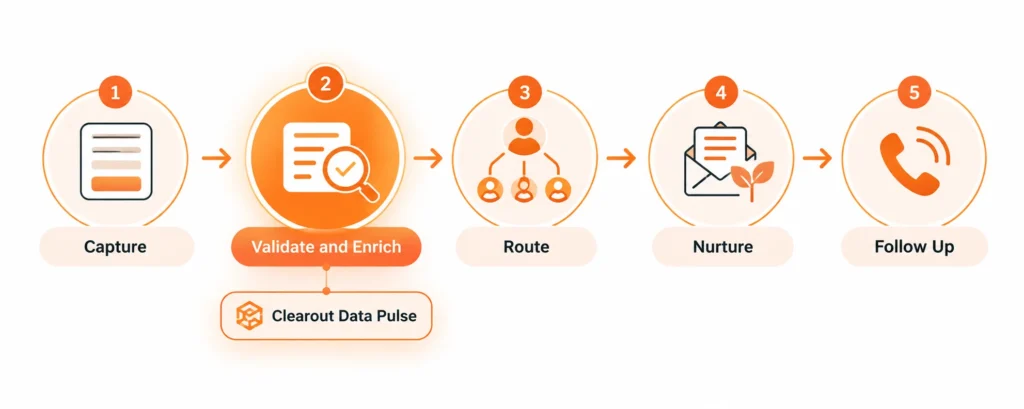
The sales process begins when someone submits a form but not all new contacts should be added to your sales queue.
Prior to giving a lead, check its source and the validity of contact information. This way, you get to treat a demo request differently.
Prior to giving a lead, check its source and the validity of contact information. This way, you get to treat a demo request differently.
| Step | What happens | What handles it |
|---|---|---|
| Capture | Creating a form fill, signing up for a webinar or requesting a demo creates a contact. | The forms, landing pages and event tools. |
| Validate and enrich | Email and phone are verified, the record is enhanced, and a lead score is calculated. | Clearout Data Pulse |
| Route qualified leads | High-intent, verified leads go to sales. | CRM routing rules |
| Nurture the rest | Lower-intent leads shift to marketing automation. | Marketing automation |
| Follow up | Sales reps do not reach out to leads until checks are done | Sales |
Step 1: Capture
You get leads from demo request, webinar, content download or manual import. The source will help you understand what they want and when to contact them.
This is how you may know about them.
If a lead downloads an ebook, they might just be looking for information about your business or product, while someone who requests a demo is having an intent of comparing it with other solutions in the market as per the price and other offerings.
This is how you may know about them.
If a lead downloads an ebook, they might just be looking for information about your business or product, while someone who requests a demo is having an intent of comparing it with other solutions in the market as per the price and other offerings.
Step 2: Validate and enrich
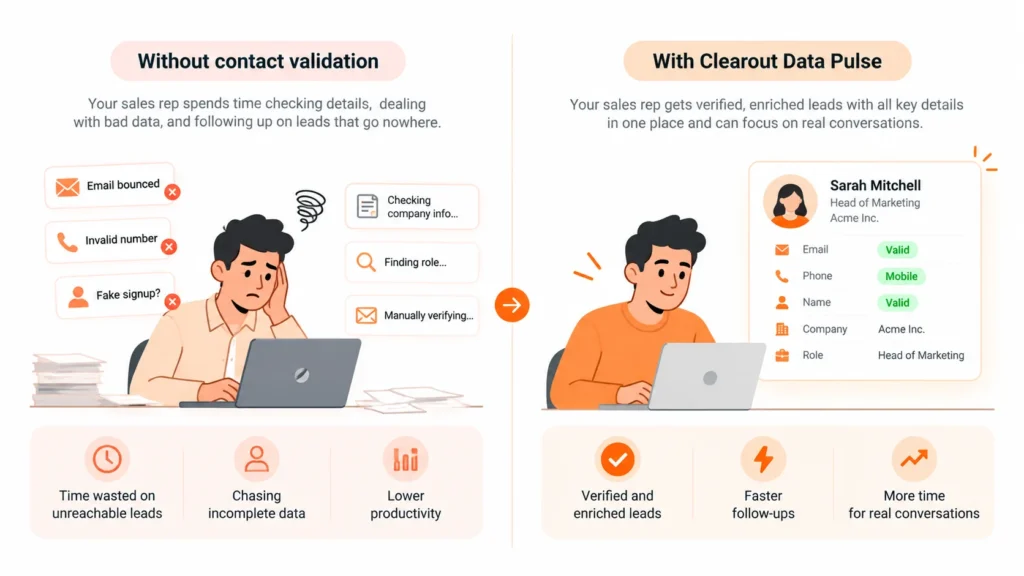
If leads enter your CRM, check their contact details before sending them to sales to see if they are reachable and their emails are deliverable.
You can connect Clearout Data Pulse directly to HubSpot through OAuth to automatically check new and updated contacts. It will verify their email addresses, phone numbers, names and help you get high-quality contacts for your campaigns.
You can connect Clearout Data Pulse directly to HubSpot through OAuth to automatically check new and updated contacts. It will verify their email addresses, phone numbers, names and help you get high-quality contacts for your campaigns.
Start with the email address
An email address can look deliverable without verifying it any tool but it can be invalid or damage email deliverability. Even the mailbox might not exist, the address could be catch-all, or might belong to a disposable email service. With Data Pulse, you can automatically check the mailbox information, disposable email status, and catch-all settings.
Check the phone number
If you get details on line type, carrier, and location of a mobile number can help your sales rep decide when to call and identify SMS-capable numbers.
Check the name
Fake signups don't always come with invalid email addresses. A bot can submit an email that passes basic checks but pair it with a name like random letters or numbers. Name validation helps catch these records before they take up space in your sales queue.
| Check | What it tells you |
|---|---|
| Email verification status and safe to send | Whether your first message can land |
| Phone status and line type | Whether to call, and whether the number is mobile, fixed, or VoIP |
| Name validation | Real name or gibberish, which catches bot submissions that pass the email check |
If your team is discovering bad leads in the CRM, stop it with Clearout Data Pulse.
Try Data Pulse free and see what your inbound list actually looks like.
Try Data Pulse free and see what your inbound list actually looks like.
Step 3: Qualify Leads
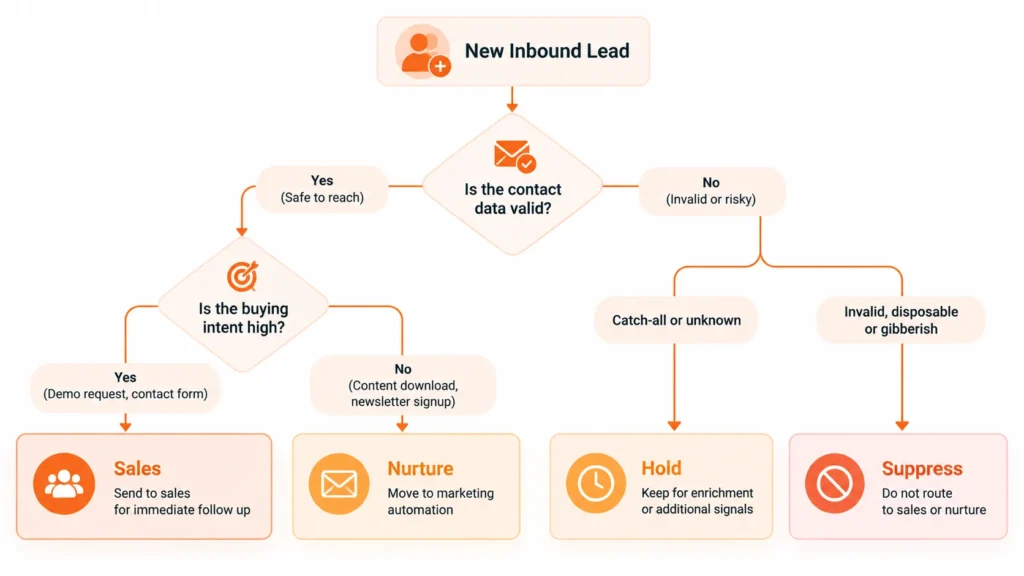
There are two factors you need to take into account when deciding on your routing rules: Data Quality and Buying Intent.
Will your team be able to meet with the person and will they be willing to communicate with sales? To determine the location of the lead, you must have a lead analysis and be aware of the answers.
Will your team be able to meet with the person and will they be willing to communicate with sales? To determine the location of the lead, you must have a lead analysis and be aware of the answers.
| Data check | Intent | Where the lead goes |
|---|---|---|
| Safe to send | High (demo request, contact sales form) | Delivered to the sales floor on the same day. |
| Safe to send | Low (content download, newsletter signup) | Marketing nurture |
| Risky or catch-all | High | Press for enrichment or one more signal and route. |
| Invalid, gibberish, or disposable | Any | Do not direct |
There are many teams that focus on lead scores, page visits and content downloads but not on data quality. That can be loss of time if you are responsible for selling products. Even those who ask for a demo may have provided temporary or fake contact information.
Step 4: Nurture the rest
Not all leads are able to engage sales. Build the relationship through lead nurturing before sending them to the sales rep.
But don't take for granted that the information they provide will last forever. B2B contact data can become invalid by about 22% annually so addresses that were valid 6 months ago may not be useful anymore.
When transferring a nurtured lead back to sales, check the contact information once again. This check can be activated on your pricing page, for when someone visits your pricing page, when someone responds to an email, or when someone downloads another resource.
When handling leads during the nurture process, follow this:
But don't take for granted that the information they provide will last forever. B2B contact data can become invalid by about 22% annually so addresses that were valid 6 months ago may not be useful anymore.
When transferring a nurtured lead back to sales, check the contact information once again. This check can be activated on your pricing page, for when someone visits your pricing page, when someone responds to an email, or when someone downloads another resource.
When handling leads during the nurture process, follow this:
- Nurture leads with legitimate contact information and LOW buying intent.
- Try an email sequence tool that tracks bounce rates.
- Re-check contacts prior to bringing them back into a sales campaign.
- Teach one person to set a behavioral trigger that sends a lead back to sales and automate the data check at that trigger.
Step 5: Follow up
When these checks are finished, your sales representative will be able to follow up very quickly, preferably within an hour. They'll be all set with contact information and validation results, not having to manually check them.
A Harvard Business Review study of some 1.25 million leads showed that firms that sent out leads within an hour were almost 7 times as likely to qualify leads as those who waited another hour. This was 60+ times more likely than after 1 day or more.
Obviously, it is helpful if you can contact the person for a quick response. If you enter an invalid email or disconnected phone number, that's an opportunity that will be lost.
Prior to the first touch, verify 3 things from the record:
A Harvard Business Review study of some 1.25 million leads showed that firms that sent out leads within an hour were almost 7 times as likely to qualify leads as those who waited another hour. This was 60+ times more likely than after 1 day or more.
Obviously, it is helpful if you can contact the person for a quick response. If you enter an invalid email or disconnected phone number, that's an opportunity that will be lost.
Prior to the first touch, verify 3 things from the record:
- Safe to send records
- Phone number or email
- Name
How does lead routing work for inbound leads
First, verify the contact information. Then, score the lead, determine the source from which the contact came from, and then use buying signals to determine where the contact belongs. This allows your sales representative to save time on chasing bad data and concentrate on speaking with prospective customers.
Inbound lead management workflow for leads that aren't ready
Move contacts with good information but low intent to marketing automation, after marking them and reengage them when they show they're ready for a conversation.
Here are some ways to control them:
Here are some ways to control them:
- Nurture warm leads with data that have passed data tests but low buying intent.
- See for risky or catch-all email addresses.
- Re-check contact information before sending a lead back to active sales follow up.
- Use a behavioral trigger (e.g., click on pricing page or reply to a question) and automate the data check prior to the lead’s return to sales.
When should a sales representative follow up on an inbound lead
A bounced email or disconnected phone number can be a missed opportunity. Before reaching out to a lead, it is important to verify the following:
- Email status: Check the validity of the sender's email address.
- Phone or line type: Determine if it is more suitable to send a phone message or a line type message.
- Name validation: Check for suspicious or nonsensical names.
Use these details to customize your opening message: company and role.
How to test your inbound workflow this week
You don't need a lengthy audit to find out where leads are getting stuck. Start with your last 50 inbound leads. How many reached sales before anyone checked their contact details? That alone can tell you a lot about your current process.
How to check:
How to check:
- Get 50 recent form fills, webinar registrations and demo requests from your CRM.
- Check their email addresses, phone numbers and names. Count the number of invalid, risky, or suspicious returns.
- Count how many unverified or suspicious contacts your sales team actually worked on.
Now look at the results. If your reps are spending time on leads with bad contact details, you have a data problem before you even get to lead qualification.
A better sales rep workflow puts data validation between lead capture and routing. That way, your lead scoring and follow-up decisions start with more reliable contact details. Run this small audit first, then use what you learn to improve your lead routing rules and sales lead management process.
A better sales rep workflow puts data validation between lead capture and routing. That way, your lead scoring and follow-up decisions start with more reliable contact details. Run this small audit first, then use what you learn to improve your lead routing rules and sales lead management process.