

- Products
- ResourcesDEVELOPER

 API
API
Clearout APIs are structured around REST and JSON Webhooks
Capture real-time events in your application workflow Clearout MCP
Verify and find emails from AI assistants like Claude and Cursor Form Guard
Real-time form validation to keep bad contacts out of your CRMKNOWLEDGE BASE Getting started
Sending campaigns without bounces is made simple FAQ
FAQ
Easily find answers to services, security and common questionsUSE CASES Lead Generation
Learn how professionals generate quality leadsGUIDES Clearout Insights Explore original research, industry statistics, and data-backed insights Pricing Transparent & flexible pricing to support pay-per-use or recurringCompare Email Verification Tools AI-powered email verification with 99%+ accuracy, real-time validation, and transparent risk scoringCompare Email Finder Tools Pre-verified B2B email addresses with confidence scoring, find real person email, not role-based addressData Pulse & HubSpot Breeze Intelligence Pre-verified B2B email addresses with confidence scoring, find real person email, not role-based addressBLOGSEmail Verification ToolsFind Anyone’s Email Address
Most Accurate, Fast & Free WaysForm Validation
Importance, Ways & Best PracticesView All Blogs - Pricing
- Integrations
- Enterprise
- Login



Clearout vs. Koalify Email Verifier
Email verification goes beyond determining whether an address is valid. The verification method, depth of checks, result classifications, catch-all handling, pricing, and CRM support can all affect how email data is evaluated and used.
Clearout and Koalify take different approaches to verification. Clearout email verification supports bulk, API, and CRM with detailed result classifications, while Koalify focuses on validating contacts within HubSpot.
In this article, I have tested both Clearout and Koalify email verifiers. I used a sample of 40+ email addresses. The following comparison covers verification processes, accuracy, result classifications, catch-all detection, pricing, free credits, API access, CRM integrations, and use cases.
Let's get into it.
Clearout and Koalify take different approaches to verification. Clearout email verification supports bulk, API, and CRM with detailed result classifications, while Koalify focuses on validating contacts within HubSpot.
In this article, I have tested both Clearout and Koalify email verifiers. I used a sample of 40+ email addresses. The following comparison covers verification processes, accuracy, result classifications, catch-all detection, pricing, free credits, API access, CRM integrations, and use cases.
Let's get into it.
Table Of Content
How does email verification work?
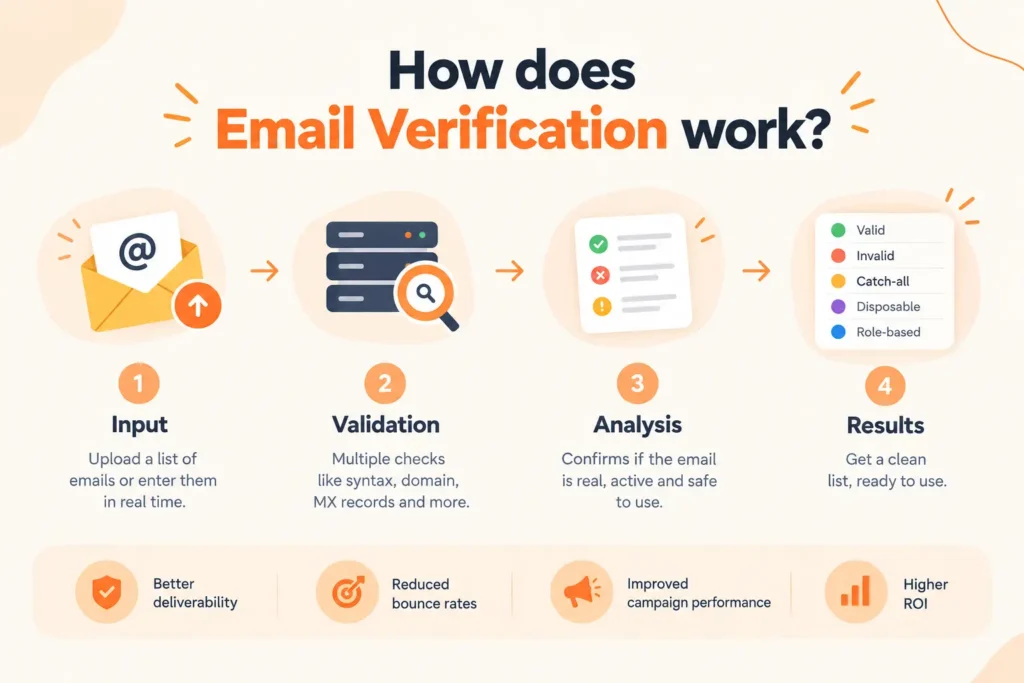
An email verifier tool checks whether an email address is properly formatted, belongs to a valid domain, and is likely to accept mail. More advanced verification systems also check SMTP responses, disposable addresses, catch-all domains, role-based accounts, spam traps, and other risk signals.
Here are the key differences between Clearout and Koalify: their verification approach, catch-all handling, and how they present results.
Here are the key differences between Clearout and Koalify: their verification approach, catch-all handling, and how they present results.
Clearout email verification process
- Upload or enter email addresses
Clearout supports individual verification as well as bulk verification through CSV and XLSX files. It also supports verification through its API and connected platforms. - Run multiple validation checks
Clearout performs 20+ checks, including syntax, MX lookup, SMTP checks, spam-trap detection, disposable email detection, catch-all detection, and other validation signals. - Classify the addresses
Results are categorized into statuses such as Valid, Invalid, Catch-All, Disposable, Gibberish, Free, and Role-Based. Clearout also provides an AI verdict to help interpret the verification results. - Export or sync the results
Results can be downloaded, exported to connected platforms, or retrieved through the API.
My review:
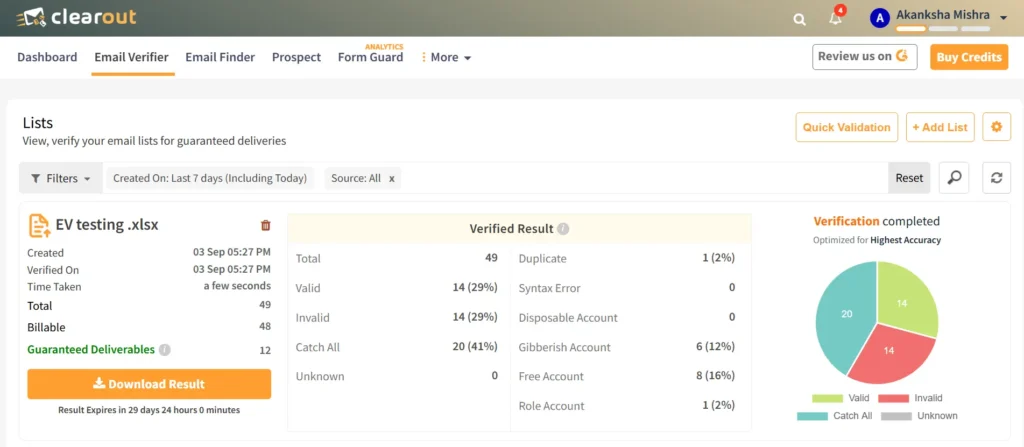
One noticeable difference was the level of detail provided with each verification result by Clearout's Email Verifier. In the 40+ email test, Clearout returned 14 Valid, 14 Invalid, and 20 Catch-All results. This made it possible to distinguish confirmed invalid addresses from catch-all addresses that require additional verification.
The additional classifications for Gibberish, Free, Role-Based, and Duplicate addresses provided more detail than a simple valid or invalid result.
The interface was easy to navigate, and Clearout supports both bulk and real-time verification. Clearout also provides 100 free credits, along with monthly, annual, and pay-as-you-go plans.
The additional classifications for Gibberish, Free, Role-Based, and Duplicate addresses provided more detail than a simple valid or invalid result.
The interface was easy to navigate, and Clearout supports both bulk and real-time verification. Clearout also provides 100 free credits, along with monthly, annual, and pay-as-you-go plans.
Key strength:
- Deep Verify for catch-all addresses: Clearout's Deep Verify provides an additional verification layer for catch-all addresses, helping determine whether these addresses can be treated with greater confidence for outreach.
Limitation:
- Some result categories may require additional context to understand what action to take.
- Processing time can increase when working with larger email lists.
Koalify verification process
- Connect Koalify to HubSpot
Koalify is built for HubSpot CRM. So, you cannot operate it as a separate email verification tool and integrate with any other tools except HubSpot. - Choose contacts to validate
Validation can be triggered through a HubSpot workflow or from the Koalify Email Validation Card on an individual contact record. - Run the validation
The workflow can validate individual contacts or bulk-validate contacts that are enrolled through a HubSpot workflow. Koalify states that it can validate up to 100,000 email addresses per hour through its HubSpot workflow. - Store the result in HubSpot
The validation status and related properties are written back to the HubSpot contact record, where they can be used in lists, reports, alerts, and workflows.
My review:
Koalify was tested through a HubSpot validation workflow to see how email validation fits into the CRM workflow. The contact was enrolled in the validation process, with the activity handled within HubSpot.
This makes Koalify's workflow particularly relevant for teams that want to validate contacts without moving them out of HubSpot. Validation data can then be used within HubSpot workflows, lists, and contact properties.
The tests show two different approaches: Clearout provides a broader verification workflow with multiple result classifications, while Koalify focuses on bringing email validation directly into HubSpot.
This makes Koalify's workflow particularly relevant for teams that want to validate contacts without moving them out of HubSpot. Validation data can then be used within HubSpot workflows, lists, and contact properties.
The tests show two different approaches: Clearout provides a broader verification workflow with multiple result classifications, while Koalify focuses on bringing email validation directly into HubSpot.
Limitation:
- CRM integrations: Koalify's current email validation workflow is integrated with HubSpot but it has no native integrations with other CRMs. Clearout comes with native integrations with HubSpot, Salesforce, Zoho CRM, and other platforms.
Key verification differences
The two tools differ in the level of verification detail they provide and where the results are surfaced.
Clearout was tested with a 40+ email sample. The dashboard returned 14 Valid, 14 Invalid, and 20 Catch-All results, along with additional classifications for Duplicate, Gibberish, Free, and Role-Based addresses.
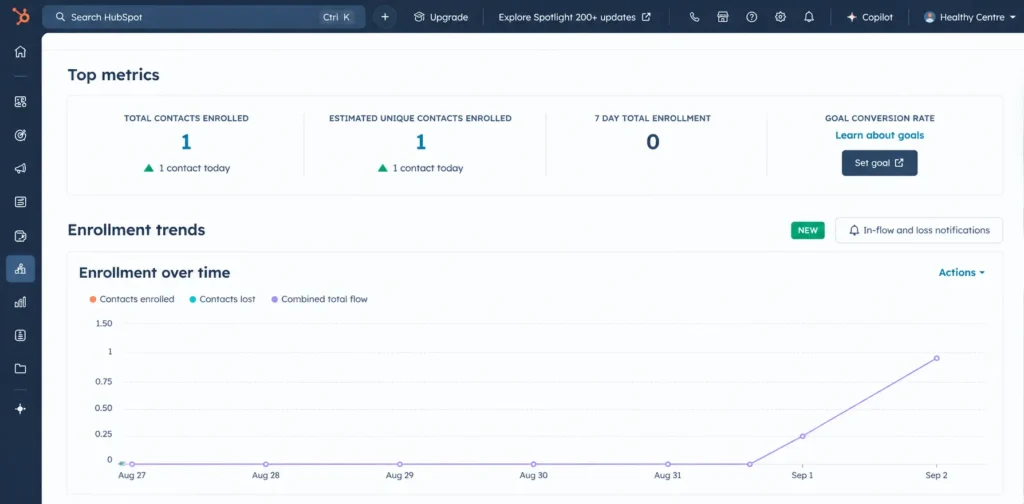
Koalify was tested by adding a contact to a HubSpot validation workflow. The contact was enrolled successfully, and the validation activity appeared in HubSpot's workflow enrollment dashboard. The validation process remained within HubSpot without requiring the contact to be exported to a separate verification platform.
The test results show a clear difference.
Clearout was tested with a 40+ email sample. The dashboard returned 14 Valid, 14 Invalid, and 20 Catch-All results, along with additional classifications for Duplicate, Gibberish, Free, and Role-Based addresses.
Koalify was tested by adding a contact to a HubSpot validation workflow. The contact was enrolled successfully, and the validation activity appeared in HubSpot's workflow enrollment dashboard. The validation process remained within HubSpot without requiring the contact to be exported to a separate verification platform.
The test results show a clear difference.
| Test evidence | Clearout | Koalify |
|---|---|---|
| Test performed | 40+ email addresses | Contact tested through a HubSpot validation workflow |
| Result visible | 14 Valid, 14 Invalid, 20 Catch-All | Contact enrollment and validation activity visible in HubSpot |
| Detailed classifications | Duplicate, gibberish, free, role-based, and other statuses | Validation data stored in HubSpot |
| Where results appeared | Clearout dashboard | HubSpot |
| Data export required. | Results can be exported or synced. | Results remain within the HubSpot workflow. |
Clearout vs. Koalify at a glance
| Feature | Clearout | Koalify |
|---|---|---|
| Primary use | Email verification, bulk list cleaning, and API and CRM validation | Email validation inside HubSpot |
| Verification location | Clearout dashboard, API, and connected platforms | Directly inside HubSpot |
| Bulk verification | Yes. | Yes, through HubSpot workflows. |
| Individual verification | Yes. | Yes, through the HubSpot validation card. |
| Validation checks | 20+ checks | Email validation with status and reason |
| Test results | 40+ email addresses tested: 14 valid, 14 invalid, 20 catch-all | Tested a contact through a HubSpot validation workflow |
| Role-based detection | Yes. | Validation result/reason available |
| Free credits | 100 credits at signup | 100 free credits |
| Pricing model | $16/month for 3,000 credits | 50,000 emails at $50/month |
| API | Yes. | Designed primarily around HubSpot |
| HubSpot | Native integration | Native |
| Salesforce | Native integration | Not the primary platform |
| Zoho CRM | Native integration | Not the primary platform |
| Best suited for | Teams verifying data across multiple systems and use cases | Teams that want email validation directly inside HubSpot |
Clearout vs. Koalify Email Verifier: Pricing, feature, & accuracy comparison
1. Clearout vs. Koalify accuracy
Clearout's test returned 14 valid, 14 invalid, 20 catch-all, and 0 unknown results. The dashboard also identified 1 duplicate, 6 gibberish accounts, 8 free accounts, and 1 role account. Clearout email verifier gives results with 99.73% accuracy.
Koalify reports 99%+ accuracy. Its validation workflow is designed to check email addresses within HubSpot.
Result: Clearout provides a directly visible multi-category result set in the test..
Koalify reports 99%+ accuracy. Its validation workflow is designed to check email addresses within HubSpot.
Result: Clearout provides a directly visible multi-category result set in the test..
2. Clearout vs. Koalify verification capabilities
The main difference is the depth of the verification workflow and where teams can use it.
Clearout runs 20+ validation checks and returns multiple classifications, including Valid, Invalid, Catch-All, Disposable, Gibberish, Free, and Role-Based. Its Deep Verify feature provides an additional verification layer for catch-all addresses and resolves them clearly into valid and invalid.
Koalify focuses on bringing email validation directly into HubSpot. Koalify's documented workflows support automatic validation, individual validation through the Email Validation Card, and storage of validation results as HubSpot properties. Unlike Clearout's standalone dashboard, API, and multiple CRM integrations, these validation workflows are centered on HubSpot.
Best fit: Clearout is suited to teams that need to verify and manage email data across multiple workflows and CRM platforms. Koalify is suited to teams that want to keep email validation directly within HubSpot.
Clearout runs 20+ validation checks and returns multiple classifications, including Valid, Invalid, Catch-All, Disposable, Gibberish, Free, and Role-Based. Its Deep Verify feature provides an additional verification layer for catch-all addresses and resolves them clearly into valid and invalid.
Koalify focuses on bringing email validation directly into HubSpot. Koalify's documented workflows support automatic validation, individual validation through the Email Validation Card, and storage of validation results as HubSpot properties. Unlike Clearout's standalone dashboard, API, and multiple CRM integrations, these validation workflows are centered on HubSpot.
Best fit: Clearout is suited to teams that need to verify and manage email data across multiple workflows and CRM platforms. Koalify is suited to teams that want to keep email validation directly within HubSpot.
3. Clearout vs. Koalify catch-all detection
Catch-all domains accept mail for addresses that cannot be individually confirmed, so they should not automatically be treated the same as confirmed valid addresses.
Clearout has an advanced catch-all resolver that runs multi-layer SMTP analysis and SEG signature detection. In the 40+ email test, 20 addresses were classified as Catch-All.
Koalify also treats catch-all addresses as a risk signal during email validation. This helps HubSpot users identify addresses that may need additional review before sending.
Clearout has an advanced catch-all resolver that runs multi-layer SMTP analysis and SEG signature detection. In the 40+ email test, 20 addresses were classified as Catch-All.
Koalify also treats catch-all addresses as a risk signal during email validation. This helps HubSpot users identify addresses that may need additional review before sending.
4. Clearout vs. Koalify verification results
Clearout provides multiple result categories that help teams decide whether an address should be accepted, suppressed, or reviewed.
The test returned Valid, Invalid, and Catch-All as the primary outcomes, with additional classifications such as Gibberish, Free, Role-Based, and Duplicate.
Koalify stores validation information as HubSpot properties, so teams can use the data in lists, reports, alerts, and workflows.
The difference: Clearout provides more detailed results that can help you remove addresses that don't require marketing spends, while Koalify makes validation results actionable within HubSpot.
The test returned Valid, Invalid, and Catch-All as the primary outcomes, with additional classifications such as Gibberish, Free, Role-Based, and Duplicate.
Koalify stores validation information as HubSpot properties, so teams can use the data in lists, reports, alerts, and workflows.
The difference: Clearout provides more detailed results that can help you remove addresses that don't require marketing spends, while Koalify makes validation results actionable within HubSpot.
5. Clearout vs. Koalify pricing comparison
Clearout offers several pricing approaches, including annual subscriptions, monthly subscriptions, and one-time/pay-as-you-go credit purchases. New users receive 100 free credits and $16/month for 3,000 credits.
Koalify's pricing is based on the number of validations. Its pro plan offers 50,000 emails at $50/month.
Koalify's pricing is based on the number of validations. Its pro plan offers 50,000 emails at $50/month.
6. Clearout vs. Koalify CRM integrations
CRM coverage is one of the clearest differences between the two tools.
Koalify's current email validation workflow, contact card, properties, lists, reports, and automation are designed to operate only inside HubSpot.
Clearout supports multiple CRMs natively:
Koalify's current email validation workflow, contact card, properties, lists, reports, and automation are designed to operate only inside HubSpot.
Clearout supports multiple CRMs natively:
- HubSpot
- Salesforce
- Zoho CRM
- GoHighLevel
Clearout also integrates with other sales, marketing, automation, spreadsheet, and form platforms.
For teams working across multiple CRM systems, Clearout provides broader native CRM coverage. For teams operating primarily inside HubSpot, Koalify keeps the validation workflow within the CRM.
For teams working across multiple CRM systems, Clearout provides broader native CRM coverage. For teams operating primarily inside HubSpot, Koalify keeps the validation workflow within the CRM.
7. API availability
Clearout provides an email verification API for real-time and bulk verification. Its documentation states that the REST API can be integrated with different programming languages and used to automate verification.
Koalify's current email validation product centers on HubSpot workflows and contact records, rather than positioning itself as a standalone cross-platform email verification API.
For a developer building email verification directly into an application, signup form, lead capture flow, or custom system, Clearout therefore offers the broader integration model.
Koalify's current email validation product centers on HubSpot workflows and contact records, rather than positioning itself as a standalone cross-platform email verification API.
For a developer building email verification directly into an application, signup form, lead capture flow, or custom system, Clearout therefore offers the broader integration model.
Choose Clearout when your email verification requirements extend beyond a single HubSpot portal.
Clearout is a stronger fit when you need:
Clearout is a stronger fit when you need:
- Bulk email verification for CSV or XLSX lists
- 20+ validation checks on each address
- Advanced catch-all resolver
- Disposable email detection
- Spam-trap detection
- Gibberish and role-based classifications
- API-based verification
- CRM integrations beyond HubSpot
- Salesforce, Zoho CRM, HubSpot, or GoHighLevel workflows
- Real-time verification
- Pay-as-you-go verification
- 100 free credits to test the platform
Choose Koalify when your email validation workflow is centered on HubSpot and you want to keep the process inside the CRM.
It is a good fit when you need:
It is a good fit when you need:
- Native HubSpot email validation
- Validation from individual contact records
- HubSpot workflow-based validation
- Validation data stored as HubSpot properties
- Lists, reports, and workflows based on validation results
Its main advantage is simplicity for HubSpot-focused teams. You can trigger validation from HubSpot without moving contacts to a separate verification platform.
Final takeaway
The choice between Clearout vs. Koalify depends mainly on where your data lives and how much verification detail you need.
Choose Clearout if you need to verify and manage email data across different workflows and CRM platforms, including additional verification for catch-all addresses through Deep Verify.
Choose Koalify if your entire email validation workflow is inside HubSpot and your priority is validating contacts without leaving the CRM.
Choose Clearout if you need to verify and manage email data across different workflows and CRM platforms, including additional verification for catch-all addresses through Deep Verify.
Choose Koalify if your entire email validation workflow is inside HubSpot and your priority is validating contacts without leaving the CRM.
Ready to clean your email data?
FAQ
1. Which is better, Clearout or Koalify for email verification?
Clearout supports bulk verification, detailed result classifications, API access, and multiple CRM integrations. Koalify is focused on email validation within HubSpot.
2. Does Koalify work outside HubSpot?
Koalify's current email validation product integrates with HubSpot workflows, contact records, and validation properties. If you need native verification across HubSpot, Salesforce, Zoho CRM, or GoHighLevel, Clearout offers broader CRM coverage.
3. Can Clearout verify bulk emails?
Yes. Clearout can do bulk verification with 99.73% accuracy through CSV and XLSX uploads, in addition to API and CRM-based verification. It runs 20+ validation checks and returns classifications such as Valid, Invalid, Catch-All, Disposable, Gibberish, Free, and Role-Based.