

- Products
- ResourcesDEVELOPER

 API
API
Clearout APIs are structured around REST and JSON Webhooks
Capture real-time events in your application workflow Form Guard
Real-time form validation to keep bad contacts out of your CRMKNOWLEDGE BASE Getting started
Sending campaigns without bounces is made simple FAQ
FAQ
Easily find answers to services, security and common questionsUSE CASES Lead Generation
Learn how professionals generate quality leadsGUIDESPricing Transparent & flexible pricing to support pay-per-use or recurringCompare Email Verification Tools AI-powered email verification with 99%+ accuracy, real-time validation, and transparent risk scoringCompare Email Finder Tools Pre-verified B2B email addresses with confidence scoring, find real person email, not role-based addressData Pulse & HubSpot Breeze Intelligence Pre-verified B2B email addresses with confidence scoring, find real person email, not role-based addressBLOGSEmail Verification ToolsFind Anyone’s Email Address
Most Accurate, Fast & Free WaysForm Validation
Importance, Ways & Best PracticesView All Blogs - Pricing
- Integrations
- Enterprise
- Login



9 Common Misconceptions About Finding Email Addresses
Finding someone's email address is really not that simple. You will have a lot of trouble when you try to find an email address. You might need to use a lot of formats and methods that do not always work.
There are tools that can find the email address but they often give you disposable or wrong contacts. This means you send emails that do not get delivered and not get any replies. Hence, your sender reputation will be harmed.
1 in 6 emails never get to the customer's inbox. The main reason for this is low data quality. So before you make a list of people to contact, you should know that a significant share of those addresses are invalid, fake, temporary, or role-based emails that will never convert.
This blog will help you understand the common mistakes people make while finding email addresses and also the exact fixes to take into account.
There are tools that can find the email address but they often give you disposable or wrong contacts. This means you send emails that do not get delivered and not get any replies. Hence, your sender reputation will be harmed.
1 in 6 emails never get to the customer's inbox. The main reason for this is low data quality. So before you make a list of people to contact, you should know that a significant share of those addresses are invalid, fake, temporary, or role-based emails that will never convert.
This blog will help you understand the common mistakes people make while finding email addresses and also the exact fixes to take into account.
Table of Content
Top Email Finding Misconceptions You Need To Know
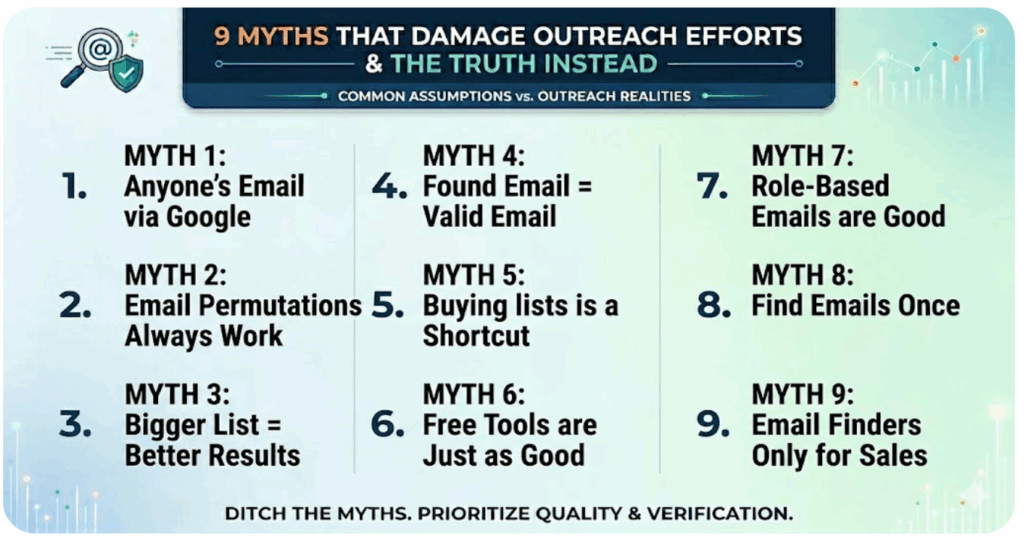
Below are the misconceptions that waste your budget on email outreach and we have also listed down the fixes you should use to get better list quality.
Myth 1: You Can Find Anyone's Email Address With a Simple Google Search
Reality: Google can show you some email addresses. You cannot rely on it to find what you need.
Some people put their email address on their website, LinkedIn page or on a bio. Most professionals, especially those who work for big companies do not make their email address public.
Even if you do find an email address on Google, you do not know if it still works. People change jobs, companies change their names and email addresses get closed.
Instead, if you are serious about contacting decision-makers, investors, HR professionals, or potential clients, you should not just use Google.
You need an email finder tool like Clearout that can actually find pre-verified email addresses.
Myth 2: Email Permutations Always Work
Reality: Most of those guesses are wrong, and every bad address you send to chips away at your sender reputation.
The idea seems okay; if you know a company uses [email protected]
put in the name you are looking for. This does not work for long. Companies often use different formats especially when they have gotten bigger, joined with another company or acquired a new team.
Some companies use nicknames for email addresses. This means that even when you send emails to email addresses that're real they might not receive.
However, there are tools that can help you try email addresses but you should always check if an email address is real before you send an email to it.
Myth 3: A Bigger List Means Better Results
Reality: List size is not a proxy for list quality.
If you’re sending emails to 10,000 unverified contacts, you’re creating risk. On the other hand, a clean list of 2,000 verified emails will almost always perform better.
Why?
Because every time your email hits an invalid address, it sends a signal to email providers. Once that happens, even your good emails can end up in spam. So instead of chasing volume, shift your focus.
Start small. Build targeted lists. Make sure your contacts are verified before you hit send. Then segment based on relevance so your message actually feels personal.
When you prioritize quality at every step, your emails land where they should. And more importantly, they get replies.
Myth 4: If You Found the Email It Must Be Valid
Reality: Email addresses expire faster than most people expect, people move on, companies evolve, and some businesses simply do not exist anymore.
An email account that was working 6 months ago might not work today. Some tools can give you email addresses from big lists. The only way to know if an email address really works is to use an email finder like Clearout that helps you find emails that are valid.
Additionally, every contact you get must be checked against the mail server. Confirmed if it's still active before writing outreach messages.
Myth 5: Buying an Email List Is a Shortcut Worth Taking
Reality: Buying an email list can damage your deliverability, trigger spam complaints, and get your domain blacklisted, often before you realize what went wrong.
Pre-compiled email lists come with real problems. The data is often outdated by the time you use it. You have no visibility into how those contacts were collected or whether the people on the list have any relevance to your offer. And because the same lists get resold across multiple buyers, spam complaints accumulate fast.
From a standpoint, laws like CAN-SPAM, GDPR and CASL have rules about getting permission and using contact information correctly. Lists that you buy usually do not follow these rules.
If you want to understand this in more detail, read our blog: “Buying email list”
When you send emails to people who have not agreed to get them it can cause problems. You might get a lot of emails bounced back, people might not read your emails. You could even get in trouble with email providers.
Myth 6: Free Email Finder Tools Are Just as Good as Paid Ones
Reality: Free tools are not as good as paid ones because they have limitations that affect the quality of the results.
Free email finder tools work fine for occasional one-off searches. But they cap your usage, pull from older databases, and don't confirm whether an address is actually deliverable.
Paid tools do more layered checks across syntax, domain health, MX records, and SMTP responses. Additionally, tools like Clearout give a confidence score on every result, indicating the likelihood that the address is valid, deliverable, and safe to contact. It means you can prioritize outreach with precision and avoid sending to addresses that carry risk.
Myth 7: Role-Based Emails Like info@ or sales@ Are Good Enough
Reality: Emails sent to generic domains rarely get read by the right person, if they get read at all.
Role-based addresses are monitored by teams. So, if your message is seen, you probably won't get the reply.
Targeted outreach needs a real person, someone with the context and authority to actually respond. A generic inbox doesn't get you there.
That said, there are exceptions like broad partnership inquiries or vendor submissions can work. But for sales prospecting, direct contact beats a shared inbox every time.
Myth 8: You Only Need to Find Emails Once
Reality: Email list gets old and less useful over time. Keeping it up to date is important.
Contacts change, people move to jobs, get promoted, switch companies or retire. A list that was good 6 months ago is already getting old. According to MarketingSherpa data via HubSpot, B2B contact data decays at 2.1% per month, that's roughly 25% of your list going stale every year.
If you send campaigns often, updating your list before each send is a good idea. At least the lists that have not been used for a month should be cleaned before using it again.
Myth 9: Email Finder Tools Are Only for Sales Teams
Reality: Email finding supports far more use cases than sales outreach.
Sales teams use email finder tools the most. Recruiters use these tools to contact candidates who are not looking for jobs. Email finders also help marketers create lists of media contacts and influencers. Business development teams use them for partnership outreach. Researchers use them to contact subject-matter experts.
Anywhere you need to reach a specific person who isn't already in your network or CRM, an email finder tool has a practical role.
How to Choose the Best Email Finder Tool
Here are the features that makes an email finder tool the best:
- Real-time verification: The tool should give pre-verified email addresses.
- Confidence scoring: Every email address should have a confidence score that tells you how real it is.
- Search methods: You should be able to search by name, domain, by company name or just by domain.
- Role-based email control: When you’re building your email list, you need control. For example, decide upfront if you want to include role-based emails like info@ or support@, and always remove duplicates.
- Bulk and API support: For large-scale prospecting or high-volume outreach campaigns, Clearout helps you process thousands of emails at once through bulk upload or API integration.
- GDPR compliance: This is especially important if you are contacting people in the European Union.
Why Clearout's Email Finder is the Best For You
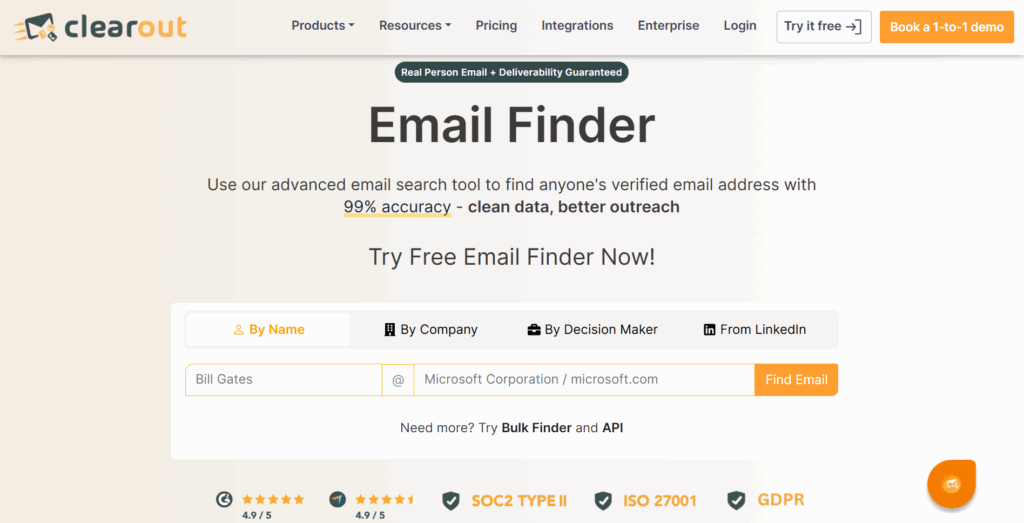
Clearout's Email Finder is built around one core principle: every email you find should be safe to send.
- Clearout gives you 3 ways to search by; domain, company name, so there is always a method that fits how you are building your prospect list.
- Every result comes with a real-time confidence score generated by machine learning across multiple data points. Hence, you know exactly how reliable each address is before it enters your outreach.
- Emails arrive pre-verified. It means you get valid email addresses in the prospect list.
- Single lookup or bulk list building, both are covered. Quick Finder, Bulk Finder, and API access are all available depending on the scale you are working at.
- The LinkedIn Chrome Extension keeps you in your workflow, find and verify email addresses directly from a LinkedIn profile without switching tabs or copying details across.
- With GDPR compliance is applied uniformly across the entire database.
- With 99.73% accuracy, one of the highest in the industry, every contact you find is reliable from the start.
- Finding and verifying happen in a single step under one credit, so there are no surprise charges or double billing.
- Clearout's Email Finder is built to keep your bounce rate under 3%, actively protecting your sender reputation as you grow your list.
Closing Thoughts
Start treating email finding as the best solution to your data quality problem. Getting replies has nothing to do with how big your list is. Rather it depends on how clean your list is. That is why you need a tool that finds and delivers pre-verified email addresses.
Clearout takes care of that, so every contact you reach out to is a prospect who can actually receive your email.
Clearout takes care of that, so every contact you reach out to is a prospect who can actually receive your email.
Start Finding Bulk Emails
FAQs
1. Is it true that all business emails can be found through public web searches?
Most professionals don't have their contact information on any public page, and even the ones that do show up in search results may no longer be active. A dedicated email finder tool can help you reach out to your audience that Google simply can't.
2. Which popular email finder services are known for debunking myths?
Clearout is the best email finder tool that helps you find pre-verified emails. With 99.73% accuracy and AI-driven confidence scoring, it increases the quality of your email list.
3. What are the disadvantages of relying solely on free email lookup tools?
Free tools limit your searches and pull from outdated databases, so the contacts you find are often invalid. For anyone doing consistent email outreach, accurate email finder tools become a necessity.
4. Can I trust email lookup apps to avoid spam or invalid addresses?
You might get invalid addresses and spam depending on the email lookup tool. Reputable email finders like Clearout filter out gibberish, role-based, invalid, and risky addresses during the discovery process itself. Hence, you get a usable and valid contact.
5. What are the legal risks of buying compiled email contact lists?
Laws such as CAN-SPAM, GDPR and CASL need proper consent. Something purchased lists almost never have. With such lists, you will get fines, spam complaints, and get blacklisted. It takes months to recover from that. That's why CAN-SPAM, GDPR, CASL are laws you should go for.