
clearout
  • Products
    • Email Verifier Verify emails addresses individually, in bulk or through API, with 99% accuracy
    • Email Finder Find individual or bulk emails by entering the person & company name or domain
    • Form Guard IconForm Guard Protect your forms from spam, bots, and invalid submissions with real-time email, phone, and name verification.
    • Form Guard IconData Pulse Verify, enrich, and monitor your CRM contacts in real time - heartbeat monitor for your data.
    • Prospect SQL/MQL list building with high levels of personalization, real-time data enrichment and prospect search
    • Clearout For SheetsVerify email addresses directly on Google Sheets with Clearout for sheets add-on
    • Prospect – LinkedIn Chrome ExtensionBuild verified, targeted prospect lists directly from LinkedIn profiles
    • ClearoutPhoneValidate phone numbers across 240+ countries in bulk, quick or real time validation
    • Free Tools
    • Disposable Email Checker
    • Reverse LinkedIn Profile Lookup Tool
    • Reverse Email Lookup Tool
    • Email List Cleaner
    • Company Domain Finder API
  • Resources
      DEVELOPERAPI iconAPI
      Clearout APIs are structured around REST and JSON
      Webhooks iconWebhooks
      Capture real-time events in your application workflow
      Form Guard iconForm Guard
      Real-time form validation to keep bad contacts out of your CRM
      KNOWLEDGE BASEGetting started iconGetting started
      Sending campaigns without bounces is made simple
      FAQ iconFAQ
      Easily find answers to services, security and common questions
      USE CASESLead Generation iconLead Generation
      Learn how professionals generate quality leads
      GUIDESPricing arrow iconTransparent & flexible pricing to support pay-per-use or recurringCompare Email Verification Tools arrow iconAI-powered email verification with 99%+ accuracy, real-time validation, and transparent risk scoringCompare Email Finder Tools arrow iconPre-verified B2B email addresses with confidence scoring, find real person email, not role-based addressData Pulse & HubSpot Breeze Intelligence arrow iconPre-verified B2B email addresses with confidence scoring, find real person email, not role-based addressBLOGSEmail Verification ToolsFind Anyone’s Email Address
      Most Accurate, Fast & Free Ways
      Form Validation
      Importance, Ways & Best Practices
      View All Blogs
  • Pricing
  • Integrations
  • Enterprise
  • Login
Try it free Book a 1-to-1 demo
Aastha Shaw / February 23, 2024 September 3, 2026

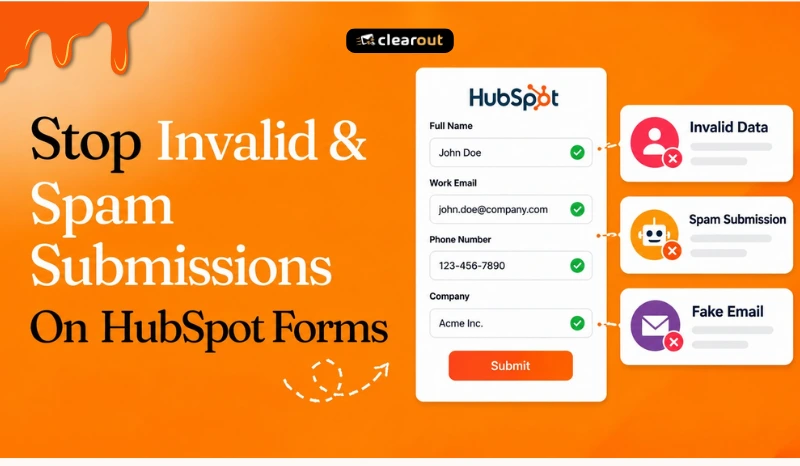
Stop Invalid & Spam Submissions on HubSpot Forms (2026)


Stop Invalid & Spam Submissions on HubSpot Forms (2026)

If you are looking for a simple solution to prevent spam submissions on your HubSpot Forms, this guide is just for you!

HubSpot, a leading marketing and sales platform, boasts millions of active users, and its easy-to-use forms are a cornerstone of its popularity.

But, do you ever feel like your forms are being used by robots instead of real people?

You're not alone!

Fake leads and "spam bots" are a major headache for marketers.

They waste your time, clutter your data, and make it hard to understand your audience.

“Person gesturing to stop with text saying ‘TELL THEM TO STOP.’”

This guide explains what spam submissions look like in 2026, what HubSpot's native controls can stop, and where additional validation can help prevent unwanted submissions before they reach your CRM.

Let’s get started…

Table of Content


‣ What Spam Submissions Look Like in 2026
‣ Spam, Invalid Data, and Bad Leads are Different Problems
‣ Why HubSpot Forms Attract Spam
‣ Problems Caused by Spam Form Submissions: A Growing Pain for Marketers
‣ Immediate Solution To Stop Spam Submissions On Your HubSpot Forms
‣ What HubSpot Offers Natively to Stop Spam Form Submissions
‣ How Form Guard Adds Another Layer of Protection
‣ Benefits of Using Clearout Form Guard With HubSpot
‣ Pro Tip: Use Real-time Validation + Progressive Profiling
‣ Final Thoughts: Stop Spam Without Stopping Conversions
‣ FAQs
What Spam Submissions Look Like in 2026


Spam bots and fake lead generators have grown smarter.

In 2026, you’re not just dealing with gibberish emails like "[email protected]" or obvious bot names like "asdf qwer." You’re also up against:

  • AI-generated fake personas with valid-sounding names
  • Disposable email addresses that bypass basic filters
  • Repeated entries that clutter analytics and confuse marketing automation

These submissions can skew campaign reporting, waste sales time, and increase CRM cleanup work.

Spam, Invalid Data, and Bad Leads are Different Problems


Before choosing a solution, separate these three problems.

1. Automated Spam


Scripts and bots can submit your form using randomized or scraped data, sometimes hundreds of times an hour. Those submissions can still be recorded as form submissions and inflate your lead numbers, even though no genuine prospect filled out the form.

2. Invalid Information


A real visitor can sometimes submit incorrect or unusable contact information. This can include email typos, disposable addresses, or unreachable phone numbers.

3. Unqualified Leads


A submission can contain completely valid information and still be irrelevant. For example, a competitor can submit a genuine business email address through your form. Form validation can check whether the information is usable, but it cannot determine whether the person is a qualified prospect. That is where lead qualification comes in.

Why HubSpot Forms Attract Spam


HubSpot forms are commonly used to capture leads from websites and landing pages.

HubSpot's popularity also makes its forms attractive targets for spambots and other unwanted activity. These submissions may contain nonsensical data, disposable emails, gibberish, or inaccurate information.

This leads to a frustrating influx of fake leads that clog your database and waste your time.

Problems Caused by Spam Form Submissions: A Growing Pain for Marketers


Let’s break down the real-world impact:

  • Wasted Time & Resources

    Sales teams waste hours chasing ghost leads, and marketing teams spend time cleaning data instead of nurturing qualified prospects.

  • Damaged Reporting & Attribution

    Spam submissions can inflate form submission counts, lead volume, conversion rates, and other campaign metrics. This makes it harder to see which campaigns are actually generating genuine prospects.

  • Automation & Workflow Problems

    Spam records can trigger workflows, emails, notifications, and lead-nurturing sequences that were designed for genuine prospects.

  • CRM & Data Quality Issues

    Every unwanted submission that reaches your CRM adds another record for your team to review, filter, or remove. Over time, this can make segmentation and database management harder.


So, how do we fix this?

Immediate Solution To Stop Spam Submissions On Your HubSpot Forms


The most effective way to keep spam from affecting your CRM is to stop unwanted submissions before they are recorded.

Clearout Form Guard works at the point of form submission, validating contact details and detecting automated activity before unwanted records reach your HubSpot CRM.

It validates email addresses, phone numbers, and names in real time as visitors fill out your HubSpot form. It also uses bot detection to help block automated submissions without requiring visitors to complete a CAPTCHA challenge.

With Form Guard in place, you can address two problems at the point of capture: incorrect contact information from form visitors and automated spam submissions from bots.

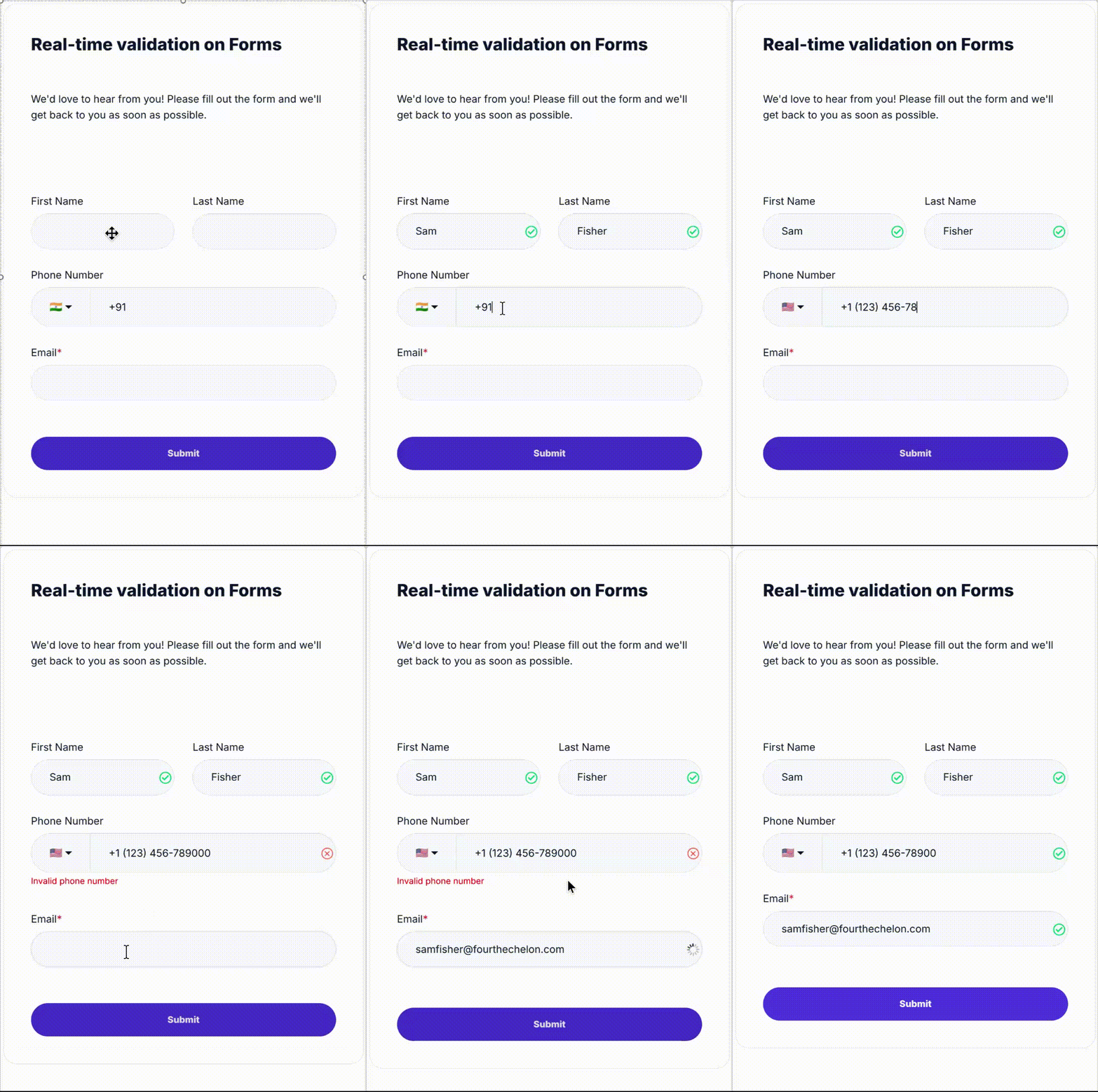
Real-time form validation with email and phone number fields.

Combining HubSpot email validation with Clearout's real-time verification helps you catch invalid addresses before collecting additional information. Here’s how you can integrate Clearout with your HubSpot forms:


What HubSpot Offers Natively to Stop Spam Form Submissions


HubSpot spam protection includes tools such as reCAPTCHA and disposable-domain blocking, but these controls don't validate every contact data entered into a form.

1. Google reCAPTCHA (v3)


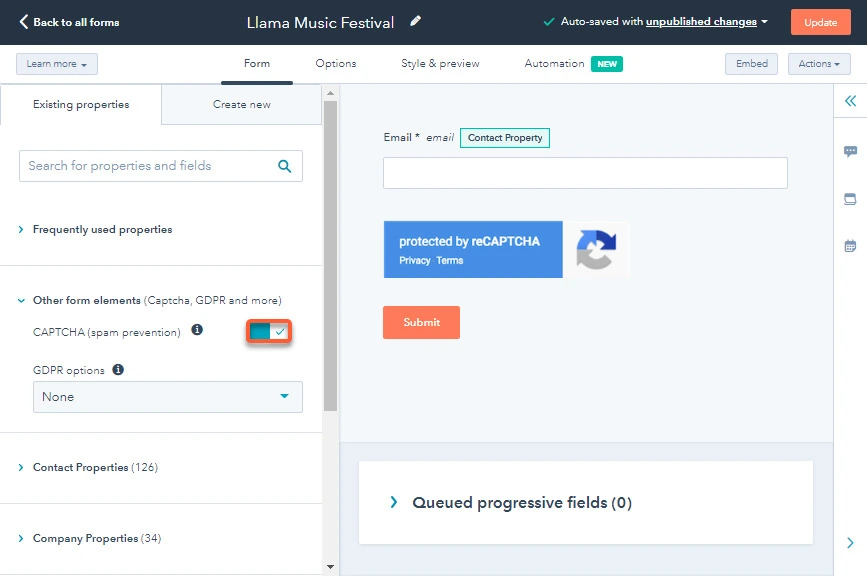
HubSpot offers some basic protection against spam bots by allowing you to enable CAPTCHA on your forms:

  • Go to Marketing > Lead Capture > Forms
  • Edit the form
  • Under "Other Form Elements," toggle on CAPTCHA
  • Click "Update" or "Publish"

Once enabled, HubSpot uses Google’s invisible reCAPTCHA v3.

HubSpot form showing Google reCAPTCHA v3 enabled for spam prevention.

If Google determines that a visitor is suspicious, they must solve a CAPTCHA challenge before they can submit the form.

While this can deter simple bots, it also adds an extra hurdle for human users, potentially decreasing your conversion rate.

Limitations with this method:

  • Bots are evolving to bypass reCAPTCHA, especially invisible versions.
  • False positives sometimes block real users.
  • UX trade-offs: Users might still be presented with image or checkbox challenges, increasing friction.

Why Not Just Use CAPTCHA?


Let’s compare:

FeatureCAPTCHAClearout
Stops botsPartiallyYes (validated)
User frictionHighNone
Detects real-time mailbox validityNoYes
Detects duplicate or incomplete submissionsNoYes
GDPR/CCPA alignmentIndirectYes

2. Blocking Disposable Domains


System abusers often use temporary or disposable email addresses to pass through forms which leads to invalid and spammy leads in your system.

To stop such signups, HubSpot has a list of disposable domains that are blocked by default. While this can help prevent obvious spam, it has key limitations:

  • Not updated in real-time — many new disposable services can slip through
  • Doesn’t validate mailbox status, syntax, or domain activity
  • Cannot detect malicious intent — only domain pattern

3. Advanced Bot Protection (Enterprise Tier Only)


HubSpot now offers enhanced bot filtering for high-tier accounts. However, it’s not available to most users and still lacks real-time field validation.

You can't rely on HubSpot's default validation and blocking tools to catch every unwanted submission.

How Form Guard Adds Another Layer of Protection


HubSpot email validation can help catch obvious email errors, but it doesn't replace checking whether the address is actually usable. So, you must add another layer of protection with a real-time form validation tool.

Clearout Form Guard works at the point of form submission before unwanted records reach your HubSpot CRM. It also uses bot detection to help block automated submissions without requiring visitors to complete a CAPTCHA challenge.

Unlike HubSpot's disposable-domain list, Form Guard checks mailbox validity, phone reachability, and name quality in real time, on every submission.

Benefits of using Clearout Form Guard with HubSpot


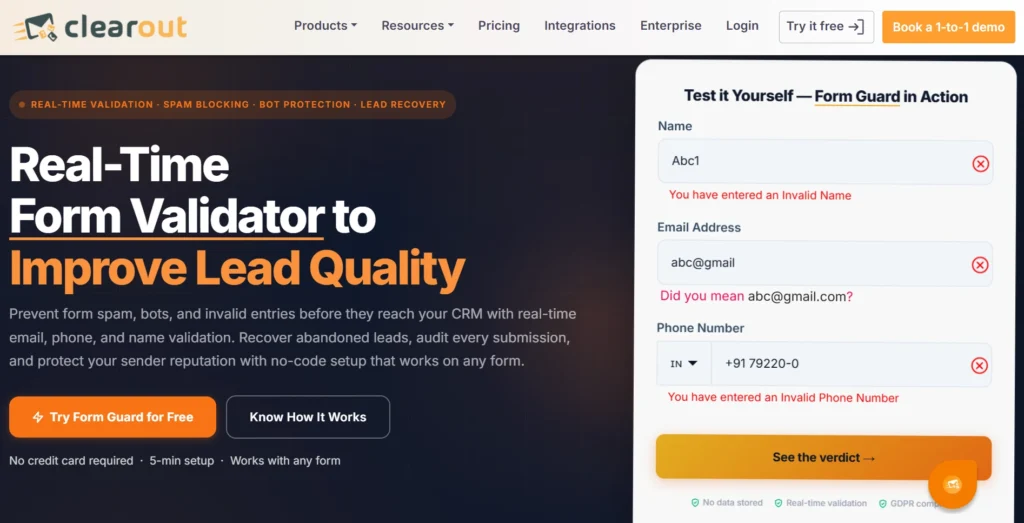
Clearout Form Guard validating invalid name, email, and phone entries.

1. Block Invalid and Disposable Emails Before Submission


Form Guard checks email addresses as visitors enter them and can block disposable, gibberish, and other unwanted addresses before the form is submitted. This keeps unusable contacts from becoming new CRM records.

2. Stop Invalid Phone Numbers From Entering Your Database


Phone validation checks submitted numbers for issues such as invalid numbers and VoIP numbers. You can also set country rules and dial-code preferences to control which numbers your form accepts.

3. Catch Gibberish Names at the Point Of Entry


Form Guard checks names for gibberish and meaningless entries before the form is submitted. This helps keep random text and unusable names from entering your HubSpot CRM.

4. See What Your Form is Blocking


Form Guard's dashboard shows validation results, including which submissions were blocked or allowed and the reasons behind those decisions. This gives you visibility into the types of unwanted submissions reaching your forms instead of leaving you to investigate the CRM records later.

5. Keep Hard Bounces and Undeliverable Addresses Out Of Your Lists


Blocking invalid and disposable email addresses at submission reduces the number of addresses that can later produce hard bounces or undeliverable messages. This helps protect the quality of the contacts entering your email lists.

Pro Tip: Use Real-time Validation + Progressive Profiling


Once the basic lead data is verified, you can keep the first form short and collect more details later through progressive profiling.

What is Progressive Profiling?


HubSpot allows you to gradually collect information from leads over multiple interactions.

Instead of overwhelming users with a long form on the first visit, you show only the most essential fields like Name and Email.

Then, when the user returns or fills out another form, additional fields (e.g., Company, Role, Phone Number) appear based on what’s already been captured.

Why Combine It with Clearout?


Because Clearout validates the email in real time, you can check the submitted address before asking visitors for additional information. This lets you screen out invalid or disposable email addresses before asking visitors for additional information, so genuine visitors can move through a shorter form.

Benefits:


  • Reduced Form Abandonment: Shorter forms = higher completion rates
  • Smarter Data Collection: You build a complete profile without overwhelming users
  • Cleaner CRM: Invalid emails never make it to the next stage
  • Optimized Lead Nurturing: Each follow-up interaction feels more tailored
  • Segmentation Accuracy: Better data lets you segment based on valid, progressive inputs

Final Thoughts: Stop Spam Without Stopping Conversions


Spam form submissions aren't just unwanted entries sitting in your HubSpot database. They can inflate submission and conversion numbers, trigger workflows meant for real prospects, add invalid contacts to your lists, and introduce addresses that later bounce or become undeliverable.

Once those records enter your CRM, your team has to identify them, remove them, and deal with the effects across reporting, automation, and email campaigns.

Prevention is easier than cleaning up those records afterward. Form Guard helps stop invalid contact details and automated submissions at the form, before they become CRM records.

If spam is already reaching your HubSpot forms, don't wait for your database and workflows to absorb the damage. Stop unwanted submissions at the point of capture with Form Guard.

Stop Spam Submissions in HubSpot Forms


Get 100 FREE Credits

FAQs


Q1: Is Clearout GDPR-compliant?
Yes, Clearout doesn’t store or misuse any personal data. It adheres to GDPR and other global data protection laws.
Q2: Will Clearout slow down my forms?
No, Clearout Form Guard validates submissions in real time with minimal delay, so your forms stay fast.
Q3: Can I apply Clearout to old forms too?
Yes, you can add Clearout Form Guard to existing embedded HubSpot forms. Just connect Form Guard to the form you already have, and it can start validating submissions in real time. Your existing fields, form design, and workflow can stay in place.
Q4: Does Form Guard work on mobile devices?
Yes, Form Guard works on mobile as well as desktop devices. It validates form entries and protects submissions when visitors fill out your HubSpot forms on phones or tablets.

Share this article

Recent Posts

07 Sep 2026
Form Abandonment: Why Leads Drop Off & How to Recover Them

Learn why visitors abandon forms and how Clearout Form Guard reduces drop-offs with real-time valida ...

02 Sep 2026
Bounce Rate Above 2%? What to do in the Next 24 Hours

Bounce rate above 2%? See what to do in the next 24 hours, spot hard and soft bounces, verify contac ...

31 Aug 2026
HubSpot Data Quality Audit Framework for New Clients

Learn how agencies can audit HubSpot CRM data, identify critical issues, score data quality, and bui ...

31 Aug 2026
Why Is My Email Click Rate Dropping In 2026?

Discover why your email click rate is dropping in 2026, how security bots inflate clicks, and how to ...

22 Aug 2026
Why Validating Contact Information Matters for Shopify Checkouts

Shopify checkout validation catches typos, fake numbers, and disposable emails. See how Clearout's F ...

Clearout's

Form Guard

Validate email, phone & name on any forms!

  • Real signups only
  • Verified emails
  • Valid phone numbers
  • No fake names
  • Cleaner CRM
  • No devs needed
Try for Free Now

Email Verification, Email Finding Form Guard & Prospecting Service

Expand Your Reach By Finding & Verifying Ideal Prospects.

Sign up & get 100 free credits

No Credit Card required

Create Free Account
Company

Why Clearout?

Pricing

Contact Us

Careers

Press

Enterprise

Sitemap

FAQ

Status

Products

Email Verifier

Email Finder

Form Guard

Data Pulse

Prospect

LinkedIn Email Finder

Reverse Lookup

Google Sheets Add-on

WordPress Plugin

ClearoutPhone

What's New?

Resources

Integrations

HubSpot

Team Account

API

Compare Email Verifier

Compare Email Finder

Compare Prospecting

Use Cases

Blog

Help

Legal

Privacy Policy

Terms

DPA

Security

Trust Center

Certification

ISO 27001/2022

SOC 2 Type 2

GDPR

Partnership

HubSpot Certified

Affiliates

Partners

Clearout for browser

⚡ Supercharge Your Prospect Research with Clearout's LinkedIn Chrome Extension - Find and Verify Emails with Confidence!

Clearout Chrome extension

clearout
© 2026 Clearout Inc. All Rights Reserved. Powered by Clearout.
Validate Enrich New Salesforce contacts automatically with Data Pulse. Learn More ➞
X