clearout
  • Products
    • Email Verifier Verify emails addresses individually, in bulk or through API, with 99% accuracy
    • Email Finder Find individual or bulk emails by entering the person & company name or domain
    • Form Guard IconForm Guard Protect your forms from spam, bots, and invalid submissions with real-time email, phone, and name verification.
    • Prospect SQL/MQL list building with high levels of personalization, real-time data enrichment and prospect search
    • Clearout For SheetsVerify email addresses directly on Google Sheets with Clearout for sheets add-on
    • Prospect – LinkedIn Chrome ExtensionBuild verified, targeted prospect lists directly from LinkedIn profiles
    • ClearoutPhoneValidate phone numbers across 240+ countries in bulk, quick or real time validation
    • Free Tools
    • Disposable Email Checker
    • Reverse LinkedIn Profile Lookup Tool
    • Reverse Email Lookup Tool
    • Email List Cleaner
    • Company Domain Finder API
  • Resources
      DEVELOPERAPI iconAPI
      Clearout APIs are structured around REST and JSON
      Webhooks iconWebhooks
      Capture real-time events in your application workflow
      Form Guard iconForm Guard
      Real-time form validation to keep bad contacts out of your CRM
      KNOWLEDGE BASEGetting started iconGetting started
      Sending campaigns without bounces is made simple
      FAQ iconFAQ
      Easily find answers to services, security and common questions
      USE CASESLead Generation iconLead Generation
      Learn how professionals generate quality leads
      GUIDESPricing arrow iconTransparent & flexible pricing to support pay-per-use or recurringCompare Email Verification Tools arrow iconAI-powered email verification with 99%+ accuracy, real-time validation, and transparent risk scoringCompare Email Finder Tools arrow iconPre-verified B2B email addresses with confidence scoring, find real person email, not role-based addressBLOGSEmail Verification ToolsFind Anyone’s Email Address
      Most Accurate, Fast & Free Ways
      Form Validation
      Importance, Ways & Best Practices
      View All Blogs
  • Pricing
  • Integrations
  • Enterprise
  • Login
Try it free Book a 1-to-1 demo
Akanksha Mishra / June 11, 2026 June 11, 2026

5 Signs Your HubSpot CRM Needs Real-Time Data Validation


5 Signs Your HubSpot CRM Needs Real-Time Data Validation

Gartner estimates poor data quality costs $12.9 million annually. And that’s exactly what happens when bad data enters your CRM.

If you’re using HubSpot CRM, data quality issues can start from day one. Here’s how.

A contact who switched jobs last month can be in your active pipeline or someone might sign up with invalid email address, typo names, invalid phone numbers and your system will accept it.

HubSpot isn’t designed to question your data. It stores and processes whatever enters the system, valid or not. Over time, every workflow, every forecast, every outreach you build on top of that data becomes less accurate and harder to rely on.

This guide covers the 5 warning signs your HubSpot CRM data is already degrading, and how Data Pulse catches the low quality data before it can even enter your pipeline.

Table of Content


‣ Sign 1: Invalid contacts are entering HubSpot undetected
‣ Sign 2: Duplicate contacts are multiplying across your database
‣ Sign 3: Low-quality leads are entering the system
‣ Sign 4: Your HubSpot reports no longer reflect reality
‣ Sign 5: You're running recurring manual cleanup sprints
‣ About Data Pulse
‣ Your HubSpot CRM data is already costing you
‣ FAQs
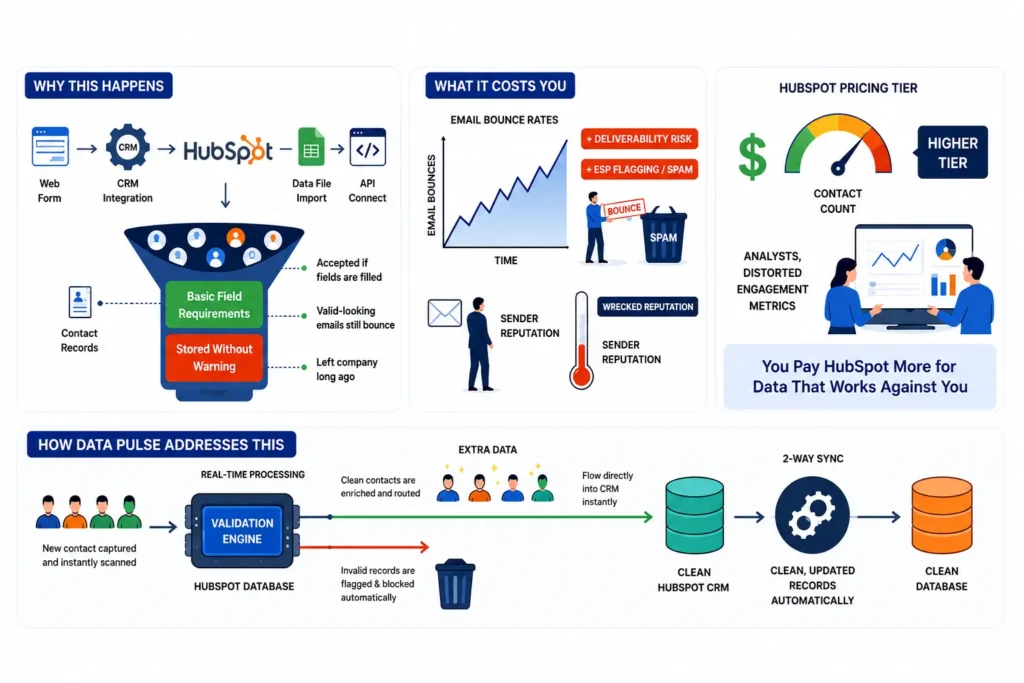
Sign 1: Invalid contacts are entering HubSpot undetected


An infographic showing invalid contacts entering HubSpot undetected.

  • Why this happens

  • HubSpot CRM accepts contact records as long as they pass basic field validations. But passing basic validations doesn't mean the data is actually usable. Emails can look valid and still bounce. Phone numbers come in with wrong formats, missing digits, or not at all. Names arrive blank, incomplete, or inconsistently formatted.

    Bad data enters through web forms and HubSpot CRM. It can also come in through imports in CSV and API integrations, and by the time you discover it, it is too late.


  • What it costs you

  • On the email side, a bounce rate above 2% signals deliverability risk to inbox providers. Above 5%, your emails are likely getting filtered into spam. And deliverability damage doesn't reverse the moment you clean the list. Rebuilding sender reputation takes months.

    But bad data costs you beyond email, too. Missing or invalid phone numbers mean your sales team is reaching out to contacts they can't actually connect with. Incomplete or incorrect names break personalization across every channel.

    These issues distort your engagement metrics, inflate your contact count, and can push you into a higher HubSpot CRM pricing tier. You end up paying more for data that isn't working for you.


  • How Data Pulse addresses this

  • Data Pulse monitors and validates contact data immediately after creation across all entry points, verifying email, phone, and name in real time.

    Any inaccurate records are identified and corrected as soon as they enter your CRM. Data Pulse validates each contact across email, phone, and name fields and writes the validation status back to the same HubSpot contact record automatically. Since it runs as a native integration, there is no additional setup or third-party tools to manage. Only accurate, usable records make it into your system. This keeps your outreach performance, reporting and overall data health on track.

    It also works without a paid HubSpot plan, so there is no additional platform cost to get started.


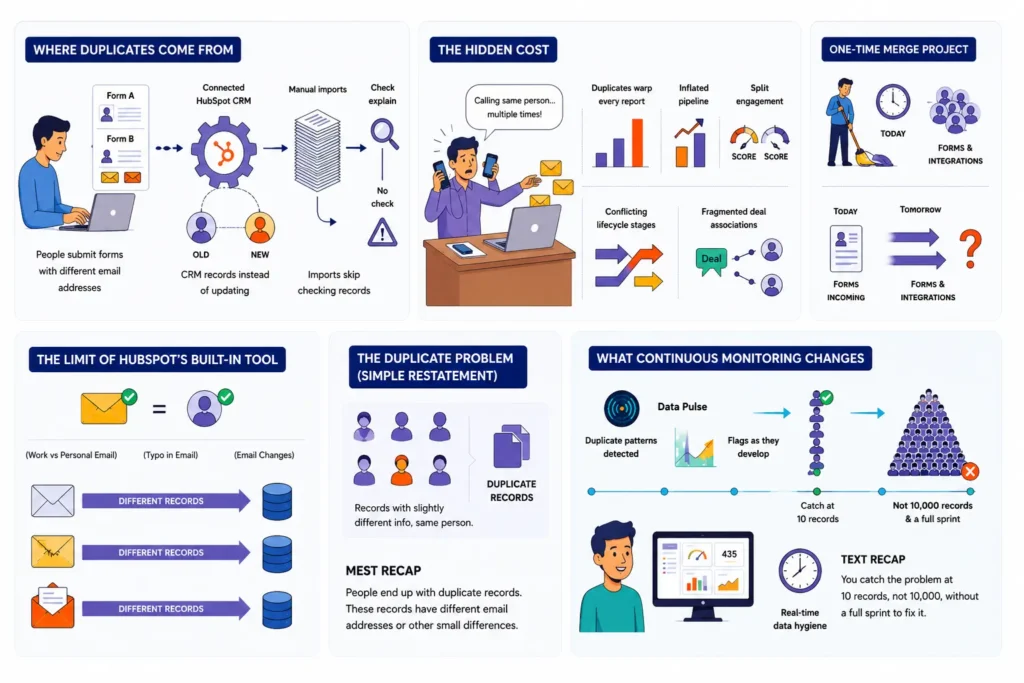
Sign 2: Duplicate contacts are multiplying across your database


An infographic titled showing how duplicate contacts are multiplying across your database.

  • Where duplicates come from


Duplicates build up in 3 ways:

  • Users submit forms using different email addresses.
  • When HubSpot syncs with other tools, it creates new records instead of matching existing ones.
  • Manual imports do the same when they skip checking for existing contacts.

    HubSpot's built-in deduplication only looks at primary email addresses. A work email and a personal email, a typo in a form, a job change with a new email address, each one ends up as a separate contact in your CRM.

    HubSpot relies on email addresses as unique identifiers. But the same contact can still end up with multiple records. A typo in an email, a slightly different name variation, or an import that didn't cross-check existing contacts before adding new ones can all create duplicates.

    Manual imports are the most common source of this. The result is the same contact appearing twice in your CRM, with conflicting information, missing fields, and inconsistent data across both records.


  • The hidden cost

  • The obvious problem: sales reps contact the same person multiple times. The bigger issue is that duplicates distort your reporting. A contact with three records inflates your pipeline by 3x on paper. Engagement scores get split, lifecycle stages conflict, deal associations fragment, and suppression lists and sequence enrollments stop working as intended.

    And a one-time merge project fixes yesterday's duplicates. It does nothing about the ones that will enter tomorrow through your forms and integrations.


  • What continuous monitoring changes

  • Data Pulse continuously monitors your HubSpot CRM data hygiene and highlights the sources creating them. Instead of running a quarterly cleanup after 100 records are already affected, you catch the problem early.

    Automated duplicate resolution is part of the roadmap, which will make Data Pulse an even stronger data quality layer for your CRM.


Sign 3: Low-quality leads are entering the system


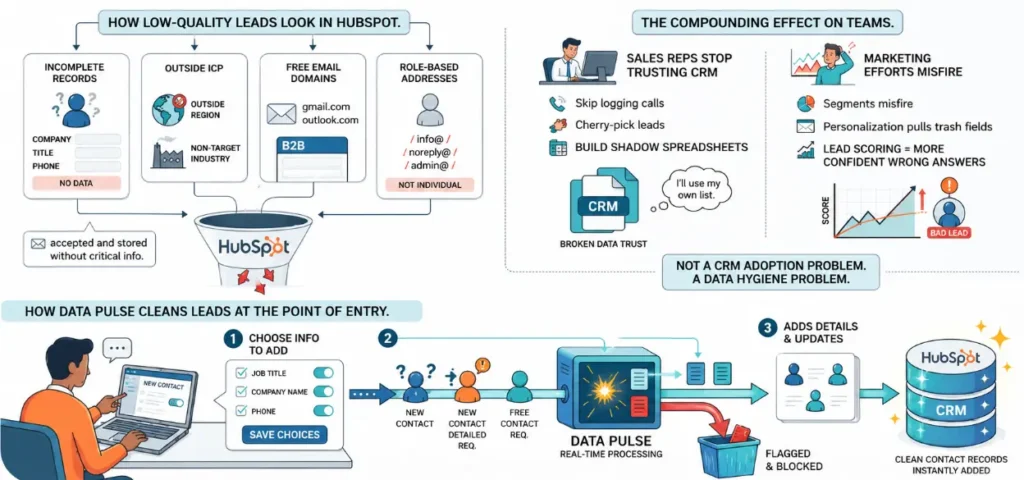
An infographic showing low-quality leads entering the system.

  • What low-quality leads look like in HubSpot

    Low-quality leads go beyond just invalid emails. They include contacts with incomplete records (no company, job title, or phone number), leads from industries or regions outside your ICP, free email domain addresses on B2B forms, and role-based addresses like info@, noreply@, or admin@.


  • The compounding effect on teams

  • When reps consistently pull up bad records, they stop trusting the HubSpot CRM tool entirely. They build shadow spreadsheets, skip logging calls, and cherry-pick leads instead of working the queue. You'll hear this framed as a CRM adoption problem. It’s a CRM data hygiene issue within the CRM. Once trust in the data breaks, rebuilding it takes months of consistently clean records, not a training session.

    Marketing takes the same hit. Segments built on incomplete data misfire. Personalization tokens pull blank fields. And a lead scoring model trained on bad data ends up producing confident but inaccurate results.


  • How Data Pulse validates contacts for better segmentation

  • Data Pulse acts as a real-time data quality engine that validates contact records the moment they are created in your CRM. Once a contact is added, Data Pulse verifies email, phone, and name, and through a two-way sync, pushes the validated results back into HubSpot CRM automatically.

    Each record is updated with structured validation metadata covering the status for email, phone, and name. When inaccurate data enters your system, it gets identified, corrected, and made usable quickly before it impacts anything downstream.

    Having Data Pulse as your validation layer also means better segmentation. With structured validation results attached to every contact record, your team can segment more accurately and run campaigns knowing the underlying data is clean and reliable.


Sign 4: Your HubSpot reports no longer reflect reality


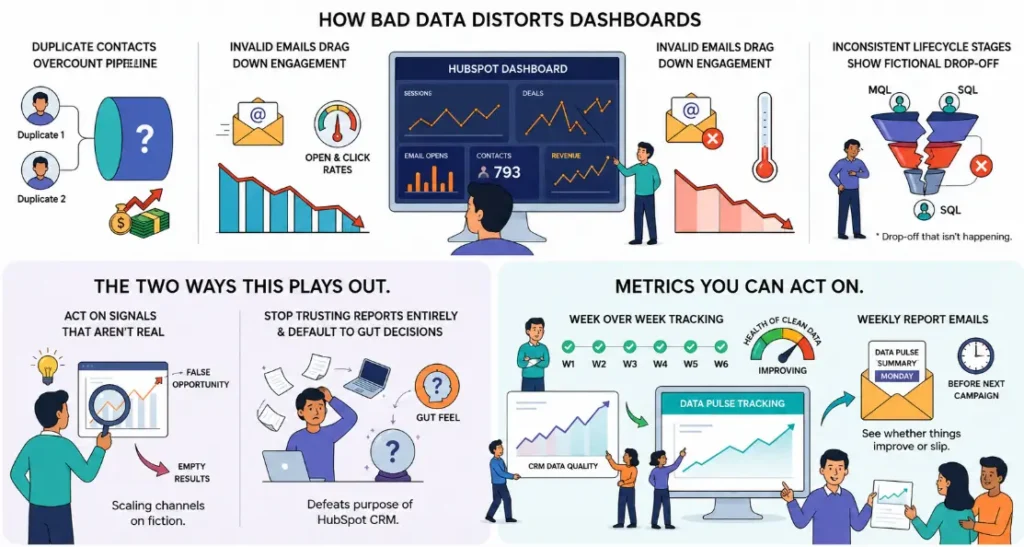
An infographic showing that Hubspot reports no longer reflect reality.

  • How bad data distorts dashboards

    HubSpot CRM reports are reliable only if the data is of high quality. Invalid emails drag open and click rates down for no reason. Inconsistent lifecycle stages show funnel drop-off that isn't happening. None of these triggers an error; it just makes every number in your dashboard wrong.


  • The two ways this plays out

  • Either you act on signals that aren't real, or you stop trusting your reports entirely and default to gut decisions. Both outcomes defeat the purpose of running a HubSpot CRM system in the first place.


  • Metrics you can act on

  • Data Pulse tracks real-time data quality of your HubSpot CRM. It allows you to compare key metrics and insights across time periods to identify trends and changes. A weekly metrics email delivered every Monday surfaces changes before they affect your next campaign.


Sign 5: You're running recurring manual cleanup sprints


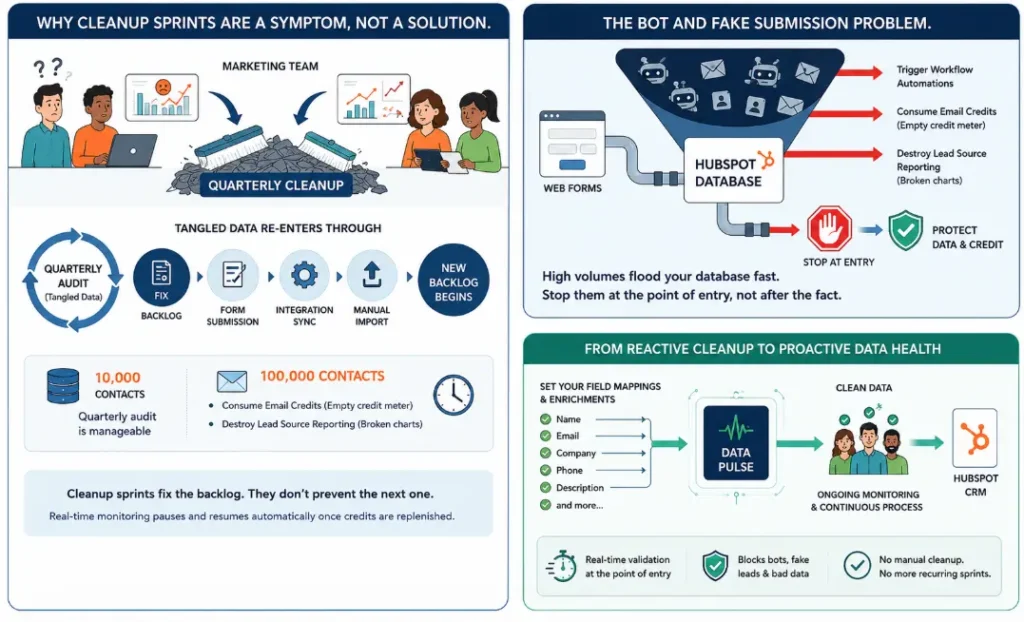
 Image showing reactive cleanup sprints vs. proactive CRM data health.

  • Why cleanup sprints are a symptom

    If your team is running HubSpot CRM cleanups every few months, it means data validation isn’t part of your process yet. Cleanup sprints help clear your low-quality data, but they don’t stop the same issues from coming back.

    New form submissions, integrations, and imports keep adding more bad data. And as your database grows, cleaning it takes more time, while new issues continue to pile up in the background.


  • The bot and fake submission problem

  • Bot and fake form submissions don’t just pollute your database; they trigger workflow automations, consume email credits, and destroy your lead source reporting. Auditing records after the fact only manages the damage; it doesn't stop it.

    Data Pulse verifies all contacts immediately as they are added to your CRM, and improves email deliverability, phone validity, and name completeness. Your team can then use Data Pulse's validation status fields to filter contacts in HubSpot workflows, segments, and lists. You can also make sure that only contacts with a valid email and reachable phone number enter active sequences.


  • From reactive cleanup to proactive data health

  • This is where HubSpot CRM data validation has to move from a periodic task to a continuous process. Data Pulse runs in the background from the moment you configure it. Set your field mappings and enrichment presets once, and it eliminates ongoing manual validation work after initial setup.

    When validation credits are exhausted, real-time monitoring pauses and resumes automatically once credits are replenished. The system manages itself.


About Data Pulse


Data Pulse is a real-time data quality engine that acts as a continuous validation layer for your CRM. Built natively for HubSpot, with plans to expand to additional CRMs and API-based data sources. It validates every new contact at the moment of entry, validates the record, and writes it back to your HubSpot CRM system automatically.

  • Real-time validation: Every time a new contact enters your system, it triggers a “Pulse”, allowing Data Pulse to validate, enrich, and evaluate the data instantly.
  • Two-way sync: Validated records are written back to your HubSpot CRM automatically. No Zapier or Make required.
  • No third-party integrations: Data Pulse works natively with HubSpot CRM integrations.
  • Intelligent insights: When data quality patterns in your CRM need attention. Data Pulse surfaces the right recommendations at the right time.
  • Weekly reports: Performance summaries every Monday with period-over-period trend data.
  • Enrichment presets: Configurable field mappings, reusable across multiple accounts of the same data source.
  • Auto pause and resume: Data Pulse pauses when credits run out and restarts automatically once replenished.
  • No paid HubSpot plan required: Data Pulse works with free HubSpot CRM accounts, so there's no additional platform cost to get started.

Learn more about Data Pulse

Your HubSpot CRM data is already costing you


Inaccurate HubSpot CRM data is a major issue, as duplicate records can waste budget and impact revenue.

So, cleaning your CRM data should be made a part of an everyday workflow. Teams that do this have clearer reporting, stronger outcomes from campaigns, and high revenue growth.

If you’re seeing these signs already, it’s time to start fixing it with Clearout's Data Pulse today.

Monitor Your Data with Data Pulse

FAQs


1. What is data validation in HubSpot CRM?
HubSpot CRM data validation is the process of verifying that contact records meet defined quality standards, valid email formats, no duplicates, and complete required fields, before they affect your campaigns or pipeline. Real-time validation catches issues as data enters your HubSpot CRM. Without it, you usually don’t notice issues until they begin to impact performance, this is exactly what tools like Clearout help avoid.
2. How do I clean up data in HubSpot CRM?
HubSpot built-in tools clean what’s already in the system. Data Pulse stops the problem earlier by validating and enriching new contacts on the way in.
3. What is the importance of the data quality of HubSpot CRM in marketing?
Accurate segmentation, personalization, and email deliverability all crumble when your CRM data is wrong or not complete. Lack of CRM data hygiene results in budget being wasted, open rates being tanked, and attribution gaps.
4. What are the signs of bad data in a HubSpot CRM system?
If your HubSpot CRM data is going bad, it usually shows up in a few obvious ways. Your bounce rates start creeping up. Duplicate records keep showing up. Sales reps stop relying on the CRM and go back to their own spreadsheets. The numbers in your dashboards don’t quite add up anymore. And those regular cleanup efforts never really fix things for long. If more than one of these is happening, your CRM data likely needs attention.
5. What is Data Pulse?
Data Pulse connects to your HubSpot CRM and validates every new contact the moment it is created. It writes the validation status back to the contact record automatically, so your team always has a clear quality signal on every contact without running manual cleanup cycles.

Share this article

Recent Posts

11 Jun 2026
5 Signs Your HubSpot CRM Needs Real-Time Data Validation

Dirty data in your HubSpot CRM costs more than you think. Explore 5 warning signs your HubSpot data ...

04 Jun 2026
Sales Funnel Metrics & KPIs You Must Track in 2026

Discover the sales funnel metrics in 2026, including MQL-to-SQL rate, pipeline velocity, CAC, conver ...

02 Jun 2026
Top 11 LinkedIn Automation Tools in 2026 (By Use Case)

Explore the top LinkedIn automation tools of 2026 for prospecting, outreach, content and workflow au ...

29 May 2026
Email Verification for Startups vs Enterprises: What Changes at Scale

Explore startup vs enterprise email verification as businesses scale. Learn how requirements differ ...

22 May 2026
8 Best Email Tracking Tools in 2026

Discover the 8 best email tracking tools in 2026 for Gmail, Outlook, and team performance tracking. ...

Clearout's

Form Guard

Validate email, phone & name on any forms!

  • Real signups only
  • Verified emails
  • Valid phone numbers
  • No fake names
  • Cleaner CRM
  • No devs needed
Try for Free Now

Email Verification, Email Finding Form Guard & Prospecting Service

Expand Your Reach By Finding & Verifying Ideal Prospects.

Sign up & get 100 free credits

No Credit Card required

Create Free Account
Company

Why Clearout?

Pricing

Contact Us

Careers

Press

Enterprise

Sitemap

FAQ

Status

Products

Email Verifier

Email Finder

Form Guard

Prospect

LinkedIn Email Finder

Reverse Lookup

Google Sheets Add-on

WordPress Plugin

ClearoutPhone

What's New?

Resources

Integrations

HubSpot

Team Account

API

Compare Email Verifier

Compare Email Finder

Compare Prospecting

Use Cases

Blog

Help

Legal

Privacy Policy

Terms

DPA

Security

Trust Center

Certification

ISO 27001/2022

SOC 2 Type 2

GDPR

Partnership

HubSpot Certified

Affiliates

Partners

Clearout for browser

⚡ Supercharge Your Prospect Research with Clearout's LinkedIn Chrome Extension - Find and Verify Emails with Confidence!

Clearout Chrome extension

clearout
© 2026 Clearout Inc. All Rights Reserved. Powered by Clearout.
Keep HubSpot data clean on autopilot — validate, enrich, and sync contacts in real time with Data Pulse. Learn More ➞
X