

- Products
- ResourcesDEVELOPER

 API
API
Clearout APIs are structured around REST and JSON Webhooks
Capture real-time events in your application workflow Clearout MCP
Verify and find emails from AI assistants like Claude and Cursor Form Guard
Real-time form validation to keep bad contacts out of your CRMKNOWLEDGE BASE Getting started
Sending campaigns without bounces is made simple FAQ
FAQ
Easily find answers to services, security and common questionsUSE CASES Lead Generation
Learn how professionals generate quality leadsGUIDES Clearout Insights Explore original research, industry statistics, and data-backed insights Pricing Transparent & flexible pricing to support pay-per-use or recurringCompare Email Verification Tools AI-powered email verification with 99%+ accuracy, real-time validation, and transparent risk scoringCompare Email Finder Tools Pre-verified B2B email addresses with confidence scoring, find real person email, not role-based addressData Pulse & HubSpot Breeze Intelligence Pre-verified B2B email addresses with confidence scoring, find real person email, not role-based addressBLOGSEmail Verification ToolsFind Anyone’s Email Address
Most Accurate, Fast & Free WaysForm Validation
Importance, Ways & Best PracticesView All Blogs - Pricing
- Integrations
- Enterprise
- Login



The Pre-Send Email Verification Checklist Clearout Recommends

Email lists start losing accuracy long before the first bounce appears. People change jobs, companies shut down domains, and inboxes become inactive without warning. Yet most of these changes never make it back to your CRM. This means that the teams find data quality problems only when campaign performance begins to go down.
Use this pre-send email verification checklist to spot risky contacts, ensure high list quality and minimize the number of unnecessary bounces. From verification schedules to catch-all handling rules, these checks improve campaign performance.
Use this pre-send email verification checklist to spot risky contacts, ensure high list quality and minimize the number of unnecessary bounces. From verification schedules to catch-all handling rules, these checks improve campaign performance.
Table of Content
1. Verify segments idle for 90+ days
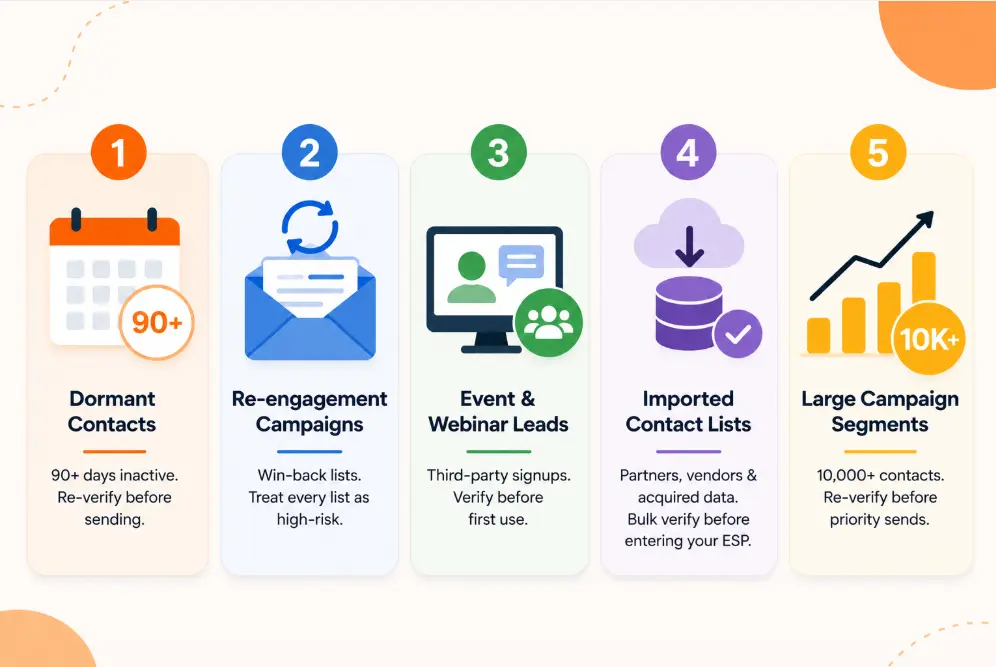
The rule: Any segment not mailed in 90 or more days must be re-verified before it enters a campaign.
A segment that cleared verification 90 days ago is not the same list today. Clearout's verification results on re-uploaded dormant lists consistently show status shifts: addresses that previously returned Valid now return Invalid or Unknown. The reasons are predictable.
Someone left the company. A domain lapsed. An ISP recycled an abandoned inbox into a spam trap. None of these changes trigger a CRM update. The record remains active until a bounce or spam complaint forces a correction.
A segment that cleared verification 90 days ago is not the same list today. Clearout's verification results on re-uploaded dormant lists consistently show status shifts: addresses that previously returned Valid now return Invalid or Unknown. The reasons are predictable.
Someone left the company. A domain lapsed. An ISP recycled an abandoned inbox into a spam trap. None of these changes trigger a CRM update. The record remains active until a bounce or spam complaint forces a correction.
5 triggers requiring mandatory re-verification
1. 90-day dormant segments.
Any contact with no send activity in 90+ days must be re-verified before campaign inclusion. This applies regardless of how recently the contact was acquired.
2. Re-engagement and win-back lists.
These are lapsed contacts by definition. Treat every re-engagement list as a 90-day dormant list regardless of actual segment age.
3. Post-event and webinar lists.
Collected through third-party platforms like Eventbrite, Zoom, and LinkedIn Events, these addresses are unverified at source. Verify on receipt, not on first use.
4. New CRM imports from acquired or partner sources.
Any list imported from a data provider, list purchase, or partner exchange must pass bulk verification before entering your ESP. No exceptions.
5. Large segments before major sends.
Any segment over 10,000 records going into a priority campaign should be re-verified even if last mailed within 60 days. The risk-to-cost ratio favors verification.
Why 90 days specifically?
It maps to one full business quarter. That is the point at which job changes, company restructures, and abandoned inboxes have had enough time to meaningfully degrade a B2B list. For B2C lists with high churn rates, tighten this threshold to 60 days.
Any contact with no send activity in 90+ days must be re-verified before campaign inclusion. This applies regardless of how recently the contact was acquired.
2. Re-engagement and win-back lists.
These are lapsed contacts by definition. Treat every re-engagement list as a 90-day dormant list regardless of actual segment age.
3. Post-event and webinar lists.
Collected through third-party platforms like Eventbrite, Zoom, and LinkedIn Events, these addresses are unverified at source. Verify on receipt, not on first use.
4. New CRM imports from acquired or partner sources.
Any list imported from a data provider, list purchase, or partner exchange must pass bulk verification before entering your ESP. No exceptions.
5. Large segments before major sends.
Any segment over 10,000 records going into a priority campaign should be re-verified even if last mailed within 60 days. The risk-to-cost ratio favors verification.
Why 90 days specifically?
It maps to one full business quarter. That is the point at which job changes, company restructures, and abandoned inboxes have had enough time to meaningfully degrade a B2B list. For B2C lists with high churn rates, tighten this threshold to 60 days.
2. Clearout Bulk Verification settings by list type
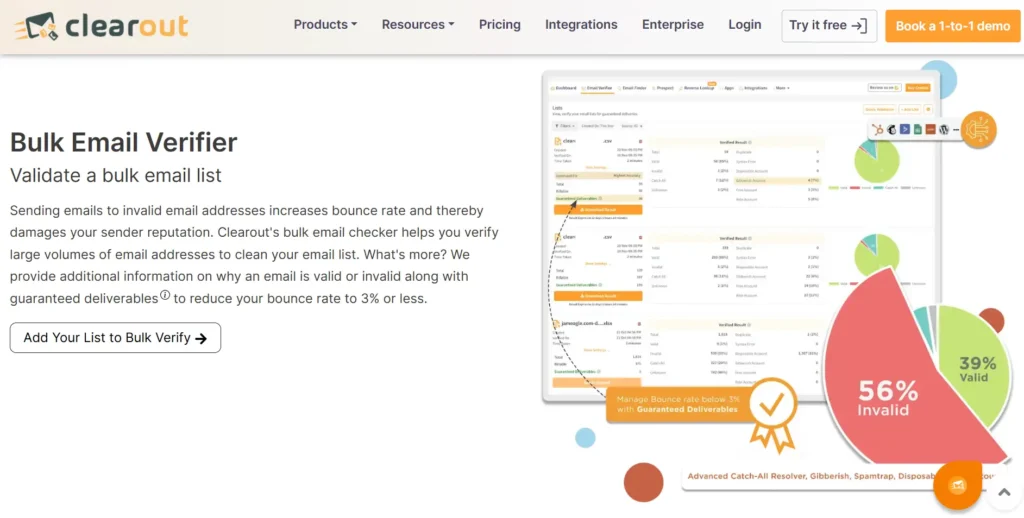
Clearout's bulk email verifier accepts CSV and XLSX files up to 1 million emails per upload. Your file must include at least one column named Email. All other columns, including name, source, lifecycle stage, and company, are preserved in your results file.
Navigation path:
Navigation path:
Dashboard → Email Verifier → Add List → Select File → Go To Email Verify Lists → Select Verification Mode → Click Verify.
The Mode selector appears before verification begins. This is the most commonly misconfigured step in the workflow. Clearout processes approximately 10,000 emails every 3-4 minutes. Large lists run in parallel, so turnaround stays consistent at high volumes.
1. Cold outbound lists
Net-new contacts with no engagement history in your system.
- Use Guaranteed Deliverables as the download mode.
- This returns only addresses where the Safe-to-Send flag is confirmed Yes. Real mailboxes, currently accepting email, verified at SMTP level.
- Do not use Deliverables With Risk for cold outreach. An unestablished sender domain combined with unverified addresses is how domains get flagged on the first campaign.
- Send within 24 hours of verification. If your campaign is delayed, re-verify the list before sending.
2. Warm or re-engagement lists
Contacts with prior engagement, at least one open or click in the last 6-12 months.
- Use Deliverables With Risk as the download mode.
- This includes Guaranteed Deliverables plus addresses flagged as risky: catch-all domains, high role-account concentration, and temporary server issues.
- Prior engagement is the justification for including these contacts. A confirmed click means there is a real person behind the address.
- Segment the risky contacts separately before sending.
3. CRM or ESP database cleanup
Full-database cleaning passes before a major send or quarterly hygiene cycle.
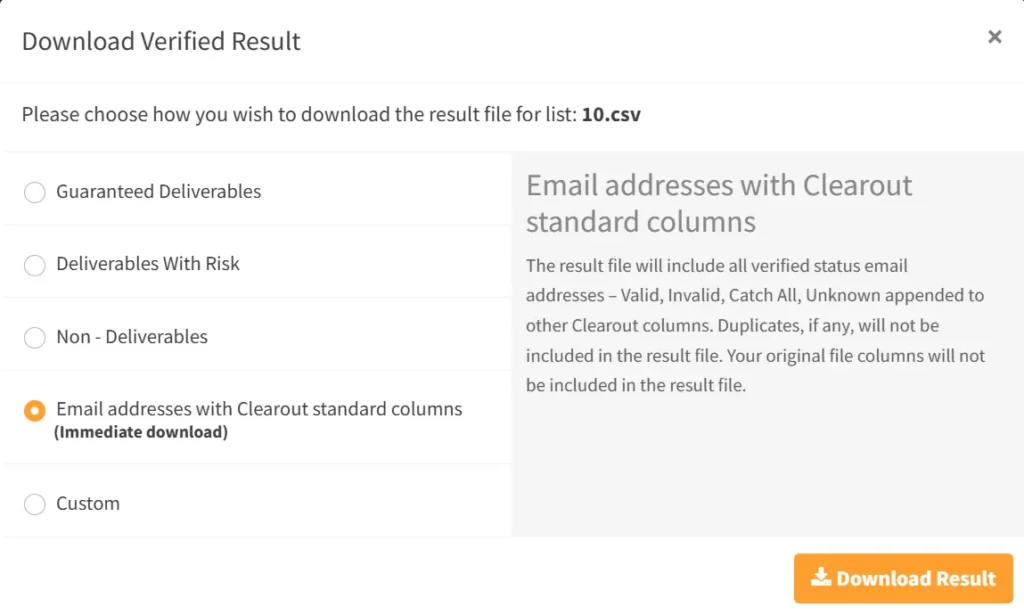
- Use Custom download mode.
- Select all statuses: Valid, Invalid, Catch All, Unknown.
- Enable the Clearout Standard Columns append option. This adds Clearout Safe to Send, Clearout Verification Status, Clearout Reason, and additional fields to your original list.
- Do not delete records from CRM immediately. Import the enriched file back into your CRM. Filter and suppress inside the ESP using the appended status columns. This preserves contact history while protecting future campaigns.
4. ESP-connected imports
Clearout integrates directly with HubSpot, Mailchimp, ActiveCampaign, Sendgrid, Zoho, MailerLite, and Moosend.
- Import the list directly from the connected ESP account inside the Clearout dashboard.
- After verification, export back to the ESP with the Unsubscribe checkbox enabled.
- This automatically unsubscribes non-deliverables in the ESP without a manual CSV export and import cycle.
- Use the Append option to push Clearout verification columns back into your ESP contact records. This makes verification status queryable inside your marketing automation platform.
Note on duplicate handling: Clearout automatically detects duplicates in bulk uploads and does not charge credits for them. If you re-upload a previously verified file, Clearout triggers a duplicate file alert. Confirm to proceed without paying for the same addresses twice. This is useful for 30-day re-verification cycles on the same list.
3. Which statuses to keep, suppress, or delete?
Clearout assigns each email address an email verification status (Valid, Invalid, Catch All, Unknown) as well as a Safe-to-Send flag (Yes, Risky, No, Unknown). Each address has some flags too: bounce type, gibberish, role-based, free account, and disposable.
Valid (safe-to-send: yes)
Action: Keep and send.
Valid means a confirmed, real mailbox that passed full SMTP verification and is currently accepting email. This is Clearout's Guaranteed Deliverable classification. Send within 24 hours of verification for the deliverability guarantee to apply.
Valid means a confirmed, real mailbox that passed full SMTP verification and is currently accepting email. This is Clearout's Guaranteed Deliverable classification. Send within 24 hours of verification for the deliverability guarantee to apply.
Invalid (safe-to-send: no)
Action: Suppress in ESP. Do not delete from CRM immediately.
Invalid means the mailbox does not exist or is not accepting email. Sending to invalid addresses generates hard bounces. Clearout further classifies invalid addresses by bounce type.
Hard bounce sub-statuses (permanent failures, suppress immediately):
Invalid means the mailbox does not exist or is not accepting email. Sending to invalid addresses generates hard bounces. Clearout further classifies invalid addresses by bounce type.
Hard bounce sub-statuses (permanent failures, suppress immediately):
- Syntax error (code 400)
- Domain not found (403)
- Not a mail server (404)
- Mailbox not found (406)
- Account disabled (701)
Soft bounce sub-statuses (temporary, re-verify after 72 hours before suppressing):
- Mailbox quota exceeded (413)
- Message receiving limit reached (421)
- Account inactive due to quota exceeded (428)
When exporting from a connected ESP, use the Unsubscribe export option. This logs the unsubscribe action, which matters for HubSpot, Salesforce-connected stacks, and compliance audit trails.
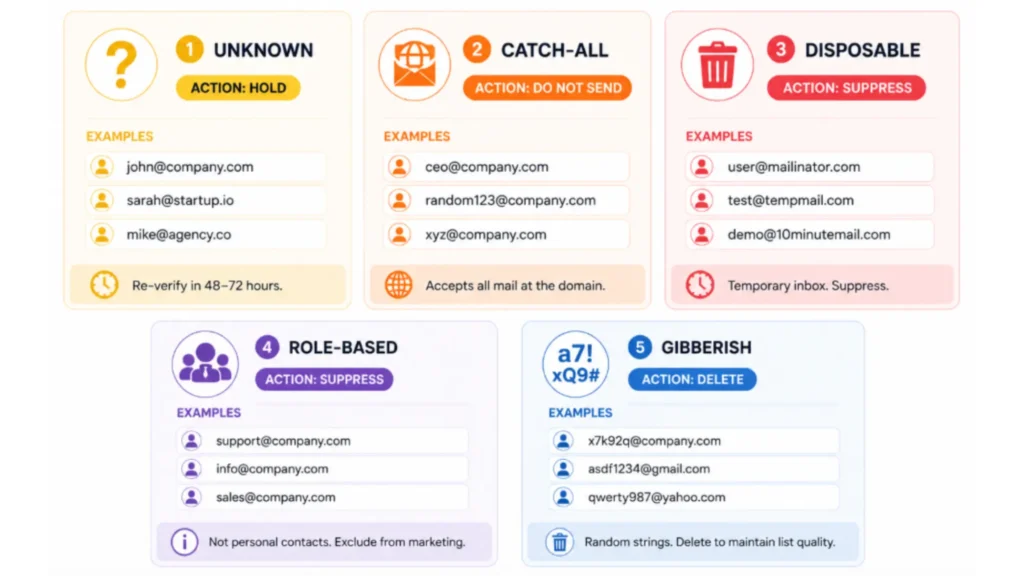
Unknown (safe-to-send: unknown)
Action: Hold. Do not send. Re-verify in 48-72 hours.
Unknown means Clearout received an inconclusive response from the receiving mail server. This is a server-side condition: slow response, temporary unavailability, greylisting (code 407), or DNS timeout (code 417). It is not a permanent verdict on the address.
Clearout does not charge credits for unknown status results. Re-verify after 48-72 hours. Most will resolve to Valid or Invalid.
Unknown means Clearout received an inconclusive response from the receiving mail server. This is a server-side condition: slow response, temporary unavailability, greylisting (code 407), or DNS timeout (code 417). It is not a permanent verdict on the address.
Clearout does not charge credits for unknown status results. Re-verify after 48-72 hours. Most will resolve to Valid or Invalid.
Catch-all (safe-to-send: risky)
Action: Do not send.
A catch-all domain will receive mail sent to any address that it has, including non-existent ones. The message may appear to be delivered, but it can be rejected by spam filters or mailbox limits after receipt. Clearout marks the Safe-to-Send flag as Risky for all catch-all addresses.
A catch-all domain will receive mail sent to any address that it has, including non-existent ones. The message may appear to be delivered, but it can be rejected by spam filters or mailbox limits after receipt. Clearout marks the Safe-to-Send flag as Risky for all catch-all addresses.
Disposable
Action: Suppress permanently. Do not send even if the status returns Valid.
Disposable addresses come from temporary mailbox services with a lifespan of hours to days. The inbox will not exist at campaign time. Clearout flags these regardless of primary verification status.
Disposable addresses come from temporary mailbox services with a lifespan of hours to days. The inbox will not exist at campaign time. Clearout flags these regardless of primary verification status.
Role-based accounts
Action: Suppress from marketing and outbound campaigns.
Addresses tied to a function (support@, info@, sales@, admin@, billing@) are not person-level contacts. Engagement rates are near zero. Spam complaint rates are higher because multiple people may monitor the same inbox. Exclude from all marketing sends.
Exception: ABM campaigns deliberately targeting a known operational alias. This requires manual validation of the decision.
Addresses tied to a function (support@, info@, sales@, admin@, billing@) are not person-level contacts. Engagement rates are near zero. Spam complaint rates are higher because multiple people may monitor the same inbox. Exclude from all marketing sends.
Exception: ABM campaigns deliberately targeting a known operational alias. This requires manual validation of the decision.
Gibberish
Action: Delete.
Random character strings with no real identity behind them. Clearout surfaces these specifically so they do not silently lower list quality scores over time.
Random character strings with no real identity behind them. Clearout surfaces these specifically so they do not silently lower list quality scores over time.
4. How to handle risky addresses?
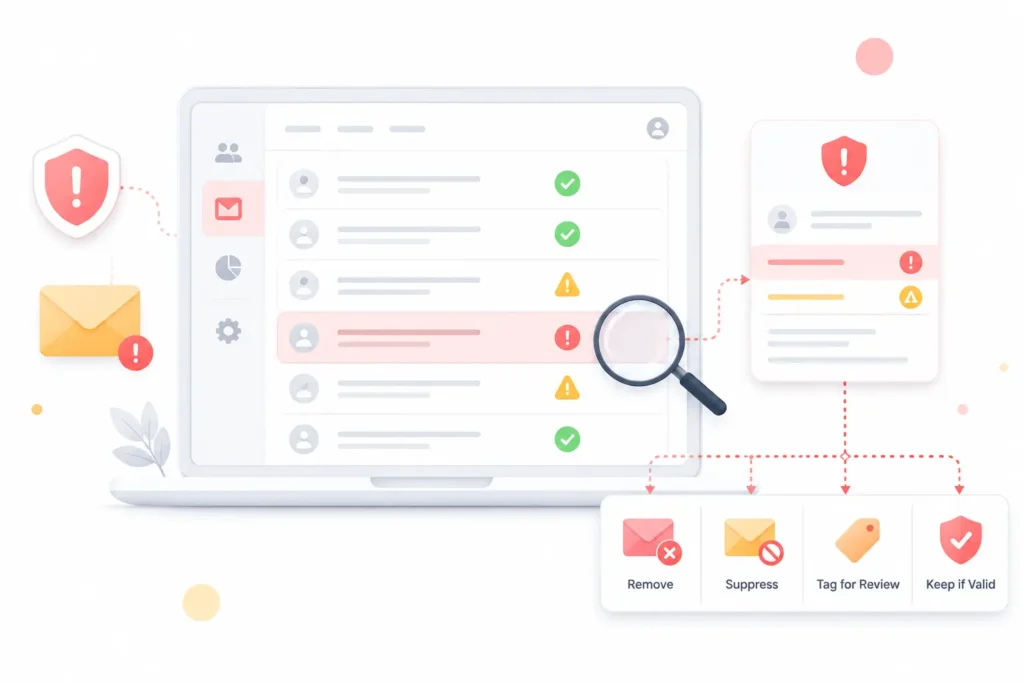
Most teams make one of two errors with risky-flagged contacts. They suppress the entire group and lose the real pipeline, or they ignore the flag and send to addresses that damage senders reputation. Neither approach is correct.
5-step decision process for risky addresses
Step 1: Export by sub-type.
Download results using Custom mode with all status columns. Filter separately: catch-all, role-based, disposable, and high-risk sub-status codes. Combining them into one segment produces incorrect suppression decisions.
Step 2: Cross-reference engagement history.
For catch-all addresses, pull engagement data from your ESP. Any catch-all contact with a confirmed open or click in the last 90 days represents a real person. Keep them in the send. Remove catch-all contacts with zero engagement history from the current campaign.
Step 3: Run a phased send on new catch-all segments.
For catch-all contacts with no prior engagement but a legitimate acquisition source, send to 10-15% of the segment first. Monitor hard bounce codes for the first 4 hours. If hard bounces stay below 0.5%, deploy the remainder. If hard bounces cross 1%, suppress the rest of the segment.
Step 4: Exclude risky contacts from domain warm-up sends.
If you are warming a new domain or IP address, exclude all Risky-flagged contacts until the domain has established a positive engagement history. A single set of catch-all bounces during warm-up can permanently interrupt the ramp sequence.
Step 5: Re-verify catch-all segments quarterly.
Catch-all domain configuration changes over time. A domain accepting all mail in Q1 may have tightened its spam filters by Q3. Add catch-all segments to a quarterly re-verification cycle in Clearout. A previously verified catch-all status does not carry forward indefinitely.
5. Post-send feedback loop
Pre-send verification covers what is visible before the campaign goes out. Post-send feedback addresses what only surfaces after deployment. Most teams stop at pre-send verification. The ones with consistently clean lists close the loop after every send.
Bounce codes that require re-verification
Hard bounces (5xx - permanent failure):
- 550: Mailbox does not exist
- 551: User not local
- 553: Mailbox name not allowed
- 554: Transaction failed / policy rejection
Soft bounces (4xx - temporary failure):
- 421: Service temporarily unavailable
- 452: Mailbox full / quota exceeded
- 450: Mailbox temporarily unavailable
The post-send verification workflow
Within 24 hours of campaign send:
- Pull the hard bounce report from your ESP. Export as CSV with email address and bounce code.
- Compare against your Clearout verification result. Any address returned as Valid but hard bounced indicates recent inbox abandonment. It may also indicate an Office 365 domain that confirmed at SMTP but rejected at delivery.
- Upload hard-bounced addresses back into Clearout as a new list. Most will return Invalid. This keeps your suppression list calibrated to current list state, not the state from your last bulk verification.
- Sync updated Invalid statuses back to your ESP suppression list and CRM contact record.
Within 72 hours:
- Soft bounces with 3 or more consecutive occurrences move to a monitoring segment.
- Re-verify persistent soft-bounce addresses using Clearout's single email verifier or via API. Three consecutive soft bounces with no resolution after 7 days of monitoring warrant permanent suppression.
- Export re-verification results and update CRM contact tags accordingly.
Monthly cadence:
- Pull all addresses with 2 or more soft bounces in the last 30 days. Batch upload to Clearout for re-verification.
- Unknown results: hold for re-verification after 48-72 hours.
- Invalid results: suppress immediately.
- Valid results that were previously soft-bouncing: move back to active segments with a monitoring flag.
Why pre-campaign email list cleaning matters?
Sending to an unverified list increases hard bounce rate, spam trap hits, and complaint rate. ISPs use these signals to calculate sender score. A degraded sender score triggers deferrals, rate limiting, and eventual blocklisting.
Here is what pre-campaign list cleaning prevents:
- Increased hard bounce rate, negatively impacting sender reputation and inbox placement.
- Spam trap hits from addresses ISPs have recycled to catch senders with poor list hygiene.
- Inflated ESP costs, since most platforms bill by contact count.
- Distorted campaign metrics from undeliverable addresses that corrupt open and click data.
- ESP account limits triggered when bounce rates cross the threshold ISPs flag as problematic.
Clearout verification cost & credit planning
Here is how Clearout's pricing is structured for email verification specifically.
How credits work
- Email verification costs 1 credit per email address verified.
- Clearout does not charge credits for duplicate addresses in bulk uploads.
- Clearout does not charge credits for Unknown status results.
- New accounts receive 100 free credits on signup, with no credit card required. Free credits do not expire.
Pricing plans
1. Pay-as-you-go
- Plans start at $40 for 5,000 credits.
- No subscription required. Pay only for what you use.
- Best for: teams running verification infrequently or testing list quality before committing to a subscription.
2. Monthly subscription
- Plans start at $23/month for 3,000 credits.
- Credits replenish each billing cycle automatically.
- Best for: teams running regular send programs with consistent monthly volume.
3. Annual subscription
- Plans start at $16/month (billed annually) for 3,000 credits.
- Annual billing locks in a lower per-credit rate than monthly plans.
- Best for: high-volume senders who verify lists on a quarterly or monthly cadence.
4. Custom / enterprise
- Available upon request for teams with volumes beyond standard tiers.
- Contact Clearout directly for custom pricing.
5. Auto credit replenishment
Clearout offers auto credit replenishment. When your account balance drops below a set threshold, credits are added automatically. This prevents verification from pausing mid-campaign due to an insufficient credit balance.
6. Re-verification cost consideration
Clearout does not charge credits for re-uploading a previously verified file if duplicates are detected. For 30-day re-verification cycles on the same list, confirm the duplicate alert to proceed without paying twice.
Final thought
Pre-send email verification is not an administrative checkbox. It directly affects deliverability metrics, sender reputation, and inbox placement. Every step in this checklist has a specific configuration and a specific consequence if skipped. The 90-day re-verification requirement, download mode selection, and post-send bounce processing should be applied consistently. Run each step consistently and list decay stops being an undetected liability.
Verify your list before the next campaign
FAQs
1. How often should you run email list verification before a campaign?
Re-verify any segment you have not mailed in 90+ days before sending. If you run active email programs, verify your list at least every 30 days. You should adjust your verification frequency based on how you acquire contacts and how quickly your data changes.
2. Does email verification guarantee zero hard bounces?
No verification tool guarantees zero bounces. Catch-all domains and Microsoft 365 configurations can accept email at SMTP level but reject it at delivery. Clearout flags these as risky and targets a post-send bounce rate not exceeding 3% for qualifying sends.
3. What is the difference between Invalid and Unknown status in Clearout?
Invalid is a permanent failure. The mailbox does not exist, and sending to it will generate a hard bounce. Unknown is a temporary email address verdict. This usually occurs when Clearout could not reach the mail server due to greylisting, DNS timeout, or server unavailability. Re-verify unknowns after 48-72 hours. Clearout does not charge credits for Unknown results.
4. Should you suppress or delete invalid email addresses from your CRM?
You should suppress invalid email addresses in your ESP instead of deleting them from your CRM. If you delete them, you'll lose engagement history, attribution data, and suppression audit trails. You should also tag invalid contacts as non-deliverable and exclude them from active audiences. The Unsubscribe export option in Clearout's ESP integrations can handle suppression automatically.
5. What happens when you email a catch-all address?
The email may appear delivered, but it can be rejected after receipt. As a result, you may not see a hard bounce even when the message does not reach the intended recipient. You should send to catch-all contacts only when they have confirmed engagement. You should also run a phased send to 10-15% of the segment before full deployment.