clearout
  • Products
    • Email Verifier Verify emails addresses individually, in bulk or through API, with 99% accuracy
    • Email Finder Find individual or bulk emails by entering the person & company name or domain
    • Form Guard IconForm Guard Protect your forms from spam, bots, and invalid submissions with real-time email, phone, and name verification.
    • Prospect SQL/MQL list building with high levels of personalization, real-time data enrichment and prospect search
    • Clearout For SheetsVerify email addresses directly on Google Sheets with Clearout for sheets add-on
    • Prospect – LinkedIn Chrome ExtensionBuild verified, targeted prospect lists directly from LinkedIn profiles
    • ClearoutPhoneValidate phone numbers across 240+ countries in bulk, quick or real time validation
    • Free Tools
    • Disposable Email Checker
    • Reverse LinkedIn Profile Lookup Tool
    • Reverse Email Lookup Tool
    • Email List Cleaner
    • Company Domain Finder API
  • Resources
      DEVELOPERAPI iconAPI
      Clearout APIs are structured around REST and JSON
      Webhooks iconWebhooks
      Capture real-time events in your application workflow
      Form Guard iconForm Guard
      Real-time form validation to keep bad contacts out of your CRM
      KNOWLEDGE BASEGetting started iconGetting started
      Sending campaigns without bounces is made simple
      FAQ iconFAQ
      Easily find answers to services, security and common questions
      USE CASESLead Generation iconLead Generation
      Learn how professionals generate quality leads
      GUIDESPricing arrow iconTransparent & flexible pricing to support pay-per-use or recurringCompare Email Verification Tools arrow iconAI-powered email verification with 99%+ accuracy, real-time validation, and transparent risk scoringCompare Email Finder Tools arrow iconPre-verified B2B email addresses with confidence scoring, find real person email, not role-based addressBLOGSEmail Verification ToolsFind Anyone’s Email Address
      Most Accurate, Fast & Free Ways
      Form Validation
      Importance, Ways & Best Practices
      View All Blogs
  • Pricing
  • Integrations
  • Enterprise
  • Login
Try it free Book a 1-to-1 demo
Akanksha Mishra / May 21, 2026 May 21, 2026

How Fake Form Submissions Are Wasting Your PPC Budget


How Fake Form Submissions Are Wasting Your PPC Budget

Every PPC campaign eventually surfaces the same disconnect: form submissions climbing, qualified pipeline remains stagnant. Your sales team is processing contacts that don't exist, addresses that hard bounce, phone numbers that reach no one, and names with no verifiable digital footprint. This isn't a traffic quality problem. The fraud is entering through your landing page form.

According to the Imperva bad bot report, malicious bots account for 37% of all internet traffic in 2025. A portion of that activity hits paid landing pages and submits forms.

Fake leads from ads corrupt conversion signal integrity across campaign optimization, attribution models, and CRM pipelines simultaneously. As a result, Clearout's Form Guard detects invalid submissions at the point of entry before bad data registers as a conversion or enters your CRM.

Table of Content


‣ What are Fake Form Submissions in PPC Campaigns?
‣ Why are PPC Campaigns a Primary Target for Fake Form Submissions?
‣ How to Identify Fake Form Submissions in Your PPC Campaigns?
‣ How Fake Leads Corrupt Your Ad Algorithm?
‣ How Low Quality Leads Inflate Your Cost Per Lead?
‣ How Invalid Form Submissions Distort CPL and Attribution?
‣ How Fake Leads Corrupt Meta Ads and Lookalike Audiences?
‣ How to Prevent Fake Leads in Google Ads?
‣ The Full Cost of Fake Leads on PPC Campaigns
‣ The Bottom Line
‣ FAQs
What are Fake Form Submissions in PPC Campaigns?


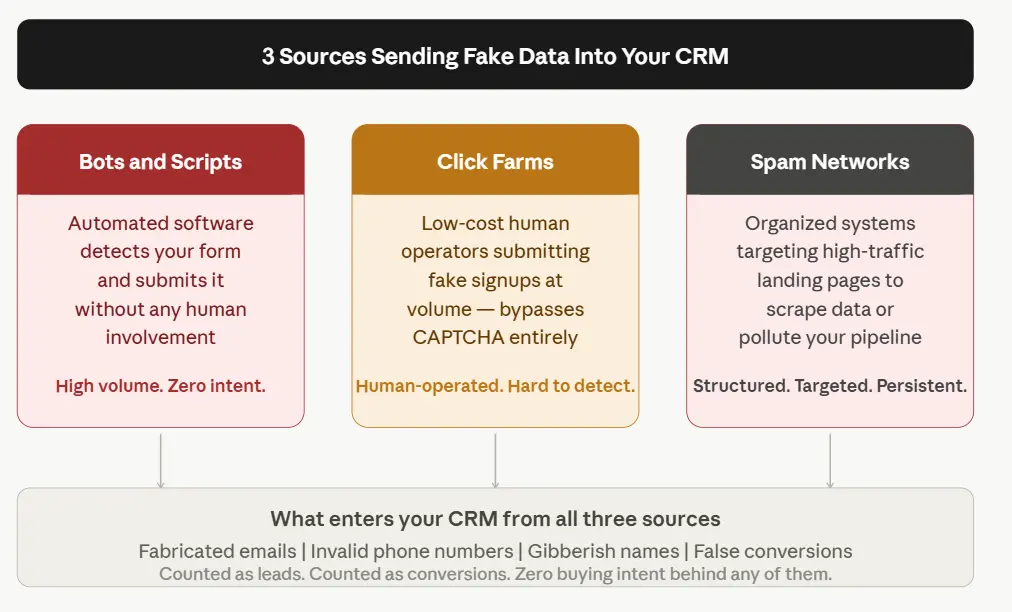
 3 sources of fake form submissions in PPC campaigns

Automated scripts, scrapers, and fraudulent traffic operators submit your landing page forms with fabricated contact data. The submission looks real, gets counted as a conversion, and enters your CRM, but no actual buyer was ever there.

This is not always a competitor draining your budget intentionally. Most of the time it is bot submissions from ads - automated bot traffic that detects a form and submits it without any human involvement.

The downstream effect is predictable: Your CRM accumulates contact records that pass format validation but fail deliverability checks, invalid addresses, disconnected numbers, and non-existent domains. These invalid form submissions from ads register as conversions in your ad platform, receive attribution credit, and move your CPL metric without a single qualified buyer entering the funnel.

3 main sources drive fake form submissions:

  • Bots and automated scripts: Software that fills and submits forms without human input
  • Click farms: Low-cost human operators submitting paid traffic fake signups at volume
  • Spam networks: Organized systems targeting high-traffic landing pages to scrape or pollute data

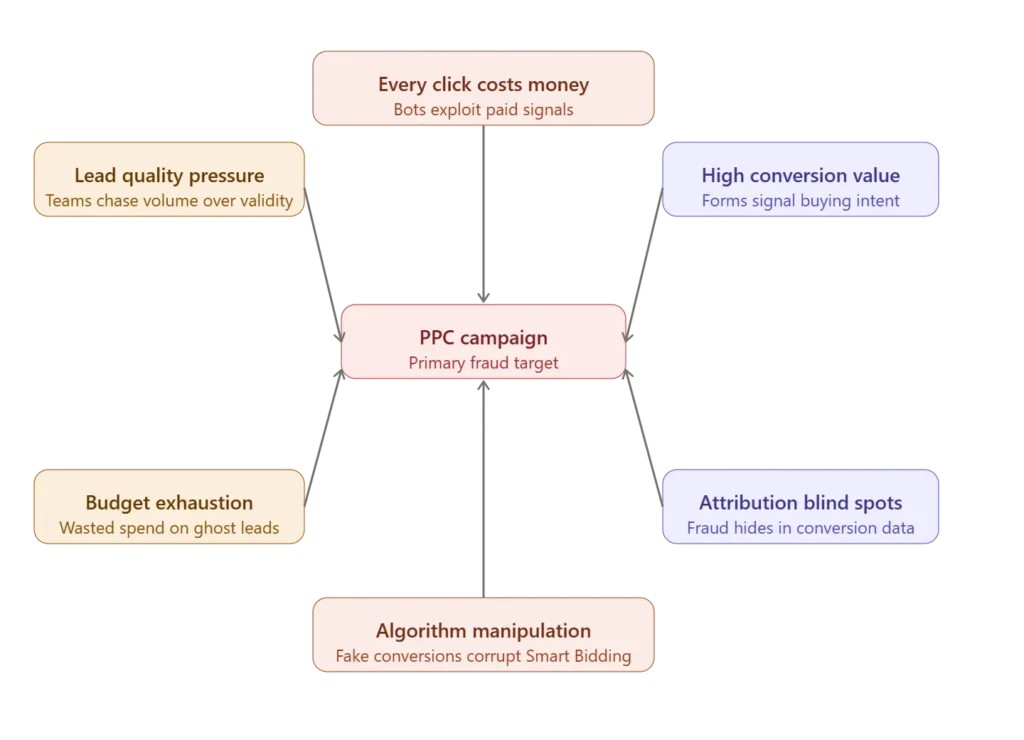
Why are PPC Campaigns a Primary Target for Fake Form Submissions?


Why PPC campaigns attract fake form submissions.

Paid traffic isn't automatically safer than organic. Your landing page URL is publicly accessible the moment your ad goes live. Bots index it. Spam networks find it.

PPC campaigns run 24/7, which gives bots more surface area. Paid landing pages also tend to use simplified forms with fewer fields, making them faster to submit automatically. This is precisely why PPC form spam concentrates on paid funnels over organic ones.

Key signals your PPC forms are receiving invalid submissions:

  • Sudden spike in lead volume with no increase in paid ads lead quality
  • High form submissions but near-zero reply rates to outreach
  • Disposable email domains
  • Identical or near-identical form entries submitted in short intervals
  • Submissions from IP locations outside your campaign targeting

How to Identify Fake Form Submissions in Your PPC Campaigns?


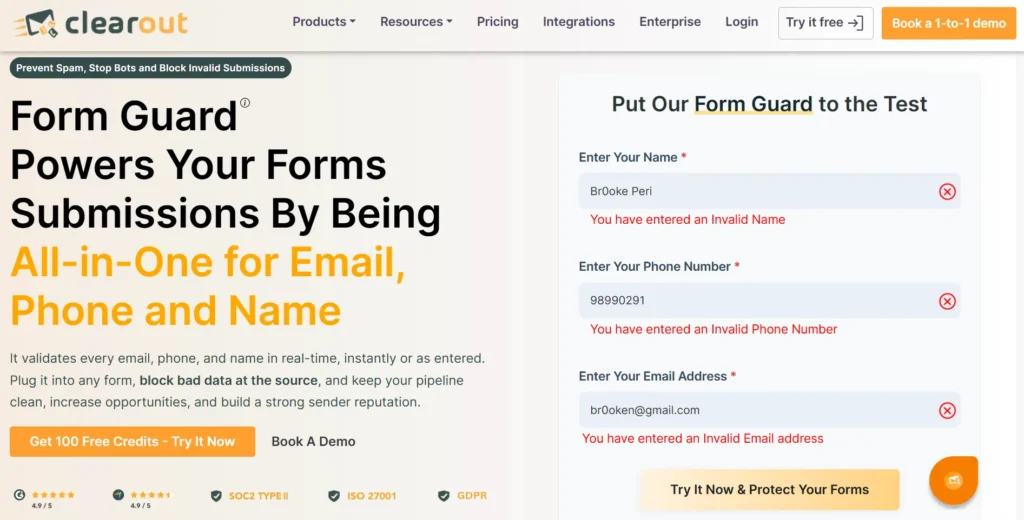
Screenshot of Clearout Form Guard blocking invalid form entries.

Fake form submissions appear as normal conversions inside ad dashboards because they complete the same form flow as genuine visitors. However, they can drain ad budgets, waste sales team bandwidth, and make campaigns appear successful.

But there's a solution to avoid all these: Clearout Form Guard.

Clearout Form Guard helps prevent invalid submissions from being accepted in a form. Real-time logs help you see where people leave forms incomplete, improve weak spots, and retarget visitors who showed interest. It validates email addresses, checks phone number structure, and detects name entries. This keeps junk submissions from being counted as conversions or stored in your CRM.

Here’s a quick comparison of how basic form validation stacks up against Clearout Form Guard across key data quality dimensions.

Form Guard vs. standalone verification tools


Validation DimensionWithout Form ValidationWith Clearout Form Guard
Email deliverabilityUndeliverable addresses enter the CRM uncheckedReal-time mail server checks verify deliverability before submission
Disposable emailsTemporary addresses from Mailinator and Guerrilla Mail pass throughFlags and blocks at the point of entry
Role-based addressesinfo@, admin@, support@ enter pipelineDetect and block, configurable per use case
Catch-all domainsAccepted as valid regardless of inbox activityIdentifiable and blockable via dashboard settings
Phone validationInvalid formats and random numbers are entered into the CRMValidates format, length, and structure configurable by number, line type, and country
Name fieldGibberish, special characters, and numeric strings pass throughBlocks names containing gibberish characters, special characters, or numeric strings before submission
SetupRequires developer time and ongoing maintenanceSingle JavaScript snippet works with HubSpot, Unbounce, Leadpages, and vanilla HTML

How Fake Leads Corrupt Your Ad Algorithm?


Google Ads and Meta both use conversion data to optimize your campaigns. When fake conversions in Google Ads get counted as conversions, the algorithm receives inaccurate conversion data. It targets the wrong audience and increases bids on traffic that never converts into revenue.

And it does this automatically, at scale, with your budget. The same dynamic plays out in Meta - spam leads from landing pages feed the pixel and build lookalike audiences modeled on bot behavior.

The result follows a predictable sequence:

  • CPL drops because fake leads from ads are cheap to acquire
  • Algorithm doubles down on those traffic sources
  • PPC lead quality issues compound - real lead quality drops further
  • ROAS collapses while CPL still looks favorable

Many advertisers watch CPL decline while revenue stays flat. The algorithm is prioritizing fraudulent sources over legitimate ones, and standard dashboards do not flag this automatically.

How Low Quality Leads Inflate Your Cost Per Lead?


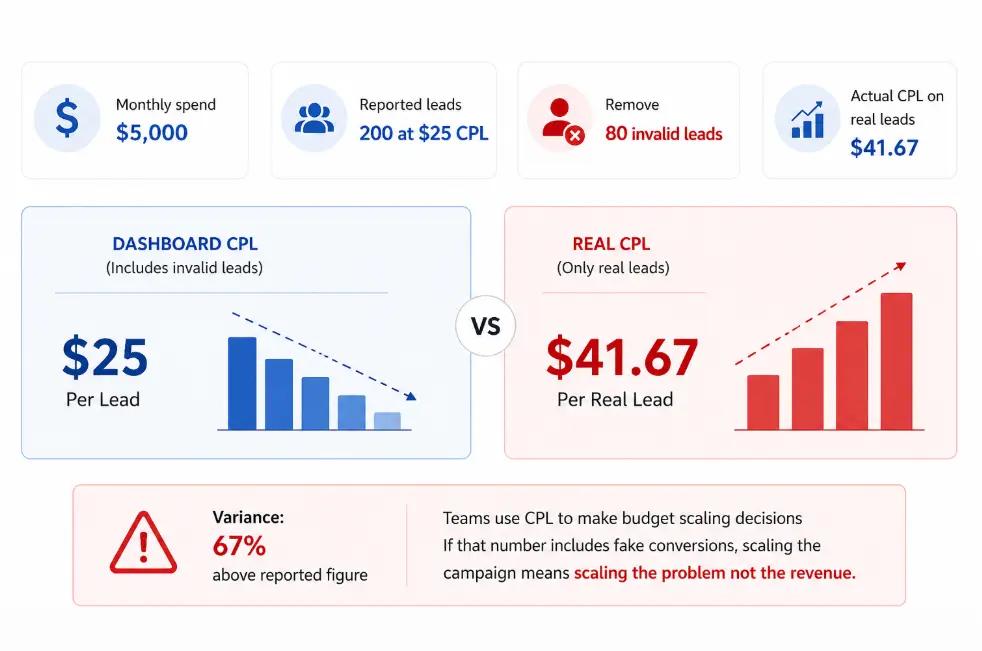
Graphic comparing reported CPL & real CPL with a 67% cost difference.

A declining CPL looks like a performance win. But if 40% of your leads are invalid form submissions from ads, your actual cost per real lead is far higher than your dashboard indicates.

Start blocking fake leads free

The numbers illustrate the gap clearly:

  • Monthly spend: $5,000
  • Reported leads: 200 at $25 CPL
  • Remove 80 invalid leads
  • Actual CPL on real leads: $41.67
  • Variance: 67% above the reported figure

Teams use CPL to make budget scaling decisions. If that number includes wasted ad spend on bad leads, scaling the campaign means scaling the problem.

How Invalid Form Submissions Distort CPL and Attribution?


Attribution models depend on accurate conversion data. Marketers use last-click or data-driven attribution to understand which campaigns, ad groups, or keywords drove results.

Fake conversions in Google Ads corrupt this entirely. If a bot submits a form through your branded keyword campaign, that keyword gets credit for a conversion. Your attribution model shows branded terms outperforming non-branded. You shift the budget based on fake data.

The same applies to Meta's pixel. Every fraudulent submission the pixel registers build lookalike audiences. This directs Meta's algorithm toward users who replicate bot behavior.

How Fake Leads Corrupt Meta Ads and Lookalike Audiences?


Meta Ads optimization depends heavily on pixel conversion data. When fake form submissions enter your landing pages, Meta records them as legitimate conversions and begins optimizing toward similar behavior patterns. Over time, this corrupts audience targeting across campaigns.

Spam submissions also pollute Meta lookalike audiences. The algorithm starts building audiences based on bot activity, low-quality clicks, and fake engagement signals. This leads to lower lead quality, unstable CPL trends, and campaigns that scale volume without increasing pipeline.

Common signals of Meta pixel spam submissions include:

  • Sudden spikes in low-quality leads from Meta campaigns
  • High conversion volume with weak booked-meeting rates
  • Lookalike audiences underperforming despite stable CTR
  • Leads using disposable emails or fake phone numbers
  • Meta retargeting audiences filled with non-human traffic

How to Prevent Fake Leads in Google Ads?


These measures address PPC form spam before bad data reaches your CRM.

  • Require double opt-in confirmation. Ask leads to confirm their email before their contact record enters your CRM. Bots do not access inboxes, and that one step filters out a large portion of fake submissions from PPC ads before they touch your pipeline.
  • Validate email addresses at the point of submission. When a visitor fills out your form, real-time email verification runs before the submission is processed. It checks whether the address actually exists and can receive mail. An address can pass a syntax check and still hard bounce. Real-time verification stops low-quality leads from ads before it becomes your problem.
  • Block known bot IP ranges: Use your ad platform's IP exclusion list to block ranges associated with known bot activity. This requires ongoing maintenance but reduces bot submissions from ads.
  • Set conversion quality rules in Google Ads: Apply conversion value rules to reduce the weight of leads that do not advance past the first funnel stage. This recalibrates the algorithm toward paid ads lead quality rather than submission volume.

The Full Cost of Fake Leads on PPC Campaigns


Global ad fraud losses are projected to reach $41.4 billion in 2025, up from $37.7 billion in 2024. A significant portion ties directly to fake leads from ads generated through PPC channels.

The impact goes beyond ad spend. Consider the full scope:

  • Sales team capacity spent contacting invalid form submissions from ads that will never respond.
  • CRM data hygiene is damaged and this makes segmentation or reporting unreliable.
  • Campaign recovery time - once Smart Bidding trains on fake conversions, correcting that signal takes weeks of clean data to reverse.

The Bottom Line

Fake form submissions from PPC ads run deeper than an inflated lead count. They distort the conversion signals your campaign optimization, attribution models, and sales pipeline depend on. CPL looks favorable. The pipeline stays flat. The algorithm keeps bidding on traffic that submits but never buys. Your CRM accumulates records that fail every deliverability check.

That means the fix has to happen before a submission is counted. Clearout Form Guard validates email addresses, checks phone numbers, and blocks name entries containing gibberish, symbols, or profanity before a submission is processed.

Bots found your landing page the moment your ad went live.


Block Them Now

FAQs

1. What are fake leads in Google Ads?
Fake leads from ads are form submissions generated by bots or automated scripts that enter fabricated contact data into your landing page form. They register as conversions in your ad account but no real buyer was ever involved.
2. How do I stop spam leads from Google Ads?
Stopping PPC form spam requires layered defences, where reCAPTCHA v3 filters automated behavior, honeypot fields catch basic bots. Real-time field-level validation, like Clearout Form Guard blocks invalid form submissions from ads before they enter your CRM.
3. Why am I getting fake form submissions from my ads?
Your landing page URL is publicly accessible the moment your ad goes live. Bots index it, and lead form spam in PPC ads occurs because paid forms use fewer fields and less friction, making them fast to submit automatically at scale.
4. Can Google Ads automatically detect fake form submissions?
No. Smart Bidding counts all conversions equally. It cannot distinguish between the two submissions without offline conversion import or value rules. Hence, you need Clearout Form Guard to detect fake form submissions effectively.
5. How do I know if my PPC leads are low quality or fake?
Start by comparing form submission counts in your ad account against actual contact records in your CRM. A gap of 10-15% or more is a reliable signal. Export your recent leads and check for disposable domains, role-based addresses, and submissions with no matching phone or name data. Timestamp clustering multiple entries within seconds from the same IP range confirms automated submissions.

Share this article

Recent Posts

21 May 2026
How Fake Form Submissions Are Wasting Your PPC Budget

Fake form submissions inflate CPL, and waste your PPC budget. Discover how to block spam form submis ...

18 May 2026
13 Go-To-Market Metrics to Track Across Every Funnel Stage

Explore the most important GTM metrics to track across every funnel stage, from awareness to revenue ...

13 May 2026
7 Signs You Need to Switch Your Low Accuracy Email Finder

Discover 7 measurable signs it’s time to switch your low accuracy email finder before high bounce ra ...

07 May 2026
Top 6 GTM Mistakes That Slow Down Your Revenue

Discover the top 6 common go-to-market mistakes that slow down your revenue and learn proven strateg ...

30 Apr 2026
7 Cold Email Frameworks That Work in 2026 (With Examples)

Explore the 7 cold email frameworks for 2026 with real examples. Learn when to use AIDA, PAS, BAB, a ...

Clearout's

Form Guard

Validate email, phone & name on any forms!

  • Real signups only
  • Verified emails
  • Valid phone numbers
  • No fake names
  • Cleaner CRM
  • No devs needed
Try for Free Now

Email Verification, Email Finding Form Guard & Prospecting Service

Expand Your Reach By Finding & Verifying Ideal Prospects.

Sign up & get 100 free credits

No Credit Card required

Create Free Account
Company

Why Clearout?

Pricing

Contact Us

Careers

Press

Enterprise

Sitemap

FAQ

Status

Products

Email Verifier

Email Finder

Form Guard

Prospect

LinkedIn Email Finder

Reverse Lookup

Google Sheets Add-on

WordPress Plugin

ClearoutPhone

What's New?

Resources

Integrations

HubSpot

Team Account

API

Compare Email Verifier

Compare Email Finder

Compare Prospecting

Use Cases

Blog

Help

Legal

Privacy Policy

Terms

DPA

Security

Trust Center

Certification

ISO 27001/2022

SOC 2 Type 2

GDPR

Partnership

HubSpot Certified

Affiliates

Partners

Clearout for browser

⚡ Supercharge Your Prospect Research with Clearout's LinkedIn Chrome Extension - Find and Verify Emails with Confidence!

Clearout Chrome extension

clearout
© 2026 Clearout Inc. All Rights Reserved. Powered by Clearout.
Auto Credit Replenishment is here! Your credits can now recharge automatically. Learn More ➞
X